Use SGII and sg-cosi to provide access to AI in public cloud
Introduction
Recently I saw a pretty funny workflow-come-book for "solving" data access for AI in a hybrid cloud scenario where "AI" is in the cloud. Similar to my previous post:
- documents used to create embeddings are accessed from the cloud
- embeddings are created in the cloud (vector DB is in the cloud)
- there's no requirement to write modifications back to source share/bucket
Essentially, save for the grounding links, after embeddings have been created, cloud-based AI can work without continued access to sources, save for the grounding links.
I've said several times: on-premises S3 storage solved that "challenge" 10 years ago, so a "solution" that copies data to the cloud to be ingested faster (how is that even helpful!?) is fundamentally flawed and on top of that almost guarantees a DMV-like experience.
Can we do better with StorageGRID? Probably, but if you look it up, NetApp StorageGRID lacks any recipes, solutions or best practices for such workflows, as if it works out-of-the-box. It doesn't.
I've given practical examples on how to actually do that in here and other posts, mostly analytics-related.
Last week I touched upon an "indexing and search" use case in the post . That's for unstructured data.
In Appendix A - at the bottom of that post - you can see some examples. I won't repeat that, but I'll share a screenshot of how that works for me now:
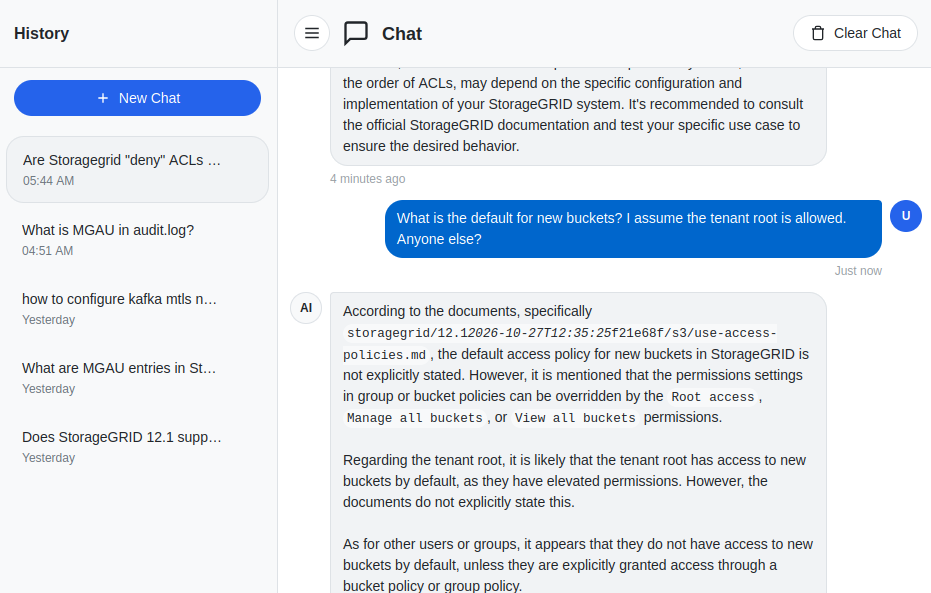
All right, so that works as described and my "SOHO" workflow with "Project Ragdoll" (also described in that post) is very nice for that particular use case.
But, seeing that hilarious "solution" mentioned at the top, I thought about formalizing my own workflow for the purpose of demonstration.
Hybrid cloud workflow with SGII and sg-cosi
If we wanted something more serious, we'd have multiple stakeholders, not just the initiator, but also an approver, possibly multiple.
StorageGRID is very flexible, so it can be made more complex than this, but at the very least, there would be two guys involved: the AI user and the AI approver guy.
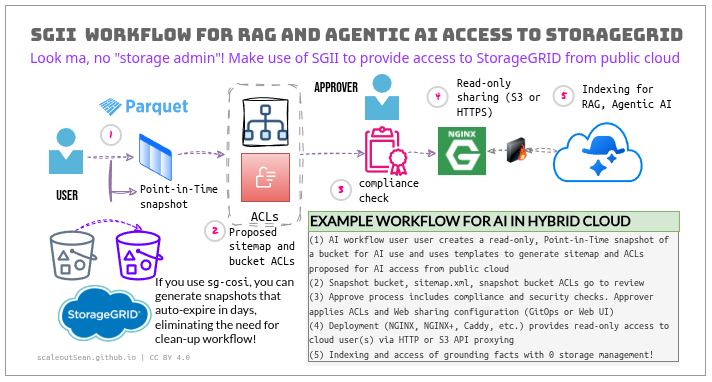
And we need to use templates for these things, to avoid mistakes and sneaky "customizations".
How's it work?
We don't need anything new:
- StorageGRID supports bucket snapshots
- You can roll your own script or workflow
That's all. Here's how I do it:
- Kubernetes-based bucket snapshot workflow: I can create snapshots with
sg-cosias explained here and - Non-Kubernetes based snapshot workflow: I use SGII, StorageGRID Incremental Inventory tool, described here
What's the difference?
- Kubernetes-based:
sg-cosicreates a read-only snapshot that auto-expires, which is perfect for situations where you want to delete it anyway after indexing is done. But, you may have objects that you don't want indexers or AIs to read. So you need to tighten bucket policies and create a sitemap by yourself if you are concerned about access to some data in the bucket. - Non-Kubernetes: SGII creates a snapshot and builds a bucket inventory. With that, we use SGII query to create a prefix- and extension-filtered object list. That is used to create a "scoped-down" sitemap.xml and then we tighten the snapshot bucket policy before getting approvals and starting a proxy to expose it to the cloud. We need to remember to tear that snapshot down later, as SGII isn't a service and doesn't manage stuff like Kubernetes COSI does.
Depending on workflow, you could use sg-cosi to create a snapshot and SGII (container-packaged, it can run in Kubernetes as well) to take care of indexing, query filtering and snapshot deletion.
I have not crammed these "extras" into sg-cosi's Snapshot Lease feature because they aren't supposed to be in it.
Additionally, now that NetApp Trident 2026.10 supports COSI, you aren't supported to run two COSI drivers for StorageGRID at the same time, so if you use NetApp Trident COSI, then sg-cosi component cannot be used - you'd have to use Trident COSI or own scripts for that part, so SGII is stand-alone.
Workflow details (examples, sample bucket policy, and more) have been shared in the sg-cosi examples, but to make this post less ambiguous:
- (1) Use SGII to create a snapshot, then SGII query to dump desired file list to a JSONL file:
$ sgi query objects \
  --manifest s3://sgi/scans/<chain>/<baseline-scan-time>/manifest.json \
  --prefix public_blog/ \
  --latest-only \
  --sample 0 \
  --format jsonl \
  --output web-objects.jsonl \
  --env-file kompromise-cosi-snapshots/.env
- (2) Data prep script creates
sitemap.xml:
$ python3 data-prep.py \
  --input web-objects.jsonl \
  --base-url https://proj1a2b3c.public.company.com/ \
  --extensions .html,.htm,.md,.txt \
  --output SITEMAP
- In step (3) above, Approver has the ability to apply bucket policy on the snapshot bucket, and push Web server configuration to deploy. We'd use a canned template for bucket policy.
That makes the sitemap and content accessible to scanner in the cloud.
We could package the steps 1-3 in a simple API server for these stages of our workflow.
How does that look like? It's just a sitemap. Using the URL from above and my own blog posts posted to a bucket, and after filtering on public_blog prefix, I expect to have a sitemap such as this one:
<?xml version='1.0' encoding='utf-8'?>
<urlset xmlns="http://www.sitemaps.org/schemas/sitemap/0.9">
<url>
  <loc>https://proj1a2b3c.public.company.com/public_blog/2024-04-02-storagegrid-networking.md</loc>
  <lastmod>2026-11-09T04:59:51.846000Z</lastmod>
</url>
<url>
  <loc>https://proj1a2b3c.public.company.com/public_blog/2026-07-25-weka-io-tier-cold-to-netapp-storagegrid.md</loc>
  <lastmod>2026-11-09T04:59:50.490000Z</lastmod>
</url>
</urlset>
And then a cloud AI or indexer reads this sitemap and indexes its content. The bucket policy allows the S3 keys used by our Web proxy to access only s3://<snapshot-bucket>/public_blog using proxy's GetObject action.
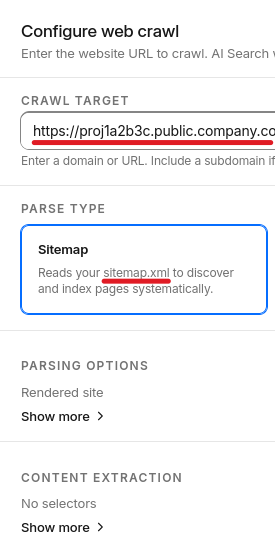
In the last step, some kind of indexer reads sitemap.xml, gets listed objects, creates embeddings and indexes and uses them the same way I do in that screenshot at the top - for AI-assisted search, RAG, chat…
After download (from the cloud) is done, you can remove the proxy and the snapshot bucket. The read-only nature of SGII makes it impossible to "update" the snapshot with new documents, although sitemap.xml could be updated and - after another approval - reloaded on the reverse Web proxy.
This workflow is available on my Github.
In a less secure workflow we can manually create writable StorageGRID snapshots, but I'm not interested in such "pet snapshot" approaches because I don't believe that they should exist outside of datalake or similarly comprehensive management workflows.
If I have a datalake, then I keep my object lists in a table, and can use it to create OpenSharing "file" shares on the fly.
Conclusion
My SGII-enabled workflow is convenient, fast, secure and works correctly.
Time required to create a SGII inventory table is variable and depends on bucket object count, but can be under 60 seconds for buckets with 100K objects. With such buckets, you can have AI accessing your content in single-digit minutes, excluding turn-around time required for approvals or compliance checks.
For best experience and full automation both sg-cosi and SGII can be used together, although stand-alone SGII is sufficient for what you see in the diagram (tear-down has to be taken care of in a reverse workflow and SGII doesn't delete buckets, objects/data or snapshot buckets).
sg-cosi - when Trident COSI isn't used - adds value with automated tear-down of snapshot bucket, proving its design, scope, and value beyond the ridiculous COSI idea and specification.
Appendix A: Demo
This video shows the entire workflow. It's fast-forwarded in places, but for a small bucket with 10-20 thousand files, on-premises part of the workflow takes just 2-3 minutes to execute.