Adapter, network and VLAN isolation on NetApp HCI
This comes up every so often:
- Somebody out there (such and such team or person isn't comfy with virtual switches or VLANs, etc.) wants to physically or virtually segregate networks
- People take the easy way out and isolate less than they think they should, and need to reconfigure after the implementation
NetApp HCI with VMware supports both Virtual Standard Switch and Virtual Distributed Switch.
Excluding the less frequently used H610C compute node:
| NIC Ports | VSS | VDS | Compute Platform | Connectivity | Speed |
|---|---|---|---|---|---|
| 2 | x | OK | H410C, H615C | 2xSFP28 | 2x10/25 G |
| 6 | OK | OK | H410C | 2xRJ45, 4xSFP28 | 2x1/10, 4x10/25G |
If you mix VDS and VSS (assuming your vSphere license supports both), your compute nodes (H410C and H615C, for example) need to have the same number of network ports. The H410C Series has 6 by default, but you can use only 2 x 10/25G of them and leave the rest unused.
Or you can use asymmetric network configuration, but then you need to have different clusters (with uniform network configuration in the same cluster).
Two remarks on NetApp HCI storage nodes and IPMI ports:
- NetApp HCI (SolidFire) storage nodes run Linux, so we can ignore them (they do need to be configured properly, of course.)
- Each NetApp HCI Compute Node (also Storage Node) has an IPMI port. These are also ignored in this post, but if you want to perform automated firmware upgrades from NetApp Hybrid Cloud Control, your NetApp HCI Management Node needs to be able to communicate with the compute nodes via IPMI, so Management Node should be connected to the network where IPMI is. Or you can ignore this, and perform compute node firmware upgrades manually. You may keep IPMI ports configured but disconnected and bring them up only during scheduled firmware upgrades.
Physical port segregation with VSS
With VSS (and H410C which has 6 NIC ports) NDE creates three virtual switches:
- vSwitch0: 2 x 1/10 G - Management Network(s) (if one, it can use Access Mode, if many, Trunk Mode is required). Note that these are RJ45
- vSwitch1: 2 x 10/25 G - VM Networks and vMotion (separated by VLANs, so usually Trunk Mode); SFP28
- vSwitch2: 2 x 10/25 G - iSCSI (separated by VLANs, while Access Mode can be used, usually you want to use Trunk Mode so that you can have multiple VLANs for different clusters or hypervisors); SFP28
VDS can make use of six network interfaces as well, but needs careful management. With VSS, once you set it up, the rest is just "don't touch vSwitch0 configuration".
VDS provides more features and is more efficient in how it uses uplinks, but also has better overall manageability. But if you want to easily separate all Management traffic and don't need VDS features, VDS and 6 port configuration provide physical and logical traffic segregation for Management networks.
What else is the 6-cable VSS config good for
As you can see above, VSS vSwitch0 uses 2 x 1/10 G NICs, which means you can connect them to a 10 GigE switch and get up to 2 GB/s of backup performance from them, while still leaving few hundred MB/s for the rest. Assuming you can use vSwitch0 for Backup (usually it's used only for Management traffic), that is. A similar use case would be SolidFire SnapMirror replication to ONTAP, if you don't want to, or cannot, use other networks for that. The third in this category could be Fabric Pool tiering from ONTAP Select 9 on NetApp HCI (that VLAN would connect to Public Cloud VPN Gateway, or on-premises StorageGRID load balancers which could serve FabricPool users on dedicated VLAN).
You can also use VSS for Kubernetes on VMware-based NetApp HCI; Rancher on NetApp HCI supports vSphere Standard Edition (and VSS), you just need to make sure all ESXi hosts you deploy Rancher VMs to have symmetric network configuration (which is why VDS is good, as it makes that happen for you.) The other two Kubernetes-on-VMware solutions (Google Athos and Red Hat OpenShift) are designed for VDS as most enterprise users do not use VDS.
VLANs
NetApp Deployment Engine offers the ability to set a unique VLAN ID for several management networks.
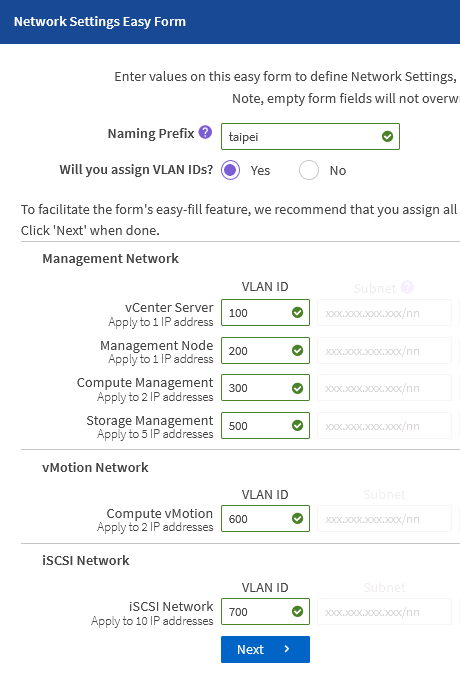
What I've seen a lot of people do is use one VLAN ID for all Management Networks. And that's okay, but what happens later is someone figures out that anyone who can access the vCenter IP can also access Management Node and HCC IPs (they still need to authenticate, but let's ignore that for now.)
Nothing prevents you from using multiple Management VLANs like in that screenshot above. As you can see in the NetApp HCI PCI DSS white paper, some users put Management Node ("mNode") and NetApp HCI / SolidFire Management IPs on their own networks, separate from vCenter.
That makes it possible to expose mNode to only vCenter, and SolidFire MVIP only to mNode and vCenter, and possibly few selected apps that needs access to SolidFire management IP(s) (meaning, storage node management IPs (MIPs) and cluster management virtual IP (MVIP)).
Here's a screenshot of a H410C-based cluster configured with VDS and six network ports. As you can see on the right, there are three compute nodes in the cluster.

Some random thoughts
NetApp HCI mNode lets you add vNICs to its VM. It's meant to let mNode be able to store HCC data directly on SolidFire iSCSI devices, but I wonder if it can be used to connect to other networks. I haven't had time to try (it's not supported anyway).
If you purchased NetApp HCI or SolidFire with NVIDIA Networking (a.k.a. Mellanox) Ethernet switches, you probably want to be able to connect to their Management IP from somewhere (mNode network, for example) to be able to deploy a Mellanox NEO VM, which is an easy way to get visibility into your L2 network gear.
Who else needs access to SolidFire MVIP and why
Random examples (I've blogged about some of them before, see in Archive or Categories):
- Backup management app needs to use the SolidFire API to orchestrate hardware snapshots
- NetApp Trident (CSI Provisioner) needs to use the SolidFire API for storage provisioning to Kubernetes and other container orchestrators
- Operations Team needs to use the SolidFire API to monitor storage performance and events
- Operations Team has a jump/bastion VM or physical node which runs signed Microsoft PowerShell, Ansible Tower, HashiCorp Terraform and other automation
- Operations Team needs to gather logs from SolidFire and mNode, so these need to be able to send logs to syslog servers (which those can cleanse, aggregate and forward upstream)
- Cross-Availability Zone communication between SolidFire clusters, or SolidFire and ONTAP (with SnapMirror) for storage replication - the APIs need to talk to each other (data traffic goes via other links)
- mNode needs access to SolidFire MVIP to manage SolidFire storage, perform storage node and storage OS updates, gather system and hardware logs and performance data and send it to NetApp ActiveIQ (if enabled; it's optional to enable unless you use Term Capacity Licensing - that's a new NetApp HCI and SolidFire storage licensing model, similar to old SolidFire Software Capacity Licensing, by the way)
There's probably more but this, I think, illustrates the point: sooner or later someone out there will ask for something that can't be done because your network configuration is too open or too closed, and you or they will have to reconfigure. It's probably better to consider these scenarios and accommodate them before they happen - don't use whatever is easiest to get by just to save 10 minutes of planning time.
What if you need to change your configuration in a major way? Well, at least your data is outside of your compute nodes. If you have four or more compute nodes in one vCenter cluster, you may be able to take 2 out, stand up a new cluster and move the workloads by re-assigning SolidFire volumes to the new cluster (set up a new vCenter storage account and VAG, (re)move the evacuated nodes' IQNs from old cluster's VAG, etc.) A partial workaround might be to configure ACLs on network switch ports to limit access to certain IPs.
As always, if you make important decisions regarding NetApp HCI networking, feel free to check with your trusted NetApp advisor or contact NetApp Support. NetApp partners can play with NDE in Lab on Demand.