VMware Photon 4.0 with SolidFire 12 iSCSI Target
Summary
Why
Because you may want to connect to SolidFire iSCSI targets from VMware Photon OS. Say, Docker.
Potentially Kubernetes as well.
How to iSCSI
Build iSCSI package from Photon source RPM file for your version, for example here. Unfortunately the Photon documentation isn't the greatest, so install all Development Tools rather than debug why rpmbuild doesn't work.
The RPMS generated were three and if you don't want to build them yourself, download them from here:
open-iscsi-devel-2.1.3-2.x86_64.rpm
open-iscsi-2.1.3-2.x86_64.rpm
open-iscsi-debuginfo-2.1.3-2.x86_64.rpm
Then configure, enable, and start iSCSI as you normally would.
How to Docker
It's included, so just run it.
# systemctl start docker

# systemctl enable docker
Created symlink /etc/systemd/system/multi-user.target.wants/docker.service → /usr/lib/systemd/system/docker.service.

# systemctl status docker
● docker.service - Docker Application Container Engine
     Loaded: loaded (/usr/lib/systemd/system/docker.service; enabled; vendor preset: disabled)
     Active: active (running) since Fri 2022-03-11 15:44:21 UTC; 11s ago
TriggeredBy: ● docker.socket
       Docs: https://docs.docker.com
   Main PID: 445 (dockerd)
      Tasks: 7
     Memory: 105.0M
     CGroup: /system.slice/docker.service
             └─445 /usr/bin/dockerd -H fd:// --containerd=/run/containerd/containerd.sock

Mar 11 15:44:21 photon-machine dockerd[445]: time="2022-03-11T15:44:21.121662867Z" level=warning msg="Your kernel does not support CPU realtime scheduler"
Mar 11 15:44:21 photon-machine dockerd[445]: time="2022-03-11T15:44:21.121805163Z" level=warning msg="Your kernel does not support cgroup blkio weight"
Mar 11 15:44:21 photon-machine dockerd[445]: time="2022-03-11T15:44:21.121869628Z" level=warning msg="Your kernel does not support cgroup blkio weight_device"
Mar 11 15:44:21 photon-machine dockerd[445]: time="2022-03-11T15:44:21.141258366Z" level=info msg="Loading containers: start."
Mar 11 15:44:21 photon-machine dockerd[445]: time="2022-03-11T15:44:21.200005566Z" level=info msg="Default bridge (docker0) is assigned with an IP address 172.17.0.0/16. Daemon opt
ion --bip can be used to set a preferred IP address"
Mar 11 15:44:21 photon-machine dockerd[445]: time="2022-03-11T15:44:21.239397416Z" level=info msg="Loading containers: done."
Mar 11 15:44:21 photon-machine dockerd[445]: time="2022-03-11T15:44:21.294091479Z" level=info msg="Docker daemon" commit=847da18 graphdriver(s)=overlay2 version=20.10.11
Mar 11 15:44:21 photon-machine dockerd[445]: time="2022-03-11T15:44:21.294413924Z" level=info msg="Daemon has completed initialization"
Mar 11 15:44:21 photon-machine systemd[1]: Started Docker Application Container Engine.
Mar 11 15:44:21 photon-machine dockerd[445]: time="2022-03-11T15:44:21.311159289Z" level=info msg="API listen on /run/docker.sock"
I was able to install NetApp Trident Docker Volume Plugin, create a volume and run Elasticsearch 8 with data on SolidFire iSCSI.
It'd be interesting to see if Trident CSI or Cinder CSI would work with Photon and SolidFire, but no one is asking at the moment so I won't try to figure that out.
Issues
I noticed one problem which was also spotted by Rancher Kubernetes users: the inability to login to a second target (only one volume can be logged in to).
# sudo iscsiadm --mode node --loginall=all
iscsiadm: eth1: 1 session requested, but 1 already present.
Logging in to [iface: eth1, target: iqn.2010-01.com.solidfire:46z9.pv.184, portal: 192.168.103.34,3260]
Login to [iface: eth1, target: iqn.2010-01.com.solidfire:46z9.pv.184, portal: 192.168.103.34,3260] successful.
iscsiadm: Could not log into all portals
I "solved" this by logging out of the first volume (pv) which was a test volume, and then started Docker with Elasticsearch data on another volume (esdata01). Another "solution" was to set "node.session.nr_sessions = 2" in iscsid.conf, which fixed it for the second, but not for the third volume:
# iscsiadm --mode discoverydb --type sendtargets --portal 192.168.103.34 --discover
192.168.103.34:3260,1 iqn.2010-01.com.solidfire:46z9.pv.184
192.168.103.34:3260,1 iqn.2010-01.com.solidfire:46z9.esdata01.185
192.168.103.34:3260,1 iqn.2010-01.com.solidfire:46z9.third.186

# sudo iscsiadm --mode node --loginall=all
iscsiadm: eth1: 2 sessions requested, but 2 already present.
Logging in to [iface: eth1, target: iqn.2010-01.com.solidfire:46z9.third.186, portal: 192.168.103.34,3260] (multiple)
Logging in to [iface: eth1, target: iqn.2010-01.com.solidfire:46z9.third.186, portal: 192.168.103.34,3260] (multiple)
iscsiadm: eth1: 2 sessions requested, but 2 already present.
Login to [iface: eth1, target: iqn.2010-01.com.solidfire:46z9.third.186, portal: 192.168.103.34,3260] successful.
Login to [iface: eth1, target: iqn.2010-01.com.solidfire:46z9.third.186, portal: 192.168.103.34,3260] successful.
iscsiadm: Could not log into all portals
I built and installed Open-iSCSI 2.1.6 (instead of Photon's 2.1.3) and it seemed better, but I didn't test it systematically to make sure of that.
To-Do's
- Try Kubernetes with Trident CSI (iSCSI) and Photon OS - maybe next time
- Try Velero Plugin vSphere - I don't have vSphere and Tanzu in personal lab so I won't try this anytime soon, but I tested Velero with SolidFire and don't expect it to be a problem if Kubernetes with Trident CSI on Photon OS can work. Notice how the VMware documentation suggests to use Photon 3.0 (which also has iSCSI SRPMS, but I haven't tested that version). Non-Tanzu Kubernetes with Velero should work as well, although that would be a DIY approach
Software versions
- SolidFire Demo VM 12.3
- VMware Photon 4.0
- open-iscsi 2.1.3 (and later self-built 2.1.6)
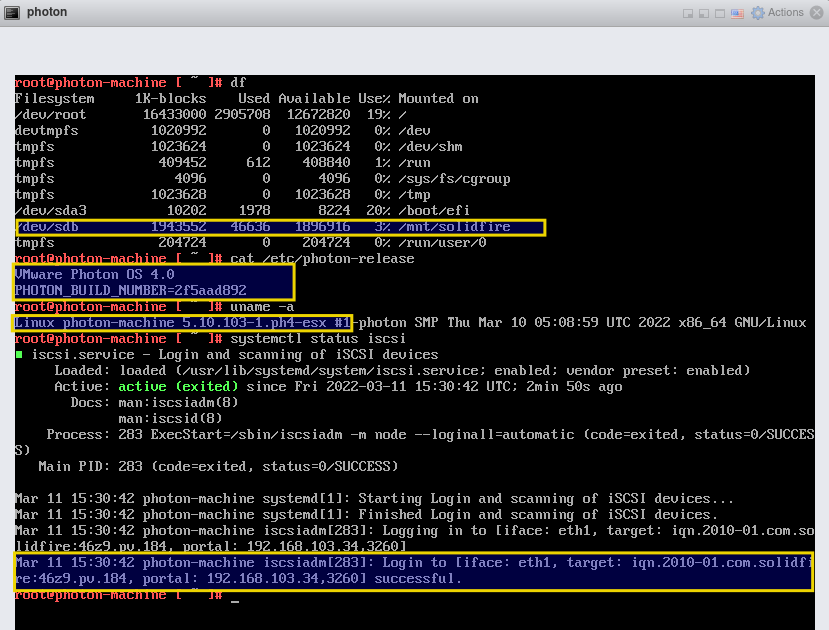
root@photon-machine [ ~ ]# uname -a
Linux photon-machine 5.10.103-1.ph4-esx #1-photon SMP Thu Mar 10 05:08:59 UTC 2022 x86_64 GNU/Linux

root@photon-machine [ ~ ]# cat /etc/lsb-release
DISTRIB_ID="VMware Photon OS"
DISTRIB_RELEASE="4.0"
DISTRIB_CODENAME=Photon
DISTRIB_DESCRIPTION="VMware Photon OS 4.0"

root@photon-machine [ ~ ]# cat /etc/photon-release
VMware Photon OS 4.0
PHOTON_BUILD_NUMBER=2f5aad892
root@photon-machine [ ~ ]# systemctl status iscsi
● iscsi.service - Login and scanning of iSCSI devices
     Loaded: loaded (/usr/lib/systemd/system/iscsi.service; enabled; vendor preset: enabled)
     Active: active (exited) since Fri 2022-03-11 15:30:42 UTC; 8min ago
       Docs: man:iscsiadm(8)
             man:iscsid(8)
    Process: 283 ExecStart=/sbin/iscsiadm -m node --loginall=automatic (code=exited, status=0/SUCCESS)
   Main PID: 283 (code=exited, status=0/SUCCESS)

Mar 11 15:30:42 photon-machine systemd[1]: Starting Login and scanning of iSCSI devices...
Mar 11 15:30:42 photon-machine systemd[1]: Finished Login and scanning of iSCSI devices.
Mar 11 15:30:42 photon-machine iscsiadm[283]: Logging in to [iface: eth1, target: iqn.2010-01.com.solidfire:46z9.pv.184, portal: 192.168.103.34,3260]
Mar 11 15:30:42 photon-machine iscsiadm[283]: Login to [iface: eth1, target: iqn.2010-01.com.solidfire:46z9.pv.184, portal: 192.168.103.34,3260] successful.
Demo
Conclusion
Photon is poorly documented and doesn't have or maintain essential packages (iSCSI is SRPMS only and out of date).
I wouldn't use it if I had a choice. There are better skinny Linuxes out there. Take a look at Flatcar Linux, for example.
But maybe you don't have a choice, maybe you need to run Photon with Tanzu or something… It can work.
I'm not sure what's the official VMware approach regarding iSCSI support in Photon OS.