SolidFire capacity and efficiency report generator
NOTICE: any and all credentials and tokens on this page are samples, not leaked.
Intro
Yesterday I published a sample Jupyter notebook for SolidFire automation and didn't have the time or will to screw around with tables and charts. But then I spent the entire evening working on it.
Couple of notes for those new to SolidFire or this blog:
- Before taking action based on results you get with this report, compare key data with the SolidFire Web UI, Hybrid Cloud Control or ActiveIQ - just to make sure it's not completely wrong
- If wish to monitor this stuff on a sustained basis and generate reports over time, I recommend to collect data with SolidFire Exporter or HCI Collector or indirectly by sending SolidFire logs to Elasticsearch (and then you can generate reports in Kibana or Grafana, for example). Check this blog's Archive for various posts about that
How
Like in that Jupyter notebook, it's all done in PowerShell 7, and the formulae are the same.
The HTML and what you see displayed is generated with the help of POSHTML5.
Two things about POSHTML5:
- POSHTML5-related code is published under the GPL 3.0 license. I regret that I didn't notice this until I completed the script and was creating license notes for it.
- POSHTML5 is otherwise easy to work with - it's HTML5 so it's responsive and has "features" (see a demo, at the end)
To get started, fire up PowerShell, install the modules.
Install-Module SolidFire.Core
Install-Module POSHTML5 -RequiredVersion 0.0.7
Get the script from scripts directory here and check the sample output file in the same directory (HTML format; you may need to download it first).
I wrote the script on Linux. If you're on Windows, modify $outFile value (at the top of the script) which tells the script where to spit out the report. OS X users may be able to use it as-is while Windows users could try some temporary directory in current user's path. Maybe even current directory would work ("." on Windows).
./solidfire-capacity-report.ps1
Security
The script doesn't require Internet connectivity. It only needs to connect to a SolidFire MVIP.
The script doesn't use hard-coded SolidFire credentials or MVIP. If you want to execute it periodically (e.g. every Friday 5pm) you can use various schedulers for that and feed credentials to the script from another file.
The report is a single file which makes it easy to forward to others. It doesn't have many components so it's reasonably easy to inspect as well. If you don't feel comfortable sharing HTML:
- the first tab can be printed to PDF or screenshot
- entire tables in Volumes and Accounts tab can be exported
- original capacity & efficiency script produces simple text output that appears when you run the script
- of course you can fork the script to create your own script, text or HTML free of JavaScript; the PowerShell code that calculates capacity is liberally licensed i.e. not under the GPL 3.0 license
As mentioned earlier, POSHTML5 module is OSS. Feel free to inspect its code. The report script imports module version 0.0.7, which is latest version and what I used. If you later update it, remember to modify that Import-Module row.
Screenshots
What's in the report?
Basically just a couple of things to get you an idea where you're at in terms of cluster capacity and potentially spot some outliers.
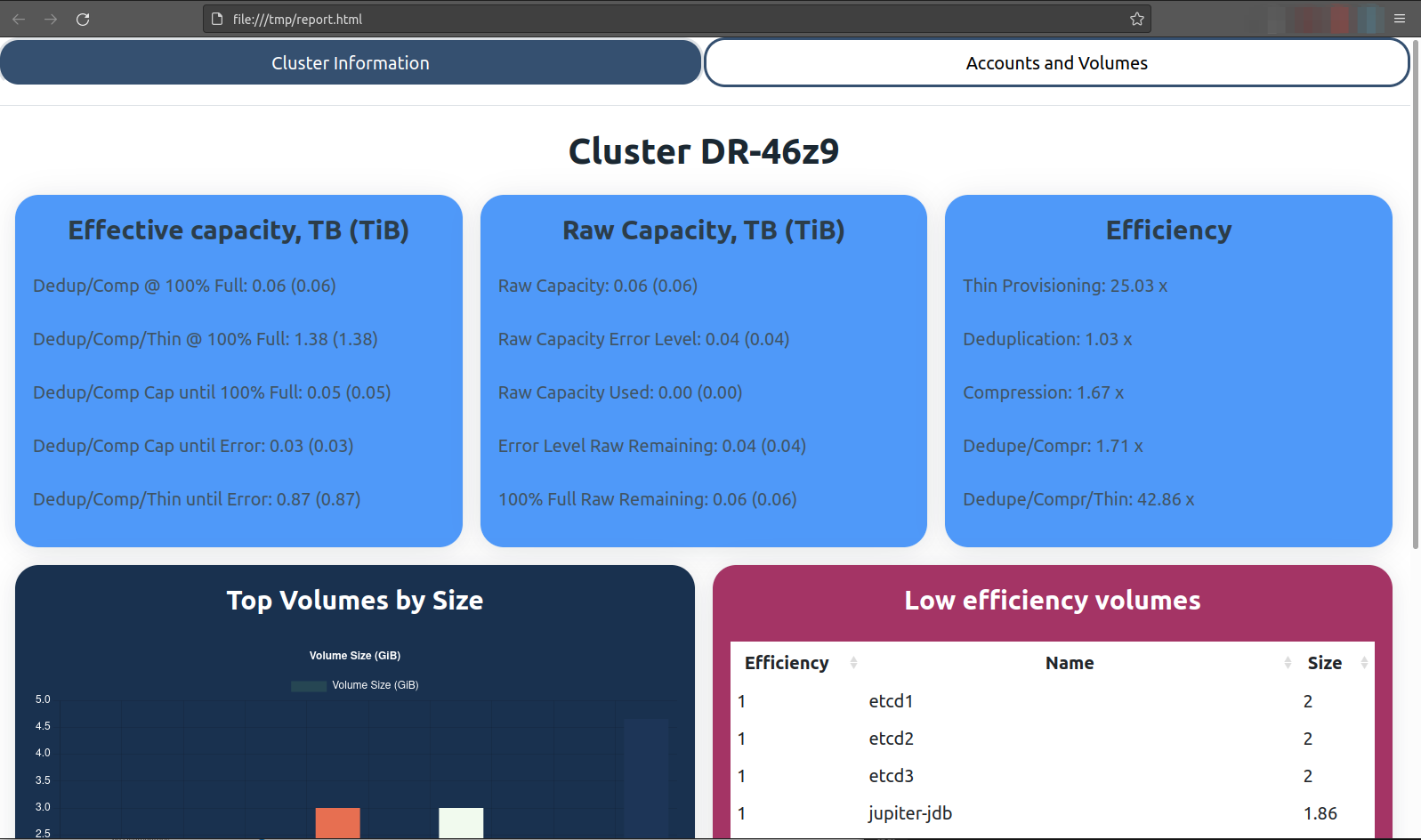
The first tab gives general cluster information:
- Effective cluster capacity
- Raw cluster capacity
- Cluster efficiency
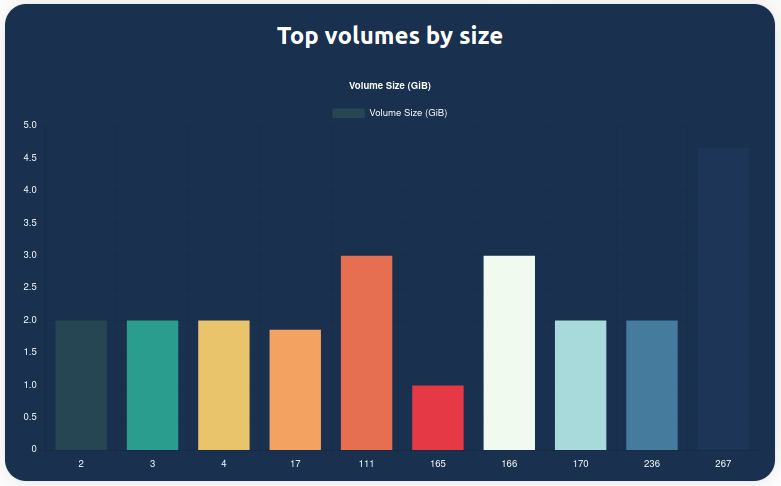
- Top 10 volumes by size
- Top 10 volumes by poor efficiency
NOTE: this report was generated from a SolidFire Demo VM (which you can download for free) so the capacity numbers are very low.
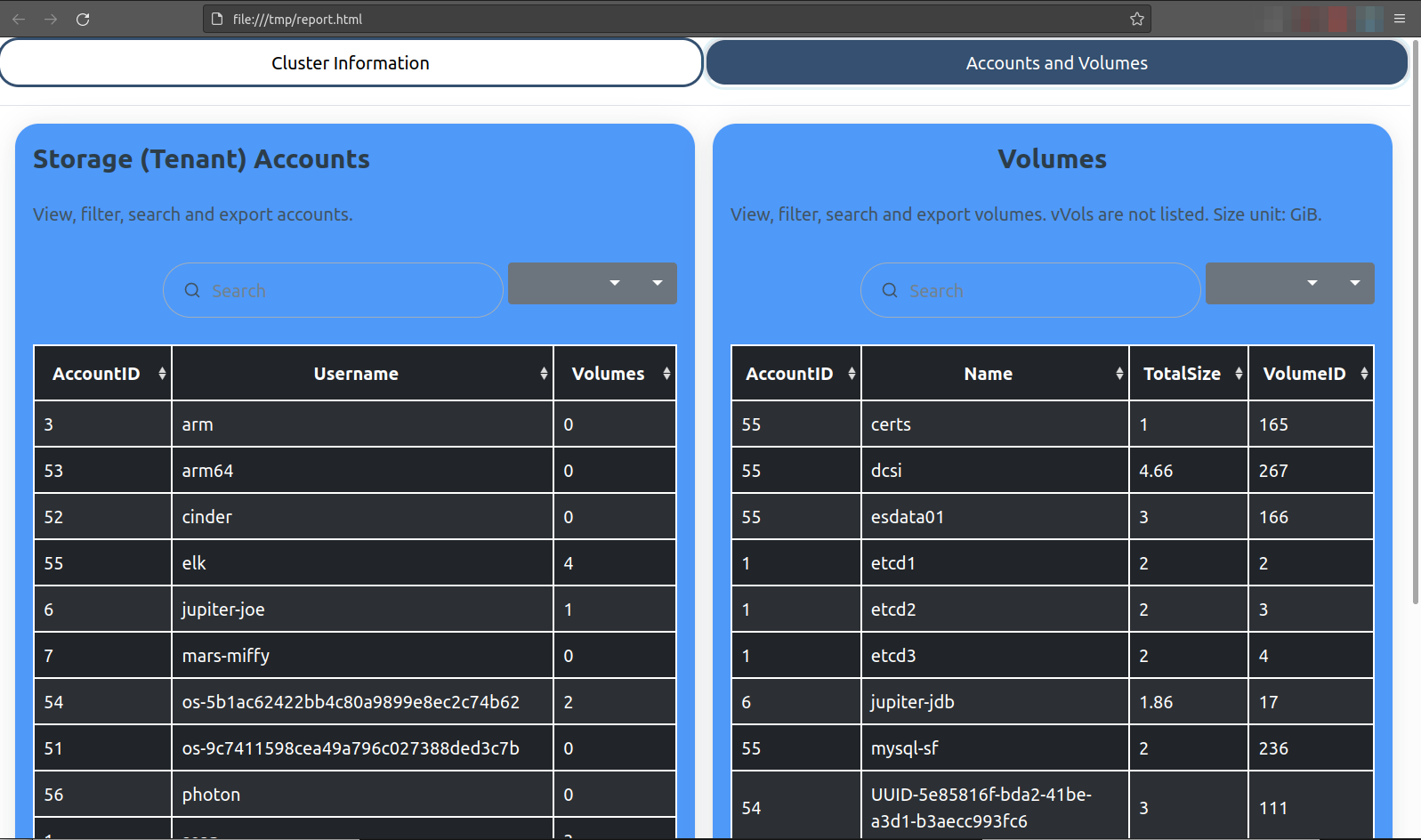
The second tab is about storage (tenant) accounts and volumes. The idea is if you spot some big or low-efficiency volumes, you can go to that tab to find out more.
There you can:
- Find which tenant has a ton of volumes
- Large volumes, their IDs, and who owns them
- Switch between different views and export this information in various formats
Known issues and workarounds
- Details from cards in the first tab can't be copy-pasted but the script outputs all details in text as well so you can get them there
- Table manipulation buttons in the second tab don't seem to render 100% properly (at least not on Firefox on Linux), but after a couple of clicks it's easy to figure out which button does what
- Color scheme may seem suboptimal. Feel free to edit it
MVIP, IP addresses, etc. can be added to HTML and text output, but I wanted to limit the need for scrolling and collect only essential info, so there isn't much other information in the report.
Maybe I'll improve the script if I get to use it sometimes, or notice that others use it. I wrote it because recently I heard of several cases where people struggled to get this info with curl and whatever they were told to use.
Possibly useful improvements (that can be done by anyone):
- Feature: obfuscation or encryption of account and volume names (something ActiveIQ doesn't do for SolidFire data).
- Update: DONE! If
$noName = $Truethe script simply omits the names and uses Volume and Account IDs instead (these are always unique integers on SolidFire). This could be coded as a function and we could replace real names with code names rather than omit names, but for now this will do and it's easy to understand (volume IDs are easy to map to volume names for customer). Here's an example of what that looks like - Volume IDs instead of Volume Names:
- Update: DONE! If
- Additional details: NetApp OneCollect already does this, which is why I'm reluctant to add more details to this HTML report. And usually users are reluctant to share the network configuration details, so the present minimalistic approach with very little identifiable data is likely to stay
If you need to collect a whole bunch of data for tech support, I suggest to use OneCollect or enable ActiveIQ.
I think this report can be helpful when deciding on cluster expansion, upgrades or getting general high level advice for SolidFire management.
Demo
- SolidFire capacity and efficiency report generator walk-through - 1m30s
- Sample report from demo video