SolidFire Gateway for Windows Admin Center 2025
Introduction
Yet another "extra gloves" flashback today.

I won't say who I think "Dumber" is, but I have a very accurate list of suspects.
What it is
SolidFire WAC Gateway is an API gateway for Windows Admin Center.
It essentially acts as a smart proxy to your SolidFire API endpoint also known as MVIP.
Remember HCC from NetApp HCI? This is like HCC, but probably better.
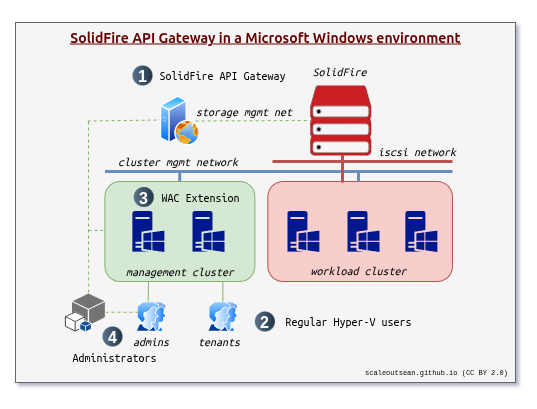
It's about (1) in this diagram below, and a little bit about the why of it - related to (2, (3) and (4). I'll write another post about (2) and (3) later.
What it does
I already mentioned it acts as a proxy. That's nothing special, I agree.
But it does a few other things and can do even more.
Here I use the gateway API to get to SolidFire API.
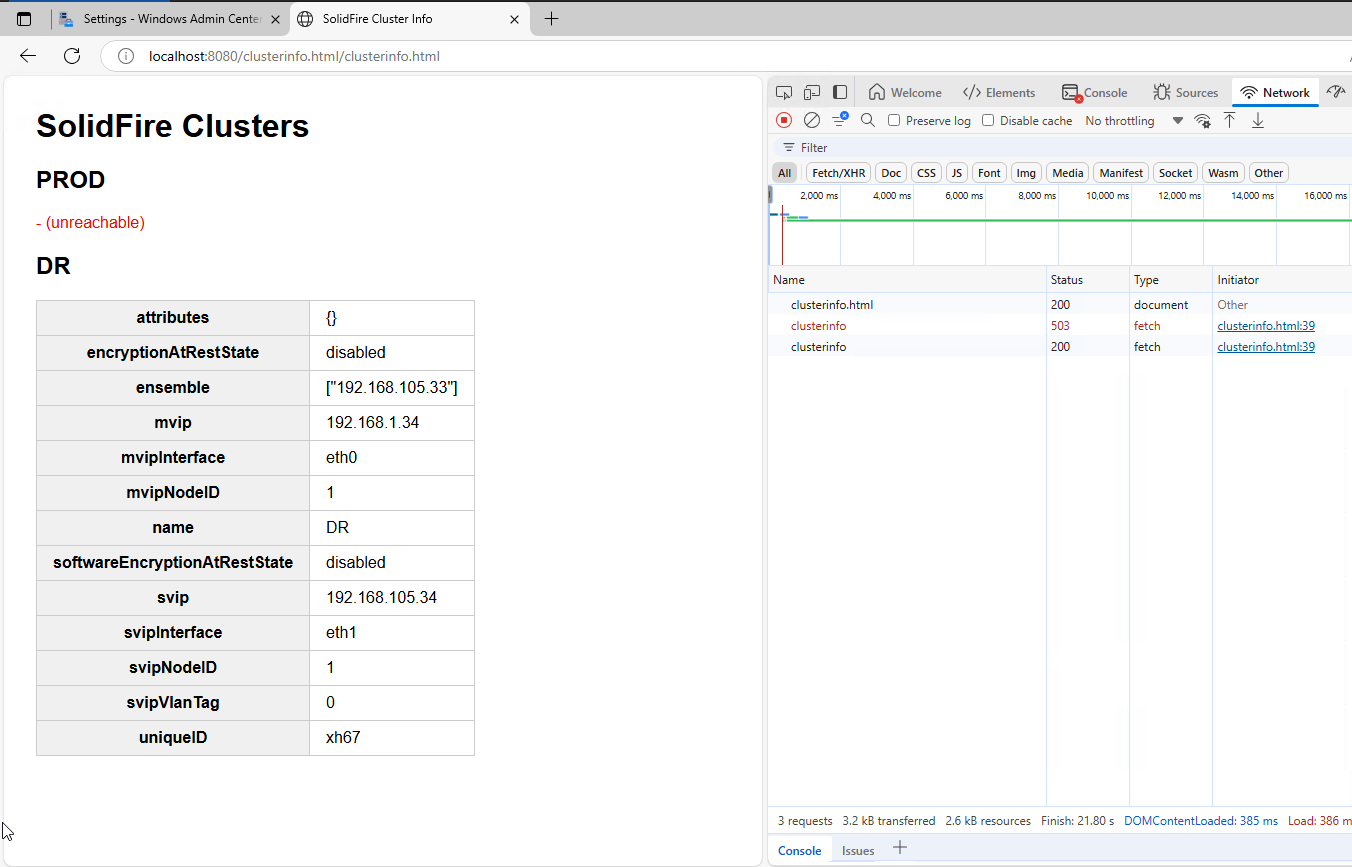
What's so special here? Nothing special.
- clusterinfo.html is served from static Web server without authentication
- I can show status of multiple SolidFire clusters and their details this way
- JavaScript reloads status every few minutes, so I get the same effect I did years ago in this post
Already a bit useful!
As an example, here's a list of volumes owned by an account.
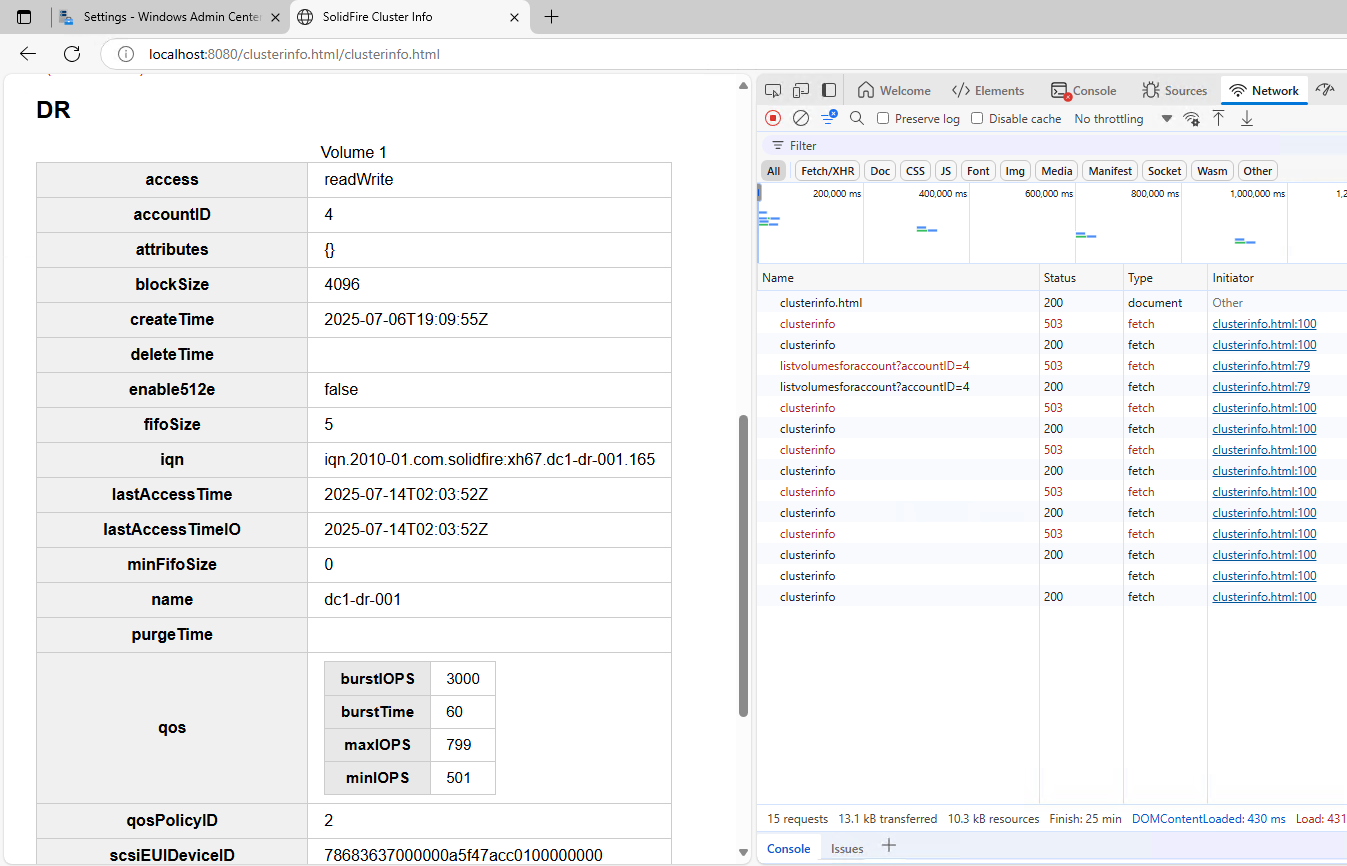
This is already interesting. Not because we can see volume info, but because:
- SolidFire volume info is stripped of all the unnecessary details on SolidFire WAC Gateway
- Responses I get (in JavaScript) is just the useful and usable content we need to easily and quickly build nice clients
Why is that useful?
Because this is a static server with JavaScript that calls the gateway's API endpoint.
Because I can consume these RESTful responses natively from Windows.
Or PowerShell on Windows. Or even WAC.
And your API calls can always be IIS TLS 1.3 and use the most secure ciphers IIS has.
That's what SolidFire WAC Gateway - with simple static Web server - can do for now. Additional objects (Accounts, etc.) and methods (especially those that you know as New- and Modify- PowerShell cmdlets from SolidFire Tools that no longer work on PS 7, by the way) can be added easily.
Is it starting to make sense now?
And - since I already view multiple clusters (one of which (PROD) is down, as you can see in the screenshots) - that also means I may be able to add actions that instruct SolidFire clusters fail-over from A to B by promoting one of them to "active". Isn't that interesting?
One issue with this setup is this is a static server with JavaScript and I have no authentication and authorization. It's JavaScript-to-API gateway.
But the gateway (application) can run on IIS Server. And then we can put some safeguards in place to use this from authenticated and authorized clients.
But it can be tricky. Took me three hours to get this to work (2 hours with Kestrel, 1 with IIS).
IIS Setup
For Windows authorization to work, SolidFire WAC gateway must be deployed on a secure site (TLS, FQDN).
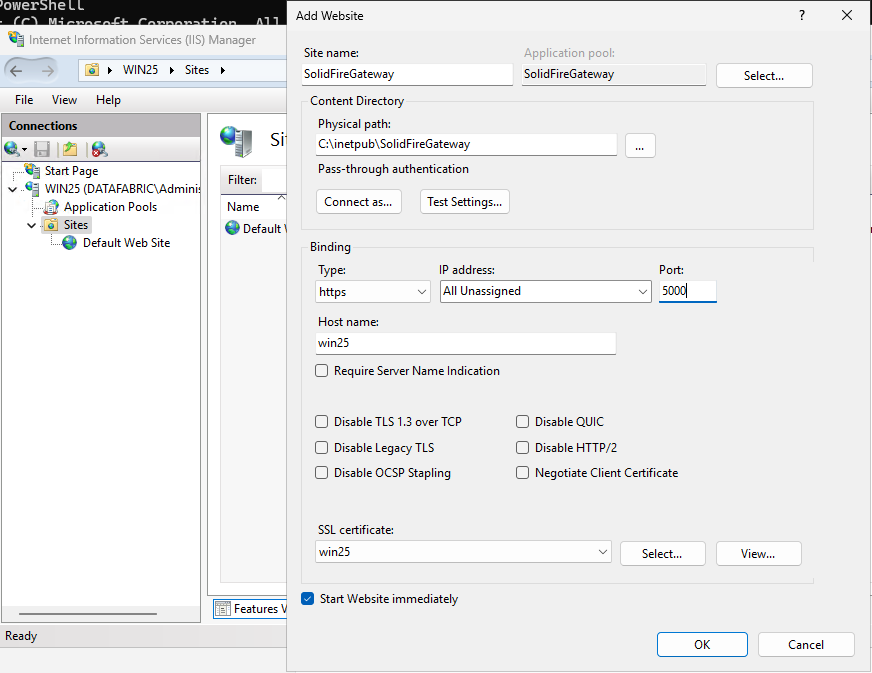
The gateway application should be set to "No Managed Code".
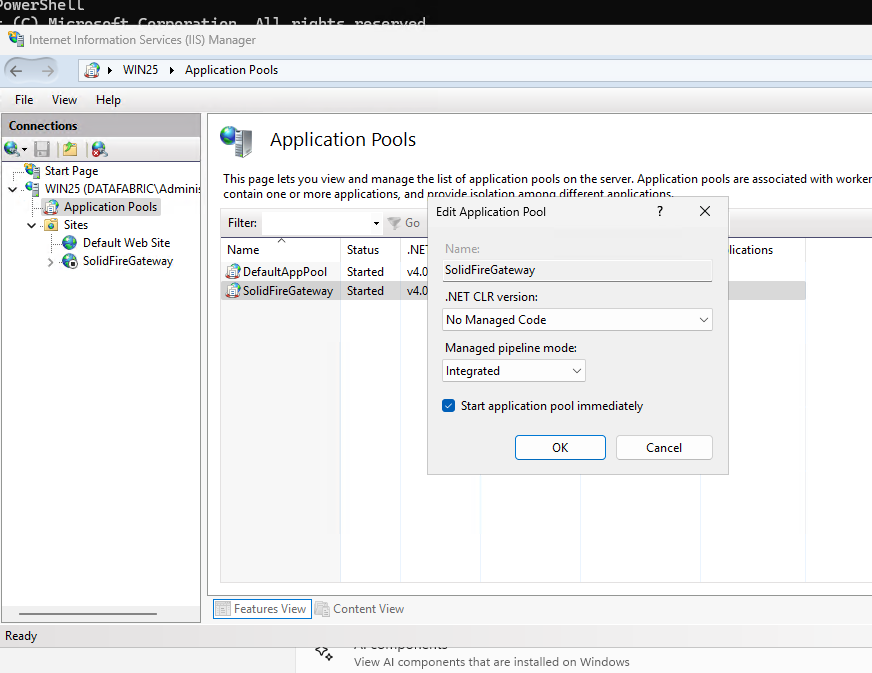
I had major problems getting this non-default site to work. Anonymous and Windows authentication both had to be enabled on IIS server core configuration, which overrode the first (and wrong) default value.
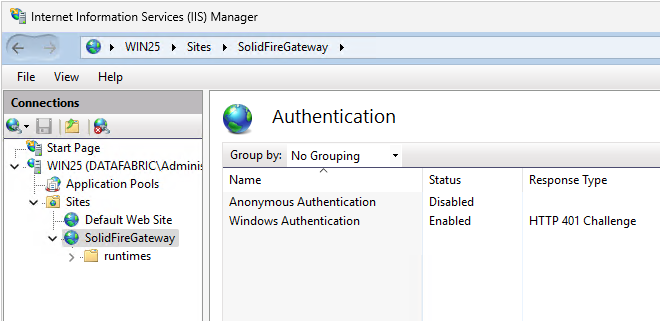
This IIS part isn't related to some special SolidFire WAC Gateway feature. It's just an IIS thing - how it has to be set up for Windows authentication to work.
I hope you can do it out of the box without fiddling, but if you can't, then the gateway won't work either. It's HTTPS-only and ABAC is enabled by default. If you disable it, then anyone with access to gateway can access the upstream SolidFire APIs and wipe everything, which is why we don't want to disable HTTPS and ABAC.
Why this matters
Once IIS works as it's supposed to work with ASP NET applications that have Windows authentication enabled, SolidFire WAC Gateway works like this:
- Non-authenticated or unauthorized users can't access gateway's API
- Windows AD user who is a member of one of white-listed AD groups can access gateway's API endpoint
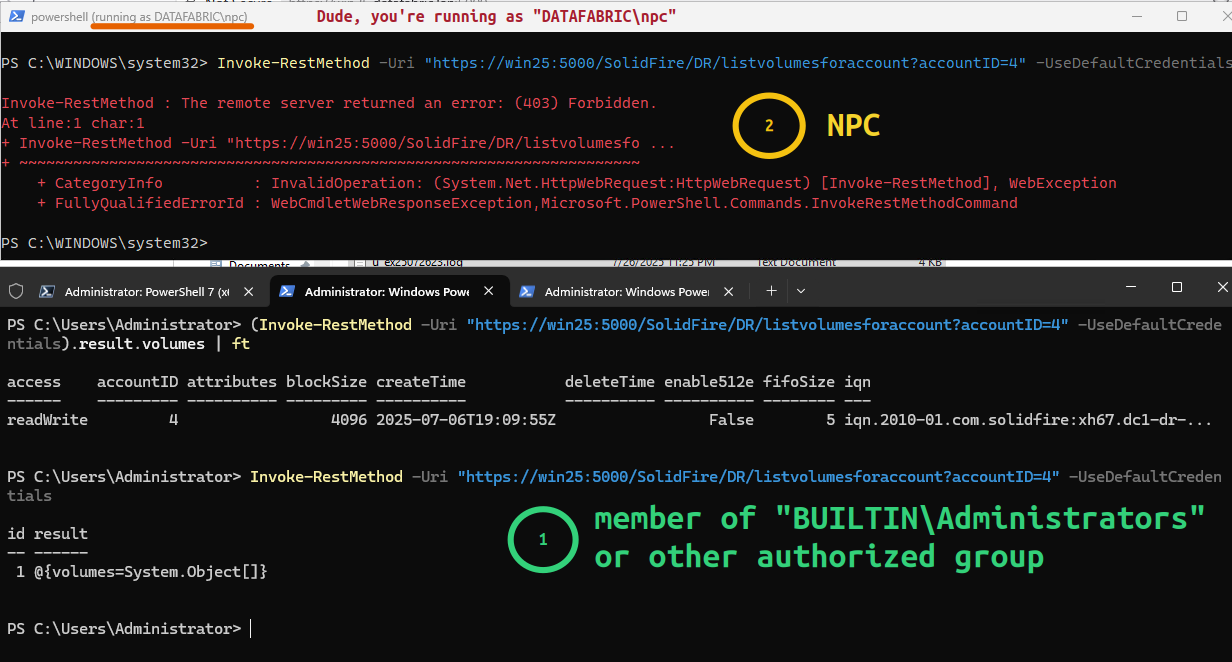
Related to RBAC, I've revisited this in the context of Linux a number of times, e.g. in RBAC and delegation for SolidFire JSON-RPC API with Lua.
In the context of Windows, the "static PowerShell server" post from early 2023 gave me the idea ("provide RBAC to PowerShell automation") and I knew it wasn't difficult. Heck, the page even has valid JSON-RPC examples.
But I'd never tried it on Windows until today and I'd never seen the path from there to Windows Admin Center.
Ages ago, when I last looked at Windows Admin Center, I couldn't do much because TypeScript was too hard for me.
What about it?
- What you've just seen is this step
- Two additional steps are needed to reach the goal (WAC-managed SolidFire clusters). This includes the annoying TypeScript part, but now I no longer have to massage API output because it's trimmed down
Once the remaining steps will have been finished, I'll be able to have ABAC for storage operations down to SolidFire volume level.
I'll be able to provision CSVs on Hyper-V clusters with 3-4 clicks.
I'll be able to fail over one SolidFire cluster to another in seconds.
I'll have nice li'l charts with all relevant SolidFire storage details.
Oh, and how about granular action authorizations down to volume level?
Everything that we should have had ages years ago. That's the goal and I'm ~40% done.
Conclusion
So the second pair of gloves has been there all this time (and this reminds me of the S3 vector indexing blog post from the other day).
"Who could have known?"
Right.
Well, this works on latest & greatest Windows Server 2025 which should work fine with SolidFire.
The source code for SolidFire Windows Admin Center Gateway will be posted to Github when I tidy up the code and complete the documents. After that, I hope we can finish the additional steps (SolidFire WAC Tools/Extension) and then add additional functions - that should be easy based on the existing two examples with cluster information and volumes methods.
Something speculative for the end: could this gateway be used to manage SolidFire attached to Azure Local clusters using Windows Admin Center in Azure? That's quite possibly another pair of gloves in hiding.