Like Flask, but with PowerShell
PowerShell (still) rocks
I haven't written (and won't write) a "2022 in review" kind of post, but I did think about it.
One of the topics I wanted to write about is PowerShell.
Every year I'm consistently shocked how people don't use PowerShell. 2022 was no exception.
At the same time this is a good example of why you should never fully rely on surveys and polls. As they say: trust, but verify.
I verified it years ago, and found that I shouldn't trust the majority. What helped me is the best storage I've worked with - SolidFire - has great PowerShell integration. PowerShell is great!
What prompted me to write about this today is I recently played with PowerShell-based Web and API service.
PowerShell-based services
Services allow us to serve Web content, but also RESTful or JSON-RPC APIs. Of course, I'm talking about PowerShell-powered Web services.
Yeah, yeah, I hear you - you can do that in Flask in five minutes. So can I.
But with PowerShell we can do it more "natively" on Windows, and we can do it quite well on Linux as well.
This isn't to say Flask or Python suck, but that in some cases PowerShell based dynamic Web or API is just as good, and sometimes can be better.
To clarify: the client can be a Python app, PowerShell script, Go program (API) or any Web browser (Web apps).
It is only the API/Web site that runs PowerShell.
The advantages are if you like PowerShell you can build server-side apps, and the same PowerShell scripts that you could run locally may be able to run on the server - it's a bit like server-rendered JavaScript, just with PowerShell.
PowerShell Web/API services also remind me a little of Jupyter. The Jupyter home page says "Think HTML and CSS for interactive computing on the web", after all. I built a .NET-based Jupyter notebook demo in early 2022, so I'm not making random comparisons here!
Some ideas and use cases
I haven't created any toy applications yet - so far I've been only exploring. Below are my early thoughts and ideas.
De-skill Kubernetes operations
Back in 2021 I created (but never published - most Kubernetes users don't feel comfortable straying away from distribution-provided management tools) a PowerShell module that simplified Kubernetes storage failover, so I thought about building a Web UI or API for that.
In this very basic example the PowerShell API server returns information about Kubelet and SolidFire version.
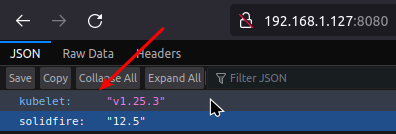
It's pretty incredible, but this is all it took to return that SolidFire version information:
$sf = (Connect-SFCluster 192.168.105.32 -Username monitor -Password *****).VersionApiNumber
Write-PodeJsonResponse -Value @{ 'kubelet' = $kubelet; 'solidfire' = $sf}
I'd need to load those PowerShell modules for Trident and storage failover and create a few Web page with two big buttons ("PROD" and "DR") to make Kubernetes storage failover work across sites. (You can see in that Kubernetes storage failover post and demo videos, storage failover took 10 seconds and failback less than a minute.)
Provide RBAC to PowerShell automation
Another use case is to enrich existing APIs. For example, SolidFire never built a good RBAC.
If you don't expose your SolidFire API to the Internet (and most people don't), it's easy to use PowerShell to build an API proxy server to enrich back-end API and provide RBAC that allows application users to directly manage volumes that belong to them.
What could that possibly be, when everything is managed by vCenter plugin or Kubernetes? Volume backup to S3, for example.
Or storage QoS modifications: let's assume your team's budget is 100K IOPS, and as person of charge of storage I don't care how you distribute them. I watch your aggregate IOPS in Elasticsearch, and alert when a team is over 100K across all volumes.
I still need to trust that you won't do 200K, but that can be fixed quickly and I can disable users who consistently make mistakes.
Last year I created an example of RBAC for SolidFire with Ansible. If you're not a fan of Ansible, you could do the same with PowerShell.
Here's an example I was playing with yesterday:
- PowerShell API server accepts whitelisted SolidFire API calls. That could be backup to S3, cloning or even something that I have in server-side scripts that the SolidFire API does not have.
- My simple API client is Postman, and from there I issue PUT requests to PowerShell server (which happens to run on Linux, by the way)
- On the server, I perform simple transformations, run some tasks, and send a response to the client
Postman request (this is SolidFire's CreateVolume API):

{
  "id": 52,
  "method": "CreateVolume",
  "params": {
    "name": "test",
    "accountID": 1,
    "totalSize": 2000000000,
    "enable512e": true,
    "qos": {
      "minIOPS": 50,
      "maxIOPS": 1500,
      "burstIOPS": 1505
    }
  }
}
PowerShell server's response doesn't pass it on to SolidFire (I didn't get that far) but does something with it locally and returns a JSON response to Postman:
$request = $WebEvent.Data
$name    = $WebEvent.Data.params.name
$size    = $WebEvent.Data.params.totalSize
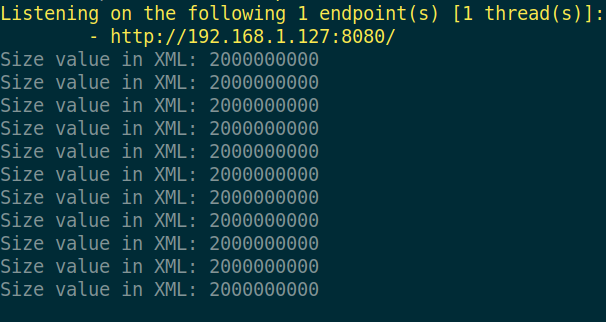
Write-Host "Size value in XML:", $request.params.totalSize
Write-PodeJsonResponse -Value @{
    guruSez = "yo man this crazy"
    method = $request.method
    volumeName = $name
    size = $size
}
Because authentication and authorization can be easily added to the server, we can whitelist certain operations for certain user accounts on the PowerShell server.
Apart from exposing this to application oweners through a simple Web (or API), another use case is building a UI or API for existing PowerShell scripts used by administrators. Same scripts, but in the Web UI. And some charts, reports and output can be exposed in read-only manner to application owners without having to:
- build complicated apps,
- allow direct access to SolidFire API endpoint,
- load more data to Splunk when it has no long term value
Improve logging and monitoring
Logging and monitoring is another interesting use case.
I sometimes write simple scripts to automate repetitive operations.
They're usually hacky - no error handling, no logging, no monitoring. Because let's be real - it's not easy to do that right in Bash, and it's not much easier in Python either.
PowerShell not only makes it easy to create reasonably "professional" scripts, but with a small amount of effort those scripts can be converted to a PowerShell Web app or API without introducing another language (JavaScript).
We can easily show logs in the Web page or console. This example shows how PowerShell server logs just one selected value (the size of CreateVolume request from the larger screenshot above). In the use case with storage QoS quota, we could show the total IOPS granted to an account, either in the API server log or in a Web page report served by the same server.
PowerShell JSON-RPC API log
Maybe you think that's trivial. Yes, it's not rocket science, but how many people actually create those trivial scripts and applications?
There aren't many out there and even when they're available, relatively few users create and use Bash or Python scripts in production. I know Ansible and have written playbooks for personal use, but apart from one apt-get playbook which I use on a regular basis, I can't say I'm a big fan of writing, using or maintaining Ansible.
Conclusion
PowerShell is (still) great and getting better even though most technical people don't realize that.
Personally I don't have much need for PowerShell-based home API services, so I may or may not prototype PowerShell APIs without real-life opportunities that need it.
But I will migrate some of my crappiest Bash scripts to PowerShell and send output (log) to centralized logging service (Elasticsearch, for example) - that's what I could use at home, and that's what some customers I know may want to do for their PowerShell scripts.