Flash media overprovisioning on NetApp E-Series
- Why overprovisioning exists
- Who needs this
- Who doesn't need this
- Impact on capacity sizing
- Impact on deployment
- Resources
Why overprovisioning exists
"Dude, where's my capacity?"
People sometimes get confused by "overprovisioning" that E-Series by default does when it uses flash media. I was no exception.
This stuff is not that easy to find - even today I spent 15 minutes to re-find it in order to share with someobody - so I'll put it here.
First, this [1] Samsung white paper explains how it's done:
- Manufacturers of flash drive media reserve (by not exposing it to the user) sane amount of capacity to ensure smooth functioning of the drive
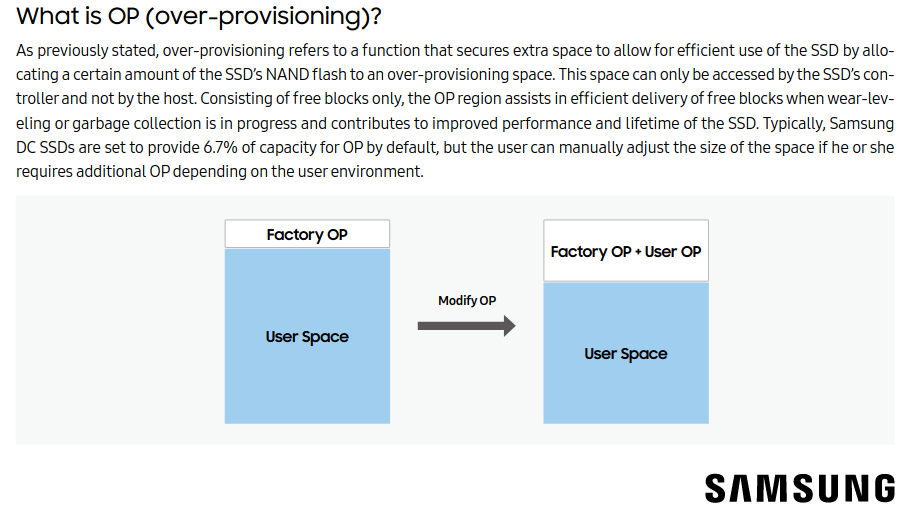
- Storage vendors and users may want to reserve (the E-Series team calls that "overprovisionining" (of raw capacity), although from my perspective "underprovisionining" (of LUN capacity) describes the concept better) additional capacity in edge cases
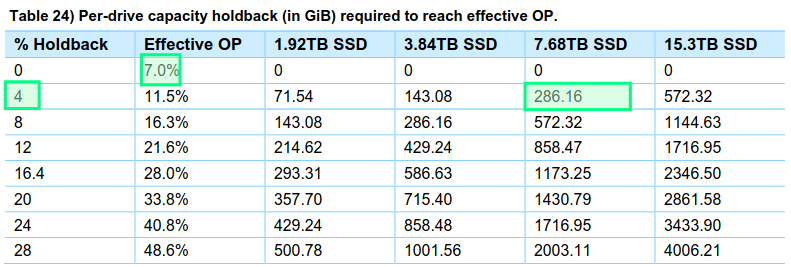
The first figure in the "Effective OP" column (7.0) is (the prevailing) "Factory OP" by flash media vendors.
In the case of E-Series arrays, they work just fine without any extra OP. Extra OP capacity ("Holdback") can be 0% and that's fine - drives include around 7% of factory-fixed OP and that's good enough for most users.
But, as TR-4800 explains, very write-heavy workloads (and E-Series has plenty of those) can result in a disk drive being fully overwritten once per day (1 DWPD). In that case additional holdback capacity can help ensure no impact on write performance.
The TR suggests an additional 4% for 1 DWPD and more for users who write even more every day on a sustained basis. See [2] for the details.
Who needs this
Most users don't need extra holdback and can lower it to 0% in the E-Series Web UI.
But let's say you use E-Series with SSDs to store CCTV (camera) recordings. This workload runs 24 x 7 and is almost 100% write.
Furthemore, storage performance is usually sized fairly precisely and required 24 x 7 - we can't lower feed resolution by 20% to acommodate temporary slowness in maximum write performance.
If this workload does 1 DWPD (7.68 TB of writes per 7.68 TB disk), then in order to consistently deliver that level of performance we should hold back another 4% from the user and overprovision disk capacity by the total of 11% (or underprovision storage to hosts, as I like to think of it).
BeeGFS example
One concrete example out there is metadata volumes used by BeeGFS on NetApp E-Series; you can see here that we recommend very high Effective OP for those volumes (22.5%). For data volumes we would use filesystem IO metrics (see this) to determine how many DWPDs are involved.
Who doesn't need this
Let's say an environment has a heavy and sustained write workload, but it doesn't matter if writes on a bad hour do 12 instead of 15 GB/s.
If it does matter, provision storage with holdback that's right for your environment.
Impact on capacity sizing
If you have 24 x 7 (not 1- or 10 hour-sustained) write workloads that approach 1 DWPD, deduct 11.5% of usable capacity (the second row deducts 286.16 GB from a 7.68TB drive). The TR (see References, below) has examples for other DWPD figures.
Then deduct another 2-3% for filesystem overheads.
Most (my guess would be 90%) users can use 0% holdback, but those with constant heavy write workloads may want to consider this before buying flash capacity.
Impact on deployment
Most environments cannot "shrink" filesystems. That's why it's important to think about this beforehand.
Before you buy E-Series, check your workload if you suspect it's consistently write-heavy.
Existing E-Series users moving from HDD to flash can check their array metrics.
NetApp Cloud Insights (subscription-based; subscription can be as short as necessary) and E-Series Performance Analyzer (free, but not as good) can provide good insights into write workload over weeks and months.
E-Series users with flash media can check wear level and amount of data written in the SANtricity Web UI.
If a drive is 5 months old an has 648 TB written to it, that's ~50 MB/s or 4.3TB/day, or 0.56 DWPD. If you cannot tolerate uneven write performance, a 4% holdback should be more than enough to handle up to 1 DWPD without any deterioration due to media garbage collection in flash media.