Windows Server 2025 and Hyper-V with NetApp E-Series
Introduction
NetApp E-Series is a great shared storage platform for Windows Server 2025 integrations, whether it's Hyper-V, SQL Server or other.
You may find about it … nowhere, but the usual SANtricity stuff applies very much:
- Excellent performance (both throughput and latency, both single and multi-volume)
- Very good price/performance
- ODX support
- SCSI-3 reservations for HA clustering
- Choice of classic and modern RAID configurations (unlike most modern storage) for those who need to micro-manage RAID levels which is often the case in high-performance environments
- No bloat
- Comparatively few security vulnerabilities
- Short I/O path
- Set & forget, generally speaking
- You get to choose the right balance between performance and storage efficiency (with application- and OS-side compression or deduplication if you need it)
E-Series is relatively weak when it comes to plugins and integrations, which generally doesn't bother users who create just a few volumes for large and fairly static workloads and those who can automate stuff using the API. I've done some work on open source tools and libraries that aim to make this easier on the rest of SANtricity users.
Windows Server 2025 is a nice OS and I've started working on a PowerShell module for SANtricity with the objective to produce something that makes SANtricity more useful to those who need a bit of help while using a very permissive license to encourage forking and improvements (make it unstoppable!).
As some of that code is already on Github and new cmdlets are on way, it's time to start a post on Windows Server 2025 with E-Series.
Why now
- SANtricity ODX support isn't new, but no one knows about it (see the link above). Many users are looking for VMware alternatives
- My SANtricity PowerShell module for Day 1 operations is available. Although it currently has only a few (mostly
Get*) cmdlets, even that is enough to simplify storage operations for Windows servers - The official documentation is outdated (
echo list disk | dispart- echo like it's 2005…) which isn't what we want for our SANtricity users reading this in 2026 - Most importantly, since mere weeks ago we have native NVMe/ROCEv2 support in Windows Server 2025 by Microsoft
The last and most important part (the Microsoft link) was last updated on January 6, 2026 - I figure that's because many users are interested and asking questions. Check it out!
Windows users seeking highest performing, protected external storage can now use EF600 and many GB/s of throughput and millions of IOps for their databases and other workloads. This is all quite new, though, and the NetApp Interoperability Matrix ("IMT") doesn't yet show Windows Server 2025 on the list of supported NVMe/RoCEv2 clients so we need to keep an eye on that.
Because of that I believe it is time to revisit this combination (Windows Server and E-Series SANtricity storage). For time being I'll assume an iSCSI, and later if NVMe/RoCEv2 makes it to the IMT I'll add something on that as well.
Prepare Windows for Hyper-V
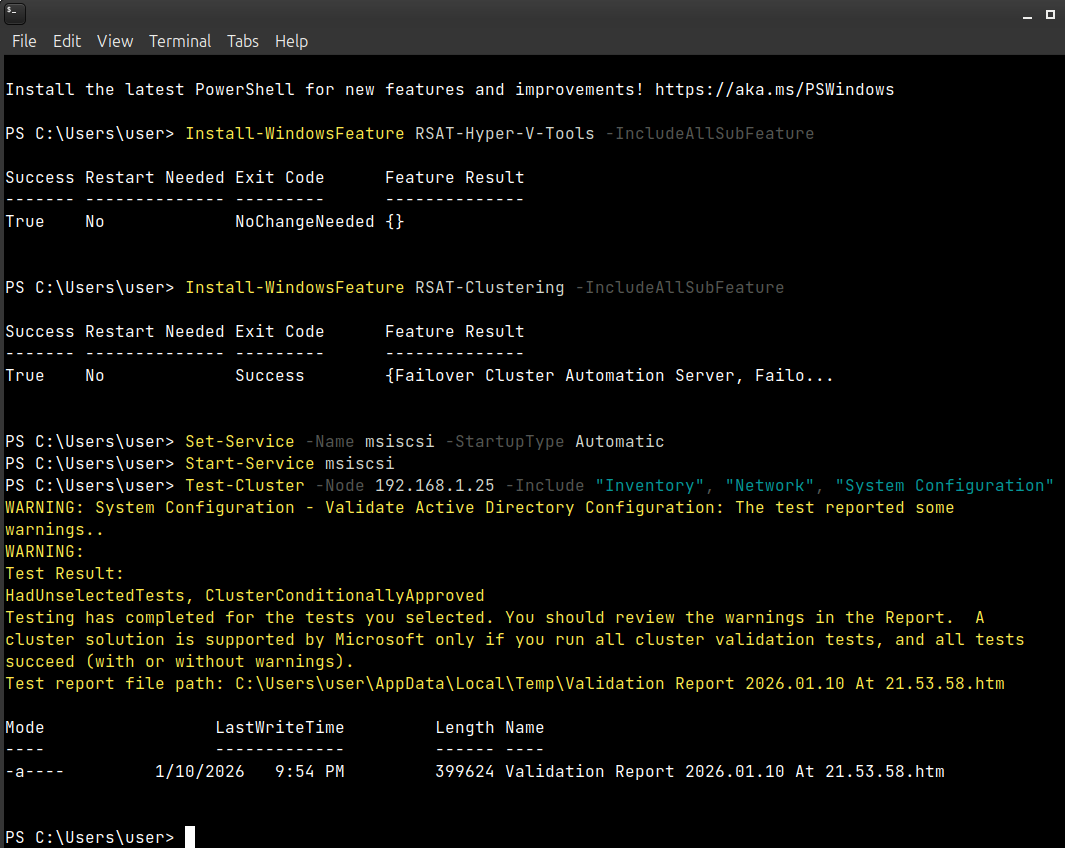
Whether you enable and use Hyper-V isn't that important, but I wanted to mention it because of ODX and because I really, really love the ability of Windows to run Hyper-V without domain membership. While that's not new (it's been possible since Windows 2016), I still like that.
Most everyone who used Hyper-V in last 15 years knows what's generally required and how it all works, so I won't rehash the MS documentation.
Hyper-V is a delight to install and configure. In the case you're interested in the "workgroup" approach, you can use PowerShell to install everything you need, enable SSH or other method for easy external conectivity, configure Hyper-V without domain membership (which includes creating a "Hyper-V" account, here user accessing Windows Server 2025 via SSH) and test your setup.
iSCSI
Like many other arrays, SANtricity requires two networks ("dual fabric") for multipathing. Usually on each host attached to E-Series we'd create two or four iSCSI network interfaces (e.g. 192.168.10.0/24 and 192.168.20.0/24) on two physical networks.
Use jumbo frames (Set-NetAdapterAdvancedProperty) if you wish, but don't max it out (e.g. try 8800) to leave room for the various virtualization overlays if you use those NICs not solely for iSCSI. You don't have to worry about "wasting" 50 bytes in every packet - even the difference between regular and jumbo frames isn't significant so it won't be noticeable at all.
Other recommendations from TFM:
- Enable send and receive hardware flow control end to end
- Disable priority flow control (PRC)
Get SANtricity Windows DSM for MPIO and deploy it. See this for more. Use dsmUtil.exe from this package to confirm redundant MPIO paths.
To CHAP or not to CHAP? SANtricity lets you do either (CHAPless or CHAPful): you can rely on IQNs, or CHAP, or both.
A list of Windows iSCSI cmdlets is available here. Some often used ones:
Get-IscsiTargetPortal- gets iSCSI target portals to see if ours have been addedNew-IscsiTargetPortal- configures a new iSCSI target portal on E-SeriesSet-IscsiChapSecret- sets a CHAP secret key if you configured CHAP for the host or Hyper-V cluster on E-SeriesGet-IscsiTarget- returns an iSCSI target object for each iSCSI target that is registered with the iSCSI initiatorConnect-IscsiTarget- establishes a connectionUpdate-IscsiTarget- refreshes the information about connected iSCSI target objectsUpdate-IscsiTargetPortal- Updates information about the specified iSCSI target portal
Other relevant groups of cmdlets:
Where does santricity-powershell fit?
Get-SANtricityVolumes- you can pipe the output of this cmdlet to the iSCSI commands above and if you carefully name your E-Series volumes, you can have consistent storage names end-to-end- You can also use the
Getcmdlets to create storage pool and volume reports and combine them with Hyper-V or Windows reporting.Get-SANtricityMappingsReportis one of those cmdlets. Similarly, otherGet-cmdlets can be used to pipe outputs to the MPIO or other commands on Windows New-andRemove-cmdlets are being added and with them your day-to-day automation work both ways - SANtricity-to-Windows ("pull" style, for those who like to start on the storage side) or Windows-to-SANtricity ("push" style, for those to prefer to start from the servers or Hyper-V)- Other automation (Hyper-V-related) will be possible as well
Some of these examples will be added to the santricity-powershell repository.
What's missing in santricity-powershell? Well, a lot. For example, snapshots and clones. Those aren't easy to use on E-Series (the API itself), but the current scope of the module is to cover the common CRUD operations for volumes, hosts/clusters and mapping between them.
iSCSI (without RoCEv2) is available on host-facing controlles with 10G and/or 25G ports.
Host configuration-wise, iSCSI initiator is stored in node's iscsiNodeName key:
"nodeName": {
  "ioInterfaceType": "iscsi",
  "iscsiNodeName": "iqn.2004-10.com.ubuntu:01:e7f6625b59c",
  "remoteNodeWWN": null,
  "nvmeNodeName": null
}
NVMe/RoCEv2
TODO (additional, finalized details after Windows Server makes it to the NetApp IMT)
This should be very similar to iSCSI - which is why I focus on these two - because there are only minimal differences between the two:
- iSCSI uses IQN or CHAP (or optionally, both)
- NVMe/RoCEv2 uses NQN
The only difference should be that NVMe uses a different string (NQN vs IQN) and no CHAP in New-SANtricityHost parameters. Once hosts have been configured, create a group with New-SANtricityHostGroup and add your Windows server(s) to it.
What that would do is simply create an NVMe entry when cmdlet uses POST hosts on back-end to populate nvmeNodeName instead of iscsiNodeName (with iSCSI, above).
"nodeName": {
  "ioInterfaceType": "nvmeof",
  "iscsiNodeName": null,
  "remoteNodeWWN": null,
  "nvmeNodeName": "nqn.2014-08.org.nvmexpress:uuid:7430905e-9836-11eb-a394-0a94efb9842b"
}
NVMe multipathing on Linux is done in kernel and the use of DM-MP is optional. The information on that with SANtricity and Windows Server is currently not available (Microsoft for now seems to be focused on internal NVMe, not yet NVMe-oF) and I don't have access to such hardware, so I don't know how NVMe MPIO is going to work on Windows.
Maybe SANtricity Windows DSM won't be neded for NVMe/RoCEv2.
Some existing NVMe integrations for Windows rely on NVMe-to-SCSI translation and use "classic" MPIO. But there are indications (nvmedisk.sys, StorNVMe) Windows Server with NVMe/RoCEv2-oF may work differently. It would be nice it DSM drivers became unnecessary - that would make deployment and operations even simpler. I give that a 40% chance on the account of this (RoCEv2) being Ethernet and not IB or FC.
Of course, hardware support for NVMe should be present on both clients and storage system. On E-Series EF arrays with 100G or faster NICs (Host Interface Cards aka "HICs") NVMe is available over both IB and Ethernet. Windows-specific instructions for NVMe/RoCEv2 hosts aren't yet available as I've mentioned earlier but physical connectivity requirements are likely to be the same as for Linux.
Conclusion
Official NVMe/RoCEv2 storage support on Microsoft Windows Server 2025 couldn't come at a better time - just as I've started to do more work in this area.
If you like storage that delivers fast, reliable and protected volumes and gets out of your way, you'll like Windows Server (and Hyper-V) with E-Series.
Automation and integration are not good enough, but now we have permissionless and permissively licensed OSS-based automation that will be usable for years. Most E-Series users don't create and recreate volumes every month, let alone every day, so having just these libraries (there's one for Python, too) and modules done right goes a long way.
Appendix - santricity-powershell cmdlets
This list includes new cmdlets posted on January 12, 2026.
- Get-SANtricityHostGroups
- Get-SANtricityHosts
- Get-SANtricityMappingsReport
- Get-SANtricityStoragePools
- Get-SANtricityTargets
- Get-SANtricityVolumeMappings
- Get-SANtricityVolumes
- New-SANtricityHost
- New-SANtricityHostGroup
- New-SANtricityVolume
- New-SANtricityVolumeMapping
- Remove-SANtricityHost
- Remove-SANtricityHostGroup
- Remove-SANtricityStoragePool
- Remove-SANtricityVolume
- Remove-SANtricityVolumeMapping
- Resize-SANtricityVolume
- Set-SANtricityVolume
- Show-SANtricityMappingsReportFormatted