Windows Server 2025 with NetApp SolidFire 12 iSCSI Part Two
This is the second of the posts posts on Microsoft Windows Server 2025 and NetApp SolidFire.
- Part One: Windows Server 2025 with NetApp SolidFire - getting started
- (you're here) Part Two: SQL Server T-SQL Snapshots - using SolidFire snapshots with SQL Server 2022
- Part Three: Windows Server 2025 with NetApp SolidFire 12 iSCSI - notes related to Hyper-V
In this post you can find the following:
- SolidFire snapshots
- Transact-SQL snapshot backup with SolidFire
- Snapshot schedule creation
- Restore
- DR for SQL Server T-SQL hardware-assisted snapshots
- Data masking
- Other uses of SolidFire snapshots
- SolidFire DBA Tools
- Security
- Conclusion
- Appendix A - filesystem layout
- Appendix C - cloning workflow with CLI
- Appendix D - workflow screenshots, tips and workarounds
As explained in Part One, SQL Server 2022 makes it possible to easily use hardware snapshots without VSS.
Windows Server 2025 isn't directly related to that, but my thinking is SQL Server 2022 is, and by 2025, at least those SQL Server users who don't wait until the last day of support will start using SQL Server 2022.
SolidFire snapshots
- Maximum of 32 snapshots per volume
- Single volume snapshot takes a crash-consistent point-in-time snapshot of a volume
- Group (volume) snapshot takes a snapshot of one or more volumes
- Snapshots can be restored (which reverts the source volume) or cloned (which is a space-efficient copy with a new VolumeID, Name, etc.)
If the "base" volume is wiped and its snapshots haven't been replicated, backed up or cloned, they will be lost as well. Snapshot is not a backup.
If our SQL Server has database files on one volume and log files on another, we'd take a group snapshot to protect that data.

wwi's properties:

Above:
- SQL data for the DB
wwi: E:\data\wwi\ (VolumeID 136, Name sqldb) - SQL logs: F:\log\wwi\ (Volume ID 134, Name win1)
- Backup directory: G:\ (Volume ID 135, Name win2)

To take a group snapshot of one or more volumes from the UI, select volume(s) and take a group snapshot like so.
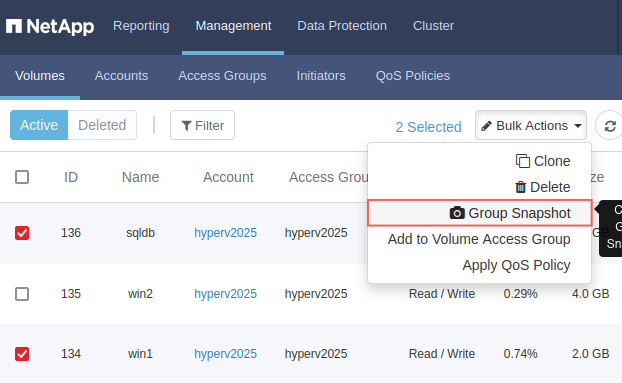
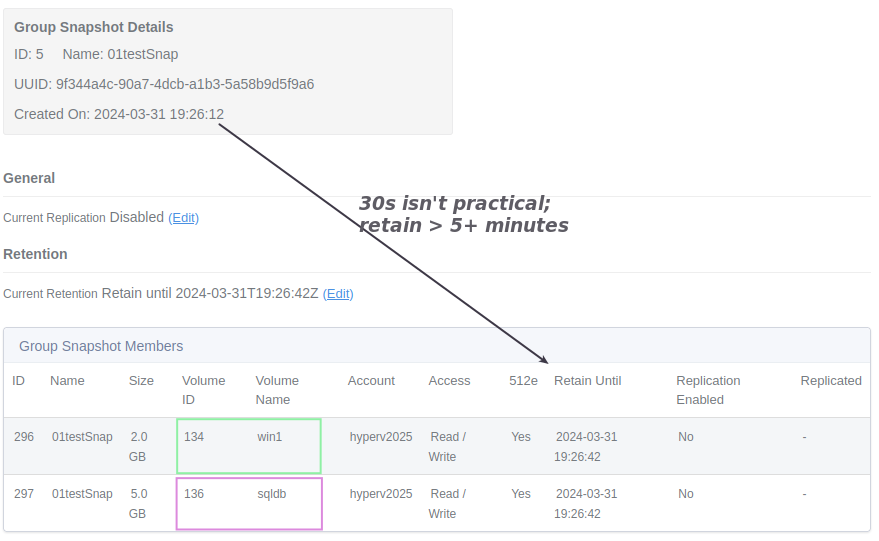
Snapshot retention may be set and in PowerShell we'd use -Retention "00:10:00" to set the expiration to 10 minutes from the time of snapshot creation.
While you can set expiration to a very low value, that wouldn't make sense as database would have to fail and be restored within seconds for that snapshot to be useful. Remember, T-SQL "backup" based on storage snapshots is just SQL Server's data about (snapshot) data - if there's no snapshot, there's no way to get data back!
Using PowerShell to create a snapshot:
- Step 1: Find volume IDs you want to backup (note that a user may have dozens and you may want to filter by name or other properties)
- Step 2: Create a snapshot and specify retention time and optionally attributes.
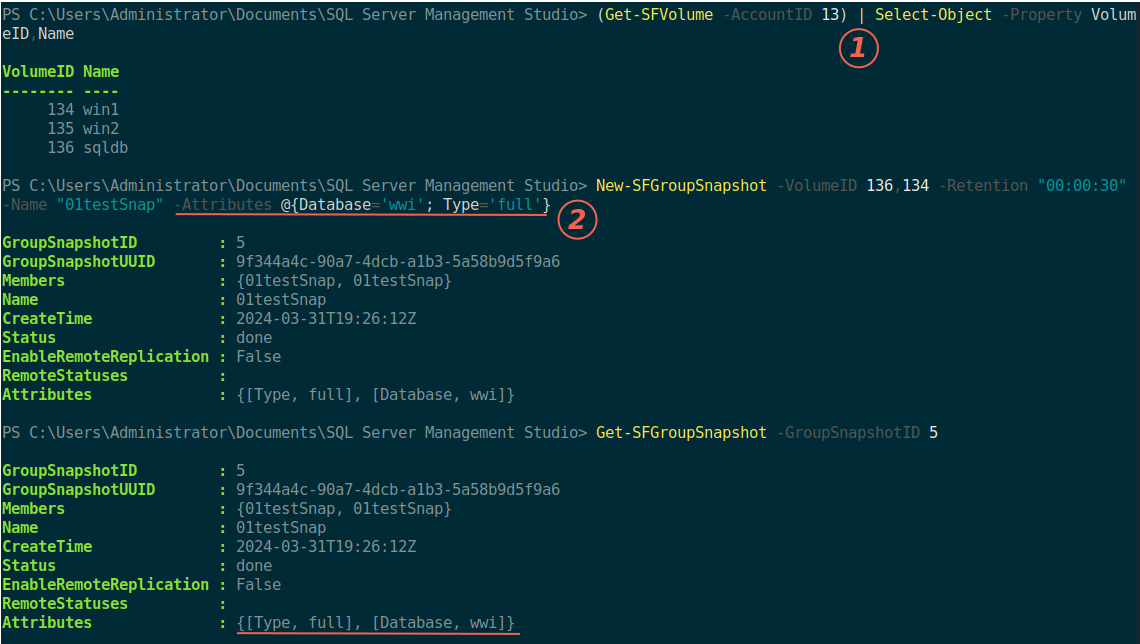
SolidFire has had volume attributes for close to a decade now, by the way. If you automate a lot, you may want to take advantage of that feature to store a bit more KV pairs to make workflows faster.
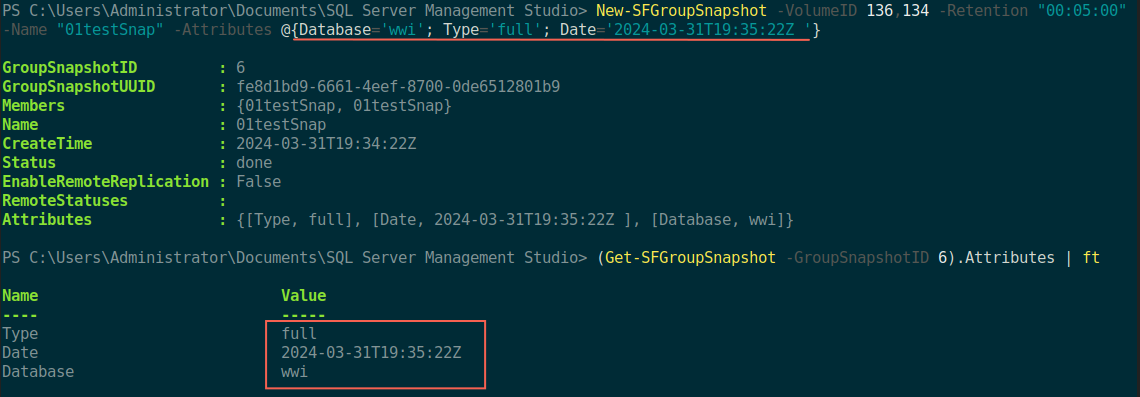
If some snapshots are local-only while others need to be replicated, we can use that in snapshot attributes.
PS C:\> New-SFGroupSnapshot -VolumeID 136,134 `n
        -Retention "00:48:00" -Name "02testSnap" `n
        -Attributes @{Database='wwi'; Type='meta'; Site='local'}

PS C:\> New-SFGroupSnapshot -VolumeID 136,134 `n
        -Retention "00:08:00" -Name "03testSnap" `n
        -Attributes @{Database='wwi'; Type='full'; Site='replicated'}

PS C:\> Get-SFGroupSnapshot | Select-Object -Property GroupSnapshotID, Attributes

GroupSnapshotID Attributes
--------------- ----------
             70 {[Site, replicated], [Database, wwi], [Type, full]}
             69 {[Site, local], [Database, wwi], [Type, meta]}
I may have a bunch of these, but if only full backups need to be replicated, it's easy to find out which ones to set up for replication and add -EnableRemoteReplication to New-SFSnapshot options.
Transact-SQL snapshot backup with SolidFire
This is based on this, also linked from yesterday's post.
For Transact-SQL backup assisted by hardware snapshots, I assume most users would take snapshots frequently and retain each for just minutes.
The idea is that because they're very light on storage, there's no harm in taking them every 15 minutes (for example), and keeping each for 30 minutes.
Using T-SQL snapshots with storage snapshots doesn't mean you can't have other snapshots, so it's just one of the tools that is nice to use.
SolidFire seems perfectly suitable for this because its snapshots are fast and using them isn't a pain in the butt.
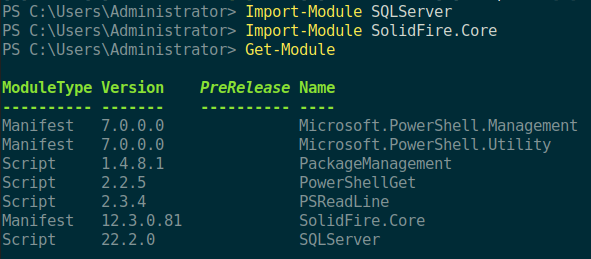
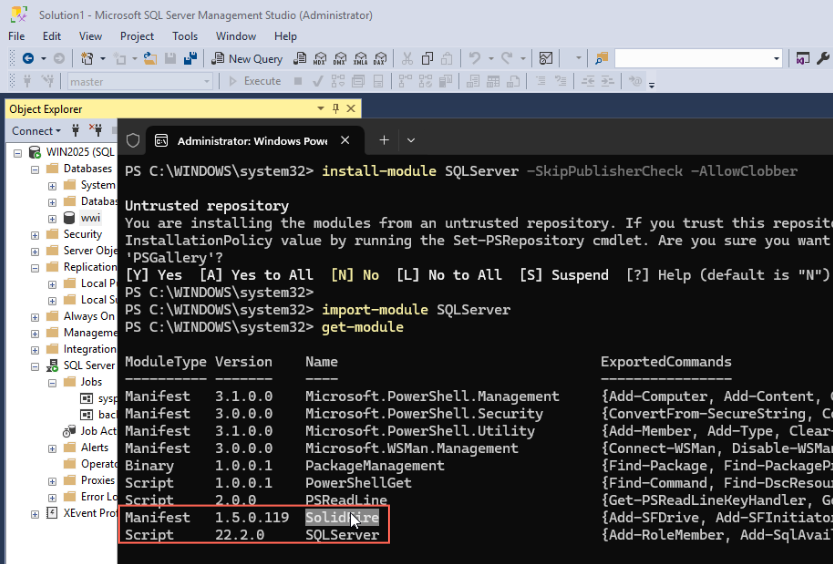
- PowerShell 5.1:
Install-Module SolidFire - PowerShell 7:
Install-Module SolidFire.Core
PowerShell 7 example:
PowerShell 5 example:
From the page on the Microsoft Web site, this is our workflow:

While a production script should handle errors, there's little that can go wrong with New-SFGroupSnapshot (or New-SFSnapshot). You may max out the maximum number of snapshots per volume (so, don't do that) and if you rotate passwords, you may forget to do that for the script. At the very least use Try-Catch as I annotated in the screenshot.
At the very minimum, just five lines will do. We connect to SolidFire MVIP at 192.168.30, freeze the database wwi , have SolidFire create a snapshot (Volume ID 134, 136), and then we backup database to G:\wwi_snap.bkp.
In theory, this would be all that it'd take (plus some exception handling):
Import-Module SolidFire
$cred = Get-Credential
$null = Connect-SFCluster 192.168.1.30 -Credential $cred
Start-Job -ScriptBlock {sqlcmd -E -Q "ALTER DATABASE wwi SET SUSPEND_FOR_SNAPSHOT_BACKUP=ON;"}
$SfSnap = New-SFGroupSnapshot -VolumeID 136,134 -Retention "00:10:00" -Name "wwi-snap-demo"
Start-Job -ScriptBlock {sqlcmd -E -Q "ALTER DATABASE wwi SET SUSPEND_FOR_SNAPSHOT_BACKUP=OFF;"}
SolidFire credentials could be loaded from environment variables. The example above is for interactive execution.
We could query DB log and compare against snapshot's CreateTime to make sure snapshot is taken during suspend.
PS C:\Users\Administrator> New-SFGroupSnapshot -VolumeID 136,134 -Retention "00:05:00" -Name "Example"
GroupSnapshotID         : 67
GroupSnapshotUUID       : cab2e806-3ead-4cc1-b7af-e97d6d79216d
Members                 : {Example, Example}
Name                    : Example
CreateTime              : 2024-04-01T07:32:24Z
Status                  : done
EnableRemoteReplication : False
RemoteStatuses          :
Attributes              : {}
In practice, I had problems with DB instance exiting suspend mode on its own before T-SQL backup job executed which meant that backup always failed.
My second idea was to schedule these jobs independently (SQL Server stored procedure as one, SolidFire snapshot as another). As long as NTP is managed and working properly and database can remain suspended 10-15 seconds, that should work fine.
Eventually that was the only way to get this to work reliably (from SQL Server 2022 side):
- stored procedure that enters suspend mode, sleeps 15 seconds, takes a backup, and leaves suspend mode
- Scheduled or manual SolidFire snapshots that occur at the time database is suspended (i.e. they need to start 2-3 seconds after that stored procedure)
We know a backup (command in SQL Server) will fail if database isn't suspended, so I only had to make sure that SolidFire snapshot occurred during the time it was suspended.
I created this stored procedure in master database.
USE [master]
GO
SET ANSI_NULLS ON
GO
SET QUOTED_IDENTIFIER ON
GO
CREATE PROCEDURE [dbo].[backupTSql]
AS
BEGIN
	SET NOCOUNT ON;
	ALTER DATABASE [vip] SET SUSPEND_FOR_SNAPSHOT_BACKUP=ON;
	WAITFOR DELAY '00:00:10';
	BACKUP DATABASE [vip] TO DISK = 'G:\bkp\vip.bkm' WITH METADATA_ONLY, FORMAT;
	ALTER DATABASE [vip] SET SUSPEND_FOR_SNAPSHOT_BACKUP=OFF;
END
I added some PRINT and SELECT statements to the stored procedure during debugging to show suspended databases at that time and also compared the time of SolidFire snapshot.
Here we can see that vip was correct suspended, and in the second query (below red rectangle), after we resumed it was not.
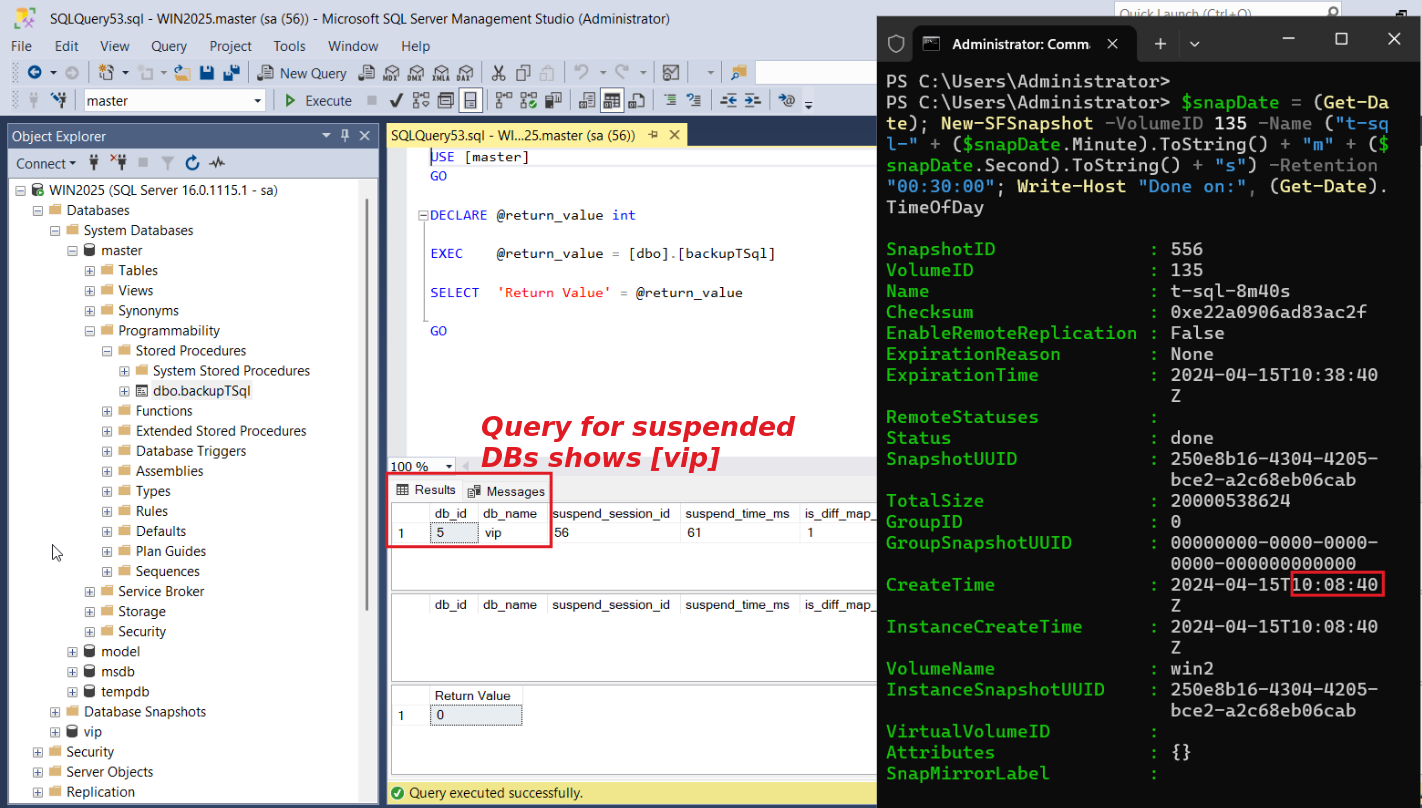
In Messages tab we could also see that database was suspended and successfully backed up, and that our SolidFire snapshot occurred during the time the DB was frozen.
Steps show:
- Execute the stored procedure backupTSql located in
master - After 2-3 seconds take a SolidFire snapshot of the volume(s) - manually, from a script, or scheduled
- Observe if snapshot was taken during the wait (while DB was suspended)
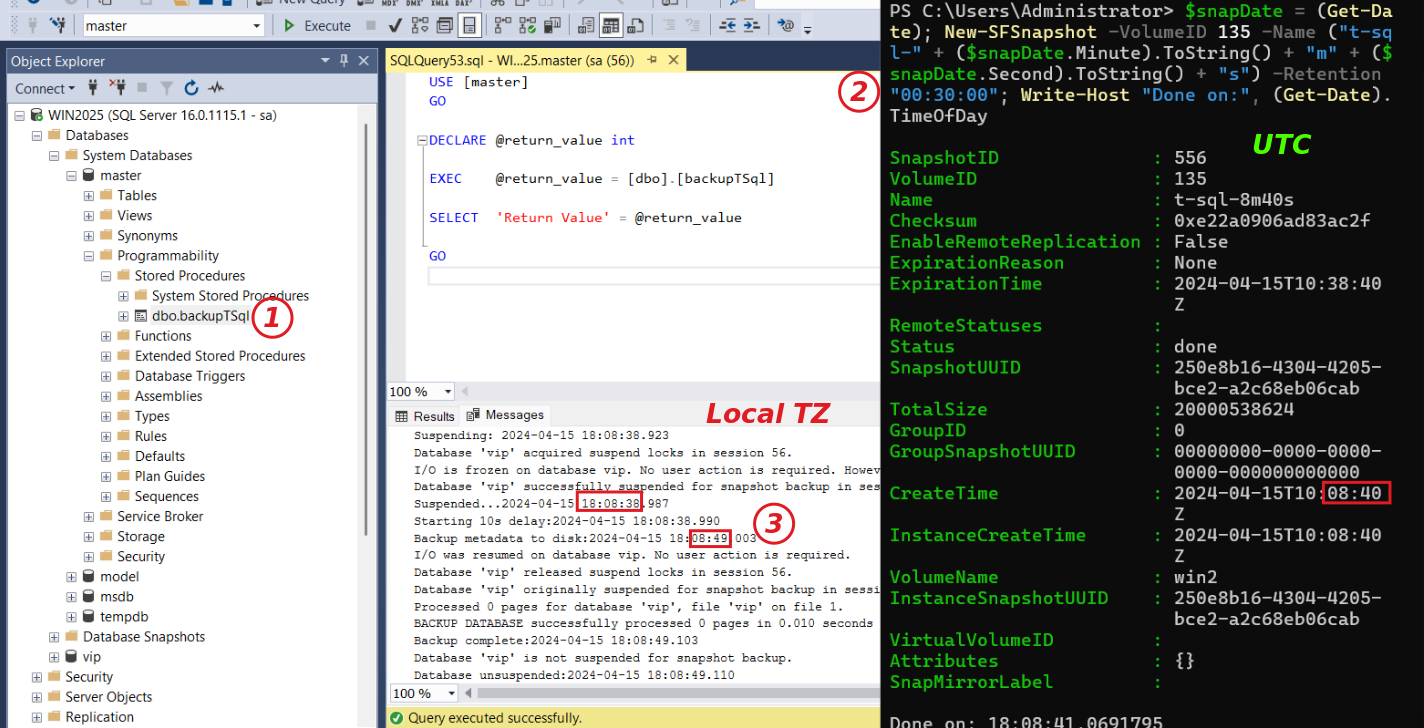
The snapshot we took contains the time it was taken, which is when the DB was suspended.
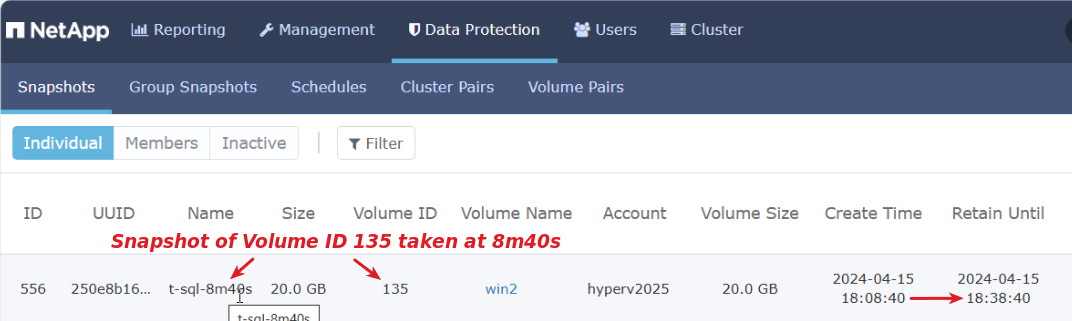
It is possible to run PowerShell scripts from SQL Server (so you'd only have to schedule the SP itself, and take a SolidFire snapshot as one of its steps), but that's another can of worms.
Snapshot schedule creation
This is easy to do in the Web UI. We'll schedule snapshots for Volume ID 135 - one every 10 minutes, retain 30 minutes.
PS> New-SFSchedule -VolumeID 135 -ScheduleName db-vip `
    -Frequency TimeInterval -TimeIntervalHours 0      `
    -TimeIntervalMinutes 10 -SnapshotName win2025-g-db-vip-snap `
    -RetentionDays 0 -RetentionHours 0 -RetentionMinutes 30

Frequency          : SolidFire.Element.Api.TimeIntervalFrequency
HasError           : False
LastRunStatus      : Success
LastRunTimeStarted :
Name               : db-vip
Paused             : False
Recurring          : True
RunNextInterval    : False
ScheduleID         : 3
ScheduleInfo       : {"Retention" = "00:30:00", "SnapshotName" = "win2025-g-db-vip-snap"}
StartingDate       :
ToBeDeleted        : False
Group snapshots are created by simply specifying multiple volumes, e.g. -VolumeID 134,135.
View your schedule with Get-SFSchedule and see/modify it in SolidFire Web UI under Data Protection > Snapshots (or Group Snapshots).
In the case you're wondering, snapshots get scheduled like this. We would schedule our stored procedure to start three-four seconds earlier.
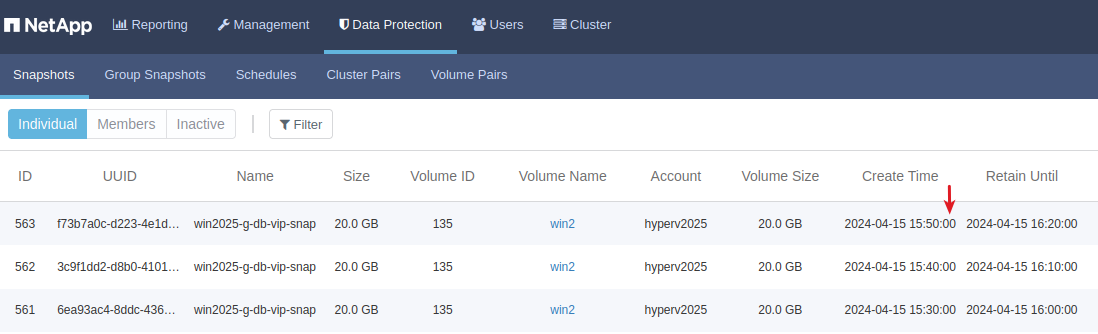
Notice how all snapshots are named the same. You'd identify them by UUID and as you Get-SFSnapshot -Volume 135 you could sort-descending by Create Time and pick the first to get the latest. Maybe you can by Snapshot ID as well, but personally I prefer to know (and log) the time of creation in any case.
If you want to replicate these to a remote site (probably not; for those I'd create a separate schedule), also consider these options:
- Include in replication
- FIFO (First In First Out)
Restore
Please refer to Microsoft examples - there's little SolidFire-specific about that part.
- T-SQL-assisted snapshots store only metadata, so snapshotted SolidFire volume must be cloned and database file copied either with T-SQL restore command, or manually
- Hardware snapshots can be rolled back, but that rolls back all databases on the volume, so pay attention
The only SolidFire-specific tip I can think of is that when you roll back a snapshot (to overwrite "original" volume) from the SolidFire UI, you will see a check-box which says "Save volumes' current state as a group snapshot" (if you're rolling back a group). Of course, you should stop SQL Server, offline the volume that's being restored from a snapshot, but you may want to take a snapshot of the volume that's being rolled back because if you (separately) clone that volume later, you can get some transaction logs from it, to roll the database forward. Or you may want to have a "last before rollback" snapshot of the entire volume, for whatever purposes.
In Appendices below you can see some OS-related details and tips.
DR for SQL Server T-SQL hardware-assisted snapshots
- SolidFire data/log volume(s) and snapshots replicated to another SolidFire cluster
- SQL Server backup "metadata" file uploaded to S3, or the volume replicated to another cluster; because SolidFire snapshot happens while DB is frozen and before this snapshot data is taken, it won't exist on the snapshot of that DB volume. Save it elsewhere (another volume) with a timestamp suffix or - if you keep it on the same volume - also upload it to S3 or someplace safe.
Remember that SQL Server can backup to S3. It may be less bandwidth-efficient but more operationally efficient to backup SQL Server to S3, especially if you have multi-site S3 which can take care of DR and is accessible from both sites without any scripting.
Data masking
Using built-in SQL Server features:
- Determine masking requirements and prepare masking "template" files
- Backup Prod DB instance
- Restore Prod DB to DevTest DB (may be on another SQL Server instance)
- Execute data masking on DevTest DB
- Allow access to DevTest users to DevTest DB
Some tools perform the masking during restore to DevTest.

Masking can be performed after restore as well, as long as DevTest users are not immediately capable of accessing data.
While a sensitive column in a production database may look like this…

A clone DB with masked data could have random data instead of real values. Or it could be non-random, deterministic replacement of production values. While approaches and needs differ, the common point is DevTest database should not contain sensitive data.

Using SQL Server and SolidFire volume clone features, we can eliminate backup-and-restore and rely on storage-side features:
- Create a DB snapshot (group snapshot or single volume snapshot)
- Create a clone from snapshot
- Rescan iSCSI targets, mount disk(s), attach DevTest DB
- Execute data masking on DevTest DB
- Allow access to DevTest users (or make another clone for actual DevTest user(s))
Assuming CPU and disk resources required to mask data are the same, the main difference between these two approaches is for large databases it is much more efficient to use SolidFire to clone a volume than to restore database from a backup.
Also, remember that SolidFire has two ways of cloning:
- Clone volume or snapshot to existing volume of the same or larger size (this is called "copy")
- Clone to new volume (the usual), which will have the same size
To a SQL Server user with larger databases the first approach is usually better, because if you clone volume ID 1 every day, it's better to clone it once (say, volume ID 14) and the next day just run:
Copy-SFVolume -VolumeID 1 -DstVolume 14
# If this volume has been accessed before, no need to rescan
# Set-Disk 4 -ErrorAction Stop -IsOffline $true|$false
A potential disadvantage of that approach is you aren't deleting the large volume, so with many databases that aren't needed every day it may be wasteful in terms of maximum volume count or metadata use (both on Solidfire).
To avoid host confusion and mistakes, it is possible to re-assign storage tenant ownership so that production host doesn't see any clones. We can also clone a volume outright, or use one of its existing snapshots. The latter may be interesting if you need a clone from some point-in-time, or if you're taking database-consistent snapshots and want to work with such snapshots rather than create crash-consistent clones (or suspend SQL every time you create a clone).
As you can see the exact steps will vary depending on procedures, preferences and such.
Some users may use one host and one SolidFire tenant account for everything, others may have two or three. The intermediate and DevTest team may not need more than one copy per DB instance, but in some cases they may keep a bunch of them for regression testing, and so on.
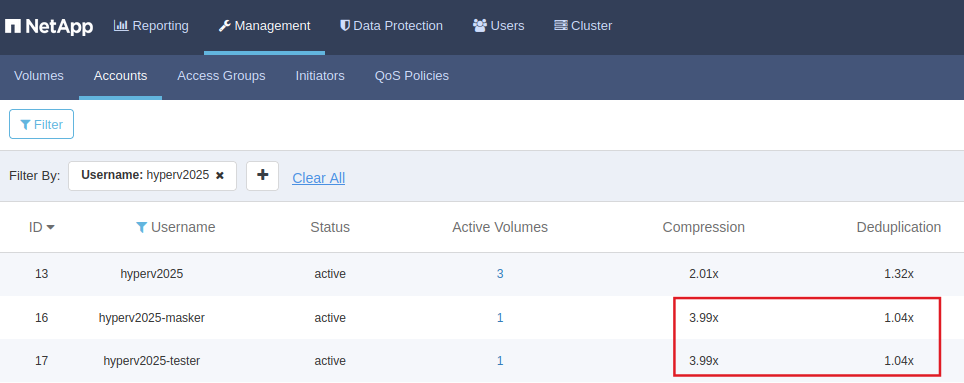
Depending on the amount of masked data, this should be usually cost very little due to data deduplication and SolidFire's global deduplication. In this screenshot we can see Compliance & DevTest have one volume each as we refresh them daily, plus all identical blocks are deduplicated after being compressed by SolidFire.
Storage workload-wise, Copy-SFVolume is the same thing as New-SFClone; the only difference is if the target host is different usually no rescan is needed after Copy-SFVolume.
For large databases with a small amount of masking (just one or two columns, for example), it may be better to use one of these two commands than backup-mask-restore. For small databases and databases where many columns need to be masked, the benefit of cloning or copying volumes are less pronounced.
Other uses of SolidFire snapshots
The T-SQL approach above doesn't use much IO on storage.
If you have "traditional" backup jobs or data dump operations, then you may need some extra QoS Max/Burst for the duration of such jobs - both on Source (SQL Data/Logs) and destination (Backup) volumes. See this post for more on using volume attributes to handle temporary QoS adjustments. Here's a simple demo of how that works:

To use the module you just need to have at least two QoS policies defined so that you can switch between QosPolicyIDs. In my environment, I had three, with 2 being the one used during backup.

You can find Set-SFQosException module in my Github repo "awesome-solidfire".
Hyper-V (at least as of Windows Server 2019) uses VSS writer, so there's no integration with SolidFire. Protecting Hyper-V data may become a topic for a future post.
SolidFire snapshots are also used by Velero and other backup software for Kubernetes supports CSI.
SolidFire DBA Tools
For fun & giggles, I modified PureStorageDbaTools which has two hardware-related functions (crash-consistent snapshot and database refresh) and modified the first of those functions.
Here's an example of the first function with SolidFire:

But it would take some work to make it work for everyone.
For an example, PureStorageDbaTools assumes data and logs are all on the same volume. That's probably the case for many small databases, but to deal with other cases it would need to look up all volumes, and (on SolidFire) use Consistency Group Snapshots.
The other part is if I want a crash-consistent snapshot, it's easy enough to do "New-SFGroupSnapshot -VolumeID 200,201", so to make that function work with databases on multiple volumes it'd need more work and still do the same thing as that one line (crash-consistent SolidFire snapshot command).
The second function from PureStorageDbaTools performs volume copy and optional data masking on the clone, which would also need to be modified to support consistency groups in order to deal with multiple volumes. As-is, using single volume you can get the same with Copy-SFVolume - just bring the destination DB offline with detach, offline the volume, then Copy-SFVolume, online the clone volume and re-attach the DB.
If you want you can use DbaTools to make both of them nicer. PureStorageDbaTools has one very nice feature and that is it's able to figure out the volume from drive letter, so as a DBA you don't need to know the SolidFire Volume ID, you just snapshot your DB instance and let the script figure out which volume to pass to New-SFSnapshot.
I adjusted that for SolidFire and you can get the function in solidfire-windows.
Security
Be mindful of security when working with scripts that use SolidFire, OS and database credentials.
- Guard the OS
- Sign your scripts
- Limit read/execute access to the specific OS account that executes the script
- Don't use the default account "admin" on SolidFire and remember to change passwords when/if you rotate them on SolidFire
- Encrypt the SolidFire account's password and load it from the script when it runs
As mentioned elsewhere (see my SolidFire RBAC-related posts) you may also go out of your way to route SolidFire API calls through a reverse HTTPS proxy.
Scheduled crash-consistent snapshots on SolidFire give you less flexibility, but more security as there are no scripts to run and no passwords to manage. But the storage admin may need to get involved to set it up and clone/restore volumes when they need to be copied or rolled back.
Conclusion
T-SQL with hardware snapshots works great - they take less than 10 seconds, are robust and trivially easy to use.
Other approaches may involve more work and more careful performance management. The ability to easily set and un-set a QoS policy specific to backup requirements is also extremely easy - it takes just two commands.
Other use cases for Windows Server 2025 with SolidFire need more investigation. That includes containers, but I haven't heard of anyone using Kubernetes on Windows with SolidFire.
Appendix A - filesystem layout
My test database was basically empty, but even so - notice how small wwi_snap.bkp is (<40 KB) - it's just metadata that tells SQL Server about what's supposed to be in the snapshot (should it be cloned and used in a restore operation) and should remain small regardless of database size.
    Directory: E:\data\wwi

Mode                 LastWriteTime         Length Name
----                 -------------         ------ ----
-a---            4/1/2024  1:29 PM        8388608 wwi.mdf

    Directory: F:\log\wwi

Mode                 LastWriteTime         Length Name
----                 -------------         ------ ----
-a---            4/1/2024  1:29 PM        8388608 wwi_log.ldf

    Directory: G:\

Mode                 LastWriteTime         Length Name
----                 ------New-SFSnapshot
-a---            4/1/2024  2:01 PM          36864 wwi_snap.bkp
Appendix C - cloning workflow with CLI
This example uses three accounts:
- Account 13 - Hyper-V cluster or a host used for Prod
- Account 16 - Hyper-V cluster or a host used for Compliance (Masking)
- Account 17 - Hyper-V cluster or a host used for Dev-Test

The idea is to use SolidFire storage tenant Account 16 as an intermediate step (for masking of cloned volumes) before we assign them to Account 17.
We start with a single volume DB in Prod - volume ID 136:
PS C:\> Get-SFAccount | Select-Object -Property Username,AccountID

Username          AccountID
--------          ---------
hyperv2025               13
hyperv2025-masker        16
hyperv2025-tester        17


PS C:\Users\Administrator> Get-SFVolume -AccountID 13

VolumeID                    : 136
Name                        : sqldb
AccountID                   : 13
...
We create a crash-consistent snapshot-on-the-fly to clone volume ID 136 for the compliance guy (account ID 16).
PS C:\> New-SFClone -VolumeID 136 -NewAccountID 16

cmdlet New-SFClone at command pipeline position 1
Supply values for the following parameters:
(Type !? for Help.)
Name: wwi-4-masking

Volume
------
{"VolumeID" = 141, "Name" = "wwi-4-masking", "AccountID" = 16, "CreateTime" = "2024-04-12T05:20:02Z", "EnableSnapMir...
The compliance guy rescans the storage, discovers volume ID 141, onlines it, picks a path, attaches SQL to DB, masks data.
He then clones volume 141 for the DevTest guy, Account ID 17. After he's done, he deletes his copy (volume ID 141) because he's a compliance guy.
PS C:\> New-SFClone -VolumeID 141 -NewAccountID 17

cmdlet New-SFClone at command pipeline position 1
Supply values for the following parameters:
(Type !? for Help.)
Name: wwi-4-devtest

Volume
------
{"VolumeID" = 142, "Name" = "wwi-4-devtest", "AccountID" = 17, "CreateTime" = "2024-04-12T05:20:24Z", "EnableSnapMir...

PS C:\> Remove-SFVolume -VolumeID 141 -Confirm:$false

The DevTest person uses this new volume with masked data (ID 142): rescan, online, attach.
After they're done testing (before next refresh), they detach and offline the volume.
The next day, Prod admin suspends Prod database (not shown), takes a new, short-lived (5 min) application-consistent snapshot of Prod.
PS C:\> New-SFSnapshot -VolumeID 136 -Retention "00:05:00"


SnapshotID              : 454
VolumeID                : 136
Name                    : 2024-04-12T05:31:08Z
Checksum                : 0x43da1c997e6ce7e5
EnableRemoteReplication : False
ExpirationReason        : None
ExpirationTime          : 2024-04-12T05:36:08Z
RemoteStatuses          :
Status                  : done
SnapshotUUID            : 29e17467-546e-4bc4-8c57-1b2f0d100ca6
TotalSize               : 5000658944
GroupID                 : 0
GroupSnapshotUUID       : 00000000-0000-0000-0000-000000000000
CreateTime              : 2024-04-12T05:31:08Z
InstanceCreateTime      : 2024-04-12T05:31:08Z
VolumeName              : sqldb
InstanceSnapshotUUID    : 29e17467-546e-4bc4-8c57-1b2f0d100ca6
VirtualVolumeID         :
Attributes              : {}
SnapMirrorLabel         :
If the compliance person leaves his clone online, this snapshot ID 454 could be copied into it, but we saw he likes to delete volumes he isn't using, so we have no choice but to make a new clone every day. Now from this latest snapshot ID 454.
PS C:\> New-SFClone -VolumeID 136 -SnapshotID 454 -NewAccountID 16

cmdlet New-SFClone at command pipeline position 1
Supply values for the following parameters:
(Type !? for Help.)
Name: wwi-4-devtest

Volume
------
{"VolumeID" = 143, "Name" = "wwi-4-devtest", "AccountID" = 16, "CreateTime" = "2024-04-12T05:31:40Z", "EnableSnapMir...
The compliance guy runs his usual script (rescan, online, attach, mask, detach) and then copies that volume to the DevTest guy's clone from yesterday (volume ID 142).
Because the DevTest guy only detaches and offlines his volumes, the compliance guy can use Copy-SFVolume here to refresh that volume 142. He waits until that async job is complete (see Get-Async* cmdlets) and then deletes his own copy (Volume ID 143).
PS C:\> Copy-SFVolume -VolumeID 143 -DstVolumeID 142

CloneID AsyncHandle
------- -----------
     60         154


PS C:\> Remove-SFVolume -VolumeID 143 -Confirm:$false
NOTE:
- Volume cloning and deletion would probably not be left to these different users, although we could implement RBAC, by default it doesn't exist so the DevTest guy could clone for himself whatever volumes he wants. Some "storage admin" would likely execute these steps from a script or manually. Tenants can only view their own volumes and VLANs can also be used to further segregate tenants and environments.
- Remember we can use use Set-SFQosPolicyID on non-production clones if you want to give clones more or less performance. By default, a clone inherits parent's QoS Policy ID.
You may encounter some unexpected issues - Appendix D shows what I observed.
Appendix D - workflow screenshots, tips and workarounds
In this appendix I show screenshots from a workflow that uses the same SQL Server 2022 host (Windows Server 2025 Preview) for everything, and there's just one person in charge of both production and dev-test database.
It also contains some tips and workarounds.
While trying to rescan iSCSI portal to view a clone, nothing came up. I forgot that I had been using Volume Access Groups (rather than CHAP). That's common in Hyper-V (and other HA) environments, but if you want to avoid this step, you can configure iSCSI Initiator to use CHAP. I used Add-SFVolumeToVolumeAccessGroup to add the new volume (clone) to VAG and then rescan worked fine.
While adding that volume to VAG I remembered that LUN IDs can be specified at the very bottom of that modal. I never tried changing the order, but if you want to further "tune" your approach, you may try playing with those to see if it can help you present volumes in the order you want, rather than in the order of discovery.
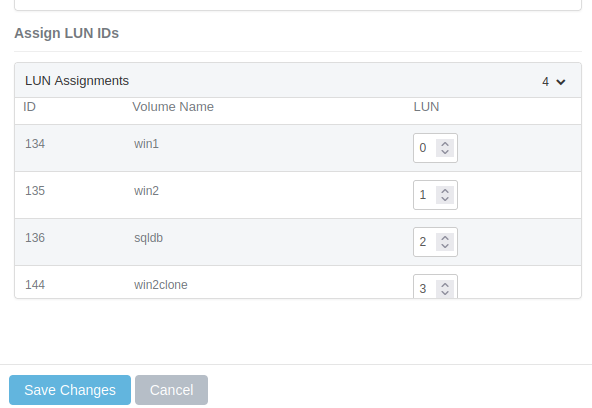
Maybe this has effect only before host-side scan/discovery.
When you login to a new clone target that you may not need, do not add that target to Favorites (in Connect dialog box).
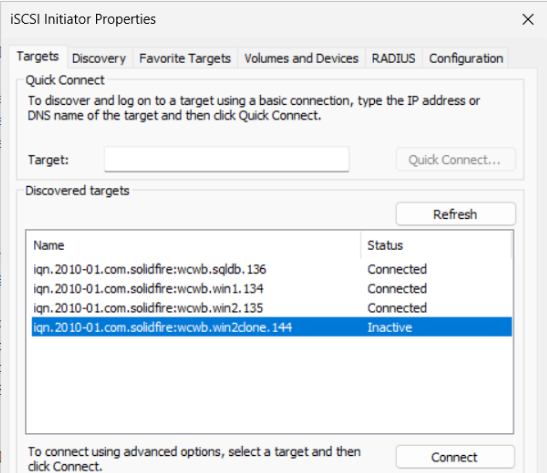
Next, when you get connected, you need to online the new disk. The first time - because it's a clone of one of the other disks on this system - it's flagged as Read Only (even though it's Read-Write on SolidFire).
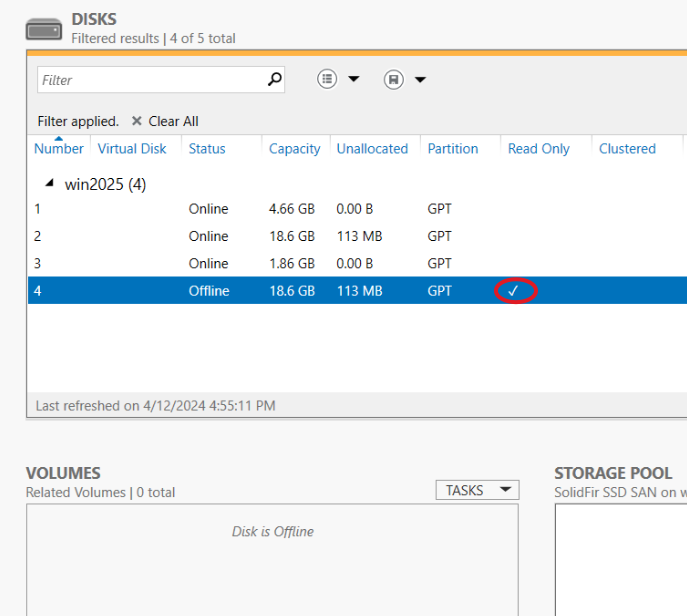
I used the tip from the Web site of Easeus to clear that read-only flag.
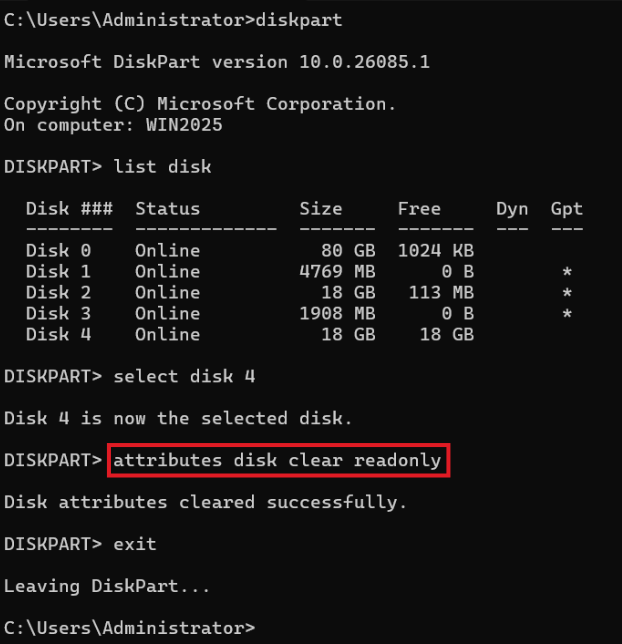
Then I was able to bring the disk online.

As I assigned it drive letter H, that's where it was mounted. Note the label "win2clone" on H.

Since I was about to attach a DB that was a clone of a DB that I was actively using on the same host, I used a new name (vip-devtest) and made sure the paths used H:.
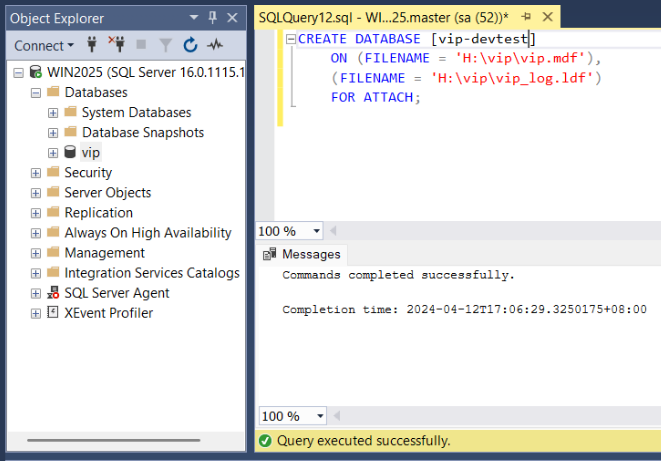
I checked the contents to make sure it was populated with the same data. Then I disconnected my client, ran a sp_detach_db procedure, and offlined the disk (second row in the CLI screenshot below). It is very important to offline the disk if it's going to be copied to by Copy-SFVolume.

After that I was ready to update Prod ([vip]) again, and then I ran Copy-SFVolume to refresh my clone volume.
As you can see in this screenshot Set-Disk worked fine - no readonly flag was required, and furthermore, earlier disk assignment remained.
But I did notice that after one refresh the clone volume lost its label I gave it - "win2clone" - and automatically used the label from the original volume, which made sense as it was indeed its clone. It didn't bother me so I didn't try to override or change.
The only sensitive part is detach, especially if you're using SQL Server Management Studio where you may be the connection that's causing detach to fail. Use generic SQL Server procedures to close those connections - it's not something related to iSCSI or SolidFire.
The way I executed SQL commands was to double-click on them in Explorer, which brought up SMS and then I'd execute them there.
SQL commands can be easily executed from a PowerShell script - you could develop queries in SMS and then load them from PowerShell.
New-SFSnapshot ...
$q1 = Get-Content sp_detach_vip.sql
Invoke-Sqlcmd -Query $q1...
New-SFClone # or Copy-SFVolume
...
I haven't done this because it was just a one-off workflow, but if you do this daily or for more than one database, maybe you could.
The SolidFire API is well behaving so from that side you'd need very little error handling.