Per-site erasure-coded copies of data with NetApp StorageGRID
Introduction
By default NetApp StorageGRID uses "2 Copy" ILM policy: make 2 copies anywhere, as long as it's on different nodes.
Because StorageGRID storage nodes use protected storage (RAID-like, not JBOD), storage node's data is already protected from disk drive loss.
As always, there are situations where people want, need or must customize.
Grid with custom requirements
Say we have a grid with 9 storage nodes total, deployed in three data centers (San Diego, Dublin, Bangalore).
Because 3 storage nodes is the minimum "pool" size, we know a 9-node grid deployed at three sites has 3 nodes per site.

By default, StorageGRID will make 2 copies of each object, sometimes even at the same site. There are no other considerations.
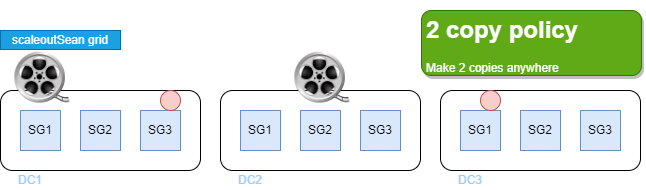
Both media files (film roll icon) and smaller files (red circle) are replicated on different storage nodes, regardless of object size.
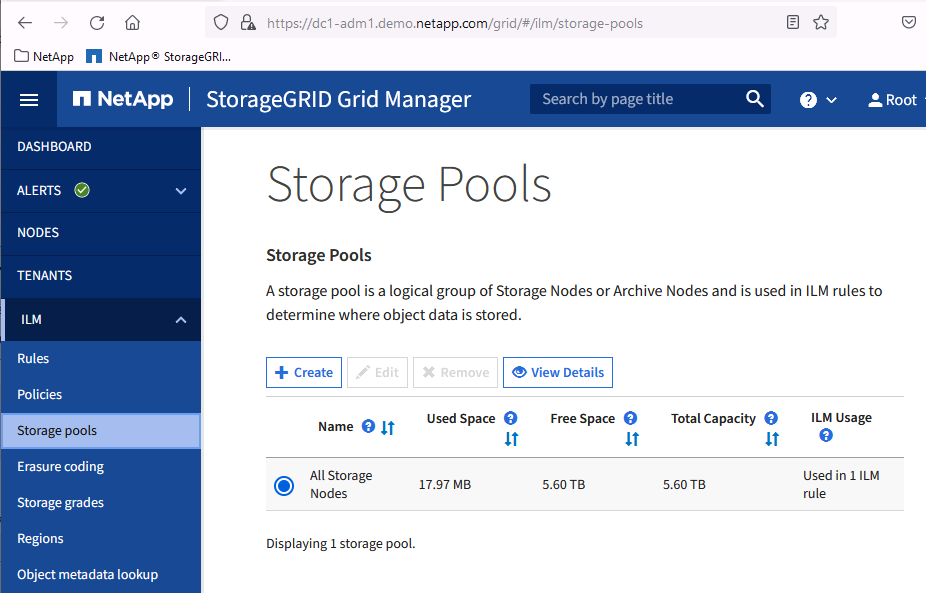
If we look at StorageGRID settings we'll see a default storage pool (all 9 storage nodes belong to it).
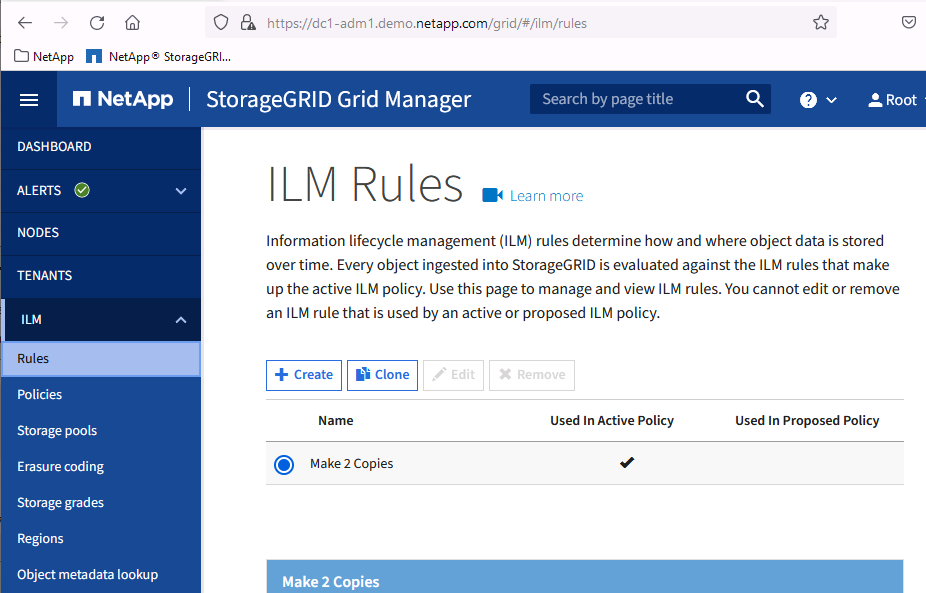
There's a default rule that says "save 2 copies on different nodes".
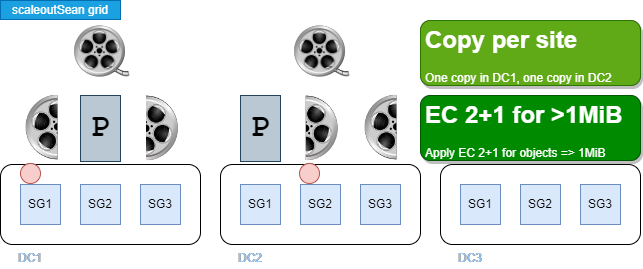
This grid's administrator has received the instructions to implement a new ILM policy:
- Two copies is enough, but each should be in a different DC, preferably San Diego and Dublin
- For large objects, Erasure Coding can save capacity (and cost), so it should be applied on objects larger than or equal to 1MB
The third site (Bangalore) is not yet in production. It will be used by R&D in Bangalore, and ILM rules for it will be added later.
What we want is:
- For any and all objects, make two copies - one at DC1, another at DC2
- For objects that are 1MB or larger, apply EC 2+1
The first rule eliminates the possibility that both copies get saved at the same site.
The second rule means non-small objects will be cut in two data and one parity chunks. Objects smaller than 1 MB will not be erasure-coded.
What needs to be done
- We need to tell StorageGRID which storage nodes' data belongs to "DC1" and "DC2", respectively
- We need to define an Erasure Coding profile, if possible
- With these details available, we build a rule set for our new ILM policy
- The new (proposed) ILM policy changes "2 Copy" approach to what we mentioned earlier
- If simulation works as expected, we activate the policy
Let's look at some (not all) of these items and discuss some noteworthy details.
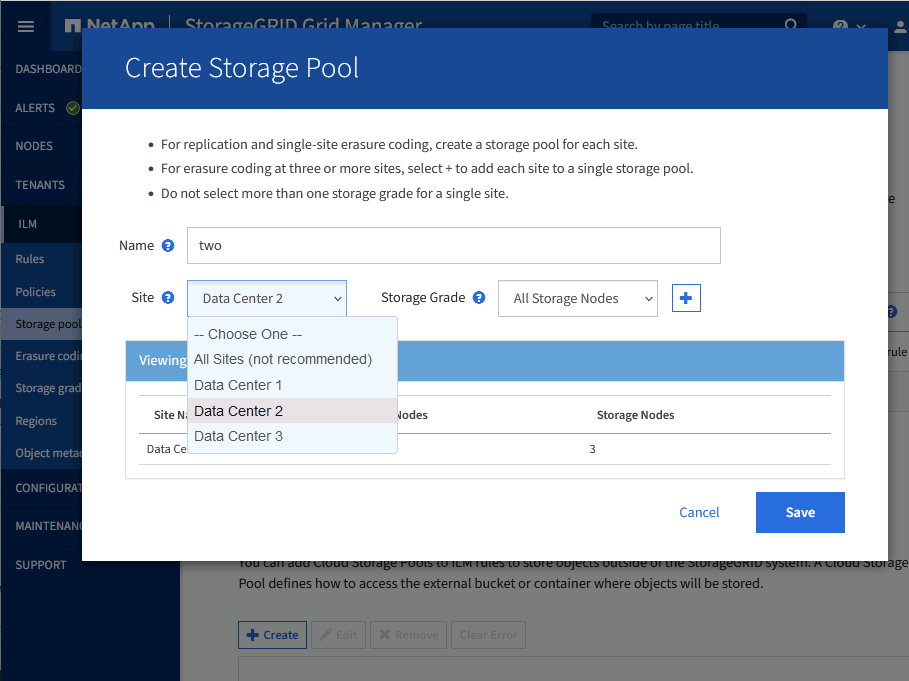
Storage pools
Since we tagged each site's nodes, we can use those tags to define storage pools. We need only two pools at this time (for DC1 and DC2).
Erasure Coding profile
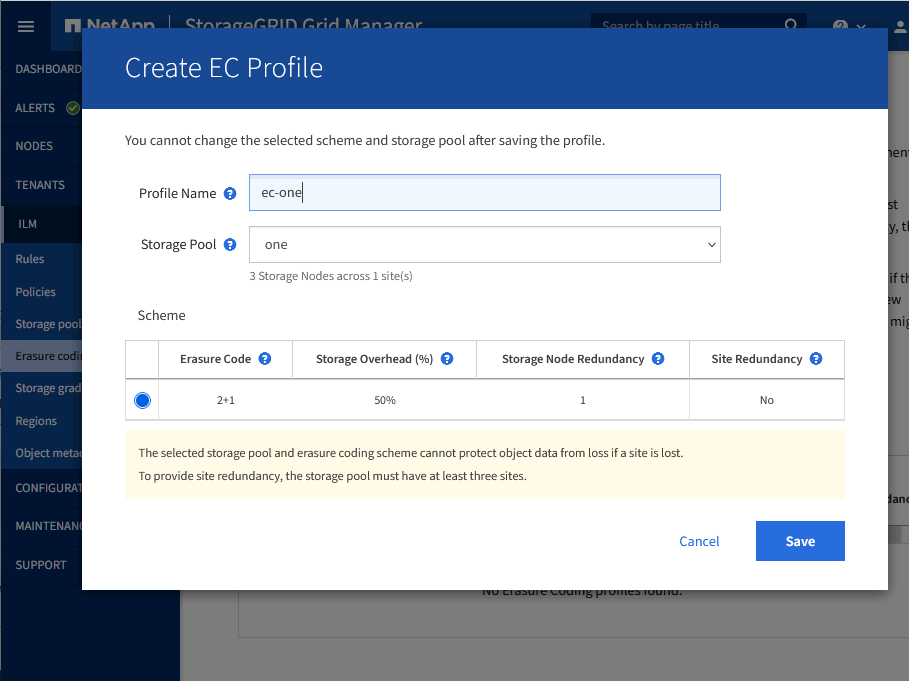
As mentioned earlier, with 3 storage nodes per site we can't do EC 6+3: StorageGRID uses 1 chunk per storage node.
In this situation we can do EC 2+1 and should a node fail, grid would by default temporarily use 2 Copy policy because at least 3 nodes are required to write 2+1 chunks (reads of EC 2+1 data will work with 2 nodes).
This is why we'd choose (or not change) Balanced, and not pick Strict, ILM consistency - to avoid having to deal with failures if a node goes down. (See that further below, in ILM screenshots.)
EC profiles "one" and "two" have been created. Each uses storage pool at its own site (DC1, DC2).

Note: do not get confused by "Storage Node Redundancy: one" in this screenshot!
That's data redundancy: EC 2+1 is 2D1P, so a StorageGRID pool can lose a node without losing data - i.e. that's for resilience only. But one can't save an object in 2D1P fashion if you have only 1 or 2 nodes up & running (we need at least 3 nodes in the pool)! That's why we use Balanced ILM policy (see below) to achieve better service uptime during temporary storage node downtime.
In other words, EC 2+1 needs at least 3 storage nodes to be even considered (we could choose to give up on it and choose 2 Copy policy). We could not "force" EC 4+1 in this pool because we don't have 5 storage nodes in it.
Propose ILM policy
When proposing a new ILM policy, we "lead" with the new requirements, but we need a default ILM rule to catch whatever objects that failed to match any of those fancy rules we configured.
In demo video linked below, I use a strict interpretation of where to save what, and configure two sets of rules:
- Replication: make 1 copy in DC1, 1 copy in DC2
- EC: if object is >=1MB, use EC 2+1
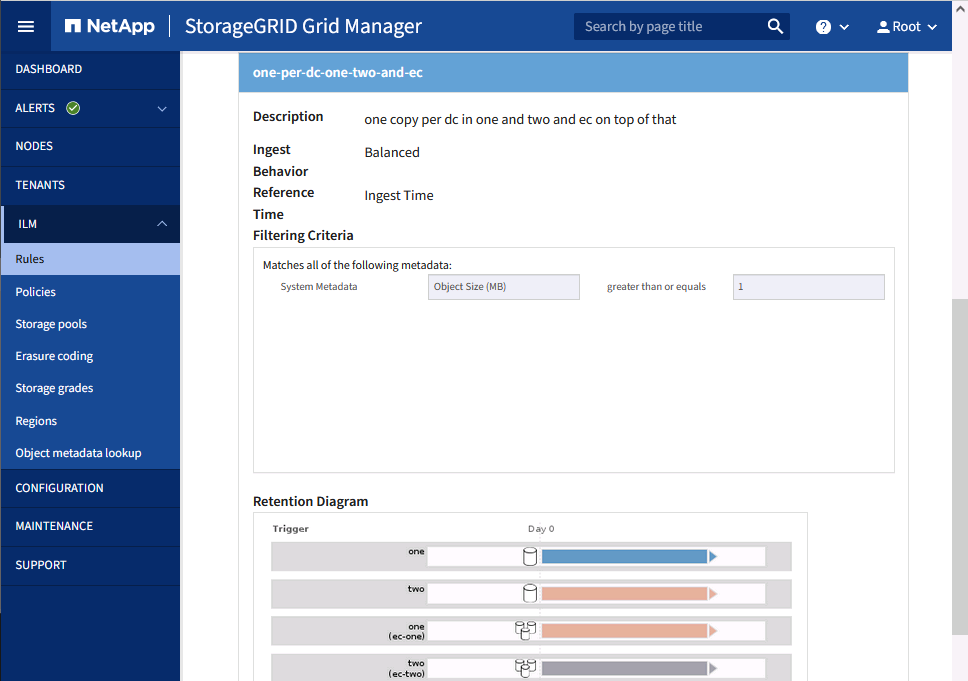
Because some objects may be smaller than 1MB and EC isn't recommended for tiny objects, our default rule doesn't do EC.
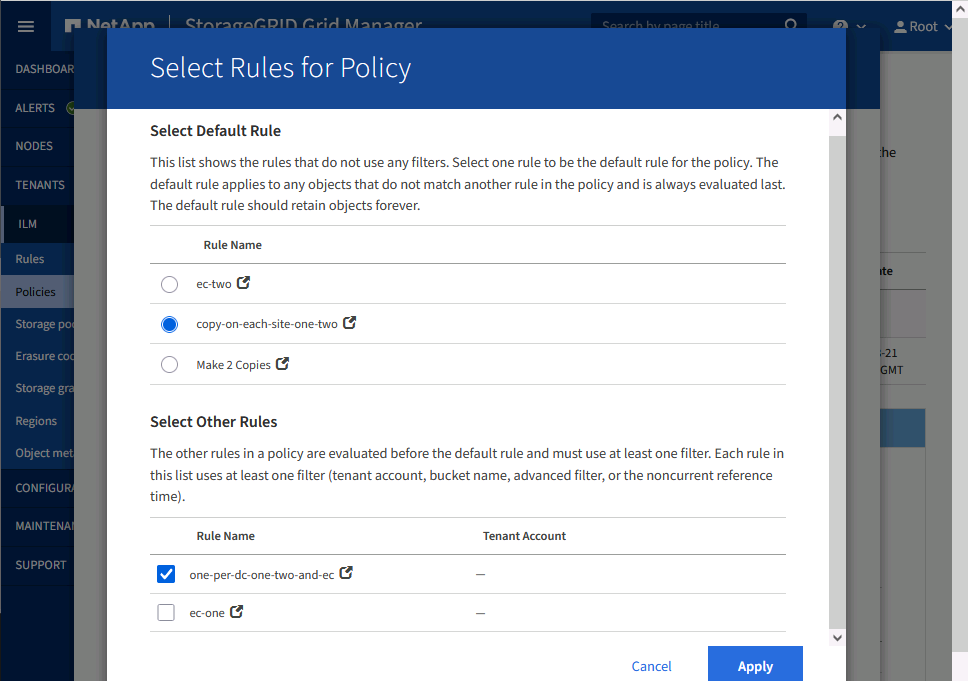
Closer look at default rule:
- Replication: make 1 copy in DC1, 1 copy in DC2
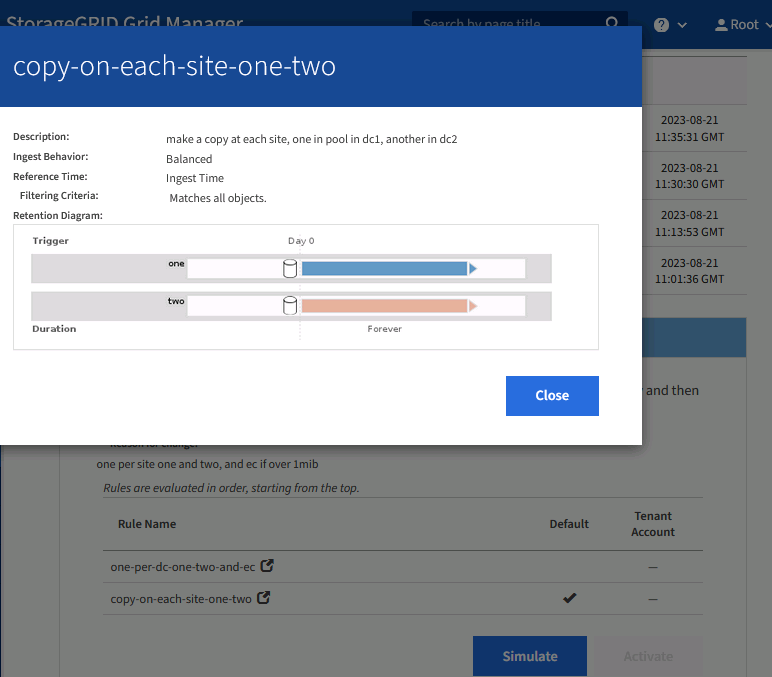
In this imaginary scenario, < 1MB objects will match the default rule and be saved a copy per each of DC1 and DC2. This means DC3 will remain empty, as per the new requirement.
But once DC3 site is live, grid admin would likely be asked to add another rule that makes use of DC3 capacity. These could use DC3 locally, or even globally. Examples:
- Use DC3 (Bangalore) capacity only for local R&D: the rule to add could be something like "if client IP is one of internal Bangalore IPs, make 2 copies in DC3"
- Use DC3 by all users: add another rule, whether by user (Active Directory group "Engineering"), bucket name ("engineering") or something else, so that matching objects are always saved 1 copy in DC3 and another not in DC2 (i.e. elsewhere)
As mentioned earlier, if it's not critical that rules be immediately applied, we can use Balanced (default) rather than Strict.
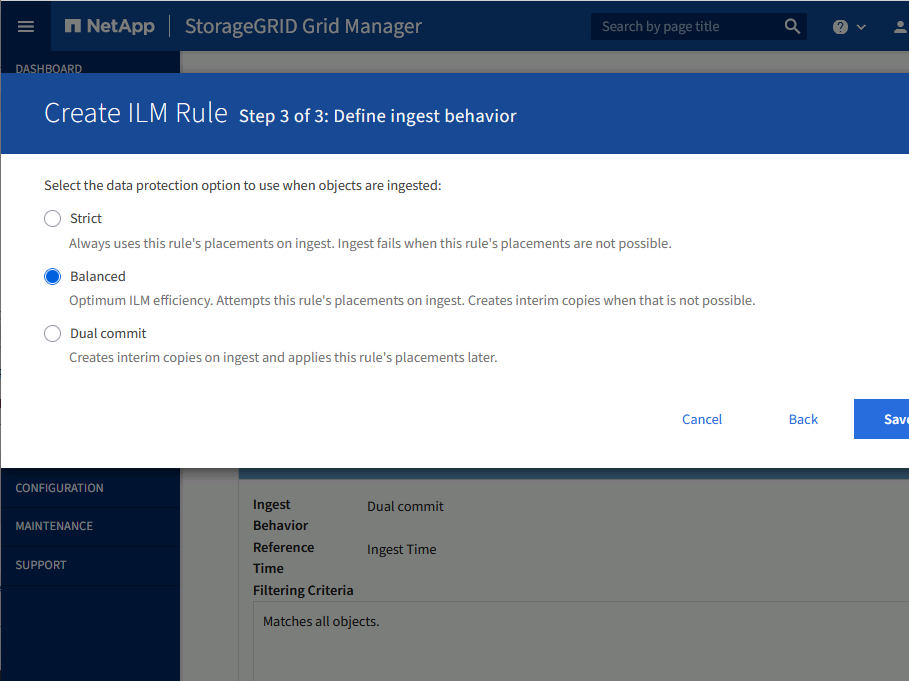
Simulate and activate
In the demo I simulate rule matching by picking a small object. To have the policy completely simulated I would only need to pick one more (>1 MB large) object. It's trivial because my conditions are simple.
But in real life rules are usually more complex - people want them per bucket, per user, per IP range, etc - and because there's no "Undo" it's very important to get simulation right. I strongly recommend to use VM-based StorageGRID nodes and try there before activating a new ILM policy. In the worst case you can even delete your own data (by selecting a wrong rule that's used to delete old data from a temporary bucket, for example)!
Demo
Conclusion
Some object storage is fairly rigid and data protection policy (EC, etc.) picked at the start remains the only, or maybe default (the rest must be dealt with by setting very narrow exceptions), policy.
A StorageGRID cluster may span multiple sites, but that still allows us to create custom ILM policies that deal with just one or two sites.
In this post we saw how easy it is to apply new rules and achieve our objectives.
Most users want to customize further, so it's highly recommended to build a VM-based StorageGRID cluster and execute detailed simulations before applying a new policy on TBs of data. For very complex grids, maybe even write ILM tests that use the S3 and StorageGRID API to run and validate rules on a sandbox grid.