SolidFire backup-to-S3 using ONTAP S3 destination
Introduction
SolidFire can backup its volume contents to, and restore from, generic S3 object stores. It's a free feature included with every cluster.
AWS S3, (post-v12) MinIO, and it appears even ONTAP S3 works.
Backup to ONTAP S3
I used ONTAP 9.12.1 with the default S3 settings and a self-signed TLS certificate (there's no validation from SolidFire client in any case).
Network configuration
As noted in previous posts here - and probably in the SolidFire documentation - SolidFire backups go over Management Network.
That means ONTAP S3 must be reachable by SolidFire over SolidFire's management network. This was my setup:
SolidFire:
- Management: 192.168.1.0/24
- iSCSI: 192.168.105.0/24
ONTAP S3:
- Management: any
- S3 Data: 192.168.1.0/24
Generally speaking, an environment usually won't serve S3 data on a management network, but ONTAP lets us create and configure S3 data interfaces on any network that can be routed to ONTAP.
Workflow
Run backup command as you normally would. Values used:
- Hostname (S3 API endpoint name): s52.datafabric.lan (internal FQDN of IP hosting ONTAP S3 service; no need to add https:// or :443)
- Bucket name: backup
- Keys: as provided by ONTAP
Start backup:
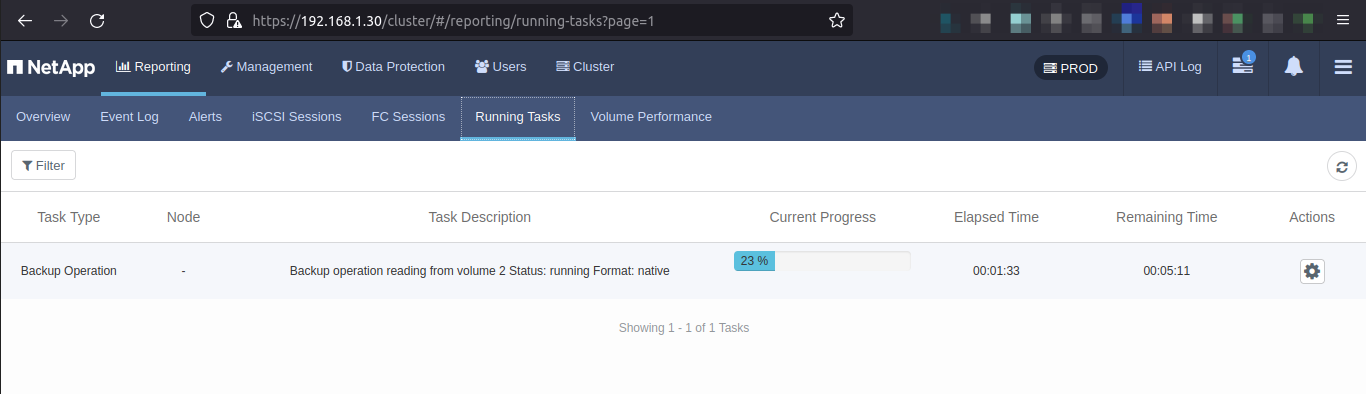
S3 protocol activity seen in ONTAP System Manager.

Backup job has started and successfully completed.
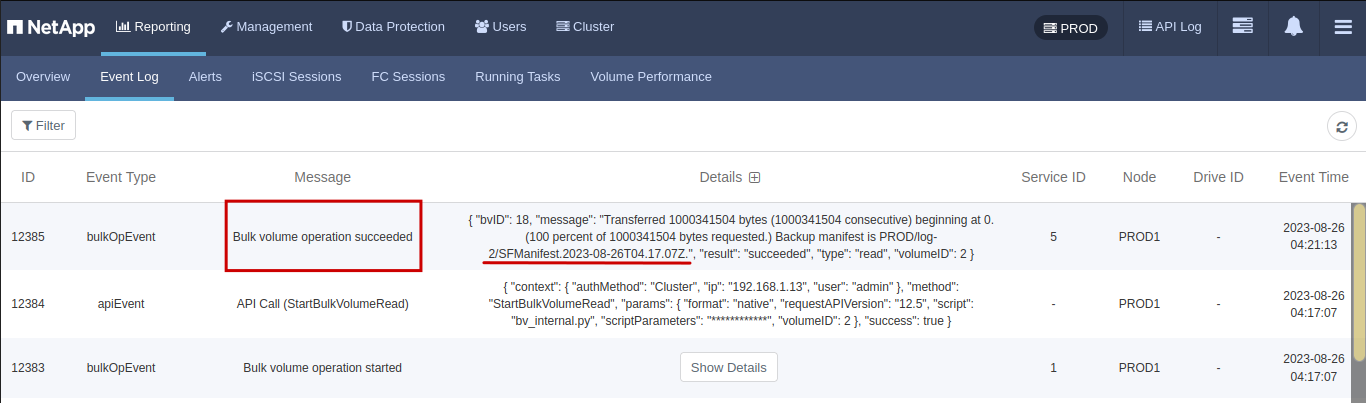
Volume 2 has been backed up to the bucket "backup" on ONTAP S3 running on SMV0. We can see the same manifest in the bucket "backup".

Note 1: PROD seen in above screenshots is the cluster name. Note that this is a bug which happened because I ran backup using Start-SFVolumeBackup from PowerShell Tools for SolidFire (see the detailed post on backup-to-S3). It's supposed to be ${CLUSTER_NAME}-${CLUSTER_UUID}, but that PowerShell cmdlet drops the hyphen and UUID that should follow it. Invoke-SFApi could be used to work around it. Or just run backup jobs from the Web UI.
Note 2: If we were to restore this backup from the Web, it wouldn't work because of what I mentioned in Note 1, as path to backup manifest is missing "-${CLUSTER_UUID}". If we worked around the bug with Invoke-SFApi or used the Web UI or Python API, restore would work without an issue.
Note 3: Later I tried backup to IPv3 of S3 (did not use FQDN) and that worked as well. It should be noted that if no "https://" and ":443" is specified in destination endpoint, HTTPS would still be used, but the feature clearly doesn't check TLS certificate validity, so it's dangerous to use it on non-secure networks. Since SolidFire Backup-to-S3 happens over management LAN, that network is hopefully quite secure.
Discussion
I discussed strengths and weaknesses of this feature in many posts.
The backup-to-S3 feature existed prior to NetApp's acquisition of SolidFire in late 2015 and was never improved.
There's no deduplication across volumes, no resume of interrupted backup jobs, no fancy scheduling, no catalog, no incremental backups, etc.
If you don't have a lot of data, storage configuration doesn't change all the time, and you don't backup to S3 every day, this feature may be enough for you.
It can be easily automated with Python or PowerShell and you can run a bunch of backup jobs at the same time.
I have two ONTAP S3-related observations: one relates to backup and another to DR.
Backup to ONTAP S3
SolidFire users who have ONTAP may choose to backup SolidFire volumes to ONTAP S3.
SolidFire native backup format saves space due to compression and deduplication of volume data, so ONTAP S3 on all-flash FLexGroups is probably too expensive to be used here. Although, if data repeats across volumes, some savings may be obtained.
ONTAP S3 on NL-SAS may be more appropriate as far as cost is concerned.
DR to ONTAP S3
SolidFire has a limited SnapMirror implementation that can copy data to/from ONTAP S3.
It has no compression and no encryption, so it's generally suitable for use on protected LANs and VPNs.
Backup to S3 isn't continuous and doesn't give the same recovery time, but - because we can backup snapshots to S3 - it gives you the ability to backup to ONTAP S3 over public networks:
- source-side compression - OK
- source-side deduplication - OK
- transport encryption (HTTPS) - OK
This solves SnapMirror problems mentioned earlier.
Note: SolidFire's "Backup to S3" allows self-signed certificates, so MITM attack is still a risk. It could be partially mitigated the same way the lack of HTTPS is addressed for SolidFire-ONTAP SnapMirror: add a secure HTTPS proxy on each side.
Secondly, ONTAP S3 has a feature called S3 SnapMirror, which can replicate S3 data continuously or based on a custom schedule. We can't use SolidFire to continuously backup-to-S3 and since each backup is full we can't backup too frequently either, but for smaller volumes scheduled S3 SnapMirror replication can be used to copy daily backups to ONTAP at a remote site. S3 SnapMirror allows you to failover (for read-only access) bucket access to the remote ONTAP S3, or alternatively, to restore from that remote replica and thereby recover local data from a S3 SnapMirror destination.
If S3 SnapMirror is used to replicate SolidFire S3 backups to a remote site, the remote site can be accessed in a read-only fashion from any location that permits HTTPS access. You'd naturally need a SolidFire demo VM or real cluster to "restore-from-S3" because by default backups are space-efficient. If, however, backup-to-S3 was done using Uncompressed, it may even be possible to restore backup with the dd command, but I haven't tried that because backup sizes (and backup/restore times) would be grossly inefficient (5-10x bigger).
Alternative "backup to S3" approaches
We're not limited by this one approach, of course:
- Most commercial software applications (Veeam, etc.) can backup to S3; not many have been certified for ONTAP S3, but ONTAP S3 is relatively new and they're being added.
- Free utilities and community projects for client-side backup/restore. SolidFire can easily create clones from snapshots, and present them to dedicated hosts that can copy such data to S3, creating full and even incremental backups. This can be done with bare metal clients, VM clients and containers. An example can be found here. Kubernetes users can simply use Velero and backup volumes and snapshots to S3.
One big advantage of "client-side" backup and restore (approach taken by both commercial and free utilities) is that they access storage from iSCSI network, so it's possible to get to multi-gigabyte backup speeds. Another is significantly improved transport security: we can choose to encrypt data at source before deduplicating and sending it to S3, and validate TLS of S3 API endpoint.
Conclusion
SolidFire's "Backup to S3" feature has been available for ages, but it still finds new benefits due to S3 ecosystem improvements.
Backup to ONTAP S3 is useful for smaller environments and partially solves data efficiency problems in SnapMirror implementation.
In non-trivial cases it is suggested to use alternative approaches, as "Backup to S3" won't see any enhancements and even if it did, it would be hard to match what freeware, let alone commercial backup software, can do from running on iSCSI clients.