SolidBackup for SolidFire Data Protection in Hybrid Cloud
NOTICE: any and all credentials and tokens on this page are samples, not leaked.
- Introduction
- First attempt
- Second attempt
- Getting there (aka "Digital Transformation")
- Next Steps
- Conclusion
- Update (May 30, 2021)
- Demo
Introduction
Caution: this may be of interest to only "DevOpsy" SolidFire users out there…
This isn't about a product, service or some Github project you can clone and deploy today - it's merely something we can create now and on our own.
First attempt
In previous posts I mentioned the idea for SolidBackup, a simple Backup & Restore solution possibly needed by Docker/K8s administrators who wanted a basic way to protect their data on SolidFire systems.
I built a prototype in Python and SolidFire CLI, which was easy, but hard. I got a bit farther than this, but essentially it had a CRUD component for SolidFire/Trident (Kubernetes or Docker) volumes to protect. It'd create a volume clone if a Target (Clone) didn't exist, and a schedule to take a snapshot of Source and re-sync Src to Tgt using the SolidFire API.
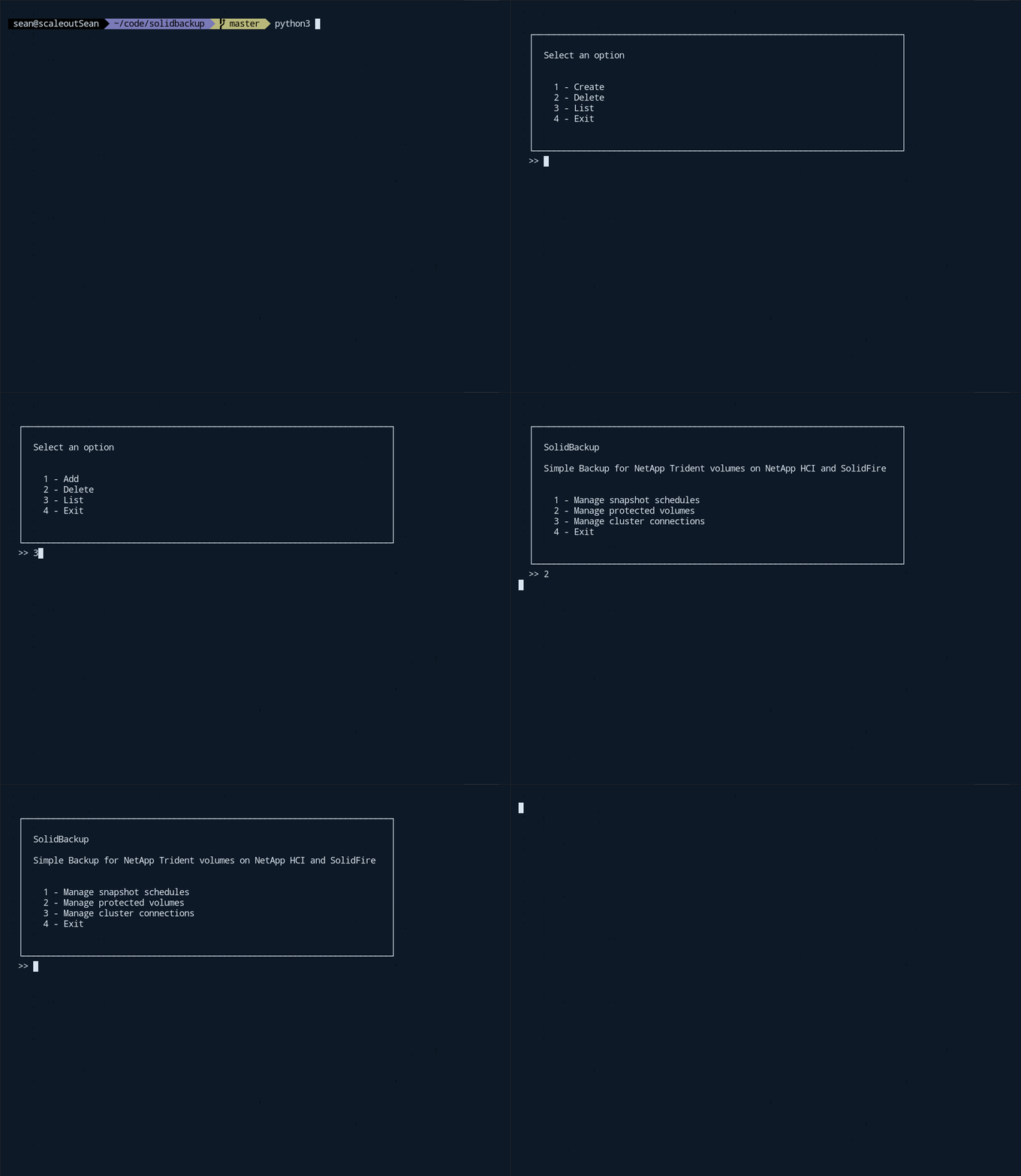
(I have a "manual" walk-through (each step) on YouTube, but it's 23 minutes long.)
Before I finished that utility I discovered there was an app for that exact use case (simple container volume backup) and that exact audience (DIY/DevOps) - Velero - which works with NetApp Trident and SolidFire (see my Velero-with-SolidFire post here, so I stopped working on SolidBackup.
But recently I came to the conclusion that Skilled (or Poor?) Man's backup/restore for containers isn't the only use case for SolidBackup.
Backup and Restore in KVM environments
Last year I worked with Trident in mind, but it turns out people use SolidFire in KVM and Hyper-V environments and sometimes they need a backup utility they can improve and integrate on their own.
In both of these cases, because we can mount SolidFire clone volumes on Linux or Windows, we can also backup and rstore them as either files or images. With VMware (VMFS 6+) it's not easy to do it out of the box with generic Linux OS.
Data Migration
If we can backup data at site A and restore at site B, that's not only B&R but also Data Migration (Nobel Prize incoming in 3…2…).
Seriously - everyone is aware that restore doesn't have to occur the same SolidFire cluster where backup was taken, but like with KVM - no one has asked (in the context of DIY approaches).
But these days people ask about it - whether it's because they are migrating to or from the Public Cloud, or because they use Hybrid Cloud and need to move their data back-and-forth between a SolidFire cluster located on-premises and Public Cloud.
Neither of these use cases were on my radar last year.
Do we really want DIY approaches to protect our data
I prefer that my SolidFire customers use enterprise-grade data protection solutions, because that almost always works better.
But sometimes that's not possible and sometimes it's not about replacing, but complementing what customers already have. I wrote about that in one of the recent posts.
Example: the SolidFire API lets you copy one volume to another (i.e. it can resync the original volume to a same-sized volume such as its clone created 24 hours ago), but I'm yet to meet a customer who knows of - let alone uses - this feature. Why? I don't know. Maybe because the API method is not exposed in the UI.
I'm sure there are users out there who use it, but my point is quite a few customers clone volumes - and sometimes say they'd like that to work faster - but no one uses the feature that makes it (let's say) 10x faster.
The first step in a daily SolidBackup workflow - once Source and Target pairs have been created, that is - is to perform a Src-to-Clone resync: for each volume pair, copy Source to Target (Clone). Even if no one pays attention to anything else but just discovers and starts using this feature, that would already be a decent step forward.
Lastly, the idea of SolidBackup isn't prescriptive. It doesn't even exist (yet), but anyone can make their own or take some ideas and adopt them in their environment. And if some of SolidFire users did that, they'd likely be better off which is another plus.
Second attempt
Last year I used SolidFire CLI (Python) and Duplicacy (which has a nice Web UI).
This year I evaluated two additional approaches:
- SolidFire CLI (Python) + Duplicati (8 min video of Duplicati + KVM + SolidFire it was very similar to last year's attempt with Duplicacy so I didn't spend time on trying to automate it - I merely worked through the same steps
- SolidFire Tools for PowerShell and Restic. Unlike Duplicacy or Duplicati, Restic has no Web UI, so the ability to automate seemed more pressing
Create configuration and keep Src & Dst (Clone) volumes in sync
This CSV file has Src Volume ID, Tgt Volume ID (made by cloning Src Volume on the same SolidFire cluster), Partition number and filesystem Type:
351,369,1,xfs
11,222,0,xfs
44,666,1,ext4
55,888,1,ntfs
When we start, we read this configuration file and copy Src to Dst/Tgt volume based on volume IDs. We just need columns 1 and 2.
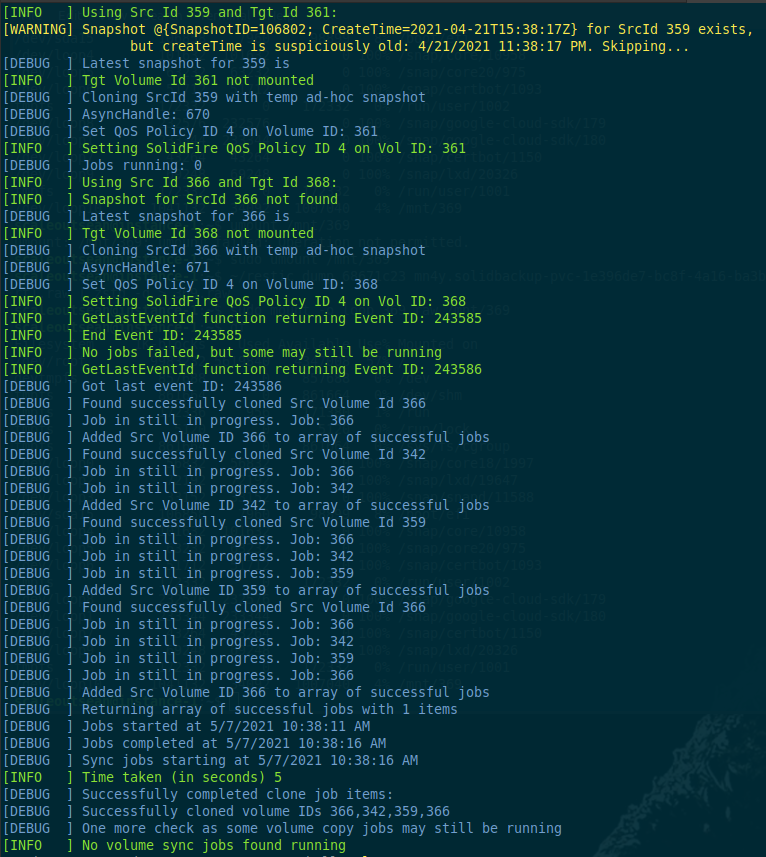
Here one can get very fancy (and never finish this step) - take "before" snapshots, run "post" scripts, etc.
I keep it simple: on-demand (crash-consistent) snapshots are taken by SolidFire when CopyVolume (to Volume) is requested, so I don't have to do anything. But if you want and can create application consistent snapshots before volume sync runs, they can be used (that is, volume sync will sync from a Source's snapshot to Destination). That would give you a way to get application-consistent backups.
Another fancy detail is you can assign clone to a different storage account (which I do) because I don't want other VMs to access clone volumes. I also adjust storage QoS on the clones, to use a fairly low Minimum (performance guarantee), but have a high Maximum (good for backup workload, if nothing else is keeping SolidFire busy).
This part already works quite well and can be used for anything - say, to quickly refresh build farm volumes for DevOps workflows.
Backup to S3
Next I mount each Dst (clone) volume) to /mnt/$SrcId. I don't care about mounting clone volumes to /mmnt/$DstId because when we need to restore volume defined by SrcId, we look for /mnt/$SrcId as that's where (a copy of) data we care about is. This way we don't have to check Src-to-Dst mapping in SolidBackup configuration file.
Then we can use PowerShell or Ansible or something else to login to the clone volume iSCSI target and mount volume or a partition as necessary. We use columns 3 and 4 (Partition number (0 in a NetApp Trident environment), and FS type (usually xfs or ext4, but can be ntfs or other)).
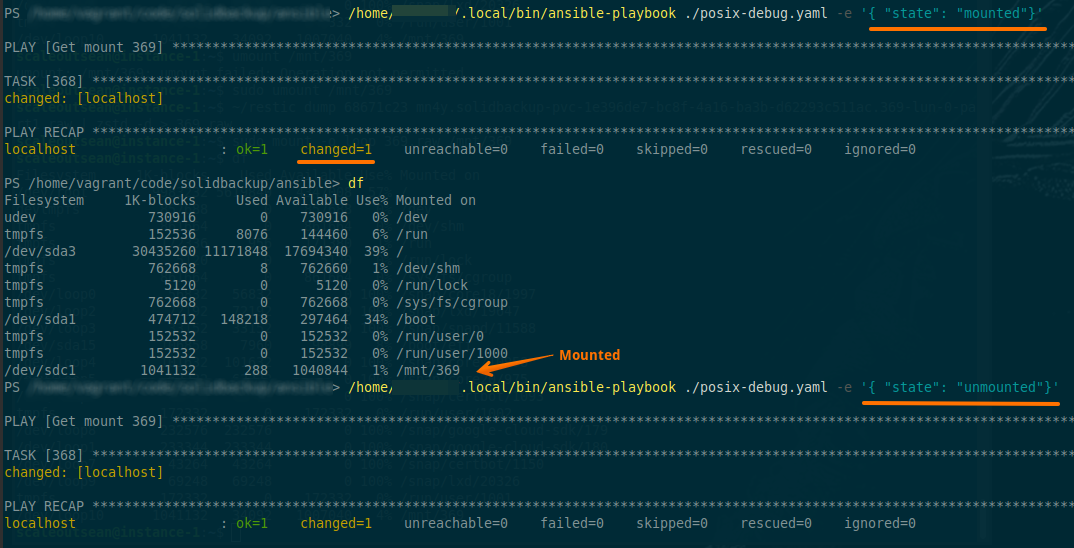
Once we can see data (files), we just run our a backup software or replication utility (it can be anything; Duplicacy, Duplicati, Restic, NetApp Cloud Sync, etc.).
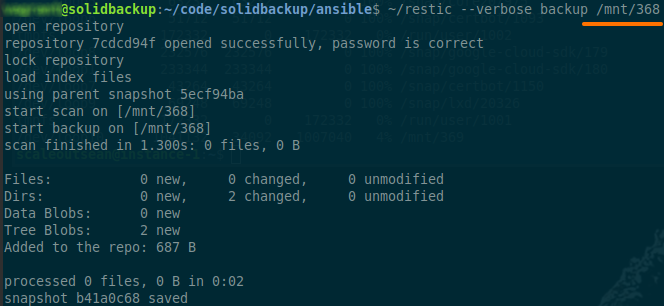
You cannot see it in the screenshot above, but Restic copies data to a backup repository which doesn't have to be S3, but it can (and indeed, in my demo it is - I used NetApp StorageGRID).
You could copy data to a VM running on StorageGRID on NetApp HCI server (ESXi) attached to E-Series as well. Or Google Object Storage (my nearest hyperscaler at this time), or a non-S3 target supported by your backup software.
Once backup is done, we can see it. Confusingly, Restic calls backups "snapshots" - these "snapshots" are Restic backups, not SolidFire snapshots.

But wait, what about that Src Volume ID 55, there some NTFS action going on in in that CSV configuration file above? That's right. And that's easy to deal with:
- We can run Restic (and Duplicacy and Duplicati) on Windows. You'd tell PowerShell or Ansible to dispatch all login/mount jobs for rows with
ntfsin Column 4 to a Windows VM or container - Restic supports VSS on Windows and SolidFire has a VSS plugin, so DBAs who use Windows could use Restic independently of this workflow ("SolidBackup") to backup their databases to S3
- We can choose to ignore the filesystem and simply backup the entire "raw" device the way SolidFire's Backup to S3 feature does it! Let's do that for a partition - partition 1, in this case:
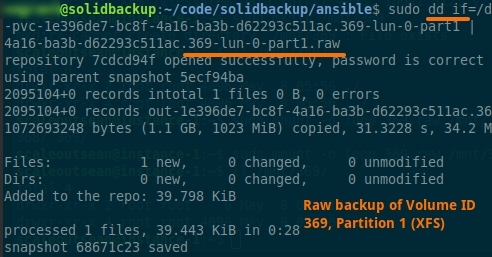
But what about Windows Dynamic Volumes and LVM?
Take a group snapshot of Src Volume IDs and backup all block devices involved. Or - this would take some additional scripting in the - clone, reassemble and mount LVM. You'd need to gather LVM configuration prior to that, so you'd have to have LVM configuration files which wuld make everything more complicated (probably time to pay for enterprise backup software?).
In any and all cases, volume or partition backups can be compressed and deduplicated, so it's all very efficient. You even get cross-volume deduplication (it's much coarser than SolidFire's 4kB granularity, of course).
To check space efficiency, I created a 1Gi partition with XFS that didn't have any data in it - Restic backup was only 35kB. Even when using the device or partition approach, I can easily backup and/or migrate a 50 Gi database to or from GCP Taiwan in under 30 minutes. If it's not the first time we backup, then backup is incremental and switch-over to or from GCP or other Public Cloud can be done in less than 10 minutes.
And all our SolidFire backups (or "snapshots", as Restic calls them) - image- and file-based alike - are available to any client who can access our StorageGRID or GCP Object Storage.
Restore from S3
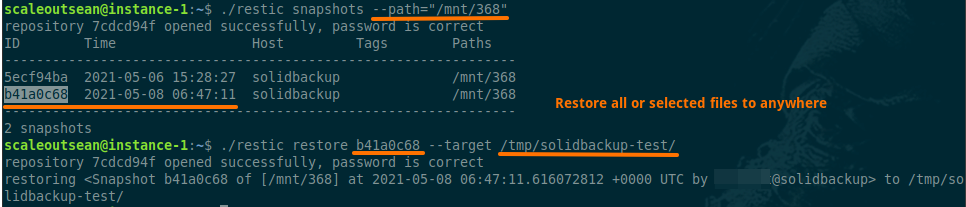
If you look at the hostname, you'll see that now I am accessing this S3 bucket with Restic from a different host.
This VM instance is located in GCP Asia East 1 (Taiwan) and can restore data from "snapshots" on StorageGRID (on-premises) or Google Object Storage (if I were to use it). There's nothing else to "download" or recover. The only thing I need is my S3 keys and Restic password used to decrypt backup data.
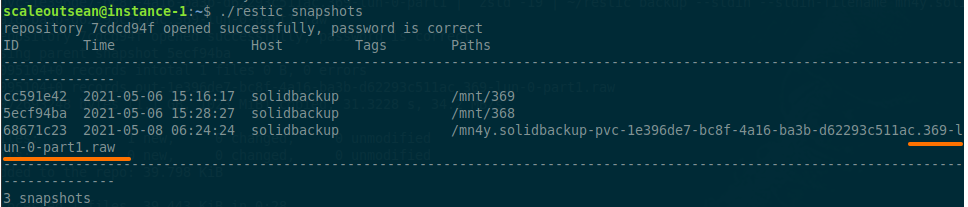
That's it! Your S3 bucket (Restic repository) is your backup database!
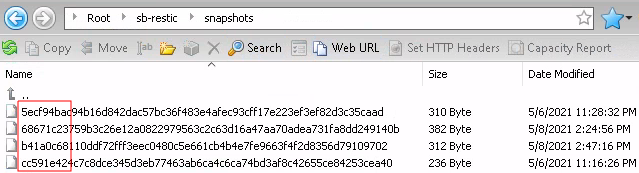
If this sounds or seems too abstract, Snapshot IDs that you see in the first column come from object names created by Restic:
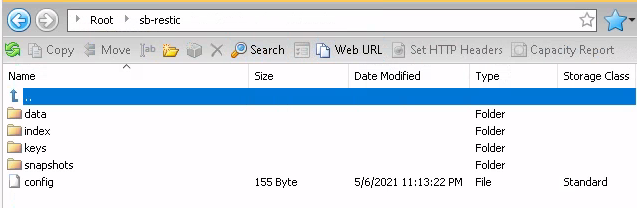
Object data and Snapshot IDs can be seen below. 68671c23 (in row 2) is (Restic) Snapshot ID of our Restic backup of Partition 1 of Vol ID 369 - you can find it in a shell screenshot above.
Restic reads data that needs to be backed up and efficiently packages it in "snapshots". It can restore, of course, but also "forget" (delete) backups and "prune" ("defrag") backup repository space.
In order to restore data from a backup, I can restore an entire "snapshot" or any file(s) from it, or - in the case of a "raw" device/partition backup - a device or partition image.
Getting there (aka "Digital Transformation")
If your data lives on VMFS or VVOLs, you can't use this approach without using the vSphere API or running backup in each VM.
If you wanted to use a "centralized" or "semi-centralized" approach (where each Application or Team has its own SolidBackup-like VM) you could move data to filesystems native to your applications (NTFS, ext4, XFS) to make it possible to use the same automation on-premises and in the cloud, with generic VMs, hypervisor or container engines.
This may require significant efforts and at the same time you lose the benefits of VMFS or VVOLs (if you move data to OS-native filesystem on RDM/iSCSI), but you gain in flexibility and get some other advantages that can pay off your investment in time and effort.
Technically, there's not much to it. Let's say you have a SQL DB with OS on C drive, data on D, logs on L (3 VMDK files). Create two new SolidFire iSCSI volumes, expose them to the VM via iSCSI, mount them under E and F, stop SQL Server, copy SQL DB and logs over, swap the mountpoints D & L with E & F, start SQL Server, remove two unnecessary VMDKs. Next app, please!
Even better, you could use this opportunity to move some apps "one last time" (that is, move to Kubernetes).
In the case the above doesn't ring a bell, here are some random ideas:
- SolidFire SnapMirror cannot replicate data to GCP Cloud Volumes Service. The approach used by SolidBackup could restore SMB and NFS file servers from Windows and Linux VMs to Cloud Volumes Service. You can do things like restore Oracle files to NFS mounts (that live on Cloud Volume Service).
- SolidBackup could use S3 (and cheap public Internet) to securely and economically backup TBs of SolidFire data to Google Object Storage before you have Cloud Volumes ONTAP up and running in it. And once you need your data (test, DR), you can restore backup of raw SolidFire iSCSI devices to CVO iSCSI targets, or restore files from restic snapshots into VMs or containers attached to NetApp CVO in GCP (or other hyperscaler of your choice)
- SolidBackup could make your Hybrid Cloud back-and-forth data migration easy. You can start with data in the Public Cloud and return on-premises, or the other way around
- SolidBackup could work exactly like SolidFire built-in Backup feature (including Backup to S3), but at >1 GB/s (and you can get that with StorageGRID or HCI+E-Series running on premises). And you can restore such (volume or partition) backups anywhere, to any block device (ONTAP, E-Series, and more).
- SolidBackup (or individual steps/components, when reused elsewhere) could let us seamlessly (I haven't demonstrated that in these screenshots) integrate SolidFire with hybrid cloud data workflows, including batch jobs, testing, and more
.snapshot, but on SolidFire
The idea of SolidBackup as a clone-focused backup to both make backup and restore run faster, and to increase the awareness of the SolidFire's volume "re-sync" feature.
The SolidFire API allows 1,000 volumes per node, but officially supported limit is 400 active and 700 inactive (i.e. without iSCSI sessions), so the cost of having (say) 1,200 clone volumes lying around is mostly just the cost of their metadata capacity. We could keep only the important ones online and clone the rest on demand (and delete them after backup). Folks with active volumes close to the limit would have to batch backup jobs on clones (say,32 or 64 at once) to not mount hundreds of additional volumes at the same time.
If you have a way (and means, i.e. you're not close to those maximums) to keep up-to-date clones online, when/if you want to restore file(s) from a snapshot you no longer need to wait until you finish creating a clone. You can copy the files from latest mounted clone as long as you can use WinSCP (or scp). So this is one immediate advantage that doesn't involve backup or Hybrid Cloud use cases.
As I mentioned above, if you don't like the idea of someone (like a K8s admin) having access to your files/data, you could use the same approach to have clone data mounted only in your namespace or your own volume. We'd just have to adjust your SolidBackup-like script to make clones and mount them in same (or on-demand) VMs or dev-test namespaces. This would work even for encrypted volumes. One common pattern seems to be "spin a temp VM + mount clone volume" which would be eaasy to automate with Ansible or Terraform.
Before we re-run volume sync we could scan clone volume for file names and put that data into an Elastic instance so that we can easily find files that are no longer present in the latest clone - but let's not get too carried away now!
Next Steps
Like in last year's demo the process and each step in it work fine - it's just a matter of putting it all together.
Or - just as good - using some of these ideas to do things better in your own SolidFire / Hybrid Cloud environment.
To those who contemplate automating some of their SolidFire workflows and are good at both PowerShell and Python, I would recommend to first consider SolidFire SDK for Python and if that's not an option then SolidFire Tools for PowerShell. The reason is there's less concern when integrating with Linux iSCSI code and Ansible (PowerShell 7.1.3 on Ubuntu 18.04 is 90% "there", but has some quirks).
I'm good at neither, but after doing the volume copy part in PowerShell, it does seem much easier than SolidFire CLI (Python) because there's no need to wrap CLI commands in Python or other language (or write everything in one of old school Linux shells).
I got past the first hurdle - volume sync (as per below) and now need to work on Ansible (login/mount) and finally backup rules and schedules followed by logout/unmount (same Ansible scripts).
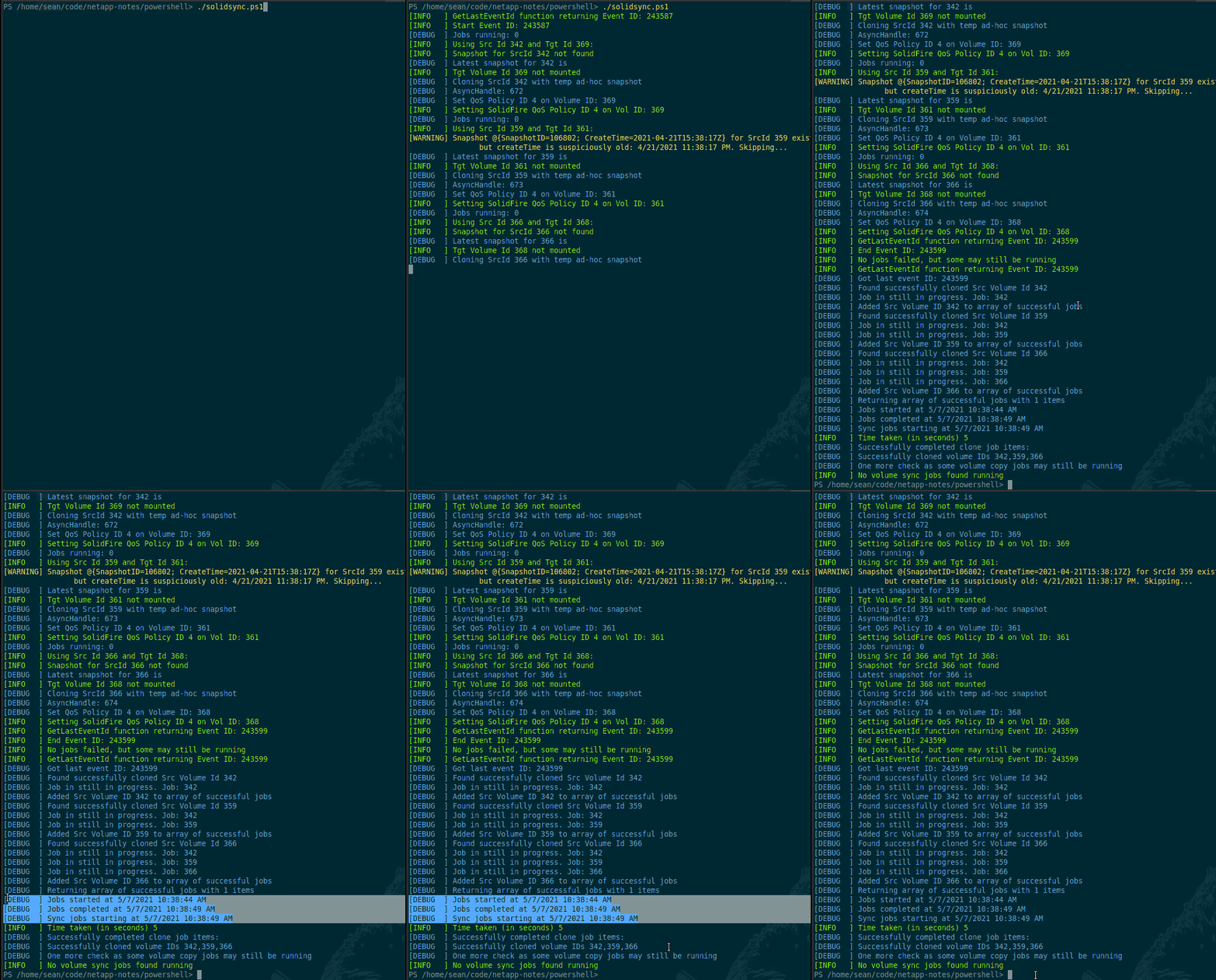
Even if the rest of the steps remain unfinished (manual or semi-manual), I think this is a big improvement over SolidFire's built-in Backup to S3 feature and can complement commercial data protection software.
Conclusion
When I think of a workflow like the one described in SolidBackup-related posts, three things come to my mind:
- it's embarrassing how many time I've blogged about something that doesn't exist
- I can't resist it - I really love this approach and think it's a great way to connect SolidFire with the Public Cloud
- it's already clear to me that some SolidFire customers are interested in using and automating some steps from SolidBackup workflow, and with small changes we should be able to reuse that to automate SolidFire backups in Kubernetes environments (Velero works with Restic)
On this last point, in one of earlier posts discussing DR for SolidFire in Kubernetes environments I played with PowerShell wrappers for the Trident CLI (tridentctl) which worked very well in PowerShell for Linux. Example of one such wrapper cmdlet:

Trident CLI is also used to import volumes to Kubernetes.
Which means a simple Import-TridentVolume wrapper cmdlet could import clone volumes to Kubernetes where Velero & Restic - i.e. the entirety of currently unfinished SolidBackup steps - have been deployed according to the Velero documentation and ready to go! With namespaces, schedules, security, logging, auditing and more already built-in thanks to Kubernetes.
Sound good?
Update (May 30, 2021)
I got something that resembles a working set of scripts.
SolidSync: PowerShell script that syncs Source to Target volumes

As you can see there's a config file with volume pairings, and the script copies Source to Target (Clone) volumes.
Here's how one such "app" (pairing) is defined. All of the info is data protection-related; Src Id, Tgt Id, Partition, Filesystem Type, and Backup Type (which can be file or image).
      db           = @{
        SrcId      = 400
        TgtId      = 403
        Part       = 0
        FsType     = "ext4"
        BkpType    = "file"
      }
The reason I use this format is I've experimented with it for SolidFire cluster failover in a NetApp Trident (Kubernetes) environment and found it better than CSV or SQL, and I hope later I can use it for SolidFire cluster failover for K8s as well ("app definition" would have PVC name, Storage Class and few other details).
By then I should build a CRUD TUI for it, though, because editing it by hand is almost as bad as working with YAML.
Once SolidSync is done running, you get refreshed Target volumes (prefixed with solidbackup- or other prefix of your choosing) that belong to the SolidBackup account and have a dedicated QoS policy suitable for high Max/Burst throughput.
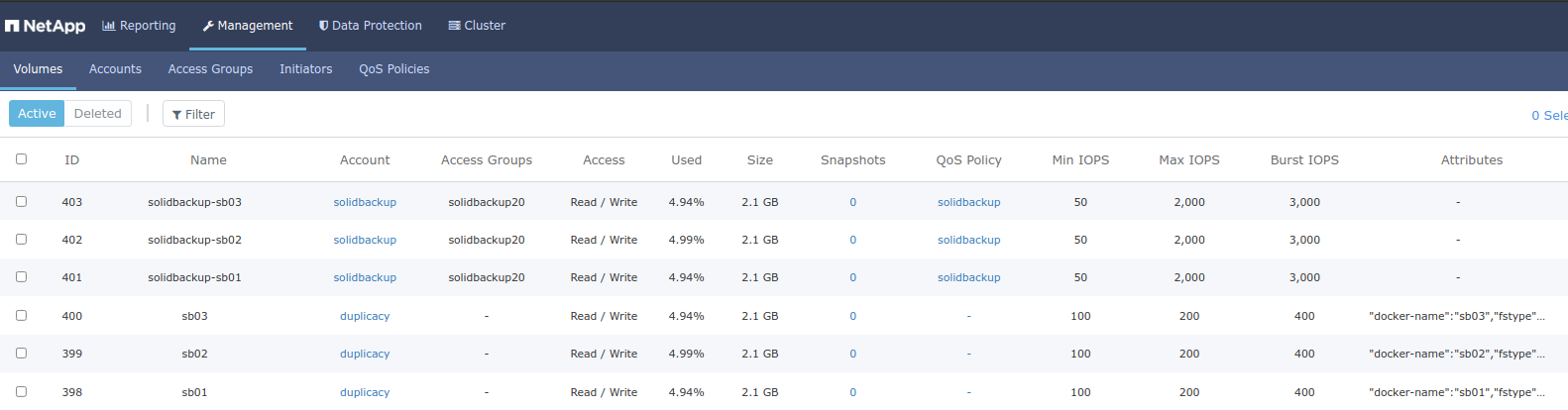
SolidBackup: stand-alone PowerShell script that does the following
- For all Target volumes (whether their backup is Image or File type): log in to iSCSI targets (clones)
- For File-based backup: mount volumes under
/mnt/$SrcId(so that it's easy to know where original volume 127 would be mounted (/mnt/127) despite what the clone volume ID might be) - Create configuration files for SolidBackup-independent execution of backup
- Ansible iSCSI login
- Ansible filesystem mount (read-only)
- Backup script (one command per backup job i.e. volume)
Example output files:
- iSCSI login for Target Volume Id 402:
{
  "login": "yes",
  "target": "iqn.2010-01.com.solidfire:mn4y.solidbackup-sb02.402"
}
- Filesystem Mount for Source Volume Id 400 cloned to Target Volume Id 403 (I mount these to
/mnt/$SrcId, so when I need to restore files from Source Volume 400, it's easy to know where to look (/mnt/400):
{
  "opts": "ro",
  "state": "mounted",
  "src": "/dev/disk/by-path/ip-192.168.103.30:3260-iscsi-iqn.2010-01.com.solidfire:mn4y.solidbackup-sb03.403-lun-0",
  "fstype": "ext4",
  "path": "/mnt/400"
}
Note the ro (read-only) mount option.
- Backup script
backup.sh(in this case, for Restic, but in "alpha" and "beta" demos of Solidbackup you could see other utilities used). In this script below jobs would run sequentially, but you could parallelize them in PowerShell or Bash or otherwise, similar to what I did with SolidFire Backup to S3.M.envcontains my Restic repository configuration and credentials.
#!/bin/bash
source /home/sean/M.env
/home/sean/bin/restic --json --verbose backup --tag src-id-400 --tag tgt-id-403 -e lost+found /mnt/400
sudo dd if=/dev/disk/by-path/ip-192.168.103.30:3260-iscsi-iqn.2010-01.com.solidfire:mn4y.solidbackup-sb02.402-lun-0 bs=256kB status=none | gzip | /home/sean/bin/restic --json --verbose backup --tag src-id-399 --tag tgt-id-402 --stdin --stdin-filename mn4y.solidbackup-sb02.402
sudo dd if=/dev/disk/by-path/ip-192.168.103.30:3260-iscsi-iqn.2010-01.com.solidfire:mn4y.solidbackup-sb01.401-lun-0 bs=256kB status=none | gzip | /home/sean/bin/restic --json --verbose backup --tag src-id-398 --tag tgt-id-401 --stdin --stdin-filename mn4y.solidbackup-sb01.401
This animated GIF below shows SolidBackup running for three pairs of volumes setup by SolidSync. Notably, we should use File backup for one of them. That one ends up mounted, while Image based backup targets do not.
Also notice in the animation how much more efficient file based backup is: we backup a 100 MB file, which is fastest to start and to finish. The other two jobs (image backups, with same amount of data (100MB in each 2GB volume)) need to read 2GB's of raw data to backup 5% of the useful content). But those are bit-for-bit identical and the only practical way if you don't understand the filesystem format.
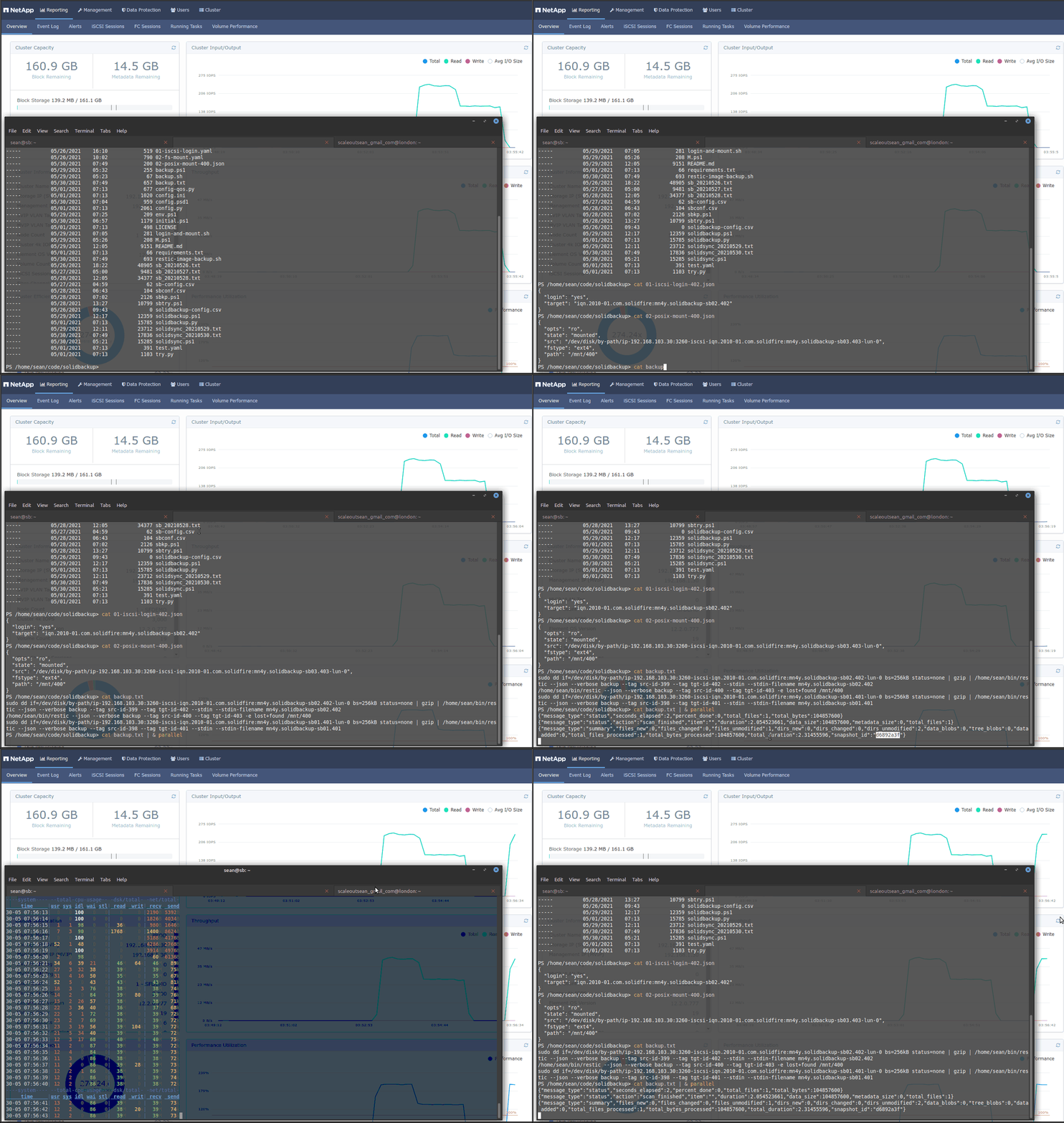
Once it's all done, you can see your backup snapshots (last three, d6892a3f is the File based job). We also got the tags added to the scripts so it's very easy to find backups by either Source or Target Volume ID!
$ restic snapshots
repository 9f88ba35 opened successfully, password is correct
ID        Time                 Host        Tags                   Paths
--------------------------------------------------------------------------------------------
974c6dfe  2021-05-30 07:53:06  sb          src-id-400,tgt-id-403  /mnt/400
dec9a904  2021-05-30 07:53:11  sb          src-id-398,tgt-id-401  /mn4y.solidbackup-sb01.401
74421868  2021-05-30 07:56:15  sb          src-id-399,tgt-id-402  /mn4y.solidbackup-sb02.402
d6892a3f  2021-05-30 07:56:15  sb          src-id-400,tgt-id-403  /mnt/400
dc20861e  2021-05-30 07:56:21  sb          src-id-398,tgt-id-401  /mn4y.solidbackup-sb01.401
--------------------------------------------------------------------------------------------
5 snapshots
Rinse & reapeat
After a backup finishes, unmount any (SolidBackup) filesystem mounts and log out of the Target(s) to be ready for the next resync (that is, the next run of SolidSync) for which our SolidBackup VM must not be attached to the Target volumes. You could run this at the end of your backup. Or simply reboot the VM after backup.sh is done.
> sudo umount /mnt/* # to unmount all SolidBackup Targets
> [array]$logins = (Get-Item 01*.json).Name
> foreach ($l in $logins) { ansible-playbook ./01-iscsi-login.yaml -e @$l -e "login=no"}
Next time we need to run backup, if nothing has changed in terms of volume and backup configuration we could simply rerun SolidSync and after it's done apply the same Ansible playbooks and run the same backup script (backup.sh). Everything can be unattended and you just need to get your Ansible and Restic logs.
> [array]$logins = (Get-Item 01*.json).Name
> [array]$mounts = (Get-Item 02*.json).Name
> foreach ($l in $logins) { ansible-playbook ./01-iscsi-login.yaml -e @$l -e "login=yes"}
> foreach ($m in $mounts) { ansible-playbook ./02-fs-mount.yaml -e @$m -e "state=mounted"}
If volumes have been added or removed, we'd have to remove old JSON and YAML files and potentially rerun SolidBackup. But this won't happen every week unless you have a large environment.
This way, apart from SolidSync (results of which can be easily validated by doing a binary diff between Src and Tgt) the rest is completely up to Ansible (easy to monitor, secure and audit) and Restic (quite manageable as well).
Why not one big script that does it all
I could continue to run Restic directly from SolidBackup, but with the workflow exported in Ansible-compatible playbook configuration format and the backup jobs in a Restic script, you don't have to worry (as much) about SolidBackup errors - it's a fairly minimalistic script that can't easily hide its mistakes.
Don't forget that you can deploy one SolidSync/SolidBackup per VM, or per Group, and execute them on behalf of different stakeholders, so that each individual or team "sees" only own volumes, and uses its own encrypted backup repoository!
The source code has been posted to Github.
Demo
- SolidSync & SolidBackup (Restic version) demo - 7m30s