Backup SolidFire volumes to S3-compatible storage
NOTICE: any and all credentials and tokens on this page are samples, not leaked.
- What it is (and isn't) and when to use it
- How it works
- Buckets, (sub)directories, nametags
- Restore from S3
- Automating SolidFire Backup to S3
- Demo
- Conclusion
What it is (and isn't) and when to use it
SolidFire's Backup (and Restore) feature is a simple data protection utility built into NetApp SolidFire software that lets cluster administrator kick off backup and restore jobs that work with data on object (S3 or Swift) storage or remote SolidFire clusters. Source (for backup operation; Target for Restore operation) is standard SolidFire volume, whether it's used by VMware or physical hosts or containers. Backup to S3 works with one of three supported targets (S3-compatible object storage, obviously).
Backup to S3 is not a replacement for enterprise data protection software (or even community backup utilities which may work less efficiently in some cases, but have more features and be easier to integrate with external tooling in other).
When Backup to S3 may be just good enough? Some examples:
- you don't have enterprise backup software (or don't have the skill or time to implement a community backup software such as Velero for Kubernetes) and don't need advanced data protection features
- you don't have ONTAP to which you could copy data with SnapMirror and from there use Cloud Backup Service to backup to S3 (I wrote about that use case here)
- you have more data than you can backup with a free/community edition of enterprise software like Veeam or Kasten, and have simple basic backup/restore requirements
Backup to S3 doesn't have a mechanism to freeze (quiesce) a volume because it's completely self-contained in the storage software and has no client components; a snapshot ID can be provided but if it does not exist, on-demand snapshot is created and used to perform backup.
You could - in theory - suspend I/O to a volume, kick of a backup job, and unfreeze the workload, but if you wanted to do this it would probably be easier to just take application consistent snapshots (group or individual) and pick latest or selected Snapshot ID for use in Backup to S3 feature. The difference is your snapshots would be taken at times you want, rather than when Backup to S3 runs.
How it works
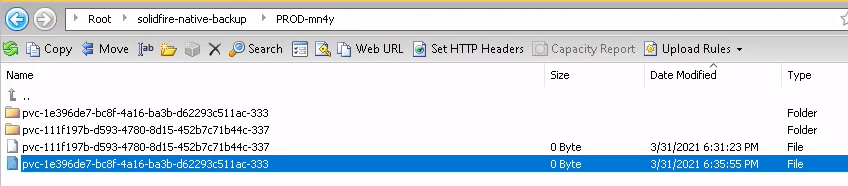
To backup, SolidFire reads volume data in segments (chunks) and copies data to a directory located in a bucket on S3-compatible storage of your choosing. This is what you'd see in Backup-to-S3 backup bucket after succesfully making a backup of two Kubernetes volumes.
To restore, SolidFire reads information provided by the user, accesses and restores data from user-provided backup data location.
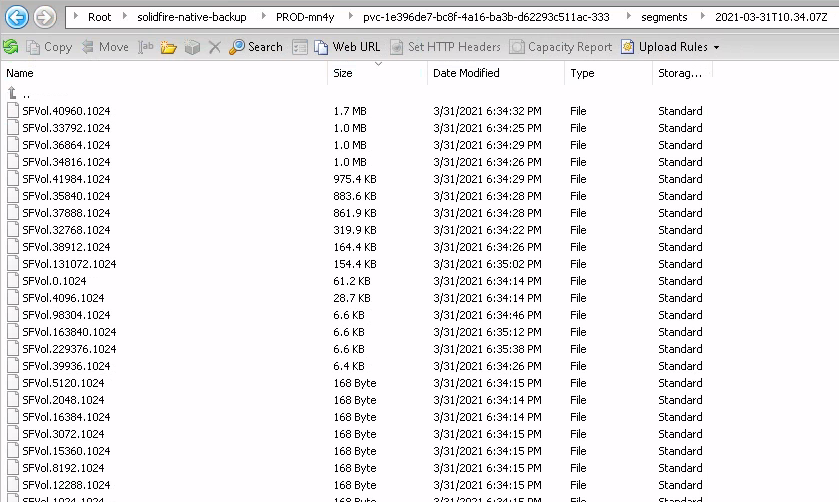
When it comes to using S3 as backup Target (the Backup feature can also send backups to another SolidFire array), we can choose between native and raw (uncompressed) backup: native backups are space-efficient and use a proprietary format to compress and deduplicate volume contents.
Completely empty chunks translate into tiny 168 byte objects, and 4MiB chunks filled with MP4 contents might become 4MB objects (approximately 0% efficiency savings).
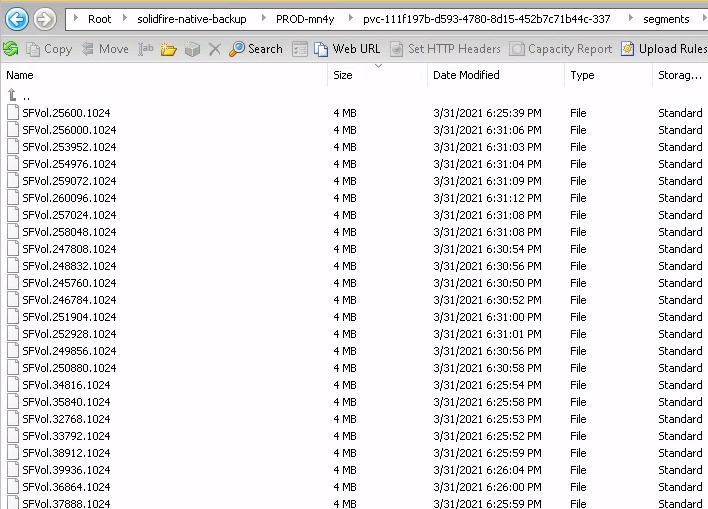
Raw volume backups can be restored anywhere (imagine concatenating all segments and restoring them to a block device using the dd command - although SolidFire Backup doesn't provide that functionality, you could probably do it yourself), but consume more network bandwidth and backup storage capacity (unless you have S3 with deduplication or at least compression enabled).
Despite the misleading bucket name in this screenshot below, you can see how each segment takes up 4MiB even when backing up a completely empty volume using raw backup.
Normally we would use the native (SolidFire) format to backup and restore more efficiently.
Experimentally I've found that Backup to S3 seems to obey SolidFire volume QoS which I did not expect. It sure makes sense if you have to prioritize I/O, but for backup workloads I had expected reads would happen as fast as possible as long as node or cluster utilization was low. Well, it seems that's not how it works, so what you can do if you want to backup volumes with low QoS quickly is use my Set-SFQoSException PowerShell module to set a higher QoS before Backup-to-S3, and reset it afterwards.
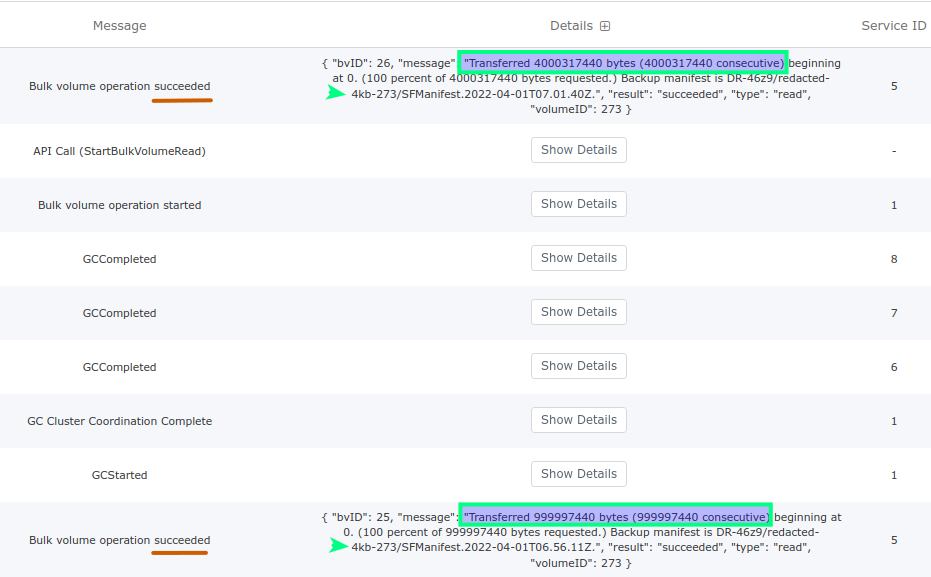
Something I noticed after checking this issue is that logs differ when range parameters are set (top) vs. when when they're omitted not (bottom) - see the screenshot below. According to my testing it's just a cosmetic (log) issue. If you rely on the logs being correct, use range params in your API and CLI commands for backup and restore (the Web UI seems to automatically and correct determine correct block count (range parameters), while backup - assuming same volume size - should be correct by definition).
Buckets, (sub)directories, nametags
S3 "directories" aren't really directories, but that's not important right now: the point is if we use Backup to S3 to backup SolidFire volumes to a bucket called backup, our cluster name is syddemo-hci and cluster ID is nfgj, volume backups will be found under s3://backup/syddemo-hci-nfgj (so that even if you had two clusters with the same cluster and volume name, these backups wouldn't collide).
Below that "cluster-directory", volume backups would be found in "subdirectories" with names automatically created by concatenating volumeName and volumeId (example: scaleoutsean-139).

Backup manifest is normally written to $ClusterName-$ClusterID/$VolumeName-$VolumeID but if nametag value is provided to the call or command, backup manifest will be saved to a bucket subdirectory like this:
DR-72k4/junk-24/- volume namejunk, volume ID 24, no (name)tagDR-72k4/pvc-1e396de7-bc8f-4a16-ba3b-d62293c511ac-247/monday/- volume namepvc-1e..., volume ID 247, tagmonday
Name tags are optional, as you can see below:
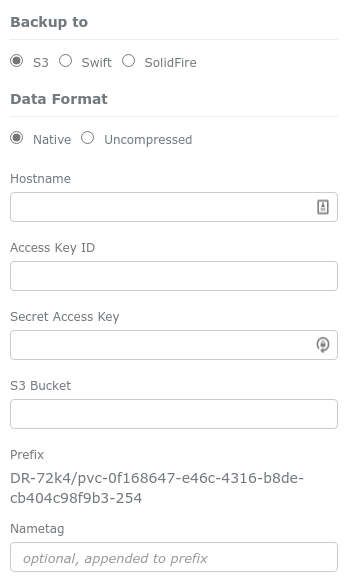
Note: Hostname (as you can see from the CLI/API examples below) can contain the S3 service port number and be written as s3.org.com:1443 (no http(s):// and no / at the end).
You can use a different bucket for every volume or group of volumes (e.g. put all HR databases in the bucket backup-hr), if you don't want to set very granular permissions within a bucket shared by many users.
You can use NetApp StorageGRID S3 storage and its ILM features to make it possible to only create new objects and append to existing, which you can use to ensure backup users cannot delete existing backups.
Restore from S3
To restore a volume we need to know its S3 endpoint (where it was backed up), bucket name where backups are stored, and subdirectory names ((cluster name + cluster ID)/(volume name + volumeID)), as well as the tag if it was used.
Active volumes have to be unmounted on iSCSI clients while they're being restored. If we completely lose a volume we can create a new one - use the same volume size and volume block size (512e or 4k) - and then restore it before accessing it from iSCSI client(s).
As you've probably guessed by now, you can restore a volume from a backup taken on any SolidFire cluster as long as you can access backup data and SolidFire you're restoring to isn't an older version. It's not fast (for that, you'd restore from SolidFire snapshots, or even clones), but it works.
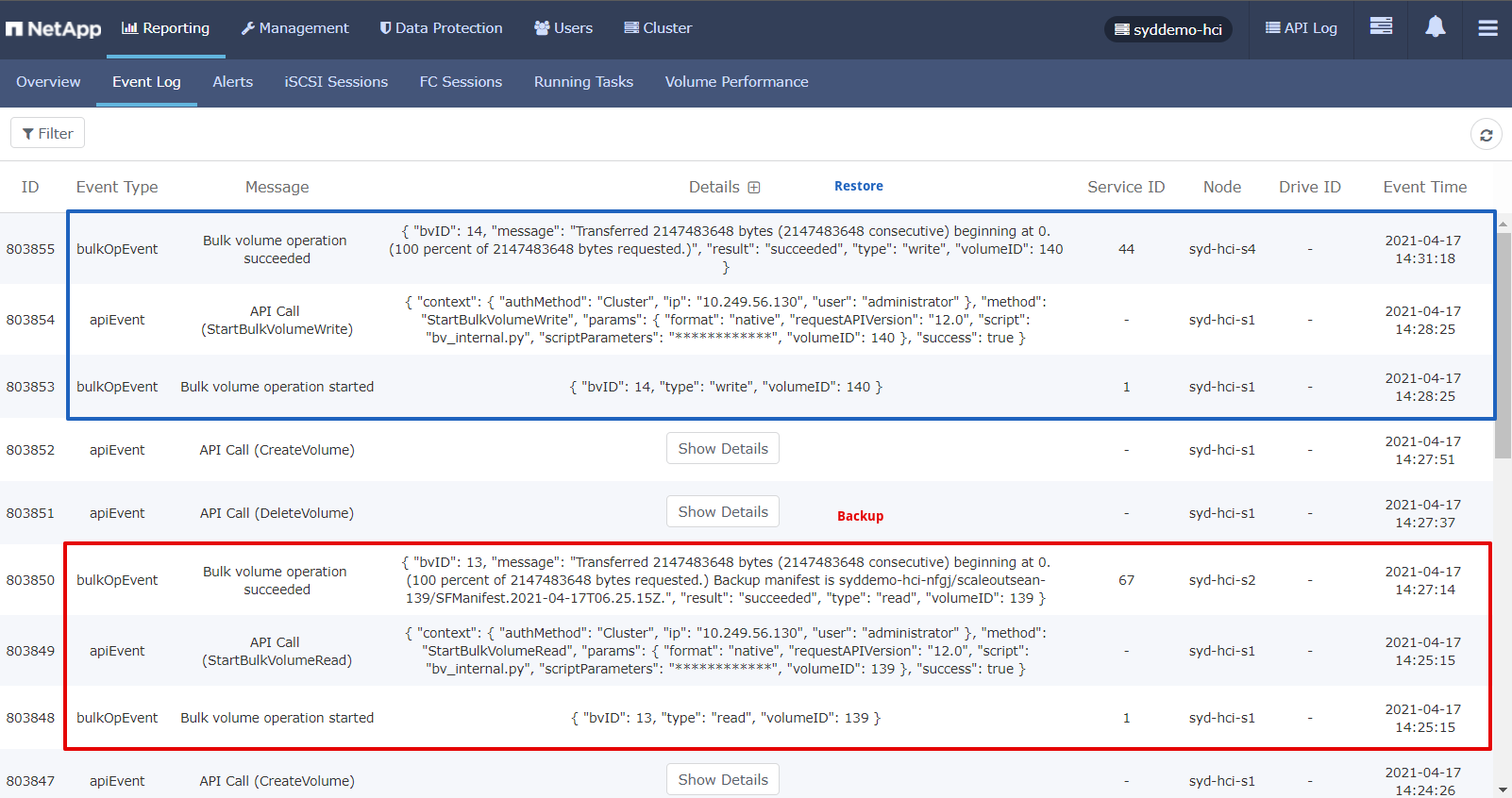
In the case multiple users (DBAs, for example) use the same destination bucket, ACLs and S3 keys should be carefully managed.
Automating SolidFire Backup to S3
There's no scheduler that would run X number of backup jobs per each SolidFire node and retry failed jobs for you.
A basic approach to automation that matches the simplicity of Backup to S3 would be to maintain a CSV file with Volume IDs and S3 target configuration (S3 API endpoint FQDN, bucket, keys), loop through those Volume IDs and keep the maximum allowed number of Backup to S3 jobs running until they're all done.
As jobs complete check their completion status: if a job has failed retry once, and if it's succeeded kick off the next one.
A more advanced approach could make use of a DB such as Sqlite which would store backup and restore job data. SolidFire keeps track of backup and restore jobs but not forever and it therefore cannot be used for reporting. I would generally recommend against this "build your own backup & restore management and reporting system" idea. Why?
It'd take quite a lot of work (I tried to do that in late 2020 and although I got close to having something that could work, I wasn't happy with the outcome), and you'd still have a limited solution.
I think it would be better to address advanced requirements with a community backup software or - if your requirements are enterprise-level - use data protection service from a vendor that integrates with SolidFire (Commvault or Veeam, for example) or make use of NetApp SnapMirror as explained at the very beginning of this post.
What follows is a bunch of examples from different backup and restore jobs, following the typical backup-observe-restore workflow. Hopefully these examples can save you some time understanding the SolidFire API.
Backup using the API, PowerShell or Python
WARNING: Remember to pay attention to StartBulkVolumeRead vs. StartBulkVolumeWrite when copy-pasting stuff around!
Example of a JSON file passed to SolidFire to backup Volume ID 139 to S3 (notice how StartBulkVolumeRead uses "write" in script parameters):
{
  "id": 1,
  "method": "StartBulkVolumeRead",
  "params": {
    "volumeID": 139,
    "format": "native",
    "script": "bv_internal.py",
    "scriptParameters": {
      "range": {
        "lba": 0,
        "blocks": 524288
      },
      "write": {
        "awsAccessKeyID": "Q36K1OR8865OA8AV3A50",
        "awsSecretAccessKey": "iHO3QsM7dnCh+uTb9/Z/4GHRGiXDLasFqhspKOg0",
        "bucket": "backup",
        "prefix": "myClusterName-k4z3/scaleoutsean-139",
        "endpoint": "s3",
        "hostname": "storagegrid.my.co:18443"
      }
    }
  }
}
For Backup to S3 in the SolidFire native format, you'd change the following from the example above in order to adjust this to your environment:
- volumeID
- scriptParameters.range.blocks - provide volume size (in blocks; you can get this easily (in PS,
Get-SFVolume -VolumeIDand divide by 4096; this 2Gi volume has 2147483648÷4096=524288)) - scriptParameters.write values except endpoint (s3) - adjust for your cluster name and backup destination and bucket
As mentioned earlier, we can optionally provide a snapshot ID, which could be interesting if we had application consistent snapshots. Otherwise a temporary ad-hoc snapshot is taken when backup job is initiated.
In a small environment with just a handful of volumes we could use PowerShell to do something as simple as this (to back up volumes 143 and 144):
> foreach ($vol in (143,144)) { `
  Start-SFVolumeBackup -VolumeID $vol `
  -Format native -BackupTo S3 `
  -Hostname storagegrid.my.co:18443 `
  -AccessKeyID Q36K1OR8865OA8AV3A50 `
  -SecretAccessKey iHO3QsM7dnCh+uTb9/Z/4GHRGiXDLasFqhspKOg0 `
  -Bucket solidfire-native-backup
}
There seems to be a bug in SolidFire Tools for PowerShell 1.7.0.55 - it doesn't append $ClusterID to $ClusterName, so the API and PowerShell result in backups executed via the API and PowerShell saved to different directories inside of the expected backup "subdirectory". To avoid this problem we can use Invoke-SFApi (instead of using Start-SFVolumeBackup) to work around this until that bug is fixed.
> Invoke-SFApi -Method StartBulkVolumeRead `
  -Params @{ "volumeID"= "356"; "format" = "native"; `
  "script" = "bv_internal.py"; "scriptParameters" = `
  @{ "write" = @{ "awsAccessKeyID" = "Q36K1OR8865OA8AV3A50"; `
  "awsSecretAccessKey" = "iHO3QsM7dnCh+uTb9/Z/4GHRGiXDLasFqhspKOg0"; `
  "bucket"= "solidfire-native-backup"; `
  "prefix"= "PROD-mn4y/pvc-f8050652-4cd0-495d-946c-1d315da725e9-356"; `
  "endpoint"= "s3"; "hostname"= "storagegrid.my.co:18443" }}}
If you are connected to cluster and pass $VOLID, you can fill the rest with the help of the API:
> $vol_data     = Get-SFVolume -VolumeID $VOLID
> $vol_data_blocks = $vol_data.TotalSize / $vol_data.BlockSize
> $cluster_info = Get-SFClusterInfo
> $PREFIX       = $cluster_info.Name + "-" + $cluster_info.UniqueID + "/" + $vol_data.Name + "-" + $vol_data.VolumeID
With S3-related variables in place, we can do something like this:
$params = @{ "volumeID"= $VOLID; `
  "format" = "native"; `
  "script" = "bv_internal.py"; `
  "scriptParameters" = `
   @{ "range" = @{"lba" = 0; "blocks" = $vol_data_blocks }; `
   @{ "write" = `
     @{ "awsAccessKeyID" = $S3_ACCESS_KEY; `
      "awsSecretAccessKey" = $S3_SECRET_KEY; `
      "bucket"= "solidfire-native-backup"; `
      "prefix"= $PREFIX; `
      "endpoint"= "s3"; `
      "hostname"= $S3_ENDPOINT }`
  }}
Invoke SF API:
Invoke-SFApi -Method StartBulkVolumeRead -Params $params
Note on range setting
As mentioned near the top of this post, bulk volume read invoked via the CLI or API (not Web UI) produces a different log output depending on whether range was set or not.
This doesn't seem to impact data integrity of backups (I tested), but check that issue linked near the top if you want to wait for official confirmation. One scenario I did not test is restore to a volume that was enlarged since the backup was taken; however you can always restore to the same-sized volume and enlarge it, or use correct range params in the unlikely case that omitting them doesn't work.
And you can also verify integrity of your restores by yourself.
Using Python SDK and SolidFire CLI
Using Python or SolidFire Python SDK, create a JSON job file and pass it to the API.
SolidFire CLI (Python) doesn't have this documented, but we also know that this doesn't work for SolidFire PowerShell Tools either, so rather than trying to figure this out let's just use the same approach we used for PowerShell, Invoke SF API mentioned in SolidFire CLI README.md on Github.
I need just params of the full StartBulkVolumeRead JSON (same as above). Params itself is a JSON document. Define it and pass it to sfcli:
$ JSON="{\"volumeID\": 390, \"format\": \"native\", \"script\": \"bv_internal.py\", \"scriptParameters\": { \"range\": { \"lba\": 0, \"blocks\": 488448 }, \"write\": { \"awsAccessKeyID\": \"AAAAAA\", \"awsSecretAccessKey\": \"BBBBBBBBBBBBBBBBBBBBBB\", \"bucket\": \"solidfire-native-backup\", \"prefix\": \"DR-72k4/etcd-3-390\", \"endpoint\": \"s3\", \"format\": \"native\", \"hostname\": \"s3.netapp.com\" }}}"
$ sfcli -m 192.168.1.34 -u admin -p admin SFApi Invoke --method StartBulkVolumeRead --parameters $JSON
All-in-one:
$ sfcli -m 192.168.1.34 -u admin -p admin SFApi Invoke --method StartBulkVolumeRead --parameters "{\"volumeID\": 390, \"format\": \"native\", \"script\": \"bv_internal.py\", \"scriptParameters\": { \"range\": { \"lba\": 0, \"blocks\": 488448 }, \"write\": { \"awsAccessKeyID\": \"AAAAAA\", \"awsSecretAccessKey\": \"BBBBBBBBBBBBBBBBBBBBBB\", \"bucket\": \"solidfire-native-backup\", \"prefix\": \"DR-72k4/etcd-3-390\", \"endpoint\": \"s3\", \"format\": \"native\", \"hostname\": \"s3.netapp.com\" }}}"
{
    "asyncHandle": 301,
    "key": "c8aef91b1e8ab373d973b78d1f460c24",
    "url": "https://192.168.103.33:8443/"
}
Note:
- Volume ID 390
- Volume Name: etcd-3
- Blocks: Volume size in bytes / 4096 (this is a 2G volume, so the number of 4kB blocks is 488448)
- Bucket: solidfire-native-backup
- Prefix: ClusterName + "-" + Cluster UUID + "/" + VolumeName + "-" + VolumeID (here: DR-72k4/etcd-3-390)
- S3: backup defaults to using port 443 if available
If you have several volumes in a static environment, you could build this JSON manually and just loop through a handful of JSON files. For more complex or dynamic situations, consider using Python (with or without the SDK).
If you use SolidFire Python SDK or just Python - both are easier than SolidFire CLI - you'd build the JSON from inside out:
- Start with connection to SF and a list of volume IDs
- Use volume ID to get volume properties (name and size; the latter should be divided by 4096 to get blocks)
- Use cluster connection to get cluster Name and UUID (or find these in the SF Web UI under (a) Reporting > Overview > Cluster Information and (b) Reporting > iSCSI Sessions > Target IQN, or run one backup from the Web UI to see this auto-populated)
- Build JSON request and pass params to
start_bulk_volume_read(orstart_bulk_volume_writeto restore).
Example for VolumeID 440 (name: test2, size: 2GiB), backed up from its snapshot (snapshot ID 3278):
>>> params
{'range': {'lba': 0, 'blocks': 488448}, 'write': {'awsAccessKeyID': 'AAAAAAA', 'awsSecretAccessKey': 'BBBBBBBBBBBBBBBB', 'bucket': 'solidfire-native-backup', 'prefix': 'DR-72k4/test2-440', 'endpoint': 's3', 'hostname': 's3.netapp.com'}}
>>>
>>> sfe.start_bulk_volume_read(440,"native", snapshot_id=3278, script="bv_internal.py", script_parameters=params)
2022-01-05 13:08:41,823 - solidfire.Element - INFO - {"method": "StartBulkVolumeRead", "id": 12, "params": {"volumeID": 440, "format": "native", "snapshotID": "3278", "scriptParameters": {"range": {"lba": 0, "blocks": 488448}, "write": {"awsAccessKeyID": "AAAAAAA", "awsSecretAccessKey": "BBBBBBBBBBBBBBBB", "bucket": "solidfire-native-backup", "prefix": "DR-72k4/test2-440", "endpoint": "s3", "hostname": "s3.netapp.com"}}}}
StartBulkVolumeReadResult(async_handle=304, key='0e380d694665a53c74c10327ac4c4f85', url='https://192.168.103.33:8443/')
Observe job progress using the API or PowerShell
No matter how you call the API, if it's accepted you get a job key and an async handle back. Example:
{
    "id": 1,
    "result": {
        "asyncHandle": 46,
        "key": "82e939a9ee81811096f4e43e61e6e4f7",
        "url": "https://10.111.55.66:18443/"
    }
}
Note the URL value above; it's a node URL where the volume's Primary Metadata service is running. You can add these up to keep track of the total number of jobs running on any storage node.
Check on this particular job using its job key:
{
    "method": "UpdateBulkVolumeStatus",
    "params": {
        "key": "82e939a9ee81811096f4e43e61e6e4f7"
    },
    "id": 1
}
Response (while job is still running or just completed - afterwards it disappears - see the KeepResult option in PowerShell-related comments):
{
    "id": 1,
    "result": {
        "attributes": {},
        "status": "running",
        "url": "https://10.128.56.54:8443/"
    }
}
In PowerShell, using async job handle ID:
> Get-SFASyncResult -ASyncResultID 48
ASyncResultID: 48
Name                           Value
----                           -----
createTime                     4/18/2021 5:56:00 AM
status                         complete
result                         {message, bvID, volumeID}
lastUpdateTime                 4/18/2021 5:57:59 AM
resultType                     BulkVolume
If a job has completed more than 20-30 seconds ago (i.e. async handle no longer exists) you may see this.
{
    "error": {
        "code": 500,
        "message": "xBulkVolumeIDDoesNotExist",
        "name": "xBulkVolumeIDDoesNotExist"
    },
    "id": 1
}
In order to get around this and if you want to check on it later and explicitly make sure it completed successfully use Get-SFAsyncResult -KeepResult:$True the first time you check and while the job is still running. SolidFire will then keep job result after execution is complete.
Or you could parse SolidFire events to look for this job, which isn't a very efficient way to do it (unless you send logs to a place where you can easily analyze them).
Restore using the API or PowerShell
To restore a backup of testvol-143 to a newly created 1Gi volume (volume ID 144):
{
  "id": 1,
  "method": "StartBulkVolumeWrite",
  "params": {
    "volumeID": 240,
    "format": "native",
    "script": "bv_internal.py",
    "scriptParameters": {
      "read": {
        "awsAccessKeyID": "solidfire",
        "awsSecretAccessKey": "NetApp123$",
        "bucket": "backup",
        "prefix": "syddemo-hci-nfgj/junk-vol-delete-it-512e-28-216",
        "endpoint": "s3",
        "hostname": "10.113.1.40"
      }
    }
  }
}
As mentioned earlier, in the current version of SolidFire PowerShell Tools, dedicated Backup cmdlets have a known issue so we'll use Invoke-SFApi for restore, too.
Invoke-SFApi -Method StartBulkVolumeWrite -Params @{  `
  "volumeID"= 223; "format" = "native"; "script" = "bv_internal.py"; "scriptParameters" = `
   @{ "read" = @{ "awsAccessKeyID" = "Q36K1OR8865OA8AV3A50"; "awsSecretAccessKey" = "iHO3QsM7dnCh+uTb9/Z/4GHRGiXDLasFqhspKOg0"; `
   "bucket"= "backup"; `
   "prefix"= "myClusterName-k4z3/junk-vol-delete-it-512e-17-205"; `
   "endpoint"= "s3"; "hostname"= "10.113.11.44"}}}
In the PowerShell example above:
- Restore target (volume ID): 223
- Format from which backup is restored:
native - Script: leave default script name as-is (maybe
scriptis optional, but I haven't tried) - Script parameters:
- Read access to backup
- S3 access key
- S3 secret access key
- Bucket name where backups are located
- Prefix used when we took that backup we're now restoring
- Endpoint:
s3to restore from an S3 endpoint - Hostname: IP or FQDN of S3 API endpoint (no need to prefix it with
https://or add:443(HTTPS is default); self-signed TLS certificate seems accepted when IP is used)
- Read access to backup
A variant with scriptParameters that include range (as in: { "range" = @{ "lba"= "0"; "blocks"= "block-count-in-4kb-blocks"}…}) doesn't appear to work, although I am pretty sure I got it by observing API logs. blocks were calculated as volume size in KB / 4kB, so a 1GiB volume would have ((1024 x 1024 x 1024) / 4096) 262144 blocks. Still, I couldn't make that section work so I just removed it, which I assume results in restore reading the entire backup and works fine when backup size is the same or smaller size than restore target.
Per-node job scheduling
The challenge isn't how to kick off your daily or weekly backup (you could do that from crontab, for example), but how to schedule individual jobs so that we don't schedule too many (which would cause some to fail) or too few (which would cause them to run comparatively longer) on each SolidFire node.
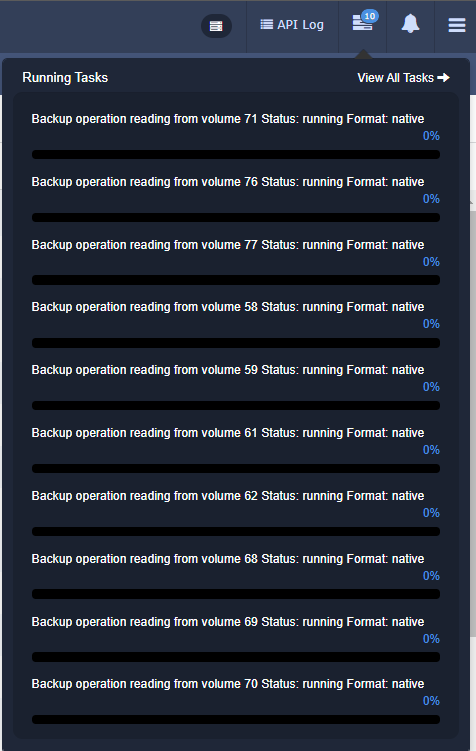
How to control the number of concurrently running backup jobs and keep it below the maximum? First we need to know how to find the maximum number of bulk jobs per node:
> (Get-SFLimits).BulkVolumeJobsPerNodeMax
8
(It's strange that on a physical SolidFire cluster 12.2 this result is 8, while SolidFire Demo VM shows 10. I assume 8 is correct.)
I'd run no more than six per SolidFire node, to leave several slots for restore and other bulk jobs (such as volume cloning or restore from S3 backup).
One problem in scheduling this is to figure out where the volume is. For active volumes we can find this by checking iSCSI connections (in PowerShell, Get-SFIscsiSession; SolidFire node that has a connection for volume scaleoutsean-139 is where your volume metadata is, and where backup job for the volume will run). I don't know how to do it for disconnected volumes, but those usually aren't many and don't change a lot.
So we would get a list of all nodes and volumes, and build a "per-node" list of volumes (backup jobs). As volumes are sometimes automatically rebalanced by SolidFire, long running scripts may need to do this more than once in the course of one daily or weekly run.
Then we'd dispatch a handful of async backup jobs from each node's job queue and watch their status. When a slot is freed, dispatch the next job.
I suspect - but I forgot to check when I was testing - that URL in the response of UpdateBulkVolumeStatus method shows Management IP of the SolidFire node running the job. If this is correct then it'd be easier to manage job scheduling: fire first 10 jobs, watch the number of jobs per unique URL (node) returned by this method, and add one more whenever no node has more than 7. Several very large volumes on one node could result in underutilized job slots on some nodes, but we could schedule those to be backed up last (query volume IDs and order them by (volume size * fullness) before you start and start with smallest by amount of data to back up).
Separately, build a list of failed jobs and notify about them or log your progress in a central location (Splunk, Elastic) where failures can be detected and remedied.
If your situation is simple - let's say you back up 50 volumes in a five-node SolidFire cluster - you might as well dispatch first 10 jobs, sleep three minutes, check if any of those jobs has completed, and if yes, run another job. It's unlikely that more than 10 concurrent jobs would end up working on volumes hosted on the same SolidFire node, but even if that happens, such jobs can be retried later.
Demo script
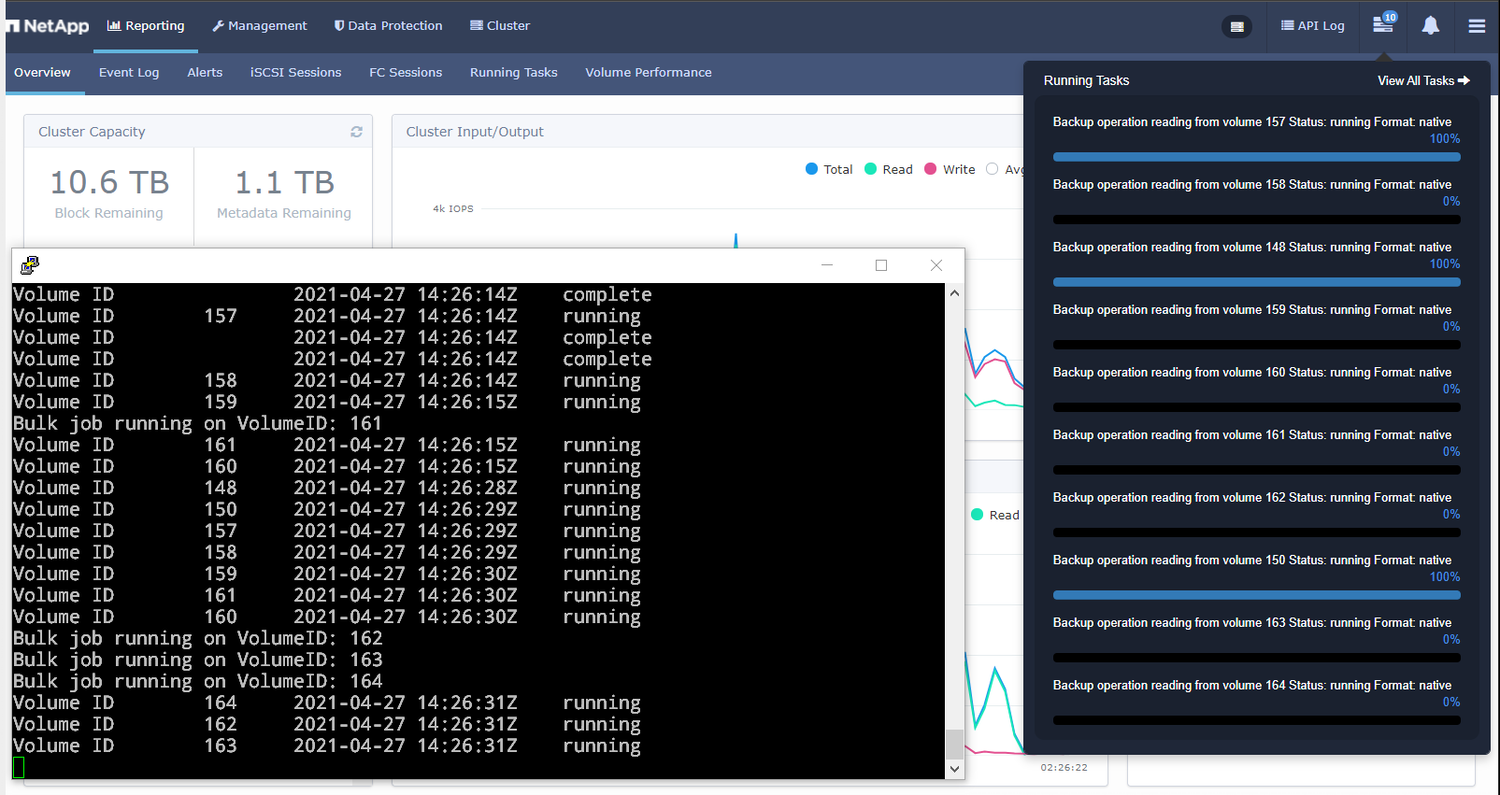
I created a proof-of-concept script that follows the simpler of the two approaches outlined above:
- Takes a parameter that specifies the number of parallel jobs (default: 10) which should be safe on a 4 node cluster although 20 might work as well
- Volumes to backup are provided in a list of volume IDs; these don't have to be ordered in any particular way and could be loaded from a CSV file or DB
- Reports errors that can be logged to a file, but I'd recommend to simply watch SolidFire events or SNMP logs with Graylog, Elastic, Splunk or something and look for failed backup jobs. Failed jobs could be rescheduled, of course, but I didn't do it in the script.
- As BulkVolumeRead (Backup) jobs take the optional parameter SnapshotID, you could easily make a quiesced snapshot before this script runs, and then simply pick the latest snapshot ID available. While experimenting with this I discovered that if
snapshotID: 0, Backup to S3 still works (it seems 0 equals none) so something like this could be added to the script:
$snapshotID = ((Get-SFSnapshot -VolumeID $v | `
  Sort-Object -Descending -Property CreateTime | `
  Select-Object -First 1).snapshotID)

if ($snapshotID -eq $null) { $snapshotID = 0 }
Then you'd just add "snapshotID" = $snapshotID to Invoke-SFApi parameters.
I did not try to save and load credentials securely because PowerShell makes that reasonably easy. I'd suggest to run such scripts signed, from a Windows VM connected only to Management Network which would make its SolidFire management credentials .
A screenshot of the script can be seen below. This script can be found in my awesome-solidfire repository. (Update: there are now two versions, v2 is probably better and certainly can run more jobs in parallel.)
Demo
- SolidFire Backup/Restore to/from S3 with Minio (2m16s)
- Simple parallel backup script for SolidFire Backup to S3 (4m00s)
Conclusion
SolidFire's Backup to S3 is probably much simpler than similar features seen in other storage platforms (for example, Cloud Backup Service available for ONTAP is already quite sophisticated and well-integrated into NetApp's hybrid and public cloud solutions). But SolidFire's Backup to S3 is free, easy to automate, has basic requirements, and can be used with on-premises or cloud S3 storage and some users find it good enough for their data protection purposes.
For advanced and enterprise use, especially with 100's of TBs to protect, I'd recommend software and services from NetApp data protection partners (currently, in alphabetic order, you may want to consider at Commvault, Rubrik, Veeam - the first and last currently integrate with SolidFire snapshot API). I wrote about some of them on this blog (mostly in the context of Kubernetes).
At the risk of fragmenting your data protection approaches - not something I'd advocate, but I'll mention it for the sake of discussion - you could use a community edition of enterprise data protection software for important data (Firewall VM, DBs, ADS/LDAP, Git, K8s Masters), and Backup to S3 for the rest (generic VMs).
One so far unexplored area is "in between" situations where community applications could be used to cover niche use cases. More on that in the next post.