NetApp SolidFire, Kasten K10, Kubernetes
NOTICE: any and all credentials and tokens on this page are samples, not leaked.
- Introduction
- Improve storage management and data protection in a Kubernetes environment
- Data protection with Kasten in a NetApp HCI or SolidFire environment
- Diagram
- Automation
- Demo
- Summary
- Appendix A: PVs (Volumes) and Snapshots
- Appendix B: Removing expired snapshots
- Appendix C: Kasten K10
Introduction
In previous Kasten-related posts I demonstrated how Kasten can be used to protect application data and metadata in a SolidFire environment, as well as how to export (backup) snapshots to a remote S3-compatible cloud storage such as NetApp StorageGRID. In the very first Kasten-themed post I noted how Kubernetes requires even more careful storage management compared to static environments such as bare metal or VM.
Why? Isn't everything automatic? It is but while automation increases your storage productivity two- or three-fold, the number of storage management tasks can increase even more. For a very simple example, imagine an application that used to run in three VMs, but now requires 10 containers, four of which have persistent volumes. In such an environment the administrator has to protect more than three to five times as many resources.
Automation not only solves, but also creates, problems. In your old VM based infrastructure you may have had two datastores named s1az1pod1hrapp1-1 and s1az1pod1hrapp1-2. You know where to go and what each storage object (volume, snapshot, backup) was. But the new Kubernetes environment has four volumes named like pvc-9f5ec0bd-8531-401c-a1dc-035592a4b7b1, and 20 snapshots with volume names like snapshot-1a988083-74b8-48de-9d64-11e3457ac147. Multiply these numbers by 10 or 50 applications.
Not good!
Improve storage management and data protection in a Kubernetes environment
NetApp SolidFire
SolidFire is distributed iSCSI block storage software. It provides provides storage QoS on a per-volume basis (Min, Max, Burst (60 seconds)). All efficiencies (Thin Provisioning, Deduplication and Compression) are always enabled. Clones and snapshots are space-efficient.
To use a SolidFire snapshot for other purposes than restore, SolidFire requires you to create a clone which is a space-efficient volume identical to the snapshot from it was created, but completely independent and can be mounted for read-write or read-only operations. This behavior is identical regardless of iSCSI client type (bare metal, hypervisor, container).
The maximum number of snapshots in SolidFire 12.2 is 32 per volume, but normally it's better to stay at 30 or below. Example:
- One snapshot every 10 minutes, retain 6
- One snapshot every 1 hour, retain 8
- One snapshot every 12 hours, retain 2
Snapshot schedule like this would consume 16 snapshots.
The SolidFire API allows us to easily create snapshot schedules, but in an orchestrated environment like Kubernetes, we'd probably prefer to do that externally (such as in Kasten K10). You can use the both and keep the combined number of snapshots at 30. If I did that, I would keep the number of self-scheduled snapshots low (2-4), let data protection software manage the rest (up to 20)) and leave some space for ad-hoc snapshots. The reason is the complexity of Kubernetes environments: while "classic" scheduled storage snapshots may make you feel safer, the less you rely on manual restore procedures the better.
NetApp Trident CSI
NetApp Trident is a CSI-compatible, dynamic storage provisioner for containers. With it, you can automate various storage operations in a Kubernetes environment: create, grow, delete, snapshot and import volume are frequently used ones.
Because SolidFire supports storage QoS policies and Trident can make use of them, in Kubernetes Storage Class definitions we can optionally specify a storage policy for each storage class.
Kasten by Veeam
Kasten K10 is a native Kubernetes application for data protection (backup, restore, replication) of your application metadata and persistent data (PV contents).
In a Kubernetes environment with NetApp HCI or SolidFire storage, it can use Trident CSI to manage (create, delete, clone) SolidFire snapshots and preserve application metadata. These bundles can also be backed up (exported) to a remote S3-compatible object store, and restored to the same or different Kubernetes cluster.
To protect NetApp HCI or SolidFire data with Kasten, we create a protection policy and define at least one schedule (snapshot schedule). To protect persistent data, Kasten uses the CSI interface of Trident. If we want to make a space-efficient copy outside of SolidFire, Kasten can export metadata & data bundles to a remote object store.
NetApp StorageGRID
This leading object storage platform with S3 and Swift API support is a popular destination for backup and other object storage workloads. Enterprise customers use it for Veeam and other applications that consume S3 storage.
Data protection with Kasten in a NetApp HCI or SolidFire environment
SolidFire QoS performance policies
Kubernetes clusters tend to have a lot more volumes than VMware or KVM clusters. You probably want to allocate performance sparingly. Example for a four-node SolidFire cluster with a performance budget of 200,000 IOPS:
| SC | Min | Max | Burst | PVs | Sum(Min) |
|---|---|---|---|---|---|
| basic | 300 | 1,000 | 3,000 | 100 | 30,000 |
| silver | 1,000 | 4,000 | 10,000 | 50 | 50,000 |
| gold | 5,000 | 15,000 | 50,000 | 10 | 50,000 |
| TOTAL | - | - | 160 | 130,000 |
This cluster would reserve 130,000 IOPS for these 160 PVs, so even if the number of PVs was a bit above the expected we'd still be able to satisfy our requirements without discounting even after a loss of one node (200,000 IOPS * (4-1) nodes).
Kubernetes Storage Classes
Based on the above, modified for your environment and requirements, you could create 3 or more storage classes. Why "or more"? Because there's more to it than just QoS.
You may want to have more than one SC for each QoS class:
- Silver with ext4 filesystem
- Silver with xfs filesystem
- Silver that deletes volumes after they're unclaimed from K8s
- Silver that does not delete volumes after K8s PVCs disappear
- Silver with extra Burst IOPS for a coworker who bought you a beer
RTFM for the gory details and keep the number of policies under control - you probably don't want to manage more than 10. You maybe want to use more than 10, but that's something entirely different.
Remember that volumes need to have reclaim policy set to "Retain" if they're to remain undeleted after the PV is released. This is important because volume snapshots be deleted together with the volume. If you want your Kasten snapshots to survive PV deletion from Kubernetes, they need to use that reclaim policy option to remain on SolidFire. Volumes which do not need protection may use other reclaim policies.
Kasten K10 protection policies
- For local (snapshots) data protection, keep in mind to keep the number of snapshots at 30 or below
- For remote (exported snapshots) data protection, refer to K10 limits while monitoring available network bandwidth, and object store cost and capacity
For this I won't recommend any specific approaches (I now everyone has their own), but I want to show how we'd have to take into account the number of snapshots required for both manually scheduled and CSI snapshots:
| Level | Type | SolidFire snapshots | K10 CSI snapshots | K10 export to StorageGRID S3 | Snapshots |
|---|---|---|---|---|---|
| Important | SolidFire replication | 15m (4), 60m (8), 1d (7) | 1h (2), 1d (3), 1w (4) | Daily, long retention | 28 |
| Normal + DR | SolidFire and K10 | 30m (2) | 1h (4), 8h (3), 1d (7), 1w (4) | Daily, medium retention | 20 |
| Normal | K10 | - | 1h (4), 24h (3), 1w (12 ) | Weekly, medium retention | 19 |
| Dev/Test | K10 | - | 1d (7), 1w (4) | Weekly, short retention | 11 |
This is already too complicated! But the important thing is we don't utilize all available snapshots on any volume regardless of its data protection requirements.
To stay safe and notice problems sooner, set a snapshot quota. Once you hit it you'll notice it quickly as your K10 jobs will fail. But at least you won't need to go to check SolidFire logs - you'll see in Trident logs:
time="2021-02-12T08:15:38Z" level=error msg="Error detected in API response." ID=877 code=500 message="Maximum snapshots per volume is 10" name=xMaxSnapshotsPerVolumeExceeded requestID=e325ee59-d6a3-4caf-8af1-5091b527f327 requestSource=CSI
time="2021-02-12T08:15:38Z" level=error msg="Error detected unmarshalling CreateSnapshot json response: unexpected end of JSON input" requestID=e325ee59-d6a3-4caf-8af1-5091b527f327 requestSource=CSI
time="2021-02-12T08:15:38Z" level=error msg="GRPC error: rpc error: code = Internal desc = failed to create snapshot snapshot-26ec168a-478f-4df8-8005-db8b421fee85 for volume pvc-f750b82d-7e13-45ac-b63b-fc3311858e64 on backend solidfire_192.168.103.30: could not create snapshot: json decode error" requestID=e325ee59-d6a3-4caf-8af1-5091b527f327 requestSource=CSI
It's very clear what's happening, and we know why exactly (as mentioned, you may want to set this to 30 or 20, if you want to leave some for manual snapshots on-demand):
volume-snapshot-quota.yaml
apiVersion: v1
kind: ResourceQuota
metadata:
  name: snapshot-quota
spec:
  hard:
    count/volumesnapshots.snapshot.storage.k8s.io: "10"
Export to, and retention on S3 storage is much less restricted (frequently by network bandwidth and S3 storage budget). It can be different (and more generous) than local snapshot retention policy. An example of a snapshot (CSI snapshots) and backup (export to S3) schedule can be seen below.
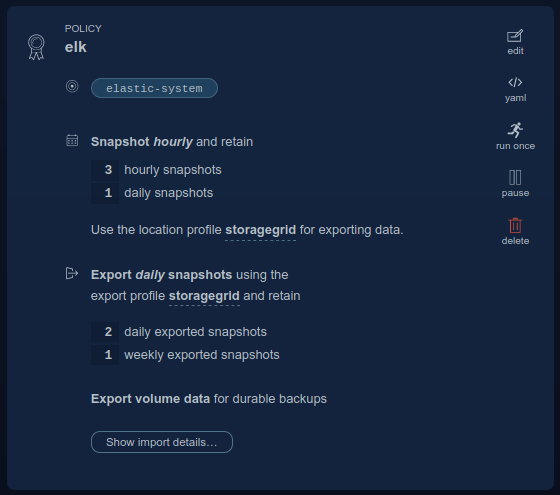
Note:
- In K10 v3.0.7 default only Snapshot schedule is created (as that one is local)
- If you enable Export, you may need to consume Internet bandwidth and paid-for S3 capacity. By default Export schedule is identical to snapshot schedule, but customize Export schedule and retention if you need to
- In the example above, my Export schedule is less frequent (maybe my network bandwidth is limited, and maybe I replicate my volumes with SolidFire SnapMirror so for older backups I prefer to restore them from LAN)
- You can also set up custom retention for Exports (go to Edit to adjust it)
Snapshot schedules are very easy to customize in the UI (you don't have to use the API if you don't want to):

Independently scheduled SolidFire snapshots
As mentioned above I advise against storage cluster snapshots scheduled and managed independently of K10 protection policies but there may be situations where this can be useful. Examples:
- If SolidFire is set up for storage replication (to another NetApp HCI, SolidFire or ONTAP system). Kasten K10 does not automatically enable storage replication of Kasten snapshots (Trident CSI does not offer that feature), so even if the underlying SolidFire volume itself is synchronously or asynchronously replicated to another SolidFire cluster, Trident CSI snapshots will not be. To work around that:
- Create your own SolidFire snapshot schedule and have those snapshots copy replication of underlying SolidFire volumes. You need less than 8 snapshots for that (example: one every 15 minutes, retain for two hours)
- Write a script that uses
kubectlor the Kasten K10 API to find Kasten/Trident CSI snapshots and use SolidFire Python CLI to enable replication on those snapshots. Run it periodically so that new snapshots get replicated.
- If you have other automation which is easier to make going without using the Kubernetes or K10 API. This includes repetitive jobs which may be easier to automate by directly talking to applications and SolidFire API in PowerShell or Python.
In the unlikely case you lose the entire K8s cluster - including K10 running on it - you could reinstall K8s and K10 and recover its configuration from the StorageGRID S3 bucket, or stand up a cluster in Public Cloud and restore K10 backups in S3 to it. But it should be faster to restore K8s management cluster from a SolidFire snapshot and then restore the rest from StorageGRID.
In the example below the second snapshot is customized to expire in 7 days and inherit the underlying volume's replication settings (if the volume be paired for remote replication to another NetApp HCI or SolidFire array, the snapshot will be replicated as well; SnapMirror (that is, replication from SolidFire to ONTAP) uses SnapMirror pairing which is similar.

Again, you should not touch K10 snapshots (let it control its own) - if you want a custom snapshot schedule and behavior, create it separately on SolidFire and give those snapshots easily recognizable names.
Application and Snapshot Management
Storage Classes are used to provide differentiated storage performance and for that they leverage SolidFire storage QoS.
That works mostly for us, but sometimes against us: a clone inherits storage QoS (and SC) from its parent (either a parent volume or a snapshot). That's good, because we don't have to touch it. But it can also be bad if we don't economize: let's say your volumes use reclaim policy "Retain" because they need to be protected by K10. If you make such a SC your Kubernetes default, all non-particular PVs will be assigned that SC, and have to be manually deleted from SolidFire after they've been released from Kubernetes and deleted from K8s.
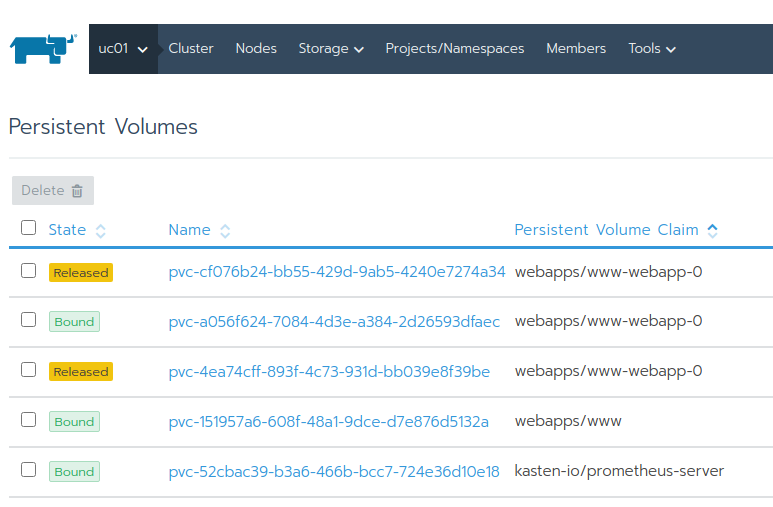
If you aren't careful you can end up with 100 released by otherwise unused volumes, each with a QoS Min 1,000 IOPS, they'll consume 100,000 IOPS because SoldiFire will reserve IOPS for them as it does for all volumes with such QoS policy.
What to do about it? Trident v21.01 won't let us change QoS (SolidFire lets you, but you don't want to have Trident and SolidFire out-of-sync with each other). Other options:
- Make a basic (lowest) Storage Class the cluster default Storage Class, and set its reclaim policy to Delete. Problem solved!
- Use SolidFire and K10/CSI snapshots to protect non-basic SC's, so that you specifically call them out in order to be able to protect PVs with K10 or SolidFire snapshots.
- For manually created SolidFire snapshot schedules, set expiration date to let them self-destruct (do not
Keep Foreverbecause you'd run out of snapshots) - For K10/CSI policy driven snapshots, let K10 manage those (they are created with
Keep Foreveroption ON (default), but K10 can delete them on its own)
- For manually created SolidFire snapshot schedules, set expiration date to let them self-destruct (do not
What if we want to clone volumes, can we change the QoS then? Yes, that can be done:
- Clone a volume (either a Kubernetes or non-partitioned non-Kubernetes volume or its snapshot), change its Storage QoS and then use the Trident volume import feature
- If you do not not plan to keep or protect a clone, you can directly override its QoS settings using the SolidFire Web UI or CLI or API, but as mentioned above, this isn't good because its Kubernetes-based metadata will become inconsistent with actual values. I would only consider this as a temporary solution for volumes that I plan to delete shortly after changing their QoS by bypassing Kubernetes (SCs and Trident CSI). For what it's worth - I wrote a PowerShell script that allows easy manipulation of Volume QoS; it's not meant for Kubernetes, but if you're interested you can find about it in blog archives.
The curious case of an abandoned clone
One very peculiar situation related to volume QoS settings is restore.
When Kasten K10 (and Veeam, for that matter) restore data from a snapshot, they work with whatever QoS is available. As volume snapshots inherit parents' QoS settings, fast volumes (high QoS) are restored faster, and slow are restored relatively slower. On Veeam you can run pre- and post-scripts to customize this behavior (this is why I wrote that PoweShell script, by the way), but with Kasten K10 3.0.7 you can't.
That usually doesn't matter, but if you deal with important but slow volumes you may want to make that exception and override QoS settings during the restore, and revert them after restore has completed. I don't recommend it, but it's possible.
The other curiosity - related to several other sections of this post - is that it seems that K10 export (to S3) necessitates the creation of a clone from a snapshot of the protected volume (as expected - I mentioned at the very top that SoliFire snapshots cannot be presented to hosts - they need to be cloned so that we can read and backup data from a clone).
But because all protected volumes must allow retention of released PVs, what happens is after such operations complete and the cloned PV is released, temporary PVs just stay there (reclaim policy: Retain) in K8s and on SolidFire (the screenshot above). This seems unavoidable, "by design" behavior of SCs.
So remember to periodically delete Released volumes (first remove them from Kubernetes (possibly with tridentctl, if you find a way to automate), then from SolidFire). Also remember to not delete all Released volumes. Not all Released volumes are abandoned clones - some may have snapshots that K10 needs to protect data.
Expect the unexpected
Normally you'd create a policy like this (here I only have snapshots, no exports):
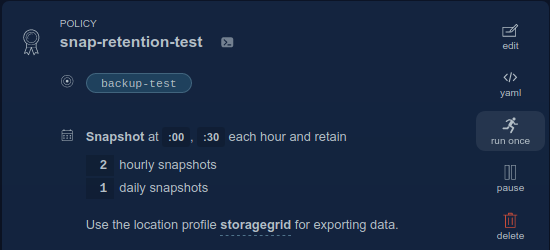
Which results in three snapshots created by K10 and Trident, and retained in Kubernetes:
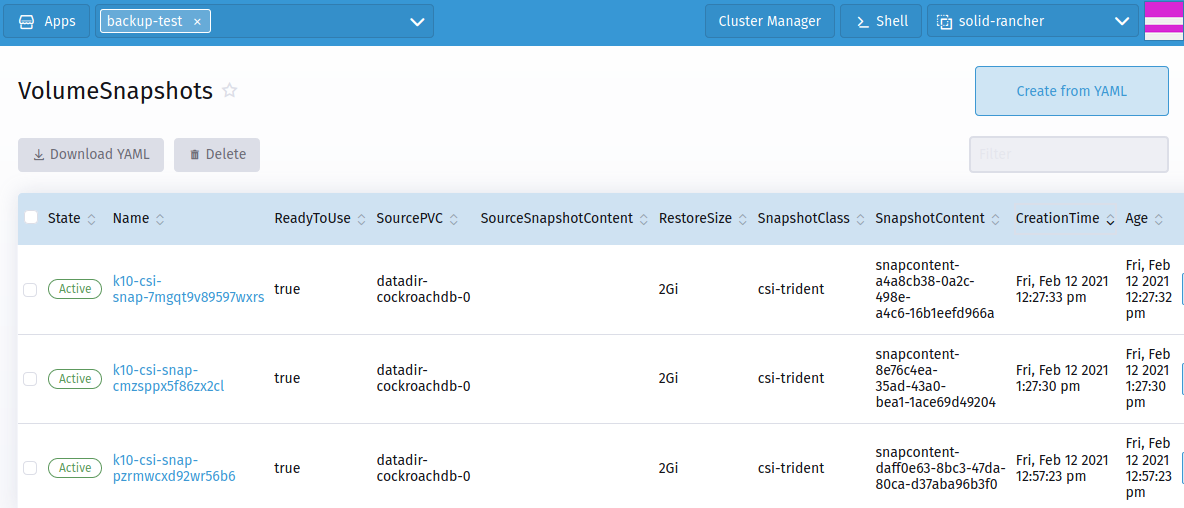
And SolidFire would show the same:

But currently SolidFire snapshots keep piling up (see Appendix B for a DIY workaround).
Diagram
How do we put these pieces together?
There are several ways to do it, but most of my customers run Kubernetes in VMs (on top of VMware), so I'll show a VMware-based Kubernetes environment on top of NetApp HCI.
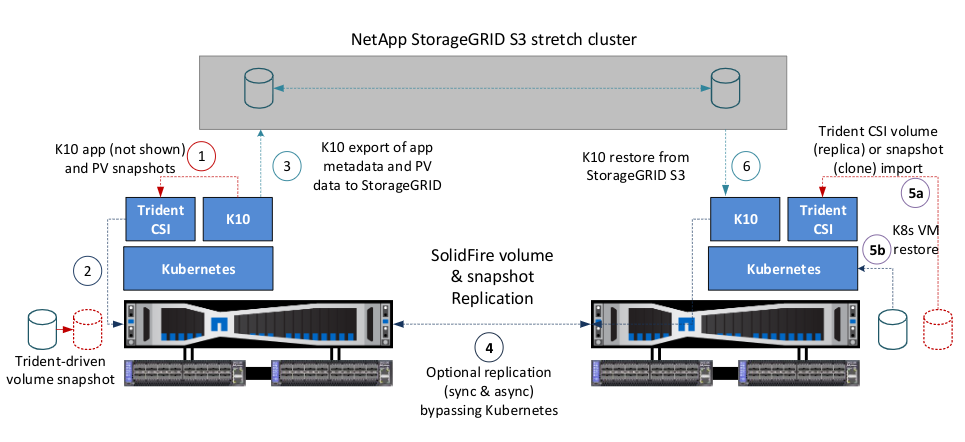
| Item | Description |
|---|---|
| 1 | K10 takes app & PV data snapshot, snapshots drive Trident CSI |
| 2 | Trident CSI takes SolidFire PV snapshots |
| 3 | K10 snapshots of encapsulated apps and persistent data are exported to StorageGRID |
| 4 | Optional SolidFire-based data replication schedule for volume and snapshot replication for PVs and K8s VMs (RPO 0m (sync) or 5m+ (async)) |
| 5a | Trident CSI can clone SolidFire-replicated snapshots and volumes (from step 4) and import them to K8s (RPO 0 (sync) or <10m (async), RTO < 5m) |
| 5b | Kubernetes VMs and other data can also be failed over thanks to replication of VMFS filesystems hosting the cluster (RPO 0 (sync) or 5-10 min (async), RTO < 5m), VMware SRM, Cleondris HCC or manually |
| 6 | Restore applications and data from K10 by importing backups from StorageGRID. K10 doesn't need to be aware of StorageGRID sites (K10 sees StorageGRID cluster as one S3 API endpoint). |
This could be 1 site (2 racks, or 2 buildings), 2 sites or 3 sites. Minimal deployment with full redundancy and all features except site replication would consist of one site with NetApp HCI (4 compute, 4 storage nodes) and a three node StorageGRID cluster running out of VMs.
Depending on how much data there is to protect, StorageGRID could run in VMs or on physical appliances (or use appliances on PROD site and VMs on DR site).
For lowest RPO of PVs and virtual machines that run Kubernetes and other workloads (DNS, etc.) consider using SolidFire replication which would be set up outside of K8s, as mentioned earlier. It takes minutes to both set up and fail-over, with RPO as low as 0 (for synchronous replication).
Automation
This could be a separate post, but here's a simple approach I would use to automate:
- Keep configuration as JSON or YAML formatted files in Git
- Use Ansible or PowerShell to manage data protection policies (snapshots and replication, if necessary) for SolidFire storage clusters
- Use
kubectlto apply K10 data protection policies (K10 has an API and it's not too hard to use it with kubectl and YAML files as long as you don't over-customize policies) - Monitor K10 with Prometheus, monitor SolidFire through Trident CSI metrics (Prometheus) (or fork HCI Collector to create your own monitor)
- SolidFire replication of PVs and their snapshots and site failover can be managed from Ansible or PowerShell; for VMs consider VMware SRM or Cleondris HCC although this too can be done manually
Some examples of PV, snapshot and K10 CLI output are provided in Appendixes below.
Demo
See this in action here (7m45s). This demo video doesn't use recommendations from this post, but it emphasizes possible problems as I work through backup and restore scenarios.
If you just want to see how K10 works with Rancher, SolidFire and StorageGRID, I have a shorter (5m11s) video here.
Summary
For snapshot protection in Kasten/SolidFire environment most users would benefit from a combined snapshot protection split between SolidFire and K10/CSI snapshots in which only a necessary minimum of SolidFire snapshots would be taken to cater to storage replication and similar requirements.
Because of the limited number of snapshots per volume, users must be careful to organize snapshot policies to fit within those limits and monitor the growth in number of SolidFire volumes and snapshots, and have a process to patch expired deleted snapshot objects and use tridentctl to delete them.
Exported snapshots (or backups) work seamlessly with StorageGRID S3 and don't seem to need special consideration compared to object stores in public cloud. Because local S3 storage usually does not have bandwidth restictions, the frequency and retention of backups to StorageGRID can be much higher than local snapshots on SolidFire.
Appendix A: PVs (Volumes) and Snapshots
tridentctl get snapshotsoutput (obtains names from SolidFire volumes and snapshots via the SolidFire API):
$ ./trident-installer/tridentctl get snapshots -n trident
+-----------------------------------------------+------------------------------------------+
|                     NAME                      |                  VOLUME                  |
+-----------------------------------------------+------------------------------------------+
| snapshot-a5d8af55-b506-4c26-9e27-704aa12a4356 | pvc-1182a9ae-0c61-4ae1-b1a2-5a0b1a42e628 |
| snapshot-f76bc1ed-000c-4045-9f43-94d197a0cb2b | pvc-1c6da81c-baf1-42fe-b28d-ed8bee13411c |
| snapshot-c4cfeed7-3293-4afe-9350-ebe5a100860a | pvc-1dbd0d72-86cc-4764-83c7-cf6f692361ed |
| snapshot-7a88af17-b89c-463b-9b98-04527520296c | pvc-3be91940-3440-4cd0-b426-d1fe4429ea74 |
+-----------------------------------------------+------------------------------------------+
- SolidFire PV names can be matched against Kubernetes PV's:
$ kubectl get pvc --namespace elastic-system
NAME                                         STATUS   VOLUME                                     CAPACITY   ACCESS MODES   STORAGECLASS       AGE
elasticsearch-data-quickstart-es-default-0   Bound    pvc-f750b82d-7e13-45ac-b63b-fc3311858e64   1Gi        RWO            solidfire-silver   6h41m
- This shows how not to manage SC's: all volumes default to
solidfire-silver. Kasten PVs need to be backed up so we want a SC with reclaim policyRetain, but that could be in a non-defaultsolidfire-silver-snapshotSC, to letsolidfire-silvernot unnecessarily consume snapshots for PVs that don't need protection, whereas busy volumes that also need protection (like Elasticsearch data) could be in yet another SC,solidfire-gold-snapshot, and for those we would be careful to manually reclaim their unclaimed clones. Or I should have made solidfire-bronze the default SC.
$ kubectl get pv --namespace elastic-system
NAME                                       CAPACITY   ACCESS MODES   RECLAIM POLICY   STATUS   CLAIM                                                       STORAGECLASS       REASON   AGE
pvc-2e2dbe6a-bb52-4fe0-a069-4c3fa2062d15   20Gi       RWO            Retain           Bound    kasten-io/jobs-pv-claim                                     solidfire-silver            2d9h
pvc-7239a0c4-d4b1-4e8a-a716-7536319055b7   8Gi        RWO            Retain           Bound    kasten-io/prometheus-server                                 solidfire-silver            2d9h
pvc-82087c70-7bf4-4951-83b3-2fdb18a40a4e   20Gi       RWO            Retain           Bound    kasten-io/logging-pv-claim                                  solidfire-silver            2d9h
pvc-bd40244e-8c29-4ccc-97d2-5bd89e1d4c08   20Gi       RWO            Retain           Bound    kasten-io/catalog-pv-claim                                  solidfire-silver            2d9h
pvc-e76cddc6-61e6-4628-b05a-24459b7e278f   2Gi        RWO            Retain           Bound    kasten-io/metering-pv-claim                                 solidfire-silver            2d9h
pvc-f750b82d-7e13-45ac-b63b-fc3311858e64   1Gi        RWO            Retain           Bound    elastic-system/elasticsearch-data-quickstart-es-default-0   solidfire-silver            6h41m
$ kubectl get sc
NAME                         PROVISIONER             RECLAIMPOLICY   VOLUMEBINDINGMODE   ALLOWVOLUMEEXPANSION   AGE
solidfire-bronze             csi.trident.netapp.io   Delete          Immediate           false                  3d1h
solidfire-gold               csi.trident.netapp.io   Retain          Immediate           true                   2d17h
solidfire-silver (default)   csi.trident.netapp.io   Retain          Immediate           false                  25h
$ kubectl describe sc solidfire-bronze
Name:                  solidfire-bronze
IsDefaultClass:        No
...
MountOptions:          <none>
ReclaimPolicy:         Delete
- This is where things get a bit crazy: volume snapshots use the format
snapshotcontent-${SNAP-ID}vs.snapshot-${SNAP-ID}on SolidFire. But they can still be matched by IDs.
$ kubectl get volumesnapshots --namespace elastic-system
NAME                            READYTOUSE   SOURCEPVC                                    SOURCESNAPSHOTCONTENT                                                        RESTORESIZE   SNAPSHOTCLASS           SNAPSHOTCONTENT                                                              CREATIONTIME   AGE
k10-csi-snap-64wf4nvrq5vdnqjj   true         elasticsearch-data-quickstart-es-default-0                                                                                1Gi           csi-trident             snapcontent-056843da-801e-4ba8-a97d-34c901a753d4                             6h46m          6h46m
k10-csi-snap-ggx9fllrltddcnjs   true         elasticsearch-data-quickstart-es-default-0                                                                                1Gi           csi-trident             snapcontent-f024aacc-a3a7-4766-bd38-aea0a61b63cc                             7h18m          7h18m
k10-csi-snap-knrhwqcckffv9d4s   true         elasticsearch-data-quickstart-es-default-0                                                                                1Gi           csi-trident             snapcontent-1a988083-74b8-48de-9d64-11e3457ac147                             8h             8h
k10-csi-snap-nkw6wmmpkbhbnvzt   true                                                      k10-csi-snap-nkw6wmmpkbhbnvzt-content-8648afa6-6883-4459-aa32-09eaba15b6dd   1Gi           k10-clone-csi-trident   k10-csi-snap-nkw6wmmpkbhbnvzt-content-8648afa6-6883-4459-aa32-09eaba15b6dd   8h             7h5m
It shouldn't be too hard to match K10 PVs and snapshots against SolidFire Volume and Snapshot names, and automatically delete unnecessary Released PVs in Kubernetes, and then the orphaned SolidFire volumes. But it can also be risky, so it's better to have smart Storage Class policies and avoid the need to automate this sensitive operation - despite the recycle bin feature in SolidFire (SolidFire volumes can be recovered up to several hours after deletion).
SolidFire snapshots manually created in Kubernetes (not by K10) are not relevant to K10 and if needed may be deleted with tridentctl. For example, I want to delete a snapshot of volume pvc-73d41364-e902-419e-9a1e-2b560ef07fd6. The snapshot was created in SolidFire Web UI. To find it, I get snapshots for the volume:
./trident-installer/tridentctl get snapshot -n trident | grep 73d
| snapshot-a4a8cb38-0a2c-498e-a4c6-16b1eefd966a | pvc-73d41364-e902-419e-9a1e-2b560ef07fd6 |
Now I can simply run ./trident-installer/tridentctl delete snapshot -n trident snapshot-a4a8cb38-0a2c-498e-a4c6-16b1eefd966a to delete that custom snapshot, right?
Wrong! As far as K8s is concerned, it knows nothing about the snapshot I created "out-of-band" by going directly to the SolidFire UI (the same would have happened if I used the SolidFire API or CLI). Trident can't see it. What Trident does see is snapshots created from Kubernetes by invoking Trident CSI snapshots.
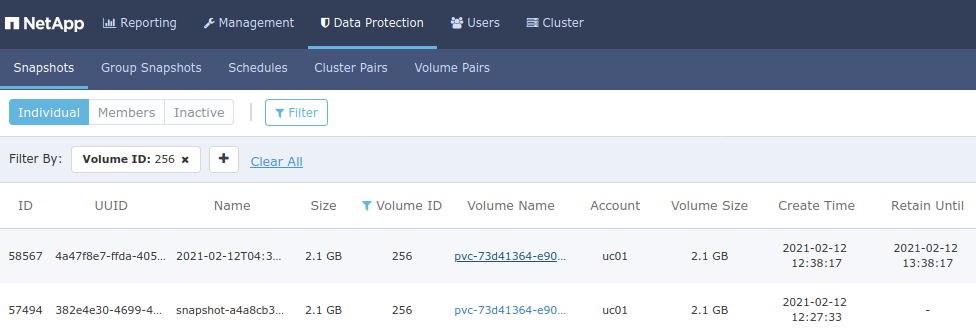
If I deleted Snapshot ID 57494, that would impact K10. Instead, we should remove it from the Web UI or CLI (PowerShell example: Remove-SFSnapshot -SnapshotID 58567 -Confirm:$false)
Appendix B: Removing expired snapshots
- Situation: protected PV uses SolidFire volume ID 256
- Challenge: although K10 protection policy is set to take and keep last 2 hourly snapshots, old SolidFire snapshots remain, creeping towards the hard limit of 32. In the Kubernetes namespace under VolumeSnapshots for protected resource K10 correctly shows only two snapshots. But on SolidFire we see a whole bunch:
PS > Get-SFSnapshot -VolumeID 256 | Select-Object -Property SnapshotID,Name

SnapshotID Name
---------- ----
     66496 snapshot-0266f29c-519b-4525-a05d-08cb8f0f5d6e
     60479 snapshot-daff0e63-8bc3-47da-80ca-d37aba96b3f0
     75495 snapshot-dc40c18e-9599-4cca-b474-f6cb339b606f
     69495 snapshot-30aafafa-ed34-4f70-a12e-2beb8e5a0185
     72512 snapshot-e511a1ea-d5e5-4403-a9a6-9a4cc245729a
     57494 snapshot-a4a8cb38-0a2c-498e-a4c6-16b1eefd966a
     77122 snapshot-78cc428f-b6d3-49a0-a9e6-ecc2dc952e40
     63490 snapshot-8e76c4ea-35ad-43a0-bea1-1ace69d49204
Edit (2021/03/19): I had thought this was Trident issue #462, but after a Trident developer suggested that in all likelihood that must be because deletePolicy: Retain was used. I went back and checked my Kasten-with-SolidFire notes and I confirmed I had tried with Delete as well - didn't help. Aha! So it must be Trident, right? Wrong!
It turns out I missed this particular note from the Kasten K10 docs which states that "K10 creates a clone of the original VolumeSnapshotClass with the DeletionPolicy set to 'Retain'." Oops! Kasten K10 is easy to use so I didn't read all of the documentation - my bad!
I agree this is a wise approach. But we can't just ignore it because eventually you'll hit the 32 snapshot limit on SolidFire. My workaround until there's a recommended best practice from either Kasten or NetApp: knowing the details of this environment (example: K10 is set to retain two most recent snapshots): find SolidFire snapshot IDs older than most recent two, find their K8s IDs, patch those snapshots to spec.deletionPolicy: Delete and then delete them with tridentctl delete snapshot, which should delete them in SolidFire as well. I haven't tried this yet.
What I did try (before I knew about the K10 volume snapshot class clone) was to delete them outside of Kubernetes:
PS > Get-SFSnapshot -VolumeID 256 | Select-Object -Property CreateTime,SnapshotID,Name | `
 Sort-Object -Property CreateTime | Select-Object -Property SnapshotID -SkipLast 2 | `
 Remove-SFSnapshot -Confirm:$false
One significant downside of this approach is that it doesn't clean up in Trident, so Trident keeps track of ever more snapshots.
If we had a more complex K10 protection policy (example: hourly snapshots (keep 8) & daily snapshots (keep 7)), this wouldn't be a one-line script. We'd have to write a more complex script, perhaps one that queries Kasten K10 for snapshots that are about to expire and patch them to Delete before that happens.
Such scripts could run out of a PowerShell container or VM.
The more complex appraoch with patching looks better but I haven't tested it. I wonder if Kasten could simply patch Snapshots to retainPolicy: Delete as it expires them.
Appendix C: Kasten K10
- Get profiles (provider for CSI snapshots, and provider for cloud storage (S3)):
$ kubectl get profiles.config.kio.kasten.io --namespace kasten-io
NAME             STATUS
solidfire-prod   Success
storagegrid      Success
- CSI provider details are fetched automatically by K10 from cluster VolumeSnapshotClass (annotated with
k10.kasten.io/is-snapshot-class: true). My SolidFire cluster is calledPROD- it's interesting that K10 got it although it's not displayed in Trident output or back-end JSON definition provided to Trident.
$ ./trident-installer/tridentctl get backend -n trident
+--------------------------+----------------+--------------------------------------+--------+---------+
|           NAME           | STORAGE DRIVER |                 UUID                 | STATE  | VOLUMES |
+--------------------------+----------------+--------------------------------------+--------+---------+
| solidfire_192.168.103.30 | solidfire-san  | a8ef63d4-8bc8-49dc-a756-857068972067 | online |      50 |
+--------------------------+----------------+--------------------------------------+--------+---------+
- Cloud storage (if you have it) details are provided to K10 via the API or in the Web UI. My cloud storage provider is called
storagegridand I can view its configuration withkubectl describe profiles.config.kio.kasten.io --namespace kasten-io storagegrid. The relevant section shows S3 API endpoint, bucket name (sean-backup), and S3 region (StorageGRID defaults tous-east-1and most people don't change that, regardless of where StorageGRID is located):
Spec:
  Location Spec:
    Credential:
      Secret:
        API Version:  v1
        Kind:         secret
        Name:         k10secret-vswfz
        Namespace:    kasten-io
      Secret Type:    AwsAccessKey
    Object Store:
      Endpoint:           https://dot.com.org:8443
      Name:               sean-backup
      Object Store Type:  S3
      Path:               k10/d5cca499-f80d-4574-a539-5c90cd0987f2/migration
      Path Type:          Directory
      Region:             us-east-1
    Type:                 ObjectStore
  Type:                   Location
- Get current data protection policies:
$ kubectl get policies.config.kio.kasten.io -n kasten-io
NAME                           STATUS
elk                            Success
k10-disaster-recovery-policy   Success
scaleoutsean-backup            Success
- Describe the policy used for
elastic-system(snapshot both hourly (keep 3) and daily (keep 1); export backups to S3 daily (keep 2)). This information corresponds to the first screenshot in this post, above.
$ kubectl describe policies.config.kio.kasten.io -n kasten-io elk
Name:         elk
Namespace:    kasten-io
Labels:       <none>
Annotations:  <none>
API Version:  config.kio.kasten.io/v1alpha1
Kind:         Policy
Metadata:
  Creation Timestamp:  2021-02-11T07:01:24Z
  Generation:          6
  Managed Fields:
    API Version:  config.kio.kasten.io/v1alpha1
    Fields Type:  FieldsV1
    fieldsV1:
      f:spec:
        .:
        f:actions:
        f:frequency:
        f:retention:
          .:
          f:daily:
          f:hourly:
        f:selector:
          .:
          f:matchExpressions:
      f:status:
    Manager:      dashboardbff-server
    Operation:    Update
    Time:         2021-02-11T09:57:06Z
    API Version:  config.kio.kasten.io/v1alpha1
    Fields Type:  FieldsV1
    fieldsV1:
      f:status:
        f:hash:
        f:specModifiedTime:
        f:validation:
    Manager:         config-server
    Operation:       Update
    Time:            2021-02-11T16:00:06Z
  Resource Version:  768877
  Self Link:         /apis/config.kio.kasten.io/v1alpha1/namespaces/kasten-io/policies/elk
  UID:               0686f661-6c43-49c8-ba9a-c8c03b1b6b70
Spec:
  Actions:
    Action:  backup
    Backup Parameters:
      Filters:
      Profile:
        Name:       storagegrid
        Namespace:  kasten-io
    Action:         export
    Export Parameters:
      Export Data:
        Enabled:  true
      Frequency:  @daily
      Migration Token:
        Name:       elk-migration-token-28vtx
        Namespace:  kasten-io
      Profile:
        Name:          storagegrid
        Namespace:     kasten-io
      Receive String:  bIz...Fa
    Retention:
      Daily:  2
  Frequency:  @hourly
  Retention:
    Daily:   1
    Hourly:  3
  Selector:
    Match Expressions:
      Key:       k10.kasten.io/appNamespace
      Operator:  In
      Values:
        elastic-system
Status:
  Hash:                2207921667
  Spec Modified Time:  2021-02-11T16:00:06Z
  Validation:          Success
Events:                <none>
- Get export actions:
kubectl get exportactions.actions.kio.kasten.io
NAME                       CREATED AT
manualbackup-2b85f-gqw9r   2021-02-11T06:31:25Z
scheduled-7529k-bndpq      2021-02-11T05:21:02Z
- Describe scheduled export (backup) action we use for
elastic-systemnamespace:
$ kubectl describe exportactions.actions.kio.kasten.io scheduled-7529k-bndpq
Name:         scheduled-7529k-bndpq
Namespace:    elastic-system
Labels:       k10.kasten.io/appName=elastic-system
              k10.kasten.io/appNamespace=elastic-system
Annotations:  <none>
API Version:  actions.kio.kasten.io/v1alpha1
Kind:         ExportAction
Metadata:
  Creation Timestamp:  2021-02-11T05:21:02Z
  UID:                 ef00afd2-6c28-11eb-96d6-dab34f9825e7
Spec:
  Export Data:
    Enabled:  true
  Profile:
    Name:          storagegrid
    Namespace:     kasten-io
  Receive String:  bIz..jQ
  Subject:
    API Version:  apps.kio.kasten.io/v1alpha1
    Kind:         RestorePoint
    Name:         scheduled-7529k
    Namespace:    elastic-system
Status:
  Action Details:
  End Time:  2021-02-11T05:23:08Z
  Restore Point:
    Name:
  Start Time:  2021-02-11T05:21:02Z
  State:       Complete
Events:        <none>