MinIO Erasure Coding with NetApp E-Series
- The concept
- Recommendations
- Tolerance to disk loss
- E-Series with unprotected media
- MinIO without EC
- Getting the most out of E-Series in MinIO EC environments
- Appendix A
The concept
I've touched upon this in previous blog posts, but I wanted to write a post dedicated to MinIO Erasure Coding with E-Series because several E-Series users have asked about it.
MinIO implements EC and the idea is to deploy X dumb servers with Y physical disks (the total number of disks Z=X*Y) and then apply EC to solve problems that need solving, plus some that don't (but MinIO thinks they do).
Here's an image from the same page (image credit: MinIO).
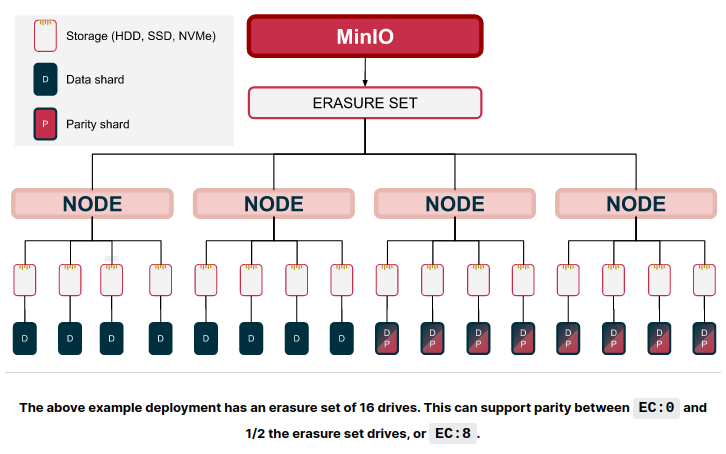
This hardware configuration above has 4 servers and 16 disks which means we can:
- Use up to 8 disks for EC parity, which in MinIO's terminology means the minimum of EC:0 (no parity, which would equal RAID 0-like striping, although this isn't supported for production multi-node clusters) to EC:8 (Z/2=16/2=8 disks)
- While that's up to us, it usually makes sense to be able to tolerate the loss of 1 server (with all its disks) or maybe 1 server + 1 disk from other servers (in MinIO speak, one server with four disks would mean E:4 and one server plus another disk from anywhere else would be E:5)
When clusters with MinIO EC are designed:
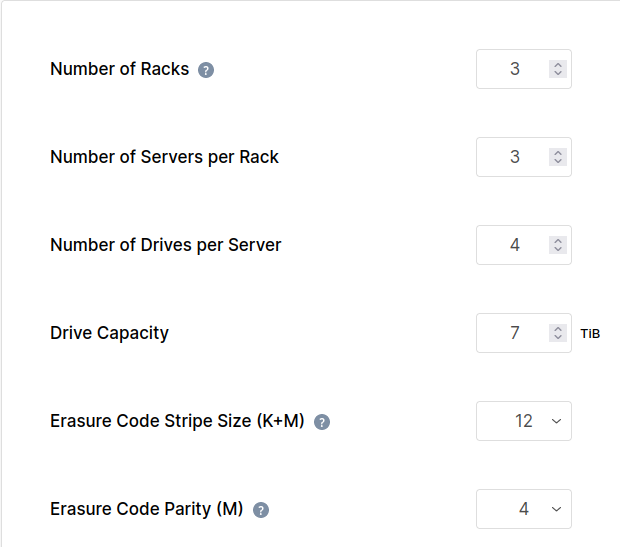
- For X servers with Y disks, use EC:Y. Example: 3 servers with 4 disks each would result in EC:4 (commonly described as EC 8+4, 12-disk stripe width with 8 data and 4 parity chunks)
- N racks: use 3 servers per rack, so X (total number of servers) would normally be at least N x 3. If you have 1 rack, you'd use 3 servers. If you have 3 racks, you'd use 9 servers. Of course, we can use fewer servers and don't need 9 physical servers just for MinIO.
Please also consider read vs. write quorum:
- 3 servers with 4 disks each: if 1 server goes down and takes 4 disks down with it, we can still read and write (!). Even after reading about it I still find that risky because during that time you're effectively writing unprotected stripes. I expected there'd be a setting where write quorum can be optionally enforced at N+M level to disable writes.
- The case where the number of parity disks equals Z/2 (half of all cluster disks), write quorum requires (Z/2 + 1). The reason for this is to ensure one side can win in the case of split brain which could happen with an even number of MinIO
Requirements sometimes specify failure tolerance for write quorum and sometimes for read quorum:
- if normal service availability is required, then we should design for write quorum. While performance and resilience may be reduced, full service must remain available
- if significant impact - such as the inability to write - is allowed, then we can design for read quorum tolerance and save cost. Here the main objective is to avoid data loss even with reduced functionality (no writes or deletes possible)
In enterprise environments that use VMs ("VI") or K8s and protected storage such as E-Series, it's very rare to lose volumes or (permanently) lose servers (especially with vSphere HA and datastores on SAN), so I'd normally design for "read quorum" which it wouldn't really be as both servers and storage would failover.
It appears in most MinIO clusters servers and disks required for read & write quorum are the same, which can be dangerous: if K+M is 12 and 4 disks are gone or 1 server goes down, it appears writes would be striped across K disks, with no parity at all. That means even after the failed server with 4 disks is back, if any disk that contains parity-less objects is lost, some object data may still be lost.
Some object storage allows you to enforce write quorum on a per-bucket basis. I suppose, but I'm not sure, MinIO's workaround for this would be to change parity to something like 4+2 until the failed server (and failed 4 disks) are back, then change the cluster rule back to EC 8+4. But the 4+2 objects would remain that way, still exposed to server failures (but safe from single disk failure). If you're curious about this you can check their community, docs, and source code.
Because in these two examples below we won't use EC sets where parity drives are 50% of stripe size and because MinIO doesn't insist on writing K+M chunks (full width stripe), read and write quorums will need the same number of disks.
Recommendations
When MinIO with EC is used with E-Series, normally it's better to use protected E-Series volumes (RAID 6 disk groups or DDP (disk pools)) as that gives us the benefits of virtualized underlying physical disks.
While direct access to non-protected physical disks (RAID 0 on E-Series, for example) has some advantages, it is not easy to manage. Consider this detail from the MinIO documentation:
Objects written with a given parity settings do not automatically update if you change the parity values later.
We'll assume MinIO servers use protected volumes and that's what I'd recommended for MinIO with EC on E-Series.
Single rack
Here's what their EC calculator does with the approach when there's a single rack.

E-Series disk arrays are fully redundant, so we would most likely use just one storage array per rack.
MinIO EC calculator is not aware of any redundant storage because it works with the assumption that servers use dumb JBOD devices, which is why we "need" three MinIO servers (we actually don't) and they recommend at least 4 disks per server (not relevant in the case of E-Series with protected volumes: we can create any number of disks (LUNs) for each of the servers).
This shows how that works on E-Series (DDP example): disks 1-16 are used to construct a DDP (pool) which would normally use 2 disks of capacity overhead to protect the other 14 (14+2). Then on top of that we can create any number of volumes for each MinIO server. All volumes write parity-protected stripes (8+2) and rely on the underlying DDP (14+2) to protect data from disk loss.
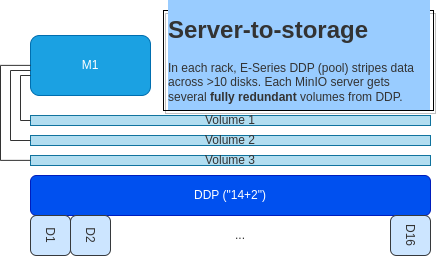
But, MinIO EC calculator does things its own way: it assumes each server has 4 physical disks and advises the following:
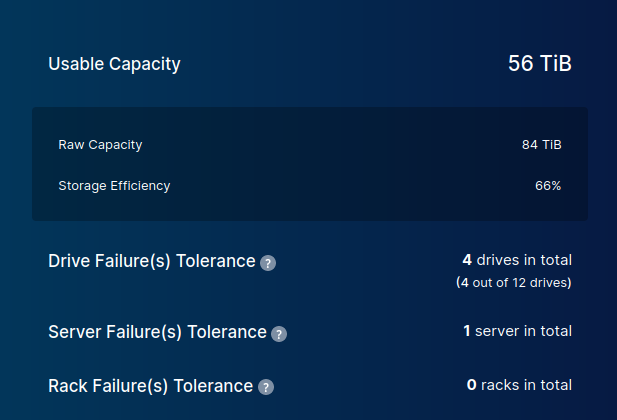
Although this doesn't take advantage of E-Series' features, it fortunately all applies to our E-Series environment:
- Rack can't fail (this makes sense; we have only one rack)
- Because each server has 4 disks and we're using EC 8:4 (stripe size: 12), we can't afford to lose more than 1 server (makes sense, too)
- Also because of EC 8:4, we mustn't lose more than 4 disks either on a single server or across all three servers combined. On E-Series we won't lose 4 physical disks (more on that later), but we may lose a MinIO server (and if VI/K8s HA doesn't bring it back, you will have lost access to four E-Series volumes the server was attached to), so losing access to volumes is possible due to a server going down
If we take a more redundant approach with multiple racks and multiple E-Series arrays, we'll likely use one array per rack.
Three racks
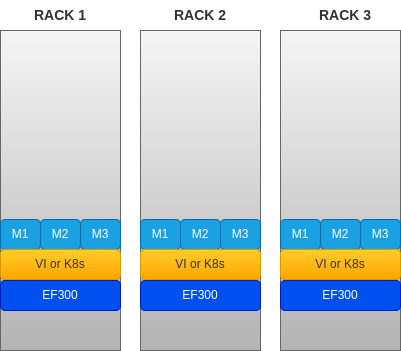
Again, we can use fewer servers, but this approach is fine. It seems like that's a lot of servers, but in this day and age you'd spin up 9 or 12 VMs or containers rather than buy a dozen 1U physical servers.
Notice that we could use as few as 1 server per rack and use EC 2:1 (stripe size: 3). That would give us the same tolerance for rack failures (1) and server failures (1).
But a major downside to this approach with few servers is that a downed server would make the cluster lose 33% of storage performance, so 3 servers per rack and 4 volumes per server gives us 12 disks and is suitable for EC 8:4.
Going back to that recommended design, 3 racks, with 3 servers (4 disks per server) in each rack gives us this:

Non-standard EC:1 on VI/K8s with E-Series
I didn't know where to put this note. It applies to the following situations:
- one MinIO server
- four MinIO servers
- four racks with one or more MinIO servers per rack
Let's consider the second case:
- Four physical servers with MinIO VMs or containers
- Four volumes on DDP (one per MinIO server)
- MinIO configured for EC:1
MinIO doesn't "support" this configuration because with unprotected JBOD storage you'd be protected from one server failure or one disk failure which isn't much, especially with large disks based on NL-SAS. Using servers with internal JBOD or 20+ TB volumes, that would be risky.
But with E-Series each volume is protected against multiple media failures, and with four servers attached to four volumes any one disk or server could be rebooted without impacting write quorum or data integrity.
You'd need at least three (for server failover with VMware HA or K8s, for example) hypervisor nodes or Kubernetes workers, or four (HA with fixed affinity) virtual servers.
In the first example (single server scenario, similar to MinIO without EC (EC:0), further below). EC:1 is still useful because it lowers the risk of data loss due to filesystem corruption. Any if any one filesystem becomes corrupt, object data would be recovered by MinIO.
In my performance testing single server with 4 disks in EC:0 and EC:1 performed similarly, indicating there's no visible performance impact from using EC:1.
Of course, at some point the overhead of EC:1 would matter, but for object stores that we'd virtualize and use for 200-300 TB large SmartStore, 4 x 64 TB or 4 x 128 TB with 2-10 GB/s in performance would be perfectly okay and in line with best configuration and performance practices E/EF Series uses for backup repositories, just with additional N+1 protection for compute and storage (provided by EC:1).
Tolerance to disk loss
MinIO EC calculator usually indicates that Y (Number of Drives per Server) can be lost.
As explained above, in an E-Series environment with protected storage (RAID or DDP) you're not supposed to lose any volumes due to storage issues, with MinIO or any other workload.
At the same time, physical disk drives do fail. When they fail, it's usually one at a time: with DDP or SSD disks, recovery generally takes less than one day (it's much faster with flash).
With RAID 6 or DDP, an E-Series array can lose 2 drives per each R6 disk group or DDP pool, and not lose any data.
So, when configuring MinIO EC for E-Series, use RAID 6 (usually 10 disks per underlying R6 disk group) or DDP (11 or more disks per pool, usually just one big pool per disk size, type and array) and ignore the MinIO advice about the maximum number of disks you can lose: E-Series must't lose more than 2 at once and the risk of that happening is extremely small (thousands of mission critical customers use it like that).
If you're still afraid of service downtime or data loss, deploy one E-Series per each rack; as you can see, both scenarios above can tolerate the loss of a single rack.
Once again, the usefulness of "number of disks per server" in MinIO's sizing and best practices is misleading - when protected external RAID or DDP is used any number of disks may be provisioned. For EC 6+3 we'd provision 3 volumes per server, for EC 8+4 or 12+4 we could use 4 volumes per server. But underneath EC, it's all the same to E-Series administrator - RAID 6 and DDP design would usually not be impacted by EC details.
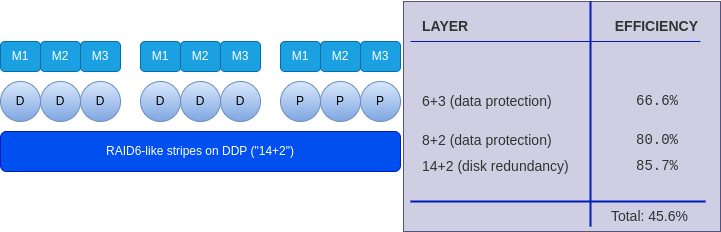
Losing a server (say, to a failed OS or K8s upgrade) will lose all disks as if they were JBOD which is why it's recommended to have more servers per rack. Other than that, volumes themselves are extremely unlikely to become unavailable.
E-Series with unprotected media
I've never heard of anyone who does this, but some users probably do: E-Series supports RAID 0, so it's possible.
You can expose individual disks to MinIO servers. You'll have the benefits (or, in MinIO speak, overheads) of fully redundant E-Series controller and shelf design, read cache, mirrored write cache, and it a better set of security features.
But each disk failure will result in a MinIO-side rebuild over LAN. You'd also have to replace the failed drive with a spare and instruct MinIO to start using it again, whereas RAID 6 and DDP would hide media failures from MinIO. RAID on on E-Series wouldn't, so you'd have to replace the disk and then fix up MinIO.
In this RAID 0 case MinIO's EC estimate for drive tolerance make sense as each MinIO drive maps to a physical drive in E-Series.
If you're interested in this approach from containers, check out MinIO's DirectPV which is a generic approach to the idea and it supports generic applications (not just MinIO).
In my own estimate, RAID 0 isn't popular among E-Series users not because it's wasteful to own E-Series for RAID 0 (it's silly to assume one wouldn't use protected groups or pools for other applications using the same array), but because protected RAID and DDP save a lot of maintenance time and protect data well.
Most rants against "RAID cards" are inspired by people who know only server-based RAID adapters and crappy JBOD disk enclosures - that's what server people with no access to good storage get to use and then assume enterprise disk arrays behave the same way. They don't. Not to mention that if you have just one other application that needs protected storage, you still need a SAN (or application-side replication, which means even more work managing storage).
MinIO without EC
Since I mentioned the unprotected approach (JBOD) for E-Series, I'll mention MinIO without EC as well.
You get a big VM or container and attach one or more protected E-Series disks to it.
- SNMD or "Standalone Multi-Drive": MinIO stripes data across E-Series volumes without EC, in a RAID 0-like fashion. You can still use EC in this scenario (e.g. EC:1) as of Nov '23, but MinIO doesn't highlight it thinking that with a JBOD and just one node, it wouldn't make sense - with protected storage it does in the sense that it protects you from filesystem corruption on one of the volumes.
- SNSD or "Standalone Single-Drive": one big E-Series volume, no striping. This is easily doable with XFS filesystem on DDP volumes which can be huge.
In both approaches downtime can happen if the server/container goes down or if any filesystem gets corrupt. Server/container fail-overs are also going to be more disruptive and there'd be no way to perform scheduled maintenance of individual servers.
The main advantage is simplicity of deployment and administration which may be appropriate for environments that don't need five nines of uptime, minimal fail-overs impact or scale-out functionality.
Think of DR site for MinIO (or even other S3 storage): one VM attached to an E-Series array can act as a reliable, low cost, low risk replication target for PBs of object storage, and requires very little effort.
If you use stand-alone MinIO without EC, it's better to use multiple E-Series volumes (SNMD), say 4 volumes on top of a DDP pool. This can give you several GB/s easily.
Getting the most out of E-Series in MinIO EC environments
- E-Series with disk media in protected RAID or DDP: it should be obvious that when using MinIO's EC calculator we don't need to care about calculator's estimates about failed physical disks, because that doesn't bother E/EF Series arrays. MinIO would use E-Series' "LUNs" or "volumes" protected by RAID 6. Server and rack failure calculations from MinIO's EC calculator are generally valid even when E-Series is used, so when considering both, N+1 (the EC:1 example above) is usually sufficient, or multiple racks for larger configurations.
- E-Series in unprotected mode (without RAID/DDP protection): it's theoretically and practically possible, as demonstrated in that DirectPV post, but seems less valuable to me. In this case disks in MinIO EC calculator's equal physical disks in E-Series arrays, so EC Calculator would apply in this case.
- EC:1 is a special case, not officially supported by MinIO, but it can provide N+1 HA for both service and data. Even though E-Series volumes don't need EC protection, EC can help prevent data loss due to a corrupt filesystem, and data downtime due to a failed node.
I would generally recommend using DDP-based volumes.
When I configure 2U controller shelves, I usually start with 14-16 2.5" disks to leave some room (8 disk slots) for future expansion (as opposed to maxing out all 24 slots with smaller disks).
Appendix A
Single MinIO server with four volumes configured with EC:1 can PUT large objects at few GB/s.

- 16 threads with 750 MB objects
- MinIO with 4 volumes (EC:1)
- Ubuntu 22.04 with iSER
- EF570 with RAID1-style volumes in DDP (16/2) with SSDs
- Tested with S3Tester
The same boxes with the same volumes, but MinIO storage class EC:0, performed similarly (EC:1 was also tested). The dots represent performance of each individual R1/DDP volume and their stacked height is the total (aggregate) performance achieved.

- Workload consisted of three runs (8, 16, 32 threads) with 750 MB objects
- 80% GET
- 10% PUT
- 5% STAT
- 5% DELETE
- Tested with Warp
This second workload was "combined" (mixed) with only 10% of PUTs, but both EC:0 and EC:1 were tested using the same benchmark (Warp) and parameters, and the difference observed from several runs was small.
With multiple servers we would be able to eventually saturate storage (paths or controllers or disks), but for smaller object stores performance penalty of EC:1 is insignificant and with 4 volumes the main "cost" is 33% more capacity.