Using synthetic SolidFire S3 backups for Dev/Test purposes
- Why
- Automation
- Restore S3 backups to new SolidFire volumes
- Restore-related notes
- Cost estimation
- Conclusion
Why
It's one of those seemingly obvious things - after you've read the title, you know what it is and it seems so simple.
But - like me - maybe you've been using SolidFire for years and haven't thought of this before (regardless of whether you have use for it or not).
So, what is it about?
- you want to run realistic replication, cloning, compression, deduplication tests
- that cannot work with empty volumes - there's nothing to compress or deduplicate, all snapshots have the same data, and cloning a volume takes ~0 seconds!
- you need volumes with data, which means you need iSCSI clients to generate data and write it to SolidFire iSCSI targets
But:
- sometimes you don't have iSCSI clients or hardware to run iSCSI clients
- sometimes you don't want to have iSCSI clients if there's a better way
- sometimes it takes time to create data (especially on SolidFire Demo VM, which can sustain around 15-20 MB/s - it takes >100 seconds to create 2GB of test data)
Technically, it's not rocket science - mount 20 volumes from one client, create 20 sample data sets, shut down the client.
But then you work in another environment, and you need to set up replication from the first SolidFire environment, or repeat the exercise.
Or you may want to have data from some application that you don't know how to set up or use.
"Backup to S3" costs next to nothing. We can create a variety of data once, back it up to S3 and when we need test data we can restore it to a SolidFire Demo VM or production environment without using any iSCSI clients.
It can't replace iSCSI clients when iSCSI clients are necessary.
Automation
That "Backup to S3" link above has all the S3-related commands to backup and restore. If you want to try these code samples, please visit that page first.
Generate data and backup volumes
Automation could include data generation and backup. For me generation is one-time activity so I'm not going to try to automate it.
But I'll share some of my steps for those who wonder how I did it. I first prepared 10 1GiB volumes like this with the idea to populate them with several different applications.
$ df | grep volume
/dev/sdc                                           1038336     40340    997996   4% /tmp/volume16.31
/dev/sdl                                           1038336     40340    997996   4% /tmp/volume20.35
/dev/sdd                                           1038336     40340    997996   4% /tmp/volume11.26
/dev/sde                                           1038336     40340    997996   4% /tmp/volume17.32
/dev/sdf                                           1038336     40340    997996   4% /tmp/volume18.33
/dev/sdg                                           1038336     40340    997996   4% /tmp/volume13.28
/dev/sdh                                           1038336     40340    997996   4% /tmp/volume19.34
/dev/sdi                                           1038336     40340    997996   4% /tmp/volume14.29
/dev/sdj                                           1038336     40340    997996   4% /tmp/volume15.30
/dev/sdk                                           1038336     40340    997996   4% /tmp/volume12.27

$ df | grep volume | wc -l
10
As we write to each volume to populate it, we can change parameters or even application, but every time we're done we should run fstrim to unmap junk data. Example:
- Dedupe percentage - in my script in increase it by 5% for each volume as I want (50% in this run). We don't need this - it can be fixed across all volumes, but we can use different parameters or even different programs for each volume
- Trim - command is executed after each run; because the volume is 1GiB and I write 750MiB, the rest (~250MiB of empty space) is expected to be trimmed every time
gen: (g=0): rw=randwrite, bs=(R) 4096B-4096B, (W) 4096B-4096B, (T) 4096B-4096B, ioengine=psync, iodepth=1
fio-3.28
Starting 1 process
...
Dedupe percentage now (%): 50
Trimming old data
/tmp/volume12.27: 263.8 MiB (276578304 bytes) trimmed
Another point on changing parameter values: if you are happy with one fixed test across each volume, there's no need to restore 10 volumes - you can restore 1 from S3 and clone it 9 times on SolidFire. That will work, but then your efficiency may shoot up to 50x.
Consider this: SolidFire has global deduplication; a block seen twice is a block deduplicated. What happens, then, is when we create a bunch of volumes with common buffer, compression and dedupe settings, they get globally deduplicated, which is something you wouldn't get on E-Series or ONTAP (for example).
Each has almost identical compression and deduplication - synthetically generated data was very uniform and repetitive across volumes.
PS C> Get-SFVolumeEfficiency -VolumeID $VolId # loop over all test volumes
Compression      : 1.910035
Deduplication    : 1.336889
MissingVolumes   : {}
ThinProvisioning : 1.36137
Timestamp        : 2023-09-02T11:00:01Z

Compression      : 1.911576
Deduplication    : 1.335702
MissingVolumes   : {}
ThinProvisioning : 1.361356
Timestamp        : 2023-09-02T11:00:01Z

Compression      : 1.911578
Deduplication    : 1.335702
MissingVolumes   : {}
ThinProvisioning : 1.36137
Timestamp        : 2023-09-02T11:00:01Z
...
Initially I was going for 2x compression and 2x deduplication, which maybe was true within each volume, but I ended up with 12x deduplication and almost 50x storage efficiency on SolidFire Demo VM.
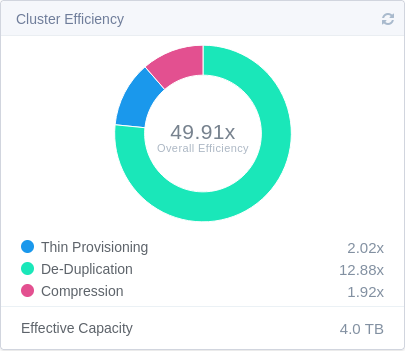
I didn't like that so I changed my data generation to use different settings across each run.
After that I got around 3x (dedupe * compression) which is a more realistic global efficiency with SolidFire.
It'd b even better to have 2-3 volumes with application data (SQLite, MySQL, SQL Server, etc.) but I didn't want to spend time on that.
Restore S3 backups to new SolidFire volumes
Automating for restore is simple, but funnily enough - you can't simply "restore a volume".
You need to have a volume to be able to restore it. (That's also funny, isn't it?)
- Create a storage account (there's an example here); you can also create cluster from scratch (scroll up on the same page)
- Create a bunch of volumes not smaller than the volumes you plan to restore (in production we'd want them to be the same size down to byte, but in the lab we can restore backups of smaller volumes to larger volumes)
- Loop over list of your 10 ${VolName}-${VolId} list in the backup bucket and insert those in a restore-from-S3 command
- Optionally Adjust QoS and change volume names (for convenience) after restore
To restore at scale (dozens or hundreds) you may want to run this in parallel, which is a bit more complicated but doable (I did it for backup, the script is in my Awesome SolidFire repo on Github).
#!/usr/bin/pwsh
# set up a new account and get the ID
$AccountId = (New-SFAccount -Username tester).AccountID
# set up a uniform QoS policy for all restored volumes
$QosPolicyId = (New-SFQoSPolicy -Name tester -MinIOPS 200 -MaxIOPS 1500 -BurstIOPS 2500).QoSPolicyId
# create empty volumes
For ($VolId = 11; $VolId -le 20; $VolId++) {New-SFVolume -Name volume$VolId -AccountID $AccountId -TotalSize 1 -GiB -Enable512e:$true -QoSPolicyId $QosPolicyId}
# now do a restore loop based on the S3 bulk "write" (i.e. read from S3, write to volume, i.e. "restore") command example
# note: you need to "pair" existing empty volumes somehow (e.g. PROD-wcwb/log-2 => PROD-wcwb/volume12, PROD-wcp/sqlite-3 => PROD-wcwb/volume13)
One way to do this "pairing" is to get a list of backups and the first Volume ID of the empty volumes to restore into and just loop through the both. Example with 2 volumes:
# assume we have 2 volumes to restore; you'd get this list from your S3 bucket where backups are stored
$s3backups = ("volume11-23", "volume12-24")
# assume your 2 "empty" volume IDs into which to restore are 36 and 37; empty volume's name doesn't matter for restore
$VolId = 36
# you need additional values in places with "HERE" below - see the S3 backup post on details
foreach ($bkp in $s3backups) {
    Invoke-SFApi -Method StartBulkVolumeWrite -Params @{  `
        "volumeID"= $VolId; "format" = "native"; "script" = "bv_internal.py"; "scriptParameters" = `
         @{ "read" = @{ "awsAccessKeyID" = "HERE"; "awsSecretAccessKey" = "HERE"; `
         "bucket"= "HERE"; `
         "prefix"= "HERE-HERE/$bkp"; `
         "endpoint"= "s3"; "hostname"= "HERE"}}}
    # hostname is the S3 API endpoint, https:// and :443 can be left out but provide port number if non-standard e.g :18443
    $VolId = $VolId + 1
    # you wouldn't need to wait for only 2 volumes, and maybe you'd need to wait longer for larger volumes, but as an example...
    Start-Sleep 300
}
Restore-related notes
To prevent deletion as well as tampering with backup images, we may create read-only keys to use them for resting data from S3 and give them to Dev/Test users. If data isn't synthetic, then even read access would have to be secured and possibly audited.

"Pairing" of new empty volumes and volume IDs with what we have in our backup bucket goes like this: backup above came from PROD-wcwb/log-2 (ClusterName - ClusterUuid / VolumeName - VolumeID) and the new volume is PROD-wcwb/test-25 (same cluster, different volume name and ID), so when restoring Volume ID 25 we'd override automatically populated manifest to the cluster/volume combination to restore:
- PROD-wcwb/test-25 => PROD-wcwb/log-2
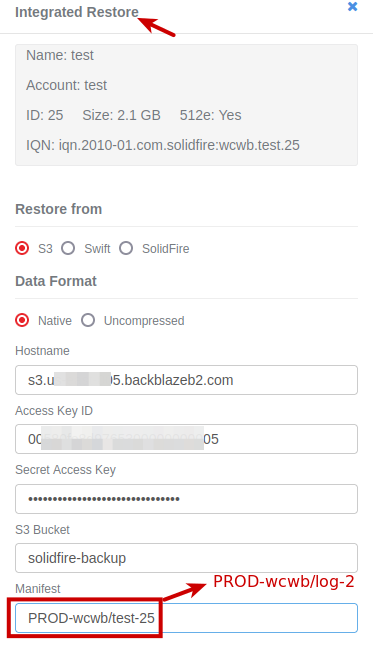
If restore destination (cluster) was different, I would have changed that part (PROD-wcwb) as well. As we went to volume ID 25 to restore, the manifest was auto-populated based on volume name and ID, but we had to change that to PROD-wcwb/log-2 (what we had in S3 bucket).
With the data generator settings I used my global cluster efficiency (dedupe * compression) was 2.8x and in-volume efficiency was 1.5x, which is similar to real-life situations.
As mentioned earlier, each of the 10 volumes with synthetic data was 1GiB large and 75% full, which resulted in approximately 0.5 GiB per volume backup size using Native backup mode.
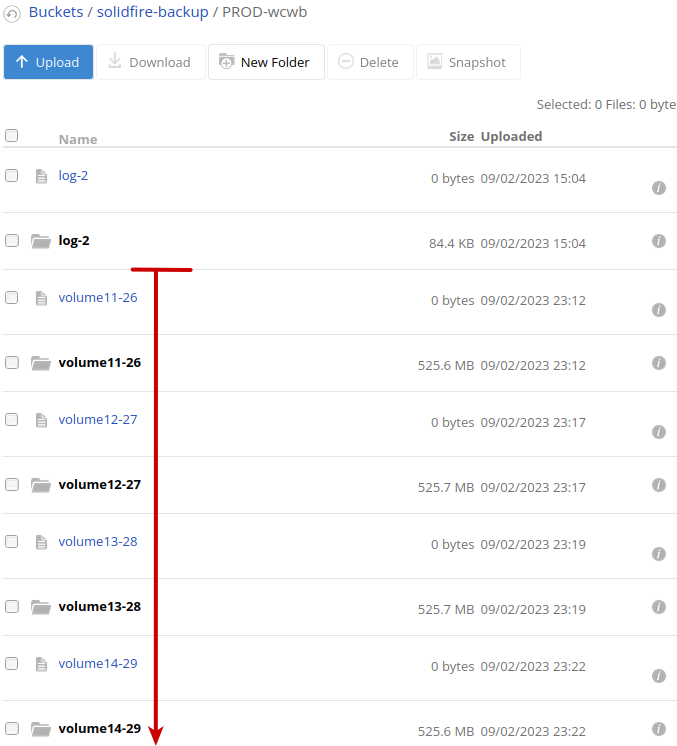
This is to say my "average" 1GiB volume that's 75% full and 1.5x efficient got reduced down to 50% in S3 bucket. If we used Uncompressed, backup would take 1 GiB in S3 (no savings - even the empty 0.25GiB would be backed up and sent to S3 although, as that's not compressed on disk, HTTPS' GZip might save that on ingress and egress). In conclusion: when backing up to the public cloud, you probably want to use fstrim` and Native mode!
Cost estimation
You just need some local or remote S3 storage. With SolidFire v12, I've been able to use a variety of on-premises S3 offerings as well as Wasabi.
For my own needs, I will create half a dozen 1GiB volumes that are 75% full and put them on low-cost S3 storage, on-premises as well as in the cloud.
Restoring data still takes time, but all it takes is one loop to get those images restored and I don't need iSCSI clients.
I just tested Backblaze which works fine. After the recent cost increases it is still affordable.
Free egress … up to three times the amount of data you store with us, with any additional egress priced at just $0.01/GB
Assuming 10 1GiB volumes that are 75% full and 2.5x efficient, each backup would take 300 MiB of bucket space. That's (10 * 0.75 / 2.5) = 3 GiB of data in the bucket.
Assuming 30 downloads a month, 10 of which would be free on the account of 3GiB stored, the rest (20) would cost 20 * 0.3 * 0.01 = $0.06 per month.
Six cents per month is not too bad!
Although just above I observed 500 MiB per volume (more than my own estimate 300 MiB), that's based on synthetic data. "It depends".
On-premises S3 storage is also inexpensive.
Conclusion
When you need to work with non-empty SolidFire volumes and don't need or can't get any iSCSI clients, restoring volume data from S3 backups is very convenient.
Even if all you have is just one S3 backup, that backup can be restored and cloned and with that you can develop your automation scripts with volumes that are populated with real data.