MinIO and Versity S3 GW with tiny object workloads on NetApp E-Series
- Introduction
- The problem
- Solutions
- Notes on MinIO
- Notes on VersityGW
- Benchmarking and testing
- Conclusion
- Appendix - additional tests and observations
Introduction
Everyone knows what MinIO is and everyone should know what VersityGW is, so I won't introduce them.
I've blogged about Versity gateway here and in another post linked from that one.
I also have posts on MinIO, but you can find those anywhere. But one sort-of-unique and relevant post on that I should mention is the one about MinIO EC on E-Series.
The topic of this post is (very) small object performance with S3 SDS on NetApp E-Series.
The problem
Small files aren't a problem as such.
If you just need to slowly write them and never read them back (maybe they get expired with a retention/expiration policy), you mostly have to care about inodes (if your object store lives on a "traditional" filesystem).
Capacity won't be a problem either. 10 billion 1 KiB files takes much less than 100 GiB of disk space.
Then there are cases where something matters - maybe you need to write them quickly. Or read quickly. Or small object churn is considerable.
Solutions
Object storage isn't really meant for such use cases, but then again, people use NAS for use cases which aren't meant for NAS either.
Maybe the problem isn't significant enough to warrant a dedicated NAS box. Maybe there's no budget for NAS.
Maybe it's OK to waste some time waiting a bit longer with S3 (this often depends on how expensive your compute stack is - 128 H100s currently costs thousands of US$ per hour, so if you wait 40 hours per year, you may be able to save money by buying a NAS, for example).
There are many reasons why people choose to leave their small object workloads on S3-compatible storage.
NetApp offers S3 on:
- (Product) ONTAP - unified NFS/S3/Block storage (appliances and SDS)
- (Product) StorageGRID - S3-only appliances (leverage E-Series arrays and x86 servers)
- (Back-end block storage) 3rd party S3 SDS on E-Series/EF-Series arrays (requires external servers to run S3 SDS)
Between those two products, ONTAP is more suitable for S3 with small object workloads compared to StorageGRID.
But StorageGRID has many S3-related advantages (including horizontal scalability to 200 nodes, geo-clustering, etc.) and sometimes adding a caching layer (Varnish, for example) is enough to make it viable depending on use case/workload.
Because these are usually purchased as appliances, their small object workload behavior is reasonably well understood.
I wanted to focus on the third choice - solutions based on S3-compatible SDS that leverages E/EF-Series arrays.
MinIO and VersityGW work on industry-standard servers, so I revisited these two.
Notes on MinIO
MinIO should (to avoid data loss and downtime) use Erasure Coding (EC). EC doesn't work well with small files, so that's a problem.
One way to "fix" it - but not really - is to not use EC, i.e. either use a single MinIO VM/container node with 1 large volume/disk or use several containers/VMs in a "RAID 0" fashion (in terms of S3 data) as far as MinIO's scale-out is concerned.
Usually neither of those are acceptable to enterprise users, so what I did is tested EC 3+1 (literally an "odd" choice, I know, and also not an EC format recommended by MinIO; but I had 4 volumes I could use). My testing wasn't "scientific" anyway, so feel free to assume MinIO EC 12+4 would work much better (normally it should, but I doubt that striping small objects even wider would change your fortunes in this particular case with tiny objects).
As we shall see below, tiny object performance wasn't good. This isn't to say MinIO is bad - I wouldn't blog about it more than once if that was the case - but that if you use it with intensive or important tiny block workloads, you'll probably have to compromise.
If tiny object workload is the only workload you have, maybe you shouldn't use MinIO, or maybe you could setup a single node MinIO with EC N+0.
MinIO Enterprise Edition has configurable cache which can improve GET performance with tiny objects. (If you read about it, you'll see it was created to address performance challenges with tiny objects.)
Notes on VersityGW
Unlike MinIO, VersityGW "exports" underlying POSIX filesystem via S3-compatible service. If you need just one object storage server, it's similar - but not the same - to running a single MinIO server with EC 1+0. (And it is exactly the same as running MinIO in gateway mode, but that's no longer possible).
The difference vs current MinIO versions is MinIO will always slice and dice objects before saving them to disk, and they won't be recognizable in the shell whereas VersityGW won't do that - it's a gateway. (You can see the BeeGFS-related post at the top for more details on scaling out VersityGW on BeeGFS). If you wanted to stripe data across disks with VersityGW, that would have to be done on filesystem and/or volume manager layer.
What that means is if you want to scale-out S3 access to the same bucket data with VersityGW, you need a cluster file system. But you'll be able to view and use files both from S3 and shell (or NFS, for example).
What that also means is you can put 100 million small files to a MinIO cluster or StorageGRID bucket without creating "directories", but on VersityGW you'd end up with 100 million files in one directory (=disaster).
Most POSIX users know that and don't put 100K+ files in a single directory, but if you can't choose (e.g. you have closed source IoT clients updating to same S3 "path" in the bucket) you may need to find a workaround (either move objects after they land, or do something else).
VersityGW is a young product compared to MinIO, so it's still maturing. Some features may not be available, and there may be relatively more bugs compared to MinIO. You can buy commercial support from Versity and download the program from Github to give it a try, both of which makes those risks low.
Benchmarking and testing
- 1 x86_64 box (2 CPUs)
- Ubuntu 24.04 LTS
- Both S3 benchmark client and S3 SDS were running on this system
- 1 E-Series EF570 (old EF-Series array that's no longer available; would be considered "entry-level" array these days)
- iSER protocol (56 Gbps IB)
- Controller cache was turned ON (default) so disks used by MinIO and VersityGW could benefit from controller caching (both read & write)
- For MinIO, I used 4 SSDs, each was 1-disk RAID 0 volume "group" with 1 LUN on the group; except for EF570 controllers between the disks and the server, this is very much like DAS with JBOD
- For VersityGW, I used just one of the four disks from the MinIO setup. This looked exactly like server with 1 unprotected, directly-attached disk, except that EF570 controllers provided some smarts like caching and path balancing
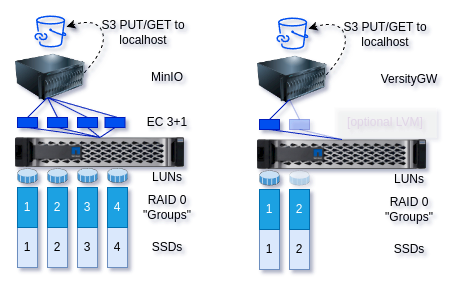
As I've mentioned above, MinIO was 1 server (OSS build from 2024/10) instance with 4 disks mapped to 4 unprotected SSDs on E-Series and MinIO used EC 3+1 across those.
VersityGW was 1 server (v1.0.7) with 1 disk (one of the 4 MinIO disks). One could say VersityGW had 25% of IOPS/bandwidth of MinIO, but no EC overheads. (The dimmed 2nd disk underneath VersityGW indicates that on VersityGW an effect similar to EC could be achieved by striping over multiple disks with LVM or ZFS pools and similarly on parallel file systems such as ScoutFS or BeeGFS.)
Small objects don't use much bandwidth and data sets were smaller than EF570 controller cache, so the single disk in VersityGW didn't matter to it. At around 128 KiB requests with the concurrency level 64, storage bandwidth would get close to 2 GB/s at which point you may wonder if adding more disks would help, but for the 1-64 KiB range it wasn't more than one disk could handle.
All volumes in all scenarios were XFS-formatted using the default formatting options.
VersityGW on scale-out file systems vs Erasure Coding on S3 SDS
This goes without saying, but I don't want to appear biased so I'll mention that multiple VersityGW instances can scale out beyond the performance of single host when VersityGW runs on top of a POSIX-compliant filesystem.
Everyone knows scale-out filesystems are generally not great for tiny files, so we won't multiply performance of one VersityGW host by 4 and claim it would "destroy" MinIO EC 3+1 because one VersityGW works very well with tiny S3 objects. Running on a parallel filesystem, VersityGW would perform slower because parallel filesystems are usually slower with small, metadata-intensive files than single-host filesystems.
Four VersityGW nodes on a 4-node BeeGFS cluster may be just a tiny bit faster than this one VersityGW instance. It's possible. But at the same time let's not forget that due to its dual nature (block + object) you could access such data over BeeGFS and save a lot of time by not using S3 in the first place.
Here we can find an example of a metadata performance with MDTest, BeeGFS on E-Series. I'm going to reproduce the image in the case that link goes away: 22,000 file create operations per second.
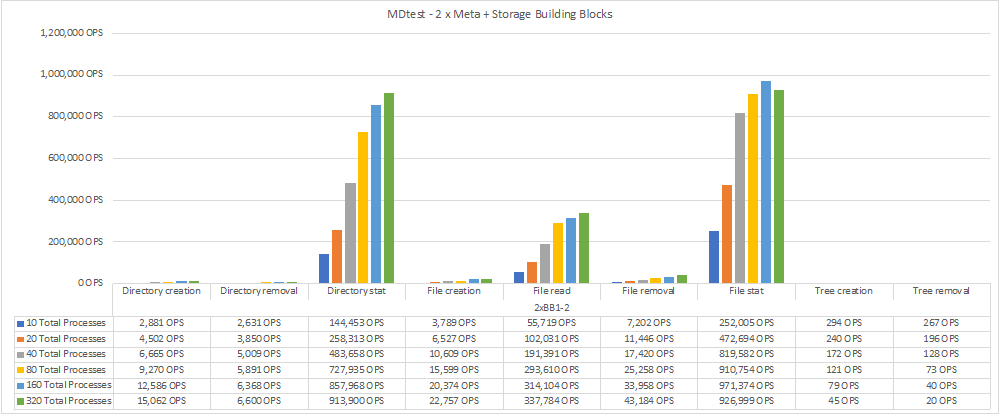
Compare that to some of the results below (9,000 obj/s for StorageGRID with Varnish, 14,000 with VersityGW on single host filesystem, etc.). It's not bad!
Tests
I ran tests on the same server and did not try to clearly segregate server and client workloads because of limited time and resources.
MinIO's WARP benchmark to test PUT and GET with 64 threads (more than server had, so at times all CPU cores could get 100% busy):
- 1k PUT and GET
- 4k PUt and GET
- 16k PUT and GET
- 128 PUT and GET (VersityGW only)
I also tried disabling controller-level cache on the LUNs involved in these tests, but because the bottleneck wasn't disk speed but small objects that didn't seem to matter.
Results
These aren't scientific or even "best practice" tests, so there's no point in "deep diving" into each scenario and analyzing results in detail.
You could assume these are "worst case" scenarios, because I've done no tuning, best practices or other optimization.
In essence, MinIO's EC kills tiny object PUt performance on MinIO, but you can easily scale out and GET performance seems to work better than "single disk" approach I picked for VersityGW.
VersityGW works great for PUTs because it's just a gateway and employs no EC, but you must pay attention to some of the things I've mentioned earlier if they can affect you. GETs were slower than with MinIO, which I suspect may be related to XFS filesystem bottlenecks (that is, the overhead of reassembling EC stripes from 3-4 volumes is smaller than the overhead of not using EC and getting files from just one volume).
I used 50% Median values for all Excel-generated charts.
I wish I had more time to test some of the guesses from this post (for example, by running Versity on a striped 4-disk LVM volume), but I'm quite busy so for now these guesses will have to do. Even with small, cache-able data sets it takes an hour per run (4 request sizes with 3 runs per size is 12 runs at 5 minutes each = 60 minutes).
Observations
Maybe this was a consequence of the suboptimal EC 3+1 on MinIO, but usually the first and second volume (especially the first) were disproportionately heavily utilized.
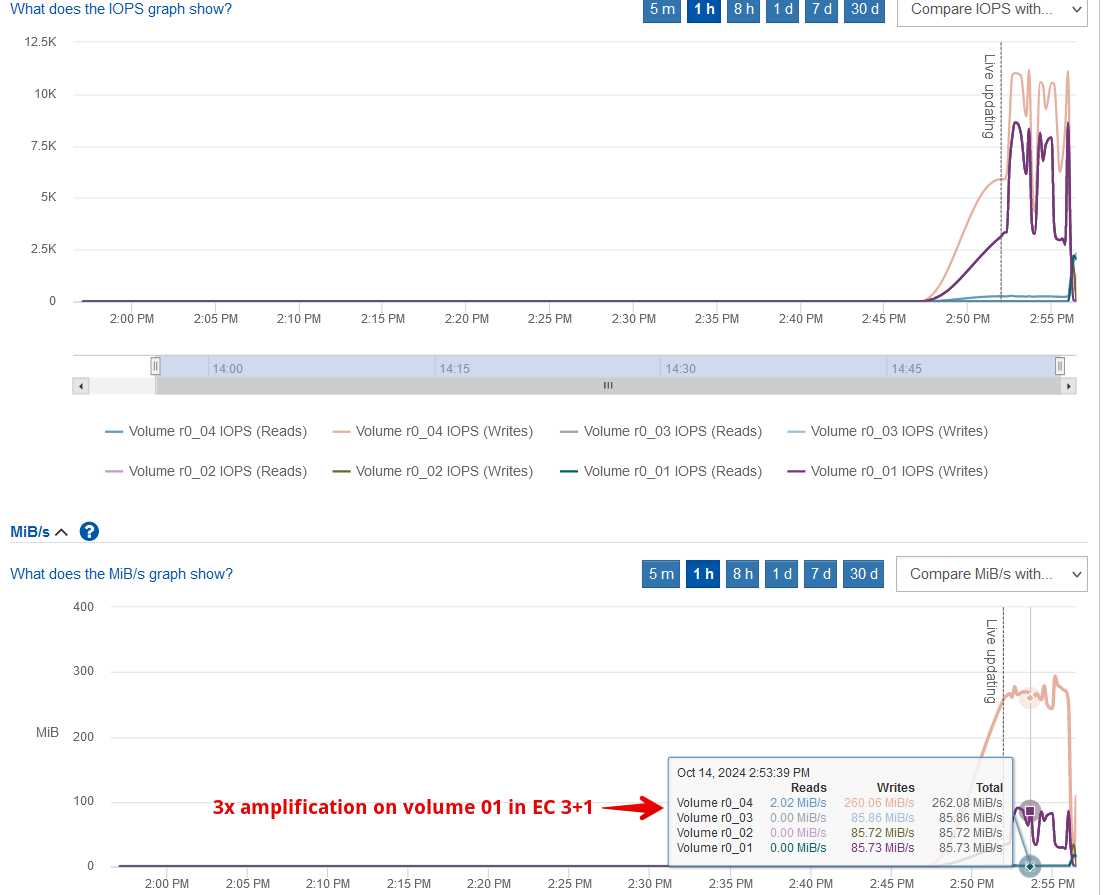
I don't know if this also appears with EC 12+4 or other MinIO-recommended schemas, but this imbalance could benefit from E-Series pools: rather than using single-disk R0's (the JBOD approach that I used here) with MinIO EC 12+4, you could use DDPs (protected disk pools) with EC 4+1 like I suggested in the EC-related post.
At the time I didn't highlight this benefit, but if EC I/O is imbalanced then balancing disk I/O across E/EF-Series pools would be another reason to not use JBOD/RAID 0 approach with MinIO on E/EF-Series.
One may think that MinIO EC somehow "consolidates" tiny objects before chunking them into larger 128 KB or 1 MB chunks (for example) and make PUT performance better, but that's not what I saw. I observed quite a few IOPS (50K!) and MB/s divided by IOPS translated to ~20kB "average" request sizes on disk. Which is a lot for tiny objects, of course: disk throughput was much higher than observed on the S3 client.
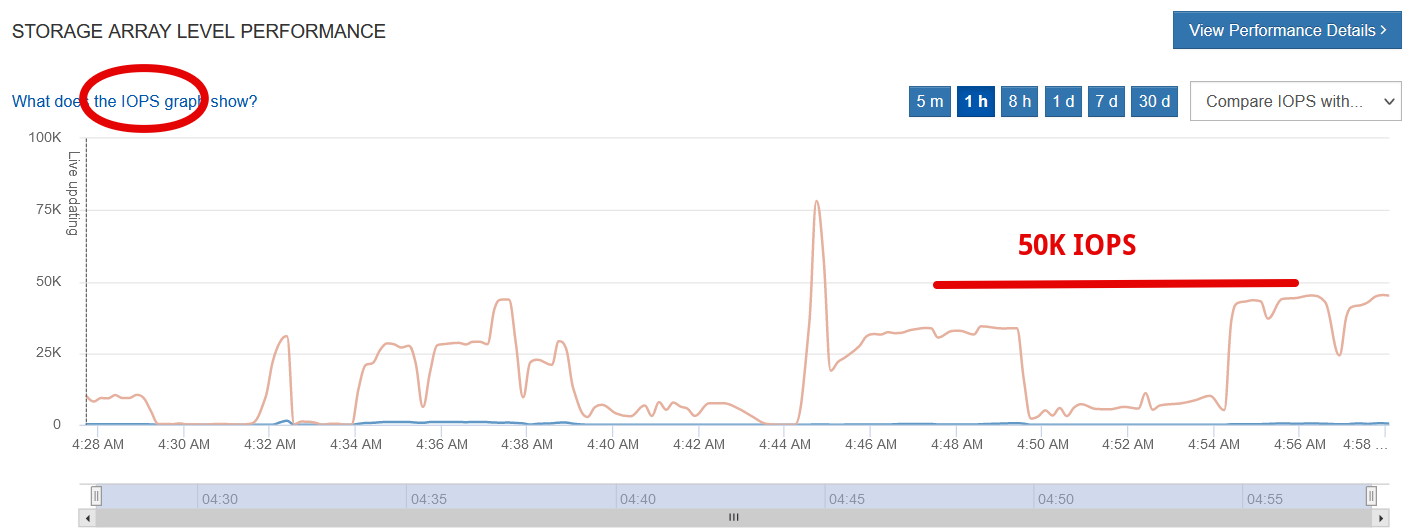
That still works fine on EF570 (all-flash, no problem storage performance-wise), but I/O requests were smaller than I thought EC would create, and yet disk throughput was higher.
Maybe MinIO EC chunks "not more than X" files per stripe so when objects are tiny EC chunks end up being tiny as well. I wouldn't say that's a bad thing - it's impossible to optimize for everything.
The other surprise with MinIO was that despite these tiny objects (4 KiB in this test below), S3 client throughput was 10 MB/s while disk level I/O was 40x higher (and this is EC on RAID 0 disks - no "RAID overheads" that MinIO likes to highlight). Again, I'm not sure if that's an EC 3+1 thing, but you may want to keep this in mind when sizing your storage.
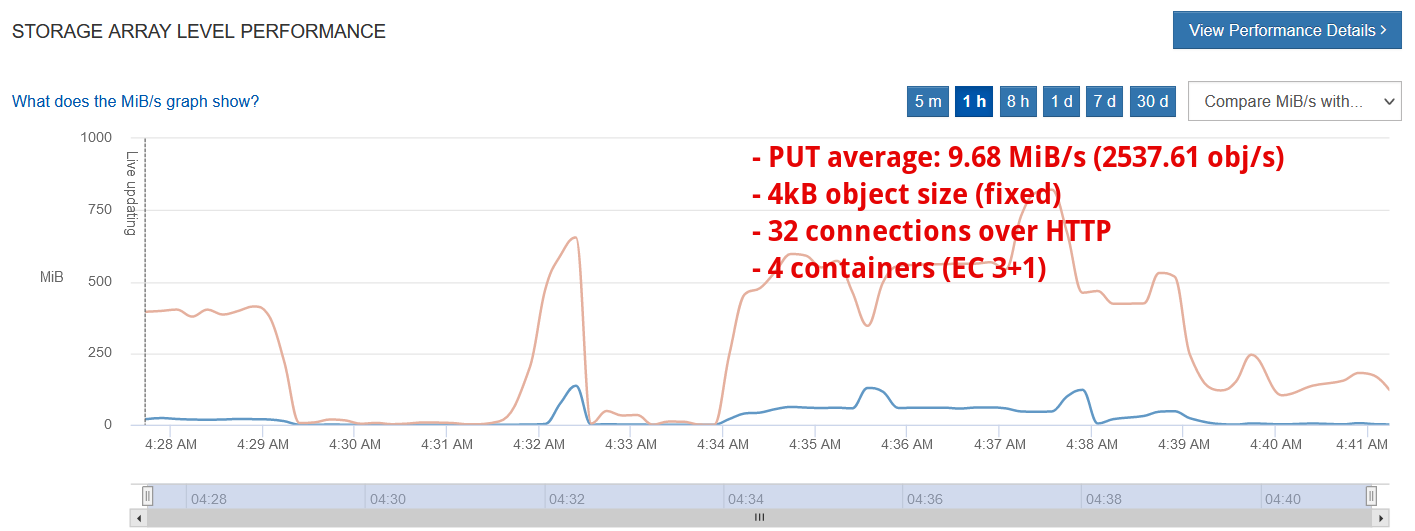
(Clarification: "4 storage containers" is 4 Linux volumes, each living on its own LUN, with each LUN being the sole LUN on a R0 Volume "Group". Essentially it's a JBOD setup on E-Series that I use to eliminate doubts about "RAID overheads".)
In the case you wonder "how many objects per second is good", "it depends".
Here's an example from a StorageGRID with Varnish RAM-based cache using a 4x higher concurrency and (obviously) RAM cache for GETs (the screenshots from my tests above were all PUTs): 9K obj/sec (4 KB request sizes, not highlighted in the screenshots) and this is with several StorageGRID nodes plus Varnish RAM-based cache in front of them!
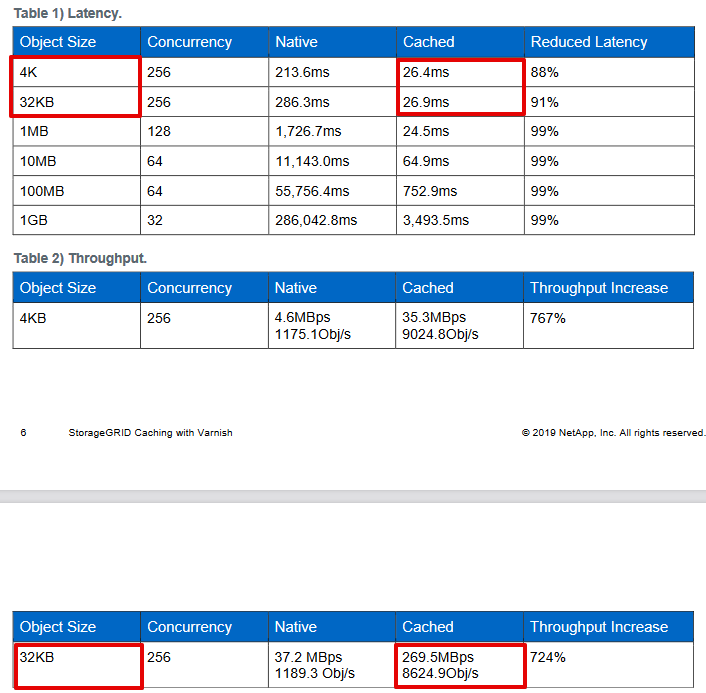
Even for 32 KB objects, "objects per second" was still around 9,000, suggesting you need to scale out to get more requests per second (i.e. it may not be a disk bottleneck).
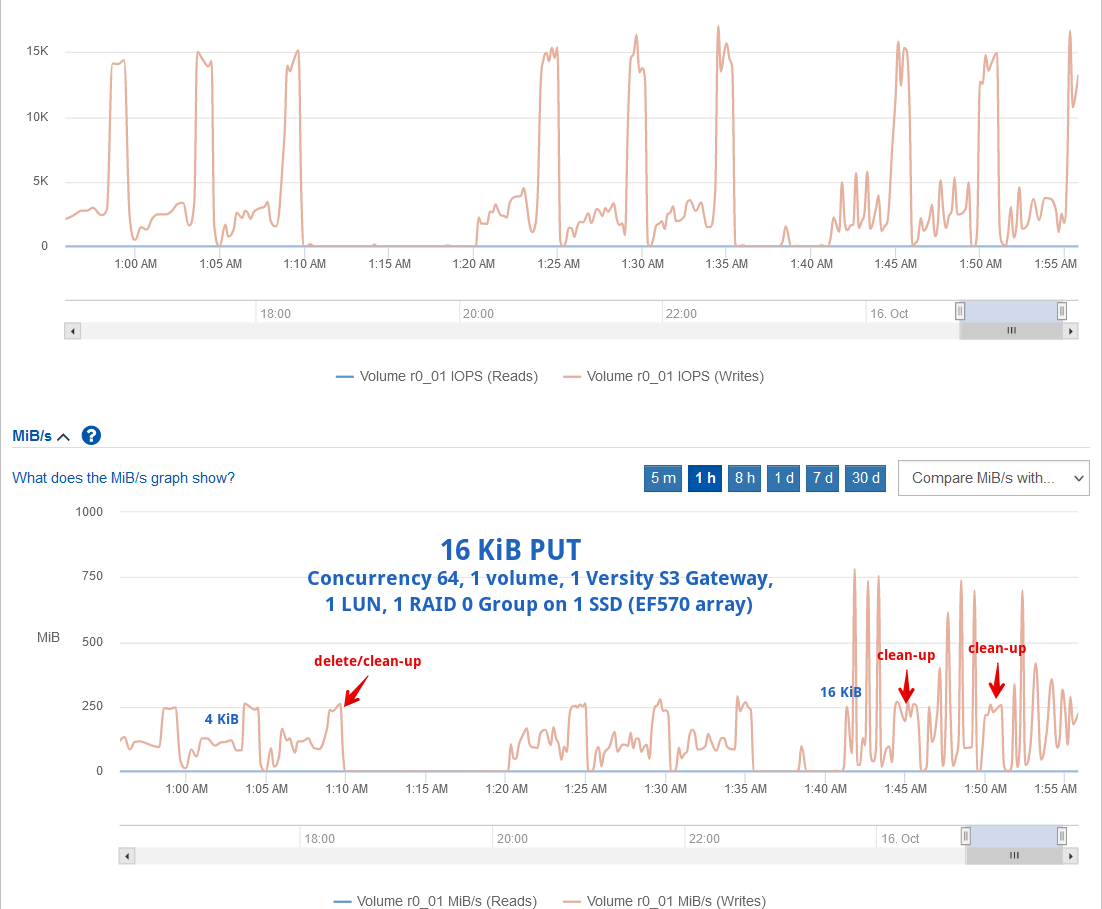
As an example, VersityGW simply passes objects to underlying filesystem, so overhead is comparatively tiny: even with 1 KiB requests IOPS are below 5,000 and MB/s not more than 100 MB/s. Much easier on storage, with some downsides as mentioned earlier.
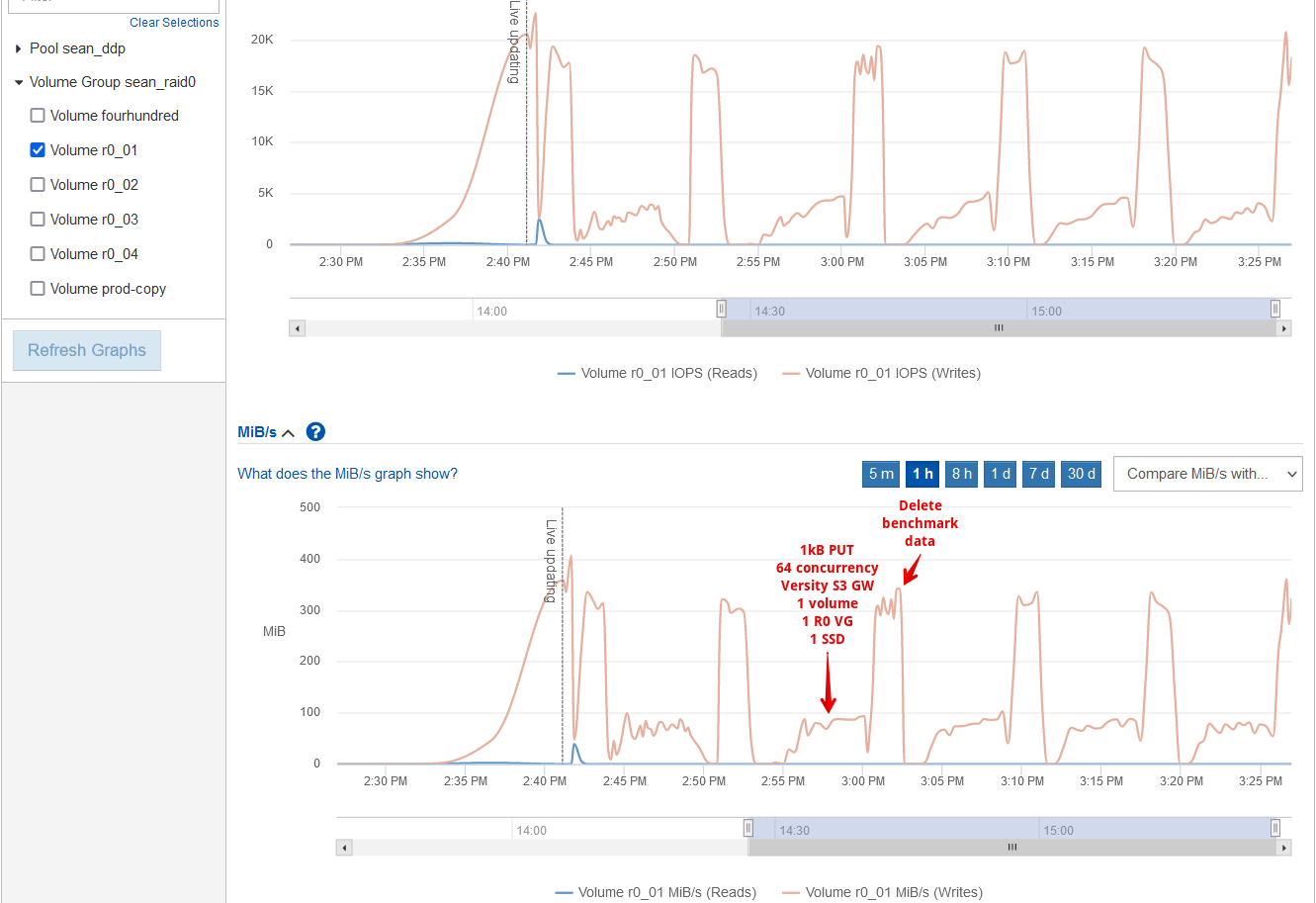
Even with 4 KiB PUTs - same as MinIO above - VersityGW was consistent and didn't amplify nearly as much as MinIO's EC. (Notice this is just 1 R0-based volume, not 4).
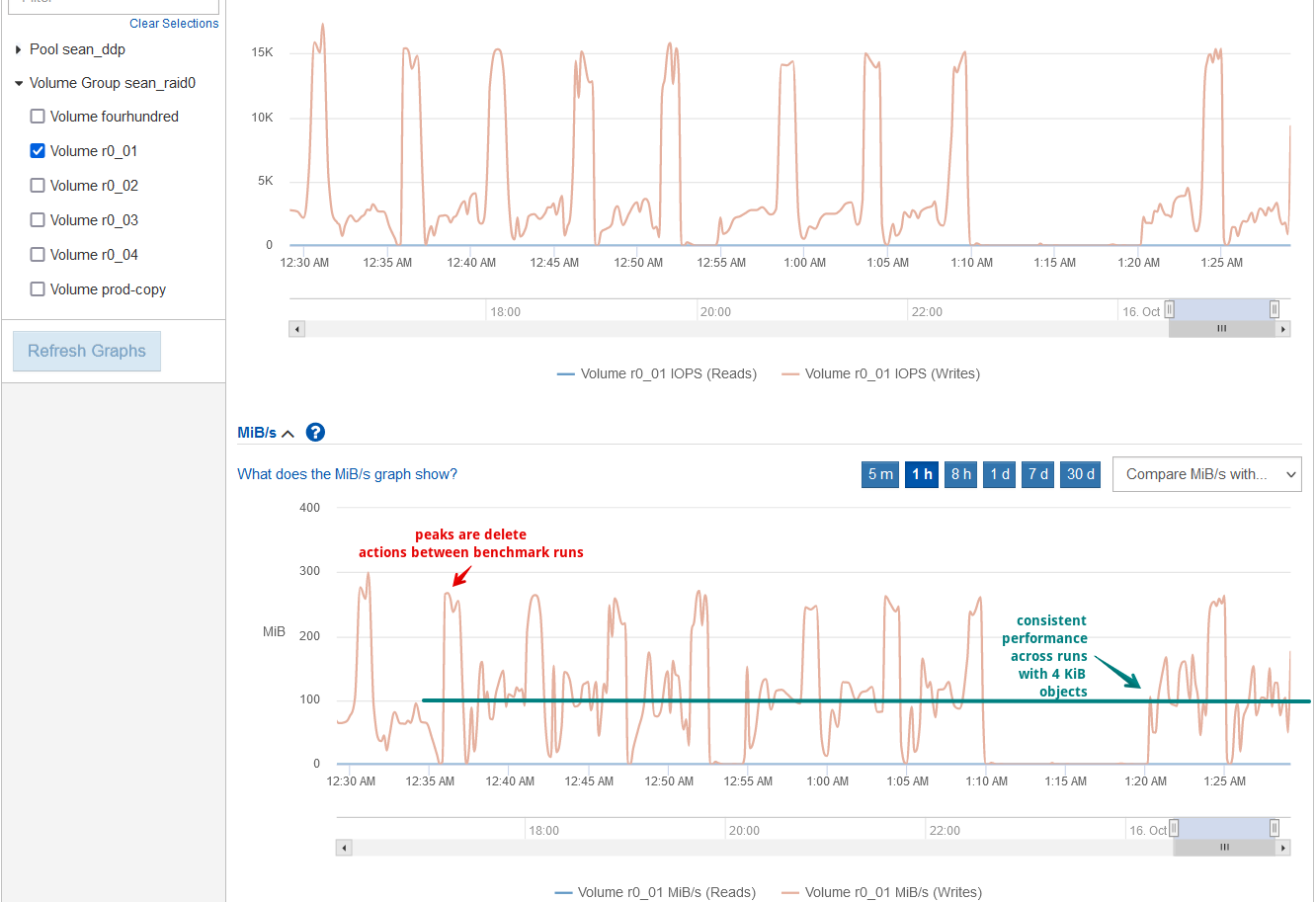
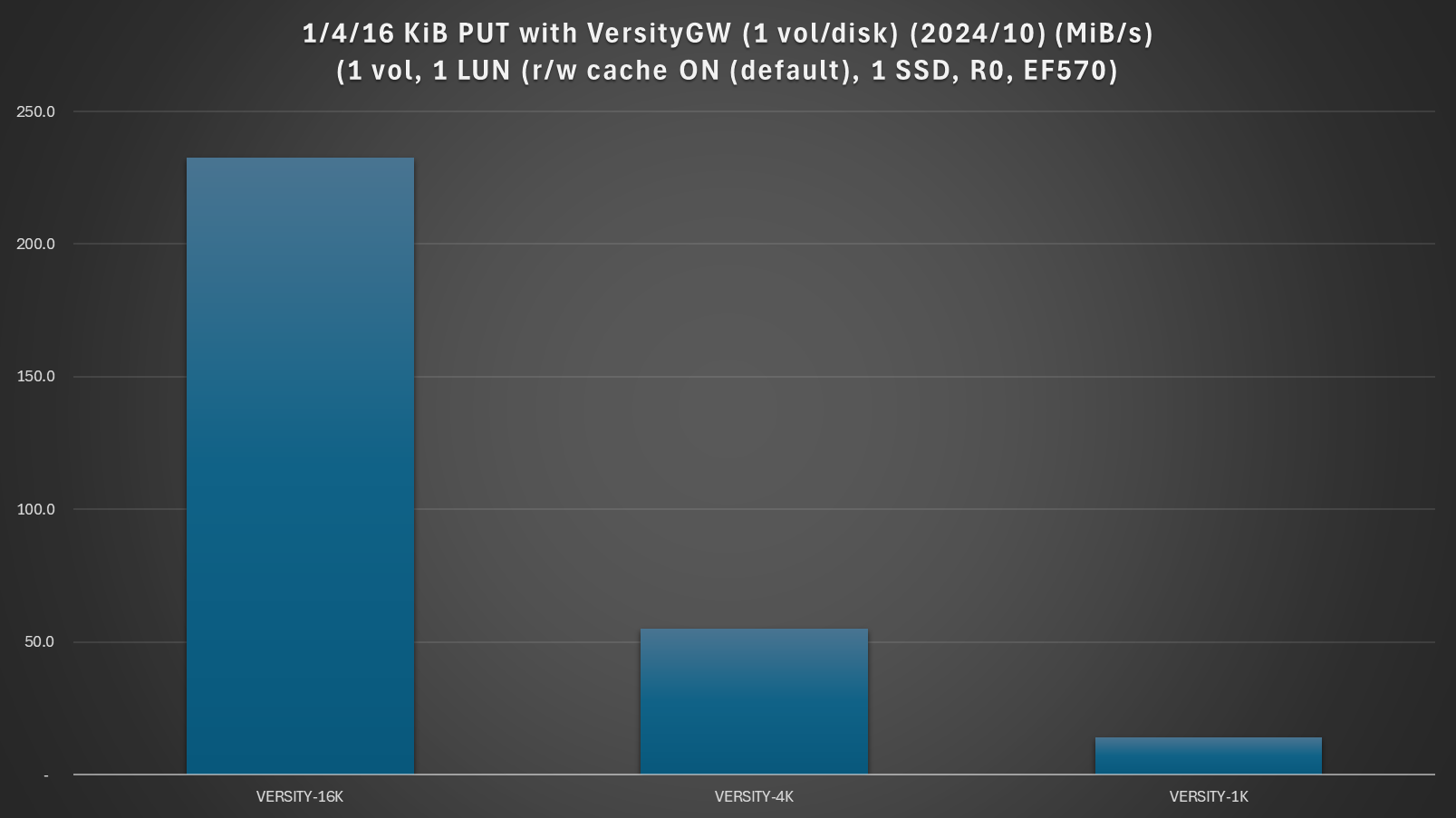
Runs with 4 KiB requests seem almost negligible comapred to 16 KiB and 1 KiB is of course even worse.
This chart below compares MinIO and VersityGW for those absolutely terrible workloads (1 KiB, 4 KiB requests), PUT only (why, because I had issues with GET tests, as I've mentioned earlier).
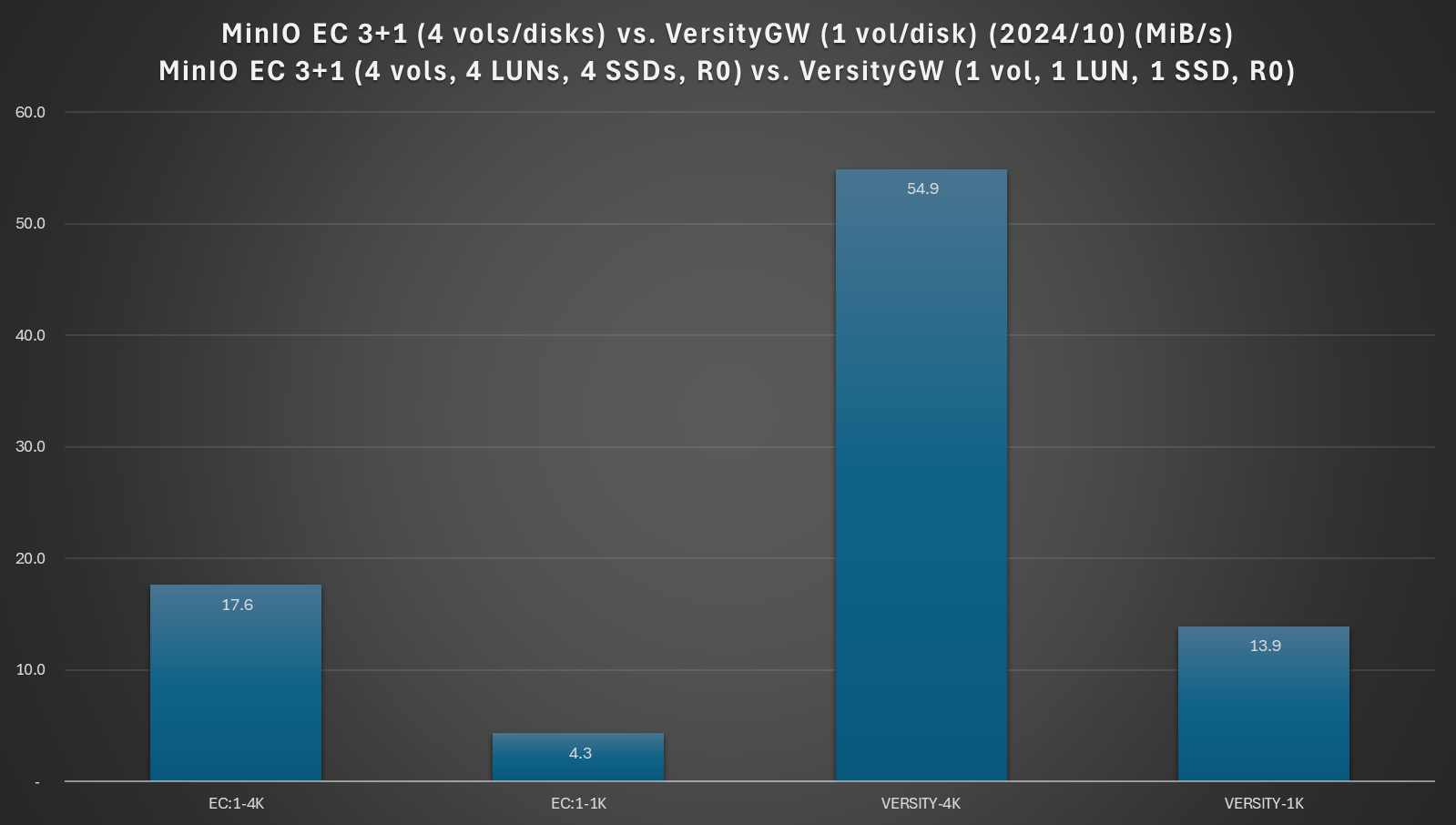
GETs are multiple times faster, by the way. But - back to this chart above - tiny PUTs on VersityGW are 3-4 times faster.
To my earlier point about low throughput with 1 KiB and 4 KiB PUTs: even on VersityGW, 1 KiB PUTs will make you wait. If you think in terms of data volume you need to PUT, 10 GiB of such tiny files can take 15 minutes to upload.
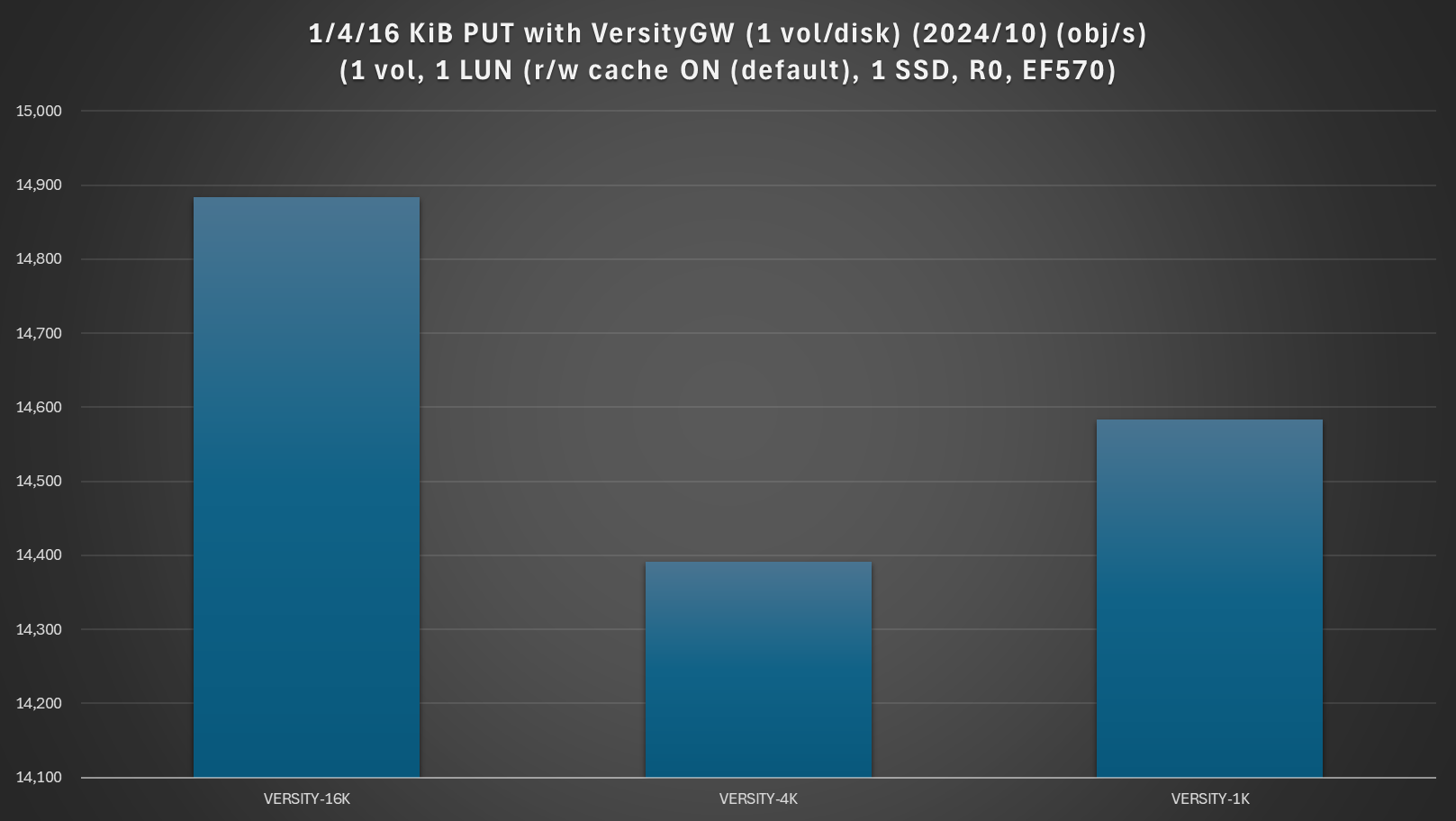
Similar to results from the StorageGRID-Varnish technical report, objects/second can be deceiving: all tests achieve similar result measures in objects per second, suggesting we'd need additional gateways (or MinIO nodes) to scale performance and make the storage work harder.
Versity has good sequential performance as well (find it on their Web site), and can scale out on top of a shared filesystem such as BeeGFS or ScoutFS, both of which work well with E-Series.
MinIO does own EC, so you need to be careful about disk placement if you scale MinIO across multiple E-Series arrays (see that earlier post on MinIO EC and E-Series). Some of the approaches may be counter-intuitive, especially since the MinIO Web site never considers MinIO EC on top of non-protected disks and/or with shared storage.
Conclusion
If your S3 workload is heavily focused on tiny object performance, you may consider VersityGW, especially if you prefer object/file duality which many HPC users do. This is similar to preferences of users used to NFS, for which NetApp of course recommends unified ONTAP NFS/S storage.
VersityGW can use E-Series for single-node S3 sharing as I did in this post, or deploy scale-out VersityGW on ScoutFS or BeeGFS with E-Series, for example.
S3-focused SDS users may want to consider MinIO. It's not fast, but all object storage is slow with tiny objects. E-Series' protected disks can level uneven disk load across many physical disks, and also eliminate worries about storage management. MinIO can still use EC (e.g. N+1), but because chunks on N disks are always protected by E-Series, there's no risk of data loss and no need to acquire EC and JBOD management skills.
EF-Series 600 (EF600) can deliver up to 2 million read IOPS. In 4 KiB GETs that would be around 8 GB/s, but we need to be careful about sizing PUTs because of significant write overheads that seem exist for both MinIO and VersityGW when tiny objects are involved. Tiny PUT workloads may need to be sized as "sequential" write workloads, which may be counterintuitive, but appears based on these tests.
Even with VersityGW or free MinIO you could use Varnish to enhance GET performance and there are some other "tricks" that could help even in environments with single-host S3 services without scaling out.
VersityGW's tiny object performance was more "balanced" (PUTs vs GETs), while MinIO's EC worked well for GETs and is easy to scale out.
Last but not least, pay attention to other details and requirements such as logging/auditing, compliance, multi-site deployments, S3 API compatibility and so on.
Appendix - additional tests and observations
I made a mistake by not validating my VersityGW version, so the main post was done with an old version. Then after publishing I realized I didn't use a recent version.
I didn't redo the above tests (so VersityGW performance may be different on recent releases), but I did notice some results were different by up to 10% compared to a pre-v1.0 version I mistakenly used earlier.
From additional tests done with VersityGW v1.0.7 (from Sep 2024) and I'll share only two of the more interesting charts related to GET tests.
Earlier I said one has to compare S3 performance with "normal" S3 object sizes with these tiny objects to realize how bad those tiny objects are.
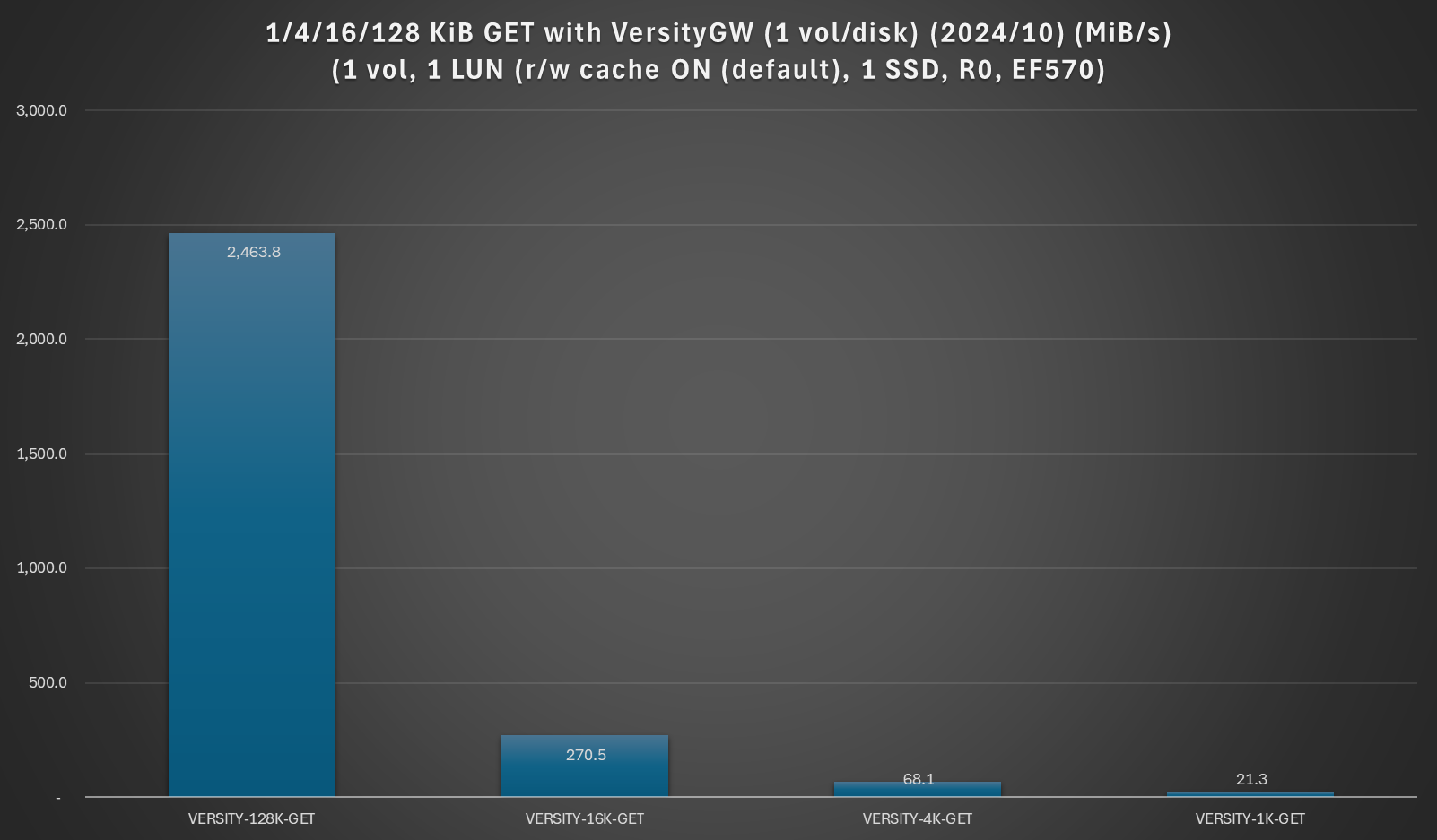
Here we have a comparison of MiB/s for VersityGW with 1, 4, 16, and 128 KiB objects. 128 KiB is still small, but not "tiny". GET performance for tiniest 1 KiB is terrible even compared to small 128 KiB objects!
And for such tiny objects PUTs are only a fraction of GETs…
This is a simple chart that shows PUT vs. GET for small (128 KiB) object sizes.
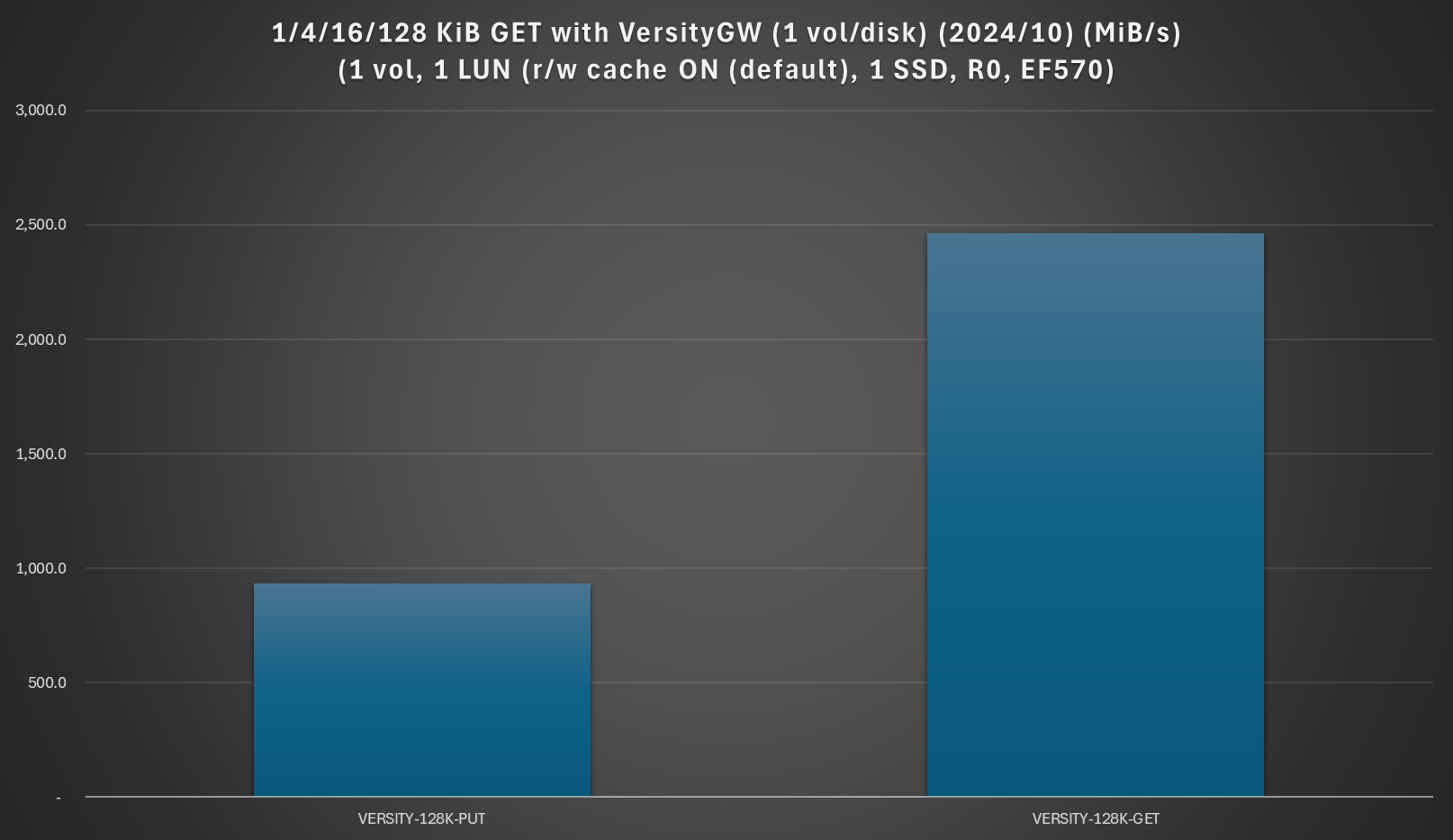
While such object sizes aren't the focus of this post, PUT vs GET performance is nice and balanced, similar to smaller sizes.
If you have a workload for tiny objects that's 50/50 PUT/GET - for example tiny objects is uploaded, accessed once for processing and then deleted - VersityGW would be a better choice than MinIO which needs more nodes for the same level of PUT performance, and could not benefit from read-only cache if objects are accessed just once and then deleted.
Like with other sequential workloads (and similar to the post about MinIO EC on E-Series where I got 4-5 GB/s in this environment), it's easy to see how 4-8 VersityGW on BeeGFS backed by E-Series could deliver many GB/s while at the same time providing block access to all applications that work better with block data. Use GDS from CUDA applications when that makes sense and use VersityGW S3 when you need S3!