Kubernetes and E-Series - DirectPV, TopoLVM, CSI Driver LVM CSI
Update (2026/01/20): See this newer post with options in 2026
- CSI choices for E-Series in a Kubernetes environment
- What's out there in terms of DAS CSI for Kubernetes
- How does it work?
- Advantages of using DAS CSI with E-Series disk arrays
- Redundancy and data protection with DAS CSI and E-Series
- Volume allocation
- Storage protocol choices
- Recovery from server failures
- Backup and restore
- CSI driver compatibility and support
- Storage networking, automation and cloud-native workflows
- Security
- How-to configure DAS CSI with E-Series
- Example with Elasticsearch with DirectPV on E-Series
- Summary
- Appendix A
- Appendix B
CSI choices for E-Series in a Kubernetes environment
NetApp currently develops and maintains BeeGFS CSI driver for its BeeGFS with E-Series solution. NetApp Trident used to support E-Series with regular (non-parallel) filesystems but that's no longer the case, so at this time E-Series users can get full support for both filesystem (BeeGFS) and CSI by purchasing BeeGFS with E-Series from NetApp.
Most Linux applications work fine with BeeGFS, but some customers prefer single-host filesystems (XFS, for example) or must replicate data across multiple Persistent Volumes. What are their choices today?
Some would prefer to have Trident support for E-Series, but in my experience more are interested in CSI drivers for direct-attached storage (aka DAS).
What's out there in terms of DAS CSI for Kubernetes
Some popular choices are listed below in alphabetic order:
I won't attempt to compare them here, but I'll comment on one that stands out which is DirectPV by MinIO: unlike the other two, which may be more "generic", DirectPV is the first choice for MinIO users in Kubernetes environments with DAS.
That doesn't mean it can't work stand-alone - it can - or that you can't run MinIO with the other two (I think you can). But if you're using something other than MinIO, the other two may have better features or documentation tailored to your use case.
Unique DAS approaches
You can also consider Ondat, which works differently in the sense that "storage service" runs in containers that virtualize physical volumes and provide additional features in that layer.
Because that's very different to how DAS CSI providers mentioned above work, I won't discuss it in this post except in this section.
It has two topologies. One is with all workers connected to storage and the other is "centralized" where only a subset of workers are connected to storage. The first, "hyperconverged" approach is similar to how community drivers above work, but the second is very relevant for switchless E-Series and high-bandwidth workloads:
- five workers with multipath storage links would normally require a pair of switches because they can't be directly attached to a single E-Series system (that would require 10 controller ports)
- to get around that using Ondat's "centralized" approach you can directly attach 2-3 workers to E-Series and with 100 or 200 Gbps links that can provide enough bandwidth to E-Series without storage network switches, while connections among workers can use different NICs (2 x 25GigE, for example) connected to LAN switches
This approach will likely still perform slower than the three community DAS CSI approaches with application-based replication, but without some of the unique software features such as snapshots and replication (for applications that don't support it on its own).
How does it work?
It works exactly as you imagine it works: each E-Series volume is presented to one, and only one, worker node. Worker nodes can be connected to such volumes directly (SAS or FC cables, for example) or even via SAN (iSCSI, for example).
Basic example for a Kubernetes cluster with 3 bare metal worker nodes connected to E-Series:
| Worker | DG/DDP | VolName | Worker volume |
|---|---|---|---|
| 1 | DDP1 | vol1 | /dev/dm-1 |
| 2 | DDP1 | vol2 | /dev/dm-1 |
| 3 | DDP1 | vol3 | /dev/dm-1 |
With MinIO and DirectPV you may have four E-Series LUNs presented to each worker, but the concept is the same.
This makes it possible to create (usually DAS, i.e. switch-less) storage configurations like the second example from my Instaclustr post which is VM- (not Kubernetes-) based but works for Kubernetes clusters as well. Using two disk groups, two volumes, and two workers in each AZ, you may have Elasticsearch with a hot-cold or production-backup pair in each AZ and three replicas globally:

This environment could look like so (for simplicity I assume one PV per LUN):
| Worker | Array | DG/DDP | VolName | Worker volume |
|---|---|---|---|---|
| 1 | E1 | DDP1 | vol1 | /dev/dm-1 |
| 2 | E1 | DG1 (R10) | vol2 | /dev/dm-2 |
| 3 | E2 | DDP1 | vol1 | /dev/dm-1 |
| 4 | E2 | DG1 (R10) | vol2 | /dev/dm-2 |
| 5 | E3 | DDP1 | vol1 | /dev/dm-1 |
| 6 | E3 | DG1 (R10) | vol2 | /dev/dm-2 |
This configuration with RF3 on application side results in application availability across three AZs, with cross-AZ application rebuilds in the case an application server fails. One way to avoid cross-AZ rebuilds on worker failure - which will happen even though we may have multiple workers in each AZ, because each worker is zoned to see only its own disk(s) - is to run workers in VMs and use SAN from VMs (iSCSI, for example).
This example also shows how a blanket statement such as "you shouldn't use SAN" can lead to a higher cost, more operational complexity, or both.
Advantages of using DAS CSI with E-Series disk arrays
If you look it up in older NetApp E-Series Technical Reports, E-Series has similar benefits for Ceph, Hadoop and similar applications, although our Kubernetes workload may be Cassandra, Kafka, MinIO, or Elasticsearch rather than Hadoop (HDFS).
- Manageability
- Better storage redundancy means less planned and unplanned downtime
- DAS CSI may also be used in SAN environments
- Cost
- Fewer issues with storage mean less time spent to manage it
- RF2 with RAID 6 or DDP is more cost effective than RF3 with RAID6 (or even JBOD)
- Compared to SAN-centric CSI, SAN switches can be eliminated if they don't add value
- DAS CSI in possible SAN environments, making it possible to use the same storage array(s) for SAN CSI and DAS CSI
- Performance
- Smaller performance impact on application and network traffic during media recovery
- Use not just NVMe/FC, but also 100G or 200G NVMe/IB when you need it
- Security
- Even with DAS iSCSI clients, IP SANs can be avoided with switch-less designs
- Storage network security becomes trivial (zoning)
Redundancy and data protection with DAS CSI and E-Series
Client connectivity
Depending on the number of client-facing storage connections you may be able to connect several workers to each E-Series array. If you choose non-redundant connections, that doubles the number of workers possible per array, but eliminates storage connection redundancy, so normally we'd use redundant connections (one per E-Series controller).
E-Series has dual controllers and because data is external to workers, with redundant connections to E-Series controllers storage is more reliable than disks internal to worker nodes.
RAID level or DDP
The second question is RAID or DDP configuration.
E-Series lets you build multiple volumes on a single RAID group or DDP ("pool", see other posts such as this one to see how DDP differs from traditional RAID). Recommended RAID levels include 1 (and 10), 5, 6. For best flexibility - especially if you would use multiple volumes per disk group - use DDP.
If your application protects data on its own by making multiple copies of data (RF2, RF3), with E-Series it is possible to go from RF3 on JBOD (or even RF3 on RAID6) to RF2 on E-Series RAID6/DDP.
Or, if you want to keep RF3 because you must operate service in three AZs, RF3 with E-Series DDP in each AZ may be more cost effective than RF3 with in-worker RAID6. Although this would require three E-Series arrays (one per AZ, like in the image above), you could run 2 workers per AZ with 1 DDP on E-Series, rather than two JBODs or two RAID6 per AZ with server-based DAS.
E-Series also supports RAID 0, which is similar to JBOD in the sense that a failed disks results a failed disk group, but thanks to controller redundancy of E-Series, its RAID 0 is more reliable than server-based RAID 0 which becomes unavailable every time the server is rebooted as well as whenever a disk fails. But in most cases RAID 0 isn't a great idea; DDP has a very low capacity overhead (20-30%) so it is a good trade-off between increased reliability and low capacity overhead for those seeking to avoid network storms during RAID 0 or software RAID failures in workers.
Volume allocation
E-Series volumes can be larger than physical disks. For example on E-Series arrays one can create a 1 PB LUN. This isn't a great idea, but on E-Series 64 TB LUNs are not rare. That's still a lot more than mainstream NVMe physical disks.
If we run many smaller workloads, it's fine to create larger LUNs and use sub-volume allocation (e.g. create five 100Gi persistent volumes on a 500Gi LUN) to simplify things.
But with few large workloads it's better to fully allocate LUNs to applications, just like DirectPV would do for a large MinIO deployment.
In a "mixed" situation where there are maybe 2 large and 10 small workloads, we can use a mixed approach:
- Two-to-four dedicated LUNs fully allocated for PVs used by busy applications
- Several large LUNs for smaller applications using consolidated allocation (many PVs on one LUN). Consolidated allocation means several or many workloads on one LUN, which is like disk partitioning: it's OK, but not recommended for busy or competing workloads
For example, a dev/test environment for applications with RF3-style replication could use workers with 1 LUN each: there's probably not enough IO to cause significant contention.
Storage protocol choices
Below are main I/O interface choices for E-Series arrays today.
- EF300 and EF600 (end-to-end NVMe) - iSCSI, NVMe/FC, FC, NVMe/IB, NVMe/RoCE… (see page 5 of this datasheet)
- E2800 and E5700 - SAS, iSCSI, FC, NVMe/FC…
Two things to highlight: EF300 and EF600 don't provide SAS connectivity, but they provide faster performance compared to E2800 and E5700. DAS connectivity is possible with all protocols (iSCSI, FC, IB, and (E2800/E5700) SAS).
If you're interested in general overview of physical connections as well as transport protocols available with E-Series, take a look at TR4766.
DAS vs SAN
What if you already have E-Series in a SAN environment and all your E-Series' client-facing controller ports are occupied?
You can use DAS CSI drivers just fine. Unlike with Trident, where all workers in a cluster (or zone, at least) used to be zoned to see the same set of volumes, DAS CSI requires each worker to see only its own volumes. For N workers you'd create N*2 zones in a SAN environment (2 per worker, one to each E-Series controller).
Should DAS CSI users ever choose SAN over DAS?
MinIO and others say no. But it really depends.
Let's say your initial requirements call for a VMware cluster (three hypervisor hosts) and MinIO (six workers). Rather than buy nine servers you can do the following:
- Minimal three-node vSphere (or other VI with HA) Virtual Infrastructure
- iSCSI SAN storage (with add-on iSCSI ports you can have up to 8 iSCSI ports per array and can avoid buying iSCSI switches)
- MinIO in VM-based Kubernetes workers with Direct PV
Now instead of nine bare metal servers (with MinIO configured with EC) we have just three servers and one E-Series array. Kubernetes workers run in VMs, directly connect to E-Series LUNs via iSCSI and VMs can fail over to another hypervisor host which together with E-Series redundancy eliminates the need for EC.
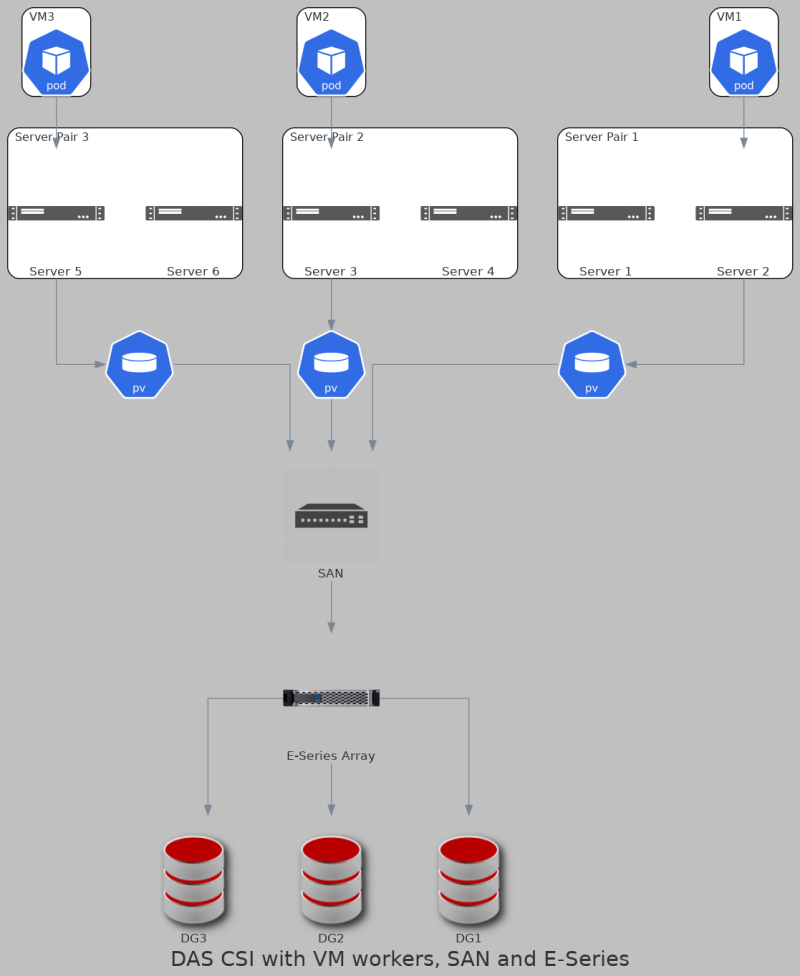
There's less need (some would say no need) to create multiple copies of application data; with Elasticsearch or OpenSearch, for example, some would set replicas to 0 (i.e. RF=1, no extra copies) and simply use sharding to spread data across Elasticsearch nodes.
Note that in this diagram we have three Disk Groups (RAID groups) on E-Series. That's not strictly necessary; as mentioned earlier one large DDP would work as well.
At the same time other E-Series volumes can be used by other applications (VIs, physical hosts) in the environment. For example, this cluster could be running VMware Tanzu.
Recovery from server failures
I'm now repeating myself but when a server fails DirectPV won't let you simply re-assign the volume to another worker in the same AZ and "import" it. That's by design:
- we're not supposed to fiddle with storage (except for the initial provisioning); data management and application recovery largely takes place on application layer
- "rescuing" data on a DAS PV by importing it from another worker may make sense in simplest of scenarios, but in many cases data is sharded or erasure-coded by the application so even if the volume was imported to another worker node, that would not mean it has been rescued. Even if TopoLVM or CSI Driver LVM can import orphaned PV in most cases that would not make sense
In a SAN environment with VM workers recovery from server failures works fine because Virtual Infrastructure takes care of VM failover.
Special case of MinIO EC with DirectPV
One unique feature of MinIO is that it can use Erasure Coding with DirectPV. When using DirectPV with E-Series EC is not necessary. But let's consider it anyway.
MinIO's EC Calculator recommends starting with 8 hosts, 16 (physical) disks per host, and EC 12+4 (K+M=16, M=4) as a starting configuration. Today's servers are very powerful and very few users need eight servers. One to four may be enough (see my simple test), so we don't have to use DirectPV that way.
- When Kubernetes workers run in VMs and DirectPV uses SAN targets (such as iSCSI), a single MinIO server backed by multiple E-Series disks like I did in that simple performance test (striping over protected LUNs) is good for several GB/s, doesn't require EC and gets HA from Virtual Infrastructure: worker VM can fail over to another hypervisor host
- If we run Kubernetes on bare metal or need more performance than a single server can deliver, we can create a cluster of MinIO nodes with EC but do it in a way that's suitable for our environment (i.e. use EC with a lower parity value)
For an example, four servers with three LUNs per server and EC 9+3 allows one worker to go down (N+1 HA for service) or up to 3 PVs on any combination of server(s) to go offline or become corrupt.
If we use EF300 with DDP (15.3TB x 24 SSD) that's around 368 TB (raw) and 270TB after DDP protection and all overheads (which include not just RAID 6-like parity, but also 2 disks worth of spare capacity in DDP pool).
After EC (3/12) which is 25% overhead, we still have over 200 TB for data and metadata (200/368; 54% total usable) with a very low likelihood of storage downtime, or even EC rebuilding happening.
While this EC configuration involves an additional storage array, it uses just 24 disks instead of 128 smaller disks (8 nodes x 16 disks) and eliminates four servers and four OS subscriptions we don't need.
Backup and restore
See that Instaclustr post linked above the image: all modern analytics applications have built in backup and restore. Some have backup and dump (or export), where backup is "incremental forever" while "full backup" is achieved with "dump" or "export".
Some "traditional" users may complain they want enterprise backup solutions for modern analytics applications but the reality is most enterprise backup applications do not support them. Why? Because it doesn't add value. Even with Oracle Database, most users today use built-in Data Guard.
Another objection is that "traditional" backup is slow. Well, if you're doing a full backup of a 100TB database, it won't be fast. But on the fast E-Series arrays you can run frequent incrementals, and then restore and test them to a warm stand-by database. Furthermore, I haven't tried but I would bet that with EF600 it is possible to backup (export, dump) an entire 100 TB database to a hybrid EF600 array in under three hours.
Application-native backups are well-behaving because everyone uses them, they're easy to automate, and they make it easy to create cold replicas anywhere (including the public cloud) or even perform DR to the cloud (for example, Instaclustr provides such services, although at this time you'd restore a Kubernetes app to VMs because Instaclustr's service is currently based on VMs).
Note that LVM-based CSI Driver LVM and TopoLVM can take volume (PV volume, not E-Series LUN) snapshots, but again - when you have five workers using volumes from two E-Series arrays, are LVM snapshots better than native incremental backups stored on S3? Probably not.
CSI driver compatibility and support
These drivers are community-supported and may be commercially supported by your Kubernetes distribution.
User's responsibility is to pick a Linux distribution and version from the E-Series interoperability matrix (aka "IMT"), which means a recent release of RHEL, Rocky, Ubuntu and such.
Here's a screenshot from NetApp IMT (support login required) that shows RHEL, Rocky, SLES (among others) as currently supported clients for Direct Attach via iSCSI to SANtricity 11.7 (latest OS for E-Series).

General Linux client configuration steps can be found in the documentation (public access).
Once connectivity to E-Series is established and (recommended) MPIO in place, there is nothing else to worry about: as mentioned above, there's no Kubernetes- or CSI-related failover that needs E-Series support.
In these setups E-Series volumes also don't need to be resized (although that may be possible the same way general DAS volumes can be resized) and there are no storage-side snapshots or replication involved. PV snapshots may be performed by LVM and we can certainly create E-Series "cold storage snapshots" if we want to, but in normal operation E-Series just needs to present storage to supported Linux clients.
Why not resize E-Series volumes? Because it's usually done by the application: use the E-Series API or Ansible modules for E-Series and hosts to a new volume to one or more workers, activate them with the CSI driver, inform the application and let it take care of data rebalancing.
Storage networking, automation and cloud-native workflows
Network automation is usually a sensitive topic because network administrators must be in the loop.
NetApp Trident (and many other CSI drivers) supports only iSCSI SANs (today with ONTAP and SolidFire), which is easiest and most convenient to use, but usually the worst from "don't mess with networking" perspective. Some users therefore ask for FC - not because iSCSI is slow (it's not) but because that helps them avoid operational issues with IP SANs.
DAS CSI with E-Series supports any I/O interface supported by OS and E-Series, and doesn't use switches. While DAS CSI users also have the option to use them with SAN-connected E-Series, DAS CSI with E-Series gives them flexibility in operations and removes the hassle of dealing with switches and especially IP storage networks.
Because modern analytics applications usually use three or more servers, capacity is usually provisioned by adding three volumes at once:
- Create volume group/pool or use existing
- Create volume and present it to one worker
- Rescan storage from the worker and possibly configure MPIO (with iSCSI you would need to login to target after discovery)
- Use DAS CSI driver to refresh its view of disks, import/activate and format PV
Step 1 can be done with Ansible.
Steps 2 and 3 need to be done for/on each worker. For that use host collection automation for E-Series. Examples of using Ansible with E-Series can be found on the Internet.
Step 4 involves several commands inside of Kubernetes.
Disk removal works in reverse and Ansible makes it easy to undo (simply add present: false) provisioning done in steps 2 and 3.
Security
Using DAS CSI drivers in Direct Attach mode results in no network and switches (IP, FC, IB) to manage.
On the host, because E-Series volumes are zoned to single host and the filesystem is a single-host file system, general Kubernetes security concepts apply. As mentioned earlier each LUN can be used to allocate several PVs, but Kubernetes' namespace segregation prevents unauthorized access and unlike with physical disks, LUNs can be right-sized and we can have as many as necessary and fully allocate each to a single PV.
In SAN environments we use zoning and (iSCSI) VLANs, but we still have to manage SAN switches. Some SANs (FC and NVMe/FC, for example) don't need to use IP networking.
How-to configure DAS CSI with E-Series
Going with a simple scenario from earlier - one array, three physical hosts, and DirectPV:
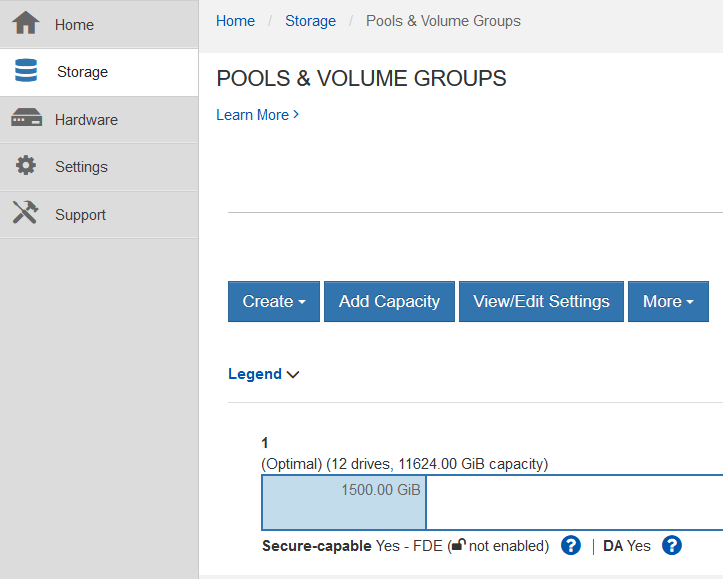
- Use the E-Series Web UI to create a Volume Group (RAID) or DDP. With only 12 disk drives we can't create multiple RAID 5 or RAID 6 groups so we'll create one DDP (pool)
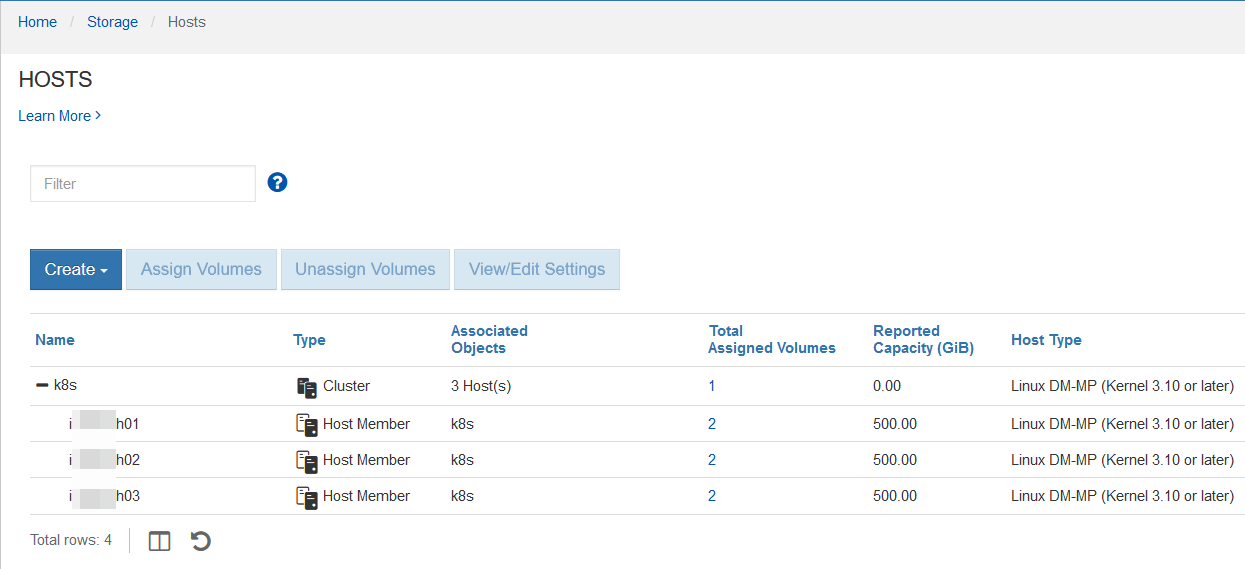
- Next, connect worker nodes to E-Series and identify them in SANtricity (here we can see that volumes have already been provisioned, but that happens later)
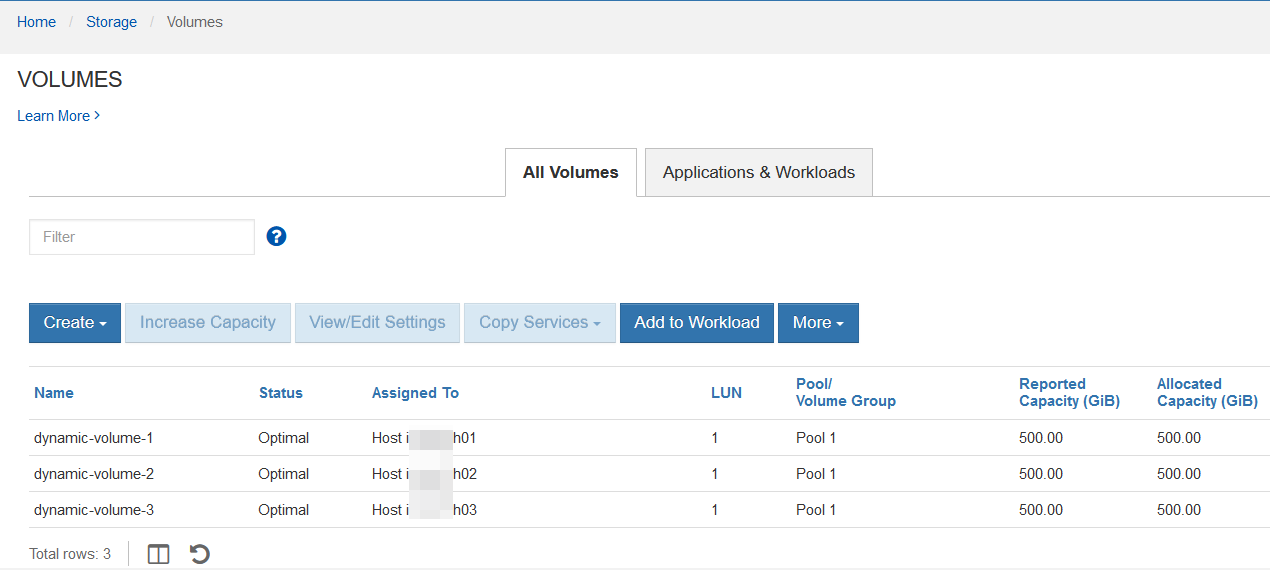
- Create one or more volumes for each host:
-
Connect worker hosts to E-Series using iSCSI or SAS or whatever else you may be having. Configure Linux multipathing if you use it.
-
Follow installation steps to deploy your DAS CSI driver to Kubernetes. In the case of DirectPV, install deploys everything, including Storage Classes (this is different from NetApp Trident, for example) so we don't need to create them

- Fresh drives are seen as Available, formatted as Ready and InUse when some space is allocated to PV(s). This screenshot shows that
dm-5on the second host has allocated 100Gi to a PV. You may see additional details in Appendix A and B.
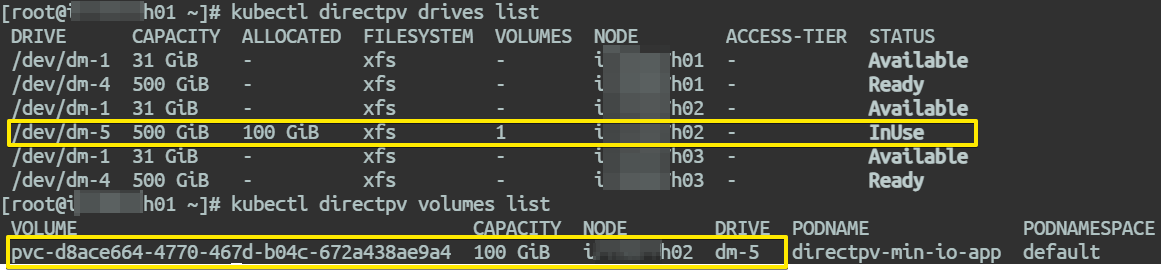
It all just works as it would with physical disks, and there are no E-Series-specific steps after hosts get connected to E-Series.
Example with Elasticsearch with DirectPV on E-Series
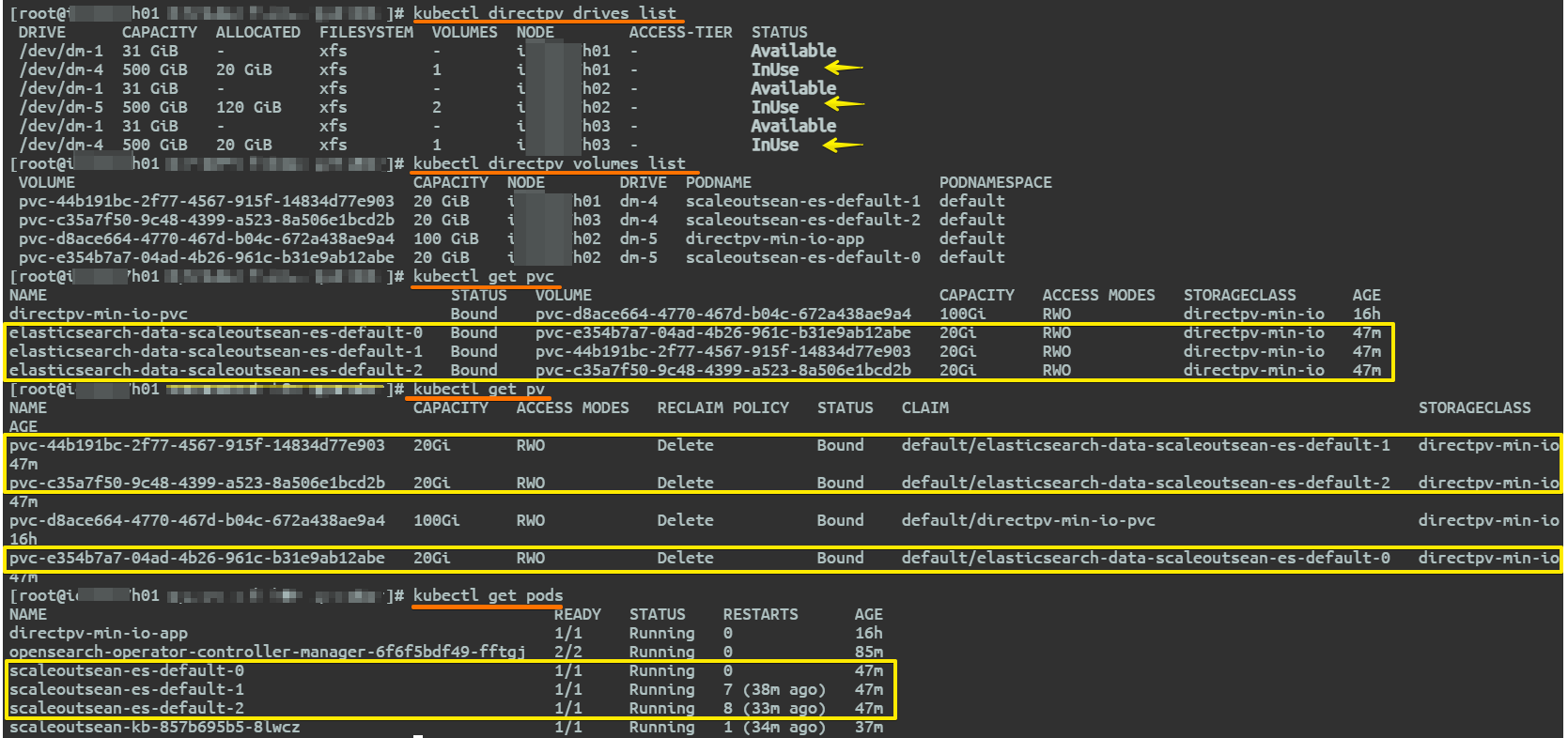
To try a modern application which does its own data protection, I deployed Elasticsearch Cloud on Kubernetes (ECK) using 3 combined master/data/ingest nodes each with one 20GiB PV based on a DirectPV storage class.
Volumes were automatically created and used by ECK. After fixing a small glitch related to host OS configuration on hosts 2 and 3, all Elasticsearch cluster nodes became Running.
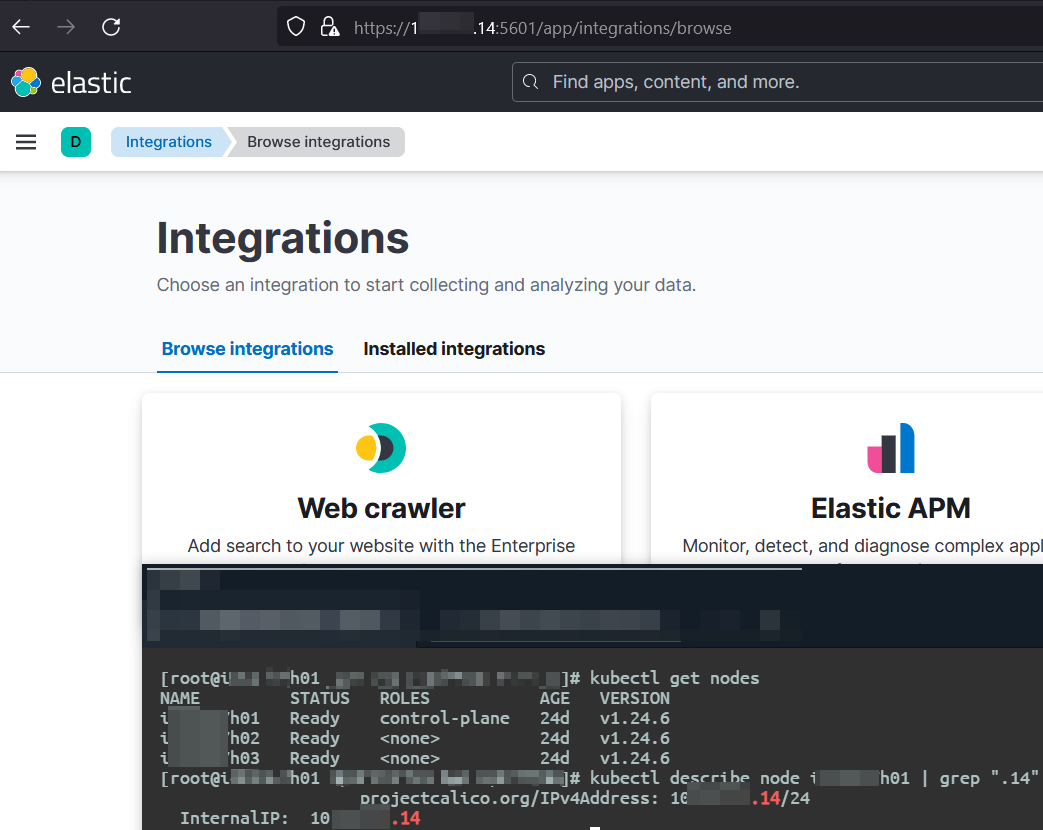
Kibana was active on the first worker (no PV).
One thing I forgot to do (or check) was anti-affinity for Elasticsearch containers, but that may have been already taken care of by ECK because from the CLI output I kept I can see each ECK PV was on a different Kubernetes worker.
This blog post explains how ECK's HA works and this page shows how affinity and anti-affinity can be used with ECK and indicates that anti-affinity is the default behavior which is consistent with what I observed.
One thing worth trying would be scaling out (ECK should create PVs for new nodes, maybe going from two to three would work on my cluster) and scaling-in (removing pods from the cluster; ECK should remove PVs from deleted Elasticsearch data nodes). I have no reason to believe that these steps wouldn't work as expected.
You can find more details on ECK's PVCs and PVs in Appendix A.
Summary
Users of modern analytics and other applications that use single host filesystems have a choice of CSI DAS drivers which are available today and simple to use.
This lets them avoid the hassle of dealing with JBODs and worker-captive RAIDs and possibly lower their application replication factor from three to two or even one.
Appendix A
DirectPV is easy to install so we'll skip that part and focus on some highlights.
- Install and SCs are created when DirectPV is installed
# kubectl get sc -A
NAME                PROVISIONER         RECLAIMPOLICY   VOLUMEBINDINGMODE      ALLOWVOLUMEEXPANSION   AGE
direct-csi-min-io   direct-csi-min-io   Delete          WaitForFirstConsumer   false                  22h
directpv-min-io     direct-csi-min-io   Delete          WaitForFirstConsumer   false                  22h
- On E-Series we present one or more LUNs (here, just one) to each host, format them with DirectPV driver. Storage Classes are created when driver is installed, so we don't have to do that. Notice how
ALLOWVOLUMEEXPANSIONis not allowed - when you need more capacity, here you add a new disk rather than resize an existing PV (a feature and common approach with NetApp Trident) because the assumption is DAS CSI is dealing with physical disks (although in this case with E-Series these are really LUNs and not physical disks).
# kubectl get sc -A
NAME                PROVISIONER         RECLAIMPOLICY   VOLUMEBINDINGMODE      ALLOWVOLUMEEXPANSION   AGE
direct-csi-min-io   direct-csi-min-io   Delete          WaitForFirstConsumer   false                  22h
directpv-min-io     direct-csi-min-io   Delete          WaitForFirstConsumer   false                  22h

# kubectl describe sc directpv-min-io
Name:                  directpv-min-io
IsDefaultClass:        No
Annotations:           rbac.authorization.kubernetes.io/autoupdate=true
Provisioner:           direct-csi-min-io
Parameters:            fstype=xfs
AllowVolumeExpansion:  False
MountOptions:          <none>
ReclaimPolicy:         Delete
VolumeBindingMode:     WaitForFirstConsumer
AllowedTopologies:
  Term 0:              direct.csi.min.io/identity in [direct-csi-min-io]
Events:                <none>
- The status of disks varies as they move from one stage to another. InUse (not shown here, but visible in that screenshot above) is when allocated space is larger than zero.
# kubectl directpv drives ls
 DRIVE      CAPACITY  ALLOCATED  FILESYSTEM  VOLUMES  NODE        ACCESS-TIER  STATUS
 /dev/dm-1  31 GiB    -          xfs         -        ih01        -            Available
 /dev/dm-4  500 GiB   -          xfs         -        ih01        -            Ready
 /dev/dm-1  31 GiB    -          xfs         -        ih02        -            Available
 /dev/dm-5  500 GiB   -          xfs         -        ih02        -            Ready
 /dev/dm-1  31 GiB    -          xfs         -        ih03        -            Available
 /dev/dm-4  500 GiB   -          xfs         -        ih03        -            Ready
- Create a PVC and a pod that uses it (source in Appendix B) and notice it's on
ih02(hostname slightly changed), so we need to examine this PV on the second worker node:
# kubectl get pods -n default
NAME                  READY   STATUS    RESTARTS   AGE
directpv-min-io-app   1/1     Running   0          2m31s

# kubectl describe pod directpv-min-io-app -n default
Name:         directpv-min-io-app
Namespace:    default
Priority:     0
Node:         ih02/10.113.4.16
Start Time:   Fri, 09 Dec 2022 09:50:25 -0500
Labels:       <none>
Annotations:  cni.projectcalico.org/containerID: d8840b59edefc1d95670d2bb7a0e0760cf9b4b343af3d2a80506f2fd7d87fa75
              cni.projectcalico.org/podIP: 10.233.119.80/32
              cni.projectcalico.org/podIPs: 10.233.119.80/32
Status:       Running
IP:           10.233.119.80
IPs:
  IP:  10.233.119.80
Containers:
  directpv-min-io-app:
    Container ID:  containerd://ae270ad948a6c12f4d607b11a727c56584fca8005d95baf64ccf9f5ca1ba10a2
    Image:         alpine:latest
    Image ID:      docker.io/library/alpine@sha256:8914eb54f968791faf6a8638949e480fef81e697984fba772b3976835194c6d4
    Port:          <none>
    Host Port:     <none>
    Command:
      ash
      -c
      touch "/mnt/dyn/touched-by-${POD_UUID}" && sleep 7d
    State:          Running
      Started:      Fri, 09 Dec 2022 09:50:27 -0500
    Ready:          True
    Restart Count:  0
    Environment:
      POD_UUID:   (v1:metadata.uid)
    Mounts:
      /mnt/dyn from directpv-min-io-volume (rw)
      /var/run/secrets/kubernetes.io/serviceaccount from kube-api-access-z26cx (ro)
- Examine PVC
# kubectl get pvc -n default
NAME                  STATUS   VOLUME                                     CAPACITY   ACCESS MODES   STORAGECLASS      AGE
directpv-min-io-pvc   Bound    pvc-d8ace664-4770-467d-b04c-672a438ae9a4   100Gi      RWO            directpv-min-io   8m37s

# kubectl describe pvc directpv-min-io-pvc -n default
Name:          directpv-min-io-pvc
Namespace:     default
StorageClass:  directpv-min-io
Status:        Bound
Volume:        pvc-d8ace664-4770-467d-b04c-672a438ae9a4
Labels:        <none>
Annotations:   pv.kubernetes.io/bind-completed: yes
               pv.kubernetes.io/bound-by-controller: yes
               volume.beta.kubernetes.io/storage-provisioner: direct-csi-min-io
               volume.kubernetes.io/selected-node: ih02
               volume.kubernetes.io/storage-provisioner: direct-csi-min-io
Finalizers:    [kubernetes.io/pvc-protection]
Capacity:      100Gi
Access Modes:  RWO
VolumeMode:    Filesystem
Used By:       directpv-min-io-app
Events:
  Type    Reason                 Age                     From                                                                                      Message
  ----    ------                 ----                    ----                                                                                      -------
  Normal  WaitForFirstConsumer   5m33s (x15 over 8m56s)  persistentvolume-controller                                                               waiting for first consumer to be created before binding
  Normal  Provisioning           5m24s                   direct-csi-min-io_direct-csi-min-io-9b5b65577-chkbr_e4a29415-b5ff-4ad8-a48a-5b86ee2bc347  External provisioner is provisioning volume for claim "default/directpv-min-io-pvc"
  Normal  ExternalProvisioning   5m24s                   persistentvolume-controller                                                               waiting for a
volume to be created, either by external provisioner "direct-csi-min-io" or manually created by system administrator
  Normal  ProvisioningSucceeded  5m24s                   direct-csi-min-io_direct-csi-min-io-9b5b65577-chkbr_e4a29415-b5ff-4ad8-a48a-5b86ee2bc347  Successfully provisioned volume pvc-d8ace664-4770-467d-b04c-672a438ae9a4
- Display current status of drives and volumes. Volume pvc-d8ace664-4770-467d-b04c-672a438ae9a4 is on the second worker.
# kubectl directpv drives list
 DRIVE      CAPACITY  ALLOCATED  FILESYSTEM  VOLUMES  NODE        ACCESS-TIER  STATUS
 /dev/dm-1  31 GiB    -          xfs         -        ih01  -            Available
 /dev/dm-4  500 GiB   -          xfs         -        ih01  -            Ready
 /dev/dm-1  31 GiB    -          xfs         -        ih02  -            Available
 /dev/dm-5  500 GiB   100 GiB    xfs         1        ih02  -            InUse
 /dev/dm-1  31 GiB    -          xfs         -        ih03  -            Available
 /dev/dm-4  500 GiB   -          xfs         -        ih03  -            Ready

# kubectl directpv volumes list
 VOLUME                                    CAPACITY  NODE        DRIVE  PODNAME              PODNAMESPACE
 pvc-d8ace664-4770-467d-b04c-672a438ae9a4  100 GiB   ih02        dm-5   directpv-min-io-app  default
- Go to the ih02 host where the PV and pod live and find output file created by the pod:
# dir /var/lib/direct-csi/mnt/c41e8c06-082f-40a4-b71c-0a1387b3848c
pvc-d8ace664-4770-467d-b04c-672a438ae9a4
- Worker
ih02is connected to E-Series EF280 SAS ports. Looking for our PV we get two paths (MPIO) and fromkubectl directpv drives lswe confirm thatdm-5is being used for this PV:
# lsblk | grep c41
└─3600a098000a1bfa80000044663902199 253:5    0   500G  0 mpath /var/lib/direct-csi/mnt/c41e8c06-082f-40a4-b71c-0a1387b3848c
└─3600a098000a1bfa80000044663902199 253:5    0   500G  0 mpath /var/lib/direct-csi/mnt/c41e8c06-082f-40a4-b71c-0a1387b3848c

# multipath -l
3600a098000a1bfa80000044663902199 dm-5 NETAPP,INF-01-00
size=500G features='3 queue_if_no_path pg_init_retries 50' hwhandler='1 alua' wp=rw
|-+- policy='service-time 0' prio=0 status=active
| `- 17:0:0:1 sdc 8:32 active undef running
`-+- policy='service-time 0' prio=0 status=enabled
  `- 2:0:0:1  sda 8:0  active undef running
- The same cluster after deploying Elasticsearch Cloud on Kubernetes ("ECK") on Kubernetes using DirectPV, PVCs were created automatically for 20Gi PVs with SC directpv-min-io requested in deployment YAML:
# kubectl directpv drives list
 DRIVE      CAPACITY  ALLOCATED  FILESYSTEM  VOLUMES  NODE        ACCESS-TIER  STATUS
 /dev/dm-1  31 GiB    -          xfs         -        ih01        -            Available
 /dev/dm-4  500 GiB   20 GiB     xfs         1        ih01        -            InUse
 /dev/dm-1  31 GiB    -          xfs         -        ih02        -            Available
 /dev/dm-5  500 GiB   120 GiB    xfs         2        ih02        -            InUse
 /dev/dm-1  31 GiB    -          xfs         -        ih03        -            Available
 /dev/dm-4  500 GiB   20 GiB     xfs         1        ih03        -            InUse

# kubectl directpv volumes list
 VOLUME                                    CAPACITY  NODE        DRIVE  PODNAME                    PODNAMESPACE
 pvc-44b191bc-2f77-4567-915f-14834d77e903  20 GiB    ih01        dm-4   scaleoutsean-es-default-1  default
 pvc-c35a7f50-9c48-4399-a523-8a506e1bcd2b  20 GiB    ih03        dm-4   scaleoutsean-es-default-2  default
 pvc-d8ace664-4770-467d-b04c-672a438ae9a4  100 GiB   ih02        dm-5   directpv-min-io-app        default
 pvc-e354b7a7-04ad-4b26-961c-b31e9ab12abe  20 GiB    ih02        dm-5   scaleoutsean-es-default-0  default
- Elasticsearch PVCs and PVs:
# kubectl get pvc
NAME                                           STATUS   VOLUME                                     CAPACITY   ACCESS MODES   STORAGECLASS      AGE
directpv-min-io-pvc                            Bound    pvc-d8ace664-4770-467d-b04c-672a438ae9a4   100Gi      RWO            directpv-min-io   16h
elasticsearch-data-scaleoutsean-es-default-0   Bound    pvc-e354b7a7-04ad-4b26-961c-b31e9ab12abe   20Gi       RWO            directpv-min-io   47m
elasticsearch-data-scaleoutsean-es-default-1   Bound    pvc-44b191bc-2f77-4567-915f-14834d77e903   20Gi       RWO            directpv-min-io   47m
elasticsearch-data-scaleoutsean-es-default-2   Bound    pvc-c35a7f50-9c48-4399-a523-8a506e1bcd2b   20Gi       RWO            directpv-min-io   47m

# kubectl get pv
NAME                                       CAPACITY   ACCESS MODES   RECLAIM POLICY   STATUS   CLAIM                                                  STORAGECLASS      REASON
AGE
pvc-44b191bc-2f77-4567-915f-14834d77e903   20Gi       RWO            Delete           Bound    default/elasticsearch-data-scaleoutsean-es-default-1   directpv-min-io
47m
pvc-c35a7f50-9c48-4399-a523-8a506e1bcd2b   20Gi       RWO            Delete           Bound    default/elasticsearch-data-scaleoutsean-es-default-2   directpv-min-io
47m
pvc-d8ace664-4770-467d-b04c-672a438ae9a4   100Gi      RWO            Delete           Bound    default/directpv-min-io-pvc                            directpv-min-io
16h
pvc-e354b7a7-04ad-4b26-961c-b31e9ab12abe   20Gi       RWO            Delete           Bound    default/elasticsearch-data-scaleoutsean-es-default-0   directpv-min-io
47m
- I only had to adjust OS settings to ensure pods could start on hosts 2 and 3. Everything else was automatic. ECK lets you resize volumes, but DirectPV SC doesn't allow that as mentioned above, so another approach has to be used (add new disks or nodes with larger disks, then remove nodes with smaller disks, perhaps).
# kubectl get pods
NAME                                                      READY   STATUS    RESTARTS      AGE
directpv-min-io-app                                       1/1     Running   0             16h
opensearch-operator-controller-manager-6f6f5bdf49-fftgj   2/2     Running   0             85m
scaleoutsean-es-default-0                                 1/1     Running   0             47m
scaleoutsean-es-default-1                                 1/1     Running   7 (38m ago)   47m
scaleoutsean-es-default-2                                 1/1     Running   8 (33m ago)   47m
scaleoutsean-kb-857b695b5-8lwcz                           1/1     Running   1 (34m ago)   37m
Appendix B
These are borrowed from NetApp's BeeGFS CSI driver repository (PVC and application example for Kubernetes):
- PVC
# Copyright 2021 NetApp, Inc. All Rights Reserved.
# Licensed under the Apache License, Version 2.0.
apiVersion: v1
kind: PersistentVolumeClaim
metadata:
  name: directpv-min-io-pvc
spec:
  accessModes:
  - ReadWriteOnce
  resources:
    requests:
      storage: 100Gi
  storageClassName: directpv-min-io
- App
# Copyright 2021 NetApp, Inc. All Rights Reserved.
# Licensed under the Apache License, Version 2.0.
kind: Pod
apiVersion: v1
metadata:
  name: directpv-min-io-app
spec:
  containers:
    - name: directpv-min-io-app
      image: alpine:latest
      volumeMounts:
      - mountPath: /mnt/dyn
        name: directpv-min-io-volume
      command: [ "ash", "-c", 'touch "/mnt/dyn/touched-by-${POD_UUID}" && sleep 7d']
      env:
        - name: POD_UUID
          valueFrom:
            fieldRef:
              fieldPath: metadata.uid
  volumes:
    - name: directpv-min-io-volume
      persistentVolumeClaim:
        claimName: directpv-min-io-pvc