New Dynamic Disk Pool configuration and E-Series SANtricity
- Dynamic Disk Pools vs. Disk Groups
- New DDP configuration
- What does that mean?
- Things to note
- SANtricity Web Services Proxy
- Web Proxy Container
- Docs
- DDP
- DDP and Thin Volumes
- Examples of automation with Python
- Summary
- Appendix A - GET pools
- Appendix B - POST volumes
- Appendix C - GET volumes
- Appendix D - POST thin-volumes
- Appendix E - GET thin-volumes
- Appendix F - selected screenshots from SANtricity Web UI
Dynamic Disk Pools vs. Disk Groups
On E-Series or EF-Series drives, there are traditional disk groups where you configure traditional RAID. For example you can take two disk drives and configure RAID 1.
There's also DDP about which I wrote before, where data protection is always RAID 6-like, meaning 8 strips of data, and 2 strips of parity. The difference vs. a RAID 6 Disk Group is that this allocation is fixed no matter how large a DDP gets. So whether you have 11 or 51 disks in a DDP, writes will be 8D2P in 128 KiB chunks.
New DDP configuration
Apparently, this has changed and "DDP containers for RAID 1- and RAID6-like volumes" are a thing since SANtricity version 11.70.1. From TR-4652:

If you can't see the image clearly:
- The minimum number of drives in a DDP is 8 when configured through the API and comprised of SSDs. It used to be, and still is, 11 when configured through the SANtricity Web management interface
- Now we can use the API to create RAID 1-style volumes on DDPs, and these RAID 1-style volumes can coexist with RAID 6-style volumes in the same DDP (assuming DDP size is 11 or more)
- DDP with 8-10 drives lets you create RAID 1-style volumes in 3+3 configuration (very similar to 6-drive RAID 10 in a "classic" E-Series Disk Group)
- DDP with 11 or more drives creates RAID 1-style volumes as 5+5 configuration, so a DDP with less 11 disk drives that was expanded to 11 (or more) disk drives may have RAID 1 volumes of differing sizes and striping patterns
What does that mean?
It means several things:
- we no longer have to configure a separate Disk Group just to get RAID 1 or 10 protection for some volumes (we also don't need to provide a separate hot spare as DDPs don't use hot spares)
- if all we want is RAID 6 and RAID 1, this heterogeneous RAID type can make it easier from a sizing perspective as we can just create a big DDP out of all disks and call it a day
- DDP has 1 or 2 disks worth of spare capacity which means we no longer have to quote a separate hot spare for "classic" RAID groups when DDP is already available
Practical examples:
- EF600 has 24 disk slots in controller shelf. If you need RAID 6 and RAID 1 volumes, we'd do something like 2 x RAID 6 (8D2P) and 2 x RAID 1 to use up all 24 slots, but if we needed less capacity, it could be harder to lay them out nicely. Maybe we'd do 1 x DDP for 11-20 drives instead of RAID 6, but we'd still have separate RAID 1 disk groups
- Now we can use (for example) 1 x DDP with 15 drives, have RAID 10-like and RAID 6-like data in this one pool, and be able to grow it by one or more disks at a time while not having an idle Hot Spare or Cold Spare sitting there doing nothing
Before vs now:
- Before: 2 x RAID 6 + 2 x RAID 1 = 24 disks, and one Cold Spare on the side
- Now: 1 x DDP with RAID 6- and RAID 1-like volumes (11-24 drives, with 2 drives of spare capacity)
A simplified version of "before" below shows two RAID 1 (1+1) groups and a DDP. There's also a global hot spare for either of the RAID 1 groups.
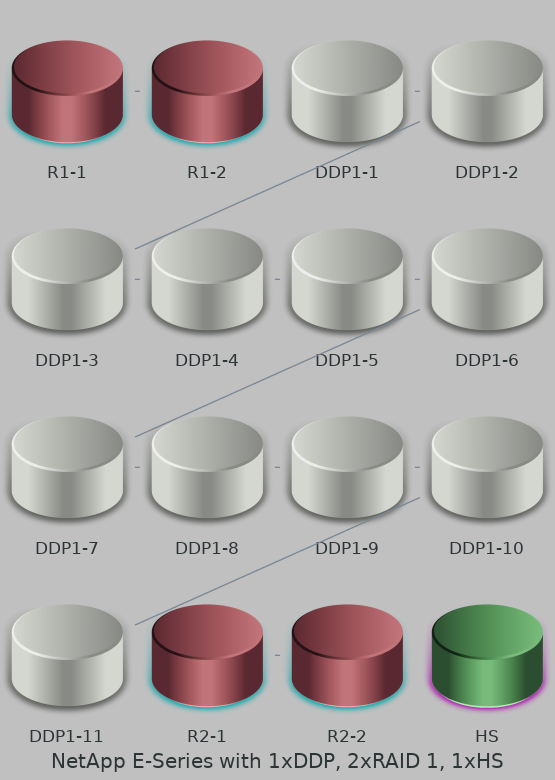
Recall - as it is not visible in the image - DDP doesn't use Hot Spares. It has two drives worth of spare capacity spread among all pool members.
While this configuration style has its advantages, sometimes requirements work against it. In such cases we could "merge" two RAID 1 groups into DDP, eliminate that Hot Spare, and still enjoy a better level of protection for RAID 1 (not in the sense that it can withstand more than 1 concurrent failure, but that instead of having the usual 1 hot spare, it can lose several disks (up to DDP protection level) as long as critical reconstruction completes before next disk fails).
DDP in the picture has more than 11 disks so RAID 10 would be written in 5+5 strips. Two concurrent disk failures in this DDP can still lose RAID 10 data, but two failures over two days of one weekend would not, because DDP would very likely reconstruct critical strips between disk failures.
Things to note
If you start with a 9 drive DDP configured via the REST API, you won't be able to create RAID 6-like volumes until you grow the DDP by two additional disk drives. But you can start with RAID 10-like volumes and migrate data to RAID 6-like volume later, if you don't mind the extra work. Generally I wouldn't recommend this, but there may be workloads (scale-out, etc.) where migration can be painless - add a new worker with new RAID 6 configuration, remove an old worker with old RAID 1 configuration, etc. until you've moved all data from RAID 1 to RAID 6 volumes on DDP.
If you start with a 10 drive DDP and RAID 10-like volumes, and later grow the DDP to 11 and beyond, new and old RAID 10 "containers" won't be the same size (3+3 vs 5+5). Same as above, this may or may not be annoying. If you run scale-out services or can afford some downtime, this may be easy to address by draining old and adding new nodes.
All disks in a DDP must have the same disk size.
Unlike "classic" disk groups, IO workload from RAID 10 and RAID 6 "volume containers" in a DDP is co-mingled, so it's not possible to separate the workloads as clearly. So a little bit more caution is required when combining workloads on the same DDP group - unlike with "classic" RAID 1 and RAID 6 which share the controllers, here R1 and R6 volumes share physical media as well.
On the one hand, we lose the benefit of workload segregation on disk level and (for R6 migrated into DDP) Full Stripe Write Acceleration (possible with "classic" RAID 6), but on the other we spread workloads across more disks and on the whole we may also gain from not over-sizing one RAID type with classic RAID, for example.
We should also think of mixed workload situations where we do not have or can't know the details while sizing. In such situations hard segregation of disks into "classic" volume groups can be risky. In those cases using DDP may be more appropriate - it loses some performance up-front (compared to "classic" RAID), but it can deliver both RAID 1- and RAID 6-like performance, so it lowers the risk of mis-sizing. DDP has been around for a while, but this approach wasn't possible because it accommodated only RAID 6-like volumes - if you gave up RAID 1 in favor of DDP, that was much more risky than giving up RAID 1 volume group in favor of RAID 1-like volumes in a DDP.
SANtricity Web Services Proxy
The "small DDP" feature is not yet available in the Web UI - we must set it via the API. Let's take a look at that. First we need a SANtricity Web Services Proxy.
It's a reverse proxy for one or more stand-alone or embedded (i.e. into E-Series or EF-Series controllers) SANtricty management interfaces.
You can run this thing locally on your "management workstation", for example.
You can learn more about it here. One thing I've learned by randomly browsing TFM is that pre-REST SYMbol is exposed through Web Services proxy and you may want to disable it for additional security.
Web Proxy Container
Okay, so how do we use this thing if we don't have it in our lab?
After some RTFM I found there's no need to download anything by logging in anywhere - there's a freely downloadable container image on the Web.
Adjust this Docker command to use 127.0.0.1 or a port inaccessible to external network. I'll use port 8443 as per the example from Docker Hub.
$ docker run -it -p8443:8443 -e ACCEPT_EULA=true netapp/eseries-webservices
Unable to find image 'netapp/eseries-webservices:latest' locally
latest: Pulling from netapp/eseries-webservices
8663204ce13b: Already exists
bee9030860e0: Pull complete
a16c61869286: Pull complete
a790ba5de190: Pull complete
Digest: sha256:df9d3265c13274606dfb7aa701bb006f81fb6d5bd2941bf4abd147494cb7d559
Status: Downloaded newer image for netapp/eseries-webservices:latest
...
Leave that console window open and elsewhere check the IP address and port.
$ docker ps -a
CONTAINER ID   IMAGE                       PORTS
92dd54394678   netapp/eseries-webservices  0.0.0.0:8443->8443/tcp, :::8443->8443/tcp
You know where to go…

Docs
If you prefer to consume the docs offline, download them and shut down the container (assuming localhost:8443):
wget https://localhost:8443/docs/static_docs.zip
Or you can browse 'em live at https://localhost:8443/um/en-US/root.html.

Get to Swagger at https://localhost:8443/devmgr/docs/ (assuming localhost:8443).
DDP
Interestingly there's nothing about Volume Groups or Pools. I guess that means Volumes is the section to look at.

I assume the right method is https://localhost:8443/devmgr/docs/#/Volumes/new-StoragePool. Default JSON in Swagger:
{
  "raidLevel": "raidUnsupported",
  "diskDriveIds": [
    "string"
  ],
  "eraseSecuredDrives": true,
  "name": "string"
}
We may want to do something like:
{
  "raidLevel": "raid7",
  "diskDriveIds": [ "1,2,3,4,5,6,7,8" ],
  "eraseSecuredDrives": false,
  "name": "ddp1"
}
According to Cloud Insights documentation it's how SANtricity reports DDPs.
Redundancy – RAID level or protection scheme. E-Series reports "RAID 7" for DDP pools
As best I can tell, that's simply wrong. See examples in Appendices below.
After we have a DDP, we can create RAID1-style volumes on it. For that use POST /storage-systems/{system-id}/volumes to create a RAID 1 or 6 volume, which would look something like this:
{
  "poolId": "ddp1",
  "name": "raid10logdisk",
  "sizeUnit": "gb",
  "size": "100",
  "segSize": 0,
  "dataAssuranceEnabled": false,
  "owningControllerId": "1",
  "raidLevel": "raid1",
  "metaTags": [
    {
      "key": "workload",
      "value": "database"
    }
  ],
  "blockSize": 0
}
For completely correct examples, please refer to the JSONs from Appendices below as it was obtained from a real SANtricity OS 11.80.
After that we'd use methods from Mapping section to create a host group, add a host or hosts to it, and map the volume to that host or host group.
DDP and Thin Volumes
NOTE: the E-Series NVMe arrays (EF300 and EF600, presently) do not support thin provisioning (on DDP, as that's the only protection level that supports DDP, just not on NVMe arrays). This is as of SANtricity 11.80 (written in September 2023).
SAS-based E-Series arrays do support thin provisioning (pn DDPs). This includes all E2800, E5700 models.
Thin provisioning thresholds are surfaced to hosts which use them. I noticed this on a client which had a thin LUN presented to it.
Oct  4 04:59:43 icxxxxxxxx kernel: [ 2932.137283] sd 15:0:0:24: Mode parameters changed
Oct  4 04:59:43 icxxxxxxxx kernel: [ 2932.152894] sd 15:0:0:24: Warning! Received an indication that the LUN reached a thin provisioning soft threshold.
Examples of automation with Python
TFM says there are samples of automation scripts in the samples directory. Enter your docker container to see them.
/opt/netapp/webservices_proxy # cd /opt/netapp/webservices_proxy/samples/restapi/python

/opt/netapp/webservices_proxy # ls -la
total 80
drwxr-xr-x    2 root     root          4096 May 16 23:54 .
drwxr-xr-x    3 root     root          4096 May 16 23:54 ..
-rwxr-xr-x    1 root     root          2773 May 16 23:54 async_mirroring.py
-rwxr-xr-x    1 root     root          5055 May 16 23:54 configuration.py
-rwxr-xr-x    1 root     root          2448 May 16 23:54 consistency_groups.py
-rwxr-xr-x    1 root     root          1963 May 16 23:54 copies.py
-rwxr-xr-x    1 root     root          1094 May 16 23:54 device_alerts.py
-rwxr-xr-x    1 root     root           329 May 16 23:54 device_alerts_email.py
-rwxr-xr-x    1 root     root          1634 May 16 23:54 device_asup.py
-rwxr-xr-x    1 root     root           418 May 16 23:54 device_asup_logs.py
-rwxr-xr-x    1 root     root           793 May 16 23:54 event_monitoring.py
-rwxr-xr-x    1 root     root          1021 May 16 23:54 hardware_inventory.py
-rwxr-xr-x    1 root     root          1498 May 16 23:54 pools.py
-rwxr-xr-x    1 root     root            17 May 16 23:54 requirements.txt
-rwxr-xr-x    1 root     root          4243 May 16 23:54 restlibs.py
-rwxr-xr-x    1 root     root          1928 May 16 23:54 snapshots.py
-rwxr-xr-x    1 root     root           955 May 16 23:54 symbol.py
-rwxr-xr-x    1 root     root          1120 May 16 23:54 volumes.py

/opt/netapp/webservices_proxy # less pools.py
There is nothing too revealing in there, but fine - we know we need to get drives or just name drive IDs if we can view them in the Web UI, and POST this to target.
drives_req = {
          "driveCount": 11,
          "interfaceType": "fibre"
driveSet = map(lambda d: d['driveRef'], drives)
generic_post('pools', {'diskDriveIds' : driveSet,
    'name' : 'pool1',
    'raidLevel' : "raidDiskPool"}, array_id=array['id'])
Unfortunately, there's nothing about valid inputs or DDP-related examples so we should refer to the JSON example from Swagger.
If you're starting with Python you can first try the example from Docker Hub:
def main():
    """Issue a simple request to list the monitored systems"""
    result = requests.get('https://dot.org.com:443/devmgr/v2/storage-systems',
                          headers={'Accept': 'application/json'},
                          auth=('rw', 'myp@ass'))
    pprint(result.json())
PowerShell users: it seem E-Series PowerShell Toolkit has been discontinued (at least I can no longer find it), but since it wasn't very advanced, it's not hard to create your own cmdlets for these 2-3 methods.
Summary
The new DDP features are smaller minimum pool size (8, limited to RAID 1-only volumes) and the ability to provision RAID 1 and RAID 6 in same DDP (with 11 or more drives).
These provide additional flexibility and improve the economics of E-Series:
- Create RAID 1-style volumes in DDP for easier capacity management
- Grow RAID 1-style volumes in DDP by growing DDP by as little as one drive at a time
- Avoid Hot or Cold Spares for configurations that have RAID 1 (now on DDP) compared to before where a Hot or Cold Spare had to be allocated even for the smallest RAID 1 Disk Group - especially convenient and economical for single-shelf SSD configurations
Appendix A - GET pools
curl -X GET "https://san.trici.ty:8443/devmgr/v2/storage-systems/$WWID/storage-pools"
Example of an array with just one pool (actually there was more than one, but other entries (RAID6 Disk Groups) were removed to shorten the output). You can see that it's raidDiskPool and not raid7.
[
  {
    "sequenceNum": 2,
    "offline": false,
    "raidLevel": "raidDiskPool",
    "worldWideName": "600A098000E3C1B000002CED62CF874D",
    "volumeGroupRef": "04000000600A098000E3C1B000002CED62CF874D",
    "reserved1": "000000000000000000000000",
    "reserved2": "",
    "trayLossProtection": false,
    "label": "sean_pool",
    "state": "complete",
    "spindleSpeedMatch": true,
    "spindleSpeed": 0,
    "isInaccessible": false,
    "securityType": "none",
    "drawerLossProtection": false,
    "protectionInformationCapable": false,
    "protectionInformationCapabilities": {
      "protectionInformationCapable": true,
      "protectionType": "type2Protection"
    },
    "volumeGroupData": {
      "type": "diskPool",
      "diskPoolData": {
        "reconstructionReservedDriveCount": 1,
        "reconstructionReservedAmt": "791884595200",
        "reconstructionReservedDriveCountCurrent": 4,
        "poolUtilizationWarningThreshold": 0,
        "poolUtilizationCriticalThreshold": 85,
        "poolUtilizationState": "utilizationOptimal",
        "unusableCapacity": "0",
        "degradedReconstructPriority": "high",
        "criticalReconstructPriority": "highest",
        "backgroundOperationPriority": "low",
        "allocGranularity": "4294967296",
        "minimumDriveCount": 11,
        "poolVersion": 0
      }
    },
    "usage": "standard",
    "driveBlockFormat": "allEmulated",
    "reservedSpaceAllocated": true,
    "securityLevel": "none",
    "dulbeEnabled": false,
    "blkSizeSupported": [
      512
    ],
    "blkSizeRecommended": 512,
    "usedSpace": "3620657430528",
    "totalRaidedSpace": "13039520710656",
    "extents": [
      {
        "sectorOffset": "0",
        "rawCapacity": "9418863280128",
        "raidLevel": "raidDiskPool",
        "volumeGroupRef": "04000000600A098000E3C1B000002CED62CF874D",
        "freeExtentRef": "03010000600A098000E3C1B000002CED62CF874D",
        "reserved1": "000000000000000000000000",
        "reserved2": "",
        "ddpRAIDCapacities": [
          {
            "ddpVolRAIDLevel": "raid6",
            "usableCapacity": "9418863280128",
            "allocGranularity": "4294967296"
          },
          {
            "ddpVolRAIDLevel": "raid1",
            "usableCapacity": "5886789550080",
            "allocGranularity": "2684354560"
          }
        ]
      }
    ],
    "largestFreeExtentSize": "9418863280128",
    "raidStatus": "optimal",
    "freeSpace": "9418863280128",
    "drivePhysicalType": "sas",
    "driveMediaType": "ssd",
    "normalizedSpindleSpeed": "spindleSpeedSSD",
    "diskPool": true,
    "id": "04000000600A098000E3C1B000002CED62CF874D",
    "name": "sean_pool"
  }
]
Appendix B - POST volumes
curl -X POST "https://san.trici.ty:8443/devmgr/v2/storage-systems/$WWID/volumes"
A minimal example of a JSON file that needs to be passed with this call:
{
  "poolId": "04000000600A098000E3C1B000002CED62CF874D",
  "name": "raid1",
  "sizeUnit": "bytes",
  "size": "10737418240",
  "segSize": 131072,
  "dataAssuranceEnabled": true,
  "raidLevel": "raid1",
  "metaTags": [
    {
      "key": "createdBy",
      "value": "scaleoutSeanApiCall"
    }
  ],
  "blockSize": 512
}
That poolId value was obtained with GET pools in Appendix A.
Appendix C - GET volumes
curl -X GET "https://san.trici.ty:8443/devmgr/v2/storage-systems/$WWID/volumes"
An example for the volume created above after host presentation was finished in the Web UI (which we can tell by the fact that my original meta tags were rudely overwritten by SANtricity UI (as far as I can tell)).
[
    {
        "offline": false,
        "extremeProtection": false,
        "volumeHandle": 15,
        "raidLevel": "raid6",
        "sectorOffset": "15",
        "worldWideName": "600A098000E3C1B000002F12650EC6BC",
        "label": "poolbased",
        "blkSize": 512,
        "capacity": "10737418240",
        "reconPriority": 1,
        "segmentSize": 131072,
        "action": "none",
        "cache": {
            "cwob": false,
            "enterpriseCacheDump": false,
            "mirrorActive": true,
            "mirrorEnable": true,
            "readCacheActive": true,
            "readCacheEnable": true,
            "writeCacheActive": true,
            "writeCacheEnable": true,
            "cacheFlushModifier": "flush10Sec",
            "readAheadMultiplier": 0
        },
        "mediaScan": {
            "enable": true,
            "parityValidationEnable": true
        },
        "volumeRef": "02000000600A098000E3C1B000002F12650EC6BC",
        "status": "optimal",
        "volumeGroupRef": "04000000600A098000E3C1B000002CED62CF874D",
        "currentManager": "070000000000000000000002",
        "preferredManager": "070000000000000000000002",
        "perms": {
            "mapToLUN": true,
            "snapShot": false,
            "format": true,
            "reconfigure": true,
            "mirrorPrimary": true,
            "mirrorSecondary": true,
            "copySource": true,
            "copyTarget": true,
            "readable": true,
            "writable": true,
            "rollback": true,
            "mirrorSync": true,
            "newImage": true,
            "allowDVE": true,
            "allowDSS": true,
            "concatVolumeMember": false,
            "flashReadCache": false,
            "asyncMirrorPrimary": true,
            "asyncMirrorSecondary": true,
            "pitGroup": true,
            "cacheParametersChangeable": true,
            "allowThinManualExpansion": true,
            "allowThinGrowthParametersChange": true,
            "allowImportTarget": true
        },
        "mgmtClientAttribute": 0,
        "dssPreallocEnabled": false,
        "dssMaxSegmentSize": 131072,
        "preReadRedundancyCheckEnabled": false,
        "protectionInformationCapable": false,
        "protectionType": "type1Protection",
        "applicationTagOwned": false,
        "repairedBlockCount": 0,
        "extendedUniqueIdentifier": "00002F12650EC6BC00A0980000E3C1B0",
        "cacheMirroringValidateProtectionInformation": true,
        "expectedProtectionInformationAppTag": 0,
        "hostUnmapEnabled": false,
        "cachePoolID": 0,
        "blkSizePhysical": 512,
        "dataDriveCount": 8,
        "parityDriveCount": 2,
        "allocGranularity": "4294967296",
        "volumeUse": "standardVolume",
        "volumeFull": false,
        "volumeCopyTarget": false,
        "volumeCopySource": false,
        "pitBaseVolume": false,
        "asyncMirrorTarget": false,
        "asyncMirrorSource": false,
        "remoteMirrorSource": false,
        "remoteMirrorTarget": false,
        "diskPool": true,
        "flashCached": false,
        "increasingBy": "0",
        "metadata": [
            {
                "key": "createdBy",
                "value": "SANtricity System Manager"
            },
            {
                "key": "createdUTC",
                "value": "1695489982"
            },
            {
                "key": "workloadId",
                "value": "4200000009000000000000000000000000000000"
            }
        ],
        "dataAssurance": true,
        "objectType": "volume",
        "wwn": "600A098000E3C1B000002F12650EC6BC",
        "preferredControllerId": "070000000000000000000002",
        "totalSizeInBytes": "10737418240",
        "onlineVolumeCopy": false,
        "listOfMappings": [
            {
                "lunMappingRef": "8800000062000000000000000000000000000000",
                "lun": 17,
                "ssid": 15,
                "perms": 15,
                "volumeRef": "02000000600A098000E3C1B000002F12650EC6BC",
                "type": "host",
                "mapRef": "84000000600A098000E3C1B000302F0C650C2668",
                "id": "8800000062000000000000000000000000000000"
            }
        ],
        "mapped": true,
        "currentControllerId": "070000000000000000000002",
        "cacheSettings": {
            "cwob": false,
            "enterpriseCacheDump": false,
            "mirrorActive": true,
            "mirrorEnable": true,
            "readCacheActive": true,
            "readCacheEnable": true,
            "writeCacheActive": true,
            "writeCacheEnable": true,
            "cacheFlushModifier": "flush10Sec",
            "readAheadMultiplier": 0
        },
        "thinProvisioned": false,
        "name": "poolbased",
        "id": "02000000600A098000E3C1B000002F12650EC6BC"
    }
]
Appendix D - POST thin-volumes
This goes to thin-volumes (not volumes) path!
curl -X POST "https://san.trici.ty:8443/devmgr/v2/storage-systems/$WWID/thin-volumes"
A minimal example of a JSON file that need to be passed with this call:
{
  "poolId": "04000000600A098000E3C1B000002CED62CF874D",
  "expansionPolicy": "automatic",
  "name": "raid1thinn",
  "sizeUnit": "bytes",
  "virtualSize": "1047483648",
  "maximumRepositorySize": "32212254720",
  "repositorySize": "25474836480",
  "growthAlertThreshold": 0,
  "segSize": 131072,
  "dataAssuranceEnabled": true,
  "raidLevel": "raid1",
  "blockSize": 512
}
Appendix E - GET thin-volumes
This also goes to thin-volumes (not volumes) path!
curl -X GET https://san.trici.ty:8443/devmgr/v2/storage-systems/$WWID/thin-volumes
Example:
[
    {
        "volumeHandle": 16385,
        "worldWideName": "600A098000F6371400002A50650ED517",
        "label": "raid1thinn",
        "allocationGranularity": 128,
        "capacity": "6416192512",
        "reconPriority": 1,
        "volumeRef": "3A000000600A098000F6371400002A50650ED517",
        "status": "optimal",
        "repositoryRef": "36000000600A098000F6371400002A4E650ED517",
        "currentManager": "070000000000000000000001",
        "preferredManager": "070000000000000000000001",
        "perms": {
            "mapToLUN": true,
            "snapShot": false,
            "format": true,
            "reconfigure": false,
            "mirrorPrimary": false,
            "mirrorSecondary": false,
            "copySource": true,
            "copyTarget": false,
            "readable": true,
            "writable": true,
            "rollback": true,
            "mirrorSync": true,
            "newImage": true,
            "allowDVE": true,
            "allowDSS": true,
            "concatVolumeMember": false,
            "flashReadCache": false,
            "asyncMirrorPrimary": true,
            "asyncMirrorSecondary": true,
            "pitGroup": true,
            "cacheParametersChangeable": true,
            "allowThinManualExpansion": true,
            "allowThinGrowthParametersChange": true,
            "allowImportTarget": true
        },
        "mgmtClientAttribute": 0,
        "preReadRedundancyCheckEnabled": false,
        "protectionType": "type1Protection",
        "applicationTagOwned": false,
        "maxVirtualCapacity": "281474976710656",
        "initialProvisionedCapacity": "25769803776",
        "currentProvisionedCapacity": "25769803776",
        "provisionedCapacityQuota": "25769803776",
        "growthAlertThreshold": 20,
        "expansionPolicy": "automatic",
        "volumeCache": {
            "cwob": false,
            "enterpriseCacheDump": false,
            "mirrorActive": true,
            "mirrorEnable": true,
            "readCacheActive": true,
            "readCacheEnable": true,
            "writeCacheActive": true,
            "writeCacheEnable": true,
            "cacheFlushModifier": "flush10Sec",
            "readAheadMultiplier": 0
        },
        "offline": false,
        "reportingPolicy": "asThin",
        "extendedUniqueIdentifier": "00002A50650ED51700A0980000F63714",
        "volumeFull": false,
        "volumeGroupRef": "04000000600A098000E3C1B000002CED62CF874D",
        "blkSize": 512,
        "storageVolumeRef": "02000000600A098000F6371400002A4D650ED517",
        "volumeCopyTarget": false,
        "volumeCopySource": false,
        "pitBaseVolume": false,
        "asyncMirrorTarget": false,
        "asyncMirrorSource": false,
        "remoteMirrorSource": false,
        "remoteMirrorTarget": false,
        "flashCached": false,
        "mediaScan": {
            "enable": true,
            "parityValidationEnable": true
        },
        "metadata": [],
        "dataAssurance": true,
        "objectType": "thinVolume",
        "wwn": "600A098000F6371400002A50650ED517",
        "preferredControllerId": "070000000000000000000001",
        "totalSizeInBytes": "6416192512",
        "onlineVolumeCopy": false,
        "diskPool": true,
        "segmentSize": 131072,
        "listOfMappings": [],
        "mapped": false,
        "currentControllerId": "070000000000000000000001",
        "cacheSettings": {
            "cwob": false,
            "enterpriseCacheDump": false,
            "mirrorActive": true,
            "mirrorEnable": true,
            "readCacheActive": true,
            "readCacheEnable": true,
            "writeCacheActive": true,
            "writeCacheEnable": true,
            "cacheFlushModifier": "flush10Sec",
            "readAheadMultiplier": 0
        },
        "thinProvisioned": true,
        "name": "raid1thinn",
        "id": "3A000000600A098000F6371400002A50650ED517"
    }
]
Appendix F - selected screenshots from SANtricity Web UI
Using that simplest JSON to create a RAID1 DDP volume, we miss some details (as expected). Our new RAID volume is raid1 and it's not presented to a host yet.
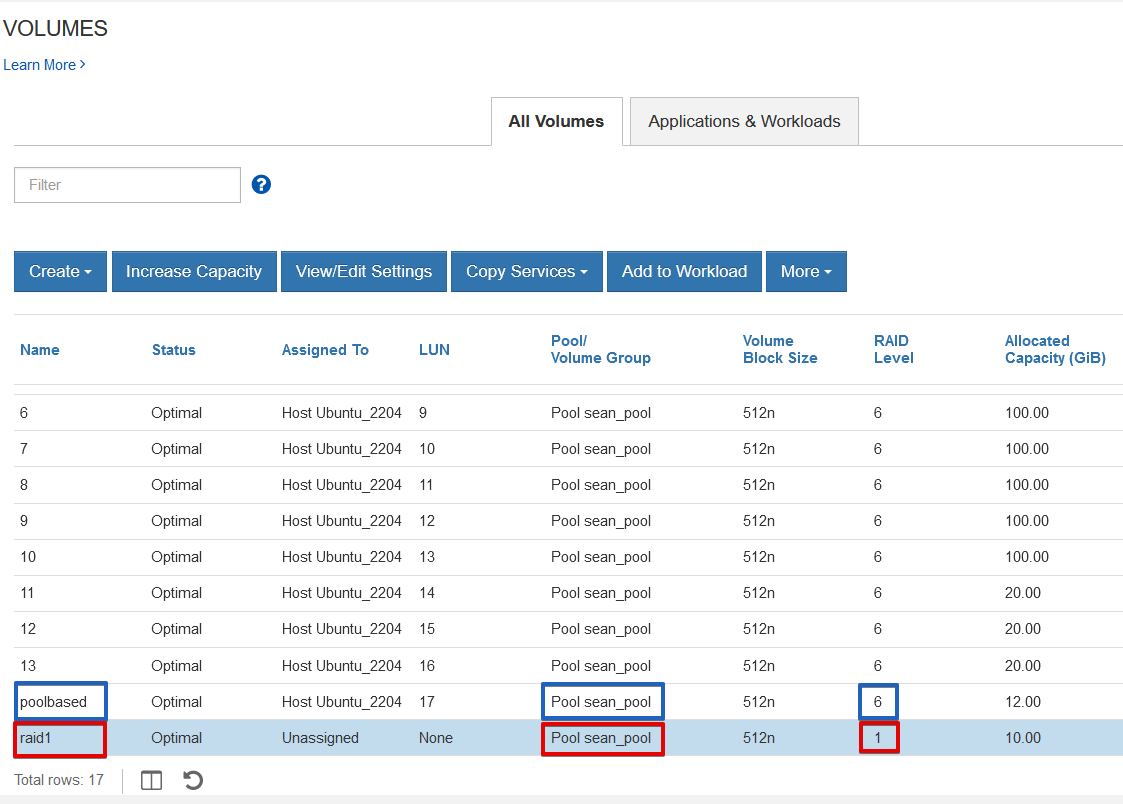
Finish host assignment and other configuration details in the Web UI or provide a more complete JSON to complete everything in one go.
As soon as a thin DDP volume is created, you're likely to get a SANtricity alert. That's because the threshold is set to just 1%.
I guess the idea is this is dangerous stuff, so everyone should be forced to set their own alert threshold. For the same reason, thin volumes can be created only through the API (if at all).
Anyway, go to Thin Volume Monitoring tab to increase the threshold.
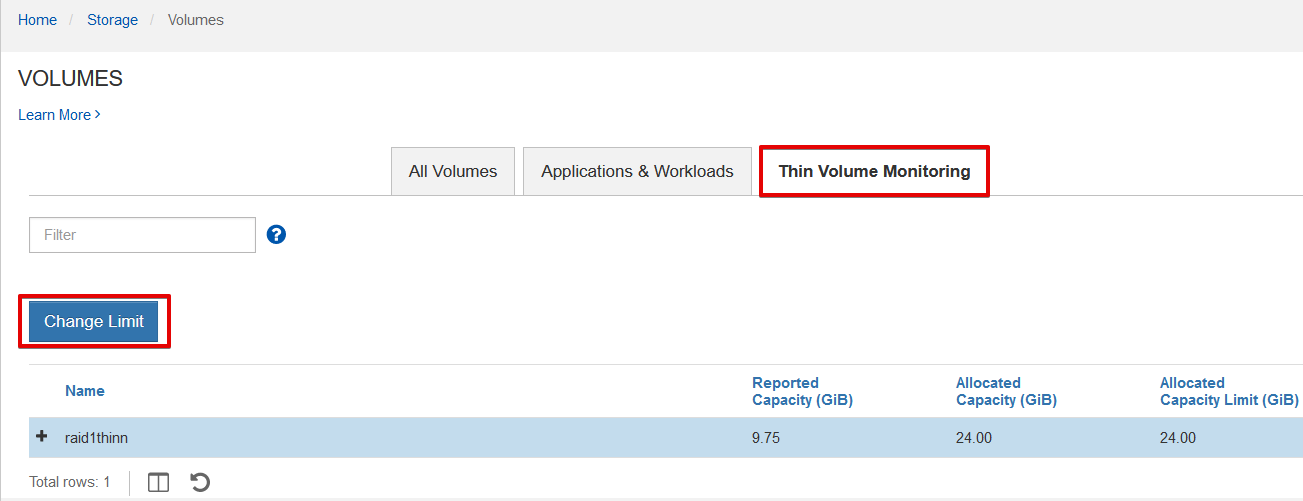
You may want a bigger number, such as 70% or whatever works for you (calculate carefully!). You need to have enough spare capacity even if all thin volumes grow to this alert level at the same time.
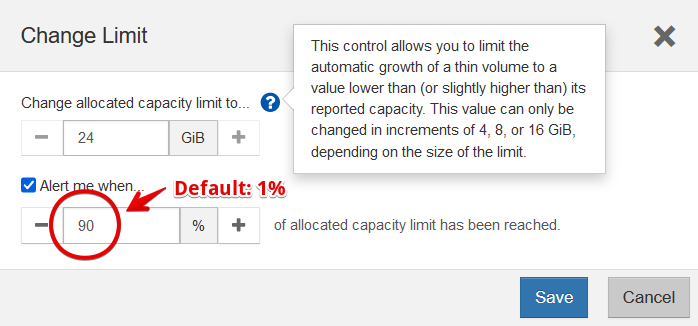
Say you have 10TB of spare capacity in a pool and 10 thin volumes that are currently using 0.2 TB each, but can grow to 4 TB.
If each went from 0.2 to 1 TB used, the pool would run out of free capacity. In that case setting all of them to 22% may be appropriate (22% of 4TB over 10 volumes is 8.8 TB). Or use per-volume settings. In any case, this example shows that sometimes setting a low threshold alert isn't unreasonable.
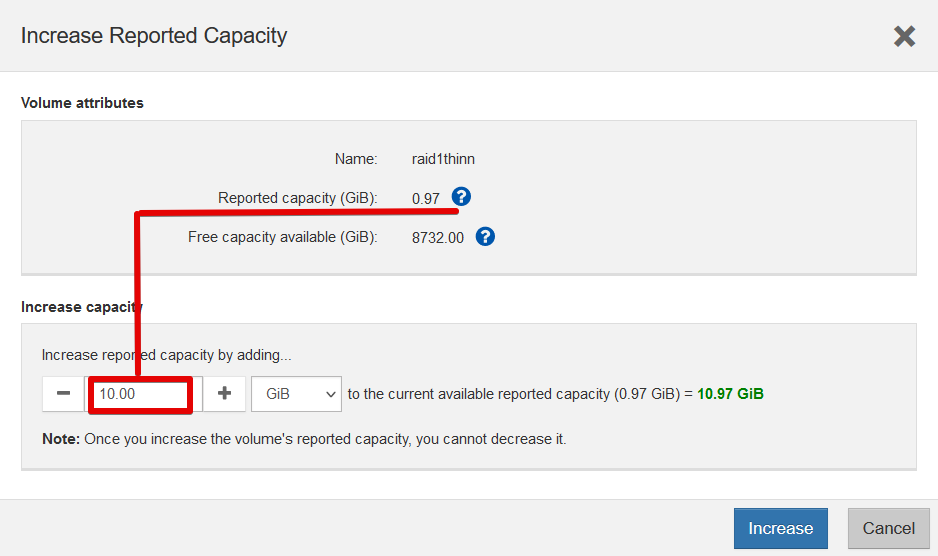
Thin volumes can be enlarged from the main Volumes pane. Here it's being increased from 0.97 Gi to 10 Gi.