Connecting to 200G HICs on E-Series EF600
Introduction
The EF600 array has decent networking options, but one of them is shockingly underdocumented.
It took me years to realize this, but I'd been sensing something was wrong with that documentation for years.
Cabling first
Before you can (mis)configure it, you need to cable it.
Here's the recommended DAS topology from the official documentation.
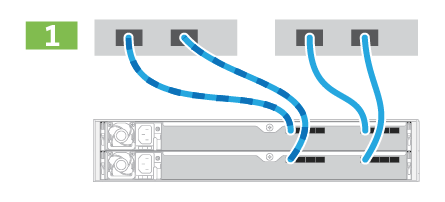
So simple! With N hosts (N=1,2), we just connect host N to port N of each controller!
Next, we can configure those interfaces.
SANtricity UI
Go to the UI and run NVMe/RoCE network configuration wizard. You'll get these suggestions by default:
Controller A, HIC 2, Port A
192.168.132.101/24
192.168.130.101/24
Controller A, HIC 2, Port B
192.168.133.101/24
192.168.131.101/24

Controller B, HIC 2 Port A
192.168.132.102/24
192.168.130.102/24
Controller B, HIC 2 Port B
192.168.133.102/24
192.168.131.102/24
Wait, what?
The UI (SANtricity 11.9, and likely in previous versions as well) has a convenient link to the FAQs where one can see this:
The EF600 storage array can include two HICs — one external and one internal.
Source: here.
There's more.
In this configuration, the external HIC is connected to an internal, auxiliary HIC. Each physical port that you can access from the external HIC has an associated virtual port from the internal HIC.
To achieve maximum 200Gb performance, you must assign a unique IP address for both the physical and virtual ports so the host can establish connections to each. If you do not assign an IP address to the virtual port, the HIC will run at approximately half its capable speed.
Wow, wow, wow…
Each of my hosts has a pair of 200G ports. How am I going to connect to four networks with just two physical ports per controller?
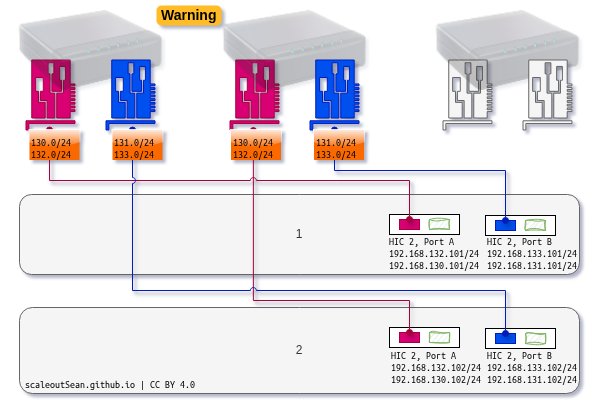
Here's how that looks in step 2 of controller port configuration wizard for NVMe/RoCE (EF600 with 200G HIC).
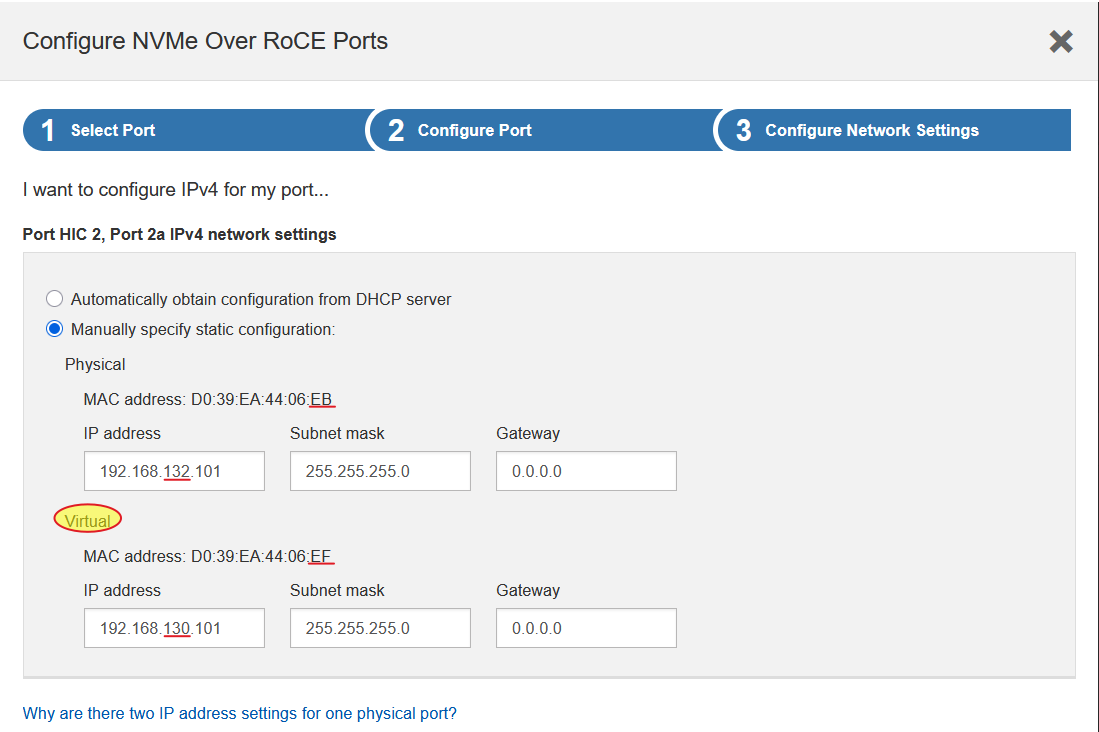
What now?
Some choices (not ordered in any particular way):
- Buy/change host NICs to have 4 network ports on each host, so that you can connect to all 4 networks on E-Series controllers
- Reconfigure: go back and reconfigure those addresses (group "lower" networks on port A, "higher" networks on port B) and use 23 bit netmask on each host's NIC
- Do nothing: configure just one IP address per NIC and (effectively) use just 100G
- Buy network switches and reconfigure NICs (use bonding and/or bridging and/or VLANs to get to 4 networks from 2 physical host ports); depending on the details, this "solution" may be worse than "do nothing"
- Use subnetting to separate networks on each 200G port and then a single network on host NICs might work. I'm not even sure if this can work (that depends on how EF600 is configured) and it's probably not supported
Maybe there are more ways to do this, but I can't think of any good ones.
Conclusion
Considering the unpleasant consequences of this trap, these details should be be covered in multiple places.
Thankfully, this unobvious and loosely documented detail exists only on EF600 with 200G host interface cards. Still, I'm surprised this has managed to remain this way for years.