Linux, NVMe/RoCE and HA NetApp EF-Series NVMe-oF storage
Introduction
The EF-Series documentation related to NVMe/RoCE is too basic and, similarly to the old iSER-related post, this post aims help E-Series users get started with NVMe/RoCE.
This post several will likely be updated several times until it's complete.
Network
Two main things I'd like to mention here:
- DAS is supported and you can run highly available applications on hosts connected to E/EF Series without storage switches
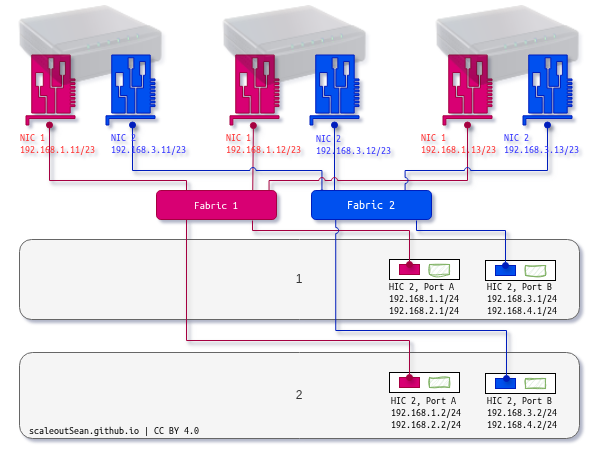
- E/EF uses dual storage fabric. Each controller has targets available on at least two logically separate networks (e.g. 1.0/24 on Controller 1 Port A, and 2.0/24 on Controller 1 Port B)
This example depicts a DAS setup of three servers with EF600 (200G NVMe/RoCE). The tricky part (described at the first link of this post) is we don't have enough NICs on the clients to fully utilize 200G, so this is workable but doesn't always fully utilize EF600 controller resources. (The green port is the "virtual" NIC - see the linked post for more).
With dual-ported NICs (or enough client NICs in any case), we would be able to do better.
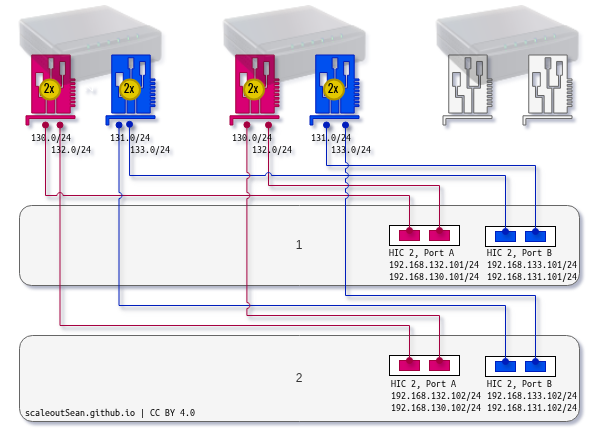
Whether or not you need to "max it out" really "depends" on objectives. Notice how you can't direct-attach all three hosts to storage in the second (supposedly "better") approach. So what's really better is debatable.
Next, I want to highlight a few things from the Web UI because the E-Series documentation for the Web UI has no screenshots (!).
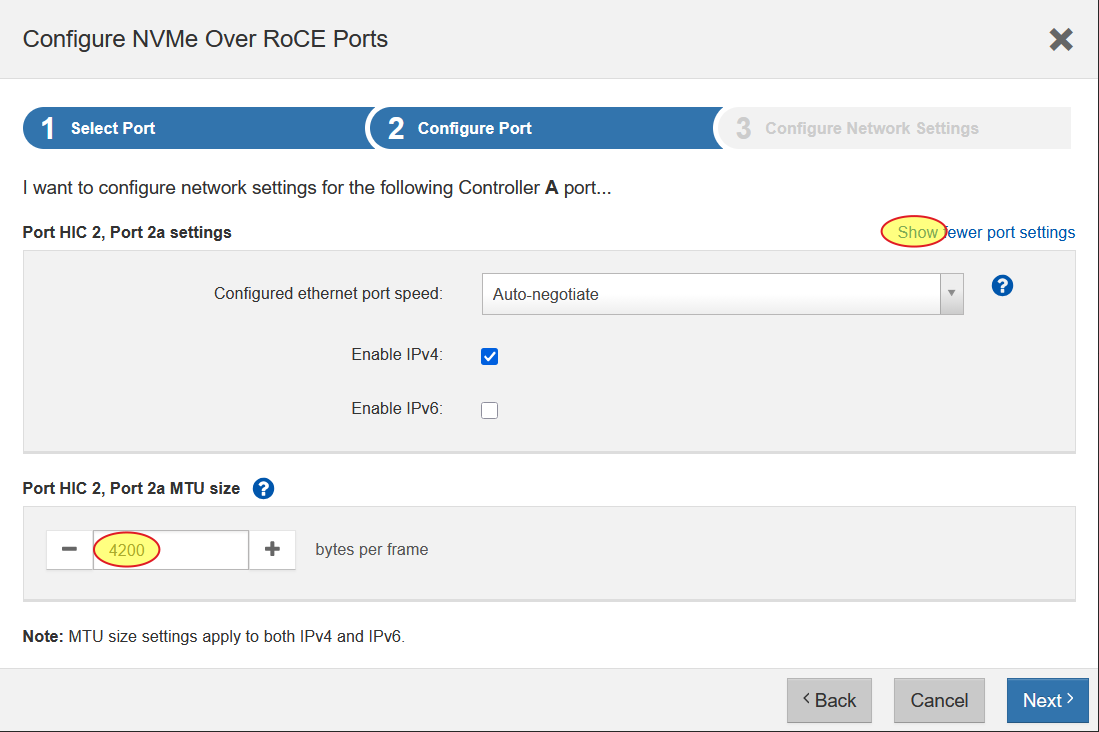
First, remember to click on "Show" to show extra settings where you will find the MTU setting. One applies to both (physical and virtual NIC on a EF600 with 200G).
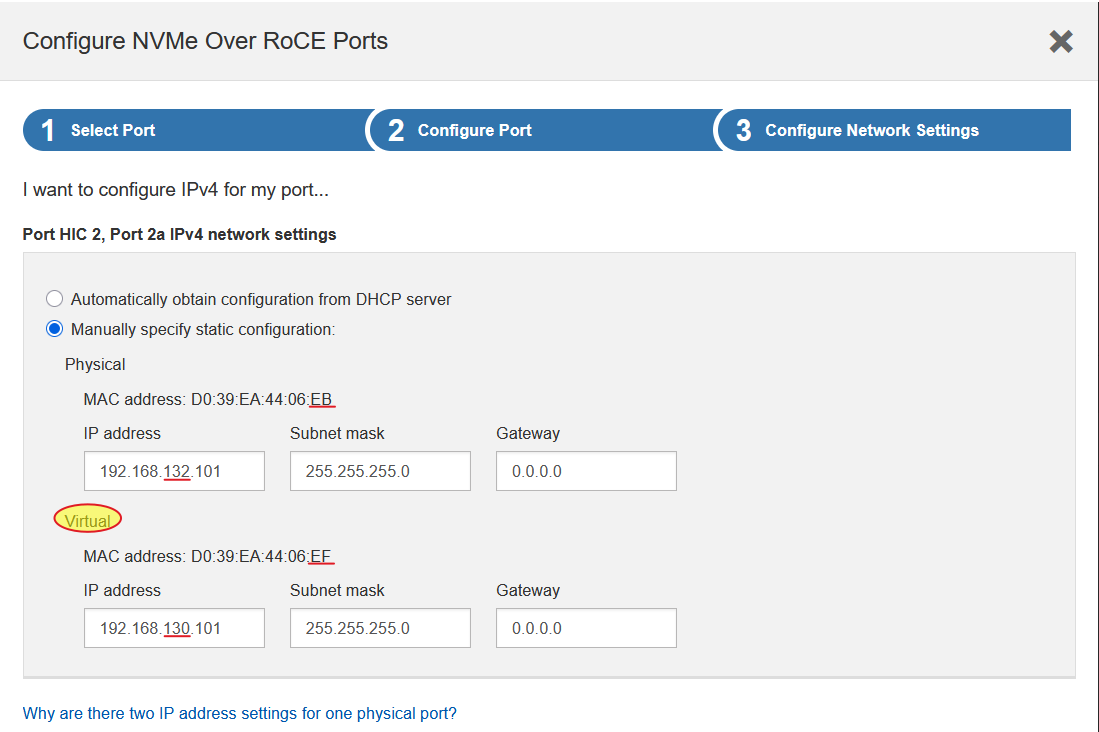
Second, this is the part that I blogged about in the other post. I'd always override these suggestions with "adjacent" networks and shorter IP addresses, but it's up to you.
Hosts
EF-Series has a fixed list of supported operating systems which is presently "RPM-centric" (Red Hat, SLES, Rocky Linux).
This doesn't mean other distributions don't work.
For any Linux distribution, I'd recommend the following approach:
- Reference the official steps
- Reference steps from your Linux distribution and switch vendor (if you use switch(es))
Usually OS documentation is more detailed and enterprise network switch vendors' even better. Neither of these need special "EF-Series-related" instructions. Dual storage fabric mention above is handled automatically thanks to NVMe ANA: unlike with SCSI, where multipathing is usually handled by Device Mapper, NVMe handles it in kernel.
You can still use DM-MP as a "unified" multipathing management tool for SCSI and NVMe, but built-in multipathing is better.
Special cases where DM-MP may still be marginally more useful today include failback, as DM-MP can force it with immediate, and ANA is currently less customizable and path failback (to a recovered controller) isn't easy to force although that should improve with time. Personally, I think immediate failback isn't worth the trade-offs if you're on a modern Linux distribution such as Ubuntu 24.04 or RHEL 10. If your NVMe stack is old (e.g. RHEL 8) - then maybe.
nvme-rdma module
To start, install NVMe CLI and make sure it works:
nvme show-hostnqn
modprobe nvme_rdma && echo "nvme_rdma" > /etc/modules-load.d/nvme_rdma.conf
That's the vanilla approach that worked for me with ConnectX mentioned below. This is a reliable and simple choice.
Of course, I "had no choice" and "had to" fiddle with it, so I broke it and wasted hours recovering from that.
Specifically, DOCA driver stack may break your nvme-rdma module and leave you disconnected from NVMe/RoCE storage target(s). If they don't fix that by the time you read this, check out this post.
NICs
Configure NVMe/RoCE on E-Series and gather network details from the array.
This example is a weird one (EF600 with 200G NIC, and only one port per controller). Yours will likely be different.
Controller A:
- Physical: Channel 3, Port: 2a, Location: HIC 2 Port 2a, speed: 40 Gb/s Full duplex
- IP 192.168.1.1/24, MAC D0:39:EA:44:xx:xx
- Virtual: Channel 1, Port: 2a, Location HIC 2 Port: 2a
- IP 192.168.2.1/24, MAC D0:39:EA:44:xx:xx
Controller B:
- Physical: Channel 3, Port: 2a, Location: HIC 2 Port 2a, speed: 40 Gb/s Full duplex
- IP 192.168.1.2/24, MAC D0:39:EA:44:xx:xx
- Virtual: Channel 1, Port: 2a, Location HIC 2 Port 2a
- IP 192.168.2.2/24, MAC D0:39:EA:44:xx:xx
I'm not using Port B on each controller and you probably would (if you purchased that hardware).
My deviation from the default IP configuration offered by SANtricity's wizard:
- I use simpler, shorter IPv4 addresses that are easier to remember
- I have only two storage fabrics (1.x/24 and 2.x/24) with a single path to each
You may have more than just 2 NICs on each host. I have just two, which corresponds to the E-Series controllers' configuration, and they're presently unconfigured (no IP address, MTU is 1500, etc.):
4: ens3f0: <BROADCAST,MULTICAST,UP,LOWER_UP> mtu 1500 qdisc mq state UP group default qlen 1000
    link/ether b8:59:9f:37:82:68 brd ff:ff:ff:ff:ff:ff
    altname enp134s0f0
5: ens3f1: <BROADCAST,MULTICAST,UP,LOWER_UP> mtu 1500 qdisc mq state UP group default qlen 1000
    link/ether b8:59:9f:37:82:69 brd ff:ff:ff:ff:ff:ff
NIC names may differ across distributions and versions, but all the rest is common to all.
I'll provide some working examples for everyone's reference.
Ubuntu 24.04.4
Ubuntu wasn't (and still isn't) on the list of supported iSER clients, but it works fine with EF-Series iSER as far as I'm concerned. There's no reason it wouldn't work well here, especially considering NVIDIA's participation in the Ubuntu ecosystem.
How to connect? Just follow the steps from the official documentation.
I created 99-eseries-ansible-<nic>.yaml files, one for each NIC (ens3f0np0, ens3f1np1), in /etc/netplan/. For ens3f0np0:
# Managed by NetApp E-Series Ansible
network:
  version: 2
  renderer: networkd
  ethernets:
    ens3f0np0:
      addresses:
        - 192.168.1.12/24
      mtu: 9000
For ens3f1np1:
# Managed by NetApp E-Series Ansible
network:
  version: 2
  renderer: networkd
  ethernets:
    ens3f1np1:
      addresses:
        - 192.168.2.12/24
      mtu: 9000
I configured Ubuntu 24.04 for the E-Series NVMe/RoCE environment above and it was able to connect without any issues.
Rocky Linux 10.1
Rocky Linux is even easier, as the official instructions for Red Hat Enterprise Linux work out of the box copy-paste style.
My setup was the same (dual-ported ConnectX-6 per host, connected to dual storage fabric).
Use nmcli (or GUI, or Ansible, etc.) to create a connection for each storage network. Example for one of two nmconnection files (one per NIC):
[connection]
id=ens3f0
uuid=<GENERATE-YOUR-OWN> # recommended
type=ethernet
interface-name=ens3f0

[ethernet]
mtu=9000

[ipv4]
address1=192.168.1.11/24
method=manual

[ipv6]
addr-gen-mode=default
method=auto

[proxy]
If you use GUI or TUI to configure, that's certainly possible, but creates ugly 'Profile <number>.nmconnection' files.

MTU 9000 is entirely optional. If you use storage switches, you may need a few extra bytes on switch MTU for VLAN and other overheads (or you may need to set a lower MTU here, such as 8800).
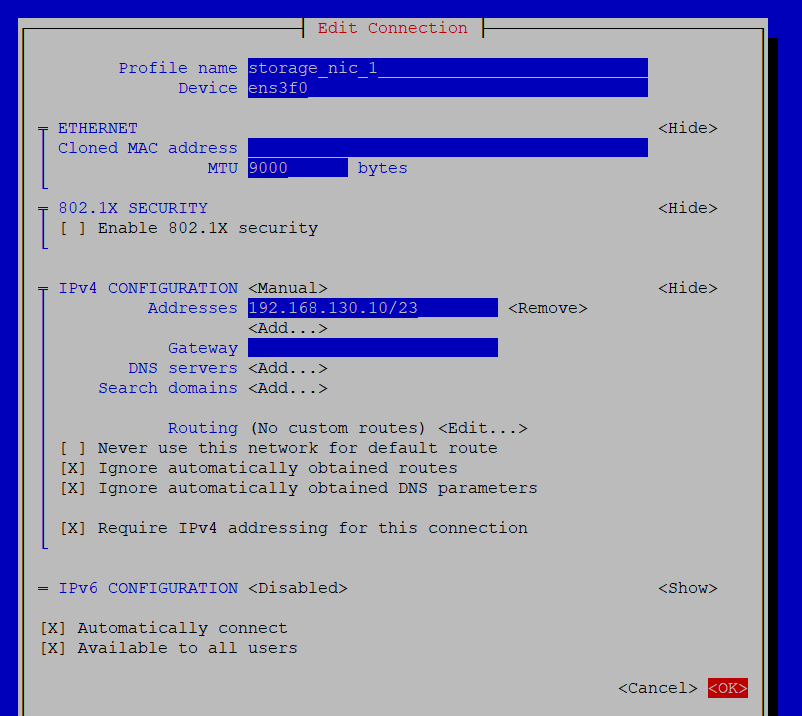
Notice the above subnet is 23, which is a workaround for "multiple fabrics per NIC" described in the referenced post. I actually used /24 in this environment.
Proxmox 9.1 (Debian Trixie)
There's nothing special or unique here - just the old school network config format.
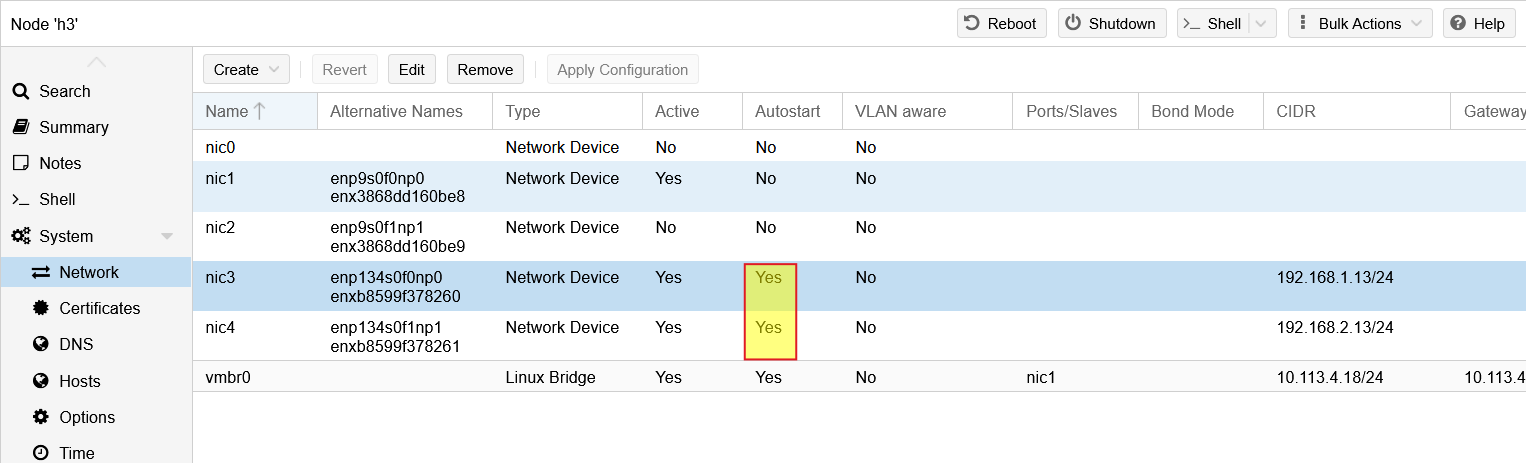
I used "pin network interfaces" in Proxmox which gave the NICs nice names (nic1 and nic2 were my public network NICs, and nic3 and nic4 were for storage, although they could allow Proxmox cluster traffic as well).
auto nic3
iface nic3 inet static
        address 192.168.1.13/24
        mtu 9000

auto nic4
iface nic4 inet static
        address 192.168.2.13/24
        mtu 9000
I configured these using the Web UI.
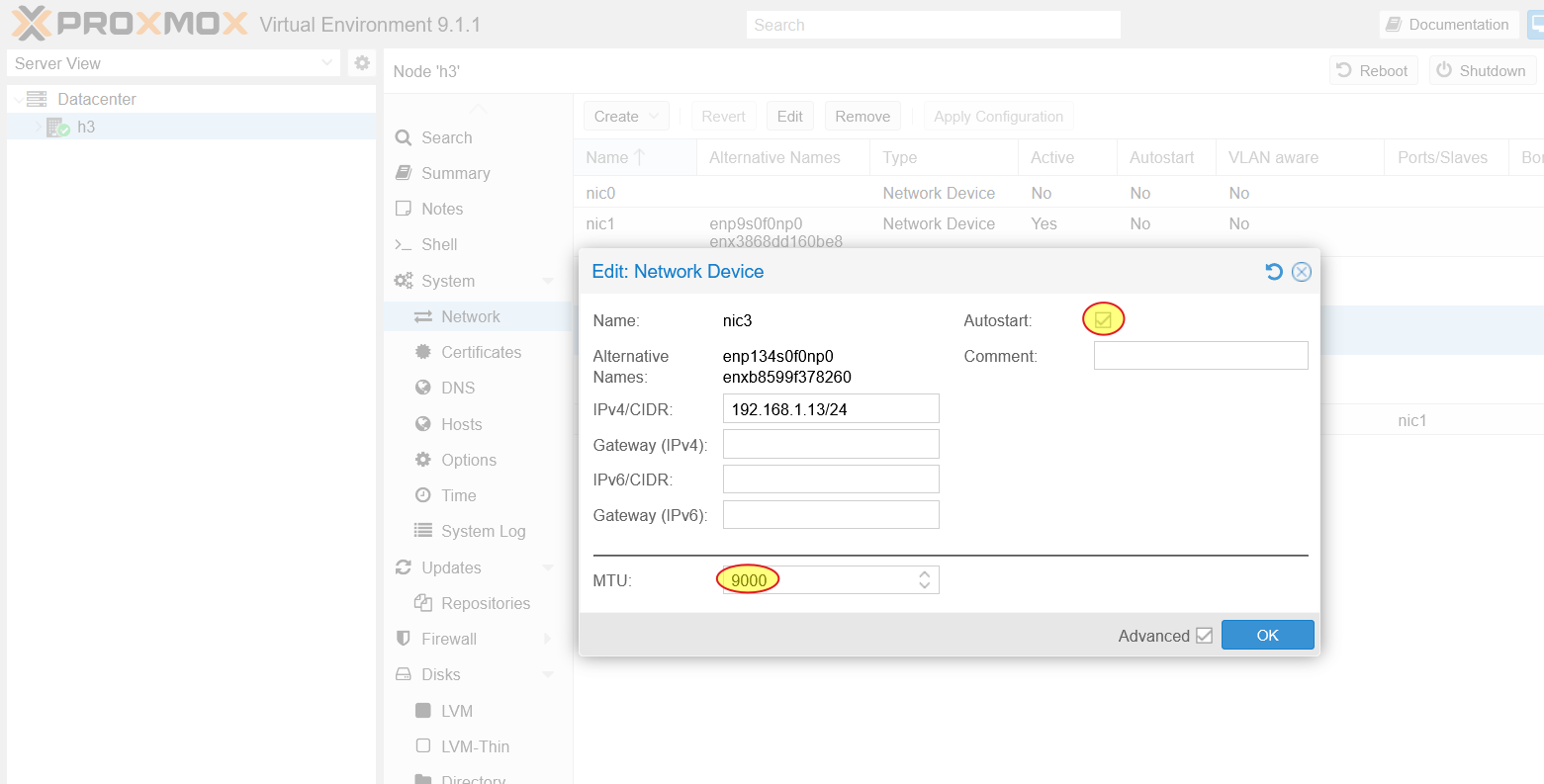
When you edit these in Proxmox UI, remember to set them to auto-start (that auto nic<number> in the Proxmox configuration file above). Apply this configuration to bring them up.
One thing to be aware of - and loosely related to NVMe - is that the PVE 9.1.1 documentation for storage looks weird.
They claim to support shared storage with kernel-based iSCSI (also with iscsidirect, not highlighted because it's too nichey and hackish for my liking), but NVMe/FC and NVMe/RoCE aren't listed. That looks outdated and completely wrong!
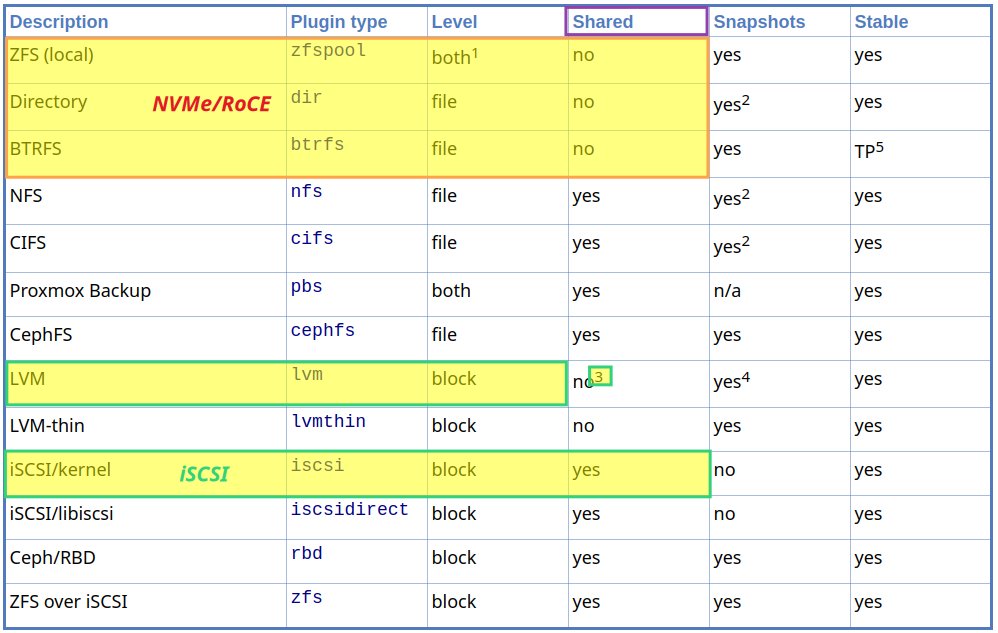
One exception for shared block storage is LVM, which has a footnote (not shown here) which says:
It is possible to use LVM on top of an iSCSI or FC-based storage. That way you get a shared LVM storage.
Sorry, but that doesn't make any sense. Why wouldn't NVMe/RoCE work? (E-Series does support both FC and NVMe/FC, but why use these if you have a choice?)
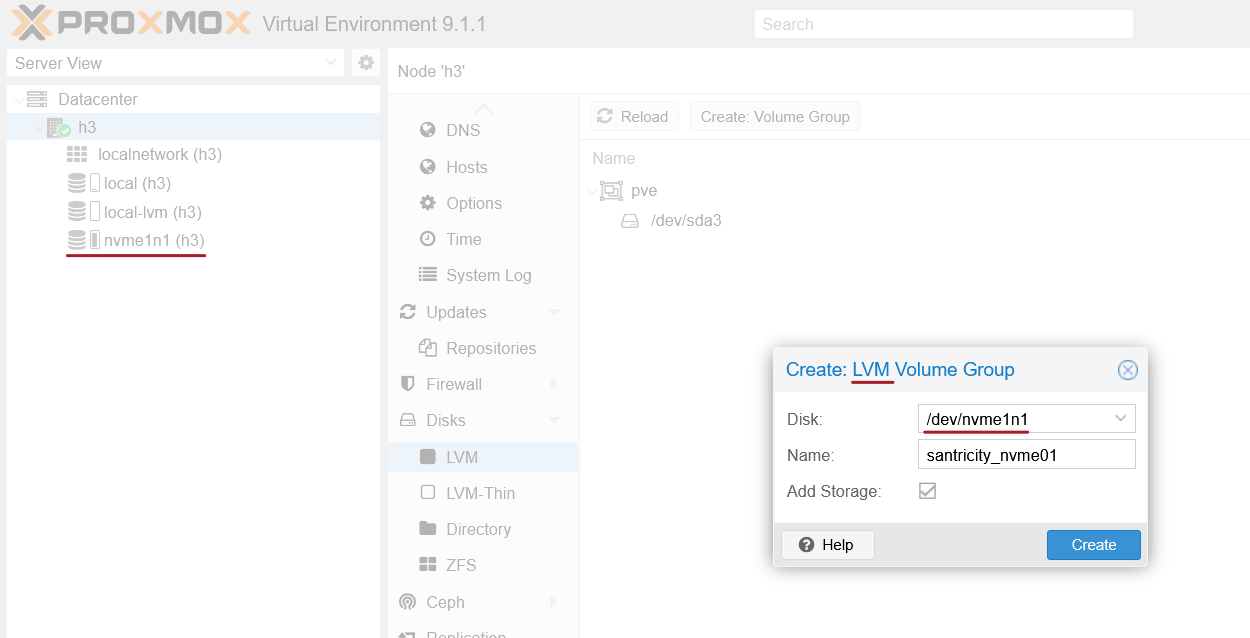
I used PVE 9.1.1 with LVM on NVMe/RoCE earlier this week and it worked fine:
- add a Proxmox host NQN to a SANtricity host (or a host group)
- create a volume on E-Series, present it to the host(s), discover and connect from the hosts
- on the host (or one of the cluster members), create ("register", really) NVMe device and create LVM on it
- I tried to resize a volume (
pveresize /dev/nvme1n1), which worked fine as well
LVM on NVMe/RoCE block storage target with EF600:
It's possible that something "works", but isn't supported. It's also possible that the documentation is outdated. Or they don't have NVMe/RoCE storage to test.
Among other options for non-block storage are ZFS, generic filesystem directory, or Btrfs (which is also supported by SANtricity CSI). You can use those as you would use direct-attached external storage (no storage switches, but unlike JBOD E-Series can present both protected and unprotected (RAID 0, alllocated as physical disk units) volumes).
In this screenshot a volume is mapped to only one host (h3). This environment happens to have just one, but it'd work the same way for 2 or 12 hosts. You wouldn't map a volume to more than one (hence, "single host filesystems"). There's an LXC container on the Btrfs filesystem created on top of the NVMe volume from E-Series.
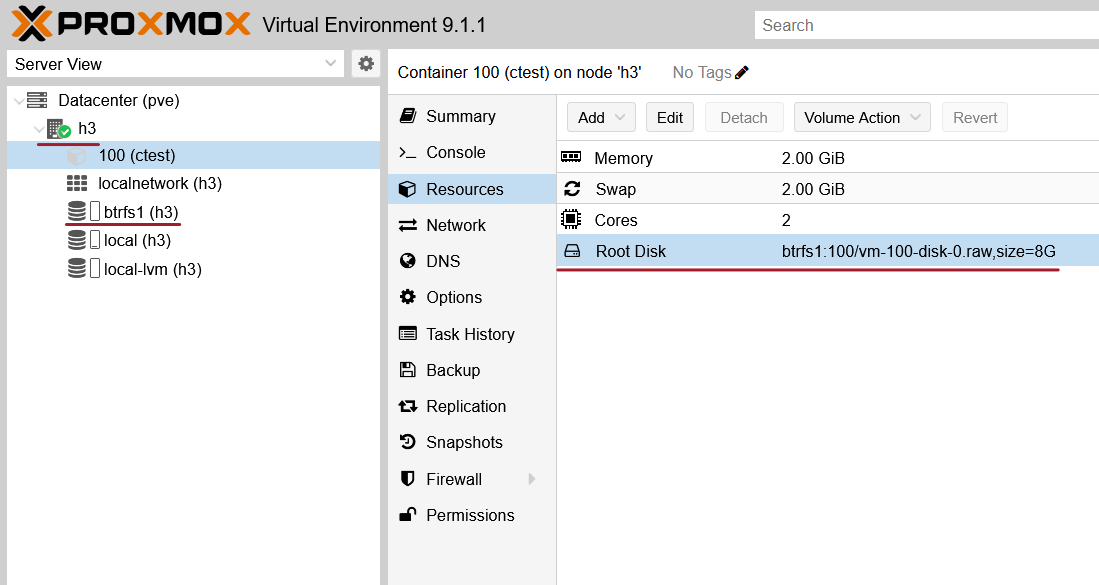
This isn't such a bad deal: if ZFS (or Btrfs) saves you 50% with 2x compression, even if you replicate disks from server h3 to server h2 and vice versa, you still don't end up using more storage than you would without efficiencies you get from ZFS (see these examples of savings you can get) or Btrfs.
Related to outdated and wrong documentation and KBs: NetApp has its own gems, such as this explanation. It's true that Debian isn't on the NetApp Interoperability Matrix, but that doesn't mean it's expected to be slow or not work well.
Summary from the two vendors' sites:
- Proxmox doesn't mention NVMe/RoCE is supported, making iSCSI and FC the only obviously viable options for "block", while NVMe/RoCE would be possible in "file" mode (ZFS/Btrfs/directory)
- But… NetApp claims Debian isn't tested, so it may or may not work well with iSCSI (and by extension any other protocol)
I was a Proxmox/E-Series user I'd simply ignore both of these points.
SuSE Enterprise Linux (SLES 16.0)
I haven't tried SLES (yet), but the good thing about it is SLES has always been well documented and well behaved and that extends to NVMe/RoCE - the best documentation and probably the best QA as well.
And it's officially supported by E-Series (version 16 not yet, though).
Discover and connect
You probably don't need --hostid if you have the file in the default location, but I mention it here becuase that's different from iSCSI where IQN corresponds to NQN (hostnqn), not hostid which you shouldn't forget about.
nvme discover -t rdma -a 192.168.1.2 --hostid=/etc/nvme/hostid
nvme connect-all -t rdma -a 192.168.1.2 --hostid=/etc/nvme/hostid
You need to have both hostnqn and hostid in /etc/nvme/. And here it's -t rdma, not -t tcp (which is for NVMe/TCP, the poor man's NVMe/RDMA) and will eventually get you if you blindly copy stuff off the Internet like I did.
If ping works but discovery doesn't, you may have a MTU (or RoCEv2) problem. NVMe CLI may give misleading error messages (I know because I had a MTU problem and was mislead about it with some nonsense error messages about hostid).
Pay attention to the --ctrl-loss-tmo parameter. The NetApp documentation suggests 3600 (seconds), while -1 is allowed and means "forever". After that timeout limit is hit without, the (dis)connected device flips to read-only mode. One hour is reasonable, but so is eight or 24.
Next, auto-connect service. Add all targets if you want the host to reconnect.
echo "-t rdma -a 192.168.1.1" | sudo tee -a /etc/nvme/discovery.conf
# discover on all NVMe/RoCE ports
# enable NVMe-oF auto-connect service
sudo systemctl enable nvmf-autoconnect.service
You wouldn't need this in a Kubernetes environment with dynamic PVCs that are scheduled on demand, and don't need to survive reboots on their own.
Also note the modern way is /etc/nvme/discovery.json, while discovery.conf still works as of now.
Among the various interesting details from nvme CLI commands you'll notice array's NQN. See about the source of that in Automation further below.
Multipathing
NVMe ANA
ANA should be on by default. Use a modprobe config file to force it. Check after loading it.
$ cat /etc/modprobe.d/50-eseries_nvme_roce.conf
options nvme_core multipath=Y

$ cat /sys/module/nvme_core/parameters/multipath
Y

$ cat  /sys/class/nvme-subsystem/nvme-subsys1/iopolicy
round-robin
round-robin is one approach, numa is another. You can echo another value or set "nvme_core.iopolicy=round-robin" in kernel cmdline.
Use nvme show-topology to to view paths to storage targets.
In this case we have one target and four paths. Optimized go through controller B where the two ".2" IPv4 addresses are located.
$ nvme show-topology
nvme-subsys1 - NQN=nqn.1992-08.com.netapp:6000.6d039ea000493a9c00000000609943a4
               hostnqn=nqn.2014-08.org.nvmexpress:uuid:f4a33812-daa8-11e9-9399-3a68dd160bef
\
 +- ns 1
 \
  +- nvme1 rdma traddr=192.168.2.1,trsvcid=4420 live non-optimized
  +- nvme2 rdma traddr=192.168.1.1,trsvcid=4420 live non-optimized
  +- nvme3 rdma traddr=192.168.2.2,trsvcid=4420 live optimized
  +- nvme4 rdma traddr=192.168.1.2,trsvcid=4420 live optimized
With multiple paths, some (or one, if you have just two) will likely be optimized and other(s) non-optimized. (Theoretically you may see two optimized if they're both connected to the same controller that's optimal for the volume, but most people with two links would connect to different controllers for HA reasons.)
I've mentioned earlier that failback in NVMe/RoCE seems hard to control. You may need to fiddle with these to push a volume from the non-preferred controller to the preferred. I haven't played with this yet.
This could probably be automated with a "watcher" service, but I'd rather not touch that unless the controller with failed over LUNs was maxed out. E-Series SANtricity Collector collects volume location (preferred vs. non-preferred), among other things, and I'd rather set alerts in Grafana or InfluxDB 3 and deal with these on a case-by-cases basis.
Under regular conditions, SANtricity NVMe targets in ALUA mode perform "implicit" failback, so you may not need to do anything to fail-back failed-over volumes to optimal controllers. If you have to push it, you can force them back from the SANtricity UI, but it's disruptive and not advisable unless volumes are grossly imbalanced and one controller is maxed-out.
multipath-tools (DM-MP)
DM-MP is not recommended for NVMe-oF as native kernel support is preferred, but for the sake of completeness:
- E-Series support was added in multipath-tools 0.9.4 (2022/12)
- Enable DM-MP for NVMe with
nvme_core.multipath=Nkernel parameter (which makes it manageable by DM-MP) - Use
multipath -Tto show the default package settings for connected devices and avoid using deprecated options - Even if you use DM-MP for some NVMe targets, you can blacklist selected products
I have not tested DM-MP with NVMe/RoCE yet given its "legacy" label, but you may consider tips below if you decide to try.
I have tested, and it's not very good. Stay away.
Whitelist E-Series NVMe (not SCSI!) storage in DM-MP:
devices {
  device {
    vendor "NVME"
    product "NetApp E-Series*"
    path_grouping_policy group_by_prio
    failback immediate # it may be better to consider: manual, <timeout_seconds>, followover
    no_path_retry 30
    # no_path_retry fail # recommended for SLES 15 for cluster file system clients
    # SLES proposes "multi-queue" with the following kernel parameters: scsi_mod.use_blk_mq=1 dm_mod.use_blk_mq=1
  }
}
Blacklist E-Series NVMe from DM-MP:
blacklist {
  device {
    vendor  "NVME"
    product "NetApp E-Series*"
  }
}
Automation
From a SANtricity admin's host management perspective NVMe is quite similar to iSCSI, it's just hosts identified by an NQN.
The slightly tricky part (at least it was for me, as I had nowhere to copy this from) is the "PUT /hosts" part for NVMe/RoCE host configuration steps, which is easier to do in Swagger than in Ansible (where it's supposed to be "easy").
This is how to create a stand-alone Linux host:
- The host name for me was
h3 - Port needs a
<hostLabel>_<portNumber>value, i.e.h3_1, aportstring (landmine!) which isn't at all a port but an NQN, and a type (nvmeof- at least one value that is as one might expect).
{
  "name": "h3",
  "hostType": {
    "index": 28
  },
  "ports": [
    {
      "label": "h3_1",
      "port": " nqn.2014-08.org.nvmexpress:uuid:b6087fac-aef6-4e75-85c1-abd7078c94f9",
      "type": "nvmeof"
    }
  ]
}
Once you have that in place, the rest is almost the same as with iSCSI: create a volume, map it to the host(s) identified hostRef (or clusterRef if mapping to a cluster of hosts), go to your host(s) to discover, connect and start cracking!
If you automate, you probably don't want to manually configure NVMe/RoCE adapters on clients/hosts - especially not on Red Hat and Rocky Linux where that results in ugly NM connection files. My preferred approach is to configure storage NICs via automation and not use Network Manager TUI/GUI at all.
Hosts also identify storage by its NQN when they discover namespaces. I prefer to call them LUNs because it's shorter. Where does that come from?
GET /nvmeof/initiator-settings
Response contains array's NQN (shortened response below). This NQN is what nvme CLI uses to identify an array.
{
  "targetRef": "900000006D039EA000493A260033001E609949E1",
  "nodeName": {
    "ioInterfaceType": "nvmeof",
    "iscsiNodeName": null,
    "remoteNodeWWN": null,
    "nvmeNodeName": "nqn.1992-08.com.netapp:6000.6d039ea000493a9c00000000609943a4"
  }
}
Ansible
For this, use the official E-Series Ansible Collection.
In this playbook, I use an EF600 array with 200G NICs. Why's that relevant? You may see the previous post (the one mentioned at the top) - the odd part is NIC speed is set only one one of the adapters, because the other one is "virtual". The less odd part is I had a 40G cable. Most real-life configurations won't look exactly like this.
TASK [Configure Controller A NVMe Interfaces] ********************************************
skipping: [server1] => (item={'channel': 3, 'address': '192.168.1.1', 'speed': 40})
skipping: [server1] => (item={'channel': 1, 'address': '192.168.2.1'})
skipping: [server1]
skipping: [server2] => (item={'channel': 3, 'address': '192.168.1.1', 'speed': 40})
skipping: [server2] => (item={'channel': 1, 'address': '192.168.2.1'})
skipping: [server2]
changed: [array1 -> localhost] => (item={'channel': 3, 'address': '192.168.1.1', 'speed': 40})
changed: [array1 -> localhost] => (item={'channel': 1, 'address': '192.168.2.1'})

TASK [Configure Controller B NVMe Interfaces] ********************************************
skipping: [server1] => (item={'channel': 3, 'address': '192.168.1.2', 'speed': 40})
skipping: [server1] => (item={'channel': 1, 'address': '192.168.2.2'})
skipping: [server2] => (item={'channel': 3, 'address': '192.168.1.2', 'speed': 40})
skipping: [server1]
skipping: [server2] => (item={'channel': 1, 'address': '192.168.2.2'})
skipping: [server2]
changed: [array1 -> localhost] => (item={'channel': 3, 'address': '192.168.1.2', 'speed': 40})
changed: [array1 -> localhost] => (item={'channel': 1, 'address': '192.168.2.2'})
Unlike with iSCSI, here we use NQNs to create (register) hosts on SANtricity.
TASK [Debug Host NQN] ********************************************************************
ok: [server1] => {
    "msg": "Host NQN for server1 is nqn.2014-08.org.nvmexpress:uuid:b6087fac-aef6-4e75-85c1-abd7078c94f9"
}
ok: [server2] => {
    "msg": "Host NQN for server2 is nqn.2014-08.org.nvmexpress:uuid:cd525b26-df3b-11e9-b457-3a68dd166ea7"
}
skipping: [array1]
The entire workflow works fine with NVMe, including volume creation and mapping to hosts.
TASK [Create Host Volumes on E-Series Array] *********************************************
skipping: [array1] => (item={'name': 'data', 'size': 10, 'unit': 'gb', 'lun': 1, 'raid_level': 'raid1'})
skipping: [array1]
changed: [server1 -> localhost] => (item={'name': 'data', 'size': 10, 'unit': 'gb', 'lun': 1, 'raid_level': 'raid1'})
changed: [server2 -> localhost] => (item={'name': 'data', 'size': 10, 'unit': 'gb', 'lun': 1, 'raid_level': 'raid1'})

TASK [Map Volumes to Host] ***************************************************************
skipping: [array1] => (item={'name': 'data', 'size': 10, 'unit': 'gb', 'lun': 1, 'raid_level': 'raid1'})
skipping: [array1]
changed: [server2 -> localhost] => (item={'name': 'data', 'size': 10, 'unit': 'gb', 'lun': 1, 'raid_level': 'raid1'})
changed: [server1 -> localhost] => (item={'name': 'data', 'size': 10, 'unit': 'gb', 'lun': 1, 'raid_level': 'raid1'})

PLAY RECAP *******************************************************************************
array1                     : ok=3    changed=2    unreachable=0    failed=0    skipped=14   rescued=0    ignored=0
server1                    : ok=42   changed=3    unreachable=0    failed=0    skipped=35   rescued=0    ignored=0
server2                    : ok=41   changed=5    unreachable=0    failed=0    skipped=33   rescued=0    ignored=0
Some observations:
- Lookup methods (pools, volumes, hosts) are all weak, as if the collection was created to configure sutff and not manage it day to day
- Create Volume module doesn't return a volume object like the API does. Thankfully, we have lookup methods. Oh, wait…
- NVMe-related features are weak (EF600 was launched in 2019!). Yes, you can create NVMe-oF hosts, but you can't look up targets and you have to build own Ansible tasks for that
- No
volume_raid_levelsupport for volume create task in DDP (RAID setting was added in SANtricity 11.7 (years ago) and I support it all my tools and applications including SANtricity CSI) - Working around these quirks and adding own tasks that do what the Collection doesn't is fine if you have very repetitive tasks. Otherwise you end up doing what you could create and run faster in a proper language without these extra layers
But, it works.
I created a playbook that configures NICs and storage for Rocky 10.1, creates volumes on storage array, and deploys PostgreSQL to Podman that uses these volumes. It was an interesting experience because Trident CSI also supports Docker in non-HA storage mode (it can't, because Docker Swarm doesn't support it).
Compared to Trident with Docker, this is actually a better experience because Ansible gives you the same storage experience (non-HA provisioning to host-bound containers) with some extras that you'd probably use in any case: with Trident for Docker you'd still have some tools for container management, and here you already have them in Ansible. And you don't have to deal with a storage provisioner just to create volumes and present them to a host.
Other automation
Frequent readers of this blog may recall I recently released other integrations for SANtricity (Python, PowerShell, Go), so Ansible is just one example.
They all "work", but need support for NVMe/RoCE (related to creating NVMe/RoCE host and host-groups).
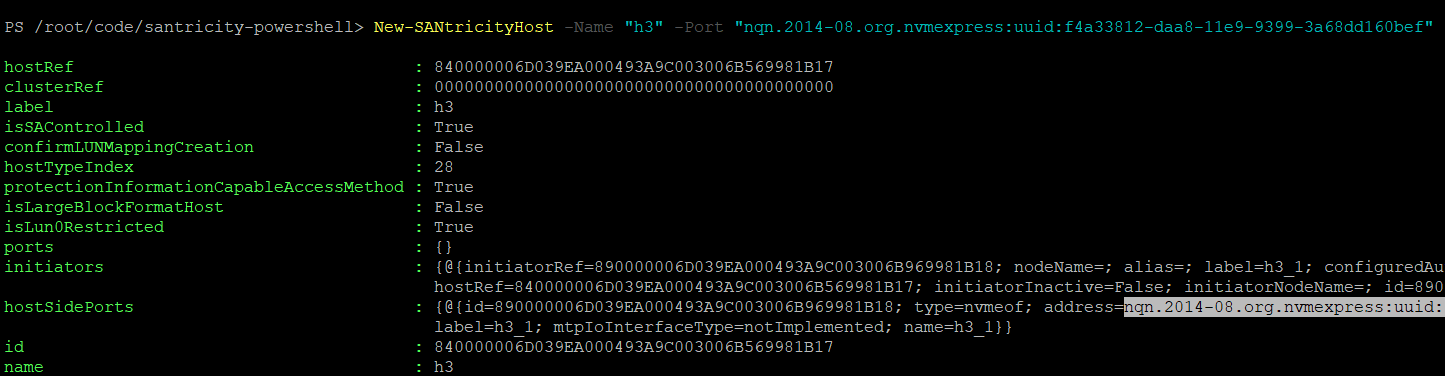
As an example, Get-SANtricityMappingsReport from my PowerShell module shows this environment, but New-SANtricityHost needed modifications.

After those modifications, now we can add h3, that Proxmox NVMe-oF host, like this.
The Get cmdlet shows configured NVMe hosts (and filtering and formatting is up to you).
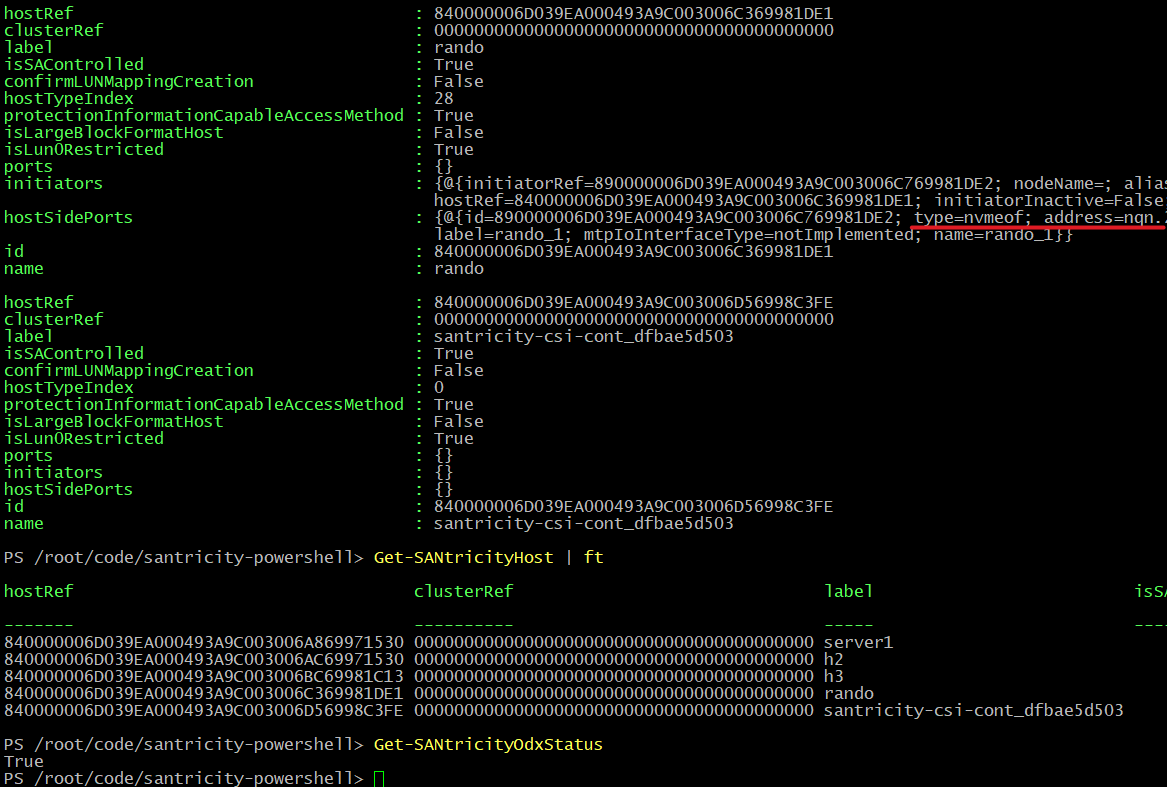
And now we have everything we need to create a SANtricity version of Firemox.
My SANtricity Go client, Terraform Provider SANtricity and SANtricity CSI have all been updated since I've published this post. And because it all works, SANtricity Go and Terraform Provider can now create a NVMe/RoCE host object, which is where a host's port(s) are defined. And SANtricity CSI is now also NVMe-oF-aware.

My santricity-client, a Python client for SANtricity, has also updated to handle NVMe/RoCE host objects (added in SANtricity Client version 0.1.1). Subsequently I also added "volume expand" support and few other things.
There is an opportunity to add custom NVMe-focused commands/cmdlets to better serve NVMe/RoCE users because existing approaches (see my comments about the Ansible Collection above) are too basic. Also, I may need to update E-Series Performance Analyzer and E-Series SANtricity Collector to make sure NVMe/RoCE is not neglected. I'll blog about that later if I get it done.
Conclusion
The simplicity, performance and (now) improving automation… How nice! Automation used to be the weakest spot of E-Series, but that's no longer the case. Now it's becoming a strength.
NVMe/RoCE is the best choice for NVMe-over-Fabric - it's not as "different" and pricey as Infiniband, it's more cost effective and works equally well for AI, Analytics and virtualization, all of which happen to be strong points of EF-Series. NVMe/TCP is even cheaper, but also slower (to me it's always been "a complicated version of iSCSI" that couldn't justify the switch).
I know, "virtualization" I've mentioned above seems out of place, but let's remember that not all VI users expect storage to do everythig for them; many expect it to work reliably, be good value for money, perform well and behave. E-Series does all that, so yes, I say it's a very good choice for virtualization, too!