NetApp E-Series SANtricity CSI
Introduction
Having built some building blocks we can now have nice things, such as a proper CSI driver for E-Series.
If you're ignorant about E-Series and wonder whey someone would want a CSI driver for it, you can read about Terraform SANtricity Provider here - SANtricity CSI uses the same client library as SANtricity Provider. There's absolutely no doubt in my mind that many E-Series users want it.
Not to mention that, as NetApp also dropped support for OpenStack Cinder driver for E-Series before that, KubeVirt and similar approaches provide new alternatives to users of other OSS solutions.
About SANtricity CSI
It's an opinionated, slim CSI provider for SANtricity 11.90+ storage systems with iSCSI and NVMe/RoCE host interfaces.
Why "opinionated"? Because I don't care about FC or targeting weak use cases. But, if you need that, the underlying SANtricity Go library is permissively licensed and you can use it to create your own or modify SANtricity CSI (also permissively licensed).
Why just these two protocols? Because they are the only ones that make sense. This (taken from the SANtricity Provider post) explains exactly what I'm after:
- One or more hosts with exclusive access to volumes
- HA pairs with shared storage for "traditional" HA failover
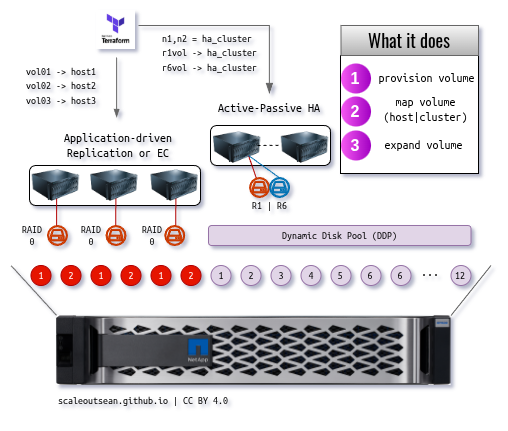
Unlike in the picture, we target only DDP pools (no traditional/classic RAID). Storage pools with classic RAID disk groups (usually incorrectly called "volume groups") can be used just fine, but are not recommended and I don't care about them at this time.
Imagine an EF600 with a single NVMe DDP pool. Configure SANtricity CSI with that pool ID and there's nothing else to do but monitor the thing (capacity, performance, events) and replace failed hardware components.

Note that there are other CSI drivers you can use with NetApp E-Series:
- non-HA CSI drivers, where Kubernetes simply uses E-Series volumes as directly attached disks that do not failover to other hosts. That's more than good enough - and extremely simple - for many workloads (stand-alone, replicated, NoSQL, NuSQL, Ceph, etc.). You can see this post and examples at the very bottom. These work with any storage protocol E-Series supports - as long as you can connect and mount, the rest is host-side stuff
- HA CSI for BeeGFS with NetApp E-Series - relies on "Building Blocks" (from NetApp) for HA of BeeGFS services, uses BeeGFS CSI
You can even use all of these at the same time.
Features
SANtricity CSI isn't a features-focused CSI driver, but here's what it aims to be good at, and where it's not trying.
Good:
- Direct API access - look ma, no SANtricity Web Services Proxy! Trident CSI required the separate Web Services Proxy software (running in a VM or container). I've promptly erradicated that thing (WSP) from every E-Series project I've forked (starting with E-Series Performance Analyzer, later also in the experimental SANtricty Python SDK for Python 3.0) and I do not support it in Trident CSI. No more "all egs in one basket". ¡Afuera!
- DDP focus and de-black-boxing: DDP-focused
poolIdconfiguration in the StorageClass makes the mapping explicit, removes ambiguity about which pool might get used when, simplifies capacity and Kubernetes management. It doesn't use "intelligent placement" and semi-randomly spray volumes around your pools - Modern Protocol Logic:
- NVMe-oF Support: PVCs can be presented to NVMe/RoCE hosts and host groups ("clusters")
- iSCSI support: continues iSCSI that Trident CSI supported
- No mixed node support; worker nodes should pick one. If you have 100G HICs on E-Series you probably won't want to use iSCSI, but if you absolutely had to, it'd have to be another cluster
- No FC or other protocol support. ¡Afuera! I wouldn't mind iSER support, but that's unrealistic because I simply don't have any hardware to test it. iSER might work anyway (if you create hosts/host groups manually), but if someone has iSER boxes send your pull request (for
hostsoperations in SANtricity Go client library) and we'll see
- Create, delete and resize: Trident CSI did not support resize as I recall, but NetApp wiped the old Trident documentation site on ReadTheDocs and I don't care enough to check in the source code
- Explicit support for RAID 1 volumes on DDP - excellent for popular E-Series workloads. Trident CSI did not support RAID 1 on DDP, so this is comparatively new and in my opinion one of the more important distinguishing features
- PVC metadata injection in SANtricity volumes - PVC names extracted from Kubernetes metadata are injected as extraTags on the array, so you can map volume names to full PVC names and easily produce end-to-end mapping
- Slim and simple - less than 50MB image size and less than 10MB RAM (when idle), folks! No bloat and a smaller attack surface means relatively fewer bugs and CVEs. Easy to understand and debug
- Privacy - no anonymous statistics gathering or phone home
- More versatility compared to before - fewer hard requirements
Bad (comparing vs. how it was when Trident CSI supported E-Series):
- 0 support
- 0 certifications
- 0 install base (currently)
- Non-zero bugs
My bet is many E-Series users who use Kubernetes don't care about the first two and maybe the rest either.
You can use LVM CSI (non-HA) today and get CSI support from your Kubernetes distribution (if it supports LVM CSI) or community. And you get protocol service and hardware support from NetApp, so there's nothing different from getting NetApp support for Ubuntu with iSCSI on E-Series here. You usually also don't get any "support" for LVM CSI driver either.
If you need an HA-capable CSI driver for E-Series with single-host filesystems, what then?
Well, you can't get it.
Or you can get it without support (this one here) just as you get single-host CSI drivers for generic block storage. You'll get better "0 support" from TopoLVM community than from me, but TopoLVM doesn't present PVs to multiple worker nodes.
If you can't (because of $$$) or won't (because you have Go and Kuberntes skills) buy another array just to use CSI with your workloads, you may as well try this CSI driver.
HA vs. non-HA CSI
I'm not sure if that's clear enough, so:
- With (say) TopoLVM, you present vol01 to host01, vol02 to host02 and so on. Then you use TopoLVM to create PVCs on the hosts. That's good enough for many workloads (especially analytics) because your application has a replica or uses Erasure Coding (2+1, for example). If
host02dies, you replace it with another, attach to the same volume (vol02) and recover data using application features or otherwise. With both one replica (RF2) or EC 2+1, you'd have no downtime - With SANtricity CSI, you could create volumes (
vol01,vol02,vol03) and present them to a cluster of hosts. Shouldhost02fail, Kubernetes could reschedule the workload that was scheduled tohost02and deploy it tohost04or some other.
So that's the main difference. SANtricity CSI should also work well for Active-Passive HA such as non-replicated PostgreSQL or MariaDB (although you could also use replication and provision "Master" using a raid1 SC and a "Slave" on a raid6 SC and so on).
SANtricity CSI Controller itself can be deployed in HA fashion (Active/Standby).
Furthermore, it is also possible to deploy multiple instances of it which may be preferred in scenarios where redundancy is required (rack-local CSI deployment for E-Series located in the same rack, so that each rack has its own CSI for in-rack workers).
Hands-on with SANtricity CSI
Watch out, because it hasn't been tested!
Wait, what?
That's true. I don't have a place to try it. It's written to work with the API (uses underlying SANtricity Go client library which does work in SANtricity Go CLI and Terraform SANtricity Provider), so it should work.
You need a DDP pool ID (although you can use any storage pool ID), and the usual (SANtricity management IP on port 8443, username and password for the user who can manipulate volumes, hosts, host groups and mappings).
Clone the santricity-go repository, enter ./csi/deploy subdirectory, edit API access and pool ID details (create Kubernetes secret, there's a sample YAML file for that too), run kubectl apply on the YAML files. If you can't pull a SANtricity CSI image from GHCR, build your local copy (docker build...) and use it.

UPDATE: As of March 2026, it is recommended to use Helm. Manifests for manual deployment can be created from Helm charts, so the described approach remains available.
CSI controller logs:
$ /usr/bin/kubectl --kubeconfig=./kubeconfig logs -n kube-system santricity-csi-controller-5cc66c765-ddvpl
Defaulted container "csi-driver" out of: csi-driver, csi-provisioner, csi-attacher, csi-resizer
I0119 04:23:56.170095       1 driver.go:37] Driver: santricity.scaleoutsean.github.io Version: 0.1.1
I0119 04:23:56.170399       1 driver.go:79] Starting listener on /var/lib/csi/sockets/pluginproxy/csi.sock
I0119 04:23:56.170683       1 driver.go:101] Registering Controller Server
I0119 04:23:56.170754       1 driver.go:108] Registering Node Server
I0119 04:23:56.170787       1 driver.go:111] Serving GRPC
I0119 04:23:56.606544       1 driver.go:116] GRPC call: /csi.v1.Identity/Probe
I0119 04:23:56.607560       1 driver.go:116] GRPC call: /csi.v1.Identity/GetPluginInfo
I0119 04:23:56.608939       1 driver.go:116] GRPC call: /csi.v1.Identity/GetPluginCapabilities
I0119 04:23:56.610274       1 driver.go:116] GRPC call: /csi.v1.Controller/ControllerGetCapabilities
I0119 04:23:56.611139       1 driver.go:116] GRPC call: /csi.v1.Controller/ControllerGetCapabilities
I0119 04:23:56.949855       1 driver.go:116] GRPC call: /csi.v1.Identity/Probe
I0119 04:23:56.950735       1 driver.go:116] GRPC call: /csi.v1.Identity/GetPluginInfo
I0119 04:23:56.951595       1 driver.go:116] GRPC call: /csi.v1.Identity/GetPluginCapabilities
I0119 04:23:56.952564       1 driver.go:116] GRPC call: /csi.v1.Controller/ControllerGetCapabilities
I0119 04:23:57.161363       1 driver.go:116] GRPC call: /csi.v1.Identity/Probe
I0119 04:23:57.162510       1 driver.go:116] GRPC call: /csi.v1.Identity/GetPluginInfo
I0119 04:23:57.163576       1 driver.go:116] GRPC call: /csi.v1.Identity/GetPluginCapabilities
I0119 04:23:57.165291       1 driver.go:116] GRPC call: /csi.v1.Controller/ControllerGetCapabilities
CSI node logs:
$ /usr/bin/kubectl --kubeconfig=./kubeconfig logs -n kube-system santricity-csi-node-9nc8k
Defaulted container "csi-driver" out of: csi-driver, csi-node-driver-registrar
I0119 04:24:09.638718       1 driver.go:37] Driver: santricity.scaleoutsean.github.io Version: 0.1.1
W0119 04:24:09.638782       1 driver.go:58] No valid SANtricity API URL provided. Controller operations will fail.
I0119 04:24:09.638793       1 driver.go:79] Starting listener on /csi/csi.sock
I0119 04:24:09.638945       1 driver.go:108] Registering Node Server
I0119 04:24:09.638956       1 driver.go:111] Serving GRPC
I0119 04:24:09.683293       1 driver.go:116] GRPC call: /csi.v1.Identity/GetPluginInfo
I0119 04:24:10.121258       1 driver.go:116] GRPC call: /csi.v1.Node/NodeGetInfo
As I've mentioned earlier, I don't have a place to test, so that warning is shown.
I can still create a PVC - just can't get a PV out of it.
$ /usr/bin/kubectl --kubeconfig=./kubeconfig apply -f example/test-pod.yaml
persistentvolumeclaim/basic-test-pvc created
pod/basic-test-pod created
Controller log:
I0119 05:14:04.729121       1 driver.go:116] GRPC call: /csi.v1.Controller/CreateVolume
I0119 05:14:04.729754       1 controller.go:90] Volume name pvc-8d2425bb-ecef-45ac-bd1f-77a128af4f00 too long, shortened to pvc-8d2425bb-ecef-45a_435f3400
I0119 05:14:04.729849       1 controller.go:104] Creating volume pvc-8d2425bb-ecef-45a_435f3400 with size 1073741824
time="2026-01-19T05:14:14Z" level=warning msg="Error communicating with controller https://10.10.10.10:8443/devmgr/v2: Get \"https://https//10.10.10.10:8443/devmgr/v2:8443/devmgr/v2/storage-systems/storage-pools/0000000000000000000000000000000000000000\": context canceled"
E0119 05:14:14.728969       1 driver.go:119] GRPC error: rpc error: code = NotFound desc = Specified poolID 0000000000000000000000000000000000000000 not found: could not get storage pool: Get "https://https//10.10.10.10:8443/devmgr/v2:8443/devmgr/v2/storage-systems/storage-pools/0000000000000000000000000000000000000000": context canceled
I0119 05:14:15.730782       1 driver.go:116] GRPC call: /csi.v1.Controller/CreateVolume
I0119 05:14:15.730890       1 controller.go:90] Volume name pvc-8d2425bb-ecef-45ac-bd1f-77a128af4f00 too long, shortened to pvc-8d2425bb-ecef-45a_435f3400
I0119 05:14:15.731044       1 controller.go:104] Creating volume pvc-8d2425bb-ecef-45a_435f3400 with size 1073741824
This looks fine to me.
For most users, given one DDP pool per backend, storage classes would be one or two:
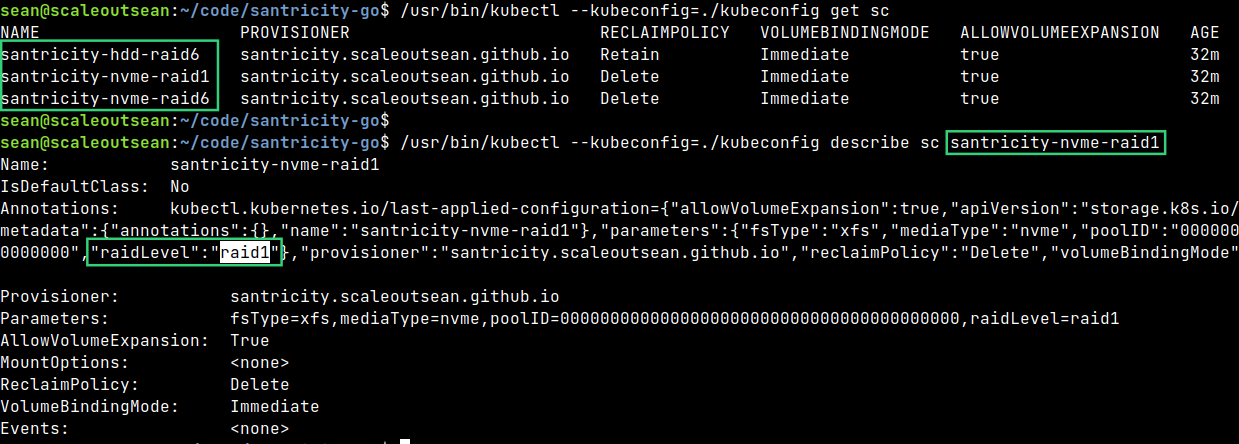
But with arrays like EF600, for example, you could have several backends (such as one NVMe DDP and another NL-SAS DDP) identified by their respective DDP IDs, and one or two storage classes per each.
Then - given the lack of support for multi-protocol within a single backend - you'd either need to group cluster nodes by protocol or have two Kubernetes clusters (one with iSCSI, one with NVMe/RoCE SANtricity backend).
Next steps
I don't have unlimited time, so I'm not going to plan on adding a bunch of features or integrations. Here's what I'd like to do if I could, though.
Features-wise, some things on my wish-list:
- Snapshots. Trident CSI didn't support them, but SANtricity CSI might. Snapshot support has to be added to the Go library and it's a bit tricky. The other day I started looking into this again (warning: risk of migraine!).
- Clones. Same same, but different! SANtricity's clones are actually "Snapshot Volumes" and there are two ways to do that; the simpler one is to use Snapshot Volumes, the complicated one is to copy Snapshot Volume to a "real" volume. See the link just above. One could also say the first way to clone is from a snapshot, while the other is a volume copy. I believe CSI relies on the first approach (snapshot-to-clone), but I haven't started looking into that yet - still trying to figure out to do this in the API first…
Integrations-wise:
- Volume metadata and monitoring: you or I could update EPA and/or ESC to extract volume metadata KVs and easily find and watch Kubernetes volumes. Then you get proper statistics (PVC volume count, etc.), capacity and performance monitoring for SANtricity CSI volumes
- Hashicorp Nomad CSI - hopefully just a matter of giving SANtricity CSI a try. Why bother with Kubernetes if you don't really need it? I like Nomad better than Kubernetes (if that's not obvious)
Here's an example of a volume metadata key in volume JSON:
"metadata": [
      {
        "key": "fstype",
        "value": "xfs"
      },
      {
        "key": "pv_name",
        "value": "pvc-185bb457-d426-4645-9122-f5e80b286c0c"
      },
      {
        "key": "pvc_name",
        "value": "basic-test-pvc"
      },
      {
        "key": "pvc_namespace",
        "value": "default"
      }
    ]
It gives us enough to present a static volume (should we need to recover from CSI failure), back it up (after making a clone) from a non-Kubernetes client, or use this for charge-back or show-back.
Demo
Conclusion
SANtricity CSI re-enables E-Series users' access to HA CSI services for single host filesystems. This isn't an "official" driver, but I believe many users won't care.
It has most of the essential features E-Series had with Trident CSI. While some (various "certifications", that are also "features") are missing, some are vastly better because Trident CSI never had them for E-Series (RAID 1, volume resize, NVMe/RoCE support, SANtricity volume metadata).
I believe this driver is much better beucase it was created with E-Series in mind and should work better for workloads and use cases E-Series is best known for.
SANtricity CSI is simple, it performs no "black box" magic. Anyone can understand it, improve it and fix bugs whether it's in the Go client library or CSI driver.
Most improvements to the CSI driver need to first happen in the Go client library first, so even if I remain the only SANtricity CSI user, the Go client library will be used by many (or at least "enough" to be viable). Why? Because there's nothing out there. Unless you are happy running Ansible playbooks, you may want a native client (such as this SANtricity Go library) that can create volumes in seconds without any bloat. Some admins will use it.
Source code for SANtricity Go library and CSI can be found in my santricity-go repository.
Appendix
Update (Jan 22, 2026)
The CSI provisioner actually did not work as expected - there were several bugs! But they've been fixed and SANtricity CSI Controller can now create PVs.

Some issues visible in the screenshot:
- CSI Controller created a new host name (although the host was already registered as
Ubuntu_2204). That bug was fixed. Now hosts are matched on IQN (or NQN) to avoid duplicate entries. - PVC size was 1 Gi, but SANtricity allocated 2.5 Gi. The PVC says it's 1GiB. In SANtricity's LUN properties, SANtricity says actual size is 1 Gi, while Allocated is 2.5 Gi. I think that's due to SANtricity allocation algorithm, but I'll investigate this later.
- The last step is Node-side rescan, login and mount which is a TODO item (once I have an iSCSI or NVMe client at my disposal).
Update (Feb 23, 2026)
Today I've pushed csi-v1.0.0-alpha.1 to Github and I updated this post because now SANtricity CSI works!
What you see here is SANtricity CSI on Kubernetes 1.32.12 and Ubuntu 24.04.4 LTS, with the first pod attached and running. (You can open this in a new tab for a high-resolution photo).

The same volume (pvc-f0dc..) that's used by the very "first pod" from the screenshot above can be seen in the SANtricity UI screenshot below.
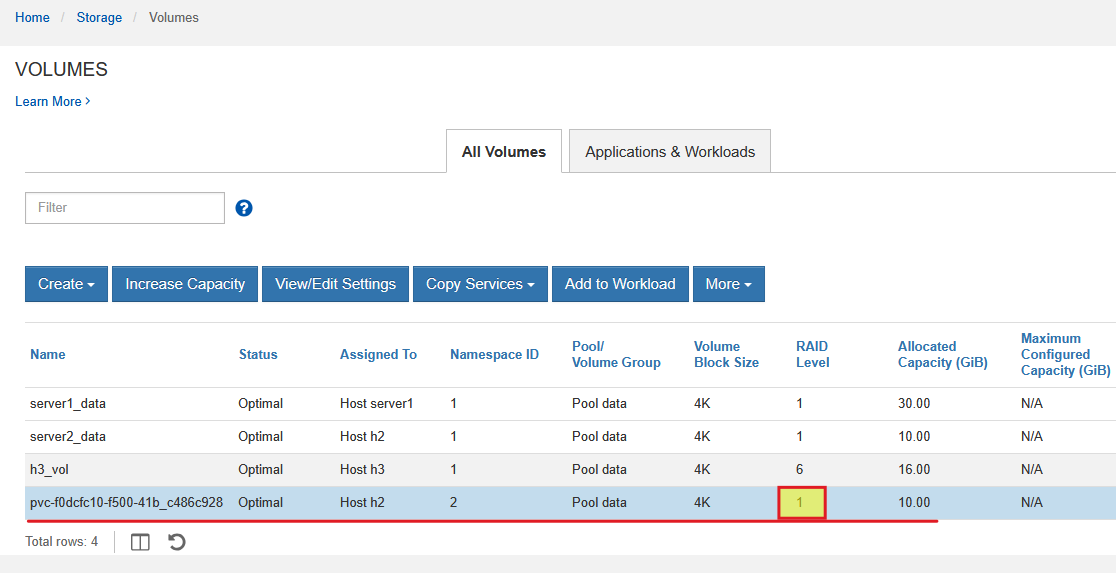
We can also see the volume format is RAID 1, which is what you want when you have heavy Kubernetes workloads crackin' at full speed.
The pod is actually connected to E-Series over NVMe-oF (NVMe/RoCEv2). CSI controller/node are NVMe/RDMA-aware.

If you're curious about using Linux with highly available NVMe-oF storage, see this post.
Update (Feb 26, 2026)
You may also consider my SANtricity-aware patch for IBM Block CSI driver.