NetApp E-Series SANtricity Terraform Provider
Introduction
As I've been saying, we need to build building blocks first and then we can have fun.
If you read that post and some of the other recent posts, the building blocks are now in place and the hard part is done.
Bbbut E-Series…
"As we all know, E-Series is hard to automate and not suitable for modern applications." Right?
Wrong!
I'll borrow this image from another post to show why. This is an example - not a recipe - of a modern storage services stack from my perspective:
- S3 as the source of truth - everything that needs protection at rest is there. Maybe there's an async replica in a low-cost public cloud or another site
- Block storage services
- Databases - data that can't be lost, but moves to S3 buckets when it cools down
- Logs - durable, fastest tier, protected, and replicated (by application or storage)
- Data - hot or warm, fast tier, stored on protected external storage
- Temp/scratch/KV cache - fast(est) tier, used by analytics and inferencing - there's a copy in S3 or databases, so nothing to backup or snapshot
- Other (front-end apps) - small capacity, big churn of many small volumes with non-persistent data. Put them anywhere - replicated ZFS on RAID 10 disks, VM-based HA NAS on RAID 6, Rook/Ceph on E-Series…
- Databases - data that can't be lost, but moves to S3 buckets when it cools down

Modern applications compress data before it's uploaded to S3. They deal with HA on their own (barely any rely on traditional clusterware) and can backup to and restore from S3. In this situation, the main requirements for block services are:
- RAID 1-like performance for logs
- RAID 6- or RAID 1-like performance for data that stays on protected storage
- RAID 1 or RAID 0 for ephemeral cache and scratch/temp filesystems (needed for analytics jobs which can be re-run if a host fails)
- "Other" applications have very simple requirements because data persistence isn't required. Containerize and scale them out if HA or rack redundancy is required. There's nothing to protect or backup - most are read-only (stateless). Create a Linux VM with a RAID 6 volume and use CSI LVM or TopoLVM, or form a small Rook/Ceph (three VMs, can be spread across racks) cluster for rack redundancy, etc.
In this situation, having a single global pool of capacity from which we can carve volumes is a great feature. Does E-Series have that? Yes, DDP. I've blogged about it many times. In short:
- Great performance for both random and sequential workloads
- Expansion in single disk increments without violating best practices
- Supports RAID 6 and RAID 1
- Simple choices - durability (RAID 6) vs performance (RAID 1) (or both, with application replicas or EC) in one large, highly available pool
DDP isn't the only way, but it's a great choice. If you have massive workloads you understand very well, you can benefit from traditional layout ("classic" RAID groups), or mix two in the same storage or across different arrays.
So I'd say E-Series is highly relevant for modern workloads.
One issue is that its automation and integrations are lacking. What can we do about that?
Well, we need to build them. That's not great, but it's happening. A Go library for Day 1+ management was posted to Github this week. Now we also have a SANtricity Provider!
SANtricity Provider for Terraform
Imagine if we could use Terraform to take care of storage provisioning… Wait, I got this to work yesterday!
For data that needs persistence and performance, create a DDP and simply provision RAID 1 or RAID 6 depending on whether it's application-replicated or needs to rely on storage array.
For data that needs just performance, consider RAID 1.
A tiny minority of users may need something else, but I'd say 95% need just DDP.
Now consider that an entire storage system's capacity can be in a single DDP (pool) and all volumes are "owned" by both controllers. And we know almost everyone needs just RAID 1 or RAID 6 protection for their volumes. What does that mean?
It means the entire Day 1+ lifecycle consists of just two main operations:
- Create volume
- Map volume to a host or cluster (host group)
Now we see E-Series is very easy to automate. Yes, we may also want to remove mappings and delete volumes from time to time, but that's the same thing only in reverse.
That's the idea behind this provider:
- Stick with DDP
- Pick RAID 1 or RAID 6
- Use E-Series Performance Analyzer or E-Series SANtricity Collector to monitor performance, capacity, events
In case you wonder how exactly that works: DDP (11+ disks) always writes in 10 stripes; those can be 5+5 (R1 volumes) or 8+2 (R6 volumes). That's it! When you query the DDP, you see it keeps track of total extents allocated to RAID 1 and RAID 6 volumes. See extents key from this pool I used: raidDiskPool has raid6 and raid1 volumes in it:
"extents": [
  {
    "sectorOffset": "0",
    "rawCapacity": "4312147165184",
    "raidLevel": "raidDiskPool",
    "volumeGroupRef": "04000000600A098000E3C1B000002CED62CF874D",
    "freeExtentRef": "03010000600A098000E3C1B000002CED62CF874D",
    "reserved1": "000000000000000000000000",
    "reserved2": "",
    "ddpRAIDCapacities": [
      {
        "ddpVolRAIDLevel": "raid6",
        "usableCapacity": "4312147165184",
        "allocGranularity": "4294967296"
      },
      {
        "ddpVolRAIDLevel": "raid1",
        "usableCapacity": "2695091978240",
        "allocGranularity": "2684354560"
      }
    ]
  }
]
There's a RAID 1 vs 6 breakdown calculator in my E-Config Web app (see Projects), but it's not hard to manually calculate expected usable capacity from a DDP based on estimates of R1 and R6 shares: R1 takes 100% more DDP space (1/1), R6 takes 25% (2/8). Remember that DDP itself has a reserve (1 or more disks) that can allow it to tolerate several consecutive failures of up to 2 disks.
This image depicts two target workloads for SANtricity Provider:
- Modern databases - each node uses own disk(s) (hosts do not belong to a SANtricity "host group", each is on its own from E-Series side, and there is no disk failover - all we need to do is provision volumes and map them to hosts, maybe resize or extend once every few months!)
- Traditional HA clusters (shared disk(s) - mapped to a common, shared host group on E-Series)
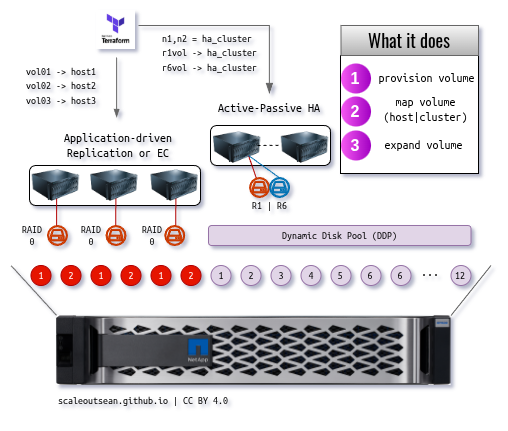
There's no difference to the provider if the pool is DDP or not, or whether volumes are mapped one-per-node or shared to a host group (shared storage cluster). You can configure and use it either way!
The difference to the administrator (and only because I didn't want to implement that, because I don't think it should be done) is modern databases (pattern on the left) need at least one disk (RAID 0 in the schematic) per application and the provider does not touch storage pools. That means you'd need to create and manage several classic RAID disk groups.
On the right, we start with a pre-created DDP (11 or more disks) and just use it and grow it when we need more capacity. The bigger it gets, the faster it rebuilds. You could have more than one DDP, of course. The point is the provider takes a pool ID and works with it. You just let the provider manage volumes, hosts and mappings.
Why only DDP?
I think consolidating on DDP is a great idea. The provider can already do almot everything we need (create and delete volumes). We also want to be able to grow (extend) volumes on storage array although we can also add new ones (the provider can do that).
One feature (or a limitation, depending on your view point) of this approach is SANtricity Provider does not attempt to micro-manage storage pools and physical disks. You don't either: create one pool and just use it.
The provider doesn't know if the pool ID you told it to use is a classic RAID disk group or DDP, so you could have multiple and use each as own "island". But I think it's hard to justify complicating things that way.
Of course, the provider can be improved in an attempt to make it become "smart". I don't like that idea because those who don't think the DDP approach is smart enough surely won't like a program's attempt to be smart about choosing between hundreds of permutations while having no idea about one's business and other requirements. At this time even an AI wouldn't necessarily outperform you with this DDP approach and three entry level EF arrays in three racks.
Why is that?
Assume you have 24 disks (full controller shelf). At any given time, maybe 1/3 of them is available for custom RAID groups. Which means you can build perhaps one RAID 1 or 0 and one small RAID 5. Once. And then you're out of disks and have stranded capacity in each pool-island. Compare that to having one DDP with consolidated capacity and the ability to create RAID 1 and RAID 6 volumes.
So, users with very large workloads (many racks) may be able to do better than DDP, but as far as this provider is concerned, it'd have to be improved as follows:
- Enumerate and analyze physical disks (size, location)
- Understand differences between one, two, three or more racks (how?)
- Build new classic disk groups or DDPs in smart way (how?)
- Take pool ID as optional. Consider more variables to become "smart" (rack redundancy, etc.)
- Select the right pool (based on new inputs - space, performance, etc.)
- Choose to create a new pool or use existing to place your data (would you let it do that?)
- Have a way to deal with unnecessary pools (consolidate into fewer to free physical disks) which can use SANtricity volume copy and destruction of evacuated pools (would you let it?)
- Assign and unassign hot spares or decide whether or not to use global hot spare (would you let it?)
In other words, that's probably a stupid idea. No MCP server can "solve" this today (and this "problem" doesn't really exist in the first place).
Then, secondly, if you take a step back you may notice the above points are simply a shortlist on how to re-invent Ceph. Why would we want to do that? Use the first pattern to create volumes for a bunch of servers and deploy Ceph on E-Series.
It doesn't even take one minute to deploy it with SANtricity Provider and MicroCeph. This is simply the first pattern on the left and - related to "other" workloads - if we needed this flexibility (RF2, RF3, EC) for "other" (stateless, "high churn") application workloads we would use a layout from the Ceph blog post and all volume and all CSI action would happen in Ceph plugins - you would not even need to use this provider to do that right (there's also Ansible and now three CLIs!).
ZFS replicated over two DDPs or Ceph with EC is decent enough for "other" applications, while micro-managing RAID groups or creating a DIY Ceph (the list above) is not.
Disk failover for NoSQL and Ceph-like applications
This was already mentioned (rely on RF or EC), but there's one other thing that I need to highlight: like most other managed storage, SANtricity lets you "remap" an existing volume to another host.
That gives you two options to handle server failures (not storage failures):
- Remove the host and volume, create a new host and volume, and let RF or EC take care of a failed server/host, or
- Replace the host with another, and remap the failed host's volumes to the new host
The second approach spares you from rebuilding TBs of data. Is it worth it? Maybe not, because if you do this once a year you could destroy everything. But if we wanted to do it:
- Use the provider to create a new host with new IQN (remember to include CHAP if you use it) or NQN
- Remap the volume(s) from the dead host to this new host
The question is: can we use SANtricity provider for that?
And the answer is: I don't know, but likely yes. In an emergency you could do it manually in the SANtricity Web UI.
The key here - from the application side - is whether the application can handle this. That's why I haven't really paid much attention to this so far. Overall, the safest way to do it is let the application do its thing.
Sometimes the application won't let you do this re-assignment. Other times it won't rebuild for minutes or hours, but then it will start, and you won't be able to stop it. So I don't see this "dead host replacement" workflow as essential, but it would be nice to be able to do it (assuming the application supports it) for planned host replacement (server hardware upgrade or refresh), so I will look into this later.
Hands-on with SANtricity Provider
I currently have no plans to publish this to Terraform community plugins - it has to be installed locally.
cat <<EOF > ~/.terraformrc
provider_installation {
  dev_overrides {
    "local/scaleoutsean/santricity" = "/home/sean/santricity-go"
  }
  direct {}
}
EOF
Build as per README and configure credentials (or use a JWT Bearer Token, which probably can be stored in Hashicorp Vault although I haven't checked).
terraform {
  required_providers {
    santricity = {
      source  = "local/scaleoutsean/santricity"
      version = "1.0.0"
    }
  }
}

provider "santricity" {
  endpoint = "10.1.1.1"   # Replace with your Controller IP
  username = "admin"          # Optional if token is used
  password = "letsGoBrandon"  # Optional if token is used
  # token    = "eyJ..."       # Optional if username/password is used
  insecure = true
}
Then we define volumes. Let's say I'm building a PostgreSQL HA cluster. One LUN (disk) for data (RAID 6), one disk for database log files (RAID 1). We simply use one DDP (identified by its pool ID) for everything. You can get these IDs from the UI, santricity-client, santricity-powershell, Swagger (GET storage-pools), Ansible (gather_facts), etc.
resource "santricity_volume" "pg_data" {
  name       = "pg_data_vol"
  pool_id    = var.pool_id
  size_gb    = 50
  raid_level = "raid6"
}

resource "santricity_volume" "pg_log" {
  name       = "pg_log_vol"
  pool_id    = var.pool_id
  size_gb    = 10
  raid_level = "raid1"
}


variable "pool_id" {
  type        = string
  description = "The DDP Pool ID (Ref) to provision volumes in."
  default     = "04000000600A098000E3C1B000002CED62CF874D"
}
We also need to create a host group for our two PostgreSQL servers and then we can map the new disks to a "host group" of these two iSCSI clients.
resource "santricity_host" "pg_host_01" {
  name = "pg-01"
  type = "linux_dm_mp"
  host_group_id = santricity_host_group.pg_cluster.id
  ports {
    type  = "iscsi"
    port  = "iqn.1993-08.org.debian:01:postgres01"
    label = "pg01-iscsi"
  }
}

resource "santricity_host" "pg_host_02" {
  name = "pg-02"
  type = "linux_dm_mp"
  host_group_id = santricity_host_group.pg_cluster.id
  ports {
    type  = "iscsi"
    port  = "iqn.1993-08.org.debian:01:postgres02"
    label = "pg02-iscsi"
  }
}

resource "santricity_mapping" "pg_data_map" {
  volume_id = santricity_volume.pg_data.id
  # Because pg-01 is in a group, this will automatically map to the Group (Cluster).
  host_id   = santricity_host.pg_host_01.id
  lun       = 10 # Arbitrary LUN
}

resource "santricity_mapping" "pg_log_map" {
  volume_id = santricity_volume.pg_log.id
  # We can also map explicitly to the Group ID
  host_group_id = santricity_host_group.pg_cluster.id
  lun       = 11
}
LUN IDs can be left out and SANtricity will assign them automatically. Since you can get WWNs out of Terraform, you don't really need to rely on LUN numbers, but you can. It may be useful for folks who build VMs or physical hosts with many disks and want to micromanage that aspect.
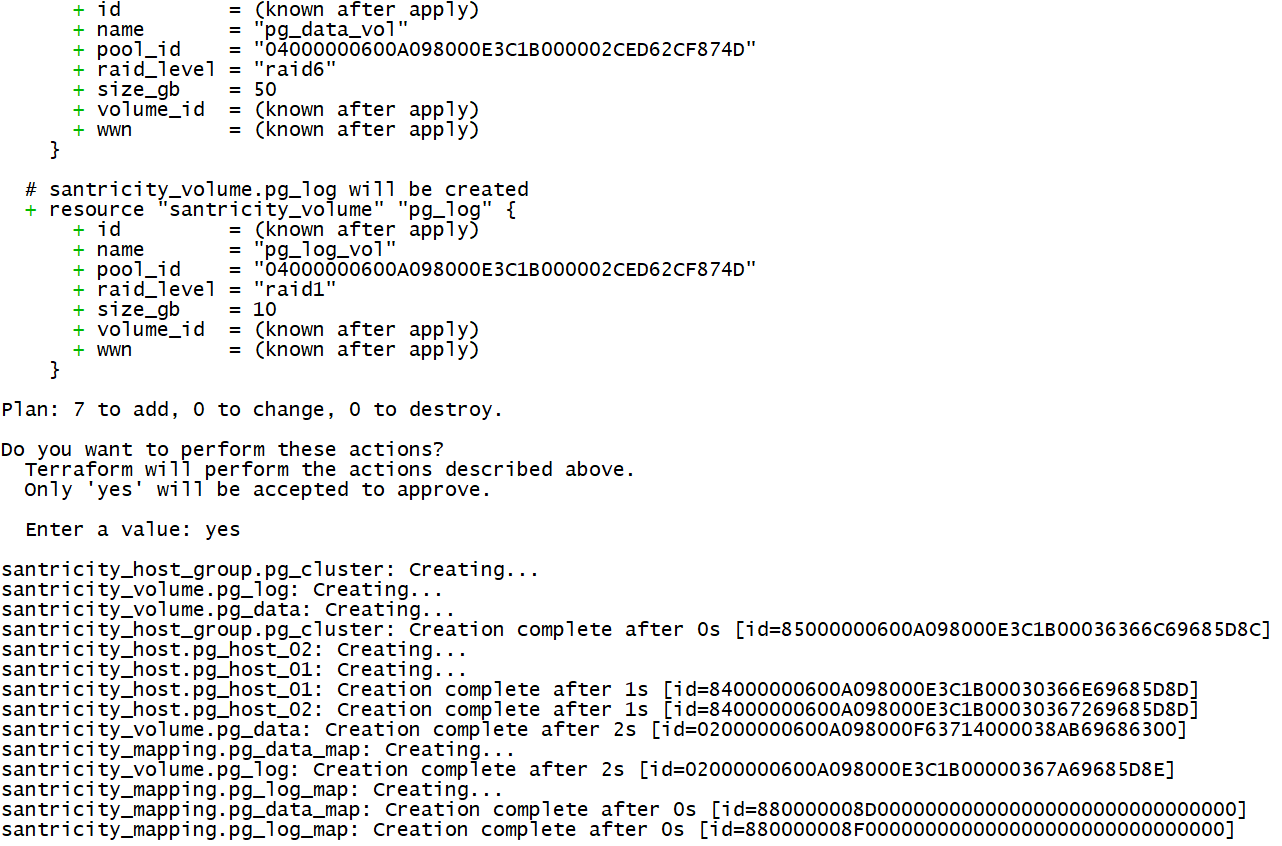
Run terraform apply.
santricity_host_group.pg_cluster: Creating...
santricity_volume.pg_log: Creating...
santricity_volume.pg_data: Creating...
santricity_host_group.pg_cluster: Creation complete after 0s [id=85000000600A098000E3C1B00036367C69688A93]
santricity_host.pg_host_02: Creating...
santricity_host.pg_host_01: Creating...
santricity_host.pg_host_02: Creation complete after 1s [id=84000000600A098000E3C1B00030367E69688A94]
santricity_host.pg_host_01: Creation complete after 1s [id=84000000600A098000E3C1B00030368269688A94]
santricity_volume.pg_log: Creation complete after 2s [id=02000000600A098000F63714000038B469689007]
santricity_mapping.pg_log_map: Creating...
santricity_mapping.pg_log_map: Creation complete after 1s [id=8800000090000000000000000000000000000000]
santricity_volume.pg_data: Creation complete after 3s [id=02000000600A098000E3C1B00000368B69688A95]
santricity_mapping.pg_data_map: Creating...
santricity_mapping.pg_data_map: Creation complete after 0s [id=8800000093000000000000000000000000000000]
Done in seconds! If you build a more complete workflow (with Terraform or other) now you could rescan iSCSI, login to these targets, configure DM-MP, deploy PostgreSQL and configure Pacemaker and Corosync.
If you use PostgreSQL's built-in replication, deploy independent hosts (similar to pattern on the left, but with DDP).
If other people build the compute side, they can use santricity-client (Python) or santricity-powershell to inspect disks host-side.
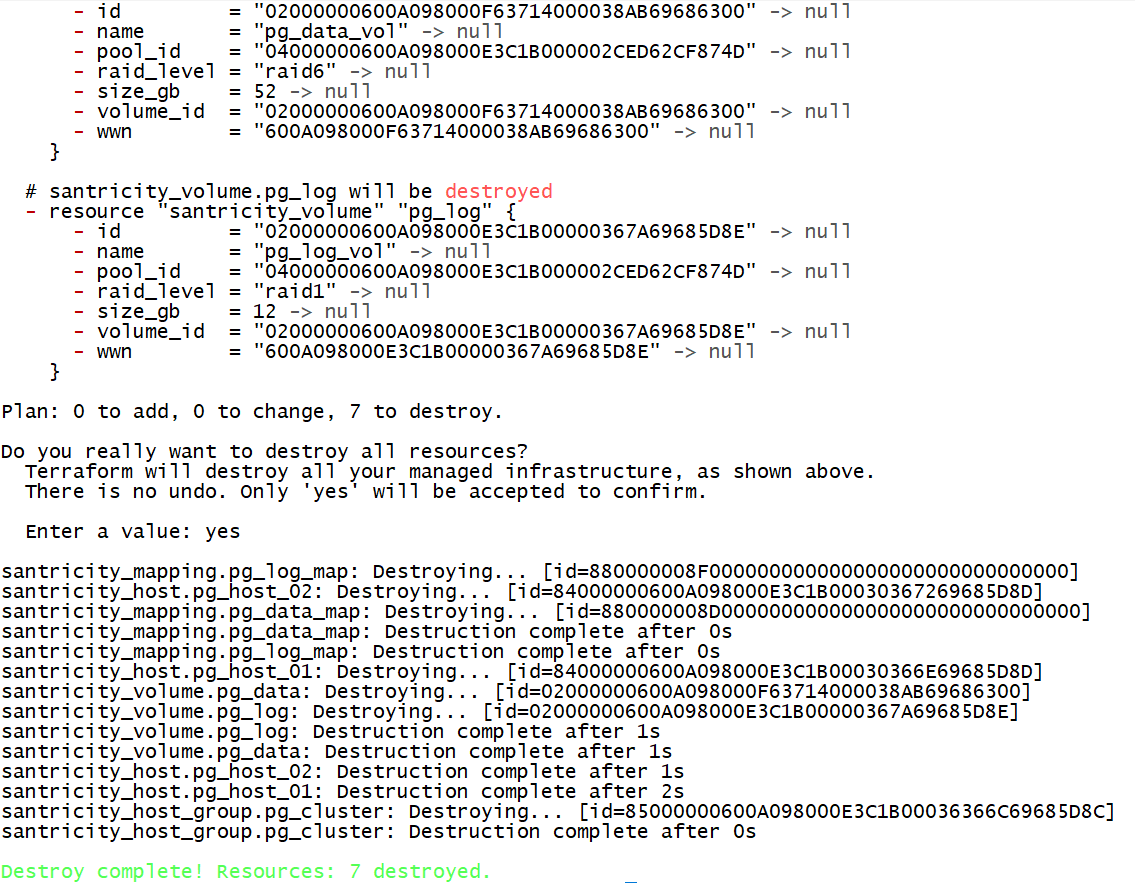
terraform destroy is also fast, as usual for Terraform.
santricity_mapping.pg_log_map: Destroying... [id=8800000090000000000000000000000000000000]
santricity_mapping.pg_data_map: Destroying... [id=8800000093000000000000000000000000000000]
santricity_host.pg_host_02: Destroying... [id=84000000600A098000E3C1B00030367E69688A94]
santricity_mapping.pg_data_map: Destruction complete after 0s
santricity_mapping.pg_log_map: Destruction complete after 0s
santricity_host.pg_host_01: Destroying... [id=84000000600A098000E3C1B00030368269688A94]
santricity_volume.pg_data: Destroying... [id=02000000600A098000E3C1B00000368B69688A95]
santricity_volume.pg_log: Destroying... [id=02000000600A098000F63714000038B469689007]
santricity_volume.pg_data: Destruction complete after 1s
santricity_host.pg_host_02: Destruction complete after 1s
santricity_host.pg_host_01: Destruction complete after 1s
santricity_host_group.pg_cluster: Destroying... [id=85000000600A098000E3C1B00036367C69688A93]
santricity_volume.pg_log: Destruction complete after 1s
santricity_host_group.pg_cluster: Destruction complete after 0s
You may add new disks by editing and re-applying your Terraform plan, and soon you'll be able to expand them (which usually requires a rescan (both) and a filesystem expansion on the (attached) client as usual).
If you want to replicate this to another site or rack, just create another Terraform plan and run it against the remote SANtricity (you may cost-down to just one host and one 60 GiB RAID 6 volume rather than 50 (R6) + 10 (R1), and then setup replication on PostgreSQL). You could also create a snapshot schedule for the remote site using the SANtricity API or Web UI.
Apply:
Destroy:
Remember to backup your Terraform state, etc.
Demo
Conclusion
I'm very satisfied how this turned out. A week ago none of this existed. I salvaged abandoned code and published a stand-alone Go library and client, and now we have this SANtricity provider for an optimal storage deployment pattern.
Several wish-list items (P1 and P2 will be done, P3 if easy):
- P1: Volume expand will be added today (edit: done)
- P2: NVMe/RoCEv2 will likely be added soon - it only impacts host creation (and the only reason it's not available now is I don't have any hardware to try it, but I'll build it based on JSON samples (edit: done, although I can't test due to no hardware access))
- P3: Planned host replacement with volume move (edit: done, also volume-to-host re-mapping in SANtricity Provider)
Gaps (real and perceived):
- "Other" workloads - mostly lightweight and high-churn, can be deployed in VMs based on the HA pattern (ZFS)
- "Custom" classic RAID groups - out of scope, use Ceph (available in Proxmox and elsewhere) or similar
- CSI (Kuberntes) - the HA pattern works for SDS VMs, the NOSQL pattern also works on DDP and manually; there's no "native" CSI plugin yet as Trident dumped E-SEries years ago
- Snapshots, clones - can be implemented, although the recommended pattern is to do that on application layer (almost all databases have it. I don't think we're not supposed to solve these application management problems with storage)
Application-level integrations? I don't think we need those. Currently the repository has a PostgreSQL (storage side) example shared above (the HA pattern). A sample for the NOSQL/NUSQL pattern may be added, but it's really the same thing - just don't create a "host group" that lets all hosts see all volumes.
The provider and examples can be found in my santricity-go repository.