Ceph with NetApp E-Series
- PART 1 - Ceph with E-Series (this post)
- PART 2 - Rook Ceph on Kubernetes backed by E-Series
Introduction
Once upon a time, NetApp E-Series had this nicely documented in Technical Reports ("TR").
Almost a decade later those are less relevant, but still useful if you want to read the value proposition as it was at the time.
I don't know if this TR-4549 is the last released TR on this topic, but it is the only one I could find within minutes.
It's posted in an unusual place (the comunity site) so they haven't managed to remove it yet, I suppose.
Let's review this TR-4549 from today's perspective and take a look at "latest and greatest" situation.
TR-4549: Ceph on E-Series Reference Architecture for Ceph Clusters Using NetApp E-Series
Now, I could be a moron and create an AI summary. Or I could read the TR and maybe learn something. I'll go with the latter.
Note that this TR was done at the time of RHEL 7.3, Ceph Jewel Release Version 10.2.2-38 and E-Series E5600.
Greatly improves stability and manageability while allowing customers to meet their cost targets.
Verdict: still true.
This doesn't say any everyone should run Ceph backed by protected storage (let alone E-Series). It says many users dislike low-level storage management (JBODs, firmware quirks, OS maintenance, and so on).
And this comes up fairly often. A CTO may like the concept of SDS S3 such as MinIO (slightly less these days), but in the end there are just 2 guys who already manage many PBs of storage across block for VI and NOSQL and file or S3 for analytics and AI and are busy enough.
Only the replica protection option is currently supported when using RBD or CephFS
Erasure Coding (k+m) has been introduced since then, which benefits Ceph-E-Series as well. Whereas in 2017 we'd make two copies (RF2) of all files, now we can make just 1.5 (EC 2+1) or even less.
Storage setup from the TR:
- NL-SAS: 20 R5 (4+1) for data
- SSD (SAS): two R10 (2+2) for (mirrored) metadata
Verdict: still fine.
- Yes, not all Ceph-on-E clusters would be designed this way, but many (especially those used in analytics, media and so on) would
- Today we may use different media, and take advantage of EC if the workload justifies it, but the above is how we could do Ceph on EF600 today and it wouldn't be wrong
Narrow RAID 5 makes smaller writes perform better. One LUN per R5 avoids contention and disk group-level interference among servers and targets.
SSDs for metadata is still the right default. BeeGFS on E-Series defaults to R10 volumes on flash storage as well. But note that this isn't required. For example, S3 storage for few hundred container images could use NL-SAS for all volumes.
For each OSD server, a 100GB volume is created. This volume is then divided into five Linux partitions to support five OSD volumes.
Verdict: this is weird. Why not create 5 LUNs? It's not like you'd end up with hundreds of volumes or hit any "limit".
Once the volumes are created, they must be mapped by using the storage partitioning feature in SANtricity. A host is defined for each OSD server by using World Wide Identifiers of the SAS HBA ports.
Verdict: this is fine.
Today we'd use NVMe over something (IB, RoCEv2), especially with faster E-Series arrays.
SAS is usualy DAS (it's been years since I've heard of anyone mentioning SAS storage switches). It avoids the need to buy storage switches when/if the number of ports (usually proportional to the number of servers) is enough. In the TR with four servers per E-Series array array ports were sufficient (eight dual-ported servers with SAS and two E5600 arrays).
Each OSD server has five 10.894TB RAID 5 volumes and one 100GB RAID 10 volume assigned to it. Two SAS ports are connected to each server.
Verdict: this is fine.
It doesn't always have to be that way, and the good news is unlike with physical JBOD disks we can create multiple patterns within one or any clusters using the same shared, protected storage.
For multipathing support, a host type of ALUA was selected, and user friendly names disabled in the multipath.conf file.
Verdict: fine.
ALUA is still the way to go and - according to the superficial E-Series multipathing documentation for SANtricity 11.90 - no changes are needed to "default" multipath.conf on the Linux distributions listed in the NetApp Interoperability Matrix ("IMT") which means RHEL, Rocky, SLES.
This doesn't mean you can't use Ubuntu or Debian - but to get it officially supported you need to ask NetApp to approve it. There's nothing that would "prevent" another distribution or version from working, but it may have quirks. I used Ubuntu 22.04 with iSER - it's quirky, but works. My reasoning was: given how superficial the official documentation is, I have to figure it out by myself in any case, so I might as well figure it out using the distribution I prefer to use.
By using the RAID engine with E-Series, the default number of Ceph replicas can be decreased from three to two to increase capacity utilization without losing redundancy.
Verdict: true.
That's how you recover the cost of using enterprise storage while at the same time getting fewer rebuilds and other benefits such as time and labor savings.
The CRUSH map's hierarchy enables users to control how data is replicated based on the attributes of a particular environment. For example, the CRUSH map typically contains types such as OSD, host, rack, row, and data center.
Verdict: true.
This information about storage devices and failure domain hierarchy is known to placement groups (PGs) now which store and access data according to settings.
Note that E-Series has no single point of failure (SPOF), so we wouldn't replicate across two E-Series arrays simply for volume data availability purposes (we could make a replica on a single E-Series array, using one or more disk groups or DDP pools).
The reasons to use these PGs with E-Series mostly have to do with rack and network redundancy and sizing. A side benefit is that performance utilization is balanced and network proximity achieved for lower read latency. It's the same thing you can find in Hadoop with E-Series and NOSQL blog posts.
Ceph with E-Series now
It is the same pattern that we see elsewhere (Elasticsearch, Splunk, HDFS, Kinetica, etc. with E-Series):
- SDS is becoming smarter (compression, erasure coding, decent interations)
- Applications that need to persist data are also becoming smarter (replicas, compression, backup-to-S3, stretch clusters…)
And yet, many still buy appliances or protected storage because if you want to find someone competent to manage SDS, it could very well cost more than buying protected storage as long sa you don't save millions.
Some IT teams do away with SDS alltogether and just use dedicated storage appliances, others offload to SDS but still buy protected storage (strange but valid example: ONTAP Select on VMware vSAN).
Very few do everything with just SDS. "It works" is different from "it's works reliably and there are two admins who know the system inside out". Technical debt, poor security, questionable recovery from hardware failures and whatnot can catch up with you eventually.
Small Ceph cluster or "Ceph-on-E building block" pattern
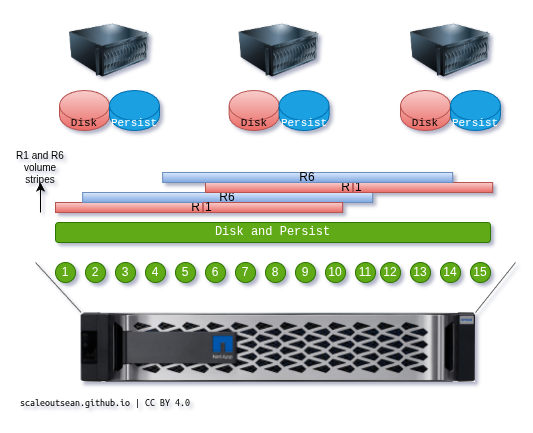
This would be something like OPEA or similar ROBO or white box setups. This image is from a recent post on Kinetica (the vector database) and applies just the same here - hot (metadata) on R1, warm (data) on R6 LUNs.
I expect these would be common Ceph-on-E deployment patterns in terms of storage media and layout:
- all Ceph storage (data and metadata) on TLC SSDs or hybrid (EF300, EF600)
- hybrid media pattern: metadata on TLC in controller shelf, data in SAS expansion shelves (NL-SAS)
- all-flash pattern (everything in controller shelf, up to 24 disks); metadata on DDP-based R1 or dedicated flash (RAID 10 or R0)
- other niche configurations
- all Ceph storage (data and metadata) on QLC SSDs (EF300C, EF600C)
- DDP pool with metadata on R1, and data on R6 volumes
Whether there's a small cluster or several building blocks, it may be advantageous to use DAS (and avoid buying extra switch ports).
Medium and large Ceph-on-E cluster
For clusters larger than half racks, you may need two E-Series systems anyway.
If you have two, you can achieve rack redundancy (power, ToR switches).
For this we use building block pattern.
Architecture and solution notes
Comparison with existing solutions
NetApp has a BeeGFS-on-E solution. How's this different?
Ceph isn't useful for HPC workloads. There may be some overlap in generic "analytics" workloads, the same way as some Big Data workloads we could run more or less the same way on Ceph as we do with HDFS, but others wouldn't work well at all.
Ceph is more feature-rich, has S3, NFS and is also suitable for low performance and low-cost use cases (virtualization, containerization).
Check out this diagram of a Bee-on-E cluster with two building blocks (each has a pair of servers directly attached to E-Series storage array):

Striping across arrays: check. Good performance for media straeming: check. But there's no replication in BeeGFS, so if these span racks and a rack has its power cut, you get downtime with this BeeGFS solution, and no downtime with Ceph with RF2 or EC, or Ozone, or HDFS with RF2. But if your servers can get more done with BeeGFS (rack failures notwithstanding) than with Ceph and 100% uptime, BeeGFS may still be better. As they say, "it depends."
Advantages of SDS
Like BeeGFS, ONTAP Select and StoragGRID, Ceph can run in VMs. That means that you can deploy it alongside whatever other storage you run on E-Series.
For example:
- You have VMware with VFMs on EF300, want to migrate to some other platform. Start with Ceph on VMs (on VMFS) and nested virtualization on vSphere, once you feel confident with it, add more storage and move workloads to the new VI platform with physical servers and Ceph.
- You have E-Series and want low-cost object storage in containers or VMs. You can get StorageGRID SDS for VMs, but if that doesn't work for you, you can deploy Ceph in VMs, containers or bare metal servers.
- You may have just 20 TB of spare capacity in a R6 disk group. You can still create 8 x 2.5 TB LUNs and deploy a small Ceph S3 cluster on this thing. It will be slow and you should probably setup replication to Glacier for DR purposes, but it will work and you will probably avoid extra cost associatd with buying or renting this capacity elsewhere.
Storage layout
The TR doesn't mention RAID 0. E-Series supports RAID 0. I ran MinIO with EC on it, and if you want to rely just on SDS to protect data, you can.
As mentioned above, you can go with EC, 2 replica or a mix (per pool).
PGs are definitively advisable for larger clusters with two or more E-Series arrays.
There are many ways to layout storage for Ceph depending on requirements
- Medium, large clusters: distinct data and metadata media, narrow (small IO) R5 or R6 groups or wide (large IO) R6 groups or R6 on DDP pools
- Smaller clusters, especially on all-flash storage: DDP with the R1 and R6 LUN pattern mentioned earlier
- Various adjustments can be made for HA, resilience or other concerns. You can achieve rack redundancy across two racks with two EF300 and just a handful of single processor 1U servers
Distributions and packaging
- Default - it's available. Different distributions package their own.
- Rook - "for Kubernetes". Rook is an CNCF incubation project.
- Red Hat Ceph - enterprise-targeting Ceph distribution for Kubernetes (OpenShift) and more.
- MicroCeph - Ubuntu's take, "Ceph for normal people" or "use Ceph without knowing anything about Ceph" kind of thing. Used by growing VI/CT projects such as Proxmox, LXD, Incus and others.
Deploy in seconds
Small Ceph clusters can be deployed in seconds. Larger take longer, but it's just about adding more building blocks with some extra Placement Group considerations.
Workflow for Ceph-on-E is normally installed with Ansible. You know the drill: enter variables, run a playbook. There's a UI and upgrades are also done with Ansible. It's the same thing we do with BeeGFS except there's no Web UI for BeeGFS yet.
Note that Ceph-Ansible won't configure E-Series for you:
- If you deploy medium or large clusters, use the BeeGFS-on-E playbook to prepare storage and hosts
- Small clusters, unless you redeploy them or re-create them, aren't worth automating with complex tools. Use a CLI or Web UI to configure storage array.
- Then use
ceph-ansibleto deploy Ceph
MicroCeph takes a more interesting approach - it doesn't put Ceph in the first plan. You'd probably use it with stacks like Proxmox without caring much about it (apart from deciding which internal disks to assign for Ceph). Proxmox doesn't use ceph-ansible to deploy, so to use Ceph on E-Series with MicroCeph, simply:
- Create disk groups (RAID or DDP) and volumes (LUNs)
- Create host groups for cluster nodes required to access storage
- Present LUNs to hosts
- Deploy Proxmox (or other stack) with MicroCeph as usual
$ sudo snap install microceph
$ sudo snap refresh --hold microceph
On one of the nodes, bootstrap singleton cluster and then add other nodes
$ sudo microceph cluster bootstrap
$ sudo microceph cluster add node-2; sudo microceph cluster add node-3 # add nodes 2 and 3
The other nodes will also install and hold microceph, but not bootstrap. Instead, they'll join with the tokens from previous command.
sudo microceph cluster join ${TOKEN}
We don't have storage yet. Create a SANtricity pool or volume group. Since this is a small cluster, we'll have just one.
We can use a Python client (better) or the official SMcli or Swagger to find the pool ID which we need for volume placement.
santricity pools list
We need this pool ID, 04000000600A098000E3C1B000002CED62CF874D, to tell SANtricity where to create volumes. We need three volumes for our cluster with EC 2+1. We'll use R6-like volumes. We'd execute three commands like this ("full command").
$ santricity volumes create  --base-url https://10.1.1.1:8443/devmgr/v2  \
  --username admin --password s3cr3t \
  --no-verify --pool-id 04000000600A098000E3C1B000002CED62CF874D \
  --name s1_ceph01 --size 1 --size-unit tb --tag workload=ceph \
  --raid-level raid6
This returns a volume JSON object that contains volume ID, 02000000600A098000E3C1B0000035B6694E542F.
Now we need to present each of these to a Ceph host. We may have a "group" where we present to a group ID, or individual hosts. We get both host and host groups with this command (whereas in the API and Ansible it's two different methods, one for hosts, another for host groups).
santricity hosts membership
The first host is 84000000600A098000E3C1B000302F0C650C2668 and our volume ID from above is 02000000600A098000E3C1B0000035B6694E542F.
Map the first volume to the first host, and do likewise for the other two host-volume pairs.
$ santricity mappings create \
  --volume-ref 02000000600A098000E3C1B0000035B6694E542F \
  --host-ref 84000000600A098000E3C1B000302F0C650C2668
Now rescan storage (in case of iSCSI or FC) and login to new target on each of the nodes, confirm multipathing (if in place) is usable and only then move on to adding volumes from Ceph. MicroCeph docs say:
sudo microceph disk add /dev/vdb
What we really want to do before that step above is to make sure multipathing works. SANtricity devices should be added by their permanent path such as /dev/disk/by-id/scsi-3600a098000e3c1b0000035b6694e542f. As I've often said I prefer to not partition LUNs at all but if you do then you could also use /dev/disk/by-uuid paths to kpartx-created partitions.
What about InfiniBand? What about NVMe/RoCE devices? Well, multi-pathing may be done slightly differently. Both E-Series and MicroCeph dumb down this critical phase of storage configuration.
Note that the MicroCeph documentation does not mention anything about Erasure Coding. It turns out EC is available - just use the ceph CLI to configure it. The MicroCeph documentation caught me off-guard as it only mentions set-rf.
Enable S3 gateway:
sudo microceph enable rgw
Is that "in seconds"? It's not if you run each command manually, but if you script them or use Proxmox, you could do deploy MicroCeph in under a minute because stacks like Proxmox abstract MicroCeph and all we need to do is loop over three hosts to create and map volumes and ensure they're visible to hosts.
The fact is, the santricity CLI I use above doesn't even exist "out there". But that's a Python CLI for essential (volumes, mappings) storage operations with E-Series that I've created this week for use cases like this (more about this in another post) - all you want is to create and present volumes without the hassle and overheads of Ansible.

So, it does exist and will be released. There's also Ansible (again, take advantage of storage-side configuration BeeGFS-on-E playbooks perform). More is coming in this area and I'll revisit this topic in 2026.
Ceph, E and Kubernetes
As I mentioned in Reautomating E-Series, E-Series has no official CSI driver. If you're the kind of guy who prefers to use SDS with protected storage (which is how StorageGRID works as well, by the way), Ceph gives you another choice - not just for S3, but for block and file in VM and Kubernetes environments.
For non-clustered CSI you can use TopoLVM, ZFS (with or without replication), static volumes and more. I recommend recommended these for "few and heavy" workloads such as NOSQL and NuSQL databases and ZFS is good for some DevOps use cases.
For clustered CSI, there's BeeGFS CSI (HPC- and AI-focused) an there's Ceph CSI driver for generic Kubernetes workloads and VI.
Conclusion
Ceph with E-Series still provides value.
Not much has changed since TR-4549. Notable exceptions:
- EC is now available and we can take advantage of it - on the whole I'd say EC benefits E-Series more than it benefits Ceph.
- Ceph has improved and doesn't require a scientist to deploy and maintain it (althought it may, to fix it), especially on protected storage
- S3 on Ceph wasn't evaluated, but that has become more visible since then, and may become even more after MinIO's big rug pull of 2025
- Ceph CSI is the best choice for general Kubernetes workloads on E-Series and also for emerging virtualization stacks (Proxmox, LXD, HPE Morpheus, Incus)
The cost of experimentation with SDS is low and, since free distributions of Ceph are readily available and can be deployed in seconds, you can give Ceph a try without buying anything at first. If it works, keep it. The same as with ZFS and other storage software I write about in the context of E-Series.
What E-Series gives you is a rock-solid and versatile platform for any SDS while eliminating low-level, low-value added work of fiddling with disk and PERC firmware and patching (CVEs). Derisking includes the ability to switch to another SDS without writing off your storage investment.
For smaller sites and/or basic three-node clusters E-Series has enough performance to drive multiple SDS options at the same time. Use ZFS for some and MicroCeph for other workloads? Why not! One reliable, high performance platform with low mainteance for SDS, NOSQL, Big Data, AI.