Rook Ceph on NetApp E-Series
Introduction
In Part 1 (Ceph on E-Series), I went over the details (architecture, features and benefits) of an old NetApp Technical Report on Ceph with E-Series. Everything that made sense years ago still applies today.
We mentioned several ways to make Ceph with E-Series work: bare metal, MicroCeph, Rook, Proxmox VE, etc. MicroCeph was introduced as the simplest approach.
This post introduces Rook Ceph, a community project that focuses on Ceph in Kubernetes environments.
How it works
There's no need to rehash what's already documented in the Rook or Ceph project documentation: this section explains just the E-Series side of it.
If you run Ceph on bare metal or in virtual machines, you'd likely let every node see only its own Ceph disks. In other words, SAN may be used, but Ceph nodes won't see disks that belong to other nodes. Even if you use a disk array, you'd probably want to avoid storage switches if you can direct-attach and avoid that cost. MicroCeph clusters would likely use the same approach.
What's interesting about Rook Ceph on Kubernetes is it has several modes, one of which is Rook-on-PVCs:
- Ceph runs in containers
- PVCs can be anywhere as long as they're reachable/schedulable or there's replication or Erasure Coding to provide availability and prevent downtime beause of individual failures
E-Series just needs a CSI driver (for dynamic provisioning) or a static PVC (PV may be provisioned in advance with Terraform Provider for SANtricity, for example) and Rook Ceph can be deployed.
In that first post I mentioned this as the easiest approach and when there's no need for RAID-type micro-management:
- Use the same DDP storage pool that I recommend for E-Series CSI drivers and Proxmox VE
- Use RAID 1-type volumes when you need fastest (active database transaction logs), and RAID 6 for more reliable and economical volumes
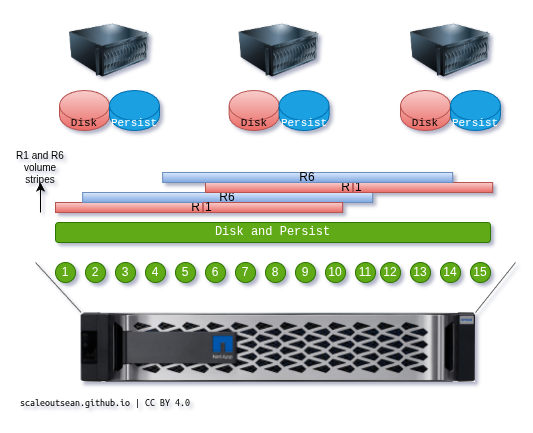
Rook Ceph
I won't belittle Ceph management skills and say Ceph is easy to manage. You can get simple block from E-Series, simple NAS from Linux VMs, and simple S3 from Versity Gateway. If you need more and like your storage cheap, you can get that from Ceph but expect to do more to manage it (or alternatively, buy a NAS appliance).
But we can say "Ceph is easy to deploy" because it is.
Here's what I used:
- Ubuntu 24.04 LTS
- Kubernetes 1.35
- IBM Block CSI 1.13.2 with SANtricity patch
- E-Series EF600 (NVMe/RoCE)
- Rook Ceph 1.19.5
I had the OS, Kubernetes, CSI driver and a Storage Class (based on the patched IBM Block CSI driver). So I just ran a couple of commands to deploy ready-made Rook Ceph manifests from Rook 1.19.5.
After 2-3 minutes, my E-Series-backed Rook Ceph cluster was ready. Rook deployed Ceph with my default Storage Class and it automatically provisioned several PVCs, including three for data disks ("OSDs").
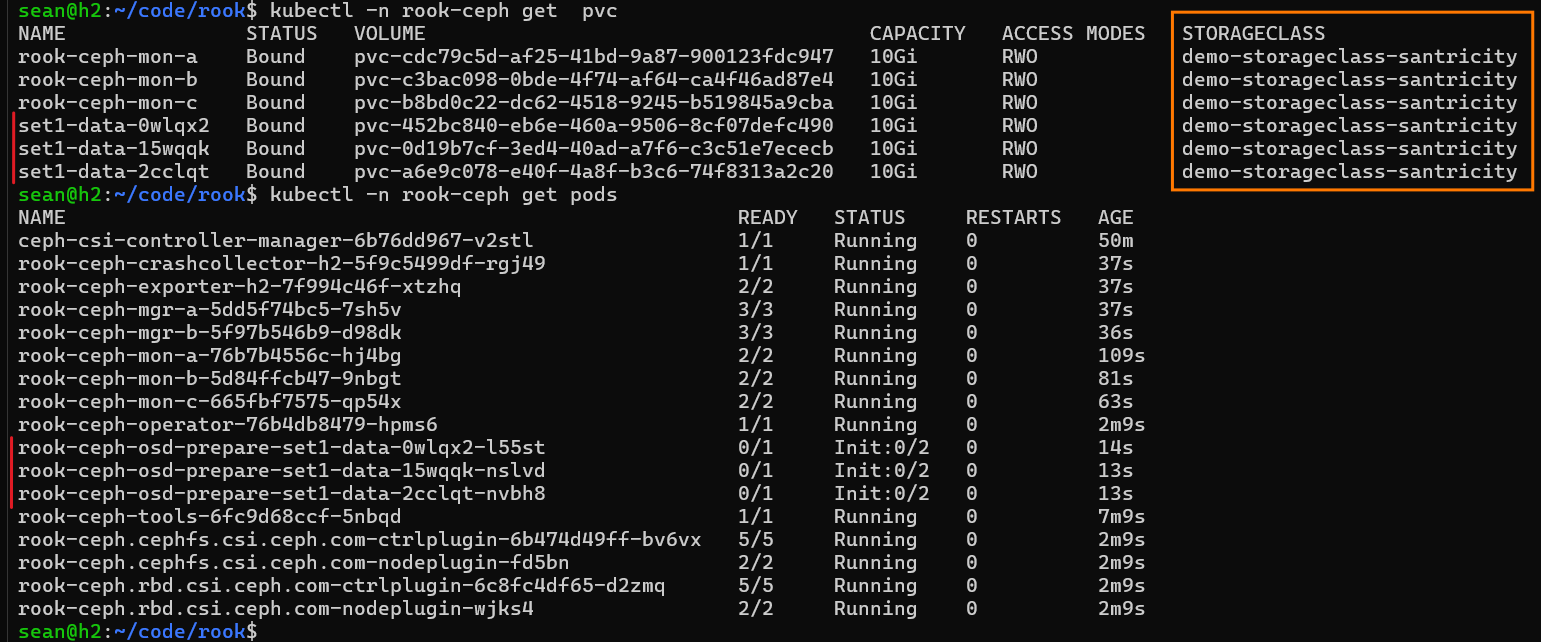
At this point you need to wait until things settle.
I should mention that - for HA and other reasons - one should have several workers, although you may override that or even use Rook's Minikube deployment manifests which already work that way. I did override the manifests because Ceph could not start without that (I had only one Kubernetes worker), but if your number of Kubernetes workers is greater than, or equal to, the number of Ceph replicas or EC width, you won't have to.
Here we can see we passed that point where all pods were running without periodic restarting. IBM Block CSI didn't have any issues.
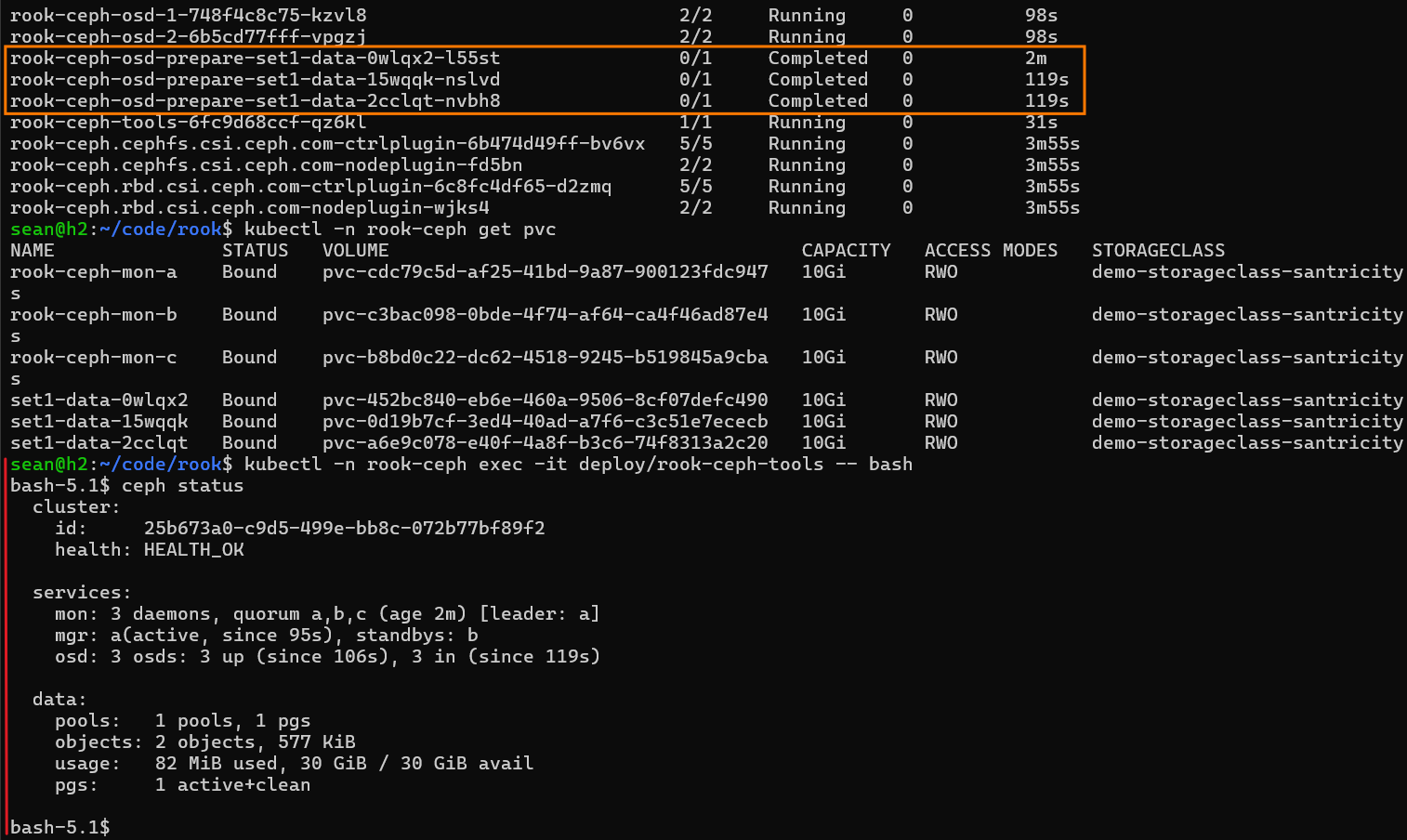
Note the age of Rook pods. Deployment took four minutes. If I also deployed CSI and few other manifests, it still wouldn't take over five minutes. "ceph status" showed the Ceph cluster was healthy.
One key detail - which I'd forgotten myself until I deployed - was that Ceph OSDs obvoiusly does not use ext4 or XFS, so how could that even work?
The reason IBM Block CSI could (and SANtricity CSI, as of today, could not) is IBM Block CSI supports Block mode PVCs.
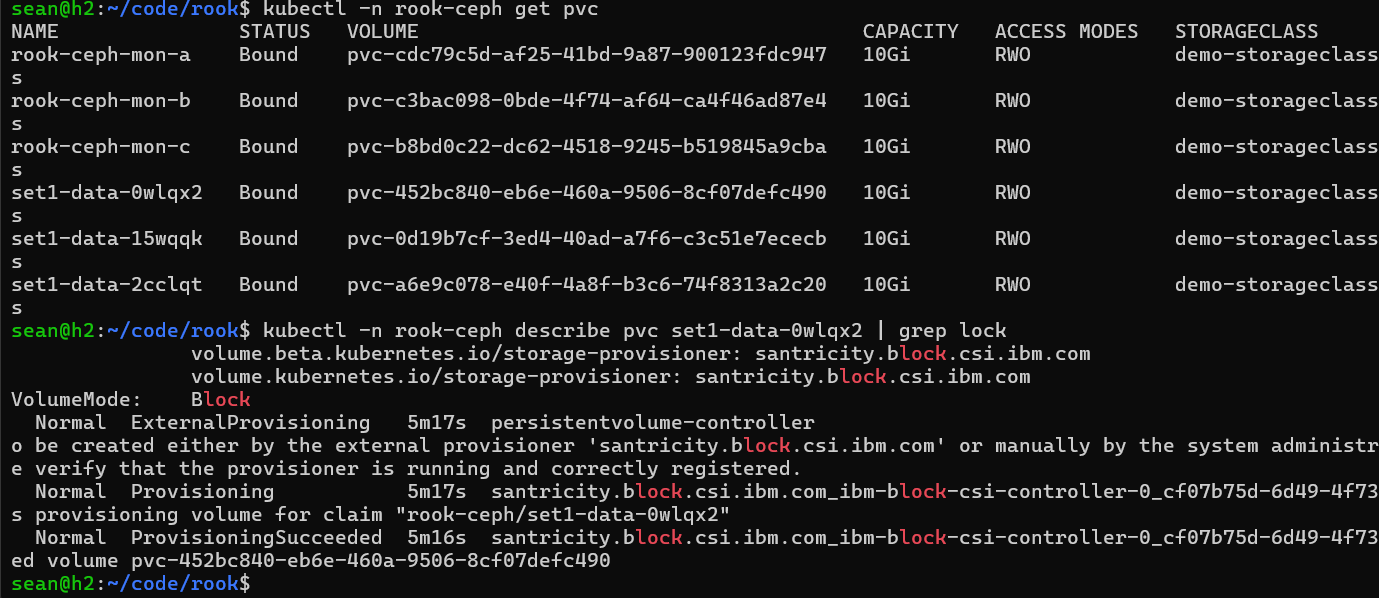
KubeVirt and Ceph are the two top reasons why I aimed to have that at least one CSI driver - which happened to be IBM Block CSI with SANtricity patches - support Block mode (that happened last weekend). SANtricity CSI will get Block mode support soon.
This is where the role of E-Series and CSI ends. The rest is all Ceph.
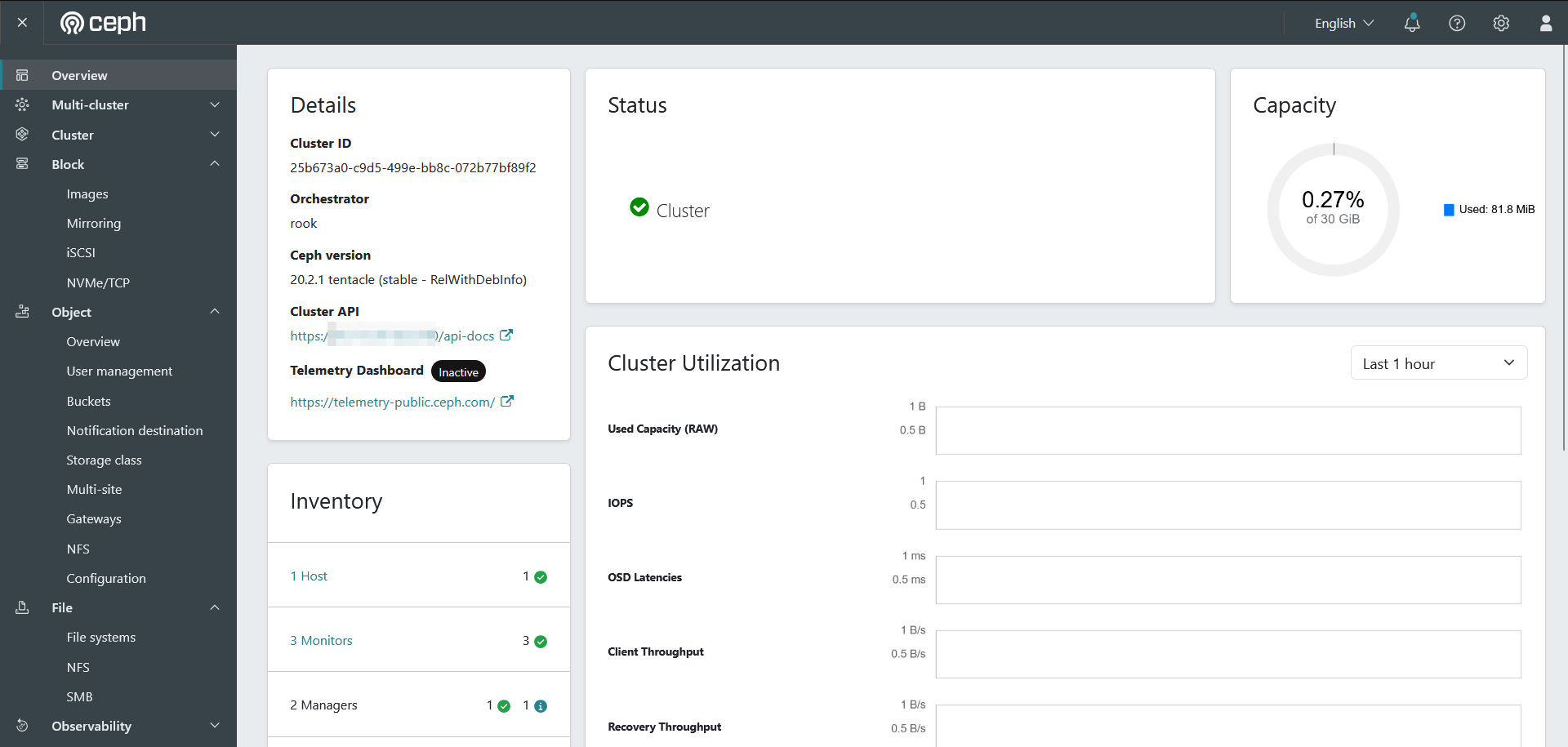
These are the three data disks:
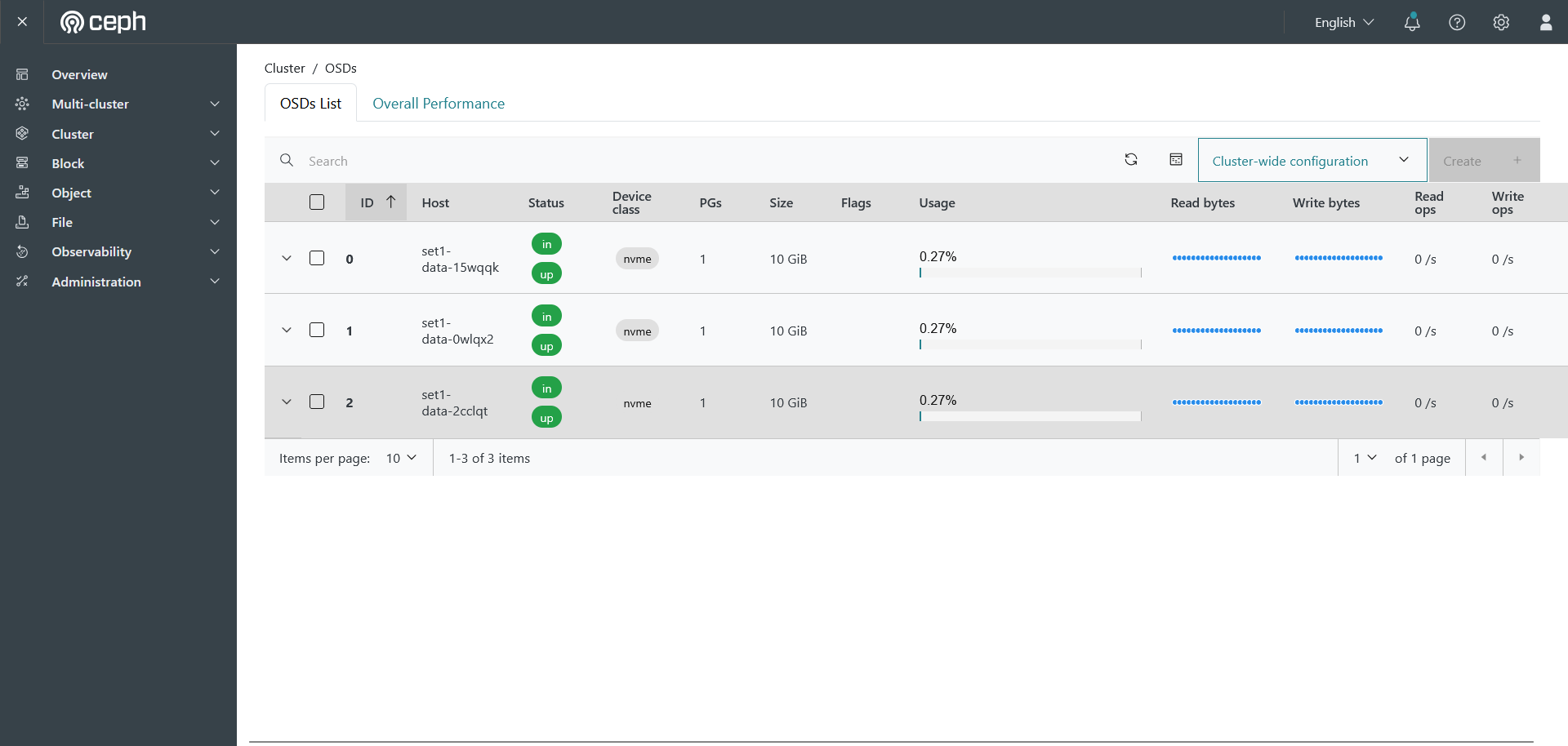
I had no events, errors, or pod restarts. Let's look at OSD details.
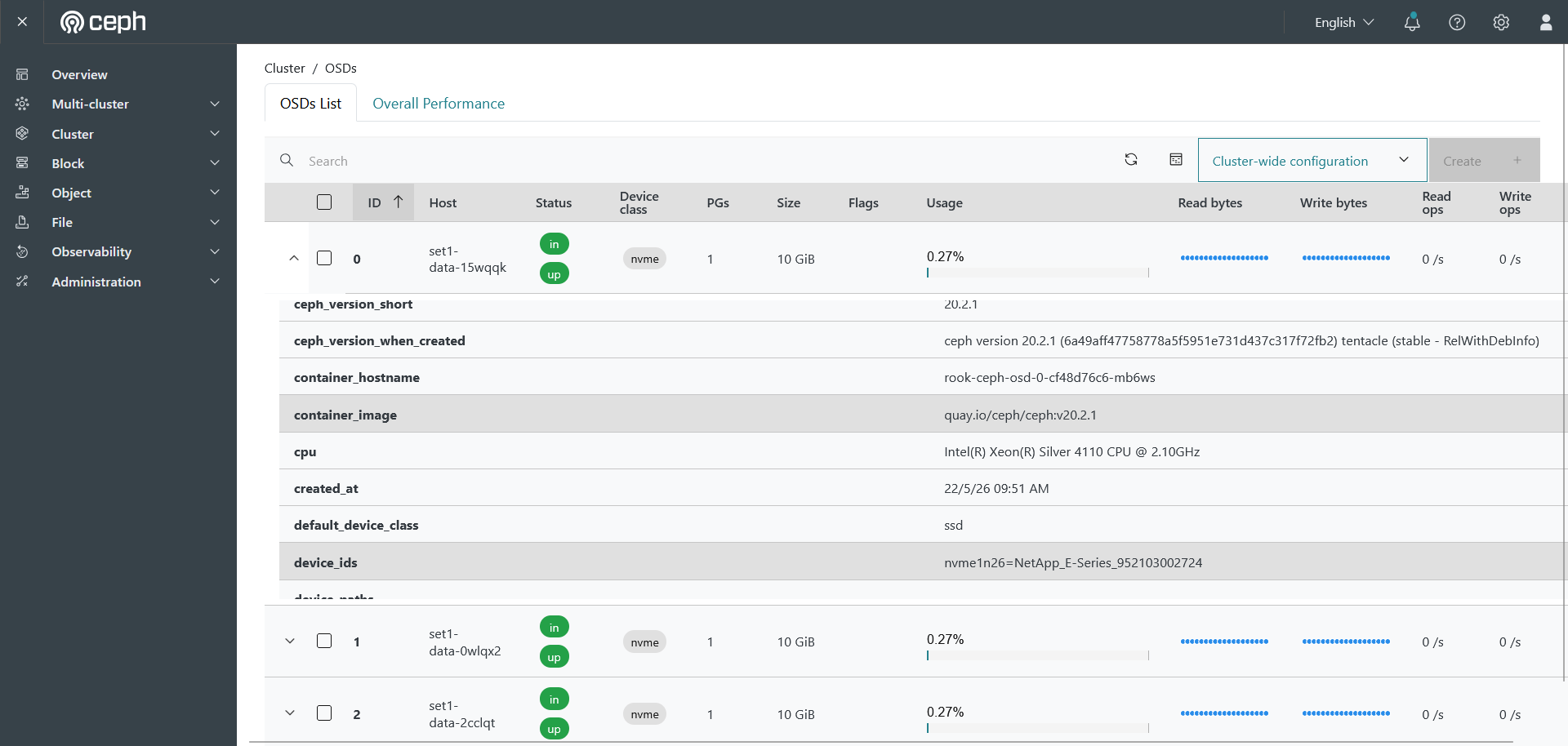
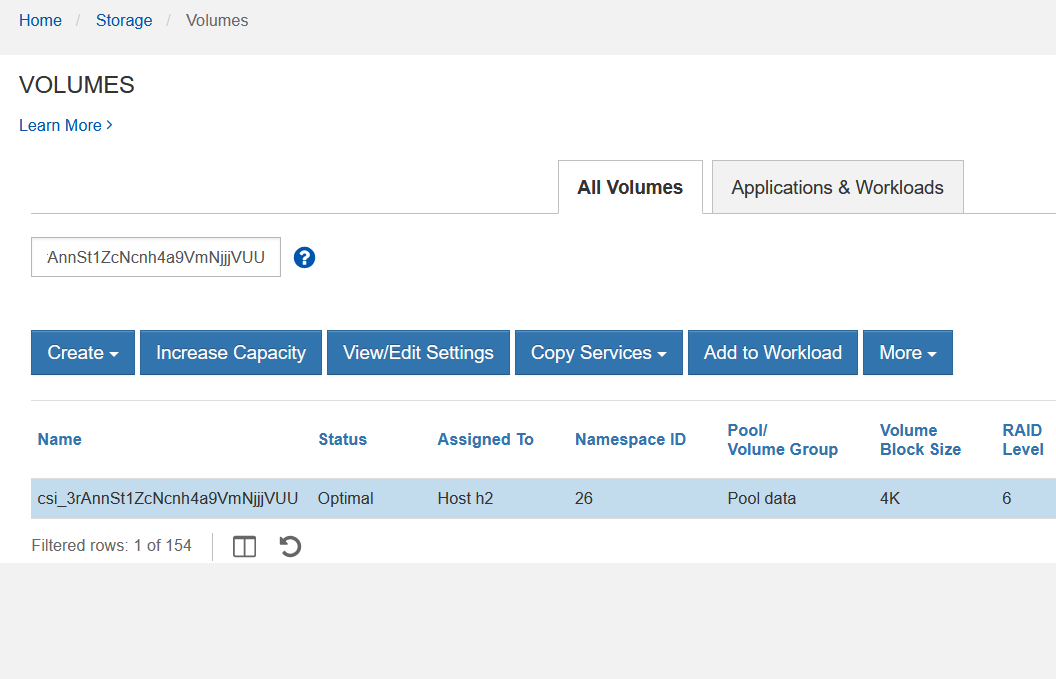
In the case the screenshot above is too small, this one below shows that OSDs use E-Series PVCs (see the value of device_ids in the middle: NVMe namespace 26).
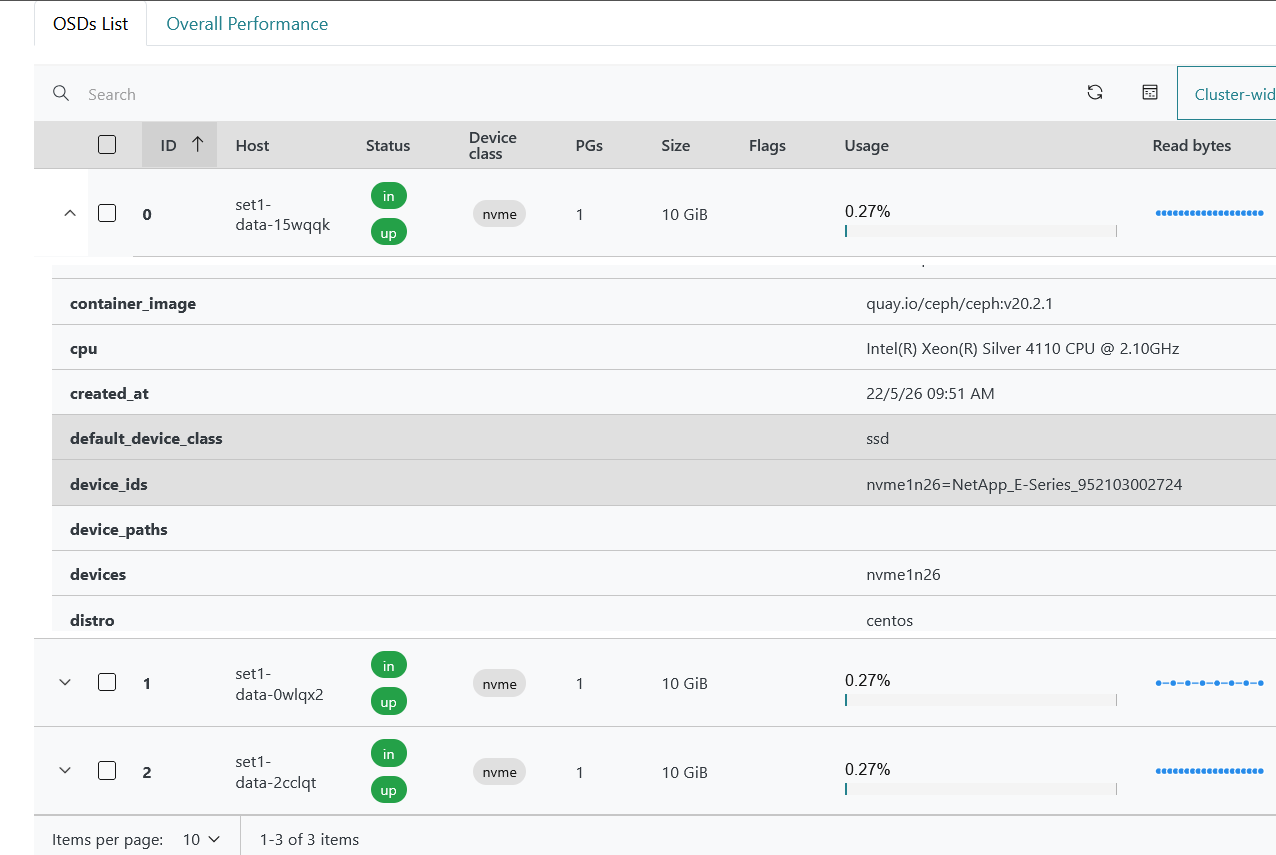
That LUN (namespace) 26 viewed in SANtricity Web UI, and easily recognizable due to the cryptic CSI volume name that IBM Block CSI hands out.
As the dashboard was enabled and deployed, we looked up services in the Rook namespace:
$ kubectl -n rook-ceph get service
NAME                                     TYPE        CLUSTER-IP       EXTERNAL-IP   PORT(S)             AGE
rook-ceph-exporter                       ClusterIP   10.111.221.95    <none>        9926/TCP            40m
rook-ceph-mgr                            ClusterIP   10.98.134.139    <none>        9283/TCP            40m
rook-ceph-mgr-dashboard                  ClusterIP   10.108.240.168   <none>        8443/TCP            40m
rook-ceph-mgr-dashboard-external-https   NodePort    10.100.25.110    <none>        8443:32180/TCP      60s
We needed to use port 32180 here. Generate a password and head to the port for rook-ceph-mgr-dashboard-external-https at https://${NODE}:32180 to see the Web UI (username: admin).
$ kubectl -n rook-ceph get secret rook-ceph-dashboard-password -o jsonpath="{['data']['password']}" | base64 --decode && echo
[zdCGw=/le}c8N+}+<bQ
Other steps in Rook configuration
The above gets Ceph ready to use, but there are still additional steps - you may want to configure NFS, or just use CephFS. You will need at least one storage class, and possibly other steps.
This is the "it depends" area. The Rook Ceph documentation is good and there are example deployment manifests for everything.
As I've mentioned, I slightly loosened the strict anti-affinity criteria to be able to deploy Rook-on-PVCs using one worker, but you may be able to do the same with the unchanged Rook-Minikube manifests. My manifests will be posted to the usual place for my Kubernetes-on-E posts.
Rook Ceph vs other approaches
Rook Ceph seems like a nice solution for E-Series. The way I see it:
- It creates a pool for storage class types E-Series cannot support without 3rd party software (whether it's Rook or BeeGFS or something else)
- It can live on top of Kubernetes which, on the one hand, adds some risks, but on the other makes it very easy to use. Just like E-Series-backed Linux NFS VMs in Proxmox VE, these are complementary to main storage. If your critical workloads use E-Series, and Tier 2 on Linux NFS VM or Rook, the risk is entirely different from having everything on Rook backed by a bunch of JBODs
- You could also deploy Rook on separate 1U servers that consume static PVs and run outside of Kubernetes or PVE: dedicated nodes for Ceph, single application workload, very careful maintenance/upgrades of the OS… There's nothing wrong with that, but now you have three 1U servers just for those services. It's OK if you need that much, but can be wasteful if you don't
- This Rook-on-PVCs approach is similar to Proxmox VE's Ceph-on-Proxmox (which frees you from having to care about Kubernetes). Depending on how many containers and VMs you have for Ceph, if you can move Tier 2 or Tier 3 to Kubernetes, maybe you can keep the rest (databases, large VMs) on Proxmox with shared LVM (E-Series block) and move all Tier 2 nd Tier 3 to Kubernetes. Also remember that Rook-on-PVCs can serve external clients, so you could also use it from PVE or KVM as NFS cluster
Personally, I wouldn't consider using Ceph without sufficient justification.
In my Linux NFS VM tests you could see hundreds of Tier 2 (or 3) VMs can be served by a single Linux NFS VM (the post about Linux NFS VM on PVE shared above) shows 20,000 IOPS (8 KiB, 100% write). You can deploy multiple VMs (one per department, or tier) and let Proxmox VE (or other hypervisor, or Corosync/Pacemaker HA) take care of their availability, and you'll have eggs in 2-3 baskets that require very little management. If what Linux NFS server can do is not enough, then it's time to look at ZFS, Ceph or NAS appliances.
And, as you consider Ceph, it's better to start with some other approach rather than Rook if you're new to Ceph or Kubernetes. Rook may seem easier to deploy and use, but that is only as long as everything (OS, Kubernetes, CSI, Roook) works. If you get into a multi-day Kubernetes networking issue, that may be too much even for users with Tier 4 workloads. The simplest approach would probably be Ceph in VMs, with VM data on hypervisor's data store.
Use cases for Rook on PVCs
"I need Ceph for 23 TB of Tier 3 VMs". Hmm, maybe. And maybe not. You could put that on a single Linux NFS VM with a 28TB disk that gets HA from SAN and hypervisor VM failover and can be trivially easily backed up, restored, and replicated.
Similarly, there are S3 use cases where you may be better off with Versity S3 Gateway. It takes one line to start, consumes very little resources, and is trivial to protect.
But if you have 100 TBs of VMs and containers that can be deduplicated to 20% of their logical size, that could be a good use case. You save 80TB, you spend some extra time on managing Ceph (whether it's Rook or some other), but it may pay off in the end.
Or maybe you need 10 GB/s from a single file sharing namespace. Your Linux NAS VM gives you just 5 GB/s and you can't easily combine two VMs in one namespace. Depending on what the workload is, Rook, BeeGFS BeeOND or even some S3 SDS may be a better approach.
Block-on-block is a weird use case, but not entirely dismissable. Consuming E-Series block devices from Rook (or Ceph in general) only to share them as Ceph block devices could be justified due to flexibility and savings. Maybe you need to run 500 KubeVirt VMs that are virtually identical, so you get 10x deduplication and save close to 500 x 50 GB (25 TB) of SSD capacity with block-on-block that way. Whether that's better done with a ZFS-based file server that runs on Proxmox off E-Series RAID 10 devices, or with Ceph, I don't know but I'd consider both if I knew all criteria and requirements involved.
Conclusion
We have covered one more way to deploy Ceph atop NetApp E-Series. Not all tasks have been completed in this post because I haven't been through the entire workflow myself, but they're also out of scope for E-Series and CSI - whether you configure NFS or S3 or RBD, none of that matters to PVCs. There is nothing E-Series or CSI driver-specific left beyond that deployment step and what was described in the initial post (design choices prior to deployent), but in a future post I may explore some options related to PVCs (different tiers, RF vs. EC, etc.).
From the perspective of file and object storage services for E-Series, in recent weeks we've covered:
- Linux NFS VMs for simple file sharing cases (example: NFS for Proxmox VE)
- Versity S3 Gateway for simple object storage services (example: S3 for backup-to-S3 (Proxmox Backup Server, Velero, Kasten))
- Rook Ceph for scale-out use cases for object and file (even block is available; it's mostly unnecessary when you can get faster and more stable block from E-Series, but it's there if you need it)
Ceph on E-Series works and makes sense when you need non-trivial file or object, and even block storage features that E-Series does not provide (deduplication, compression). In this approach - Rook Ceph on PVCs - your Ceph-backed services also depend on Kubernetes, but this is just one of the approaches at your disposal. It takes minutes to deploy and it's reasonably economical.