SANmox updates for Proxmox-NetApp E-Series
Introduction
A summary of how it was with the initial release of SANmox and SANtricity Plug-in for PVE:
- Text user interfaces (TUIs) are much better than Proxmox storage plug-ins
- Separately, a minimal
santricity_lvmplugin was created as a stub for future development in the case Proxmox storage plug-ins start making sense one day. It shadowed the standard Proxmox shared LVM plug-in with one extra feature, SANtricity API-assisted storage health-check, to illustrate how additional functionality could be added to it - A TUI, SANmox, was created for actual PVE-SANtricity management. I did the same for SolidFire last year (FireMox project). SANmox could use standard Proxmox shared storage LVM or
santricity_lvm(fundamentally the same thing, with a SANtricity API health check tool)
I've been wanting to make that plug-in do more, but Proxmox storage plug-in simply don't make sense.
So I came up with several adjustments to that initial attempt that make more sense for both SANmox and santricity_lvm.
What is new
The updated santricity_lvm plug-in is still almost identical to PVE's (shared storage) LVM plugin, but it does even less than the initial version of santricity_lvm.
Now, santricity_lvm does not even "talk to" the SANtricity API.
Before, santricity_lvm plug-in used the SANtricity monitor account for safe, secure and basic read-only API access. It performed health checks on the E-Series disk array and volume. My SANtricity Go CLI was used to execute those commands from PVE hosts (why, because that freed me from having to create Perl scripts).
That has been removed. santricity_lvm is now a very minimal plug-in; the only extra information it has compared to Proxmox LVM plug-in is E-Series array ID (chassis serial number).
On SANmox side, SANmox used to be able to work with either LVM or santricity_lvm plug-in. Now, SANmox only works with santricity_lvm.
As a result:
- SANmox ignores non-SANtricity-backed datastores (e.g. generic shared LVM or any other)
- SANmox can do a better job managing PVE - it not only knows what to not touch, but it also can do more with VGs and LVMs it is in charge of
- Since
santricity_lvmno longer talks to E-Series API, I'm moving that plugin from mysantricity-gorepository to the same directory of thesantricity-powershellrepository where SANmox is
About that NVMe/RoCE issue in PVE 9.1
This is not new, but must be repeated:
- PVE 9.1 does not have the API and CLI to talk to NVMe control plane
- Because of that, SANmox could fully automate SANtricity with iSCSI, but NVMe/RoCE required manual steps
- In the initial release, SANmox had a two-step process for NVMe/ROCE, where the user would have to SSH to PVE hosts to run
nvmein order to discover and connect to NVMe devices first, after which SANmox could continue talking to PVE API and configure shared LVM data store - To avoid having two approaches, iSCSI used the same approach: create a SANtricity volume & map it to the PVE cluster, discover and login/connect on PVE nodes, and then proceed with datastore creation from SANmox by talking to PVE API
Since the simplified santricity_lvm lowers the risk of making mistakes, updated SANmox attempts to automate the entire provisioning process for both iSCSI and NVMe/RoCE.
I've tested it only with NVMe/RoCE because I do not have access to SANtricity with iSCSI, so end-to-end iSCSI provisioning should, but may or may not work. If you try it with iSCSI and encounter problems, file an issue on Github. If the logs be detailed enough, the problem will likely get fixed.
Outcomes
With this refined approach, things seem to work better.
The first difference is we can now attempt end-to-end provisioning of Proxmox datastores:
- Create a new volume, map it to the cluster or a host
- The new step is we login to all hosts, run NVMe or iSCSI discovery and the rest of the workflow until the datastore is ready
This is how that E2E workflow looks like in SANmox:
- We provide SANtricity volume name and capacity as the only two inputs
- SANmox does the rest (create volume map to selected host(s), discover/rescan storage, login to target, create VG & LVM and finally a shared LVM datastore) for you
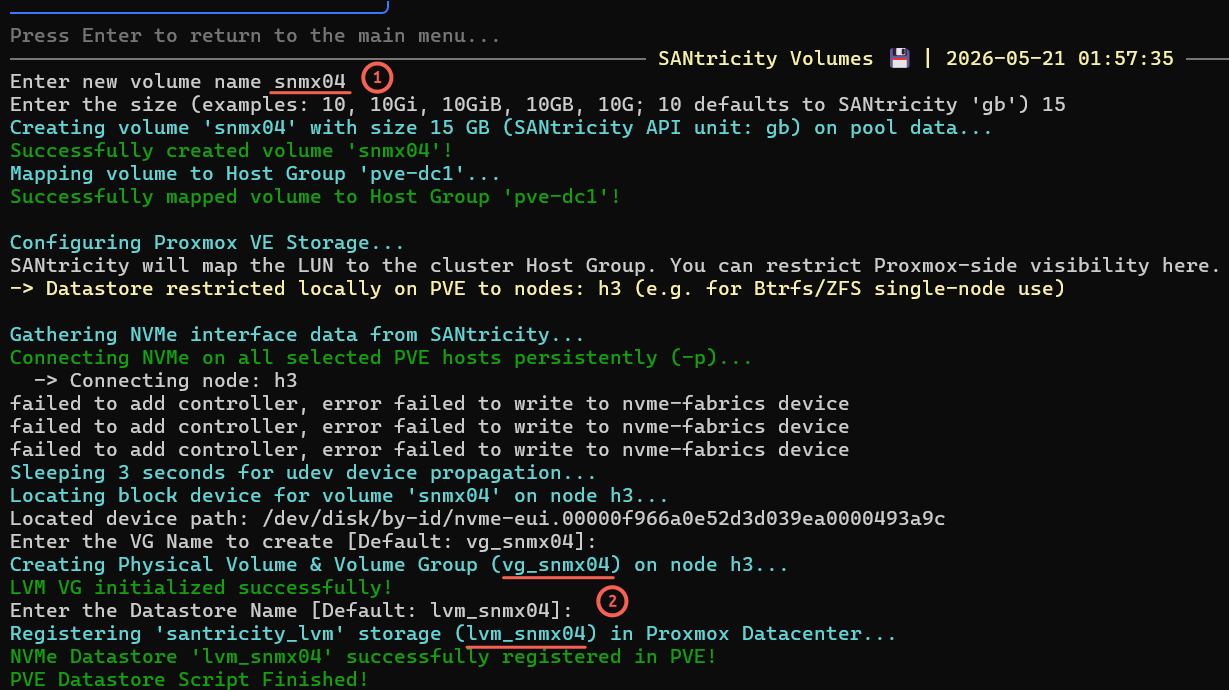
The option to map a volume to just selected hosts (one or more) isn't easy to see, but I mention it because it may be confusing.
If you have eight nodes in a PVE cluster, you may want to present a volume to just four of eight nodes, for example. Everything works the same except the volume is available to a subset of nodes you have selected. SANmox configures storage and creates a datastore configuration across the hosts that have been selected.
End result: lvm_smx04, that looks and works like other PVE shared LVM devices, is available for use.
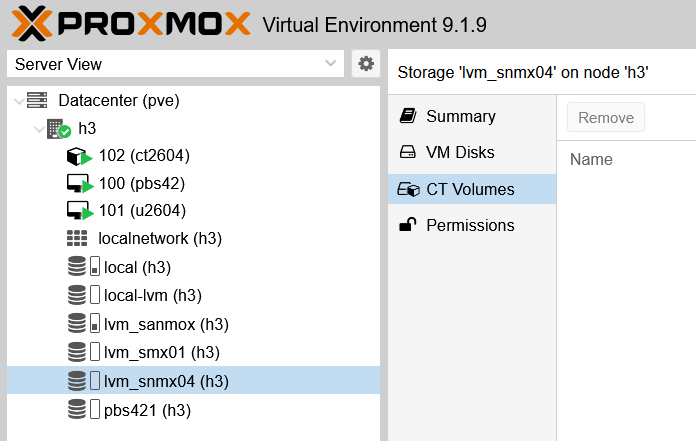
This process creates a datastore on a standard PVE shared disk LVM that is named consistently, end-to-end.
| SANtricity volume name | PVE VG name | PVE LV name |
|---|---|---|
| snmx04 | vg_snmx04 | lvm_snmx04 |
Datastore removal works the same way - you need to remove VMs, CTs and other stuff by yourself to empty the datastore. Then use SANmox to remove the DS (optionally, end to end, including the SANtricity volume). Or, you can first remove just the datastore and disk from PVE, but leave the volume on SANtricity, although - since there's nothing useful on it - it is recommended to delete that empty volume and recover its usable capacity.
Some other parts of SANmox have been improved as well. For example, this SANtricity pool view now shows more volumes from designated SANtricity storage pool (that's used by PVE), so more can be seen (although not everything, as I had over 100 volumes on this pool).
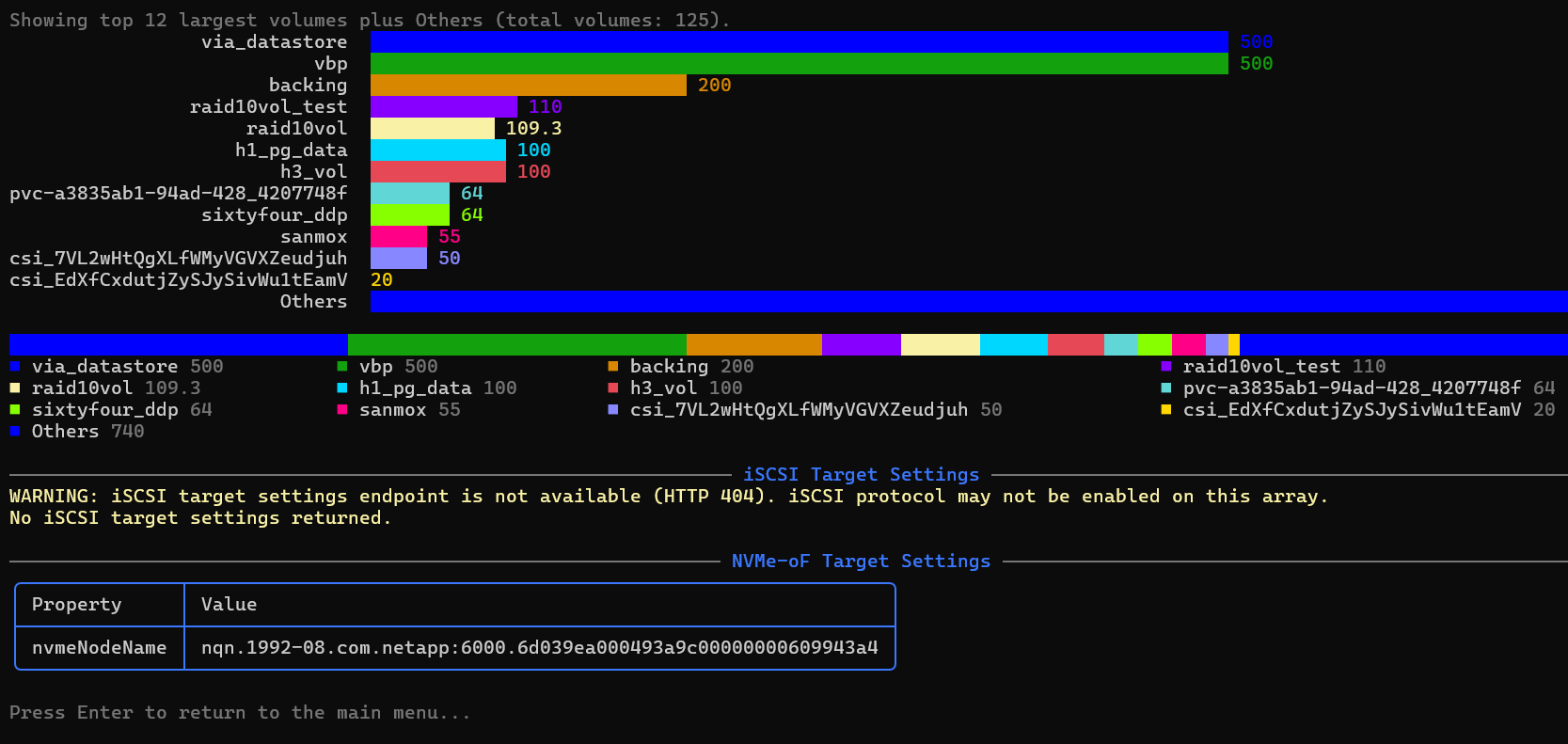
There is another view - a table - just for santricity_lvm datastores from the pool, which doesn't show anything else but SANmox santricity_lvm-type data stores that belong to the PVE cluster you manage.
"Global" volume view exists to provide insight into general situation on the storage pool - not just PVE volumes from the cluster you mange - while a cluster-specific view is specific to your PVE cluster.
For more extensive storage monitoring, you should of course use dedicated tools for both storage and PVE. Examples:
One more thing on the topic of monitoring: SANmox now injects basic metadata into SANtricity volumes. Abbreviated version (key part: metadata):
{
    "offline": false,
    "extremeProtection": false,
    "volumeHandle": 139,
    "raidLevel": "raid6",
    "sectorOffset": "139",
    "worldWideName": "6D039EA000493A2600000F586A0E72EC",
    "label": "smx05",
    "blkSize": 4096,
    "capacity": "13958643712",
    "metadata": [
      {
        "key": "pve_storage_type",
        "value": "santricity_lvm"
      },
      {
        "key": "fsType",
        "value": "LVM"
      },
      {
        "key": "pve_cluster_name",
        "value": "pve"
      }
    ],
    "dataAssurance": false,
    "objectType": "volume",
    "preferredControllerId": "070000000000000000000002",
    "totalSizeInBytes": "13958643712",
    "onlineVolumeCopy": false,
    "name": "smx05",
    "id": "020000006D039EA000493A2600000F586A0E72EC"
  }
Since EPA collects that metadata from SANtricity, now both SANtricity CSI and Proxmox VE (when storage is managed from SANmox) metadata are collected, giving the EPA users even more value for the $0 they've paid for it.
Conclusion
SANmox isn't "production ready" and it doesn't aim to be. It's an open source showcase for E-Series integrations and automation that works reasonably well. Users can fork it and complete the last 10-20% on their own if the tool looks 80-90% ready.
I wanted to improve SANmox and santricity_lvm because the attempt to do use Proxmox plug-in didn't work out: initial version of santricity_lvm introduced more complexity than it added value. These updates make santricity_lvm virtually zero-maintenance and - with changes in SANmox - it does exactly what it needs and no more.
Additionally, with end-to-end provisioning and EPA-complementary metadata tags, SANnmox delivers more value, faster. It's faster and more secure than a Web UI, while being easier easier to improve, customize and maintain.