Proxmox Backup client with NetApp E-Series
Introduction
There's already a lengthy blog post on Proxmox Backup Server (PBS) with NetApp E-Series in PVE environments. Why another post?
Because it's not another post about PBS. It's a post about using Proxmox Backup client for generic volume backup and restore.
I mentioned SANtricity Cloud Connector in some older posts. This post is related to that kind of use case, but done correctly.
Years ago I created a simple version of this workflow for SolidFire called SolidBackup and although I don't know if anyone uses it, it's usable, works well and doesn't leave you with backups that you can't restore because the software is not a black box. The workflow:
- Clone a volume
- Mount it in Docker (or Kubernetes)
- Run a backup command (Restic, rclone, Kopia or some other) to backup data to S3
Proxmox Backup Server (PBS) can store backups in an S3 bucket, so the difference here is we'd send data through a PBS "proxy", which in turn stores data on disk or S3. But wait, that's not very different - in fact it is similar to how SolidBackup would send data to a Rest Server!
Still, if you're in a Proxmox environment, it's better to be able to use existing tools, even when similar free tools already exist out there.
What PBS gives you and those approaches do not is a managed backup "proxy". Even if PBS stores data in S3, the S3 client is PBS and not every individual PBS user out there. Users get PBS API keys from PBS and send backups (or read backups, when restoring) to the PBS server, so ultimately the PBS admin manages backends on users' behalf.
That is an potentially better-organized and orderly way to consolidate and manage backups, as opposed to a self-service approach that individual users with Restic and Kopia employ.
Workflow
Log in to PBS:
$ export PBS_REPOSITORY="THE-WEIRD-PBS-URL"
$ export PBS_PASSWORD="YOUR-API-KEY"
$ proxmox-backup-client login --repository ${PBS_REPOSITORY}
Create some junk data to test backup.
$ mkdir /tmp/garbage
$ date > /tmp/garbage/file.txt
$ date >> /tmp/garbage/file.txt
Backup host data to PBS:
$ proxmox-backup-client backup csi-volume.pxar:/tmp/garbage
Starting backup: host/h3/2026-03-17T16:19:46Z
Client name: h3
Starting backup protocol: Tue Mar 17 11:19:46 2026
No previous manifest available.
Upload directory '/tmp/garbage' to 'root@pam!backup@IP.ADDR.ES:datastore' as csi-volume.pxar.didx
csi-volume.pxar: had to backup 281 B of 281 B (compressed 194 B) in 0.02 s (average 16.949 KiB/s)
Uploaded backup catalog (59 B)
Duration: 0.12s
End Time: Tue Mar 17 11:19:46 2026
It's there, ready to be restored.
$ proxmox-backup-client list
┌─────────┬──────────────────────────────┬──────────────┬──────────────────────────────────────────┐
│ group   │ last snapshot                │ backup-count │ files                                    │
╞═════════╪══════════════════════════════╪══════════════╪══════════════════════════════════════════╡
│ host/h3 │ host/h3/2026-03-17T16:19:46Z │            1 │ catalog.pcat1 csi-volume.pxar index.json │
└─────────┴──────────────────────────────┴──────────────┴──────────────────────────────────────────┘
proxmox-backup-client can do more than just this, but the above example should be a good hint.
The above process could be performed by a PBS admin using one global key, but it could also be done with a PBS API key issued to individual users which gives them backup/restore roles in own namespace such as host/h3 for the H3 administrator.
Above example used root@pam!backup@IP.ADDR.ES:datastore (PBS admin account; datastore is a name of on-disk data store), but individual users would use own accounts and API keys for self-service backup and restore. And maybe they'd use an S3 back-end rather than a data store for backup-to-disk.
What's that for
Well, if you have PBS, you probably have PVE, too. Do you use PBS to backup generic, non-PVE applications? If not, why not?
Some ideas relevant to E-Series users are explained below.
SANtricity CSI
Maybe you also have some Kubernetes. Now you can use SANtricity CSI to backup PVCs to PBS. "Can" is too strong a word - you can't really do it nicely - but it's doable.
It's still nicer to use Velero and backup directly to S3, but you also lose centralized backup management, auditing, and maybe end up with several ways to manage DR - you have some backups on PBS, others on S3, and different Kubernetes clusters use different buckets.
Until PBS creates own CSI backup plugin, there probably won't be good ways to centralize backup management using native Kubernetes integrations. We can do that today with Veeam and Kasten, but not with PBS.
Until that integration is available, you can schedule "clone, static-mount, backup and delete" jobs that use this workflow and all your data gets backed up and protected in one place (PBS), with optional PBS-managed DR replicas. Or you can use the same approach that Velero used to use for CSI storage without snapshots, which was to backup data off live PVCs, copying a moving target.
NFS shares and other large volumes
Maybe you use E-Series-backed Linux NFS server(s) to provide NFS datastores to PVE. I recommend this for non-critical PVE workloads.
If such NFS service runs in VMs on PVE, you can back up VMs using PBS. But if NFS service runs on bare metal server (see the post on NFS/RDMA), you can't back them up from PVE. But you can use this workflow to snapshot-clone-and-backup volumes with NFS data directly to PBS.
Such NFS shares can easily be multi-TB filesystems that live on E-Series, so backing them up while they change may leave many files (some of them VMs) corrupt. It also adds extra workload while backup is running, and so on. But if you create a linked or full clone of the filesystem on E-Series and mount it read-only on a different or same bare metal server, you can take your time backing it up and backup will be crash-consistent.
Backup any SANtricity volume to PBS
You could even backup volumes used by Hyper-V. PBS probably isn't a Hyper-V user's first choice for data protection and they may be better off using SolidBackup with Kopia or Restic for that. But even those NTFS or ReFS volumes could be backed up using "blob" (or "image") style backups.
That's what I did for NTFS in SolidBackup, because if you want to do it reliably from Linux, it was (maybe still is) better to just backup NTFS or ReFS volumes as images. This may sound outdated, but that's exactly how VMs and CTS are backed up - as images.
It's nicer to do it natively from Windows and be able to view and restore individual files, but do you think SANtricity Cloud Connector worked differently? No, it did not.. NTFS was not supported. With SolidBackup (or rather, Kopia, Restic), you have multiple choices.
File backups (of file systems understood by Linux) work as expected and proxmox-file-restore can restore individual files.
Backup to tape
Yep, PBS can do that, too! If you need that in a Proxmox environment, PBS may be a good way to do it. You just need to create a daily cron job to dump a DB to /mnt/pg_dump and then use Proxmox backup client to backup that directory to PBS (and PBS can make copies to both disk and tape).
Screenshots
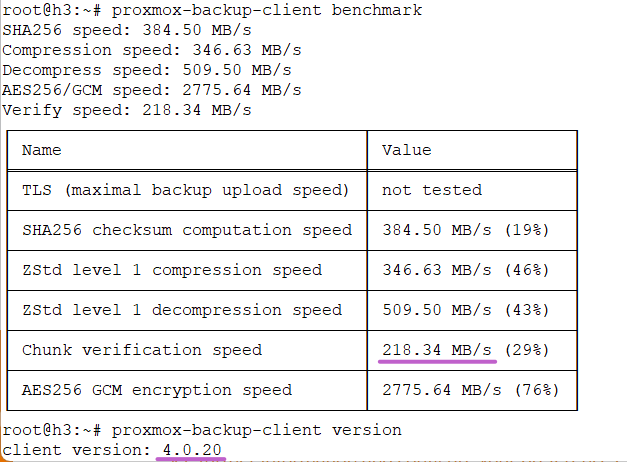
Test performance to see what to expect even if your storage is fast (your CPU may not be).
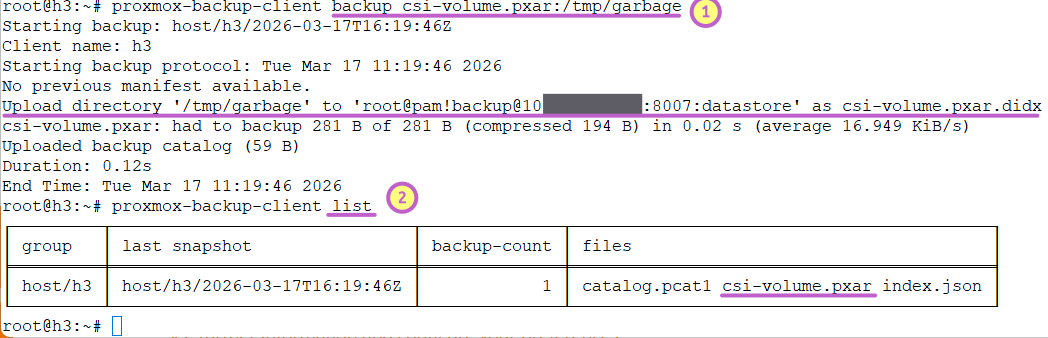
Easily execute backups to PBS.
PBS can send server-side notifications, so you don't even have to create backup scripts longer than 50 lines of code.
Conclusion
Proxmox backup client would be an interesting addition to SolidBackup. With PBS playing the role of Restic server, the same workflow from SolidBackup can be used to automate backups to PBS.
If you're interested in using Restic with Rest Server, see that Rest Server post at the top, or check out the repository. You could use it with SANtricity for both Windows and Linux.
Related to protecting SANtricity bare metal and CSI volumes in Proxmox environments, we may want to refresh and improve SolidBackup to be able to:
- Understand SANtricity volumes, as it currently only knows about SolidFire
- Provide the option of using Proxmox backup client
- Refresh and improve its features
Or you can roll your own wrapper. The SANtricity side (snapshots, clones) isn't too hard ("solved" for PowerShell) so you don't have to do much there either. I'll add similar features to Python client at some point, but maybe you can already do that using the official E-Series SANtricity Ansible collection - especially since SolidBackup also uses Ansible for certain parts of backup workflow.
PBS gives you a secure, efficient, centralized point of data protection, replication and backup data management (including security, RBAC, and more), so it's good value if you don't want to end with several approaches.
I haven't tested SANtricity CSI with Promox backup client (Velero should be tested first), but this post shows Proxmox file backup is easy to use on bare metal servers, so remaining steps aren't many.