SSD Flash Cache and bcache for Hybrid NetApp E-Series configurations
Introduction
Some two years ago I blogged about the SSD Flash Cache feature on NetApp E-Series (SANtricity) systems.
Due to these shortages/price hikes, that topic is somewhat relevant again.
I could write a "high level" post about this stuff and post it or Linkedin, or I could do something useful… I'll try the latter.
SSD Flash Cache on SANtricity systems
Nothing has changed since two years ago, the feature is still there.
I know the feature works great for many users, but you really need a suitable workload. For example, database reporting, which can be close to a 100% read workload for some users who load and report at different times. Or you clone production database to another volume dedicated to reporting where you run a 95% read workloads.
The challenge is figuring out when your workload is or isn't a suitable one. In my experience, if you're not sure, then it's best to not count on this feature unless you have good troubleshooting skills or have time to figure it out in pre-production.
Why? Because it may be hard to re-arrange things once you're already online and discover something else may have been better.
That something else may be:
- Don't use those disk for read-only caching. Create a SSD-based R10 disk group, put your database logs, indexes or some hot volume on this disk group
- Create RAID 1 volumes on DDP for write-heavy data instead of, or in addition to, SSD Flash Cache
- Check if you can use RAID 0 volumes (I've blogged about this on several occasions) for ephemeral cache
The other problem is you may not even be able to tell whether it's working well or not. It's possible with some low-level diagnostics commands, but it's not easy.
RTFM to see why. It's not easy.
- Some indicators are totals, so staring at a percentage gauge and not knowing if it was always 12%, or just now makes it difficult to explain why SSD read flash cache sucked last night.
- Some indicators are ambiguous. For example,
Cache allocation %. If it's low, why is it low? What is a good value? Why?
If you don't have time to kick tires and figure it out by doing it, it's sometimes simpler to just avoid potentially ambiguous solutions.
Well, since I've had zero takers on those three options above, I'll just skip repeating myself and say that I'll be looking at adding SSD Flash Cache monitoring to E-Series Performance Analyzer later this week. This may at least make figuring out how well it works easier for those who have it.
This is what's currently in a feature branch:
# HELP eseries_flashcache_bytes Flash Cache byte metrics
# TYPE eseries_flashcache_bytes gauge
eseries_flashcache_bytes{flash_cache_id="3233343536373839303134303200000000000000",flash_cache_name="SSD_Cache",metric="availableBytes",sys_id="6d039ea0009317330000000066f433d1",sys_name="e4012"} 9.68997805589e+011
eseries_flashcache_bytes{flash_cache_id="3233343536373839303134303200000000000000",flash_cache_name="SSD_Cache",metric="allocatedBytes",sys_id="6d039ea0009317330000000066f433d1",sys_name="e4012"} 6.19523187179e+011
eseries_flashcache_bytes{flash_cache_id="3233343536373839303134303200000000000000",flash_cache_name="SSD_Cache",metric="populatedCleanBytes",sys_id="6d039ea0009317330000000066f433d1",sys_name="e4012"} 4.46056694768e+011
eseries_flashcache_bytes{flash_cache_id="3233343536373839303134303200000000000000",flash_cache_name="SSD_Cache",metric="populatedDirtyBytes",sys_id="6d039ea0009317330000000066f433d1",sys_name="e4012"} 6.195231871e+09
# HELP eseries_flashcache_blocks_total Flash Cache block metrics (delta)
# TYPE eseries_flashcache_blocks_total gauge
eseries_flashcache_blocks_total{flash_cache_id="3233343536373839303134303200000000000000",flash_cache_name="SSD_Cache",metric="readBlocks",sys_id="6d039ea0009317330000000066f433d1",sys_name="e4012"} 600.0
eseries_flashcache_blocks_total{flash_cache_id="3233343536373839303134303200000000000000",flash_cache_name="SSD_Cache",metric="writeBlocks",sys_id="6d039ea0009317330000000066f433d1",sys_name="e4012"} 84600.0
eseries_flashcache_blocks_total{flash_cache_id="3233343536373839303134303200000000000000",flash_cache_name="SSD_Cache",metric="fullCacheHitBlocks",sys_id="6d039ea0009317330000000066f433d1",sys_name="e4012"} 34152.0
eseries_flashcache_blocks_total{flash_cache_id="3233343536373839303134303200000000000000",flash_cache_name="SSD_Cache",metric="partialCacheHitBlocks",sys_id="6d039ea0009317330000000066f433d1",sys_name="e4012"} 24876.0
eseries_flashcache_blocks_total{flash_cache_id="3233343536373839303134303200000000000000",flash_cache_name="SSD_Cache",metric="completeCacheMissBlocks",sys_id="6d039ea0009317330000000066f433d1",sys_name="e4012"} 11520.0
eseries_flashcache_blocks_total{flash_cache_id="3233343536373839303134303200000000000000",flash_cache_name="SSD_Cache",metric="populateOnReadBlocks",sys_id="6d039ea0009317330000000066f433d1",sys_name="e4012"} 60.0
eseries_flashcache_blocks_total{flash_cache_id="3233343536373839303134303200000000000000",flash_cache_name="SSD_Cache",metric="populateOnWriteBlocks",sys_id="6d039ea0009317330000000066f433d1",sys_name="e4012"} 8460.0
# HELP eseries_flashcache_ops_total Flash Cache operations (delta)
# TYPE eseries_flashcache_ops_total gauge
eseries_flashcache_ops_total{flash_cache_id="3233343536373839303134303200000000000000",flash_cache_name="SSD_Cache",metric="reads",sys_id="6d039ea0009317330000000066f433d1",sys_name="e4012"} 600.0
eseries_flashcache_ops_total{flash_cache_id="3233343536373839303134303200000000000000",flash_cache_name="SSD_Cache",metric="writes",sys_id="6d039ea0009317330000000066f433d1",sys_name="e4012"} 84600.0
eseries_flashcache_ops_total{flash_cache_id="3233343536373839303134303200000000000000",flash_cache_name="SSD_Cache",metric="fullCacheHits",sys_id="6d039ea0009317330000000066f433d1",sys_name="e4012"} 34152.0
eseries_flashcache_ops_total{flash_cache_id="3233343536373839303134303200000000000000",flash_cache_name="SSD_Cache",metric="partialCacheHits",sys_id="6d039ea0009317330000000066f433d1",sys_name="e4012"} 24876.0
eseries_flashcache_ops_total{flash_cache_id="3233343536373839303134303200000000000000",flash_cache_name="SSD_Cache",metric="completeCacheMiss",sys_id="6d039ea0009317330000000066f433d1",sys_name="e4012"} 11520.0
eseries_flashcache_ops_total{flash_cache_id="3233343536373839303134303200000000000000",flash_cache_name="SSD_Cache",metric="populateOnReads",sys_id="6d039ea0009317330000000066f433d1",sys_name="e4012"} 60.0
eseries_flashcache_ops_total{flash_cache_id="3233343536373839303134303200000000000000",flash_cache_name="SSD_Cache",metric="populateOnWrites",sys_id="6d039ea0009317330000000066f433d1",sys_name="e4012"} 8460.0
eseries_flashcache_ops_total{flash_cache_id="3233343536373839303134303200000000000000",flash_cache_name="SSD_Cache",metric="invalidates",sys_id="6d039ea0009317330000000066f433d1",sys_name="e4012"} 1278.0
eseries_flashcache_ops_total{flash_cache_id="3233343536373839303134303200000000000000",flash_cache_name="SSD_Cache",metric="recycles",sys_id="6d039ea0009317330000000066f433d1",sys_name="e4012"} 426.0
# HELP eseries_flashcache_components Flash Cache related component counts
# TYPE eseries_flashcache_components gauge
eseries_flashcache_components{flash_cache_id="3233343536373839303134303200000000000000",flash_cache_name="SSD_Cache",metric="cached_volumes_count",sys_id="6d039ea0009317330000000066f433d1",sys_name="e4012"} 1.0
eseries_flashcache_components{flash_cache_id="3233343536373839303134303200000000000000",flash_cache_name="SSD_Cache",metric="cache_drive_count",sys_id="6d039ea0009317330000000066f433d1",sys_name="e4012"} 2.0
SSD Cache monitoring has also been added to SANtricity PowerShell on March 20, 2026.
You can use the cmdlet to view all cache, or just counters, or just gauges. Since counters are hard to read, you can watch them over an interval and get "per second" averages.

bcache
bache isn't new, but it's new to most E-Series users.
It's easier to control, it's better (if not well) documented, it's included in Linux and it supports write caching ("writeback" mode), too.
What's not to like?
Here's a dramatized example of how that works, presented with the wrong hardware. Namely, all I had was NVMe storage, so you wouldn't really use that here.
But let's pretend I have a large and slow device (a NL-SAS volume on a RAID 6 group or DDP pool) and I decide to use two SSDs removed from SSD Read Cache and added to a new RAID 1 disk group with a volume for bcache use.
- Backing volume (NL-SAS on RAID 6) - 200G
- Caching volume (NVMe SSD on RAID 1) - 10G
- Expected capacity: 200G (with an "invisible" 10G caching device)
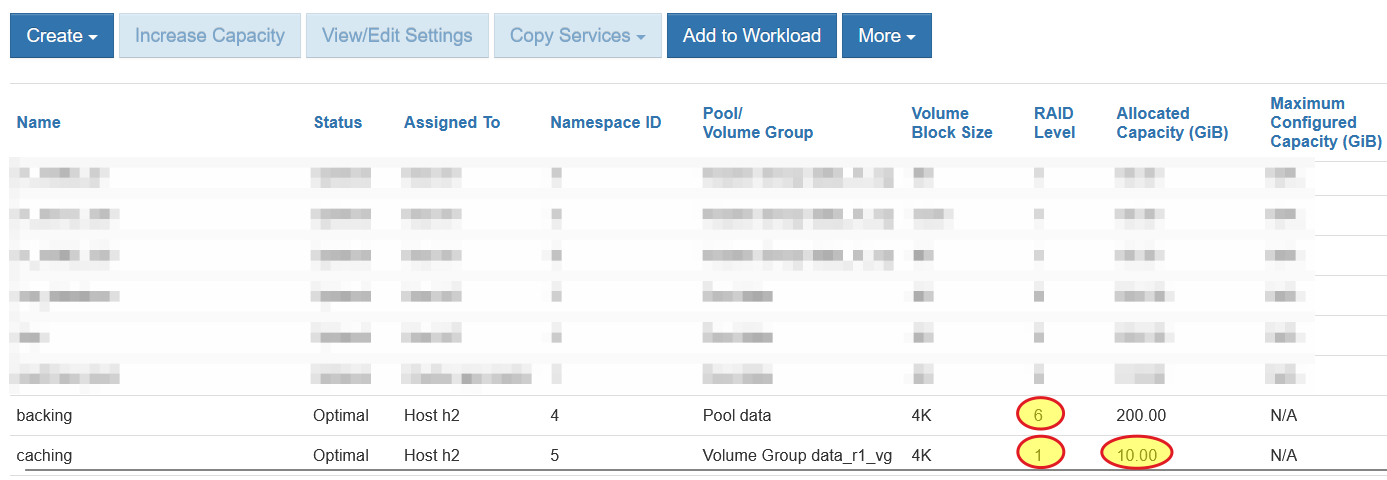
Create and map these two a host. If you have a cluster, you'd have to failover both of these together.
Again, these are both NVMe/RoCE, so as fast as it gets. Normally you'd have the backing device as NL-SAS HDD, and the smaller, caching device maybe a SAS SSD. But, since this isn't SANtricity SSD Flash Cache, you can do whatever you want. On E-Series EF600 I couldn't even use SSD Flash Cache (SANtricity won't let you cache NVMe on NVMe), but with bcache I can do whatever I want, this included.
~# nvme list
Node                  Generic               SN                   Model                                    Namespace  Usage                      Format           FW Rev
--------------------- --------------------- -------------------- ---------------------------------------- ---------- -------------------------- ---------------- --------
/dev/nvme0n4          /dev/ng0n4            952103002724         NetApp E-Series                          0x4        214.75  GB / 214.75  GB      4 KiB +  0 B   08900900
/dev/nvme0n5          /dev/ng0n5            952103002724         NetApp E-Series                          0x5         10.74  GB /  10.74  GB      4 KiB +  0 B   08900900
Now we need to make the small and fast one cache for the big and slow one. RTFM for the detailed options.
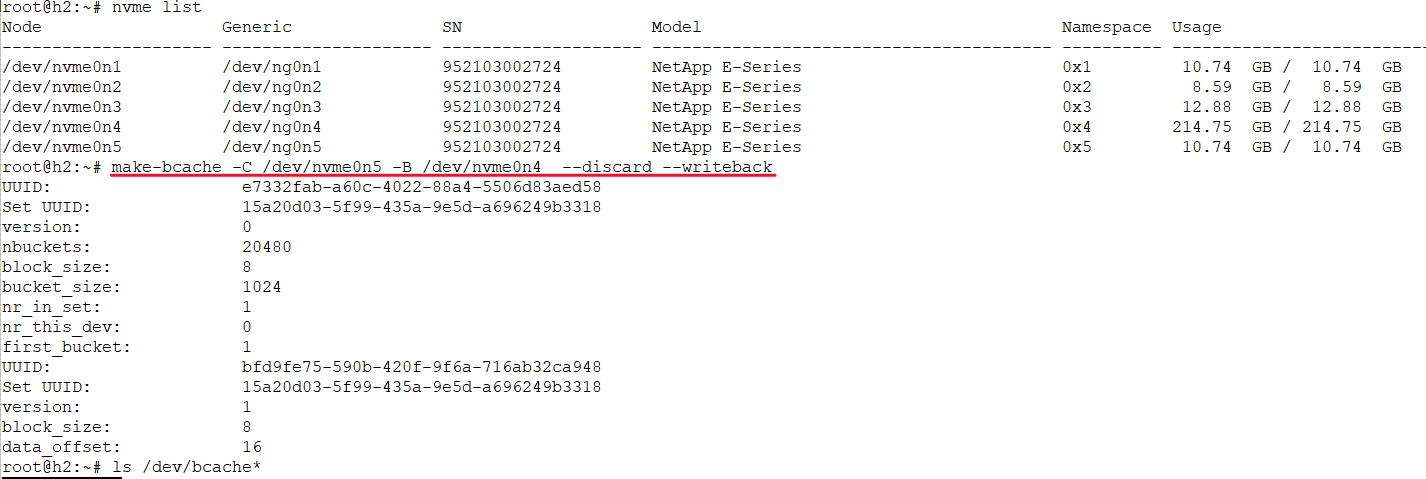
Notice that is a write-through cache. It's a RAID 1 volume, so that's fine. I could use a RAID 0 device with write-through if I wanted to. Not the greatest idea, but still valid.
Then we create a filesystem on it, and mount that bcache filesystem.
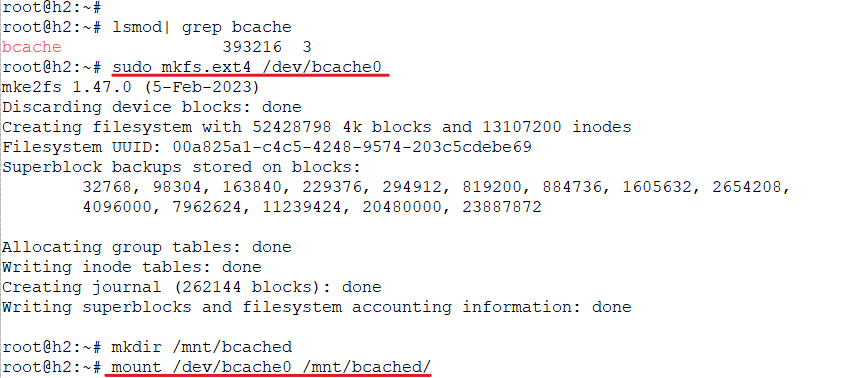
Don't forget to:
- Add
bcacheto loadable kernel module configuration file (e.g./etc/modules-load.d/bcache.conf) - Add your bcache filesystem to
/etc/fstabusing the unique bcache UUID (if stand-alone host; for clustered, check out how your cluster-ware is supposed to work with bcache) - Reboot to see it all works and check the documentation for recovery and removal steps in case you need to GTHO later
Because /dev/nvmeXnY may be unreliable as well (I don't know if they are or aren't), I'd use proper, immutable E-Series device names rather than these NVMe paths.
# ls -lat /dev/disk/by-id/ | grep n5
lrwxrwxrwx  1 root root  13 Mar 16 15:21 nvme-eui.00000a1e69b807ced039ea0000493a26 -> ../../nvme0n5
lrwxrwxrwx  1 root root  13 Mar 16 15:21 nvme-NetApp_E-Series_952103002724_5 -> ../../nvme0n5
What I would use is /dev/disk/by-id/nvme-eui.00000a1e69b807ced039ea0000493a26, not ./dev/nvme0n5.
Did bcache work for me? Well, it didn't crash and burn, that's for sure.
I created a 20GB file on the bcache device, to make sure it overflows to the backing device.
Then I ran several tests. In this one, with small/random IO with 30% write. These charts, that monitor both volumes, show IO spilled over across both.
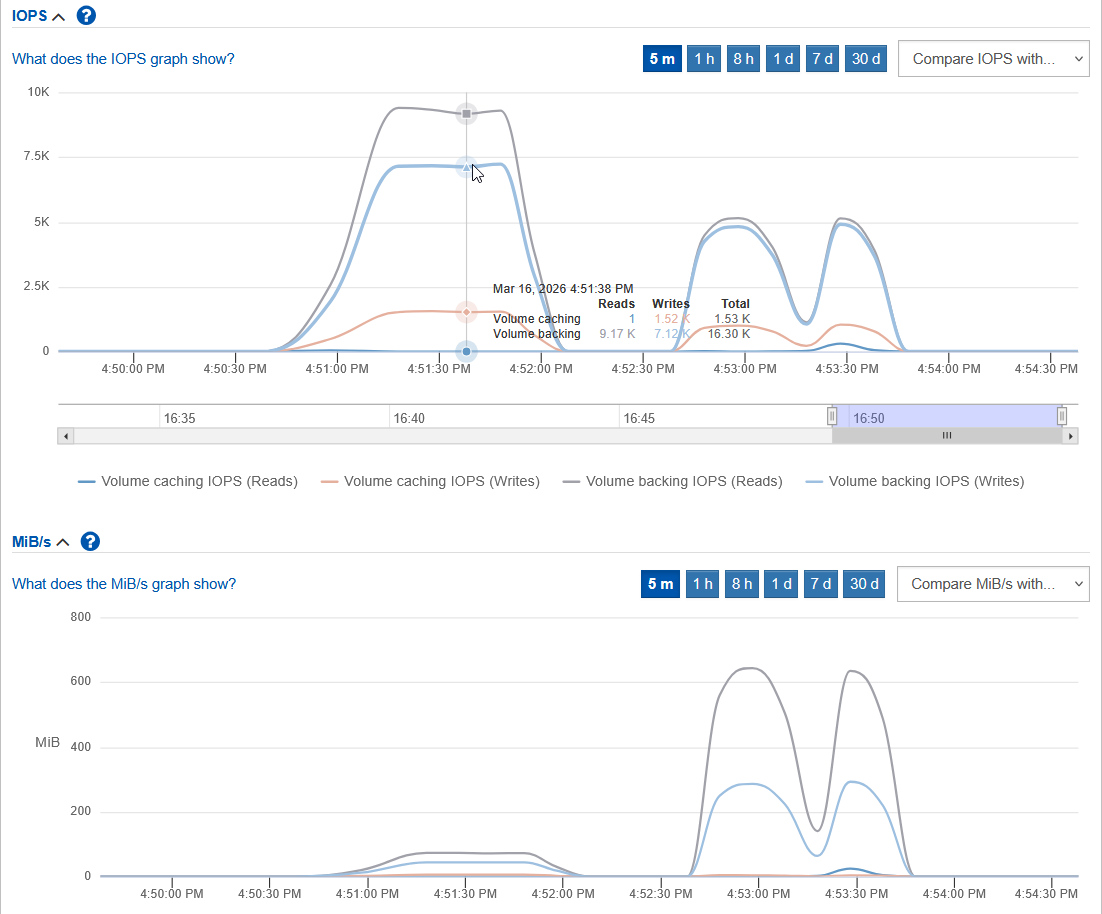
Because this was small IO test, the bandwidth was small as well. It appears the caching volume absorbed a bit more writes, but less reads.
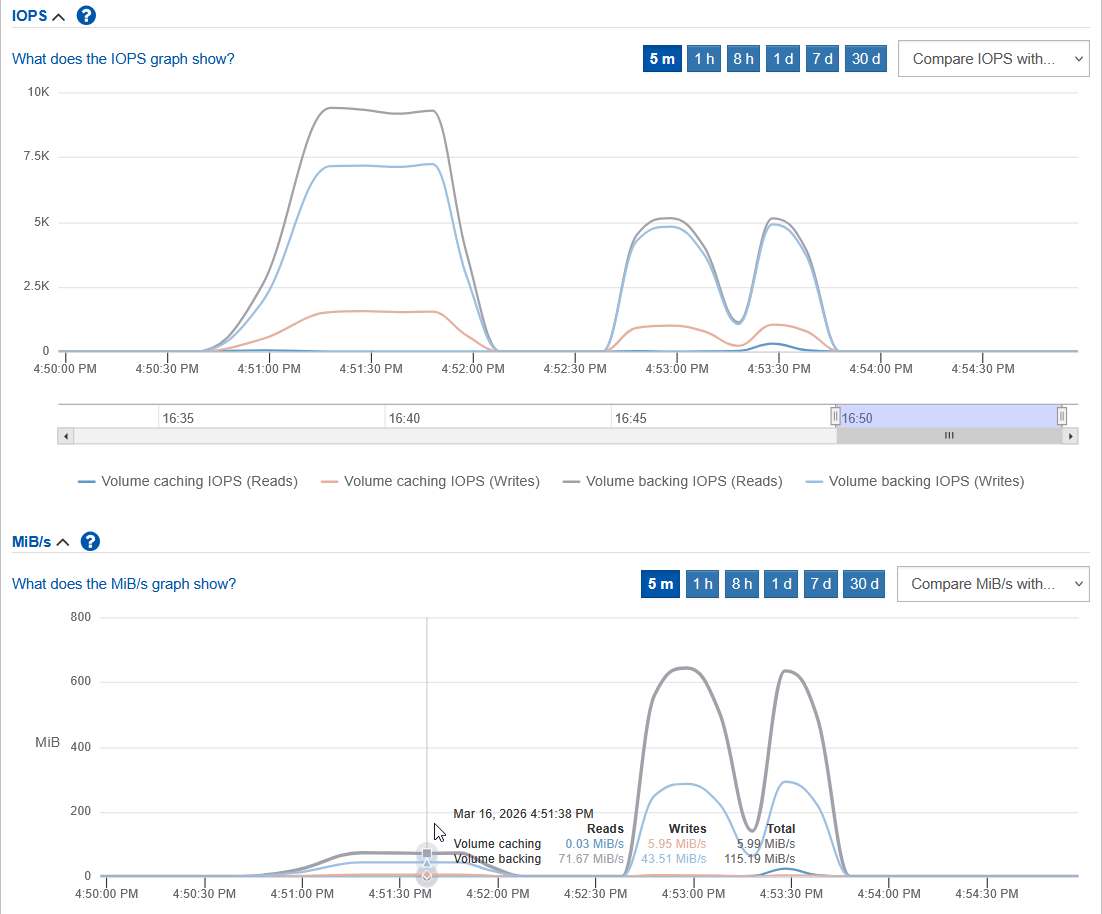
Later I tried sequential with 128K requests (30% write).
It didn't seem slower or faster than the same tests I ran the other day. So I'd say it seems not slower even in this wrong configuration where one SSD disk is caching another.
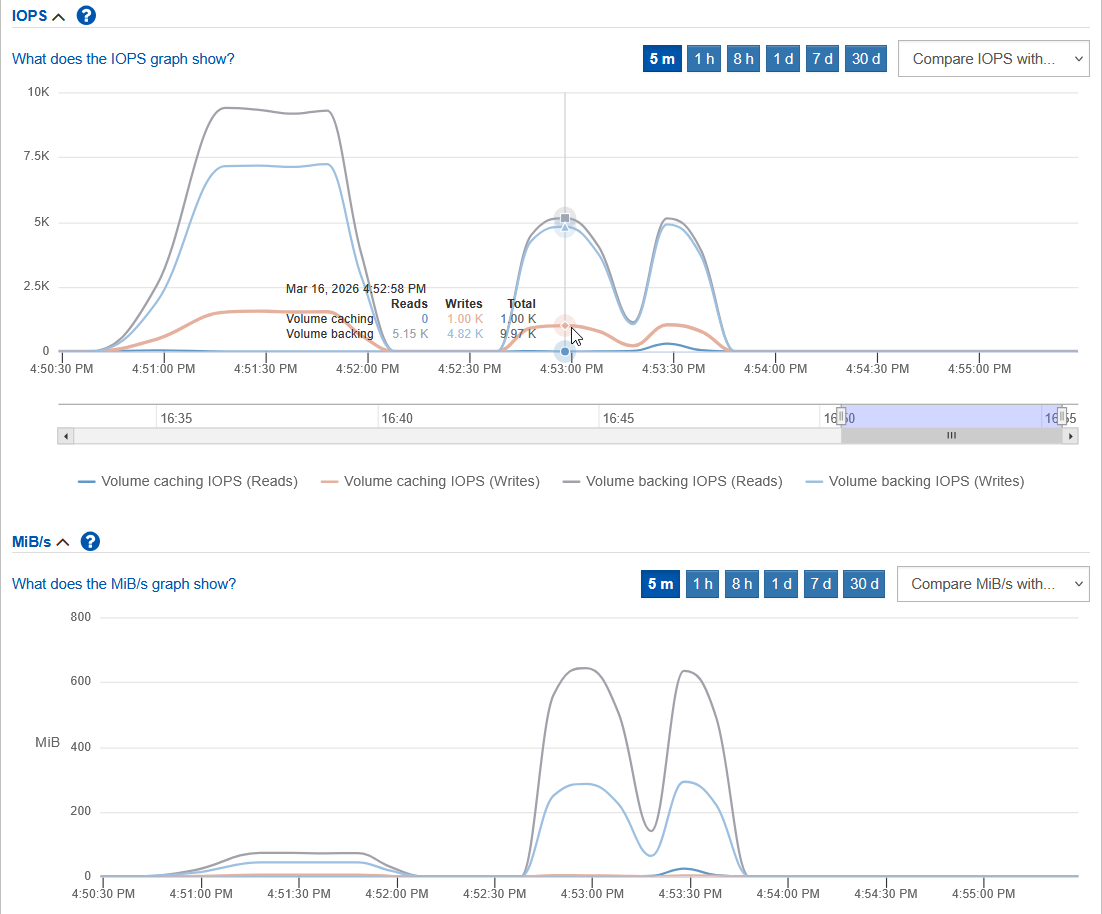
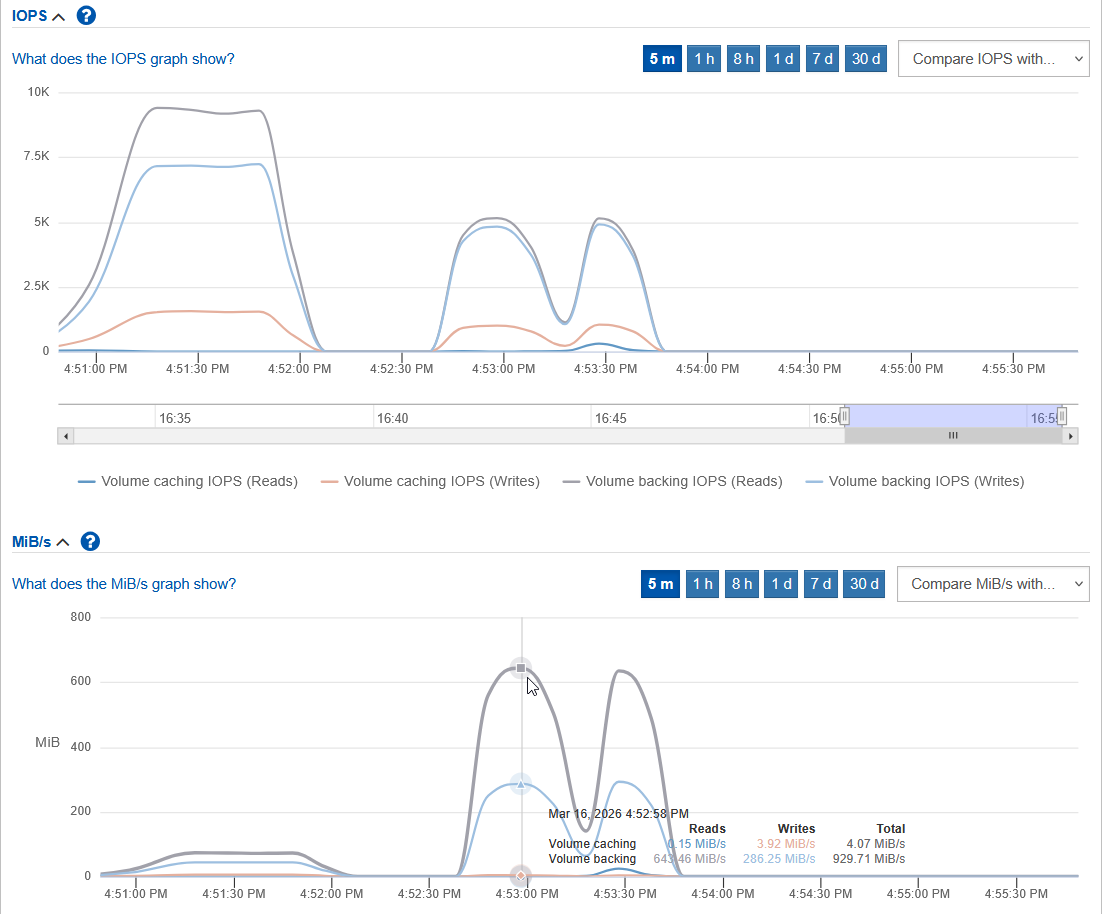
The bandwidth chart is interesting because it implies that bcache was passing a lot more to the backing device, as its share of writes is very low.
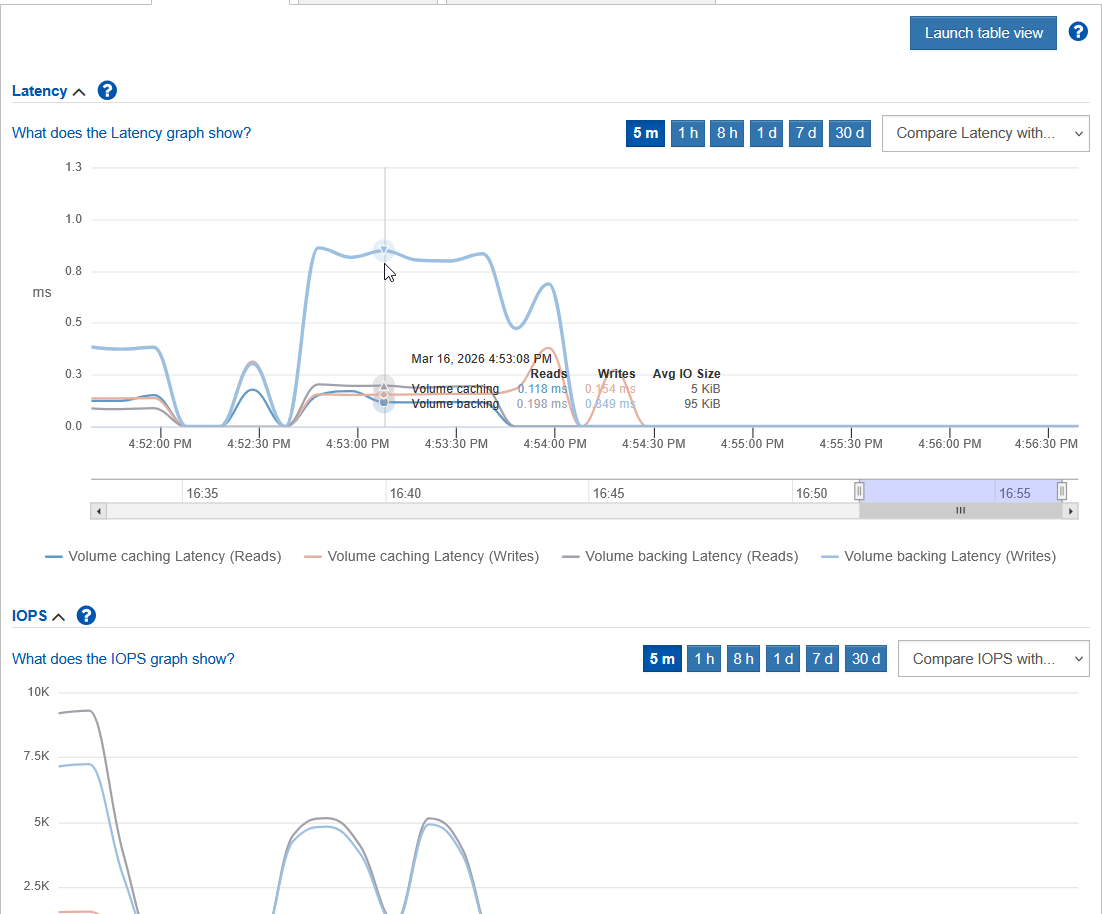
The last chart - from these two tests - is a latency chart. I don't know how significant this is, but the caching device (RAID 10) had lower latency than backing (RAID 6) which is to be expected, and a "use case" for SSD-on-SSD caching. It may not be worth the trouble, but I wanted to have a setup that's not completely fake.
See the kernel documentation and the Ubuntu link at the top for the create and mount options and other details.
Classic Active-Passive HA and modern multi-node deployments
I haven't looked - maybe I will, if someone asks - how to do HA with this setup. Both block devices need to failover, and bcache configuration needs to exist on each host. For HA, this doesn't seem trivial.
If the server using caching device restarts and bcache doesn't come alive, you may even forget where data (backing device) is.
$ cat /sys/fs/bcache/15a20d03-5f99-435a-9e5d-a696249b3318/bdev0/backing_dev_name
nvme0n4
If it's a standby node in HA cluster, you maybe don't even want that bcache device to autostart.
Let's see the backing device:
$ bcache-super-show /dev/nvme0n4
sb.magic                ok
sb.first_sector         8 [match]
sb.csum                 998EE8996D7AE511 [match]
sb.version              1 [backing device]

dev.label               (empty)
dev.uuid                bfd9fe75-590b-420f-9f6a-716ab32ca948
dev.sectors_per_block   8
dev.sectors_per_bucket  1024
dev.data.first_sector   16
dev.data.cache_mode     1 [writeback]
dev.data.cache_state    1 [clean]

cset.uuid               15a20d03-5f99-435a-9e5d-a696249b3318
The caching device:
$ bcache-super-show /dev/nvme0n5
sb.magic                ok
sb.first_sector         8 [match]
sb.csum                 A41478E44D7BF404 [match]
sb.version              3 [cache device]

dev.label               (empty)
dev.uuid                e7332fab-a60c-4022-88a4-5506d83aed58
dev.sectors_per_block   8
dev.sectors_per_bucket  1024
dev.cache.first_sector  1024
dev.cache.cache_sectors 20970496
dev.cache.total_sectors 20971520
dev.cache.ordered       yes
dev.cache.discard       yes
dev.cache.pos           0
dev.cache.replacement   0 [lru]
If you need to recover these, it's a good idea to get and backup this information as soon as you create bcache. Then they become easy to recover and re-register.
Some of these parameters are tunable, such as data.cache_mode on backing and cache.replacement on caching device, and can be modified on live bcache (very nice!) devices.
See the kernel documentation for other commands including those related to registration and unregistration of bcache. One interesting detail is that backing device can be mounted as loopback with -o 8192, so you can get to your data even without backing cache (assuming you did not use writeback and ended up with a corrupt backing device).
$ losetup -o 8192 /dev/loop0 /dev/nvme0n4
bcache seems much more usable in NOSQL environments, comparatively speaking, where you can use Terraform Provider SANtricity to create these on multiple hosts in 10 seconds. And you don't need to fail them over. And you can disband/remove bcache without downtime, assuming you have (at least) RF2 or Erasure Coding in place across hosts.
bcache vs. SSD Flash Cache vs. ZFS
I can't do that on an all-flash system - as I've said, SANtricity won't let me set up SSD Flash Cache in an all-flash array.
bcache can be used on any E-Series array, while SSD Flash Cache requires hybrid setups and may have other restrictions or limitations.
ZFS provides "all-in-one" caching and backing devices, but that does not come for "free": it's not just a filesystem, so you need a ZFS-specific failover procedure as well. Obviously, if you want to use ZFS, it's easier to use ZFS caching features. If you want to use ext3 or XFS, you can consider bcache and SANtricity SSD Flash Cache.
Microsoft Windows
Caching tiers in Storage Spaces (three servers/hosts) is a similar transparent disk caching technology on Microsoft Windows.
Microsoft officially requires DAS for those, so strictly speaking E-Series isn't supported. You could set it up anyway - it's the same "DAS pattern" as NOSQL on Linux that I've mentioned above.
Conclusion
SSD Flash Cache is a SANtricity feature that lets you offload read-heavy workload from your NL-SAS or 10K SAS HDDs. You need to be careful when evaluating your workload.
Linux users can also consider bcache, depending on the exact use case. Write-through is supported, so you can use it similarly to the way SSD Flash Cache works.
Alternatively, consider placing heaviest workloads (metadata, log, index, temp/scratch) on a small SSD disk group or at least use RAID 10 on DDP (even on NL-SAS). SSD RAID 0 is also something to consider. I've blogged about that for half a decade, it's all here on this blog.