Proxmox Backup Server 4.1 with NetApp E-Series
Introduction
Following the recent two PVE-related posts, it's a good idea to cover Proxmox Backup Server (PBS) as well.
I've wanted to explore Proxmox Backup Server in more detail since SolidFire times. SolidFire isn't included here because it's only all-flash based storage and, due to cost, performance and "global pool" nature, not suitable as a storage target for same-cluster backup. Proxmox users with SolidFire should probably backup to S3 or an E-Series array.
For current and future owners of NetApp E-Series (and EF-Series; in this post I'll refer to both as E-Series unless I need to single out EF-Series models) storage arrays, we'll look at various options at your disposal.
UPDATE (May 2026): find a PBS 4.2.0 with S3 backed by E-Series review here.
Deployment approaches
Here's how I'd go about these. I like the first two better - bare metal has less moving parts.
| Approach | E-Series Storage | Comment |
|---|---|---|
| Bare Metal | iSCSI, NVMe/RoCE, FC (yuck!) | Single host; use PBS replication (LAN/MAN/WAN) for HA/DR |
| Single node PVE VM | iSCSI/kernel (or NVMe/RoCE), zfs, lvm, xfs, ext4 |
Single host; use PBS replication (LAN/MAN/WAN) for HA/DR |
| HA PVE VM | iSCSI/kernel (or NVMe/RoCE), lvm |
Relies on HA failover of PVE cluster dedicated to PBS - must use shared PVE storage; use replication for DR |
Single node PVE or or "single node PVE cluster" is also simple and even better if you prefer to manage VMs rather than bare metal. You could backup PBS VM OS to S3 (with or without backup store(s)) to be able to recover that VM independently of the PVE cluster it protects.
It's tricky to run PBS on cluster which it's supposed to recover when it fails, so I don't list that option. Although this post uses exactly that approach and NVMe/RoCE instead of iSCSI/kernel. Or, let's play along and call this option NVMe/kernel.
ZFS and protected storage
Sometimes people get confused as to what storage ZFS "supports", so let's get that out of our way.
Here's what Proxmox says about that:
Use a hardware RAID with battery protected write cache (BBU) or a redundant ZFS setup
OK, LFG!
E-Series by default mirrors writes and write cache is battery-backed, meaning no write will be lost even in the case of a power loss (it will be "destaged").
Then in the very same sentence, there's this:
ZFS is not compatible with a hardware RAID controller.
Wait, wut?
That's simply wrong. ZFS can lose data if RAID controller it depends on loses data.
A software RAID (including ZFS'es own) can lose data just like a hardware RAID that doesn't correctly mirror write cache or destage dirty cache can lose data.
E-Series is a hardware RAID controller with mirrored, battery-backed write cache and does not lose writes. There are hardware RAID controllers that don't mirror or destage write cache. That's what Proxmox is talking about, except that it's unclear and creates confusion.
But, even if you assume the worst, ZFS isn't required, it is merely the default. XFS and ext4 are also supported:
The current implementation uses a directory inside a standard Unix file system (ext4, xfs or zfs) to store the backup data.
Okay, then. We can take any path. Unlike ONTAP, E-Series doesn't provide own efficiencies, so ZFS is a fine choice for PBS datastores on E-Series.
Deployment walk-through
Deploying PBS on bare metal is no different from deploying Debian. It's even easier as PBS has a nice Web UI.
This walk-through deploys PBS on PVE, which is a circular dependency which isn't recommended as it can result in an inability to get to backups if PVE cluster is destroyed (and your PBS VM with it). I didn't have a server where I could deploy PBS on bare metal, which is why I did it. The PBS documentation also warns against "PBS on PVE it protects", but it should be noted that PBS can be safely deployed on a stand-alone PVE host isolated from the PVE cluster(s) which it protects.
Deployment scenarios:
- Bare metal
- For NVMe/RoCE (which would be only with the EF models), detailed steps are outlined in the Linux with NVMe/RoCE post.
- For iSCSI with Device Mapper, just use steps for Linux. DM-MP can use default settings.
- Virtualized
- For PBS-on-PVE (this walk-through), PBS is virtualized and sees only PVE disks, not "E-Series volumes"
- If you wish to deploy PBS on PVE, use a stand-alone PVE host (or single-node cluster, or two bare metal nodes, PBS-only cluster)
What was installed and how:
- PBS 4.1 VM on PVE
- PVE with an NVMe/RoCE-backed LVM volume
- One Ubuntu 26.04 LTS for backup/restore testing (deployed on the same volume, which is of course not a real life scenario, but it didn't impact our tests)
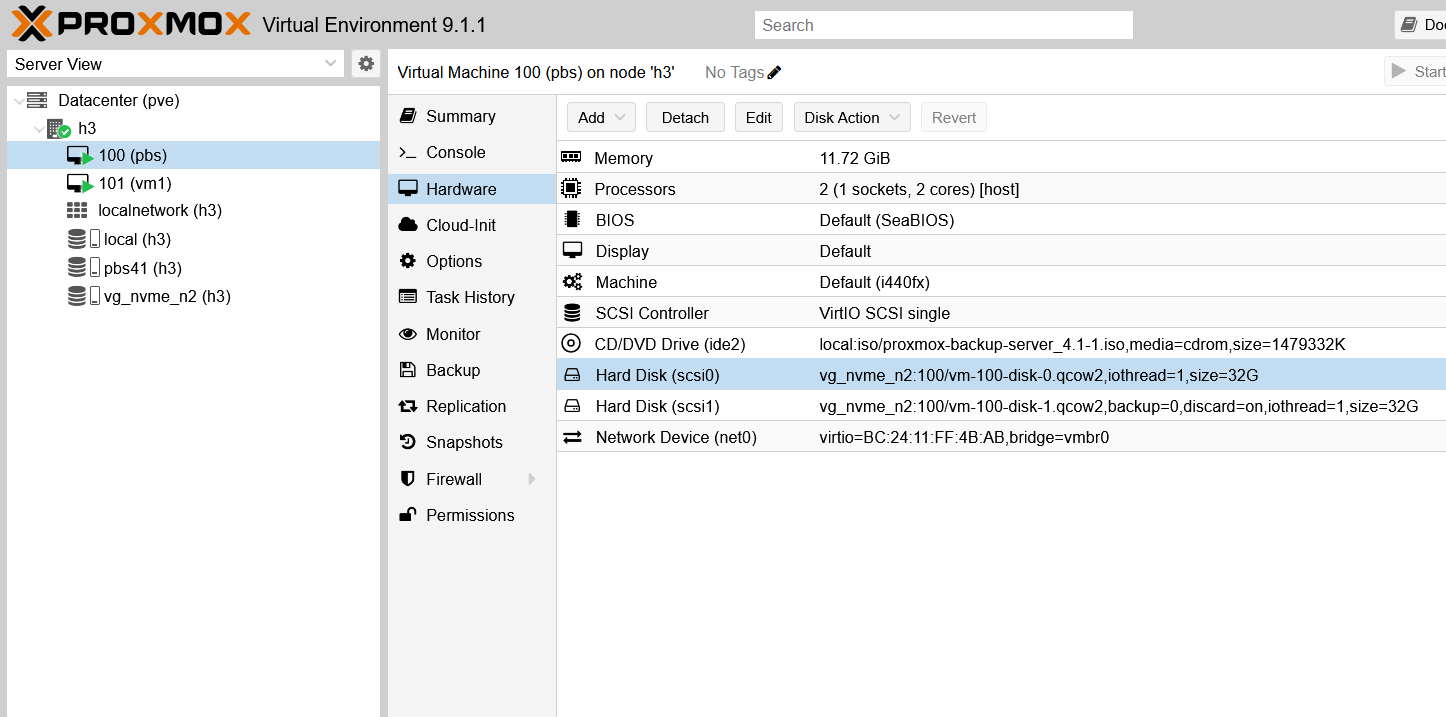
The PBS VM had two disks:
- OS disk (32GiB)
- "Backup pool" disk (32GiB)
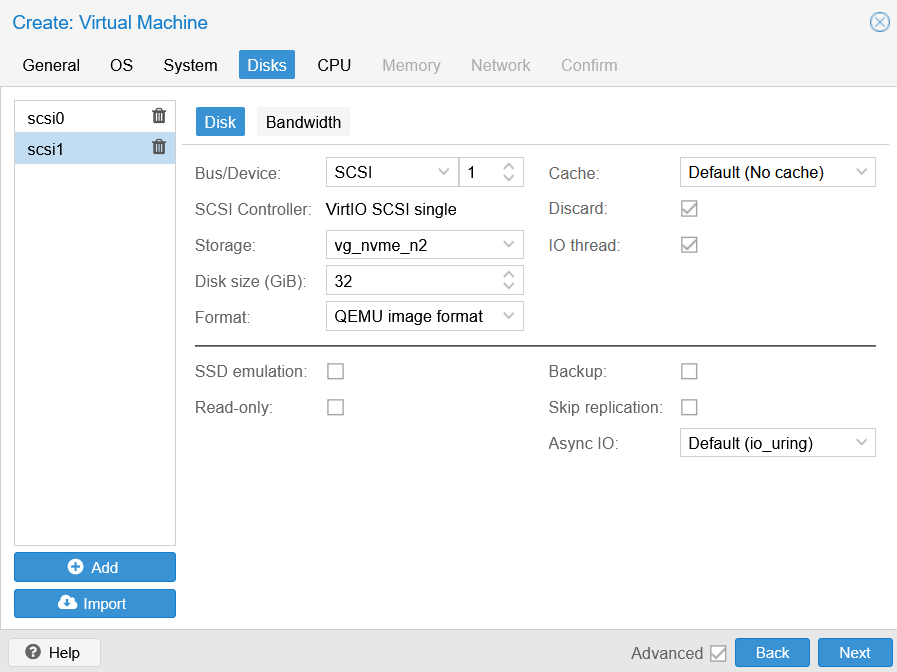
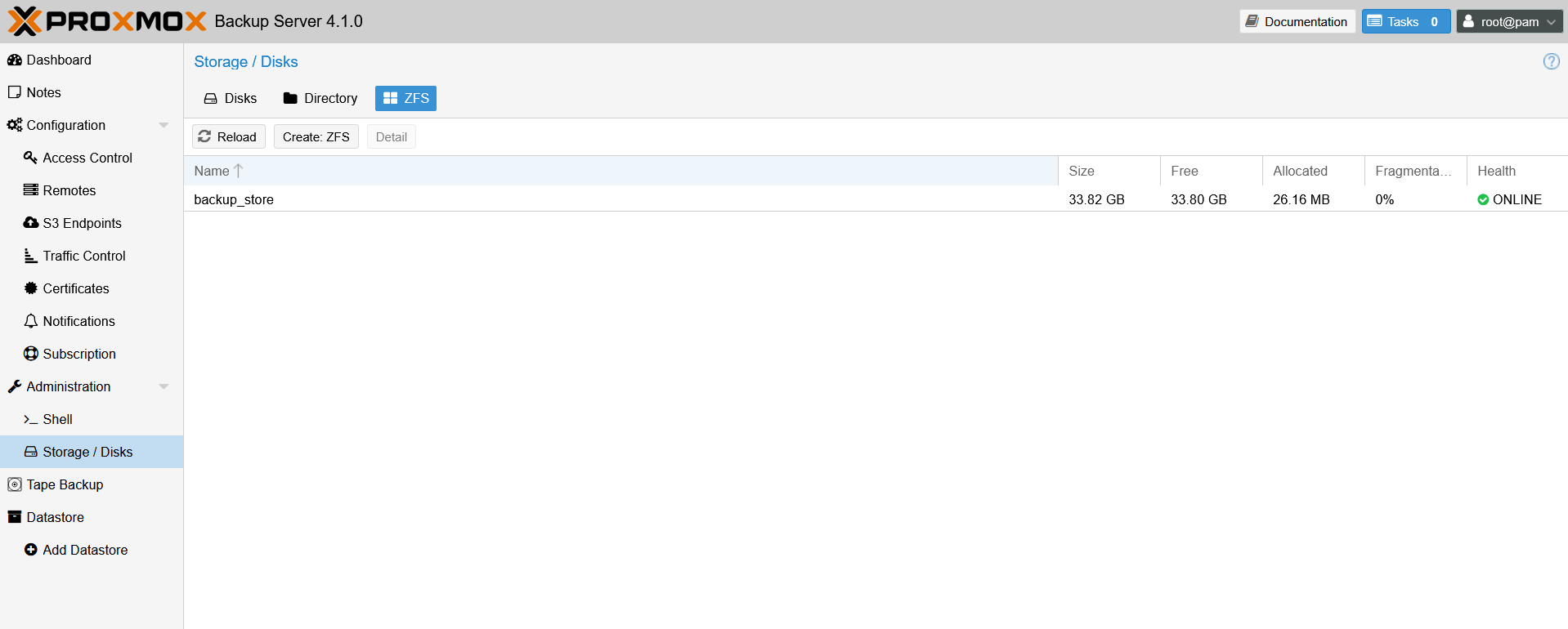
Once you access PBS Web UI (or shell), create ZFS pool(s) on non-OS disk(s).
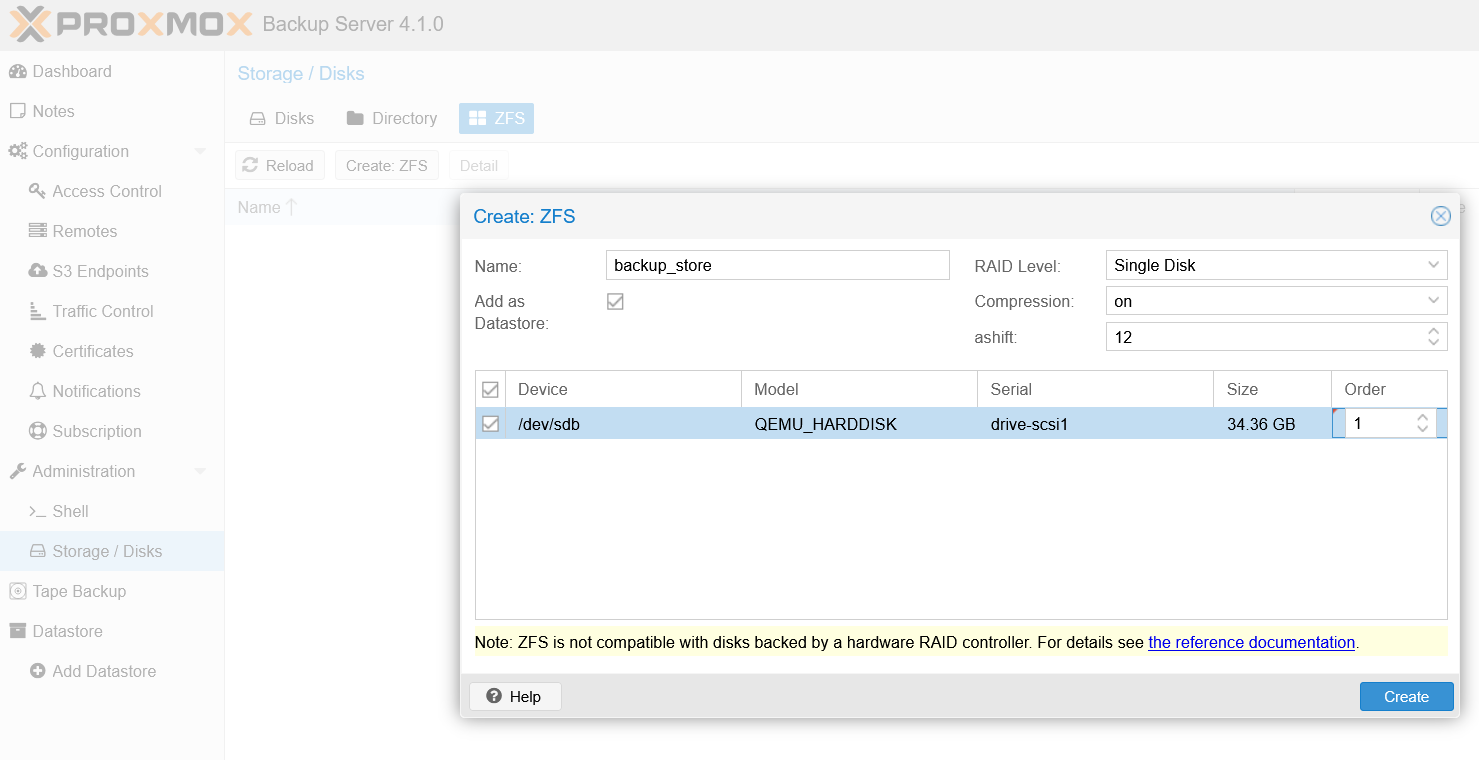
You can do that in the CLI including for "custom" Zpool and ZFS configuration (if they're supported), but the PBS UI is nice and lets you create Zpool and ZFS on unused disk(s) in seconds.
Once you're done with that, you should have one or more PBS backup stores ready.
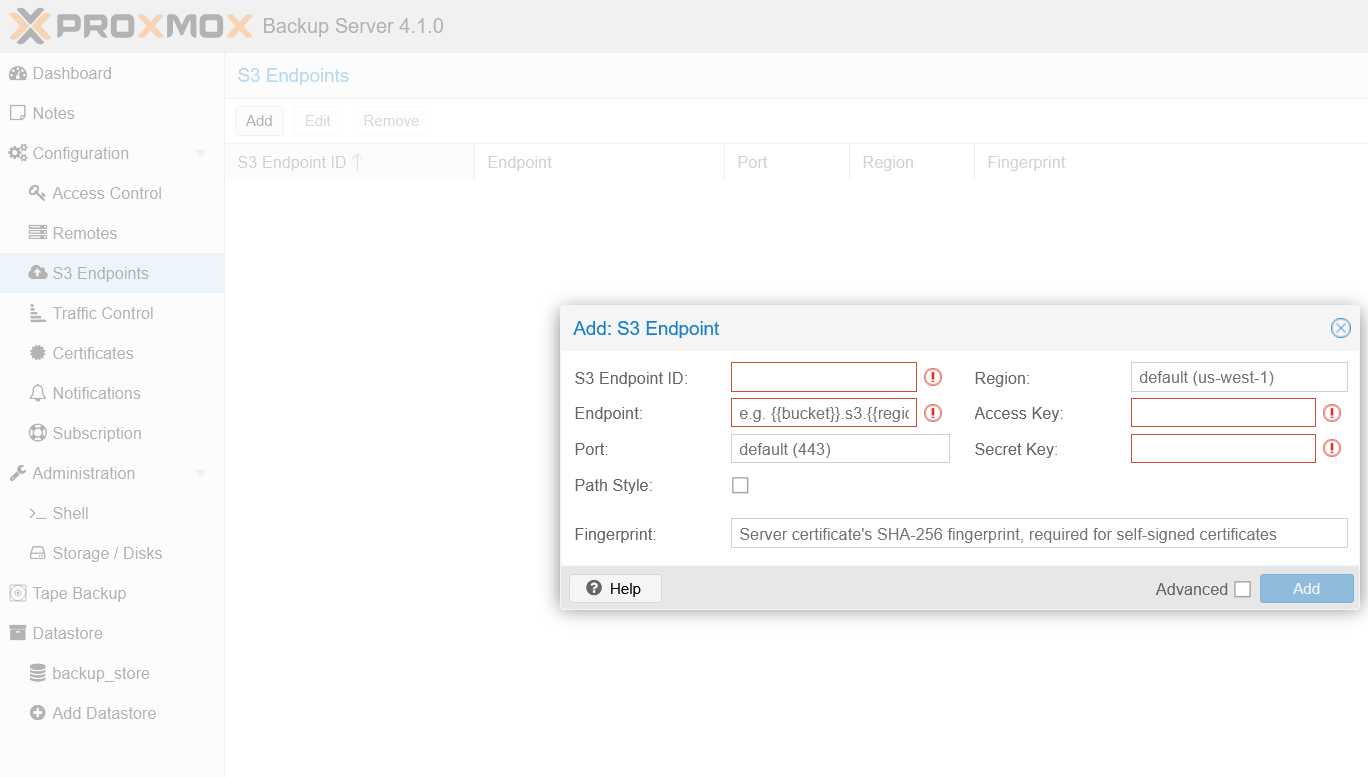
Another option - not tested, but available and discussed further below - is to backup to S3.
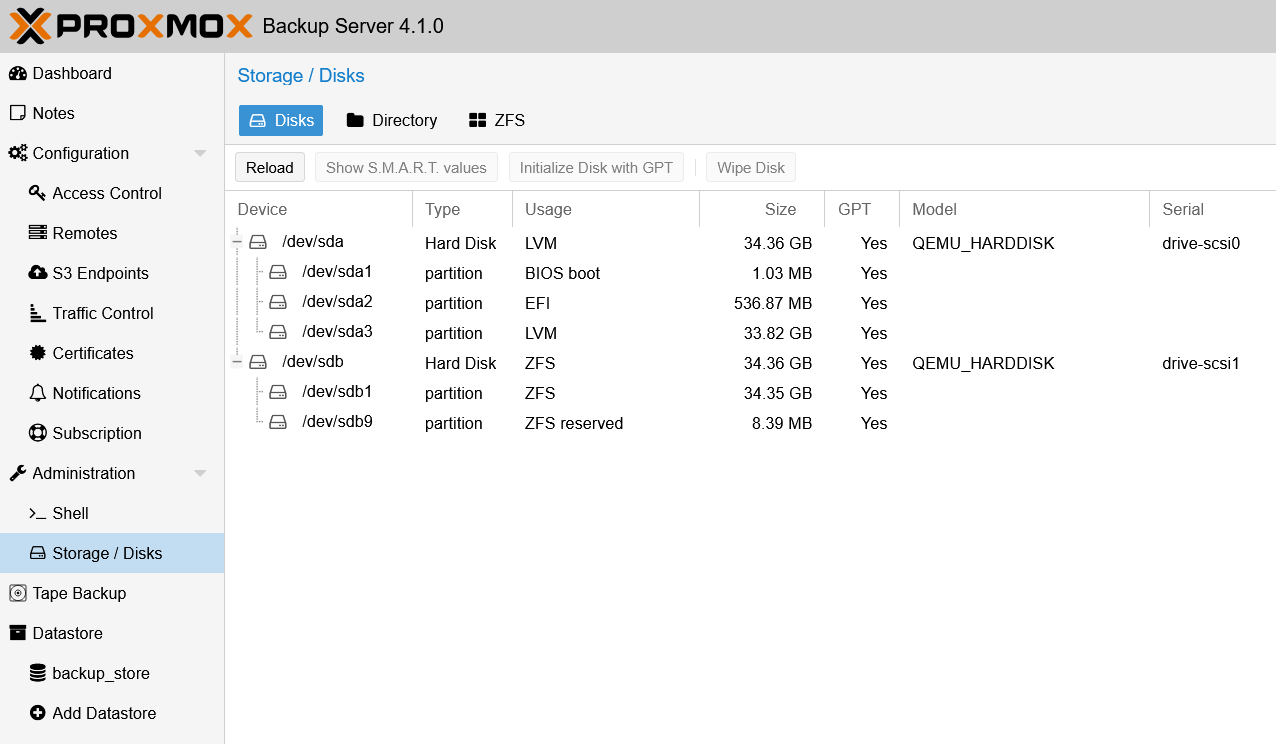
My final storage configuration for PBS was:
- OS on LVM (default)
- One backup store on ZFS
In my testing, I've created and restored backups of Ubuntu 26.04 LTS three times:
- Initial "full" backup - some 3GiB on PBS ZFS
- Post-upgrade "incremental" (Ubuntu 26.04 LTS Snapshot 3 to Snapshot 4, with hundreds of changed packages) - this took around 1.5GiB on PBS ZFS
- "Null" backup (subsequent backup with almost no changes on Ubuntu VM)- this took around 0.5 GiB in backup store. That seemed a bit high, but still acceptable
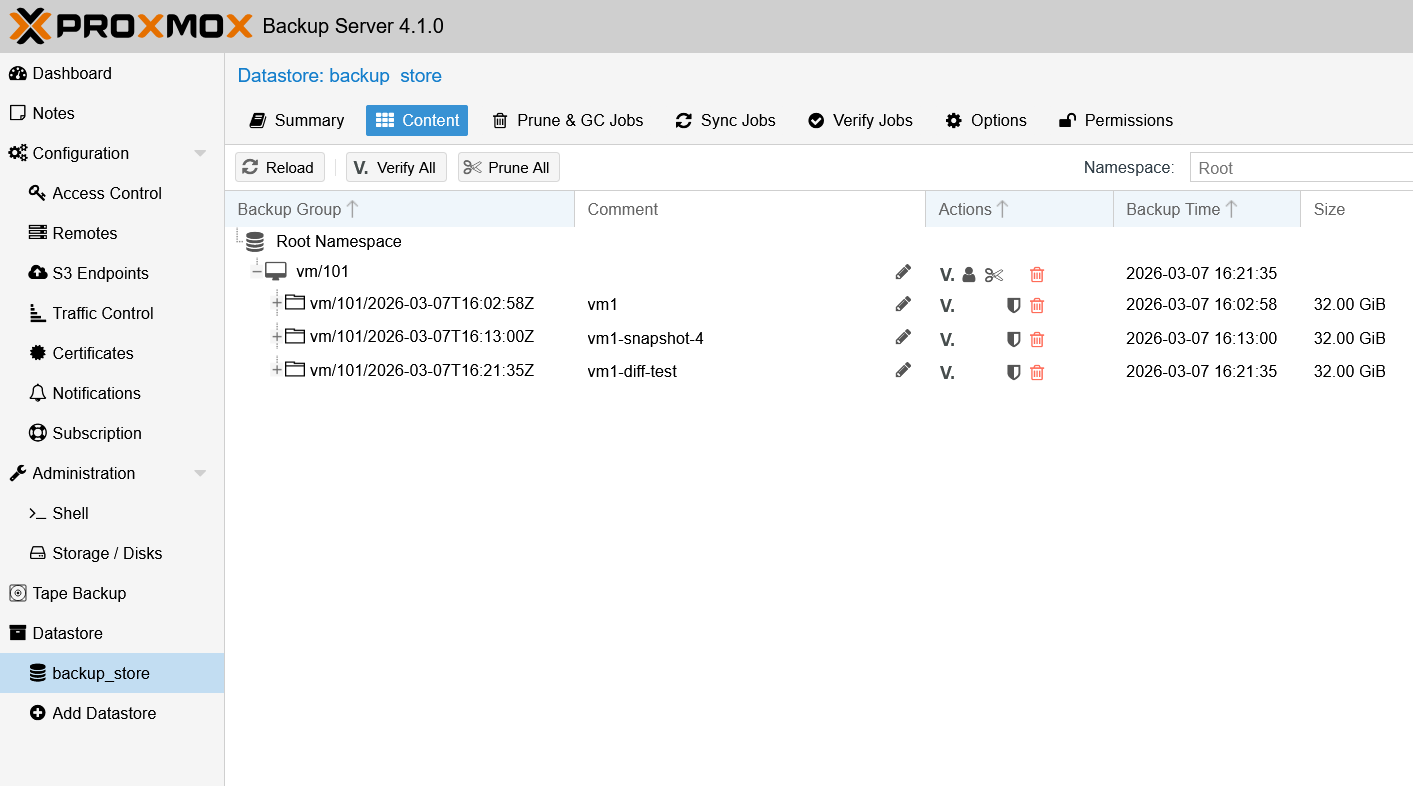
Backups can be verified by PBS/ZFS, which can be done manually or on schedule.
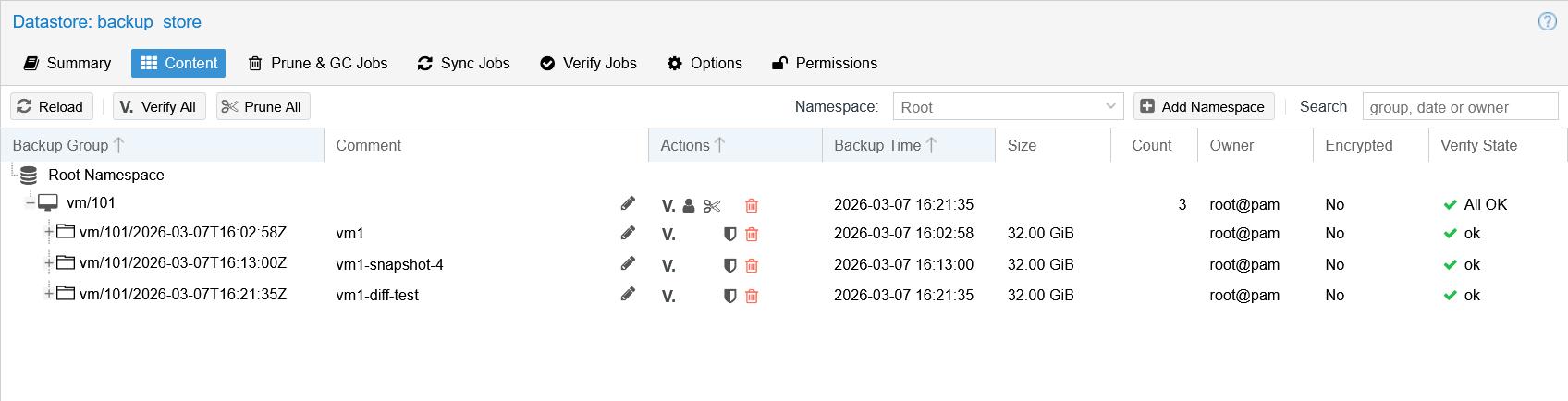
To see how much ZFS saved, you need to run garbage collection on ZFS backup store.
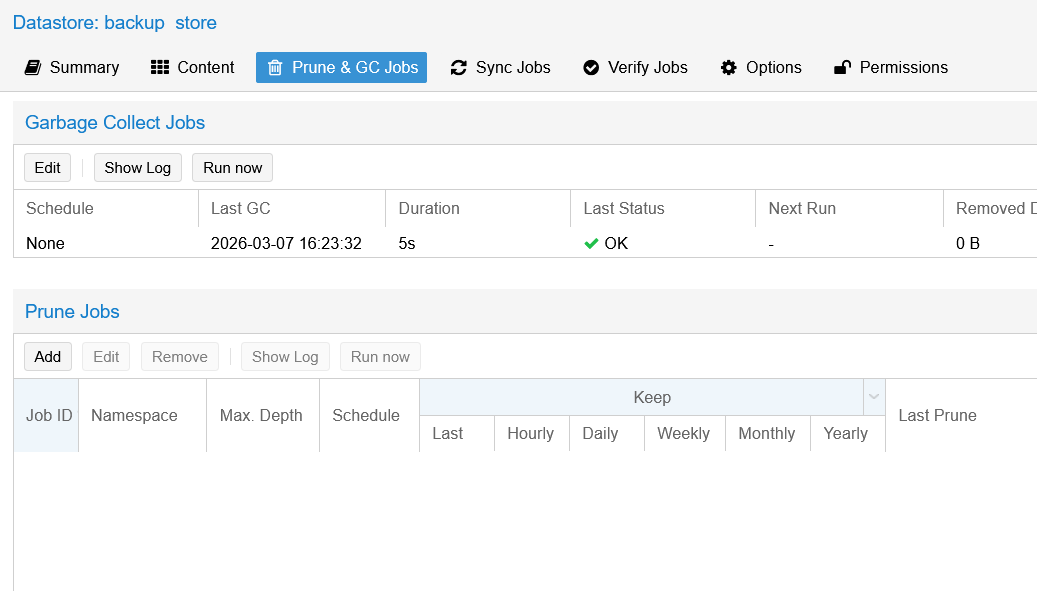
"Savings" are calculated under the assumption that PVE disks space is fully allocated (i.e. not thin) and full, neither of which was true, but at the same time, almost everyone in backup business speaks the same marketing language.
When a backup appliance vendor (HPE, Dell) tells you they save 98% of backup storage capacity, that's the formula they use.
Concretely, PBS told me my backup efficiency was close to 20x, i.e. I saved 95% in HPE and Dell "speak". Hooray! What really happens:
- My Ubuntu VM lives on a 32GiB disk that I backed up three times
- If I used Zip every time, that would likely have resulted in 10GiB (3 backups x 3.5GiB of VM data) on backup media and it'd look like I saved almost 30GiB thice, saving 86/96 GiB (90% savings or 10x efficiency) across three backup jobs
- Backup servers are smarter than that and subsequent backups do not re-copy duplicate chunks, which is is how we save more and get from 90% to over 95% percent ("20x savings")
- In reality, the 32GiB VM disk was almost 90% empty, so that capacity was never used and never "saved"
Next, one of the very few weird details is that PBS must be added as PVE "Storage", which it is not. But, whatever - pick your preferred pronouns!
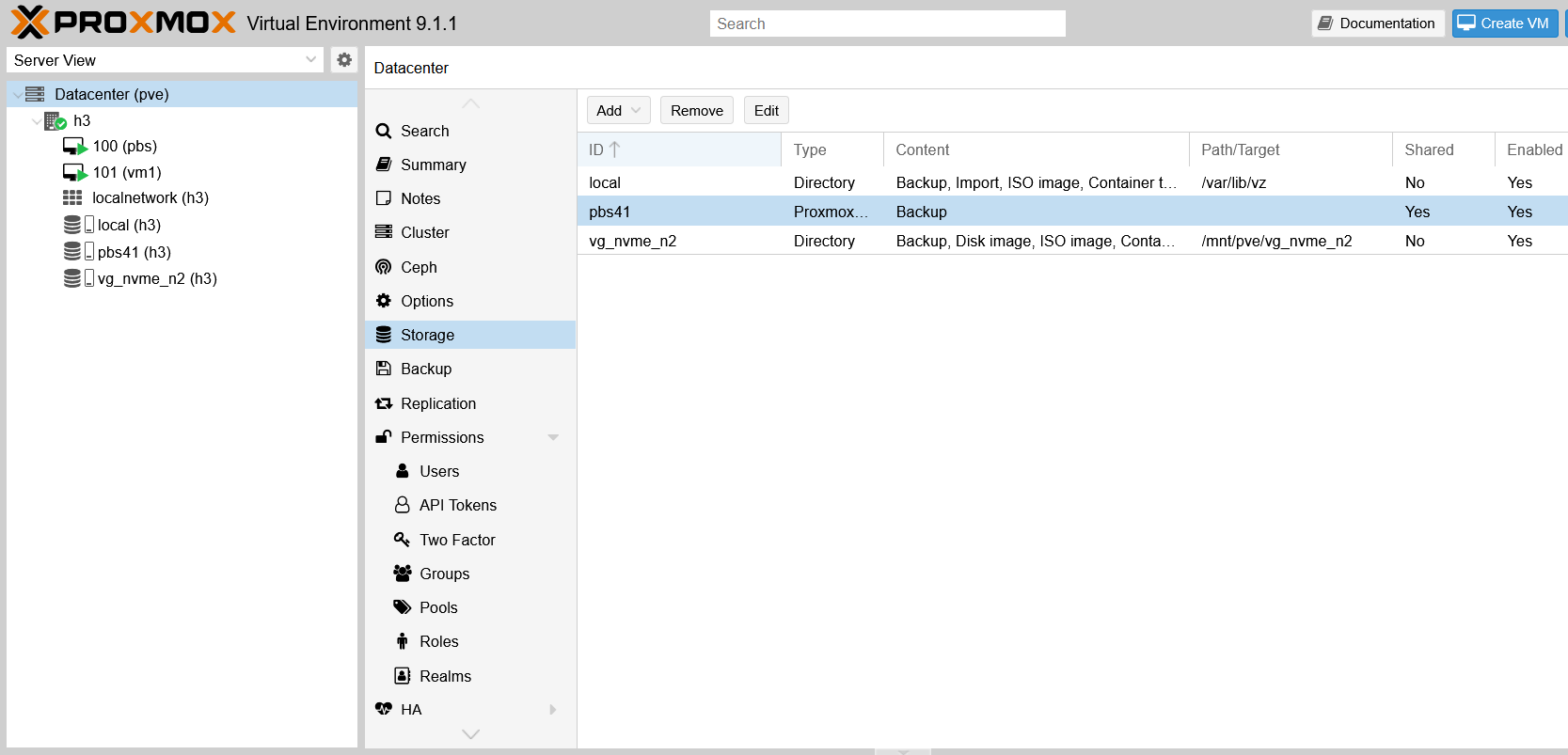
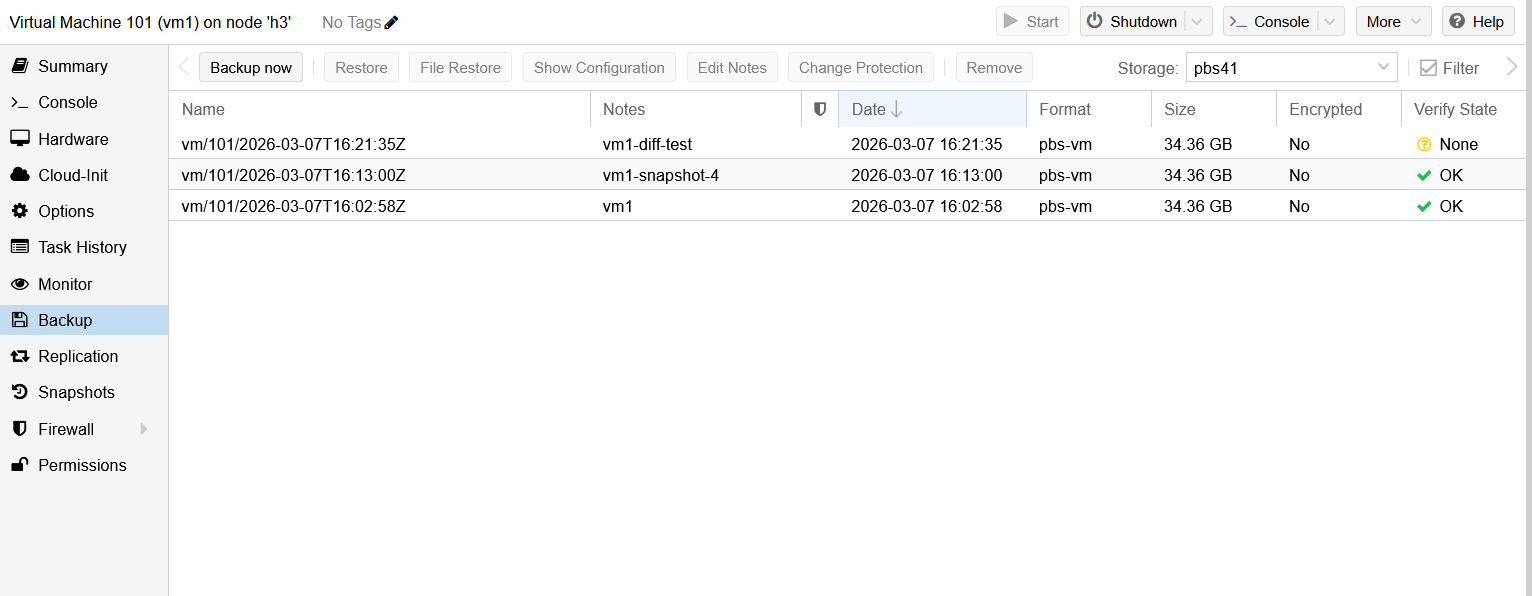
Then (also weird), you need to remember to pick that "storage" (i.e. the PBS backup store) in the "Storage" drop-down list to see your backups. But it's nice that it's easily accessible in the VM's (Ubuntu VM's) "Backup" menu, and you don't have to dig through some top level menus.
Here I can see my three backups ("full", "incremental", "null").
On E-Series, since backup store was running on a fast (and expensive) TLC-backed DDP pool, I didn't expect any troubles and - because my PBS had only 2 cores which was little but sufficient for backing up a single VM - I think backup performance was constrained by the PBS vCPU resources. The second (minor impact) was likely due to the "not-completely-sequential" nature of my PBS workload.
I know because I tested the same DDP, the same volumes from the same PVE (bare metal) machine and it was much faster with a "very sequential" workload. Note that, because both VMs (PBS and Ubuntu) were on the same disk, we see both reads and writes regardless of whether we backup or restore. This test wasn't meant to clearly isolate and monitor each to characterize PBS workload behavior (that's a non-trivial topic for another post).
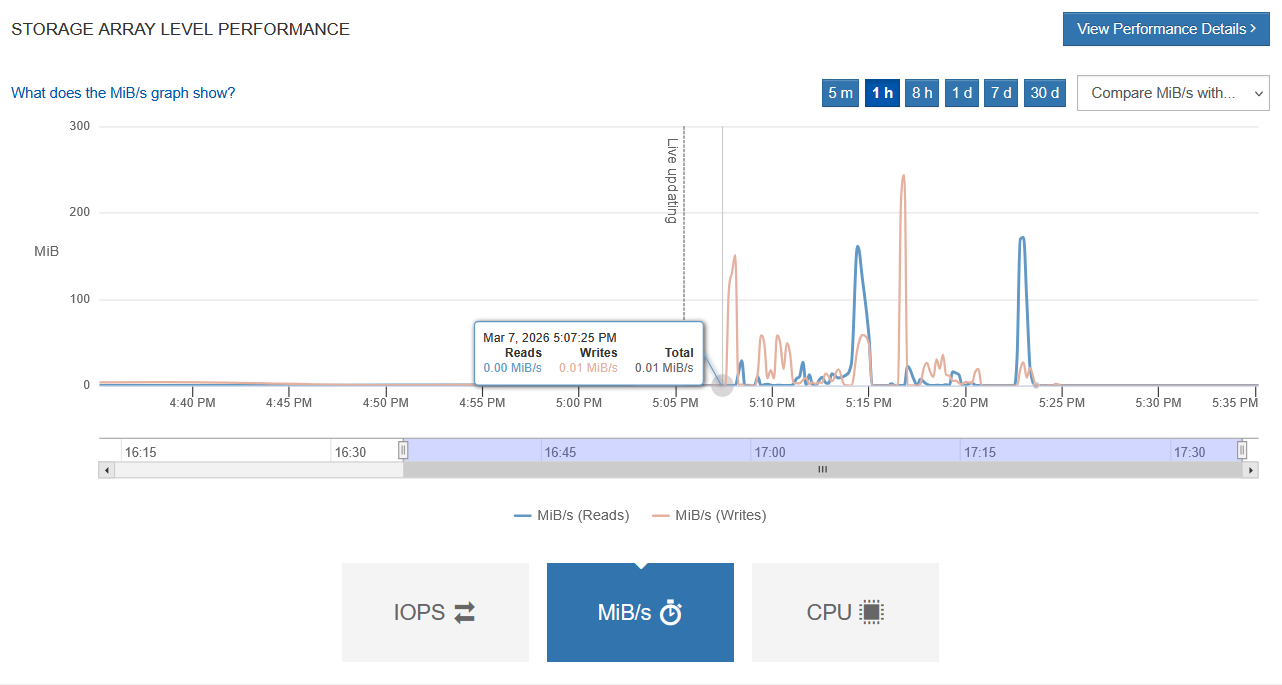
In terms of IOPS, we peaked at 2,500, but it's hard to say where from (the Ubuntu VM or PBS VM). I could have watched PVE and PBS (Zpool/ZFS) stats to see, but I wasn't particularly interested.
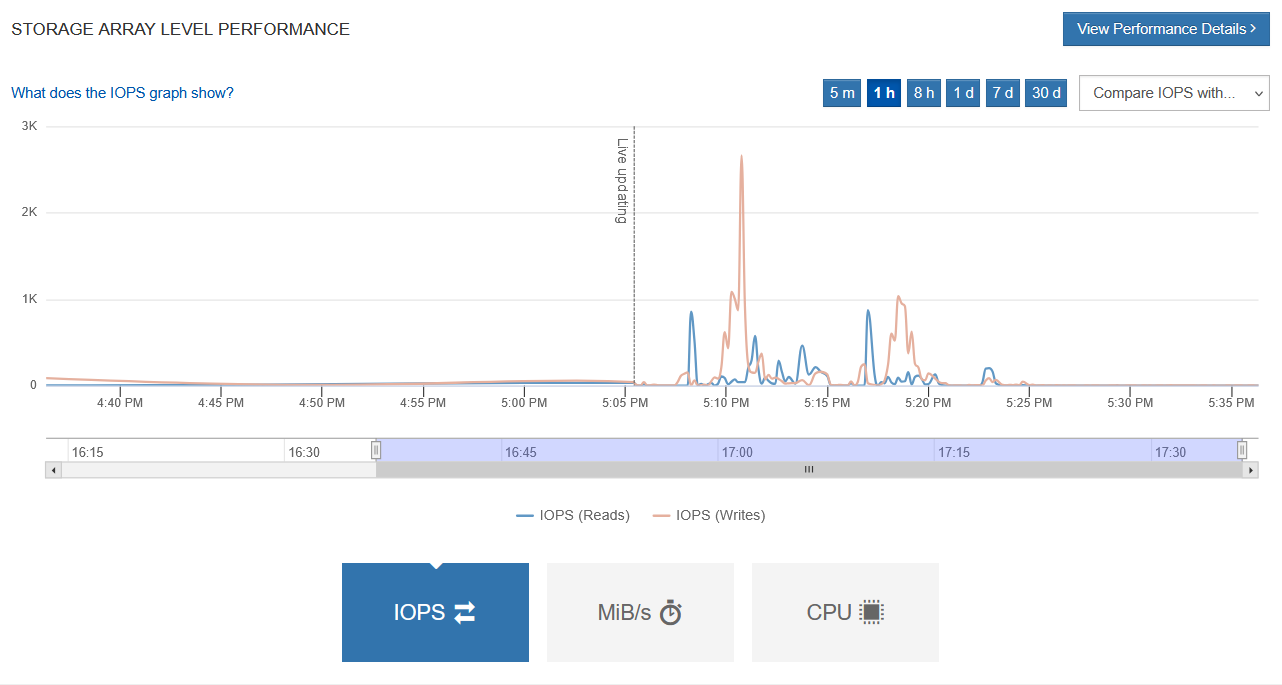
So, did we "stress" this storage box? Not really.
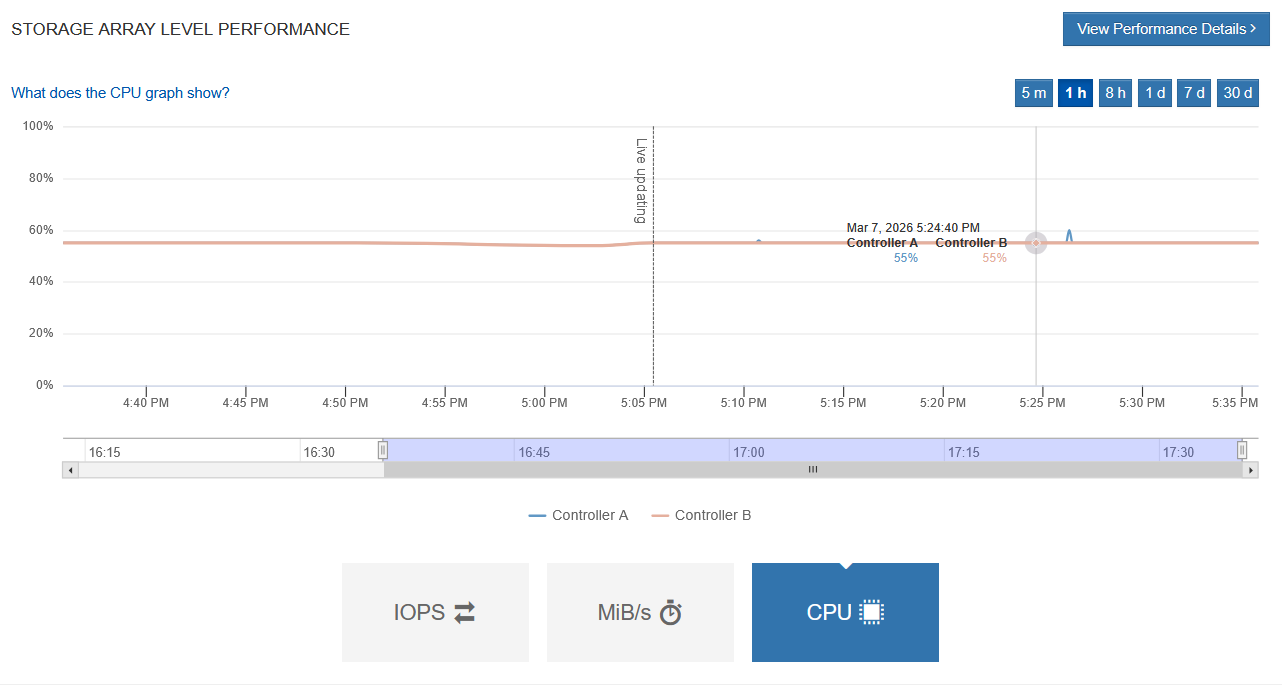
First, these CPU figures don't mean anything, as they're always at that level even when the array is idle. There are two tiny blips where CPU barely blinks.
It'd take multiple PVE servers attached to the same EF600 array and probably dozens of concurrent backups to two or four PBS servers to create contention on storage.
No one with any significant amount of data should use EF600 NVMe pools for PBS backup. A more realistic test would involve DDP based on NL-SAS, which I did not have at my disposal.
At the same time, it's not like anyone has to engage in wild guessing here: we can take a conservative approach and use 128 KiB requests and 90% write to size E-Series DDP NL-SAS pools for PBS. Or we can do another test with separate volumes and watch both the protected workload and PBS performance stats to find out how the latter behaves in terms of request sizes. Let's see about that sizing…
Sizing
Capacity sizing
Capacity sizing is easy because PBS already gives you an idea and sizing isn't E-Series specific. E-Series arrays don't compress or deduplicate, so whatever you need in post-efficiency capacity is how much PBS needs on E-Series in terms of usable capacity.
If you decide to use ZFS-protected Zpools (I wouldn't) on E-Series you can, but that introduces extra overhead for PBS, so remember to account for that.
Example for a single volume Zpool:
- After PBS efficiencies, you need 20TB usable in disk capacity
- On E-Series, create a 24TB (or larger) volume
Example for a multi-disk Zpool with overheads:
- PBS needs 48TB
- After Zpool overheads, PBS needs 52TB on E-Series
- On E-Series, create
Nvolumes ofMTB so thatN*M > 52TBwhereNis the number of disks Zpool requires
It is important to consider capacity growth with Zpools from both ZFS and E-Series side:
- With single-disk Zpools, you may want to grow the partition and, if it gets to a large size like 32TB or 128TB (whatever you deem large), create another volume and another backup store with another single-volume Zpool (or XFS or ext4). Or you can add another volume to the existing Zpool
- E-Series can grow volumes online, but it can't shrink them. E-Series can also add new volumes for PBS. With multi-disk Zpools:
- If you prefer to have exactly the same Zpool sizes and grow Zpool by adding equally sized E-Series volumes to it, you should probably use RAIDZ or concatenated multi-disk Zpools, but remember to keep E-Series volume sizes "right-sized" in terms of capacity because you may get a scenario where your Zpool constituents are 12TB each, you need another, but you have "only" 11TB left on E-Series. So if you go with this approach, you'd have to plan ahead.
- Another approach is to use Zpool to concatenate E-Series volumes of same or different volume sizes. From a Zpool perspective, the pool looks like a multi-disk RAID 0, but in reality, all disks would be protected. The main disadvantage of this approach is that performance may be uneven, but in reality that's unlikely to affect PBS users if you use DDP pools on E-Series. More on that below.
- A crazy, but very exciting opportunity is to use RAID 0 on E-Series. This means you allocate whole individual disks from E-Series as you would with a JBOD, except that write caching and write cache mirroring would work the same way as it usually does. You could even disable write caching and let ZFS control that. You should not disable write cache mirroring with RAID 0, because that would indeed mean you could lose writes to disks (and this isn't RAID 0 specific) in the case of a controller or controller's host side interface failure. In addition to having ZFS in charge, another reason to like this approach is the same array can have other, protected LUNs for XFS, ext4, Btrfs, etc. You get most of "ZPool on JBOD" characteristics without creating storage sprawl.
Here's what I tried on that PBS server:
- Add disk to (PBS) OS from PVE:
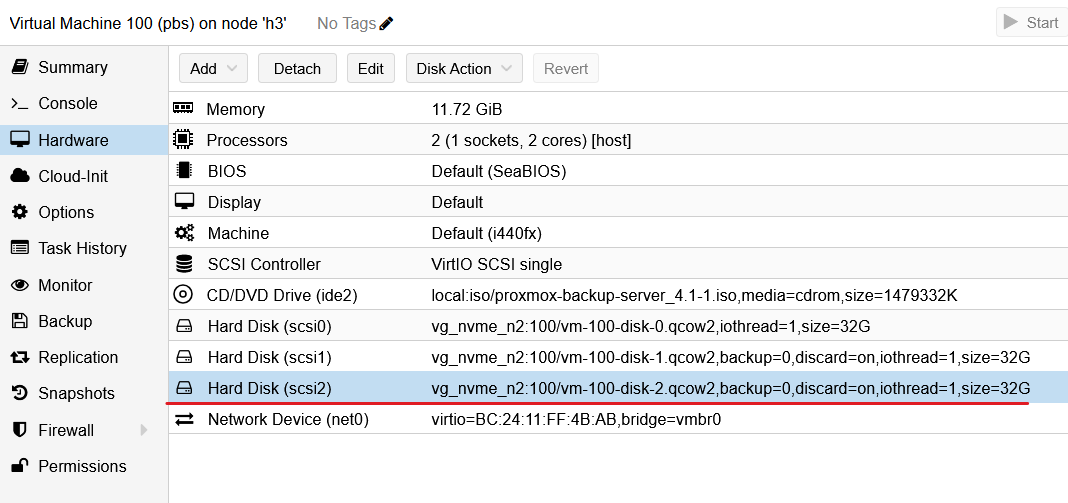
- Grow Zpool with a single command:
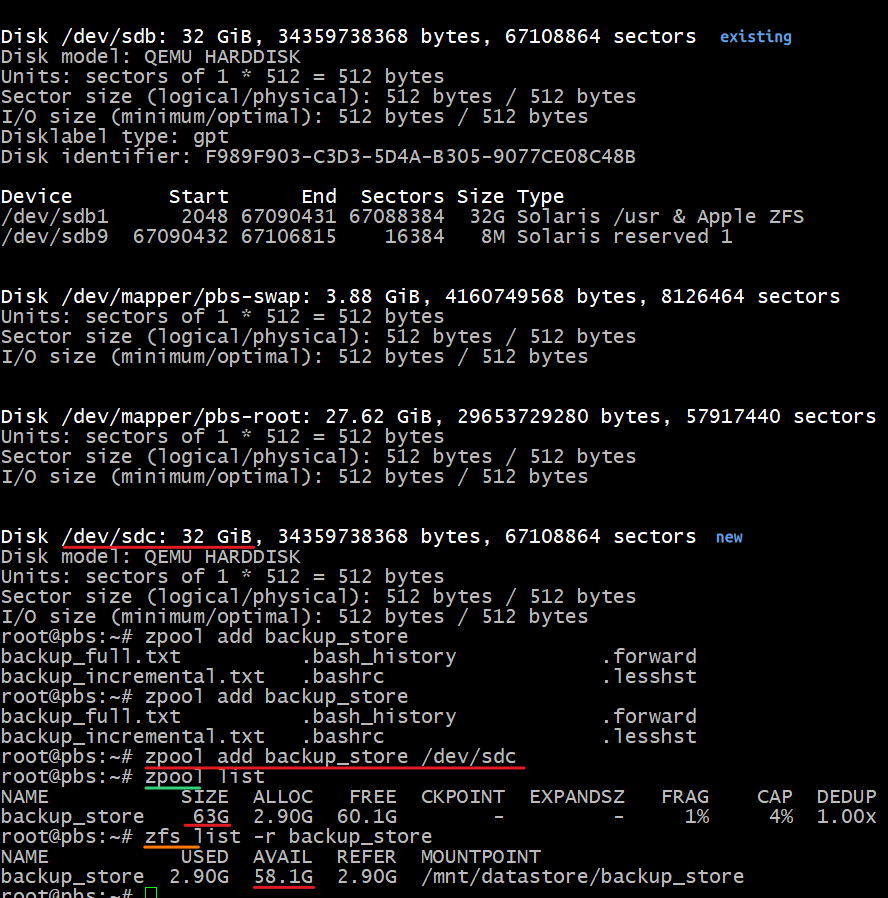
All this was done without rebooting. It literally takes one command to grow a Zpool and ZFS with it.
$ zpool add backup_store /dev/sdc

$ zpool list
NAME           SIZE  ALLOC   FREE  CKPOINT  EXPANDSZ   FRAG    CAP  DEDUP    HEALTH  ALTROOT
backup_store    63G  2.90G  60.1G        -         -     1%     4%  1.00x    ONLINE  -

$ zfs list -r backup_store
NAME           USED  AVAIL  REFER  MOUNTPOINT
backup_store  2.90G  58.1G  2.90G  /mnt/datastore/backup_store
I've also tried online device growth and that worked, too (see Appendix A).
Another thing I tried later was adding the 2nd VM (also Ubuntu 26.04 LTS) and two Ubuntu 24.04 containers. One normally wouldn't backup Kubernetes container images, but LXD containers are a little like VMs, so maybe some people do backup them. The LXD container disks were set to 8GB by PVE and I didn't override that suggestion. But it's interesting that, unlike VMs, logical backup size isn't shown as 8G (see below).
With two Ubuntu 26.04 LTS VMs (3 backups in total) and two Ubuntu 24.04 (two backups), efficiency climbed up to 24x.
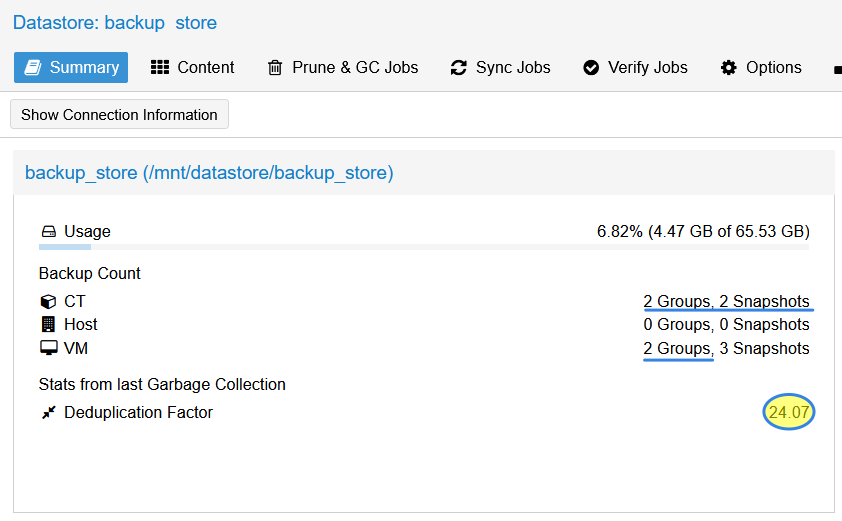
It's an awkward way of calculating efficiency - it's a "marketing math" that doesn't help with capacity sizing, it's confusing, and the figures don't always make complete sense.
These two were captured together after a GC run: 6.34G used, 22.43x efficiency, 129G in the sources' logical disk capacity:
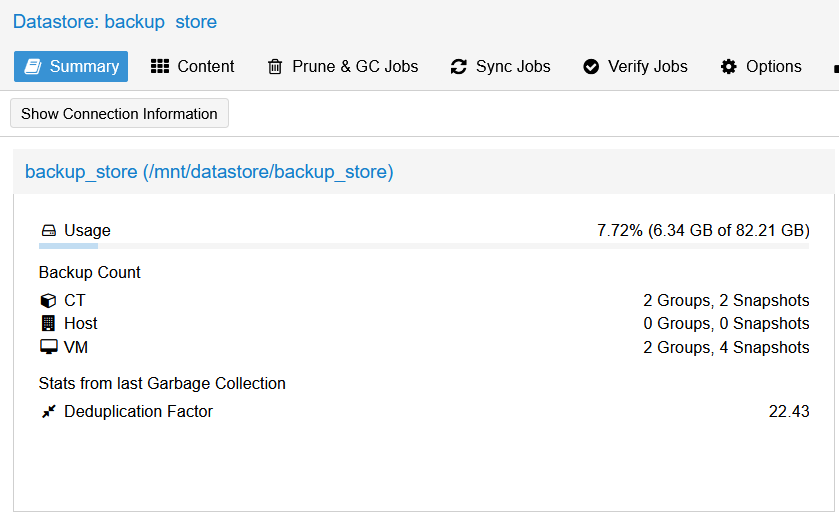
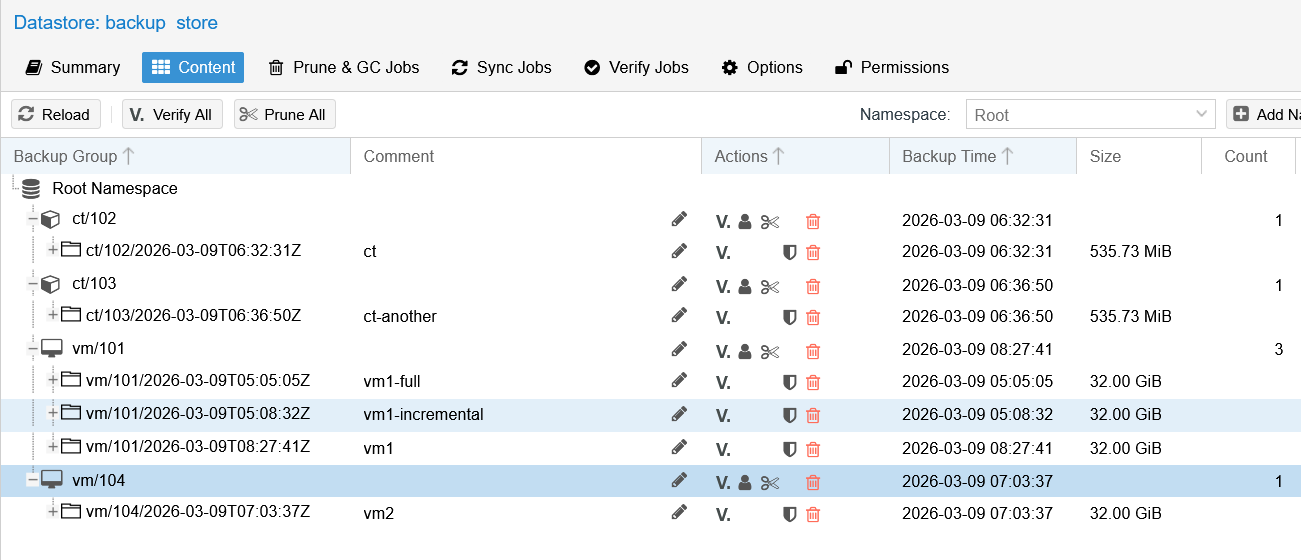
129 divided by 6.34 is 20.34, so I don't know where the 22.43x is coming from.
Performance sizing
On NL-SAS, the number of disks is the key factor. With flash disks, you won't have performance problems.
Whichever array or configuration you fancy, ask for an official sizing estimate from NetApp - that's easy to get from NetApp or their partner. But there's a potentially tricky situation here because those sizing tools currently can't precisely size hybrid configurations. If you're considering a hybrid (mixed SSD and HDD) configuration, ask for:
- One sizing report for the model (or at least same class, e.g. entry level models are currently EF300 and E4000) with just all-flash disks you want to use
- One sizing report or the model using NL-SAS disks (use E4000, as EF models can't be sized for only NL-SAS) you want to use
Example:
- You want EF300 with 11 flash disks for PVE, and an expansion enclosure with NL-SAS for PBS, sufficient for 1GiB/s 90% write using 64KiB requests
- The reason for 11 flash disks is that's a good idea because it's the minimum size for regular DDP pool, which writes in 8+2 (R6 volumes) or 5+5 (R1) stripes with 1 disk worth of reserve capacity reconstruction in case a disk fails, hence needed at least 11 disks
- For the flash portion, you could get a sizing report for EF300 with 11 disks in DDP (for PVE, mostly, so maybe 70/30 read/write, 8KiB request size)
- For the NL-SAS portion, get a sizing report for E4000 of intended disk count, using 90/10 read/write and 64KiB requests to reflect PBS workload. You must remember to indicate RAID level for the storage pool, such sa RAID 5, RAID 1, or RAID 6, DDP.
- Generally recommended is DDP (RAID 6-like, if you use RAID 6 volumes as most people would for PBS)
- If you want to micro-manage (not recommended), you could create different configurations (e.g. multiple disk groups) and grow Zpool in "E-Series disk group" increments that you'd have on E-Series. I do not recommend that - it's coarse, inflexible, confusing and not better in almost any way.
- The crazy option (RAID 0): official sizing tool can't size for RAID 0 and remember that write caching must be disabled, which is another reason any sizing wouldn't apply to your "ZFS + RAID 0 on E-Series" environment. Otherwise one could size "by proxy", using RAID 1 (RAID 10, really) for say 14 disks, and multiply writes by two as RAID 0 wouldn't have the overhead of RAID 10. But even that would include write caching on controllers and wouldn't be correct.
- If you assign a small caching or other flash disk to Zpool on PBS, that may offload some of the hard work from NL-SAS as writes would be "consolidated" and more sequential. Reads for restores are generally sequential and read is an easier workload and will likely be 2x faster than write (due to the fact that it's easier on disks, but also due to the fact that restores are overwhelmingly sequential), so you mostly want to right-size the write workload
Then you just add up performance from the two sizing reports.
That wouldn't be valid if the two sizing reports exceed the performance of a single array for which you size, but you'd have to have a lot of disks for that to happen - and probably would buy two arrays in that situation anyway. How to make sure whether it exceeds or not? Simply compare against the data sheet for the array you're considering.
Example:
- Array XYZ can do 300K 8KiB IOPS (70% random read) or 5GiB/s (70% sequential read)
- Your requirement is 100 VMs x 1000 IOPS (70% random read, 8KiB request size) and 2GiB/s (90% sequential write, 128KiB request size). You do not plan to use any flash capacity for PBS.
- The first workload would consume about 30% of array performance. The second is 90% write, and sequential write is significantly different from 70%. So you look at the data sheet of array XYZ where it says "up to 5GiB/s maximum sequential performance (3GiB/s write)". OK, so 2GiB/s 90% write is roughly around 60% of 3GiB 100% write. Your random would use 30% and your sequential would use 60%. Note, however, that the maximum write figure is achieved with large sequential requests such as 4MiB. The gap between 4MiB and 128KiB is very large, so you could still ask for the 3rd sizing example: 90% sequential write with the same RAID level and write request size you see on PBS host (e.g. 128KiB request size) and the disk count that reflects your requirement.
From what we've seen on DDP (screenshots above, with two E-Series performance charts with a spike around 5:17pm), ~250MB/s and 2,500 IOPS means ~128KiB requests (might correspond to recordsize, plus some small IO from the host and two VMs, causing the average to drop to 100KiB).
With this process, you make a guesstimate that you may get around 1.2 GiB/s 100% sequential write using 128KiB requests.
Then your budget gets cut, and you must cut the number of disks. This shaves off another 300 MiB/s. Now you're down to 0.9 GiB/s and you thought you needed 2.0 GiB/s. What to do?
- Maybe 0.9 GiB/s is enough. Remember the first backup is full, the rest are not.
- With PVE VMs mostly or exclusively located on flash disks, you can likely backup to a NL-SAS DDP-backed backup store all day long at 200 MB/s without any impact on PVE, rather than ensure that backups complete overnight.
- Change NL-SAS sizing to use more smaller disks (from 12 x 24TB to 24 x 12TB, for example) to double your performance at the cost of possibly another disk shelf and more rack space.
- Change Zpool configuration to use larger
recordsize? I wouldn't do that without testing as I'm not sure how that could impact efficiency and performance. Performance should be better, but we could also lose efficiency or some other benefit. - Revisit your assumptions. Look at my own performance charts: the small IO before the big spike was the installation of Ubuntu 26.04 and PBS 4.1. The write spike was the first "full" backup of Ubuntu 26.04 VM or the first restore (note that is aggregate performance of all volumes, including PVE volumes where a "restore" results in writes. The rest (two other backups) barely registered. Maybe we don't need 2GiB/s at all.
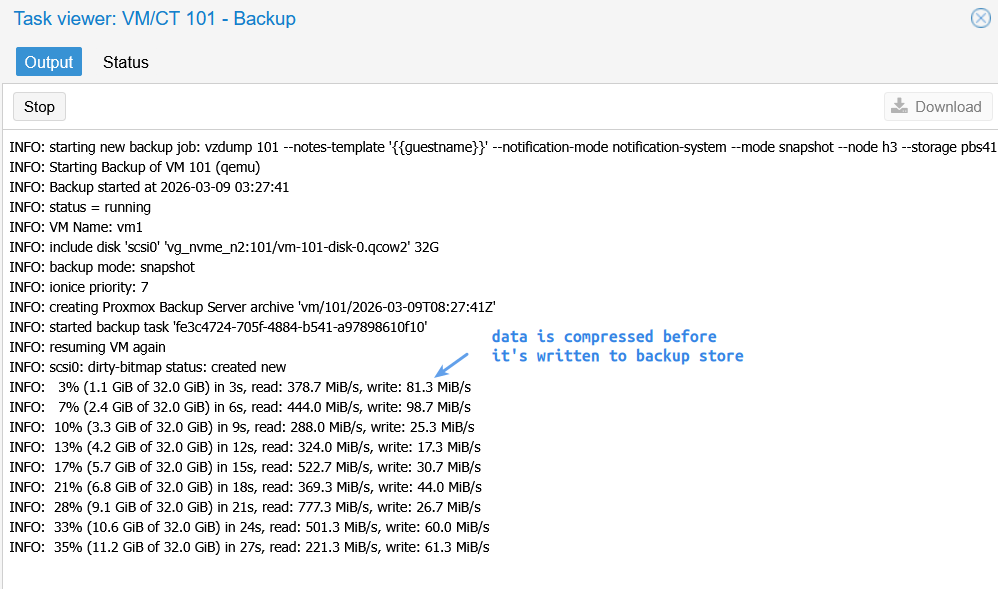
Although I said the objective was to understand PBS and not test performance, I had to take a quick look, and here's what I've found after limited time spent on this. This is the second Ubuntu 26.04 LTS VM backed up for the first time.
At first, nothing happens until PVE does its thing (gets a snapshot, suspends, reads chunks and starts sending them to PBS). Then - as we saw in E-Series performance charts - we get about 200-300 MB/s written to our backup store.
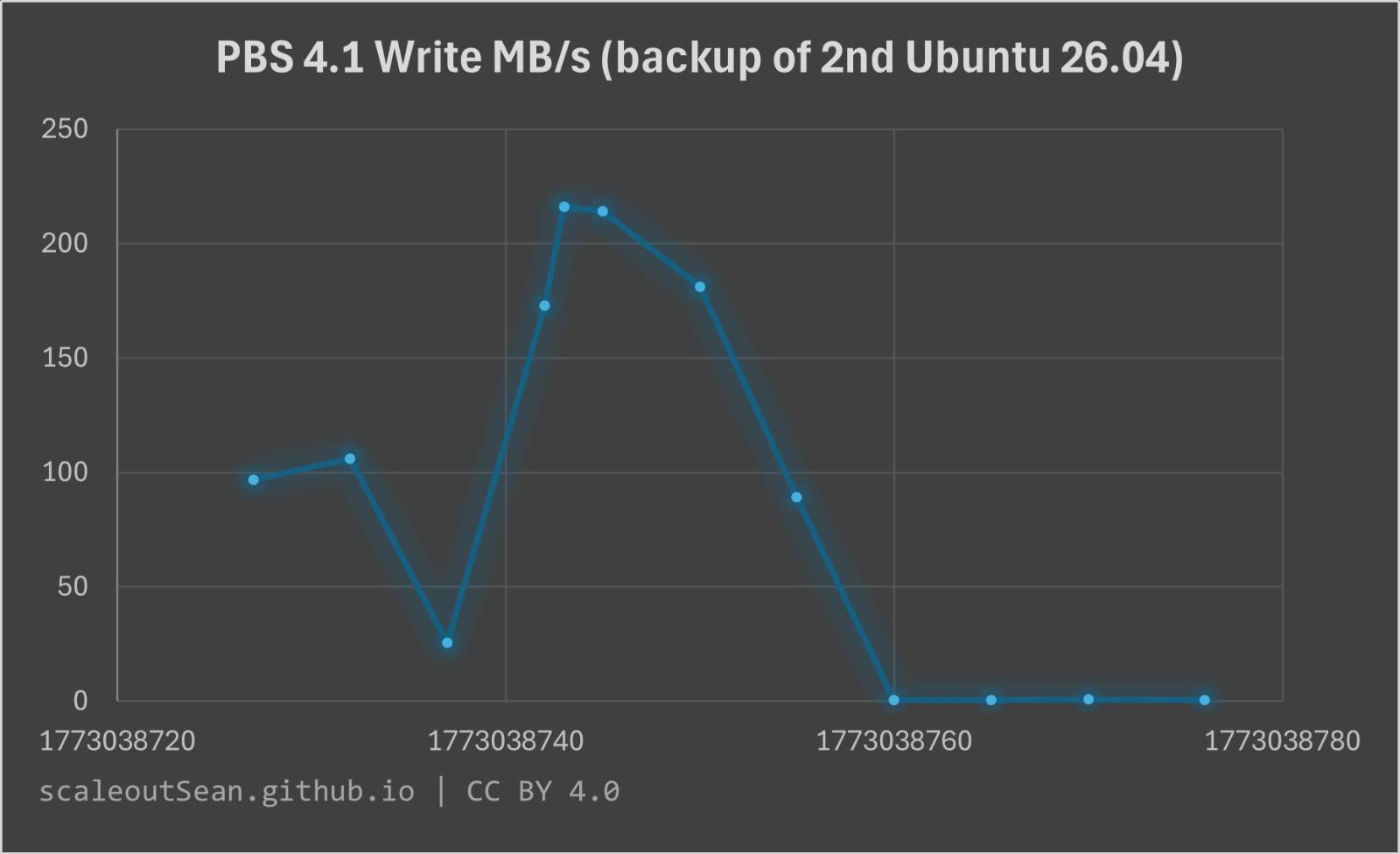
So far, so good. These requests are not tiny, which is great for NL-SAS (which I didn't have in my environment). Towards the end (job metadata, chunk lists?) we have some ew smaller requests, which is expected.
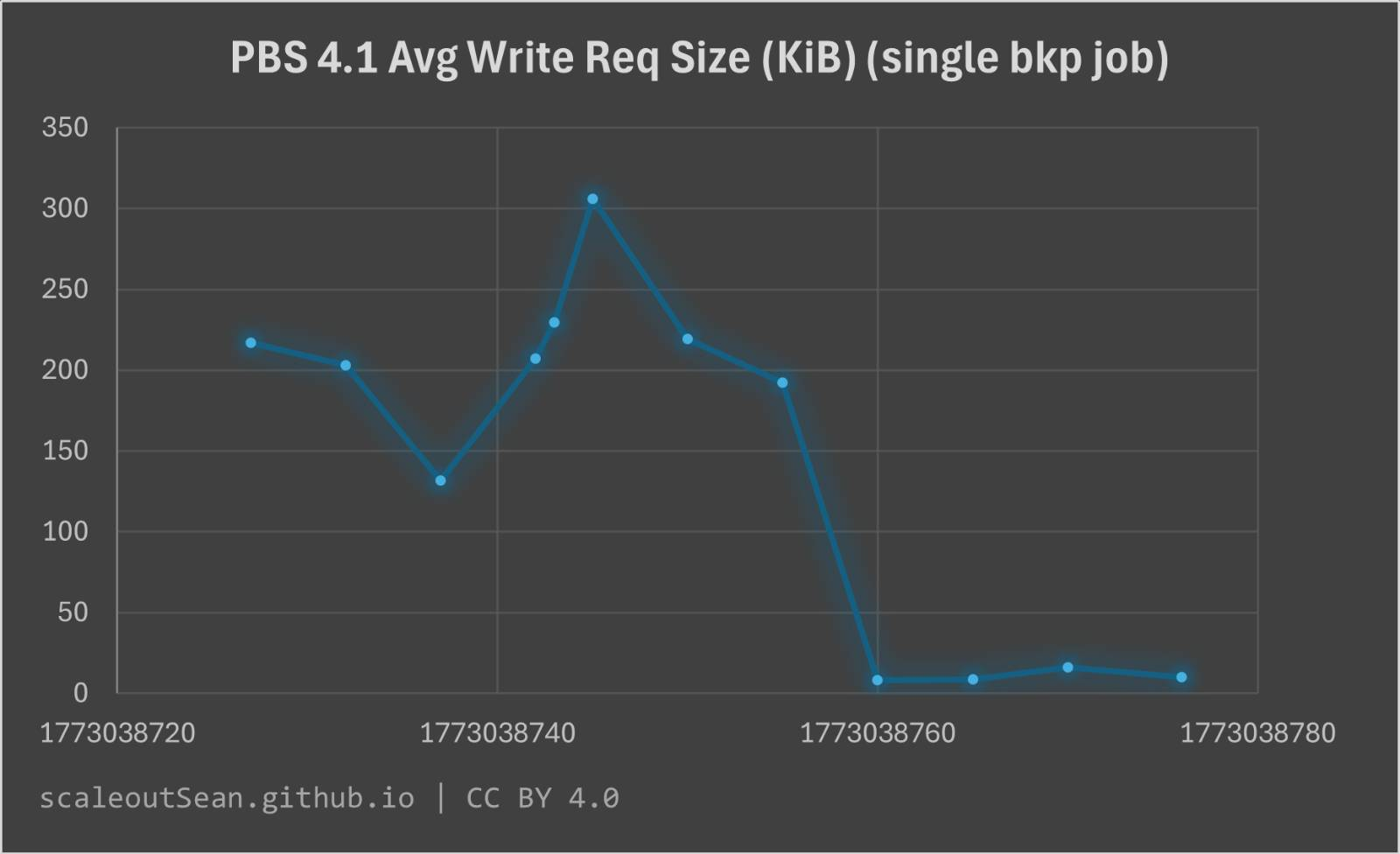
In Appendix A, there's another related screenshot that shows how Zpool nicely balanced requests across both constituent disk devices (as I later added another, to test concatenated Zpool expansion).
Performance-related comments:
- it looks that sizing for write workload can be done with 128K request size
- when it comes to NL-SAS-based backup stores, I'd grow them in larger increments to delay the spraying of requests across different devices. Flash devices could be grown in smaller increments to avoid allocating stranded capacity before it's necessary.
Zpool, ZFS, and E-Series
I've done some testing with ZFS, but not exhaustive or with custom options. I haven't yet evaluated the effect of non-default options, especially in the context of PBS.
This PBS testing was done with default ZFS options as the pool was created from the PBS UI, by the way.
ashift
Since the media PVE where PBS was installed in my PoC above was NVMe SSDs, PBS recognized 4KiB sector size used to create the volume on E-Series and correctly used ashift=12.
So, on non-NVMe models that use native 4KiB sector sizes (NVMe on all current EF arrays behaves this way), this works correctly. You can create volumes with 512e sector size, and then ashift should likely be 9, but why do that? I don't know if volumes with 512e sectors would be recognized (likely yes) or ashift=9 would have to be forced when creating a Zpool. In any case, you probably won't use NVMe disks for PBS (apart from the possible use in ZIL, ARC), and when you do, use the default 4KiB sector size.
Most PBS setups with E-Series would use non-NVMe disks (SAS flash, 10K SAS, 7.2K NL-SAS), which would all be 512n and there we'd set ashift=9.
ZIL, ARC, ZFS, recordsize and more
I haven't experimented with these and furthermore, I'd be careful guessing what non-default settings might be better because it could be more complex than it seems (I'm referring not to E-Series, but to the impact of sources on PBS'es own efficiency with different setups, and the impact on performance and capacity).
So for now, and in general, my approach is to stick with the defaults because I can't see anything wrong in the way PBS works with NVMe (and before with SAS) disks.
Some random details about the backup store Zpool/ZFS, which was created from the UI (i.e. using PBS presets).
Before expansion was done:
$ zpool list
NAME           SIZE  ALLOC   FREE  CKPOINT  EXPANDSZ   FRAG    CAP  DEDUP    HEALTH  ALTROOT
backup_store  31.5G  2.90G  28.6G        -         -     2%     9%  1.00x    ONLINE  -
- Backup data is under
./chunks:
$ du -h /mnt/datastore/backup_store/
...
3.0G    /mnt/datastore/backup_store/.chunks/
3.0G    total
- Individual backup jobs for VMs are under
./vm/{vm_id}and LXD containers are under./ct/{ct_id}. Example for our Ubuntu 26.04 VM:
$ ls -lat  /mnt/datastore/backup_store/vm/101/2026-03-09T05\:08\:32Z/
total 87
drwxr-xr-x 2 backup backup      6 Mar  9 00:08 .
-rw-r--r-- 1 backup backup    547 Mar  9 00:08 client.log.blob
-rw-r--r-- 1 backup backup    409 Mar  9 00:08 index.json.blob
-rw-r--r-- 1 backup backup 266240 Mar  9 00:08 drive-scsi0.img.fidx
-rw-r--r-- 1 backup backup    412 Mar  9 00:08 qemu-server.conf.blob
recordsizeis indeed 128K, as per ZFS defaults. Compression ison, and not much is saved by filesystem compression as backup data is already (pre)compressed. Deduplication is also disabled as it should be (I'm not sure much would be saved, and worse, Backup Server would need lots of RAM to make it work).
$ zfs get all
NAME          PROPERTY              VALUE                        SOURCE
backup_store  type                  filesystem                   -
backup_store  creation              Sat Mar  7  9:41 2026        -
backup_store  used                  2.90G                        -
backup_store  available             27.6G                        -
backup_store  referenced            2.90G                        -
backup_store  compressratio         1.03x                        -
backup_store  mounted               yes                          -
backup_store  quota                 none                         default
backup_store  reservation           none                         default
backup_store  recordsize            128K                         default
backup_store  mountpoint            /mnt/datastore/backup_store  local
backup_store  sharenfs              off                          default
backup_store  checksum              on                           default
backup_store  compression           on                           local

$ zpool get all
NAME          PROPERTY                       VALUE                          SOURCE
backup_store  size                           31.5G                          -
backup_store  capacity                       9%                             -
backup_store  altroot                        -                              default
backup_store  health                         ONLINE                         -
backup_store  guid                           17015060385844344410           -
backup_store  version                        -                              default
backup_store  bootfs                         -                              default
backup_store  delegation                     on                             default
backup_store  autoreplace                    off                            default
backup_store  cachefile                      -                              default
backup_store  failmode                       wait                           default
backup_store  listsnapshots                  off                            default
backup_store  autoexpand                     off                            default
backup_store  dedupratio                     1.00x                          -
As mentioned above, later I overrode autoexpand (default: off) for testing purposes, which worked. (This isn't a recommendation to override or not, just a note that it I used that to grow the pool.)
PBS and PVE storage options
This post is meant to be about PBS, but because E-Series supports hybrid configurations (SSD, HDD), it is completely valid to have both PVE and PBS using to the same E-Series array.
Here are couple of scenarios that can be scaled out as "pods" (N servers + 1 E-Series) or adjusted as you see fit.
Requirements
These are just examples where PBS requirements are important. If you have PVE without PBS, you may want to do it very differently as backup would be taken care of elsewhere and you'd likely need only flash storage.
Example 1: Hybrid PVE and PBS environment with hybrid arrays (E4000, EF300, EF600)
The main idea is to have a NL-SAS storage pool. This can be:
- simple - one 64TB NL-SAS volume presented to a PBS server for single volume Zpool)
- slightly complex - say, ZIL on a RAID 1 volume on all-flash tier, data on a 128TB NL-SAS volume as single disk Zpool)
- elaborate - say, several all-flash volumes (ZIL, ARC, "cache") and one or several NL-SAS volumes (multi-disk, concatenated Zpool)
In the more elaborate scenarios, PVE could use NL-SAS volumes for low-cost VMs (say, a container registry VM).
Something like this is possible, but you'd probably end up being one of 3 people on the planet with the same configuration, which isn't a great idea unless you have dozens of E-Series arrays and are extremely familiar with the entire stack.
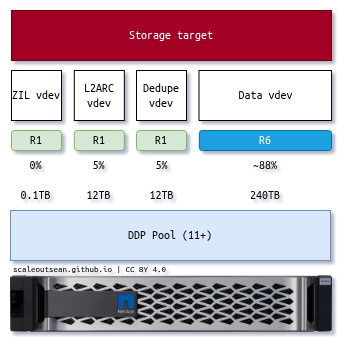
NOTE: ignore the dedupe volume, that doesn't apply here. This image was created for another situation (where ZFS deduplication was evaluated).
While mixing things up lets you do more with less, it also makes it harder to understand what is going on and can result in "do less with more".
For maximum reliability, workload isolation and lowest management cost in an environment that can justify it (e.g. >100TB usable for PBS), I would create a dedicated DDP (20 x 8TiB) for exclusive use by PBS. You could still have other DDP pools in the same E-Series, but their workload would be isolated as would their capacity.
This is how it'd look like in a small (200 VMs) environment:
- 4 bare metal 1U servers with 2 x 10/25G for iSCSI
- 1 for PBS - 11 or more disk in a DDP pool
- 3 for PVE - 6-24 disks (11 or more if DDP)
- EF300 Hybrid with extra iSCSI Host Interface Cards
- If you can get 8 iSCSI ports to PVE and PBS, you don't need any storage switch ports
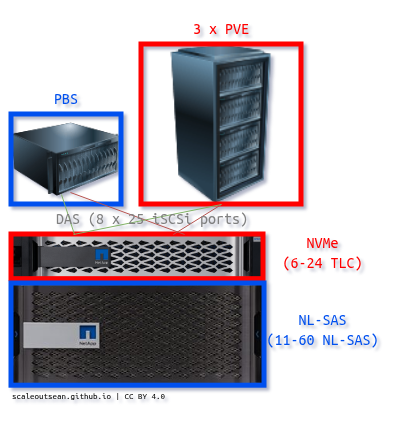
Plan carefully for DAS because you have to end up with the right protocol and port count.
Different E-Series models may support X ports with iSCSI and Y ports with NVMe/RoCE (or X ports when all-flash, and Y ports when hybrid) so it's not hard to make a mistake. The TRs (links at the bottom) are reasonably clear about these, so check them out if in doubt.
Example 2: All-flash for PVE and PBS (TLC on EF600 or EF300, QLC on EF600C or EF300C)
This seems wasteful, but maybe your requirements are minimal and it's more cost effective to keep backups on flash storage than have another shelf with NL-SAS when all you have is 40 VMs?
It would still be advisable to have a separate DDP pool dedicated to PBS. For example, 13 disks in a PVE pool, 11 in a PBS DDP pool. You may remove disks from a pool and assign them to another online, but you can't drop below 11 per. Of course, you can also do 6 (RAID 5, 4+1, plus 1 hot spare) for PVE and DDP for PBS.
A "don't think too much" approach would be to use a single DDP pool for everything, but that makes everything depend on one DDP storage pool, which isn't less reliable from a technical perspective (13 with one disk reserve and 11 with one disk reserve get the same usable, and slightly lower reconstruction performance, than one 24 disk pool with two disks of reserve capacity), but it's less "clean" and can be mitigated by also backing up to S3.
Example 3: Dedicated PBS server and E-Series with NL-SAS
Maybe your production workload uses EF300 (NVMe controller shelf) with one DE212 (12-disk SAS expansion shelf) for PVE.
Now you want a separate "pod" for PBS.
You can get a 1U bare metal server with PBS, use direct attach (2 x 10G) to an E4012 with 12 disks in DDP and have a reliable 3U backup island that can grow in DE212 (shelf) increments and 1 drive (because of DDP) capacity increments.
On PBS, keep it simple and create multiple backup stores (e.g. in 32TB units) made of single volume Zpools.
Example 4: Few large databases on PVE with dump-to-disk and PBS backup
For few, large databases, you may want to do this with every DB (VMs only):
- Step (1): frequently dump DB to a NL-SAS-based disk in the VM
- Step (2): periodically (can be every few hours) backup that DB dump volume to PBS.
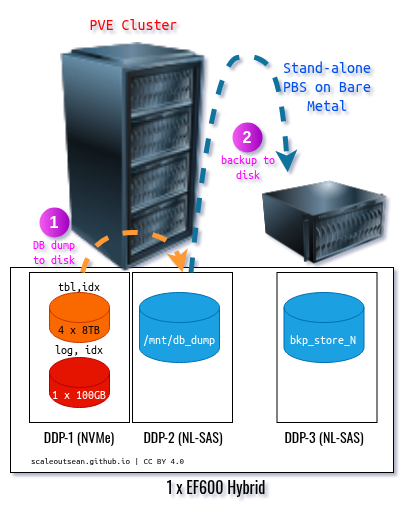
If you run a NOSQL or NUSQL DB where each server dumps its own part of the whole, keep all dump disks on the same DDP pool. As long as your dump and PBS backup job times don't overlap, PBS will back them up just fine. This backup won't bother your DB workload as much, and you won't need to snapshot or suspend your DB either.
All three DDPs can be on a single EF600, unless your databases need millions of IOPS, in which case you may want to use multiple EF600 arrays (e.g. one per rack), something I've blogged about related to Elasticsearch and other database workloads.
How your databases are laid out is a matter of preference and requirements; in the example above I used a DDP on TLC flash because I think that works well:
- Database logs and hot indexes on RAID 1 volumes on DDP
- Database tables and cold indexes on RAID 6 volumes on DDP
- Database dump zone on a RAID 6 volume on DDP
- Limit the VMs' IO on a per-volume volume basis if, for example, you want to keep the dump zone from consuming too much bandwidth
This doesn't impact this general approach: you still dump database to a local disk and use PBS to backup that disk rather than actual VM volumes with database tables, indexes and logs.
If you're interested in this approach, check how to exclude the DB volumes disks from PBS backup (i.e. include only the db_dump disk from each VM).
One potential disadvantage of this approach is that on restore, only db_dump would be restored because only it was backed up. But that's what we want, because we restore backups from db_dump at GB/s speed. Assuming you deploy and configure VMs with templates, there's no reason to backup the OS boot disk either. See some recent examples of PVE-with-EF600 (NVMe/RoCE) performance may be seen in this post.
Example 5: PBS with S3
Options for S3 on E-Series:
- Bare metal or stand-alone PVE host with PBS and SDS S3
- SDS S3 options: any VM supported or tested with PBS
Those may include StorageGRID VMs or StorageGRID SDS on bare metal Linux for larger PBS environments.
I haven't tried PBS with S3 yet, but if both can be used at the same time, you could do that as well:
- Frequent backup to storage pool for faster restore
- Weekly backup to S3 for long term retention and DR
S3 backup stores are candidate for a R1 (on DDP or other) cache volume, which is another use case for hybrid disk arrays (unless you use internal disks, which has its own costs and challenges):
4 GiB to 128 GiB are recommended given that cached datastore contents include also data chunks. Best is to use a dedicated disk, partition or ZFS dataset with quota as local cache.
UPDATE: PBS 4.2 made S3 support official. I have a post about PBS with S3 here.
High availability and disaster recovery for PBS
HA
Backup stores located on block devices on E-Series located cannot be accessed from multiple backup servers, so you'd have to either cluster PBS servers (in own "PBS only" PVE cluster) or use stand-alone PVE servers with replication.
A "PBS only" cluster could use LVM with ext4/XFS shared storage for PBS VM failover.
"Local" replication (two adjacent servers connected to two independent DDP pools on the same E-Series array) could be a low-cost redundant replica for "local HA" as well, although that would consume twice as much usable capacity compared to PBS VMs in a dedicated PVE "backup cluster".
DR
Buy another "pod" as per Example 3 and have PBS copy data to that PBS "pod" on the remote site.
Configure that in PBS UI (Configuration > Remotes) or CLI. TFM has that here.
The remote storage box can be larger, especially with in a ROBO (or hub and spokes) deployment where the hub retains backups longer or is a target for inbound replication coming from several spokes.
Example with a E4012 (12 x 3.5" NL-SAS in the minimum version, >=11 needed for DDP pool) and E4060 (minimum >=20 disks in a deep controller shelf that goes up to 60 x 3.5", and multiple shelves can be added to the same controller). You can mix these on each side, but in a hub and spokes setup spokes would presumably be smaller, and the hub use the large and deep shelf.
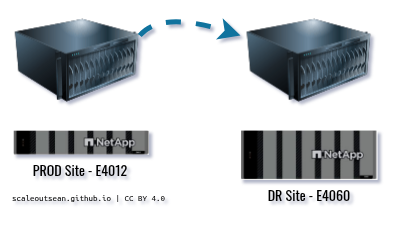
I'd recommend S3 over remote copies, but if you don't have or can't use S3, this will do.
Compatibility and support
As I wrote here, E-Series has removed Debian from the E-Series testing matrix. PBS is also affected, being Debian-based (unless you put it on a Rocky Linux KVM host, which would make that PBS VM supported).
My personal approach is to ignore that because I've no reason whatsoever to believe it matters.
As far as the NetApp E-Series "support" for Debian is concerned:
- you may ask your NetApp sales representative to submit a request for the OS (Debian Trixie) validation with E-Series using the protocol or protocols you intend to use
- you may ask your NetApp sales representative to help you validate PVE with E-Series in a Customer PoC environment
I can't say whether either will work for you, but that's how it can get "fixed" in the case you don't want to simply ignore the noise and go ahead with PBS and E-Series.
Demo
This demo is way to long for my liking (13 minutes), but I backed up and restored a VM three times plus poked around and even after cuts from 29 minutes, it still takes 13 minutes.
If you'd like to see how this environment looks like on the storage side, see the shorter PVE 9 with EF600 demo made last week.
Conclusion
E-Series is suitable for both PBS and PVE and no issues have been observed in testing.
E-Series arrays offer a range of models, protocol (I didn't even talk about FC, which I dislike), shelf, disk sizes, storage pools and RAID options.
But you can do better performance- and data protection-wise if you use PBS with standard volumes on DDP pools and otherwise follow general recommendations from the NetApp documentation for E-Series products, technology and software integration features (because the Veeam and Commvault material is useful from a design, best practices and sizing perspective related to backup).
PBS backups are compressed, so using NL-SAS makes sense as soon as the volume of data can justify adding a 12-disk NL-SAS shelf (or an E4012, which is is that shelf with a pair of E4000 controllers).
For all-NL-SAS pools I'd just go with single volume Zpools or concatenated Zpools on DDP-based RAID 6 volumes. Zpools can be grown in-place online and also use concatenated devices, so E-Series doesn't restrict these features or require changes in how they're used.
PBS works well and much better than the older versions I tried years ago. I'm sure it doesn't have some of the features "enterprise" users are used to seeing in enterprise backup software stacks, but as a Linux user it does most of what I need.
As of early March 2026, my recommended E-Series models and Technical Reports (aka "TRs") for each:
- All-in-one (PVE and PBS storage): EF300 - NVMe, NVMe SSDs in controller shelf, NL-SAS in expansion shelves, entry level performance sufficient for some 200 VMs on NVMe and PBS backup stores on NL-SAS. EF300 is the best for switchless iSCSI.
- Dedicated for PBS (PBS, or PBS with a small amount of PVE): E4000 - NL-SAS-only or hybrid SAS (NL-SAS, SSD SAS). Don't cut corners on spindle count if you have specific performance requirements!
- High performance databases (PVE with backup-to-disk (NVMe-to-NL-SAS) and disk-to-disk backup on PBS): EF600 - if you have up to dozens very high-performance VMs and dump database backups to DDP (NL-SAS), and then use PBS to backup these database dump volumes to PBS backup store on another DDP
If you're interested in backing up non-PVE servers or generic E-Series volumes to a PBS server, see this post.
Appendix A: Zpool expansion
$ zpool status -v
  pool: backup_store
 state: ONLINE
  scan: scrub repaired 0B in 00:00:02 with 0 errors on Sun Mar  8 00:24:03 2026
config:

        NAME          STATE     READ WRITE CKSUM
        backup_store  ONLINE       0     0     0
          sdb         ONLINE       0     0     0
          sdc         ONLINE       0     0     0

errors: No known data errors
Override the default to allow online expansion:
$ zpool set autoexpand=on backup_store
root@pbs:~# zpool list
NAME           SIZE  ALLOC   FREE  CKPOINT  EXPANDSZ   FRAG    CAP  DEDUP    HEALTH  ALTROOT
backup_store    63G  4.16G  58.8G        -         -     1%     6%  1.00x    ONLINE  -

$ zpool get autoexpand
NAME          PROPERTY    VALUE   SOURCE
backup_store  autoexpand  on      local
Let's see the current volume sizes for constituent volumes /dev/sdb, /dev/sdc.
$ fdisk -l
Disk /dev/sda: 32 GiB, 34359738368 bytes, 67108864 sectors
Disk model: QEMU HARDDISK
Units: sectors of 1 * 512 = 512 bytes
Sector size (logical/physical): 512 bytes / 512 bytes
I/O size (minimum/optimal): 512 bytes / 512 bytes
Disklabel type: gpt
Disk identifier: C852B282-00B4-40CC-9821-A72BC1C1502A

Device       Start      End  Sectors  Size Type
/dev/sda1       34     2047     2014 1007K BIOS boot
/dev/sda2     2048  1050623  1048576  512M EFI System
/dev/sda3  1050624 67108830 66058207 31.5G Linux LVM
GPT PMBR size mismatch (67108863 != 83886079) will be corrected by write.
The backup GPT table is not on the end of the device.


Disk /dev/sdb: 40 GiB, 42949672960 bytes, 83886080 sectors
Disk model: QEMU HARDDISK
Units: sectors of 1 * 512 = 512 bytes
Sector size (logical/physical): 512 bytes / 512 bytes
I/O size (minimum/optimal): 512 bytes / 512 bytes
Disklabel type: gpt
Disk identifier: F989F903-C3D3-5D4A-B305-9077CE08C48B

Device        Start      End  Sectors Size Type
/dev/sdb1      2048 67090431 67088384  32G Solaris /usr & Apple ZFS
/dev/sdb9  67090432 67106815    16384   8M Solaris reserved 1


Disk /dev/mapper/pbs-swap: 3.88 GiB, 4160749568 bytes, 8126464 sectors
Units: sectors of 1 * 512 = 512 bytes
Sector size (logical/physical): 512 bytes / 512 bytes
I/O size (minimum/optimal): 512 bytes / 512 bytes


Disk /dev/mapper/pbs-root: 27.62 GiB, 29653729280 bytes, 57917440 sectors
Units: sectors of 1 * 512 = 512 bytes
Sector size (logical/physical): 512 bytes / 512 bytes
I/O size (minimum/optimal): 512 bytes / 512 bytes
GPT PMBR size mismatch (67108863 != 83886079) will be corrected by write.
The backup GPT table is not on the end of the device.


Disk /dev/sdc: 40 GiB, 42949672960 bytes, 83886080 sectors
Disk model: QEMU HARDDISK
Units: sectors of 1 * 512 = 512 bytes
Sector size (logical/physical): 512 bytes / 512 bytes
I/O size (minimum/optimal): 512 bytes / 512 bytes
Disklabel type: gpt
Disk identifier: 814012D8-5B83-884F-A711-33E14DB0E6B4

Device        Start      End  Sectors Size Type
/dev/sdc1      2048 67090431 67088384  32G Solaris /usr & Apple ZFS
/dev/sdc9  67090432 67106815    16384   8M Solaris reserved 1
Now expand the volume(s) online and see if the Zpool grows to 80-ish GB.
$ zpool online -e backup_store /dev/sdb
$ zpool online -e backup_store /dev/sdc

$ zpool list
NAME           SIZE  ALLOC   FREE  CKPOINT  EXPANDSZ   FRAG    CAP  DEDUP    HEALTH  ALTROOT
backup_store    79G  4.16G  74.8G        -         -     1%     5%  1.00x    ONLINE  -
And - related to the earlier two Zpool performance charts - here's how Zpool divides workload between them during a VM backup.
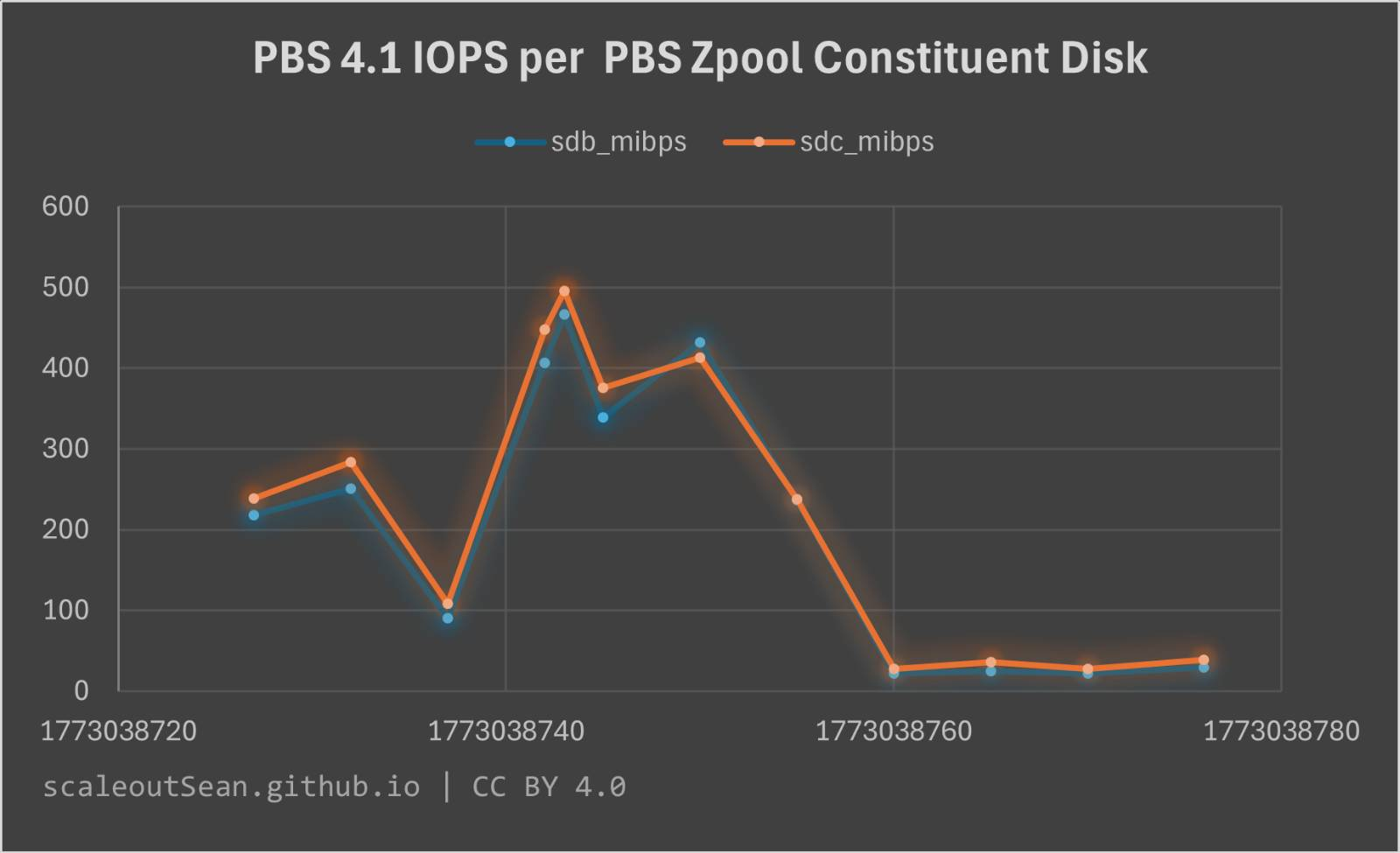
The same can be seen in this output below, which also shows that vCPUs in this PBS VM don't get maxed out by a single backup job. But those CPU resources aren't enough for three jobs, so if you run dozens in parallel, consider CPU resources required for compression or adjust backup to run no more than N jobs in parallel, where N is your number of PBS (v)CPUs, for example.
This is an entire backup run ("incremental" OS backup of an Ubuntu 26.04 VM after 500 new OS packages have been installed).
----system---- ----total-usage---- --dsk/sdb-----dsk/sdc--
     time     |usr sys idl wai stl| read  writ: read  writ
09-03 03:27:29| 14   9  76   0   0|   0     0 :   0     0
09-03 03:27:30|  0   0  99   0   0|   0     0 :   0     0
09-03 03:27:31|  0   0 100   0   0|   0     0 :   0     0
09-03 03:27:32|  8   6  87   0   0|   0     0 :   0     0
09-03 03:27:33|  0   0  99   0   0|   0     0 :   0     0
09-03 03:27:34|  0   0 100   0   0|   0     0 :   0     0
09-03 03:27:35|  1   0  99   0   0|   0     0 :   0     0
09-03 03:27:36|  0   0  99   0   0|   0     0 :   0     0
09-03 03:27:37|  0   1 100   0   1|   0     0 :   0     0
09-03 03:27:38|  9   6  85   0   0|   0     0 :   0     0
09-03 03:27:39|  7   5  89   0   0|   0     0 :   0     0
09-03 03:27:40|  1   0  99   0   0|   0     0 :   0     0
09-03 03:27:41|  4   3  93   0   0|   0     0 :   0     0
09-03 03:27:42| 22  11  65   0   0|   0     0 :   0     0
09-03 03:27:43| 39  24  36   0   0|   0     0 :   0     0
09-03 03:27:44| 17  11  72   0   0|   0     0 :   0     0
09-03 03:27:45|  2   1  96   0   0|   0     0 :   0     0
09-03 03:27:46| 25  27  46   0   0|   0    96M:   0   109M
09-03 03:27:47| 40  23  36   0   0|   0     0 :   0     0
09-03 03:27:48| 42  18  41   0   0|   0     0 :   0     0
09-03 03:27:49|  0   0  99   0   0|   0     0 :   0     0
09-03 03:27:50|  0   0 100   0   0|   0     0 :   0     0
09-03 03:27:51|  1  13  78   6   0|   0    67M:   0    79M
09-03 03:27:52|  1   1  98   0   0|   0     0 :   0     0
09-03 03:27:53|  9   4  86   0   0|   0     0 :   0     0
09-03 03:27:54|  9   5  86   0   0|   0     0 :   0     0
09-03 03:27:55| 19   9  71   0   0|   0     0 :   0     0
09-03 03:27:56|  0   4  93   2   0|   0    14M:   0    16M
09-03 03:27:57| 12   6  82   0   0|   0     0 :   0     0
09-03 03:27:58| 11   5  82   0   0|   0     0 :   0     0
09-03 03:27:59| 24  15  62   0   0|   0     0 :   0     0
09-03 03:28:00|  1   1  96   0   0|   0     0 :   0     0
09-03 03:28:01|  2   3  92   0   0|   0  7271k:   0  9173k
09-03 03:28:02| 15   8  76   2   0|   0    13M:   0    16M
09-03 03:28:03|  0   1  98   0   0|   0     0 :   0     0
09-03 03:28:04| 19   8  73   0   0|   0     0 :   0     0
09-03 03:28:05| 30  11  59   1   0|   0     0 :   0     0
09-03 03:28:06|  9   5  85   0   0|   0     0 :   0     0
09-03 03:28:07|  3   8  87   1   0|   0    35M:   0    40M
09-03 03:28:08| 33  24  42   0   0|   0     0 :   0     0
09-03 03:28:09| 43  34  22   0   0|   0     0 :   0     0
09-03 03:28:10| 40  36  24   0   1|   0    99M:   0   114M
09-03 03:28:11| 32  16  52   0   0|   0     0 :   0     0
09-03 03:28:12| 33  16  48   0   0|   0     0 :   0     0
09-03 03:28:13| 25  26  43   1   0|   0    94M:   0   108M
09-03 03:28:14| 32  16  53   0   0|   0     0 :   0     0
09-03 03:28:15| 38  16  45   0   0|   0     0 :   0     0
09-03 03:28:16| 29  18  51   0   0|   0     0 :   0     0
----system---- ----total-usage---- --dsk/sdb-----dsk/sdc--
     time     |usr sys idl wai stl| read  writ: read  writ
09-03 03:28:17| 39  42  18   0   0|   0    92M:   0   106M
09-03 03:28:18| 36  22  42   0   0|   0     0 :   0     0
09-03 03:28:19| 44  41  13   0   0|   0    83M:   0    96M
09-03 03:28:20| 44  31  25   0   0|   0    13M:   0    16M
09-03 03:28:21| 29  31  39   0   0|   0    70M:   0    80M
09-03 03:28:22| 40  31  28   0   0|   0    28M:   0    33M
09-03 03:28:23| 35  41  24   0   0|   0    99M:   0   114M
09-03 03:28:24| 36  17  47   0   0|   0    56k:   0    88k
09-03 03:28:25|  2   1  95   0   0|   0     0 :   0     0
09-03 03:28:26|  1   0  99   1   0|   0     0 :   0     0
09-03 03:28:27|  0   0  99   0   0|   0     0 :   0     0
09-03 03:28:28|  0   0  99   0   0|   0     0 :   0     0
09-03 03:28:29|  9  13  77   0   0|   0    28M:   0    34M
09-03 03:28:30|  1   0  99   0   0|   0     0 :   0     0
09-03 03:28:31|  0   0 100   0   0|   0     0 :   0     0
09-03 03:28:32|  0   0  99   0   0|   0     0 :   0     0
09-03 03:28:33|  0   0  99   0   0|   0     0 :   0     0
09-03 03:28:34|  0   0  98   0   0|   0   140k:   0   232k
09-03 03:28:35|  1   1  99   0   0|   0     0 :   0     0
09-03 03:28:36|  0   1  99   0   0|   0     0 :   0     0
09-03 03:28:37|  1   0  99   0   0|   0     0 :   0     0
09-03 03:28:38|  6   3  91   0   0|   0     0 :   0     0
09-03 03:28:39|  3   2  92   0   0|   0   152k:   0   256k
09-03 03:28:40|  0   1  99   0   0|   0     0 :   0     0
09-03 03:28:41|  7   5  89   0   0|   0   108k:   0    72k
This backup job as captured from the PVE UI: