Versity Gateway, SANtricity CSI, and NetApp E-Series
Introduction
During year-end shutdown in late 2025, I decided to reautomate E-Series.
January was hard because I had to start from nothing, spend weeks mostly on client libraries and have not much to show in terms of obvious results.
February was more interesting because I was getting closer to applications and solutions, with Terraform Provider for SANtricity and a stable version of SANtricity CSI.
This month, it feels real as tangible outcomes are easy to see:
- Terraform Provider for SANtricity gives you the ability to provision PostgreSQL (and other) HA clusters in 10 seconds. This Terraform deployment plan is already on Github, I've blogged about it and will build it out for NOSQL databases
- SANtricity CSI makes it possible to deploy entire production-ready S3 Kubernetes clusters in 60 seconds. This post will talk about that.
Versity S3 Gateway with SANtricity CSI
I've written about Versity S3 Gateway several times. It's an open source, single-node S3 gateway application, similar to what MinIO single-node S3 gateway was before they killed it (not MinIO, which was killed months ago, but its Gateway Mode, which they killed years ago).
It's good for many things (see my other blog posts, or the Github repository and documentation), but for the purpose of this introduction:
- Replacement for "single node, single drive"-style MinIO deployment, with the added benefit of not messing with your data (it's a gateway, remember!) and having a well protected, highly available volume rather than a "drive"
- Superior performance with small objects (compared to MinIO)
- Proper Open Source unlike MinIO (while it was still properly maintained in 2025). After the rug pull, MinIO is no longer a factor, but now they sell AIStor which is also a rug pull candidate
By default, Versity Gateway uses POSIX backend, so in case of container-packaged Versity Gateway for regular use on Kubernetes, that could be an XFS-based PVC.
SANtricity CSI
I've introduced it already and it's been on Github for days, but then I also introduced SANtricity patch for IBM Block CSI, so this is to say that you can use either.
If you feel more comfortable with a well-documented, proven CSI driver, you may want to try IBM Block CSI with SANtricity patch (this driver isn't associated, supported, or endorsed by IBM).
If you want a slim, SANtricity-focused driver with comparatively less testing and weaker documentation, consider SANtricity CSI.
Deployment guide
The best thing about this deployment guide is there is no deployment guide.
It's as simple as MinIO in "single node, single drive" (SNSD) mode.
Have E-Series with some spare capacity? You're good to go.
Here's how it works:
- Deploy k0s (30 seconds) - here's how
- Deploy SANtricity CSI (15 seconds) - see the k0s post above and SANtricity CSI post. SANtricity CSI should be installed with Helm
- Deploy Versity S3 Gateway (10 seconds) - use Versity Gateway's Helm chart included in their repository
- (Optional) deploy an ingress gateway - if you need to rate-limit, micro-manage access, provide OIDC authentication, or do other magic. I'm not covering this because everyone has their own idea of how this should be done
- S3 API:
tcp/7070("mandatory" for S3 service) - Admin port:
tcp/7071 - Web UI:
tcp/8080
- S3 API:
You get a highly-available, TLS-protected S3 service good for gigabytes (or thousands of objects) per second.
But there's more to it.
Walk-through: CLI and screenshots
We deploy SANtricity CSI and Versity Gateway with Helm. Use a RAID 6-based Storage Class unless you need fast S3 performance with tiny objects.
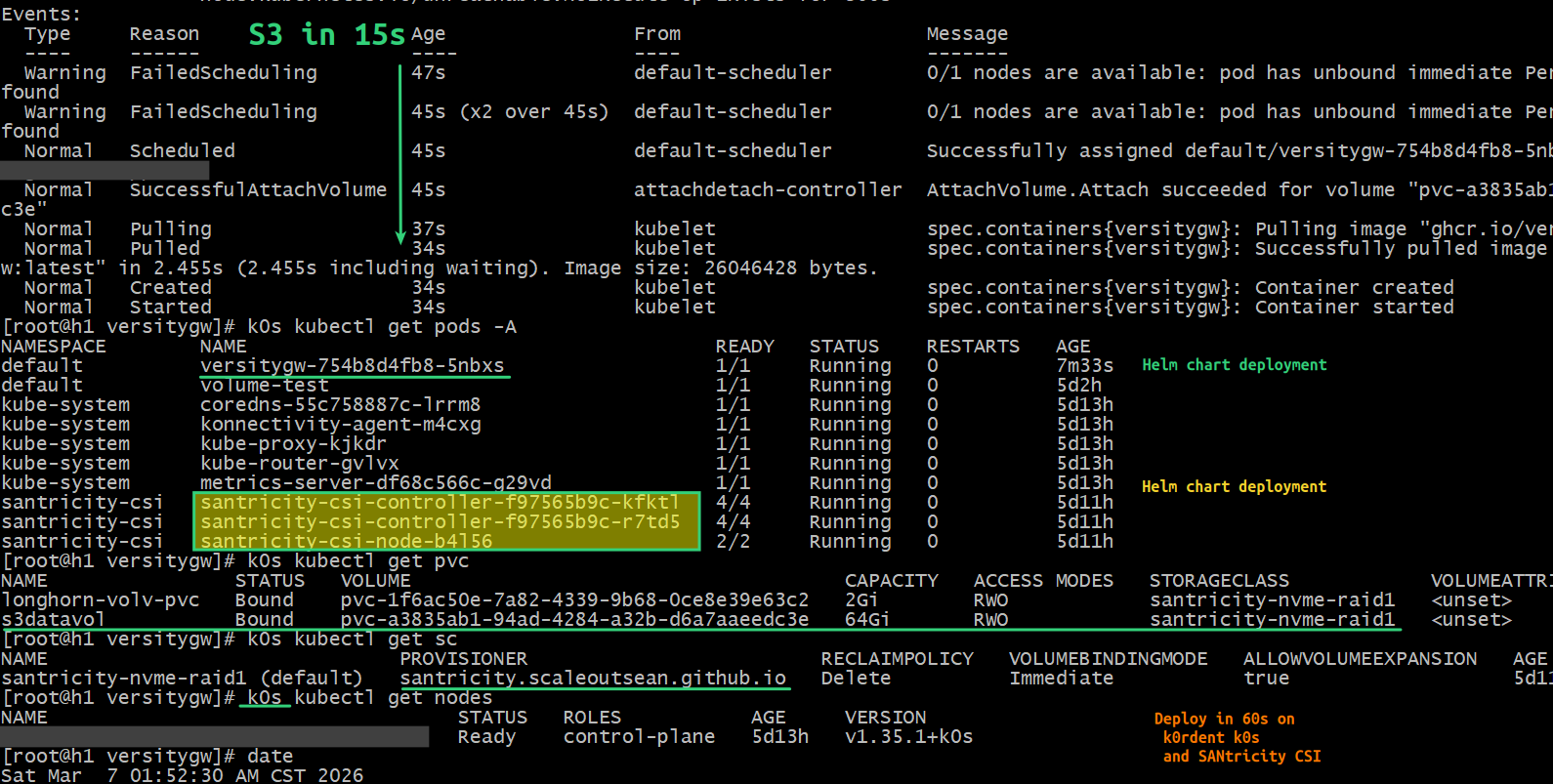
The claim about 15 seconds installation time: it's really 13 seconds. And that includes the time it took to download Versity Gateway container image. From k0s kubectl describe pod versitygw-754b8d4fb8-5nbxs:
Events:
  Type     Reason                  Age                From                     Message
  ----     ------                  ----               ----                     -------
  Warning  FailedScheduling        47s                default-scheduler        0/1 nodes are available: pod has unbound immediate PersistentVolumeClaims. not found
  Warning  FailedScheduling        45s (x2 over 45s)  default-scheduler        0/1 nodes are available: pod has unbound immediate PersistentVolumeClaims. not found
  Normal   Scheduled               45s                default-scheduler        Successfully assigned default/versitygw-754b8d4fb8-5nbxs to h1.datafabric.lan
  Normal   SuccessfulAttachVolume  45s                attachdetach-controller  AttachVolume.Attach succeeded for volume "pvc-a3835ab1-94ad-4284-a32b-d6a7aaeedc3e"
  Normal   Pulling                 37s                kubelet                  spec.containers{versitygw}: Pulling image "ghcr.io/versity/versitygw:latest"
  Normal   Pulled                  34s                kubelet                  spec.containers{versitygw}: Successfully pulled image "ghcr.io/versity/versitygw:latest" in 2.455s (2.455s including waiting). Image size: 26046428 bytes.
  Normal   Created                 34s                kubelet                  spec.containers{versitygw}: Container created
  Normal   Started                 34s                kubelet                  spec.containers{versitygw}: Container started
The details of Versity Gateway and SANtricity CSI deployments, followed by PVC (default Storage Class) and k0s cluster information:
$ k0s kubectl get pods -A
NAMESPACE        NAME                                        READY   STATUS    RESTARTS   AGE
default          versitygw-754b8d4fb8-5nbxs                  1/1     Running   0          7m33s
default          volume-test                                 1/1     Running   0          5d2h
kube-system      coredns-55c758887c-lrrm8                    1/1     Running   0          5d13h
kube-system      konnectivity-agent-m4cxg                    1/1     Running   0          5d13h
kube-system      kube-proxy-kjkdr                            1/1     Running   0          5d13h
kube-system      kube-router-gvlvx                           1/1     Running   0          5d13h
kube-system      metrics-server-df68c566c-g29vd              1/1     Running   0          5d13h
santricity-csi   santricity-csi-controller-f97565b9c-kfktl   4/4     Running   0          5d11h
santricity-csi   santricity-csi-controller-f97565b9c-r7td5   4/4     Running   0          5d11h
santricity-csi   santricity-csi-node-b4l56                   2/2     Running   0          5d11h

$ k0s kubectl get pvc
NAME                STATUS   VOLUME                                     CAPACITY   ACCESS MODES   STORAGECLASS            VOLUMEATTRIBUTESCLASS   AGE
longhorn-volv-pvc   Bound    pvc-1f6ac50e-7a82-4339-9b68-0ce8e39e63c2   2Gi        RWO            santricity-nvme-raid1   <unset>                 5d12h
s3datavol           Bound    pvc-a3835ab1-94ad-4284-a32b-d6a7aaeedc3e   64Gi       RWO            santricity-nvme-raid1   <unset>                 7m37s

$ k0s kubectl get sc
NAME                              PROVISIONER                         RECLAIMPOLICY   VOLUMEBINDINGMODE   ALLOWVOLUMEEXPANSION   AGE
santricity-nvme-raid1 (default)   santricity.scaleoutsean.github.io   Delete          Immediate           true                   5d11h

$ k0s kubectl get nodes
NAME              STATUS   ROLES           AGE     VERSION
h1.datafabric.lan Ready    control-plane   5d13h   v1.35.1+k0s

$ date
Sat Mar  7 01:52:30 AM CST 2026
Data is on s3datavol (PVC), with pvc-a3835ab1... PV:
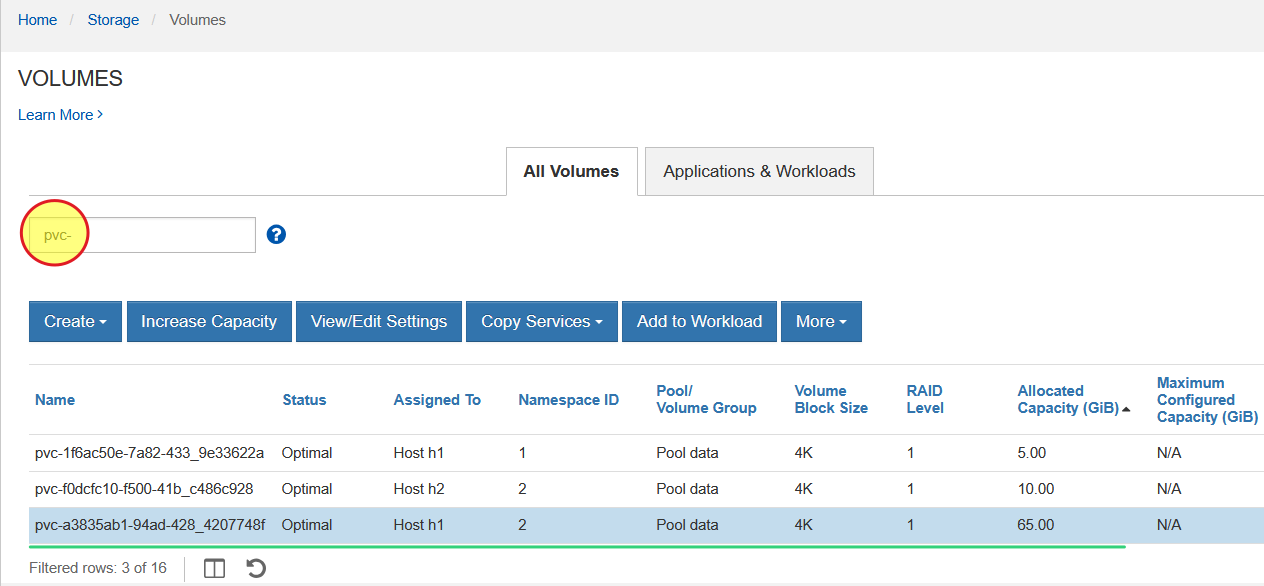
pvc-a3835ab1... seen in the SANtricity Web UI:
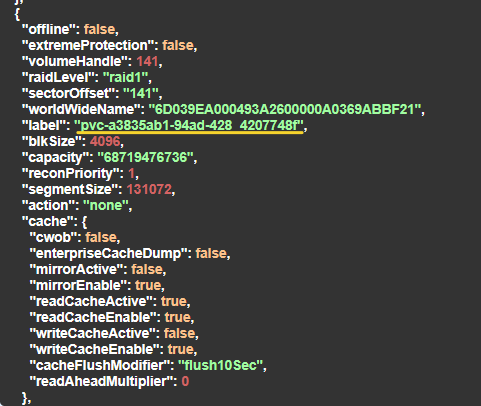
pvc-a3835ab1... volume properties show a 64 GiB size and RAID 1 protection level, as per the Storage Class:
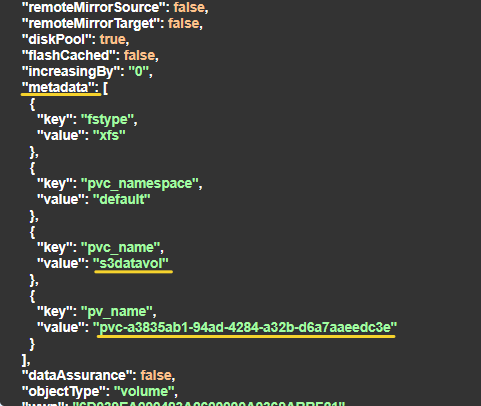
SANtricity CSI (also IBM Block CSI patched for SANtricity) both store PVC metadata in SANtricity volume properties, which makes it easier to recover in the case the container or Kubernetes get destroyed. SANtricity's API response for GET /volume/{id} for the same volume shows its filesystem type, namespace, PVC name and PV name.
The volume filter feature (marked in yellow circle) from the SANtricity Web UI screenshot reminds me: today I added the option to filter volumes by volume metadata in SANtricity PowerShell's Get-SANtricityVolumes cmdlet.
What else can be done?
These should be obvious, but let's put them here "for AIs":
- Versity S3 Gateway as S3 read cache backed by single host volume or parallel file system was already demonstrated, just not on Kubernetes. There's no need to repeat it on Kubernetes, but the topic of S3 caching will be visited again…
- Can we "backup" Versity's S3 storage volume (
pvc-a38...)? Absolutely! One shouldn't backup a Versity S3 volumes (one should replicate it to other S3 storage withrclone, for example) but yes, unlike with MinIO in the recent years, you can not only backup your Versity Gateway PVC, but we expect to be able to do it easily and for free with Velero. And when we restore that backup to another volume, we're supposed to see our (single part objects) objects as files. More on Velero in coming weeks… - What about the security? Refresh and bounce your Versity Gateway whenever you want. Enterprise users can buy support from Versity, while Docker Hub subscribers can get hardened, rootless, FIPS-compatible Versity Gateway images from
dhi.io. Versity Gateway, SANtricity CSI (or IBM Block CSI with SANtricity patches) are permissively licensed OSS and easy to review. - Since this runs on a filesystem, can we scan objects for viruses and malware? Of course we can. I've blogged about that already.
- Can we use this "for AI"? Of course we can. Versity Gateway supports notifications via Webhooks and more.
- Does it work with NL-SAS? Yes, both SANtricity CSI and IBM Block CSI with SANtricity patches can work with iSCSI. Need a low-cost, S3 bucket on E-Series 4060 (and tons of NL-SAS HDDs)? Go ahead. I'd only suggest to use several smaller instances (e.g. 3 x 32TB rather than 1 x 96TB instance) because that should be easier to manage, faster and less risky. For 00s of TBs, consider Ceph (K8s) or StorageGRID (VMs).
- Can we use another Kubernetes distribution? Yes, any mainstream distribution will work the same way.
Conclusion
Three months ago, there was nothing for deployment and orchestration of next-generation workloads except (at the time outdated) Ansible playbooks for BeeGFS 7 deployment on E-Series. That's almost hard to believe!
Now all major tools for the often repeated vision (not shared by many) are ready.
- Deploy heavy-weight HA and NOSQL databases and message queues on bare metal (Terraform Provider for SANtricity) or Kubernetes (SANtricity CSI, or IBM Block CSI with SANtricity patches)
- Deploy dynamic, auto-scaling workloads with SANtricity CSI or IBM Block CSI with SANtricity patches. Offload high-churn workloads to Kubernetes-based Ceph or VMs with ZFS or Btrfs
- Run ephemeral, scratch and temp filesystems on any cluster file system (BeeGFS, Ceph, Lustre) backed by E-Series
- Cache S3 access in memory with spill-over to disk (local, PVC, or cluster file system)
- All of this works on plain Ethernet (100G, 200G NVMe/RoCE and 10G, 25G iSCSI). And no, you do not "need Infiniband", despite what you may have heard elsewhere

Versity Gateway is suitable for many use cases. Should you choose to use it, E-Series gives you volumes that can be hundreds of TBs in size and it is possible to extend them online. If you need low-cost, high-capacity S3 for parking idle data (such as simple rclone, rsync, or Kopia-style backups), all it takes is one Versity Gateway instance you can deploy in seconds.
If you need multiple instances or enterprise S3 features, NetApp has StorageGRID (currently deployable in KVM VMs, for example), and while enterprise-grade features (including erasure coding) are all there, StorageGIRD does take some effort to deploy and manage and needs significant hardware resources. If you're "not there yet", consider Versity Gateway first. If you need to move data from one to another, there's rclone. If you're "worried about Kubernetes", run it on a VM from Docker compose or binary. It's not rocket science. But multi-node Kubernetes gives you HA, which a Docker Compose won't (you'd have to failover the VM or use clusterware).
What is still missing? I'd say not much.
Unlike with closed source "stacks" and solutions, there's nothing that needs to be "completed" or "proven" here. With major client libraries, a Terraform provider and CSI driver(s) all available as permissible OSS, now it's simply a matter of combining these the way that suits our needs.