StorageGRID Branch Buckets and Read Cache
Introduction
This posts talks about two new features in NetApp StorageGRID 12.0: branch buckets and S3 cache.
From what I've seen and heard so far, some seem rather confused by all this and aren't sure what it all means…
Here's what I think it means.
Branch what?
Yeah. That's what they call them. Like Git branches. Of course, stupid me, how did I not tink of that!
There's a page called What is a branch bucket?, but it sadly contains no answer to that question.
So we can only guess. Let us try!
Is a branch bucket a point-in-time clone of a versioning-enabled source bucket's Cassandra table exposed to tenant as an independent, read-only or read-write, bucket?
Perhaps.
Then there's this, from TFM:
A GET object operation on a branch bucket retrieves an object from the branch. If the object doesn't exist in the branch bucket, the object is retrieved from the base bucket.
The Git analogy isn't helping. This isn't "git log --graph --oneline --all" where you have transparent access to and visibility into other branches.
In fact, as a user, your horizon doesn't even extend beyond point-in-time at which your bucket was cloned. As a bucket-cloning admin, maybe you feel like a Git user, but as an S3 user you probably don't. You can get - by way of "reference" - access to an object from the source, but you don't know if the object came from there.
Let's talk about some use cases:
- Create and retain a read-only bucket clone of an old bucket
- Create a read-write clone of a bucket for several teams who may need to make modifications to data before they use it
The maximum number of these clonese per tenant is (MAX_NUMBER_OF_BUCKETS_PER_TENANT - 1) beause we need one base bucket to bootstrap the thing. This means you can have thousands of these things.
The other potentially unexpected thing is you can create them retroactively. What does that mean?
It means you enable Object Versioning and sit tight. Every version gets retained up to whatever limit is available. At some point, but before object versions expire or get rotated out, you may pick a point-in-time and create a clone.
On the one hand, you consume space with every object version.
On the other, that space isn't expensive and you have top-notch granularity for your restore points.
You could, for example, create 3600 clones from the hour in which your bucket fell prey to malware infestation. It's not "zero data loss" but it's "(up to) 1 second data loss" as soon as you identify the last clean bucket and restore all infected files from that time.
S3 Cache
I thought we'd have better luck trying to find a definition or description of this thing, but that's missing, too. After some search, I was able to find about Considerations for load balancer caching (seaching for S3 cache yielded nothing useful):
Enable caching only for workloads that are cacheable
All right, now we're talking! If they only told us how to enable it, that would have been great!
But they didn't so here we are, googling for instructions and screenshots…
Configuration > Load balancer endpoints:
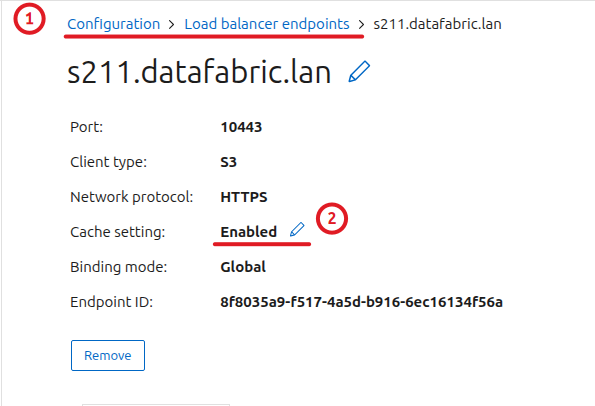
What's cacheable may be a predominantly read workloads such as those we have in AI and analytics. You may also see this on read-only bucket clones.
How to know?
Review audit logs to determine if an existing workload would be a good candidate for caching.
So, another "exercise for the user". We could use SGAC to figure it out, but we need audit logs for that. You can download audit log from Support > Log collection, but that may not be smart if the log is 47 GiB large.
Also, why are they suggesting to edit audit logs when Bucket Cache metrics are readily available (on Admin Node URL, path /d/bucket-cache/bucket-cache)? I'd prefer to use audit logs myself because I know how flakey "official" metrics can be (cough, EPA, cough), but that information isn't actionable or useful. I somehow get the logs, I am looking at them, and I don't understand what a "good candidate" looks like. Now what?
Evaluate a potential cacheable workload by directing it to the cache-enabled endpoint. Monitor and verify the cache hit rate to determine the suitability of the workload for caching.
That's not supposed to be so hard, but while are the details missing? Is a 68% cache hit rate good or not? You'll be relieved to learn there are two metric categories.
- Bucket Cache
- Cache Service
Makes perfect sense.
I guess that's another one we can file under "the initial release".
(Update: I found about this later: it's Cache Service that we need to look at. The Web UI in v12.0 has a confusing interface that lets one enable Cache Service although it can't always run. Cache Service requires dedicated (not shared Admin/Gateway) Gateway Nodes, but the UI in v12.0 doesn't enforce that and lets you "enable" it even if your Gateway is shared, which is what happened to be the case in that screenshot above.)
Bottom line: S3 cache is available and can greatly speed up repeated reads that can be served from multi-tier (that is, RAM and disk) load-balancer cache.
That can be useful for AI and much of analytics, especially when one considers that - unlike on most enterprise arrays - cache can be selectively enabled on a per-bucket basis, such as for a cloned read-only bucket. Great stuff!
This caching has one strong point and that is that access logging, authentication and authorization are all in the same system. You don't lose any of that and don't have to re-implement and cross-reference two systems to audit it.
Does this help us and how?
Oh, yes!
Bucket clones give us sub-second maximum data loss from malware or accidental deletion with practically unlimited ability to recover.
Yes, I've said there's a limit (MAX_BUCKETS - 1) that amounts to several thousand clones, but for the most part you don't have to take any until you need them! That is extremely powerful and that is why you can recover with not 900 or 300 seconds of lost data, but with 1 second or less. (I haven't actually seen the Web UI, so I don't know if PIT date-time picker is so granular, but StorageGRID is extremely meticulous about time, so I expect second-level granularity.)
The main point of this paragraph above is that it makes some workarounds unnecessary. Whereas earlier StorageGRID versions let you access all object versions, you can't examine them in an "all at once at a point-in-time" way. Object Versioning with Bucket Clones makes that possible. That is a big step forward for StorageGRID's data manageability (and this doesn't even have to do anything with AI).
My assessment of StorageGRID S3 caching feature in 12.0 is: it is moderately helpful. There's no automation as I mentioned above, and there's no scale-out in this initial version.
Both of these will be improved, but no matter how it's done, it will remain much slower than filesystems for years to come. It may be the solution for StorageGRID users with 4 SG6160's who needed 15 GB/s of low-latency read performance that they couldn't get before. For others, it may solve just a fraction of their read performance challenges.
So, how IS this supposed to be used?
Like this.

This is a v1 diagram that I may improve on later, but it's enough to explain the idea:
- StorageGRID gives you PB's of
- versioned content with sub-second point-in-time restore
- async replication (Cloud Mirror to any public cloud or another StorageGRID)
- DR (Cross-Grid Replication)
- Business Continuity (A-A-A, or A-A with a "witness" like node at a 3rd site) with the ability to rewind-and-clone any bucket in minutes
- near real-time data pipelines with Webhooks or other supported notifications
- near real-time search and embedding (see examples)
- effortless hybrid cloud readiness
- rack redundancy with 2-Copy or EC
- Use StorageGRID appliances with NL-SAS or QLC disks and enable S3 cache on a StorageGRID load balancer
- With all that, what you need in terms of Tier 1 or Tier 0 storage is little
- Add fast and disposable read-write block layer with BeeGFS. There's a CSI driver and blazingly fast filesystem notifiations (see the two links above)
- Add another level of S3 cache backed by DAS (E-Series or internal)
- If you get fast, protected block storage like E-Series, you can use it for both. If you've been paying attention, you know E-Series can do RAID 10. That's still the fastest protected disk layout one can commonly find. And you can still do RAID 6 in the same disk pool, without micro-managing disk layout
StorageGRID has all data management features one needs.
The only major thing that lacks is the Tier 0 or 1 kind of performance. If you need 50 or 500 GB/s from StorageGRID, it's available but expensive.
But you can get that from E-Series and BeeGFS. I would even recommend a non-managed Tier 1 (or 0) in some cases (e.g. if you prefer RF3 for some workloads). (Edit: as we've heard from NVIDIA in BlueField-4-related news in early 2026, lost KV cache can simply be recomputed, for example.)
In this example there's an ephemeral BeeOND cache on RAID 0 devices and a persistent BeeGFS on protected RAID. Rack, service and storage redundancy exists for data at rest. Persistent BeeGFS (one or more HA server pairs per rack) doesn't have rack resilience, but most of that data is downloaded from S3 and protected there.
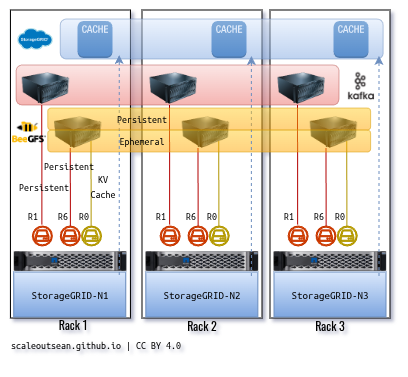
My second related point is we can still make good use of S3 cache - even though it doesn't scale out yet (in 12.0) - by using multiple layers of S3 read cache.
Last weekend I played with a DIY-patched version of the Versity S3 Gateway.
- It's a gateway for POSIX filesystems but also S3
- I can point it to a StorageGRID 12 load balancer with a cached bucket back-end and now instead of loading data to Versity S3 at 2 GB/s, I may populate my cache at 15 GB/s
- Then, if my Versity S3 Gateway cache hit rate is 20%, having 3 such gateways saves up to 60% of StorageGRID's caching throughput
In effect, I can double my performance with this simple approach and read from S3 at 30 or 40 GB/s.
Then I patched the Versity S3 Gateway to overflow RAM cache to disk (LRU-based).
That, with an EF300C back-end, would give me cache that can go up to tens of TBs QLC SSD (whether this disk-based cache is on BeeGFS or XFS or something else - it doesn't matter).
It breaks the traceable access feature, but you can run Versity on loopback interface which effectively means it can't be anyone but the user with own, valid credentials.
If you open this in new tab, you'll see it's running on 127.0.0.1 and cache hits reduce access time. For RAM-based cache hits I've seen sub-ms, for (local SSD) disk just a bit higher.

There are other ways (and out-of-box solutions including Vinyl or some of the newer open-source alternatives) to put this together but one thing is common: data is persisted (written) to S3. (See an AI/analytics focused approach in the Kompromise post here.)
The second, BeeGFS-related example for that, is BeeOND. In short, it's a way to stand-up disposable cluster filesystems for your users' high-throughput computing needs. I wrote about it here.
I have a video demo of it somewhere on this blog: it literally takes 30 seconds to create one. Unlike Versity S3 Gateway operating in read-only mode, these are by default read-write, so one thing to remember is add an "upload to S3" step to your jobs.
And BeeOND can extend to GPU nodes as Tier 0 cache.
You have no Tier 1 to maintain, no filesystems to backup or manage. There's no "Infiniband" either. One thing you don't get with BeeGFS is snapshots, but most workloads can checkpoint to S3. Just hammer the same object and use Object Versions to recover. Most applications manage this on their own.
Conclusion
That's how bucket clones and S3 cache should be leveraged in many cases by StorageGRID users. Not by creating ever more complicated "stacks".
These days we have an abundance of quality, high-performing OSS building blocks at our disposal - for example BeeGFS/BeeOND and Versity S3 Gateway.
StorageGRID 12 is very complete in terms of data management features. If your S3 requirements are significant, maybe you don't need anything else for your AI and analytics data management.
In some scenarios it can benefit from an additional boost in performance that is simple, inexpensive and doesn't create multiple data management locations.