Kompromise - control plane for S3 data pipelines with NetApp StorageGRID/E-Series and Versity S3 Gateway
Introduction
It's been almost a year since S3 GO NATS! demonstrated a rigid, centrally-administered pipeline for near real-time generation of vector embeddings for StorageGRID.
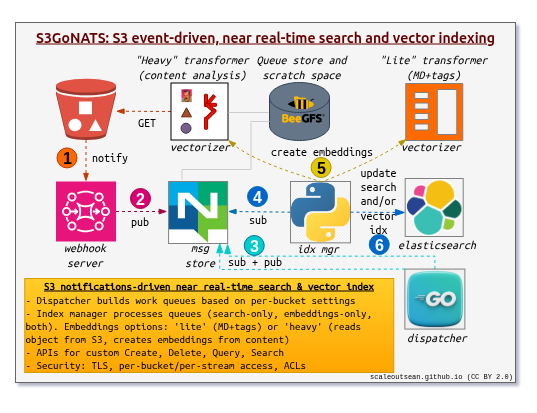
For at least nine months I've been thinking about improving on that approach, but a lot had be done for E-Series which had literally nothing as recently as last December. Most of that is now available and "good enough", so lately I have been playing with StorageGRID again.
Kompromise
Kompromise is a new personal project that's supposed to improve on S3 GO NATS! What's different?
| Property | S3 GO NATS! | Kompromise | Comment |
|---|---|---|---|
| Environment | Docker Compose | Kubernetes | Scale-out, secrets management, etc. |
| Management | Centralized | Semi-centralized | Self-service configuration in Kompromise |
| Pipeline | Fixed | Generic | Various pipelines are possible |
| Storage integration | None | SANtricity CSI | No hard dependency, just optimized for E-Series |
| Multi-tenancy | Weak | Moderate | Improved multi-tenancy |
| Scaling | Manual beyond single node | Full scale-out | Potentially thousands of events per second possible |
S3 GO NATS! was a single Docker Compose stack with 10 or so containers. It was hard to scale beyond a single node, especially Elasticsearch, but also everything else in the stack.
Because it was all one big Docker Compose, it was hard to add or remove services.
One admin managed everything for everyone, which had its benefits, but it was 100% centralized and every change required an admin-assisted or admin-involved activity.
Due to the lack of Docker plugin for storage on E-Series, it wasn't possible to easily consume E-Series capacity.
Kompromise-enabled S3 pipelines
There's no specific list of "target" pipelines. I just do stuff that I think needs more awareness or help.
- Vector embeddings is included because I already know it and there's still nothing official from StorageGRID
- High-performance S3 cache is included because this is distinct enough from S3 cache included in SG, which is a product you need to buy and very enterprise-y in its approach
High-performance S3 cache
The first Kompromise showcase is an S3 caching pipeline which I got working just yesterday. This is for the SG users who want fast, rather than "compliant", S3 caching service.
This is the basic idea: maybe your StorageGRID can do 5 GiB/s, but you need 15 GiB/s.
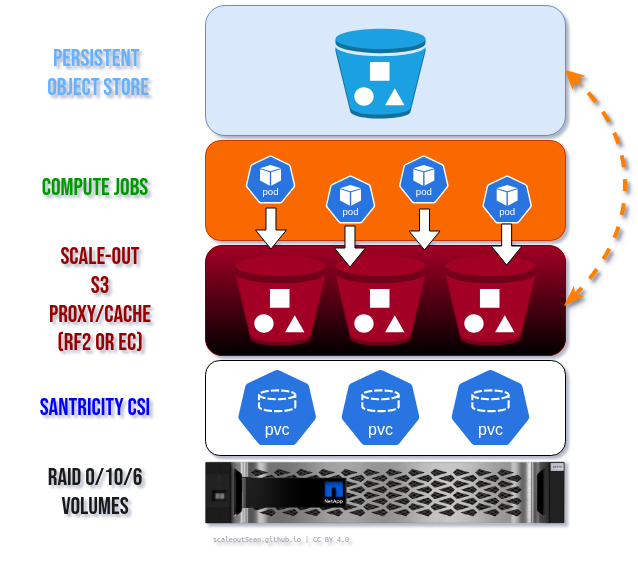
We don't have to do much to make this happen, because most of these things are off-the-shelf (software) components.
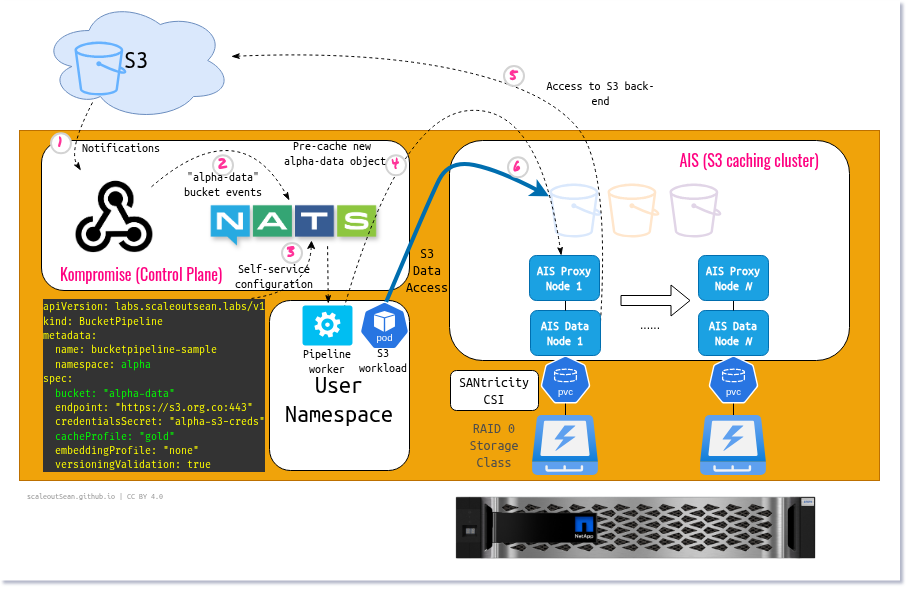
It works the same way as S3 GO NATS!, really:
- Backend: StorageGRID or Versity S3 Gateway already in place, with notifications sent to Kompromise
- Kompromise admin runs Webhook service, NATS cluster and AIS cluster
- Webhook service receives notifications from S3, and user-defined worker sends configuration commands to AIS
- NATS and AIS use SANtricity CSI for scale-out and highest performance
While there's no hardware or software dependency on StorageGRID or E-Series, development focuses on optimal and correct functioning with these two as well as Versity S3 Gateway (backed by E-Series), which is useful in many cases where StorageGRID is too big.
As we've mentioned, StorageGRID tenant admin configures Webhook notifications for the alpha-data bucket.
The same tenant configures bucket pipeline from their Kubernetes namespace.
apiVersion: labs.scaleoutsean.labs/v1
kind: BucketPipeline
metadata:
  name: bucketpipeline-sample
  namespace: alpha
spec:
  bucket: "alpha-data"
  endpoint: "https://s3.org.co:10443"
  credentialsSecret: "alpha-s3-creds"
  cacheProfile: "gold"
  embeddingProfile: "none"
  versioningValidation: true
Now Webhook service starts watching for notifications matching the configured Webhook endpoint (early prototype for VGW sources used /events/default/<bucket-name>, which may change later).
[GIN] 2026/06/26 - 14:24:11 | 200 | 207.328µs |       127.0.0.1 | POST     "/events/default/alpha-data"
[GIN] 2026/06/26 - 14:24:22 | 200 | 106.909µs |       127.0.0.1 | POST     "/events/default/alpha-data"
2026/06/26 14:24:22 Successfully published 1 event for alpha/alpha-data to subject s3.events.alpha.alpha-data
User's own pipeline worker spots items in its message queue and reacts by sending tasks to AIS.
2026/06/26 14:24:11 Received event s3:ObjectCreated:Put for key ddp-r6-data-r1-log-r1-idx-all-ddp-PGIO.svg
2026/06/26 14:24:11 T-Shirt Profile 'gold' triggered Prefetch for ddp-r6-data-r1-log-r1-idx-all-ddp-PGIO.svg
2026/06/26 14:24:11 -> Executing AIStore Prefetch for ais://vgw-alpha-data/ddp-r6-data-r1-log-r1-idx-all-ddp-PGIO.svg
2026/06/26 14:24:11 Prefetch successful: prefetch-objects[s7-g96mnf]: [ddp-r6-data-r1-log-r1-idx-all-ddp-PGIO.svg] prefetch from ais://vgw-alpha-data. To monitor the progress, run 'ais show job s7-g96mnf'
Now AIS cache prefetches this object from StorageGRID. The log already said prefetch was successful (1 MiB object), but for large objects or when there's a big queue (if we get 500 notifications for new 1 GiB objects at once), I may need to check status if want my job to run with fully cached data.
$ kubectl exec bucketpipeline-sample-worker-5cccb76586-f9457 -- ais show job  Vwgcl6mnC
prefetch-objects[Vwgcl6mnC] (ctl:
  t[naafAZOu]: cfg(list:[ddp_r1_all.png]) lifetime:[cold:(2,1.30MiB avg-lat:9ms)]
  parallelism: w[1]
)
NODE		 ID		 KIND			 BUCKET			 OBJECTS	 BYTES	 START		 END		 STATE
naafAZOu	 Vwgcl6mnC	 prefetch-listrange	 ais://alpha-data	 -		 -	 14:22:28	 14:22:28	 Finished
To emphasize: it's not mandatory to wait or check anything.
AIS can fetch missing object data or metadata on its own as your requests come in. You'd want to wait only if you wanted to kick off your job and find all data you need fully cached.
My cache bucket in AIS: alpha-data, of AWS S3-compatible kind.
$ ais show bucket ais://alpha-data
PROPERTY				 VALUE
access					 GET,HEAD-OBJECT,PUT,APPEND,DELETE-OBJECT,MOVE-OBJECT,PROMOTE,UPDATE-OBJECT,HEAD-BUCKET,LIST-OBJECTS,PATCH,SET-BUCKET-ACL,LIST-BUCKETS,SHOW-CLUSTER,CREATE-BUCKET,DESTROY-BUCKET,MOVE-BUCKET,ADMIN
backend_bck.name			 alpha-data
backend_bck.provider			 aws
checksum.enable_read_range		 false
checksum.type				 xxhash2
checksum.validate_cold_get		 false
checksum.validate_obj_move		 false
checksum.validate_warm_get		 false
chunks.checkpoint_every			 0
chunks.chunk_size			 1GiB
chunks.flags				 0
chunks.max_monolithic_size		 1TiB
chunks.objsize_limit			 0B (auto-chunking disabled)
created					 2026-06-26T21:46:27+08:00
...
I can now S3 GET large objects or list hundreds of small objects in no time.
$ ais bucket ls ais://alpha-data
NAME						 SIZE
ddp-r6-data-r1-log-r1-idx-all-ddp-PGIO.svg	 1.09MiB
ddp_r1_all.png					 211.44KiB

$ time ais object get ais://alpha-data/ddp_r1_all.png .
GET ddp_r1_all.png from ais://alpha-data as ddp_r1_all.png (211.44KiB)

real	0m0.036s
user	0m0.016s
sys	0m0.028s
Small screenshot from yesterday's successful runs:

Currently only one service level works ("Gold", which prefetches entire objects), but few different ones will be added for more flexibility.
cacheProfile: "silver", added later, just gets target properties.
14:58:33 | vgw | 200 | 523.118µs | 192.168.39.103 | GET | /vgw-alpha-data | - | list-type=2&max-keys=10000&prefix=demo.tar
This is the equivalent of doing an ls on the object - cache "lite".
$ ais ls ais://vgw-alpha-data/demo.tar -props all
NAME		 SIZE		 CHECKSUM	 ATIME	 VERSION	 COPIES	 CUSTOM						 LOCATION	 CHUNKED	 STATUS
demo.tar	 89.47MiB	 		 	 		 0	 [ETag: LastModified:2026-06-29T07:02:40Z]	 		  n/a
Vector embeddings
This is what S3 GO NATS! had as the only use case and will be added as well.
The way this worked in S3 GO NATS! was one could create "light" or "heavy" vector embeddings:
- Light: just vectorize object tags (any): this required just doing a
HEADon the object to get metadata and tags and we could create these in CPU - Heavy: vectorize object contents (images); this required reading the image like AIS caching does now, and using a GPU-based worker
embeddingProfile setting in Kompromise user config will work the same way (see screenshots in the old S3 GO NATS! post). Compared to S3 GO NATS! here it will be more flexible, but I need to improve the workflow to handle non-trivial use cases.
For example, I can create a vector embedding for an image. But I can't create one vector embedding for a movie. That may be 10s of thousands of embeddings. Do I want to be able to create embeddings for a movie, where 50 thousands? Maybe I do, but maybe I don't. Why?
- There are stacks (from NVIDIA and others) that already do that, so why reinvent the wheel? They still need data to be piped to them, and Kompromise can do that. But maybe I don't need to store those in Elasticsearch if they can store it in whatever database they use
- I don't need to be able to handle full-length 4K movies, but being able to create embeddings for a 2s animated GIF would showcase the concept works with non-trivial formats and I'd like to demonstrate this with Qdrant, which has been demonstrated with E-Series, as well as Elasticsearch
One of my wish-list items for this pipeline is to also cover vectorization of versioned objects.
Storage services
Do you need enterprise storage for cache and NATS? Some people prefer, some don't like. If you like to offload NATS (or Kafka) needs better reliability than AIS - and maybe multiple racks for redundancy - but in some cases you may want protected storage for both.
SANtricity CSI isn't the only CSI you can use here. Since both NATS and AIS can use stand-alone disks that don't need HA, you can also use TopoLVM (even when Elasticsearch is used instead of AIS, in vector embeddings use case - see this post on ECK).
What you don't want for either is RAID 6 or an inability to tolerate rack failures in an environment where many services depend on NATS or Kafka. Even if you operate these services by yourself, that doesn't change the nature of the problem.
Conclusion
Kompromise performs configuration steps that all can be performed manually. It doesn't need to do anything special, or help you do what you can't do on your own. All components are OSS (NATS, AIS, Elasticsearch) and work anywhere.
Kompromise simply aims to demonstrate how StorageGRID and E-Series easily, correctly and optimally fit in these pipelines even though you may not get that impression by seeing there's nothing on them on the NetApp Web site.
No "solution" needs to be created, it all already exists and works. That screenshot created last year, with SG and EF600, NATS/Kafka, BeeOND, and an S3 caching layer - it's all been proven by now.

Kompromise will be refined to demonstrate multiple types of S3 caching and vector embedding pipelines.
As for core services - NATS, AIS, Elasticsearch:
- NATS with E-Series was covered the other day. Unlike in that post, Webhook notifications are tiny, so we know thousands of events per second can work fine
- AIS with E-Series hasn't been explored yet, but a bunch of similar tests have been performed and we know 5 GiB/LUN is possible even on R6 volumes backed by the EF600 model from the 2010s. AIS scales out, so… with ten volumes on EF80, there's no reason why we should accept less than what the math indicates is possible…
- If you're not into JBOD/JBOF management and want rack redundancy, use three lower-cost arrays spread across three racks
I don't have an environment where I can test AIS at scale, but I plan to test a single node AIS with with a range of objects (from tiny to large). More on that in a future post.
Appendix A: Demo
Appendix B: StorageGRID-AIS caching workflow
Since the demo was created in a simpler environment without StorageGRID, here's how it went to StorageGRID 12.0.
I configured Tenant Platform Service to send notifications to http://WEBHOOK-ENDPOINT/events/sg-bucketshop/bucketshop because sg-bucketshop is my namespace in Kubernetes and bucketshop my bucket name, but this could (should?) be more generic if you plan to use various namespaces or bucket names. The urn:site1:webhook:26296085394235545212::bucketshop URN was used based on StorageGRID site name (Site1), Tenant ID, and Bucket Name. Again, maybe I should have chosen something else for this, too.
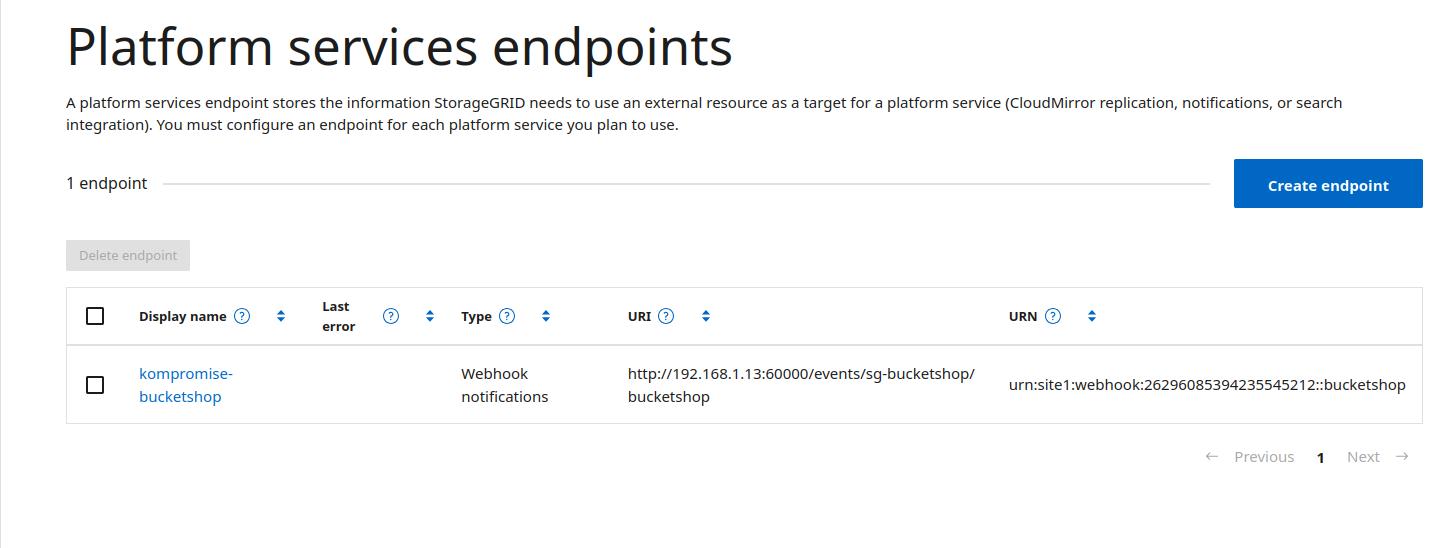
Then in the bucket (bucketshop), I used the same URN:
<NotificationConfiguration>
    <TopicConfiguration>
        <Id>stuff-uploaded</Id>
        <Topic>urn:site1:webhook:26296085394235545212::bucketshop</Topic>
        <Event>s3:ObjectCreated:*</Event>
    </TopicConfiguration>
</NotificationConfiguration>
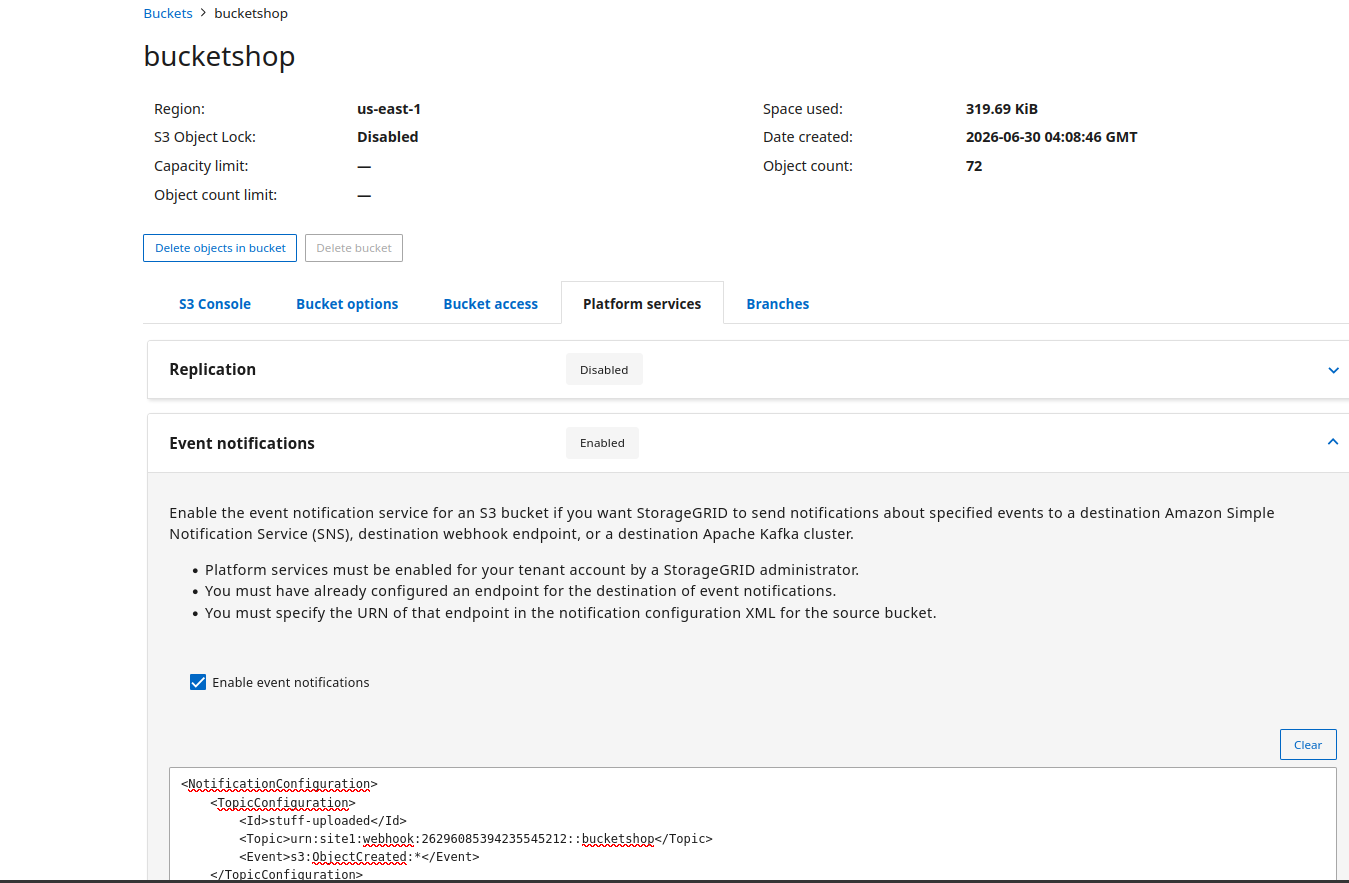
In Kubernetes, I used the sg-bucketshop namespace and my Kompromise pipeline for the bucket was configured like so:
apiVersion: labs.scaleoutsean.labs/v1
kind: BucketPipeline
metadata:
  name: bucketpipeline-storagegrid-sample
  namespace: sg-bucketshop
spec:
  bucket: "bucketshop"
  endpoint: "https://192.168.1.211:10443"
  credentialsSecret: "sg-coke-creds"
  cacheProfile: "gold"
  embeddingProfile: "none"
  versioningValidation: true
The worker and bucket:
$ kubectget pods -n sg-bucketshop
NAME                                                       READY   STATUS    RESTARTS   AGE
bucketpipeline-storagegrid-sample-worker-c5cb9d968-zwhgf   1/1     Running   0          51m

$ ais show bucket ais://bucketshop
PROPERTY				 VALUE
access					 GET,HEAD-OBJECT,PUT,APPEND,DELETE-OBJECT,MOVE-OBJECT,PROMOTE,UPDATE-OBJECT,HEAD-BUCKET,LIST-OBJECTS,PATCH,SET-BUCKET-ACL,LIST-BUCKETS,SHOW-CLUSTER,CREATE-BUCKET,DESTROY-BUCKET,MOVE-BUCKET,ADMIN
backend_bck.name			 bucketshop
backend_bck.provider			 aws
checksum.enable_read_range		 false
...
At this point I was ready to upload junk to bucketshop:
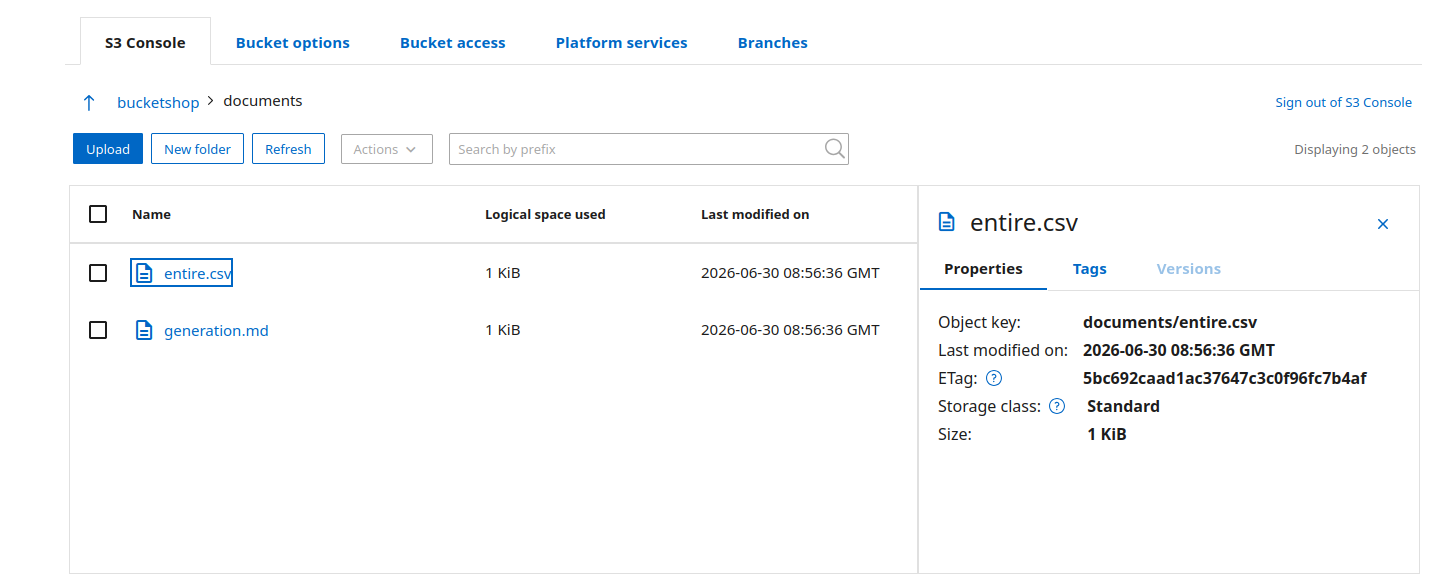
And the worker delivered.
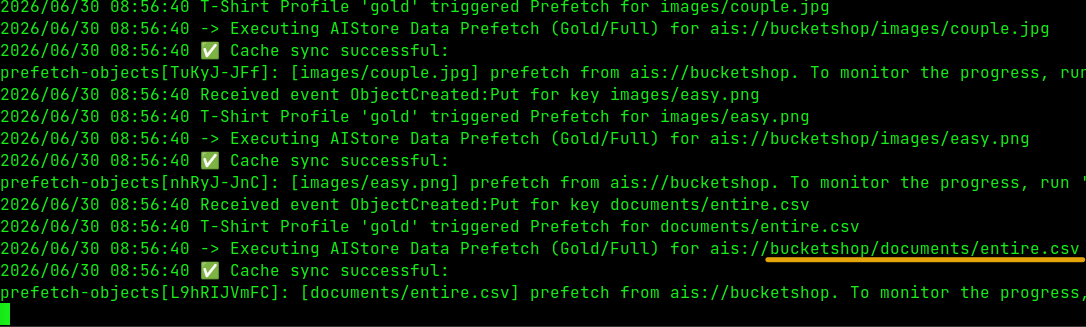
Prefetch for the marked object:
$ ais show job L9hRIJVmFC
prefetch-objects[L9hRIJVmFC] (ctl:
  t[RXcFqlZv]: cfg(list:[documents/entire.csv]) job:[cold:(1,1.00KiB)] lifetime:[cold:(8,35.52KiB avg-lat:25ms)]
  parallelism: w[1]
)
NODE		 ID		 KIND			 BUCKET			 OBJECTS	 BYTES		 START		 END		 STATE
RXcFqlZv	 L9hRIJVmFC	 prefetch-listrange	 ais://bucketshop	 1		 1.00KiB	 08:56:40	 08:56:40	 Finished

$ time ais object get  ais://bucketshop/documents/entire.csv
GET documents/entire.csv from ais://bucketshop as entire.csv (1.00KiB)

real	0m0.105s
user	0m0.014s
sys	0m0.097s
I need to improve naming conventions because it seems confusing, but it works.
When the object expires from cache, it has to be fetched, but then it becomes hot again.
$ time ais object get  ais://bucketshop/documents/entire.csv
GET documents/entire.csv from ais://bucketshop as entire.csv (1.00KiB)

real	0m0.105s
user	0m0.014s
sys	0m0.097s

$ time ais object get ais://bucketshop/documents/entire.csv
GET documents/entire.csv from ais://bucketshop as entire.csv (1.00KiB)

real	0m0.035s
user	0m0.022s
sys	0m0.022s
Appendix C: ETL workflows
Later on, I've slightly changed the bucket pipeline "profiles" concept:
- Cache pipeline remains as it was, and can be enabled at the same time as another function (it's an "extra")
- Any other pipeline just needs a different name, which triggers named workflow. Whereas before I had
embeddingProfile, now there may benotifyProfile: "vector_embeddings_lite"or whatever other workflow the user builds - Separately, there are curated ETL functions, which these named pipelines can use. The first example is a screenshot sampler which simply picks several screen captures from uploaded video. These can also be called directly, independently of pipelines or caching.
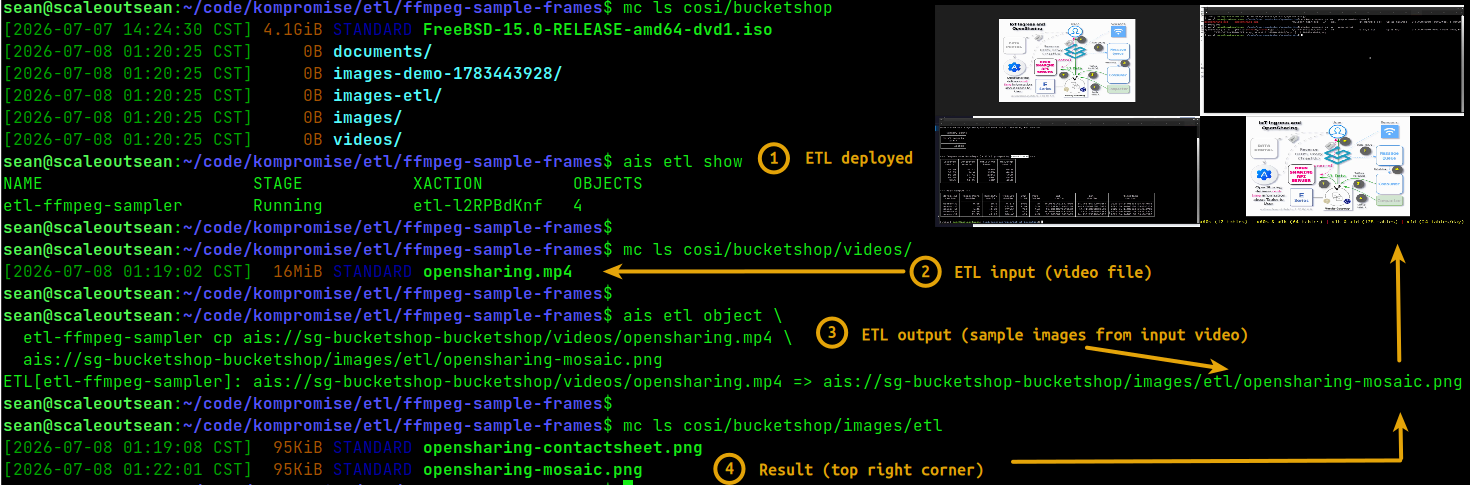
Normally, for a pipeline that runs video-to-image conversion, we'd like caching profile to be enabled, and additionally create a pipeline that can call this ETL function if you don't have a better one, or don't want to build it.
If caching is enabled, by the time ETL job starts at least some, if not all of the object content, will be in cache. We can also disable cache and let AIS fetch the object on demand. This may save bandwidth to StorageGRID if not all videos need to be sampled.
ETL outputs can be sent to any bucket which the function can access.