Elasticsearch 9 ECK (Kubernetes), k0s, NetApp SANtricity CSI
What is ECK
It's a Kubernetes Operator for Elasticsearch. You can read about it here.
It performs all lifecycle management tasks for Elasticsearch on Kubernetes clusters.
Deploy ECK on k0s with SANtricity CSI
ECK may be deployed using Helm, which is what I chose here because the previous post on k0s with SANtricity CSI also relies on Helm.
First, set up k0s with SANtricity CSI as per this post.
My configuration - redeployed yesterday - is current k0s 1.35.3 with a recent version of SANtricity CSI.
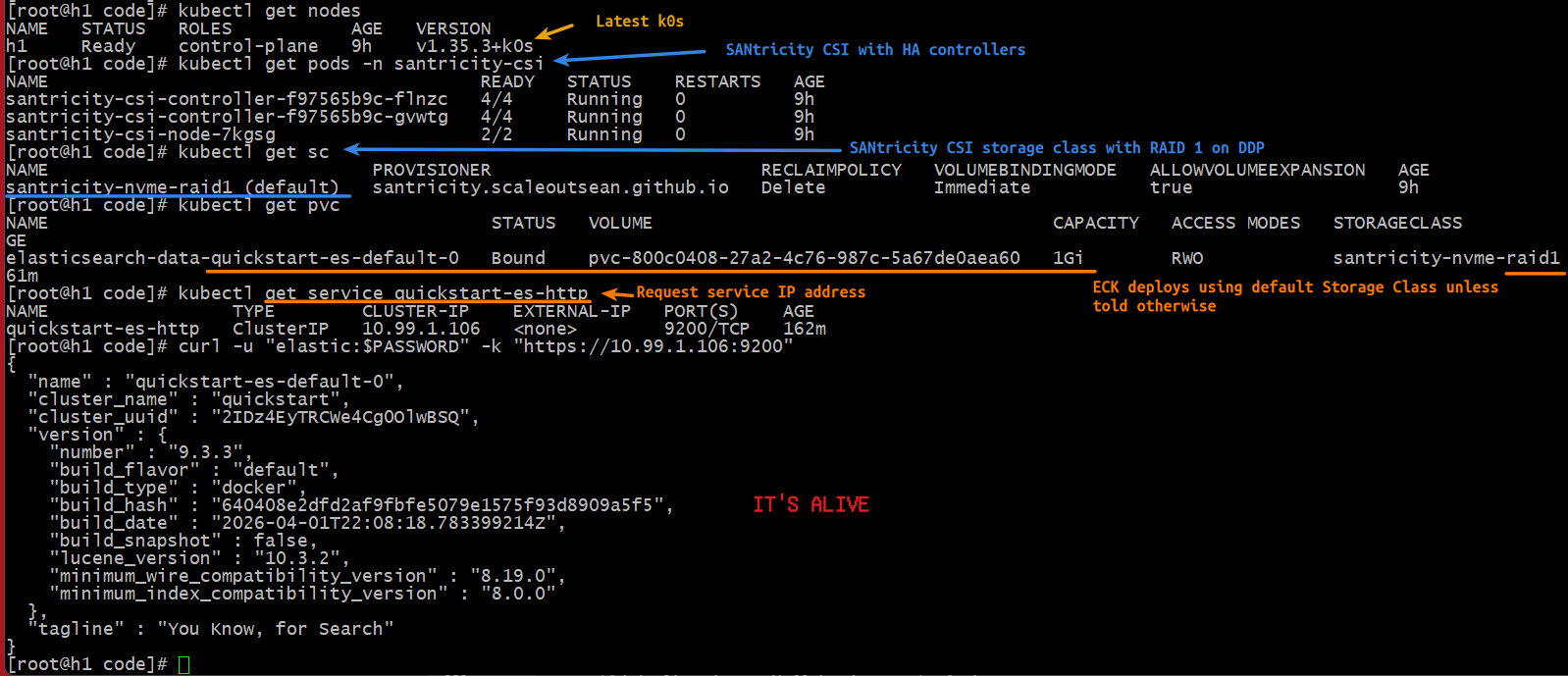
[root@h1 code]# kubectl get nodes
NAME   STATUS   ROLES           AGE   VERSION
h1     Ready    control-plane   9h    v1.35.3+k0s

[root@h1 code]# kubectl get pods -n santricity-csi
NAME                                        READY   STATUS    RESTARTS   AGE
santricity-csi-controller-f97565b9c-flnzc   4/4     Running   0          9h
santricity-csi-controller-f97565b9c-gvwtg   4/4     Running   0          9h
santricity-csi-node-7kgsg                   2/2     Running   0          9h

[root@h1 code]# kubectl get sc
NAME                              PROVISIONER                         RECLAIMPOLICY   VOLUMEBINDINGMODE   ALLOWVOLUMEEXPANSION   AGE
santricity-nvme-raid1 (default)   santricity.scaleoutsean.github.io   Delete          Immediate           true                   9h
Add ECK Helm repository.
helm repo add elastic https://helm.elastic.co
helm repo update
Install ECK operator.
helm install elastic-operator elastic/eck-operator -n elastic-system --create-namespace
ECK offers a ton of options (from CA configuration to memory and volume settings), but we don't need to use them to demonstrate Kubernetes storage integration with SANtricity.
Deploy Elasticsearch 9 with ECK
The simplest example is a single Elasticsearch 9 node with default options from this page, and it may be deployed like so:
cat <<EOF | kubectl apply -f -
apiVersion: elasticsearch.k8s.elastic.co/v1
kind: Elasticsearch
metadata:
  name: quickstart
spec:
  version: 9.3.3
  nodeSets:
  - name: default
    count: 1
    config:
      node.store.allow_mmap: false
EOF
Now we just wait and run these to see what's happening. It takes a minute for Elasticsearch container image to be downloaded and deployed.
kubectl get elasticsearch
kubectl get pods --selector='elasticsearch.k8s.elastic.co/cluster-name=quickstart'
ECK helped itself and created a PVC request which went to the default storage class which is based on SANtricity CSI:
[root@h1 code]# kubectl get pvc
NAME                                         STATUS   VOLUME                                     CAPACITY   ACCESS MODES   STORAGECLASS            VOLUMEATTRIBUTESCLASS   AGE
elasticsearch-data-quickstart-es-default-0   Bound    pvc-800c0408-27a2-4c76-987c-5a67de0aea60   1Gi        RWO            santricity-nvme-raid1   <unset>                 161m
To deploy with a more sensible storage configuration (multiple, larger volumes) or multiple nodes, check the ECK documentation.
- Storage: https://www.elastic.co/docs/deploy-manage/deploy/cloud-on-k8s/storage-recommendations
- Volume Claim Templates: https://www.elastic.co/docs/deploy-manage/deploy/cloud-on-k8s/volume-claim-templates
Then I followed these commands to get access and check service status. This one automatically creates a service IP for Elasticsearch.
kubectl get service quickstart-es-http
That created a service address for ES:
[root@h1 code]# kubectl get service quickstart-es-http
NAME                 TYPE        CLUSTER-IP    EXTERNAL-IP   PORT(S)    AGE
quickstart-es-http   ClusterIP   10.99.1.106   <none>        9200/TCP   162m
To get access we need credentials (a password or API token):
$ PASSWORD=$(kubectl get secret quickstart-es-elastic-user -o go-template='{{.data.elastic | base64decode}}')

#
# kubectl port-forward service/quickstart-es-http 9200 # only if accessing from workstation

# if running from from Kubernetes host, you should be able to access service IP directly
$ curl -u "elastic:$PASSWORD" -k "https://10.99.1.106:9200"
Response:
{
  "name" : "quickstart-es-default-0",
  "cluster_name" : "quickstart",
  "cluster_uuid" : "2IDz4EyTRCWe4Cg0OlwBSQ",
  "version" : {
    "number" : "9.3.3",
    "build_flavor" : "default",
    "build_type" : "docker",
    "build_hash" : "640408e2dfd2af9fbfe5079e1575f93d8909a5f5",
    "build_date" : "2026-04-01T22:08:18.783399214Z",
    "build_snapshot" : false,
    "lucene_version" : "10.3.2",
    "minimum_wire_compatibility_version" : "8.19.0",
    "minimum_index_compatibility_version" : "8.0.0"
  },
  "tagline" : "You Know, for Search"
}
This screenshot shows "default" Elasticsearch node created by ECK.
Elasticsearch volume pvc-800... seen in SANtricity Web UI.
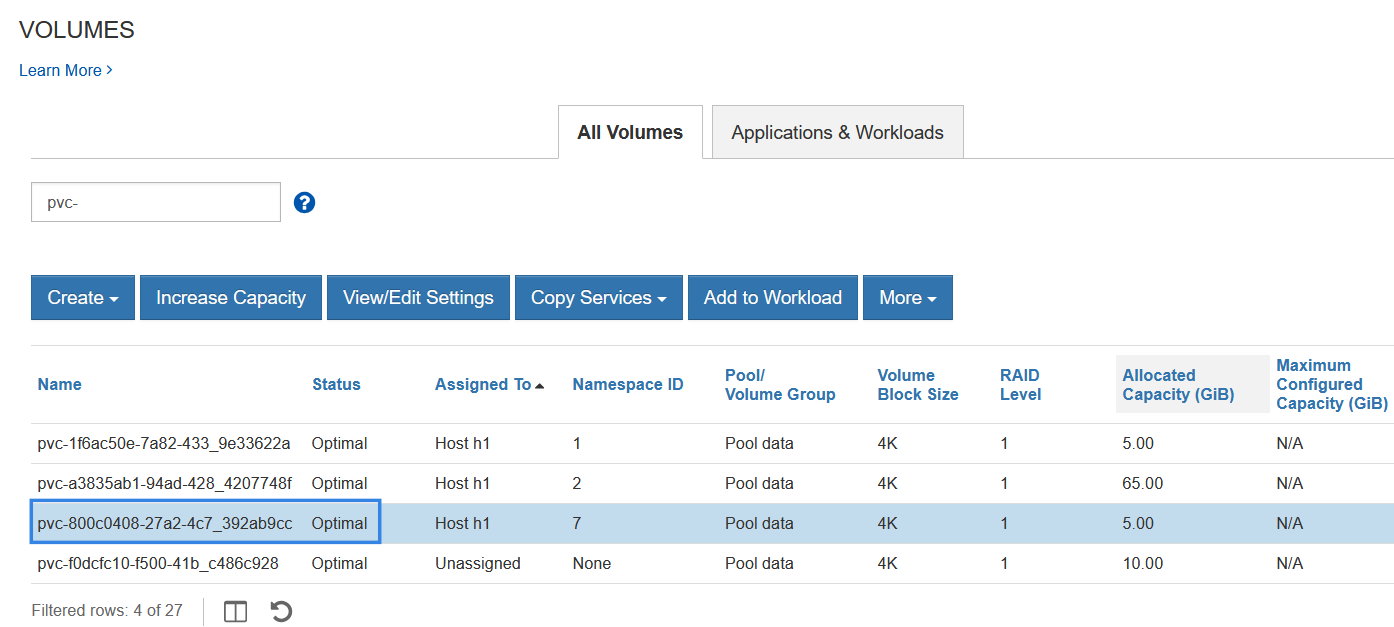
As I mention elsewhere, DDP uses large data chunks when allocating to hosts, so that 1 GiB-sized SANtricity CSI PVC was allocated 5 GiB on DDP. If you get to 16 GiB or larger, this won't bother you much, but it will if you create hundreds of small volumes on DDP.
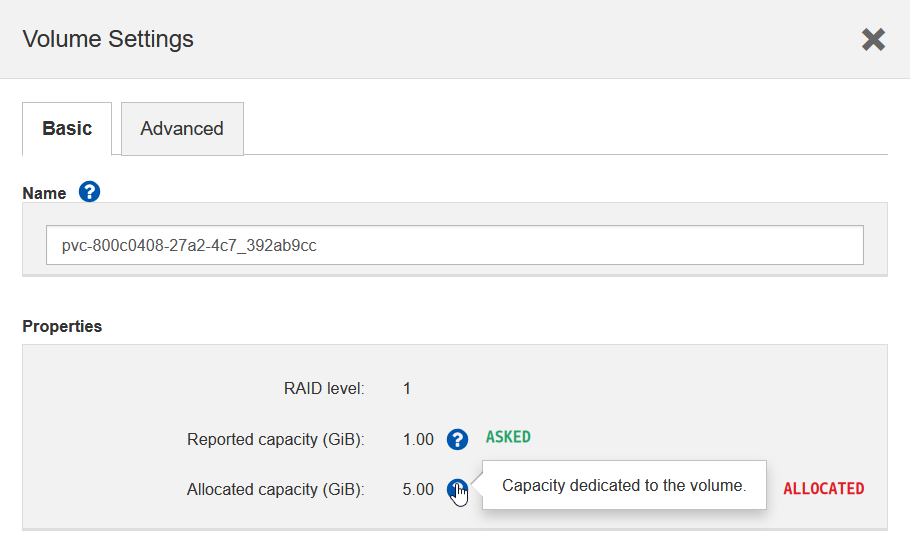
Use "classic" RAID groups (they allocate precisely) for tiny volumes or offload tiny/junk volumes to an Linux NFS VM. You won't have this problem with Elasticsearch unless you're doing it wrong (why, because even with 2 volumes per host, you'd need tens of GBs, if not several TBs, in each).
Another "advantage" of classic RAID 10 or RAID 1 groups is if you have just one E-Series and multiple Elasticsearch hosts and worry about double disk failures; then having three RAID 10 groups is better than one DDP pool (with RAID 1 volumes). That's still better than DDP with RAID 6, which can tolerate double failures, but performs worse; with warm and cold data evacuated to S3, there's no point in crippling Elasticsearch'es Hot Tier with RAID 6.
Storage configuration
SANtricity CSI - as per that post with k0s - needed just one configuration file (below) and was installed in a minute.
controller:
  endpoint: "https://a.b.c.d:8443"   # SANtricity controlle(s) management IPs
  dataIPs: "192.168.1.1,192.168.2.2" # iSCSI or NVMe Portal IPs (dual fabric)
  credentials:
    username: "admin"
    password: "xxxx"      # SANtricity admin password

storageClasses:
  - name: santricity-nvme-raid1
    isDefault: true
    # The poolID (DDP Ref) you want to use for this class
    poolID: "040000006D039EA000493A26000004FD6996CBC0"
    reclaimPolicy: Delete
    volumeBindingMode: Immediate
    allowVolumeExpansion: true
    parameters:
      mediaType: "nvme"
      fsType: "xfs"
      raidLevel: "raid1"
Instructions on getting NVMe/RoCE to work can be found here and in the official docs.
Using DDP is recommended because it allows RAID 1 and RAID 6 PVs without major downsides (coarser provisioning for tiny volumes the only one that I can think of right now).
Nothing else needed to be done. You get the right RAID type for Elasticsearch and you can resize volumes if you need to.
Is SANtricity CSI supported?
Bzzzt! Wrong question.
As I've been saying for years, you don't even need a CSI driver for ECK. That's why I've created Terraform Provider for SANtricity - for this exact use case because this method is the main pattern for all modern databases (these are not "HA" clusters).
It's been years since I've suggested this approach with single host ("non-HA") CSI, which don't have to be "supported" by anyone.
For those who didn't get the memo, here's what Elasticsearch recommends for ECK:
Static provisioning: Run a program that automatically discovers the existing partitions on each host, and creates the corresponding PersistentVolume resources. The Local PersistentVolume Static Provisioner is a great way to get started.
OK, my Terraform Provider SANtricity does that. What else?
OpenEBS and TopoLVM are examples of components you can install into your Kubernetes cluster to manage the provisioning of persistent volumes from local disks attached to the nodes. These tools leverage technologies like LVM and ZFS to dynamically allocate persistent volumes from storage pools made out of local disks.
Well, well, well… TopoLVM is what I've been recommending for half a decade. The first demo of ECK with local CSI is in that same post from 2022.
Any CSI will do and if you don't dare to use any "because support", then static volumes with Terraform Provider or the "offical" Ansible collection. No matter which approach you choose, ECK can deploy and manage Elasticsearch on Kubernetes.
Here's we can use to provision and resize volumes for ECK without needing a CSI driver for E-Series:
- Terraform Provider SANtricity
- SANtricity PowerShell
- SANtricity Client (Python)
- SANtricity CLI (Go)
- (Official) Ansible Collection for SANtricity
Conclusion
There's nothing new, really:
- ECK is still around and works well
- Elasticsearch data is compressed as it's been for years
- Elasticsearch relies on replication for service and data availability as it did forever
- Elasticsearch can tier cold data to S3 (which works with StorageGRID and other S3)
- It still does not make sense to backup or snapshot hot volumes on Elasticsearch nodes using storage (or "hardware") snapshots
If you need cross-cluster replication for Elasticsearch, Elastic has something called Cross Cluster Replication that may help.
In short, this pattern is well established and proven.
The only difference for E-Series users is now there are more options for SANtricity compared to before - TopoLVM is still around, vSphere CSI still works with vSphere block storage, SANtricity CSI is there if you don't prefer a focused community driver and IBM Block CSI with SANtricity patch if you want to hack it yourself (front-end is fixed, the patch just deals with SANtricity on back end).
For medium sized ECK deployments you can use a hybrid E-Series array to take care of both Hot Tier and S3 (use software-defined S3 like StorageGRID).
For HA, even with within a Elasticsearch cluster (and site), I recommend using separate (smaller) arrays and, with SANtricity CSI, from the day it came out I've never recommended centralizing CSI - this is how it's been from Day 1: even with one Kubenetes spread over two racks, two SANtricity CSI instances are recommended.
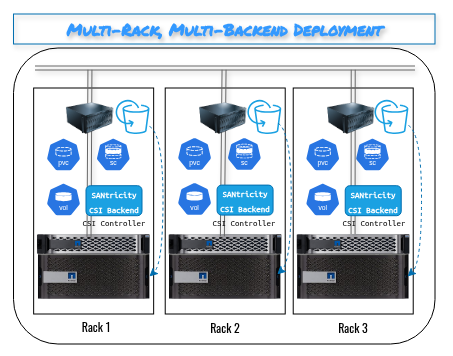
The diagram shows S3 SDS using storage in NL-SAS, but that's optional.
The exactly same pattern is recommended by Elasticsearch if you use TopoLVM.
(Docker and VMs can and should run the same way, of course, but this post is about ECK and Kubernetes.)
Short of going with JBODs, which works but requires careful SDS management, performance and capacity overprovisioning to handle recovery and disk failures, reliable RAID 1 is the main thing Elasticsearch needs from storage.
With k0s and any CSI or other automated storage provisioning method (of which there are several) it takes us five minutes to install Kubernetes, SANtricity CSI, ECK and have Eleasticsearch up and running. You get PVCs that are protected from single disk failures, essentially maintenance free (compared to JBODs) and can deliver over 2 GB/s per volume with ease.