Eke v0.2 and NetApp StorageGRID as BeeGFS Remote Storage Target
Eke v0.2
Recently BeeGFS 8.4.0 came out and made incompatible changes to its Hive Index barely a week after I built Eke.
I'm not sure if I'll update Eke again if they continue breaking stuff in minor updates, but let's assume this was an isolated incident in which ThinkParQ ruined my Saturday afternoon.
Changes in Eke v0.2:
- Fixed what ThinkParQ broke for downstream applications in 8.4.0
- Renamed
hive-importsub-command toindex-importas they renamed their index feature (!) from Hive Index to BeeGFS Index in 8.4.0
The RST stuff
As I mentioned in the Eke post lined at the top, Eke won't touch Remote Storage Targets. The way they make breaking changes to CLI adds another reason to that list of reasons why it's better to do less.
Where RST is related is the new BeeGFS Index has RST info included.
# sqlite3 /mnt/index/beegfs/tiered-stuff/db.db
SQLite version 3.45.1 2024-01-30 16:01:20
Enter ".help" for usage hints.
sqlite> select * from 'beegfs_entries' where name == 'test.py';
1|test.py|f|1320290470808312066|1|0-6A6DD429-1|6-6A6DFD96-1|2|1|1|524288|4|4|1|1|0|0-6A6DD429-1|0|1|0|300|0|1
sqlite> select * from 'beegfs_entries' where name == 'stub.file';
2|stub.file|f|12811668050040796357|1|0-6A6DD429-1|0-6A6DD5D0-1|2|1|1|524288|4|4|1|1|0|0-6A6DD429-1|0|0|0|0|0|0
As you can see, the end of test.py query looks different from stub.file. In the case of test.py, that 300 is seconds before cool-down and the last 1 is the first RST (I have only one, StorageGRID).
This is the entries table now in 8.4.0:
sqlite> PRAGMA table_info(beegfs_entries);
0|id|INTEGER|0||1
1|name|TEXT|1||0
2|type|TEXT|1||0
3|inode|TEXT|1||0
4|owner_id|INTEGER|0||0
5|parent_entry_id|TEXT|0||0
6|entry_id|TEXT|0||0
7|entry_type|INTEGER|0||0
8|feature_flags|INTEGER|0||0
9|stripe_pattern_type|INTEGER|0||0
10|stripe_chunk_size|INTEGER|0||0
11|stripe_num_targets|INTEGER|0||0
12|stripe_default_num_targets|INTEGER|0||0
13|storage_pool_id|INTEGER|0||0
14|path_info_flags|INTEGER|0||0
15|orig_parent_uid|INTEGER|0||0
16|orig_parent_entry_id|TEXT|0||0
17|file_data_state|INTEGER|0||0
18|rst_major_version|INTEGER|0||0
19|rst_minor_version|INTEGER|0||0
20|rst_cool_down_period|INTEGER|0||0
21|rst_file_policies|INTEGER|0||0
22|num_rst_ids|INTEGER|0||0
Using BeeGFS RST with NetApp StorageGRID 12.1
The main two actions are push and pull, which work as one might imagine. There's more, though, and some of these details can be complicated. See for yourself in TFM.
Related to Eke, what matters is that an object can be be just a stub: tiered off to StorageGRID, with on-disk size of just several bytes. To be precise, 31 bytes (see (7) in screenshot below) in this case.
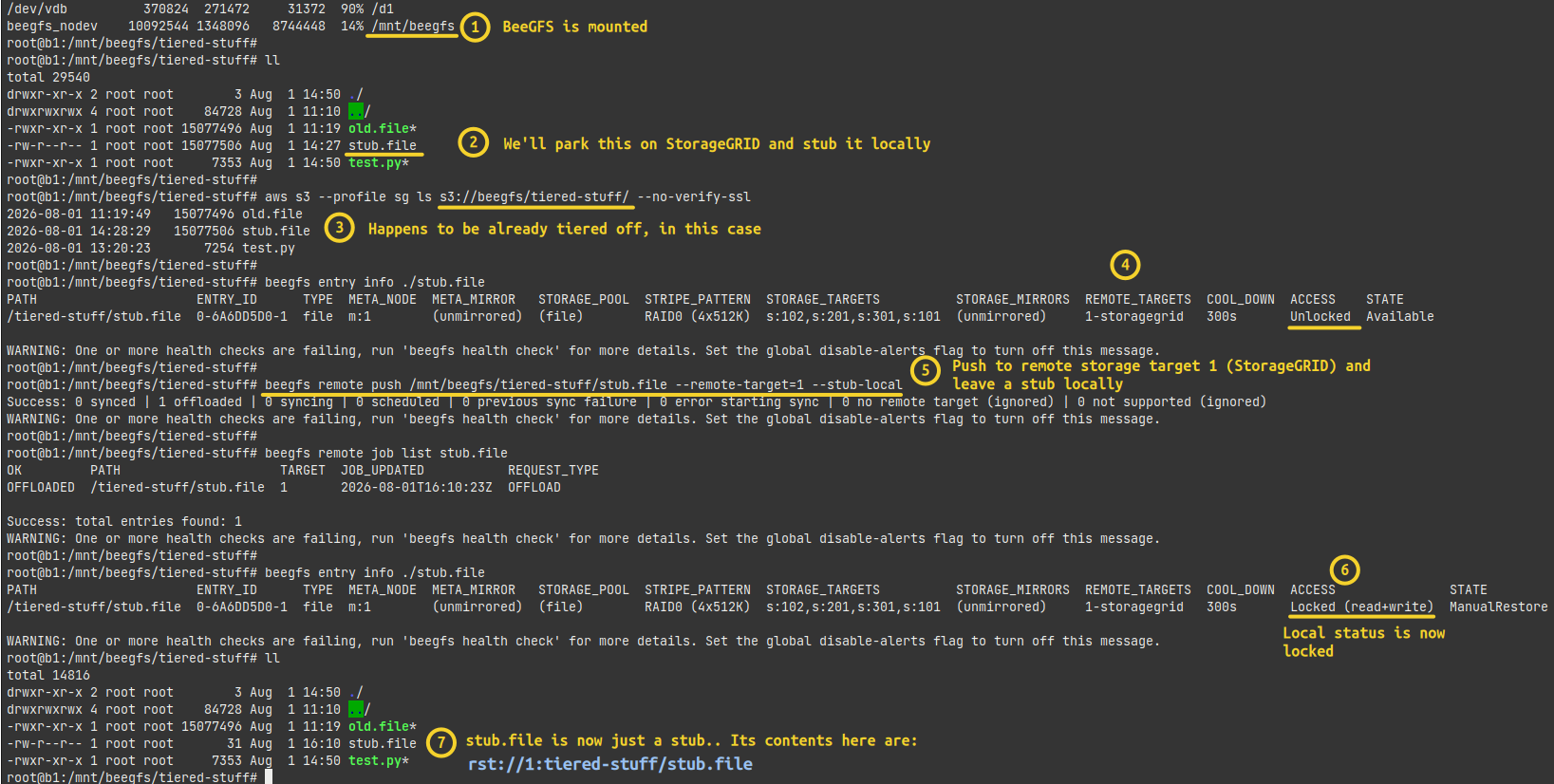
I mention this because if you're aiming to move this file to another storage pool with Eke, that could be a waste of IO because there's barely anything on disk.
On the other hand, if you do pull (rehydrate) this file from RST, then you may want to have the file rehydrated to a lower-cost pool. Or maybe not. Because in some cases you'll just want to rehydrate, and in other cases you'll want to move data to a different pool.
As a consequence:
- In Eke queries, consider this and maybe add extra to your SQL queries to include or exclude files based on RST field values
- Sometimes, using RST to push and "stub" a file may be more desirable than tiering it to a slower pool locally
- Push+stub followed by Eke action for pool relocation may be cheaper than moving it to a lower cost pool first and then pushing to an RST to create a stub and effectively remove TBs of data right after copying them for migration. So, depending on overall strategy we want to consider RST from Eke even if a file or directory isn't using RST at the time of initial tiering
That's why RST information in BeeGFS index is relevant to Eke. Eke still ignores those entries, but values from those fields are collected and you don't have to ignore them when using Eke.
Some non-Eke comments:
- If you want to rehydrate, it's easy. Although there are several commands, it's basically just one to get the file back. Wildcards work, too
- The docs don't say if cross-cluster push/pull is possible, but if it is, then RST becomes convenient for hybrid cloud workloads. Push from on-premises, pull in the cloud, compute, push results to RST, then pull them from on-premises. Generally, due to egress charges, it's better to pull more and push less from the places like EC to StorageGRID
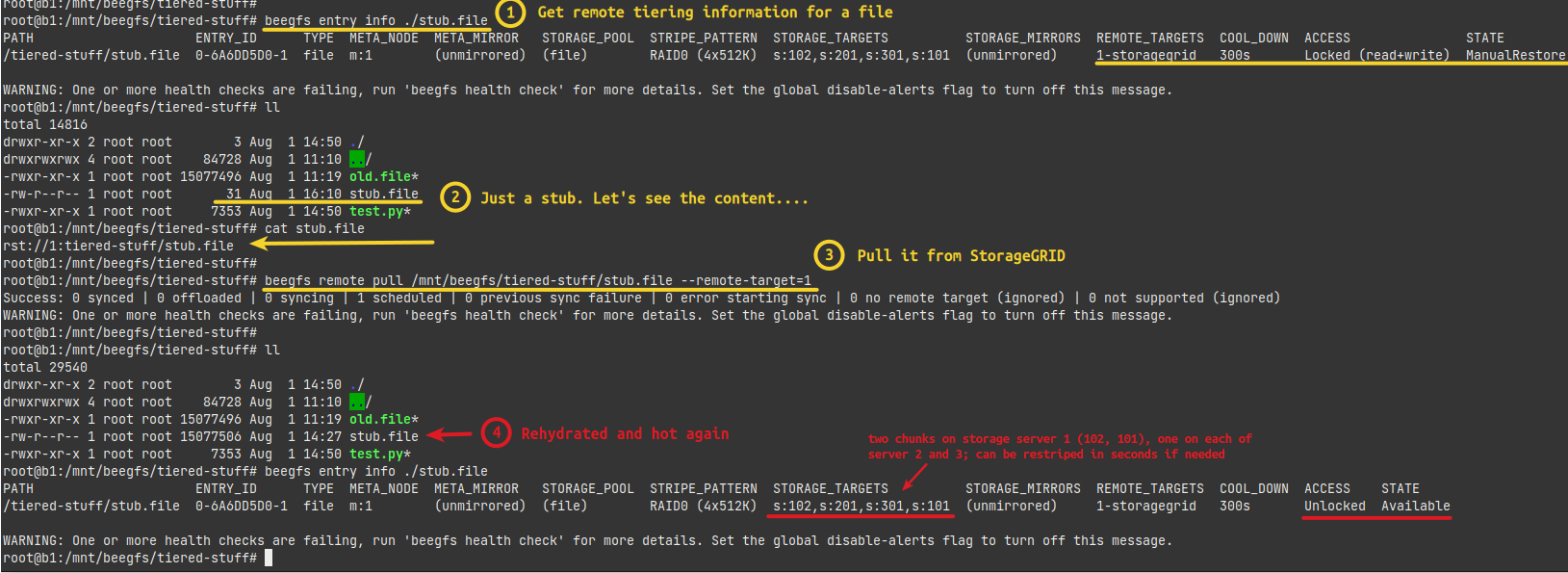
On StorageGRID, there isn't much one has to do.
Create a bucket, give the BeeGFS administrator credentials to it. Maybe create a 2-Copy ILM rule for objects smaller than 1MiB. In this case, the beegfs bucket corresponds to my filesystem name, and tiered-stuff is where the files are coming from (/mnt/beegfs/tiered-stuff/).
$ aws s3 --profile sg ls s3://beegfs/tiered-stuff/
2026-08-01 11:19:49   15077496 old.file
2026-08-01 14:28:29   15077506 stub.file
2026-08-01 13:20:23       7254 test.py
Benefits of using RSTs
RSTs give you full control over data movement, although they also require more work and monitoring, as highlighted in the BeeGFS 8.4.0 post.
With RSTs, NL-SAS isn't the cheapest storage tier you can park your data on.
At scale, you'll probably want a dedicated "mover" node or pair of such nodes for RST.
If you use IB in your BeeGFS cluster, those nodes would need Ethernet adapters to connect to StorageGRID.
With just 2 "mover" nodes, large files and several StorageGRID appliances you may be able to get more than 10 GB/s in tiering performance, which is very cost effective compared to keeping files on all-flash BeeGFS storage because it offload data to a lower-cost NL-SAS tier.
Compared to in-filesystem tiering with pools, the main difference is NL-SAS wouldn't be a part of your BeeGFS cluster, so your BeeGFS cluster could be just large enough for Hot Tier plus some buffer for RST work-in-progress data. You could have both, of course: in-filesystem tiering with pools for Tiers 1 (NVMe) and 2 (NL-SAS), and RST (StorageGRID) as Tier 3.
If you want to minimize administrator workload, in-filesystem tiering seems better.
For more control in predictable environments, RSTs may be better because ROI on extra effort and from additional flexibility should be good.
Conclusion
Eke v0.2 may be marginally more useful with the RST information in BeeGFS index.
Some "tiering" solutions offload without stubs and work based on the "set-and-forget" approach. A downside is less control.
RST gives administrator full control. If you know what you're doing, you may be better off with it.