What's new in BeeGFS 8.4
BeeGFS version 8.4
BeeGFS 8.4 came out in recent days.
Release highlight from ThinkParq:
BeeGFS 8.4 introduces the ability to automatically sync file changes and restore stubbed files in BeeGFS using Remote Storage Targets, experimental support for NFSv4-style ACLs and experimental (opt-in) long-term client-side metadata caching.
There's support for Linux kernel 7, which potentially brings some OS-related improvements, as well as new OS bugs. Personally I'd stay on older kernels until BeeGFS 8.5 is out.
Let's see about them ACLs…
In addition to POSIX ACLs, NFSv4-style ACLs can now be used, providing a richer feature set and more fine grained permission controls.
This is good for those who use NFS, obviously. It's marked "experimental", so stay away if you prefer stability.
Long-Term Client-Side Metadata Caching (experimental) … provides an alternative to the existing time-based caching mechanism, allowing clients to indefinitely cache certain metadata (i.e., entry attributes and lookup results) until it is explicitly invalidated by the owning metadata service.
This is great for read-mostly workloads, such as Deep Learning where many thousands of read-only files may be accessed over and over again. Also "experimental", so keep that in mind.
The biggest improvements, in my opinion, are related to the Remote Storage Targets (RSTs) feature:
Support for automatically triggering data movement based on file system modifications.
- Files and directories can be configured to be kept automatically in sync with one or more remote targets by setting a
--remote-cooldownthat indicates when to start syncing after a file is closed.- Set a
--restore-policyof auto or delayed when offloading a file withbeegfs remote push,--stub-localto optionally allow the file's contents to be automatically restored if a user opens the file.
RSTs appeared in v8 more than a year ago, and I while I blogged about that feature, I haven't used it much because NetApp didn't update its Ansible deployment tools for BeeGFS v8 until several months ago, so there's relatively little awareness of RST.
More on the RST auto-sync feature:
The File System Modification Events feature must be enabled with a Watch service configured to listen to all metadata services with Remote as a subscriber. Event dispatch must be enabled in Remote and appropriate rate limits and file filters configured.
I think the File System Modification Events feature is great. I blogged about it here and built a file scanner for BeeGFS which could be used for DIY replication as well.
The tricky part is making sure problems are detected when they happen. As you can see ("rate limits and file filters configured"), there may be non-trivial failure scenarios which are hard to test and are usually discovered in field.
You can read the "fine print" here:
- You need to enable the File System Event Notifications feature
- You need to run Watch service on metadata nodes
- You need to keep an eye on the BeeGFS logs and RST metrics, because otherwise you may not notice if something doesn't work
- You need to handle stuck or misbehaving sync commands
So, the feature doesn't come without new management costs, especially when it's just been introduced.
Auto-sync is designed for best-effort background synchronization, keeping data in sync as the filesystem changes over time rather than guaranteeing consistency at any given moment. The cooldown queue is not persisted across Remote service restarts, so any pending syncs are lost if the service restarts. To guarantee all data is synchronized, run beegfs remote push to explicitly sync any file paths that may have been modified.
If you have a messy environment where all sorts of crazy stuff is happening, I'd say RST (even without auto-sync) probably isn't for you. Let the users use rclone and figure it out on their own. If you have a low-churn, predictable environment, RST with auto-sync could work well and save you time. (I haven't used RST with auto-sync yet, so this is a guess.)
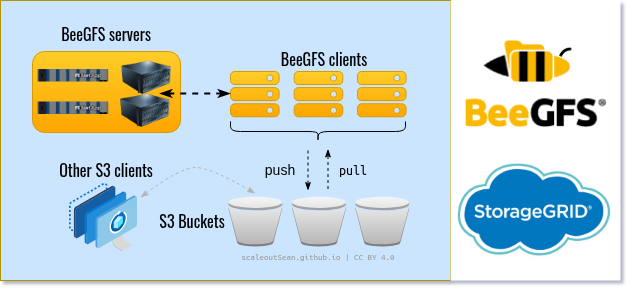
RST still has no way to provide self-service capability for pushing or pulling files out/in of BeeGFS by end users. That's likely the plan, but until then, the BeeGFS admin has to set these things up and that can become laborious.
We could build own front-end for that, but if they break it with every update, that doesn't seem like something worth investing in.
Speaking of which:
This release updates the BeeGFS Index distribution to the latest version of GUFI, and moves the support for BeeGFS specific metadata into a new file system plugin. This will require a one-time migration from the old database schema, but simplifies keeping the Index distribution in sync with the upstream GUFI releases going forward.
Just days after I released Eke for v8.3, now it may be already broken.
Existing (as in, created in <8.4) indexes have to be migrated because we can't read them with >=8.4 CLI.
v8.4 beegfs index commands cannot read pre-v8.4 .bdm.db indexes. The simplest and most complete path is to discard the legacy databases and rebuild the index
What should have happened is all <8.4 functionality should have remained in the 8.4.0 binary, so that people could query older indexes with a --legacy switch without hassle or migration. "Rebuilding" doesn't help with old index data, so it's not an option in some cases.
There's also a migrate sub-command, so older indexes can be migrated.
Luckily - although it's not like Eke has any users - Eke can extract index data to Parquet files, so while Eke's "front-end" may now be broken, "back-end" can read historic, consolidated data because it would have been extracted to Parquet files. So - if anyone used Eke - they wouldn't need to migrate or recreate indexes for v8.4.
Added a new
BEEGFS_IOC_GET_ENTRYINFO_V2ioctl that allow callers to fetch all BeeGFS metadata including the stripe pattern, RST configuration, session counts, file data state, and more.
That's interesting. I may consider using this in Eke if I update it for 8.4.
The part that's interesting is RST configuration. Eke isn't aware of RST, and while moving a file from one pool to another shouldn't change its RST functionality or status, I did mention in the Eke post that I deliberately left out RST functionality as that is a separate area.
With the ability to look up RST status of a file, RST and pool management are less separate than before.
In summary, this is a good release although I don't like the unnecessary breaking change in Hive index format. While the format has changed, they could have handled both old and new without much hassle.
The way RST works makes BeeGFS and StorageGRID a great combination for AI workflows where data is periodicaly - and now even on-demand - pulled to BeeGFS and pushed back to StorageGRID. BeeOND will benefit from that, too, especially with the new metadata caching feature.
RST itself is over a year old and although some of the RST features are very new and immature, observability and logging can help us detect issues and optimize how we use these features. In some cases (extremely high filesystem churn) we can simply disable RST and switch to DIY rclone on demand, in others we may need to optimize how we use RST and there will be setups where everything will just work and metrics and logs will help us make sure things stay that way.
Compred to other approaches (such as rclone which I've mentioned as an alternative), RST is well-integrated with BeeGFS and rclone isn't at all. It's not about the ability to use RST from the beegfs CLI binary, but about the way RST and auto-sync work: inventory, queues, retries, logging, observability, recall and more.
At scale, rclone becomes viable only for individual users with comparatively smaller scale (file count, data size) and can't do many things RST can. On the other hand, where you need a quick one-off copy in either direction and rclone can handle it, you may be right to use it - especially if you also check the logs and not just fire-and-forget.
BeeGFS and StorageGRID
In recent years, datalake workloads have moved to S3. There isn't relatively less - percentage-wise - that needs to be persisted elsewhere.
Since File System Event Notifications are now even better, BeeGFS can play an even bigger role in workflows where it and RST can be used, either separately or together.
For example, these days it's less likely that events or message streams will land on a filesystem (maybe they will, at CERN, but such sites are relatively few).
If they do, you can use Notifications as described in the BeeGFS notifications-focused posts last year.
If they don't - that is, if they land on S3 - you can use S3 event notifications to copy data to BeeGFS, process it, and store results in S3. In many cases S3 data can be processed in place* ("zero-copy"), so no copying will be required in the first place, but in some cases processing them in a POSIX environment still makes sense despite the copying overhead.
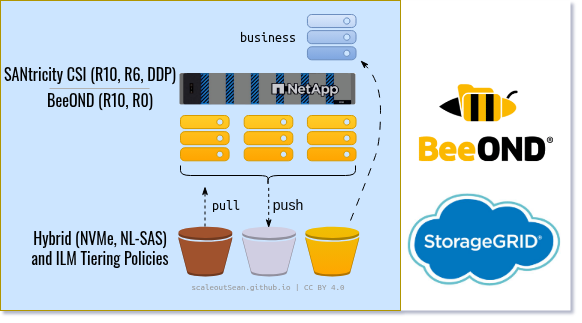
If your processing workflow needs BeeGFS data that's been RST-tiered to S3, that data can be pulled from S3 with beegfs remote pull or, in case of automated RST recall (less likely for BeeOND filesystems, which are ephemeral), that movement can be largely transparent to the user.
RST may not be desirable on BeeOND, but metadata caching may be highly desirable on BeeOND. You can have both (BeeGFS- and BeeOND-style clusters and filesystems) if you need flexibility and BeeGFS 8.4 makes it even easier to create such workflows.
This combined NetApp BeeGFS with StorageGRID solution can sync data to/from StorageGRID at 100 GB/s. Now, I made this number up, of course. I don't think I'll ever get access to hardware that would make such tests possible. But that doesn't mean even more is unrealistic. At 2 GiB/s per sync client we'd need less than 128 BeeGFS clients to make that happen, and StorageGRID 12.0 can scale to over 200 nodes which means even the entry-level models would suffice.
New data mostly lands on S3 and S3 is the single source of truth. In that case even ephemeral BeeGFS filesystems are usually sufficient because any failed jobs can be simply retried on the same or different ephemeral cluster.