Linked clones from VM Templates with Proxmox 9 and NetApp E-Series
Introduction
Compared to the usual "mega-posts", this one is initially going to be brief.
Proxmox VM Templates and Clones work only with datastores such as local, NFS, ZFS.
How does it actually work? What does that mean for E-Series?
The how for VM templates on E-Series
Well, simply deploy a Linux VM - say, Ubuntu 26.04 LTS - use PVE to configure HA for it, and set up NFS service. Then you're ready to go. There's a mega post on that.
Alternatively, for highly generic VMs (that is, where clones (VMs created from a VM template) have no personalization), you could also:
- Present an E-Series block device to each PVE server
- Have a copy of VM template on each PVE server
Say you have 5 VM templates and create VMs on the fly. You might need 50GiB per PVE node. You could create these on E-Series RAID 10 volumes.
If a PVE server dies, the VM goes away and you can't get to it unless you assign that disk to some other PVE server. But, since it's a generic VM where you probably login with LDAP and mount your NFS or SMB share, you stand up another one in 60 seconds and forget about the lost one.
Another alternative is format these with ZFS, and setup replication (server A->server B, server B->server A), so that you can get to your data on the replica. Cost: you now need 100GiB instead of 50GiB. Again, this is for generic templates where you wouldn't have much OS-based data.
Additional alternative: just use LXC, where things just work and without any VM templates. LXC images are templates. These work on shared LVM data stores, as you can see here.
Create PVE VM template
If you're into DIY, you can find step-by-step instructions here, thanks to DanB35 on Github.
This part is PVE-specific, so I'm not going to rehash what's already there.
The point is, you create a template the PVE way, and then you can clone it.
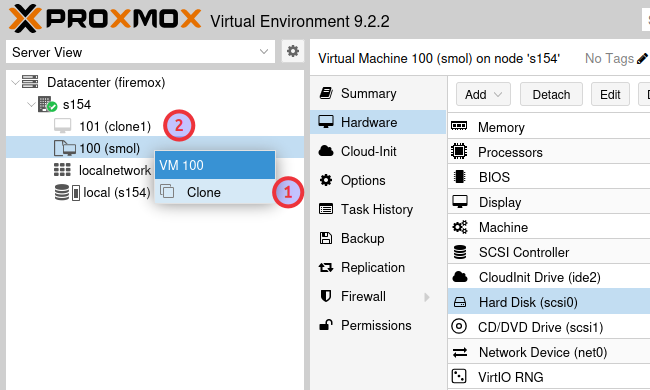
My template (Debian 13.6):
$ du -sh /var/lib/vz/images/100/base-100-disk-0.qcow2
2.2G	/var/lib/vz/images/100/base-100-disk-0.qcow2
Cloned VM (without new junk added to it):
$ du -sh /var/lib/vz/images/101/vm-101-disk-0.qcow2
904K	/var/lib/vz/images/101/vm-101-disk-0.qcow2
As Dan advises, you need to clean any data that shouldn't be in template VMs, and that includes VM personality, as is done in Windows' sys-prep tool. So install this on your PVE system and follow the rest of Dan's steps.
apt install libguestfs-tools -y
Automation
I haven't heard of anyone who needs help with this, but it seems easy to automate. This seems workable and apparently automates VM template updates, too.
I used that repo and - due to the relatively many changes - chose to fork it rather than submit a pull request.
There are three scripts in it:
- Download popular OS images
- Create VM Template
- Deploy VM from template
In this last step, let's say you want to attach an extra volume from a shared LVM datastore on EF80, to serve as user's home directory or maybe for application data.
$ openssl passwd -6

$ clone-and-provision \
  --template-id 9000 --id 9101 --name db-vm01 \
  --datastore nvme-lvm-12 --size 16G \
  --mountpoint /home/jack --fstype xfs \
  --ci-user jack --ssh-pubkey-file /root/.ssh/id_ed25519.pub \
  --ci-password-hash '$6$8x....4N'
Base disk remains where the template ID is. --datastore is where the extra disk is created.
Here's a result of a run with similar parameters. In this scenario our DBA Jack needs an extra disk mounted to /data. How long does it take?
- Approximately 10s to create a VM template (which likely already exists)
- Approximately 10s to clone & provision a thin/linked VM clone with a dedicated user and an extra disk for database data.
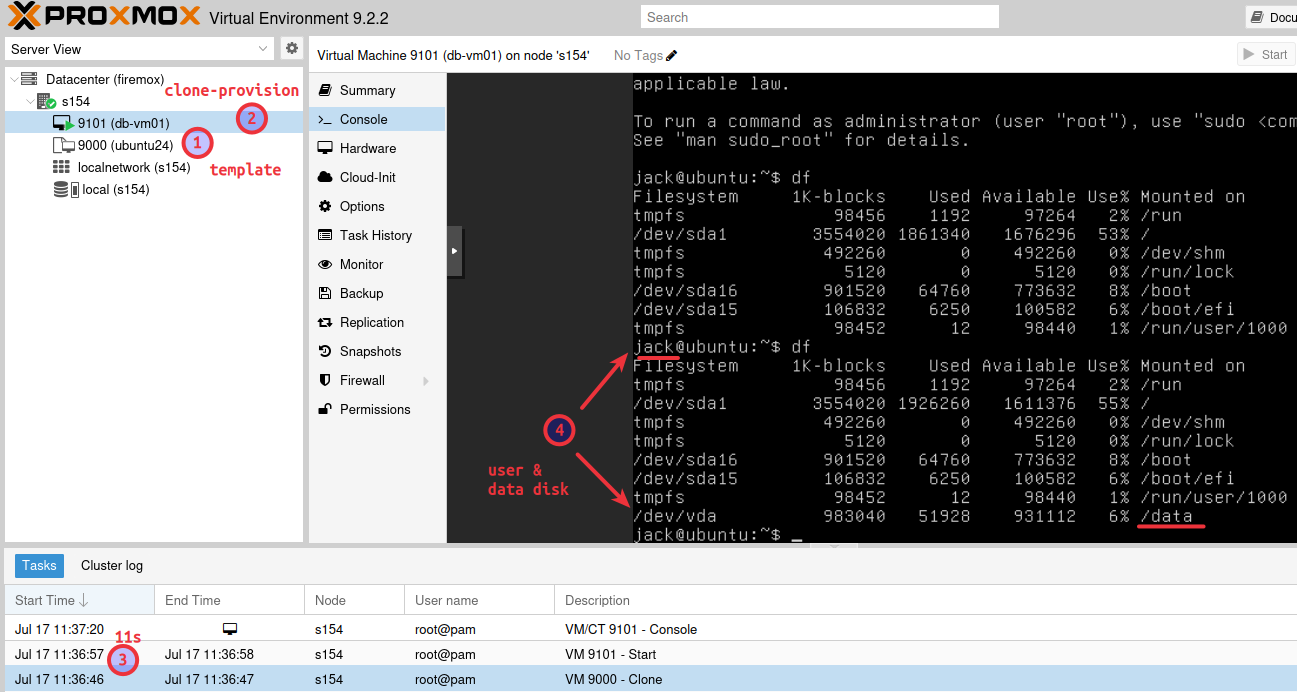
As you can see below, the linked clone VM relies on base disk from the VM Template OS disk. The added "data" (or "home") disk is a virtio1 disk and although it's on the same datastore in this environment, --datastore can be used to place it on a shared LVM backed by SANtricity.
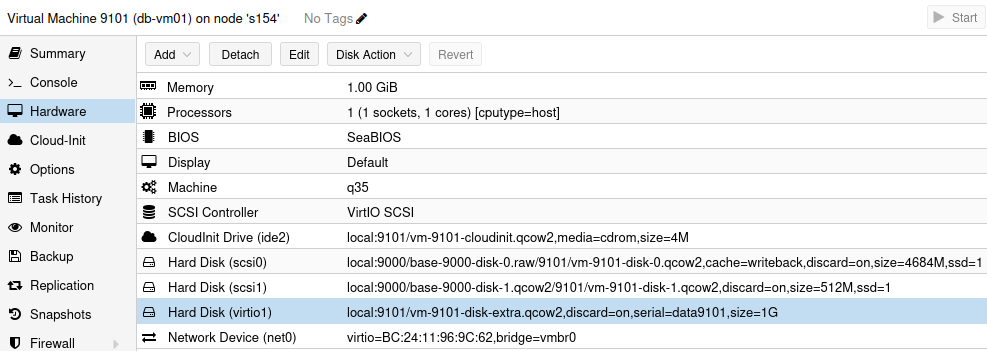
That way you need much less than 60 seconds to recreate a VM and can get back to your data even if a server with its local or local-lvm disk fails forever.
Best of all, if you create VM templates like this, you can recreate them easily and do not need to back up any VM templates. Just backup your data disks and application configuration files, if any.
Conclusion
Using an NFS VM backed by shared LVM is the easiest way, especially for cloned VMs with more significant modifications because more capacity and performance could be needed compared to think VM clones with minimum personalization.
I did mention in that PVE-with-NFS-on-E post that, due to (NFS) VM needing PVE HA and taking time to failover, I wouldn't put mission critical workloads on that NFS VM. But, anything that can tolerate temporary downtime, or that can scale out (Web, application servers) - so that you can run multiple VM clones spread across two NFS VMs on different PVE nodes - should be relatively seamless.
Because cloned VMs need regular OS and even application updates, the right way to do that is to recreate their VM template and then recreate all clones.
But, from what I've seen with VMware, people are lazy to do that, or it's too organizationally complex ("don't touch my VM!"). In that case - if all you need is a way to spin up a "VM-like" container, I'd recommend switching to LXC.
Separate "data disks" located on shared LVM data stores on E-Series make it easy to recover from PVE server failures: just create a new linked clone VM and attach it to existing disk on shared LVM.
It's also easy to backup your data disks to Proxmox Backup Server including with an S3 backend.
I would not backup NFS VMs or local datastores with templates - you can re-create them faster than you can restore them.