Data pipelines with ThinParQ BeeGFS and NetApp E-Series
- Introduction
- BeeGFS file-system events and indexes
- Dispatch jobs for data operations
- Near real-time vs scheduled processing
- Scalability of real-time processing
- NetApp DatOps Toolkit (DOT)
- The need for "AI reference stack"
- CSI driver for E-Series
- Two- or three-server node database clusters
- On-demand filesystems
- Conclusion
Introduction
Earlier this week I blogged about new (and also "recent") BeeGFS features and how they can be leveraged in the context of the NetApp BeeGFS/E-Series solution.
This post will:
- Focus on file-system events and indexes for data processing, workflows and pipelines
- Comment on TR-4890 (see below) which is becoming long in tooth due to changes in recent BeeGFS versions (especially v8.0)
Please refer to the linked post above for some background on that.
NetApp TR-4890 (MLOps with NetApp and BeeGFS, McCormick & Upton, May 2021) can (currently) be found here. I'll refer to it as "the TR" in the rest of this post. The TR was written exactly four years ago, before BeeGFS v8 and before E-Series models E4000, EF300C and EF600C (the latter two are all-QLC arrays) existed.
BeeGFS file-system events and indexes
As mentioned in that recent post, new ways to create semi-automated data pipelines are enabled are two key features:
- BeeGFS file-system events (and notifications) - real time file-system events
- BeeGFS file-system index ("Hive Index") - in version 8 (and previously 7) it's not real time, but it might become if it ThinkParQ makes it possible to use file-system notifications to keep indexes up-to-date
If we want to react to new data in real-time, we need to create a listener or processor for real-time events. The previous post shows an example of a "decider" service that listens to notifications and creates data processing jobs, or kicks off workflows, based on our requirements.
With that, as users or applications/machines create data on BeeGFS, events can be fired as soon as files are closed after writing (or removed, if we react to such events).
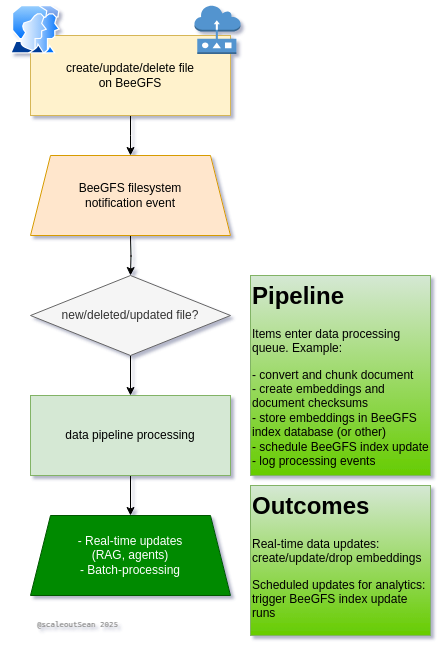
Dispatch jobs for data operations
This diagram was supposed to look nice and make it all clear but, after two hours of monkeying around with it, this is the best I got. Perhaps I shouldn't have tried.
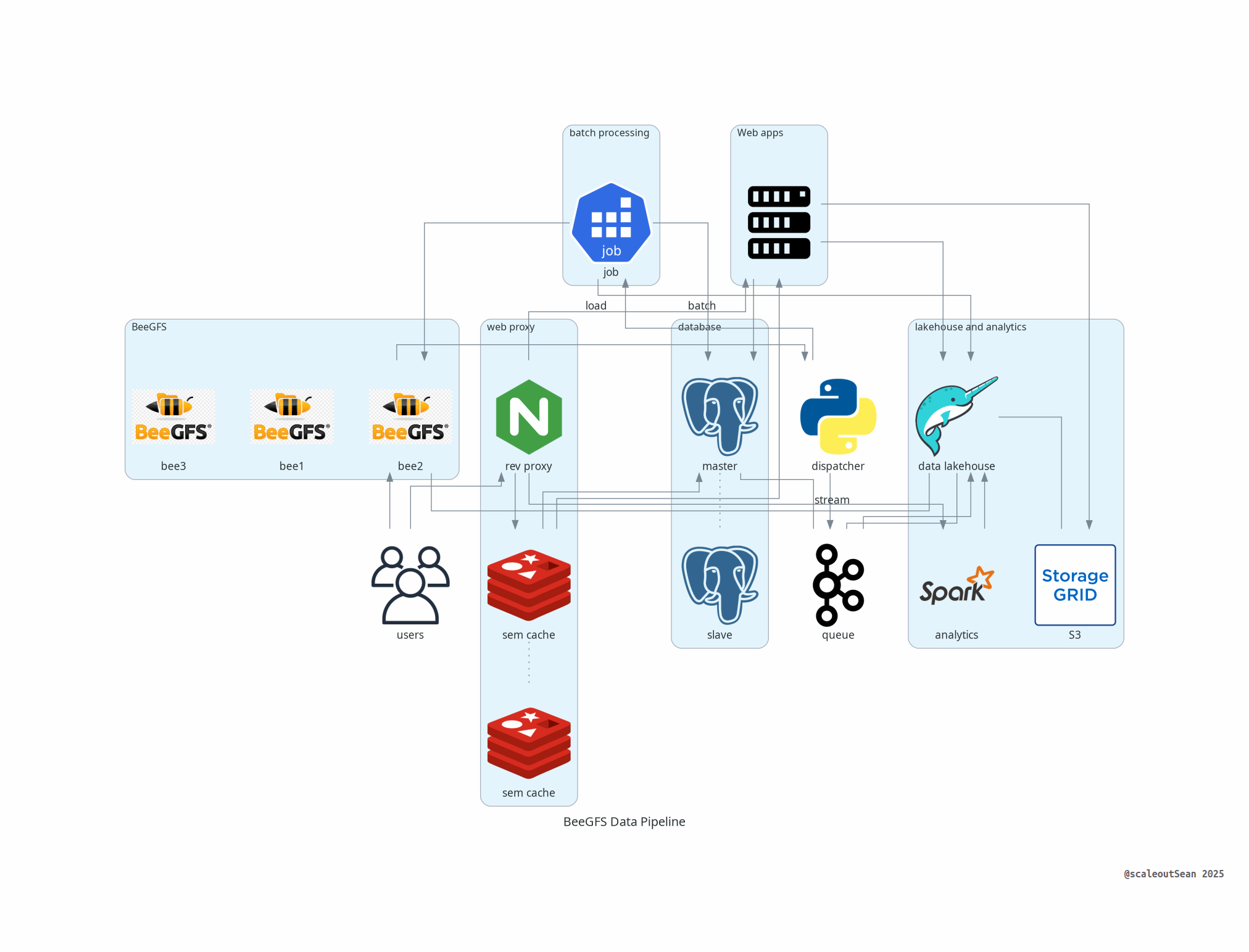
You can open it in a new tab to see a larger version, but I'm not sure that will help. This may be better:
dispatcher(or Decider, I as called it in the post linked above) is (my custom) service that listens to BeeGFS file-system events- Based on event type (see previous post), it can do things, such as:
- Create data processing jobs that don't need to start right away, and may take seconds or minutes or hours to complete
- Stream data to other applications for real-time processing
Dispatcher doesn't do anything else, as it wouldn't be able to (it'd be a very complex dispatcher!) and goes against the primary mission, which is fast and simple dispatch. Think of it as "poor man's Kafka". It could be even simpler and act as "poor man's event forwarder" that feeds events to something like Kafka where producers consume events.
In this implementation once jobs are dispatched - whether it's to forward events elsewhere, stream data to Kafka, or use a service to process these files - these tasks end up persisted in some application's queue that can take care of processing, retries, restarts and such.
A dispatcher could be written in Go or other language. If you have hundreds hundreds of files modified, created and deleted every second, Python may be able to handle it. If it's thousands or tens of thousands per second, you may need multiple dispatchers, or you may use a dispatcher in Go (which should be significant faster).
What is important is that we have the means of firing jobs and processing data without having some front end service through which users upload data, or needing to rescan directories to find new or changed files.
Near real-time vs scheduled processing
Consider some scenarios in which near real-time processing can be useful:
- Machine-generated data whose value rapidly declines with time (e.g. stock market events)
- High data churn makes RAG-based applications produce poor results as chat application provides outdated answers or even refers to non-existing information (documents that have been updated or corrected, for example)
In such cases immediate processing can be beneficial both technically and business-wise.
In other cases, we can fall back to scheduled "batch" processing: hourly, daily, weekly, or best-effort. For such jobs, BeeGFS indexes don't have to be up to date - they can be refreshed periodically. As long as indexes are created before scheduled batch jobs run, that is enough.
Near real-time data workflows
In recent conversations with customers, I've heard of problems that may be addressed with real-time processing:
- AI applications (whether it's a "vector database" or something else) have duplicate embeddings or other data
- Embeddings are "out of sync" with file-system data. For example, a file may have been deleted, or RAG has no embeddings for a file we expect to be accessible to RAG
- Workflows are difficult to automate without file-system events or frequent directory scanning
This isn't to say BeeGFS file-system event notifications are the only or "best" way to solve this, but that they could be used to mitigate or fix such problems.
For the "high churn RAG environment" problem, I created the following PoC workflow:
- Dispatcher watches selected path where files used by RAG are located
- File delete event: file is immediately removed from vector database
- File create or update event: embeddings are recreated immediately
- Other actions can be scheduled before (antivirus scan, for example, which can be a problem for non-SMB protocols) or after
Specific steps:
- For new files, just make sure the file exists (as it may have been deleted right away). Calculate file checksum to determine if the file has changed (for updated) and to store it (for new) in a database for comparison later on.
- For new or updated non-empty files, create new embeddings. Save them wherever you usually save them (PostgreSQL, dedicated vector database, file-system, etc.)
- Perform other tasks required by your stack (e.g. you may want to trigger cache expiration for particular documents, users or applications)
Scheduled batch jobs
We can use both file-system events or Hive Index refreshes to handle these requirements.
I realized that in some cases I can make use of BeeGFS Hive indexes even in a combination of "near real-time" and scheduled processing. How?
First, we can create an out-of-tree (BeeGFS FS directory tree) index.
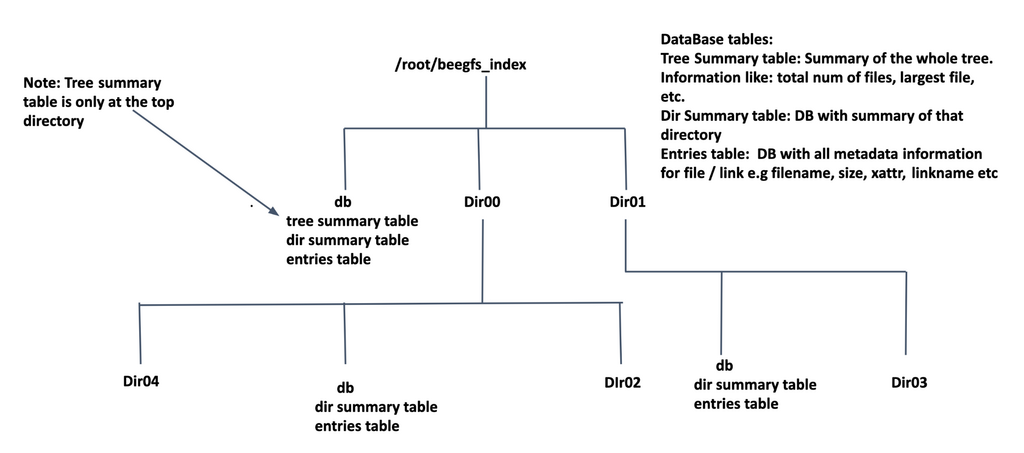
As explained in the linked post, these are SQLite databases. Example of records from the entries table which has individual files and directories (just several more important columns):
sqlite> SELECT id,name,type,inode,mode,nlink,uid,gid * FROM entries;
1|flights-1m_v2.csv|f|1909176012111188957|33204|1|1000|1000|
2|flights-1m_v3.csv|f|513814766249959608|33204|1|1000|1000|
3|flights-1m.csv|f|16836383133063020310|33204|1|1000|1000|
As files-system notifications do not yet update Hive Index(es), we can insert them into Hive index DBs on our own (as long as index refresh on the same database isn't running at the same time and we do it right).
But let's consider the scenario in which the file has been updated (which was the problem one customer had - updates, edits or "replacements"). I can find it in this database, and the size will likely be different. If there's no risk of false negatives, I can update embeddings and invalidate cache. If there is risk of false negatives:
- Ensure the database table has columns
sha256(checksum) andembedding(if I want to reference or store it in this database). - Calculate checksum and embeddings, insert records in table
- Invalidate application cache
In my proof of concept, I thought most users who are happy with these indexes being SQLite databases will also be happy to have embeddings in SQLite as well. To do that, I:
- Calculate and store embeddings in a new table
- Update record in entries table to refer to embeddings for the document in "vector" table
The assumption - which I haven't tested yet, as my PoC experiment is still running - is that on next run BeeGFS Hive Index update won't err because the table entries has two extra columns.
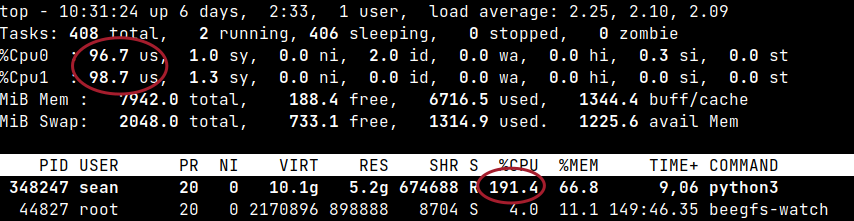
(Having a GPU or using KB-sized data set would have been helpful. It seems this might take time… Update: hours later it got killed due to OoM, maybe that was one of the final phases of refreshing embeddings. I'll need to change data, re-run and update this post, if I remember.)
Alternatively - if that turns out to be a problem or if the user prefers to use a "real" database, we can load SQLite data into PostgreSQL or other database. This is vastly more complicated and in this situation we may prefer to create index entries with Dispatcher, since it knows about all file-system events and we can get the important data (entry name, type, UID, GID, size) by ourselves without special BeeGFS commands.
In the case you haven't thought about that:
- BeeGFS Hive Index is "file-system focused" (duh!)
- Knowing that, the UID and GID information may seem unimportant "for AI" but that's not true. Because of ACLs, they may reflect actual individual owners or "file-system tenants" and if ACLs reflect that, we can use that information to enhance effectiveness of our AI
Examples:
- When querying shared knowledge base data, our own (based on UID) and team (GID) files can be given priority so that we can get more relevant results
- UID/GID can be used to restrict search access to the user and/or group
- UID/GID can probably be leveraged to build per-group or per-user cache, or achieve some other interesting customizations or enhance security
Scalability of real-time processing
Although I've already explained that, I know some may wonder if Python is up to the task here.
It doesn't have to be, but (see the linked post) for the most robust event processing we should build a listener service (based on the example from ThinkParQ documentation, which uses Go) rather than use the legacy UNIX socket listener which is how I listen to BeeGFS events in the linked post.
Having said that, I doubt many users have many hundreds of actionable file-system events per second. Generic events, yes, but those are already processed by their existing stream-processing queues and databases. These are just lists of files and only those that need to be acted upon immediately. In this scenario, 100 per second is a lot (almost 9 million a day).
We know from the metadata tests in the BeeGFS-E-Series documentation that file creation events may be be up to in thousands per second, but I'd say most such files are processed within compute jobs and often deleted after work is done. It is usually only the result that concerns us and for it we don't even need to "watch" the file-system when job schedules take care of the next step in compute pipeline.
I think the main scenario for watching file-system for new files are things like new machine generated data copied to the file-system. Not many users have over 1,000 new files every second and those may need a fast event listener. Secondly, in many cases it will be feasible to run reindex the hot directory every minute, process the files and then move them to an archive or upload to a low cost S3 tier.
NetApp DatOps Toolkit (DOT)
tldr: if you don't use it, you don't need it.
If you're curious what DOT is see this. It's a Python wrapper for file/object copy jobs such as:
- BeeGFS to ONTAP NFS or SMB (in either direction)
- BeeGFS to STorageGRID or ONTAP S3 (either direction)
The TR mentions it, but is DOT still relevant for BeeGFS v8?
In the case of BeeGFS, it's a wrapper for tools you probably already use (e.g. rsync), so it's not strictly necessary for BeeGFS users. Some impacts of BeeGFS v8:
- with BeeGFS sync (see the linked post) we can sync to/from S3 faster than with DOT or S3cmd (which the TR mentions as one of sync tools)
- with BeeGFS Hive Index (see the linked post) we may be able to avoid large file-system scanning with rsync and feed Hive index entries to rsync or other copy utility
- with BeeGFS file-system events we can avoid sync and copy-on-create, for near real-time "mirroring" of BeeGFS data to any destination (S3, NFS, SMB…)
There's probably more, but the main point is: you probably no longer need DOT, unless you're also a heavy user of DOT with ONTAP systems.
The need for "AI reference stack"
I see these "recommendations" regarding "stacks" and they mildly go on my nerves. Having an AI "reference stack" seems fashionable among storage vendors and reminds me of "LAMP" and similar stacks 20 years ago.
There seems to be a lot of bloat in many of those those "recommended" platforms with "batteries included". Some users benefit from the extra convenience, but not all do.
I prefer to start with a slim stack I can understand, and add only what I have to, over deploying a fat stack on day 0. And as someone who makes recommendations (which others may or may not consider) I prefer to ask a few questions first rather than promote a bloated "stack" the user doesn't necessarily need.
Road to bloat
While working on these proof-of-concept workflows with BeeGFS, I used the following:
- Langchain - workflows
- Llama Index - data integration
- Redis, SQLite - KV cache
- PostgreSQL, SQLite - embeddings
Then, as I (indiscriminately) installed various dependencies, I ended up with all sorts of 3rd party packages - for example over 1GB of NVIDIA modules (which I didn't even need as there's no GPU in that particular VM) to various other things I've never heard of!
$ pip list | wc -l
141
That is terrible! I'd rather invest my time and effort in reducing unnecessary bloat than trying to implement some "AI reference stack" that will cause all sorts of problems down the road. The less the better!
I do know there's "nothing to it, just put it all in a container image", but I also loathe the idea of auditing dozens of update packages every month, resolving dependency conflicts, and the rest of it.
The NetApp BeeGFS solution with Series is a reference platform and doesn't have an "AI reference stack". And you probably don't need it, either.
This is just Linux where you can install applications you need. Whatever you've used elsewhere will likely work here, too, and to plug into BeeGFS all you need to do is consume file-system modification events and build/refresh Hive indexes.
The NetApp BeeGFS MLOps TR does mention Kubeflow, but doesn't encourage the reader to look at it as a recommended "stack". From page 24 of the TR:
based on the requirements of an actual internal project, each component can be easily interchanged or swapped depending on the individual project requirements.
That's how I see it as well.
Some users will use Kubeflow Spark Operator in the same Kubeflow cluster where they run AutoML, while others have a different team who prefers to run Spark on a separate Red Hat OpenShift cluster.
AI users should be skeptical about any generic "stack recommendations" when recommendations are made without knowing detailed requirements.
VMware vSphere was a great generic recommendation 15 years ago (great choice for 9 in 10 VI users - amazing accuracy!). There's nothing like that in AI and analytics today.
Databases
The TR doesn't mention databases, as MLOps is usually about files (even when they're databases, e.g. Parquet on S3) and perhaps databases are seen as somewhat "out of scope" or taken care of somewhere else (e.g. on dedicated ONTAP all-SAN array, perhaps).
That may be true, but there's rarely just one good way to achieve something. For example:
- You may have a smaller all-in-one environment where rack space, cost or other constraints force you to consider alternatives
- You feel more comfortable solving your problems on the host (as many HPC and AI shops do)
- You value some unique E-Series features enough to use E-Series for databases as well
So, you may want to look at databases on E-Series. What's next?
One can run databases on BeeGFS. While InfluxDB works, Redis database works even better - it normally doesn't need any disk space, but can be persisted to BeeGFS and BeeGFS CSI can be integrated with Velero to back up that data.
But for traditional RDBMS "on-disk" databases such as PostgreSQL and queuing systems (such as Kafka), I suggest building a 2 or 3-node cluster that uses standard Linux file-systems as explained in the OPEA post written this week.

Smaller environments could use a single hybrid EF600 for both BeeGFS and Kubernetes. I'd only suggest to not try to put all of your all-flash LUNs on one disk group because - as the diagram above suggests - it's prudent to leave metadata LUNs alone (at least own disk groups, if not own disk array).
On QLC-only all-flash models (EF600, EF300C), it isn't possible to easily create multiple disk groups (they're DDP (pool)-only designs), so for those I'd still suggest:
- BeeGFS metadata on R1-style LUNs on DDP
- BeeGFS data on R6-style LUNs on DDP
- Non-BeeGFS (i.e. Kubernetes) LUNs on R1- or R6-style LUNs as appropriate (e.g. DB or DB write logs on R1-style LUNs, apps and DB data on R6-style LUNs)
If you have between 22 and 24 disks in your E-Series all-flash array, you can even create two DDPs, in which case I'd suggest one for R1-style disks if possible, although that's probably not going to be realistic considering that 80-90% of capacity may need to go to R6-style data disks for BeeGFS. Again, if you need to micromanage, an EF300 (for MD and databases, on TLC) and EF600C (for Data, on QLC) is a good pattern.
CSI driver for E-Series
If you wonder where to download E-Series CSI drivers for Kubernetes, the answer is they don't exist.
The good news is there are enough good community CSI drivers we can use. Read the Kubernetes part in my OPEA post on what CSI drivers we can use with E-Series.
Two- or three-server node database clusters
The diagram depicts a three-node Kubernetes cluster. This is generally recommended for bare metal and virtualized Kubernetes. In this cluster, databases are expected to be made highly available using database features (such as master-slave mirroring or three-way replication), except in the case where you run Kubernetes in VMs on a VMware and rely on VMware HA.
Another option is two-node Linux cluster with a VM-based Docker or VM-based Kubernetes. In this case we would probably use Pacemaker + Corosync for monitoring and failover. That's traditional active-passive HA, with its own pro- and counter-points unrelated to E-Series.
Note: the TR mentions BeeGFS CSI driver. It's available (for BeeGFS, obviously), but it's now maintained by ThinkParQ.
On-demand filesystems
The TR mentions BeeOND (I also mentioned and demonstrated in the post linked at the top), which is a way to provide temporary "on-demand" BeeGFS file-systems.
Before BeeGFS v8, ACLs were an "enterprise feature", but now they're available in the community edition. Prior to version 8, users of the community edition couldn't create ACL-protected temporary file-systems, but today that is possible.
Use cases for BeeOND
I'm sure the BeeGFS documentation explains these better, but I'll make several comments BeeOND use cases here.
Temporary file-systems often store data that already exists in another BeeGFS file-system. It may be a NL-SAS system where processing would be expensive, or it may be on an all-flash file-system that's not meant for jobs with extreme IO intensity.
Some vendors use "tiers", which BeeGFS also has ("pools", which has been, and still is in v8, an enterprise feature), so data are still "copied" from a slower tier for processing. But almost no one has a RAID 0 tier. You can have a temporary BeeGFS on a tier made of E-Series RAID 0 volumes, which is pretty amazing. And you can use striping/chunking settings that "normal" BeeGFS file-systems never use.
Now, just like everyone else, you copy data from some slower file-system or "pool" to this BeeOND file-system. But, unlike everyone else, you have a temporary file-system that's 2x or 3x faster than other guy's "temporary" directories or file-systems, while using 20-30% less disk capacity (if you use LUNs on RAID 0 on E-Series with BeeOND). And, you can see in the linked post, it takes seconds to create and delete them.
Imagine you have a data set of 20 TB. Let's say that copying it to BeeOND at 5 GB/s takes 4,000 seconds while others take at 5,000 seconds. Then we process data which, with an optimal BeeOND configuration and underlying RAID 0, takes 1 hour instead of 1.5 hours on a "regular" Hot Tier in 3rd party storage systems (in many cases using RAID 6-equivalent), and copy back a small 1 GB result. Savings: 1,000 seconds less to copy and 1,800 seconds less to compute in a workflow that takes less than 10,000 seconds.
Obviously it's a made up "example", but such workloads and use cases do exist.
To avoid having "stranded" capacity for a scratch file-system we can create a "permanent temporary file-system" with BeeOND and make it available to BeeGFS CSI users, so that PVCs can be created on it as needed. Or we could create BeeOND and small K8s clusters on demand. If it can save time or provide flexibility for regularly occurring data processing jobs, it can be valuable.
Conclusion
With the new file-system event notifications, Hive indexes and the ability to use CSI and temporary file-systems, it is possible to build a fast and capable real-time data pipeline that is simple, robust and easy to maintain.
Some storage (and compute) vendors highlight "reference stacks" simply because they can't test everything. But, as you can see in the BeeGFS TR referenced here, even the BeeGFS solution team highlighted the fact that the user can use whatever works for them.
This flexibility stems from the fact that with Linux, BeeGFS and E-Series (block devices) there is nothing that stops you from doing things better (or worse).
Vendors who sell proprietary solutions have to test and create guard-rails.
With BeeGFS and E-Series, you can work smarter if you know how to work smarter and don't engineer a foot-gun.
As always, E-Series does almost everything you need, and almost nothing you don't. BeeGFS is a great match for this approach.
More freedom, less bloat, and more responsibility!