OPEA AI with NetApp E-Series
- Introduction
- What is the OPEA project
- The stack
- Where's the storage?
- E-Series storage and solution stack for OPEA
- Multi-tenancy
- Conclusion
Introduction
NetApp and OPEA (Open Platform for Enterprise AI) recently announced a joint solution.
In this post I'll describe how an OPEA & E-Series can work together.
UPDATE: some of the "nice to have" solutions are now available in 2026:
- Community SANtricity CSI driver - see here
- Containerized Versity S3 Gateway - see this recipe
What is the OPEA project
This is the part where I could insert a keyword-peppered junk snippet created by AI, except I don't do that here.
You can read about OPEA here. Their docs site has a brief mission statement:
OPEA streamlines the implementation of enterprise-grade Generative AI by efficiently integrating secure, performant, and cost-effective Generative AI workflows into business processes.
Cost-effective seems like a code word for "maybe you can avoid buying NVIDIA GPUs or at least software", which in turn means relatively more DIY.
What does that actually mean?
The stack
- The good (and bad) news is any Kubernetes will do. Some variance.
- Kubernetes install instructions are limited to several approaches. More variance.
- Reference OS is just one. The good thing is it's Ubuntu, the bad thing is it's (only) Ubuntu. YMMV. Of course, you are free to use any other that works for you. More variance.
- Deployments can also happen on Docker. More flexibility, more freedom, and more variance!
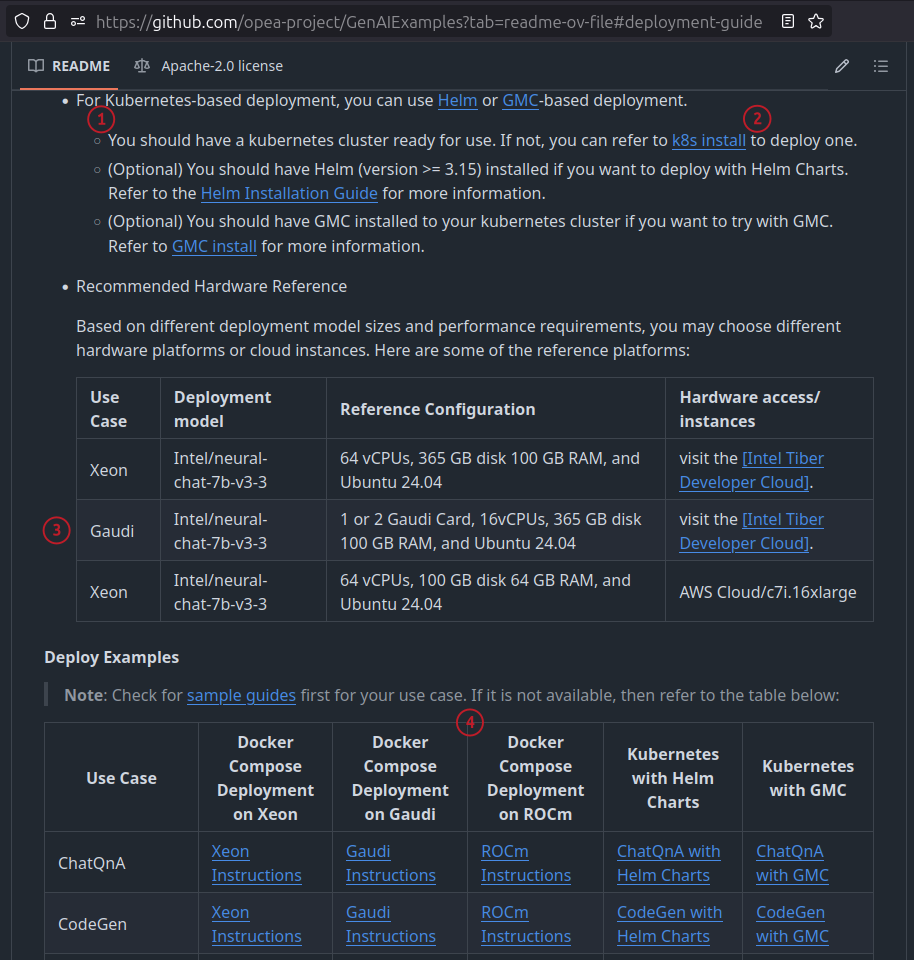
Source: GenAIExample README.md as of 2025/05/21
That's what "DIY" means.
There's a lot of freedom and flexibility, but at the same time you may end up with a lot of experimenting and no two deployments that look exactly the same.
Docker vs. Kubernetes
If you're not doing OPEA at scale - say, you're a department or a ROBO site with 2 Intel servers, Docker may be fine or even better.
- it costs nothing
- it's easy to deploy in seconds
- it doesn't require Kubernetes management personnel
- it can run on one (no HA) or two (HA) servers with "classic" HA failover
- it can easily share server and storage with whatever other stuff you have in your ROBO site (VMware, etc.)
Where's the storage?
Oh, the storage section is just below that Kubernetes section in the README file - I couldn't capture a larger screenshot, sorry! Actually, that's not true. There's no storage section!
You can use any storage that works. It's completely transparent to OPEA - as long as the OS can use it, you're good to go.
More precisely in terms of E-Series:
- For OPEA in Docker, all you need is for your OS (whether it's the reference OS or some other) to be on the NetApp E-Series IMT for the protocol you use. For example, Rocky Linux is on the list, but (gotcha!) there's no Docker RPM for Rocky Linux (as of now). Luckily - because you're a fiddler (otherwise you wouldn't be using OPEA) - that's not a problem for you so you'll install the CentOS or Red Hat RPM.
- For OPEA on Kubernetes, things get more complicated
- Kubernetes in VMware - this becomes just VMware with E-Series because vSphere CSI driver takes care of storage provisioning. See this. As long as your vSphere is on the IMT list for E-Series, the rest is up to vSphere CSI driver. If you need NFS, deploy a Linux VM and let VMware HA take care of HA.
- Kubernetes in other VI - several choices
- use BeeGFS CSI for shared data access (either on VMFS or block devices from E-Series)
- setup a Linux (VM) NFS server and CSI driver for NFS. If you need HA, let VI HA (or set up own Pacemaker/Corosync) take care of it.
- Proxmox, LXD, and Incus are all good choices. They're not in the E-Series IMT, but they don't need to be; the OS is and that's enough. There's no specific plugin that would require these to be specifically listed in the IMT.
- Kubernetes on bare metal Linux - see this. Of course, BeeGFS CSI is also available.
E-Series storage and solution stack for OPEA
Storage services:
- Single-host block storage (native)
- any E-Series block devices (SAS, iSCSI, FC, NVMe, etc.)
- NFS service
- ONTAP Select 9 (VM that can run on VMware or Redhat-based KVM hypervisor)
- Classic Linux NFS server VM (HA with Pacemaker/Corosync or VMware HA)
- ZFS-based Linux NFS server VM (same HA recipe, but rich snapshot and efficiency features)
- Parallel file system (shared block storage)
- S3 service
- NetApp StorageGRID (bare metal or VMs (at least 3))
- Versity S3 Gateway (can be S3 gateway to Linux NFS server or BeeGFS directory/filesystem) or generic S3 gateway on your Linux VM
- MinIO server (HA with 3 VM/container deployment (EC 2+1) or 1 VM with VMware HA (no EC needed))
- Apache Ozone S3
Inferencing may not need much more than just block devices, but if you do need other services then you can deploy them as necessary. For example, RAG may need a file server or object store.
Some other useful and relevant details in the context of AI services:
- Storage performance and event monitoring: E-Series Performance Analyzer, PRTG, SNMP (event only)
- Access control
- Linux NFS server - Yes
- BeeGFS (even in the free community edition 8) - Yes
- S3 gateway - Yes for all three mentioned above
- Antivirus
- ClamAV - works with standard Linux filesystems, can be containerized, and for BeeGFS it can work as a service that acts on BeeGFS filesystem notifications. Note that on-access scanning for S3 would have to be done on the filesystem level, and that any scenario (local filesystem, shared filesystem, NFS) on-access scanning probably isn't feasible due to performance impact
- Other, commercial solution that work with Linux distribution you have. There may be none for S3, but for local filesystems they should work well and probably better than ClamAV
- Snapshots
- E-Series can take snapshots of any block devices, individually or in a consistency group. As controls are exposed only to management network, these are considered indelible from server and storage network. See the Rest Server post for a recipe
- Hypervisors, CSI drivers or filesystems may offer their own (obviously, these can be deleted on the servers)
- Backup
- VMware-based - any VMware-compatible backup
- Linux-based - any Linux-compatible backup
- You can create a separate (e.g. HDD-based) disk group for Veeam Hardened Repository
- If you run a single server with S3, Veeam Hardened Repository or Rest Server, you get a physically separate domain for your backups
- Kubernetes - Velero (works with generic CSI, which includes BeeGFS CSI driver), probably Kasten K10, too
- Data synchronization and replication
- Whatever Linux utilities and tools exist out there, e.g. rsync, rclone, and more
- BeeGFS has its own highly optimized sync solution that can copy data to/from S3. Like rclone, but better when you use BeeGFS.
- These let you securely burst to the cloud or distribute code and data to/from edge locations
- Automation
- SANtricity API and CLI should be enough, as these are expected to be simple deployments (probably one big disk group/pool with 3-4 LUNs presented to all storage clients)
- Ansible modules for SANtricity storage and client-side automation
- Storage area network (SAN) is optional
I want to elaborate on this last point: with FC, iSCSI or SAS, it's possible to attach several servers to E-Series and completely avoid buying storage switches. Since OPEA is (at least initially) aiming for ROBO and departmental use, this is perfect:
- Saves $10K-ish (pair of 25G switches)
- Saves 1 or 2 U in rack space. With one EF300 (2U) and 3 1U servers (3U), that represents savings of 1/6 or 2/7 (16% or 28%, respectively, depending on whether storage networking switches take 1 or 2 RUs)
Multi-tenancy
From a compute perspective, we don't get to decide - that's up to the stack (and mind you, OPEA isn't just Intel, so YMMV).
From a storage perspective, VM-based solutions give you better segregation than Docker or Kubernetes, but you still need to be make sure multi-tenancy works in your compute stack. On the storage side, services can be stuffed into containers or VMs and VMs put on separate compute (service) networks so you can get full segregation, but without encryption (perhaps the only exception is client-side encryption for S3, where available).
If a storage network is used, physically segregate hosts can be attached to E-Series, and segregation is done by selective presentation ("zoning") of LUNs. E-Series iSCSI doesn't support VLANs, so there's no way to limit access to iSCSI clients by presenting storage on different VLAN-tagged LANs.
For multi-tenant inferencing or similar cases where block devices are sufficient and shared storage not required, local (LUKS) encryption of VMs may be sufficient, depending on use case (I'm sure this wouldn't be enough for BFSI or defense use cases).
Conclusion
Even NVIDIA GPU-focused stacks require a fair amount of work to deploy, integrate and support. Because Kubernetes is usually required for NVIDIA stack and storage systems like E-Series don't support it, they stand out as hard(er) to integrate.
OPEA requires even more work, so the extra effort to add E-Series to the stack is not comparatively significant. Most of the items are standard Linux solutioning and deployment, and most are documented on this blog with enough API examples and source code that do 80% of the work always aiming to use the minimal number of dependencies which eases the cost and effort of integration and support while lowering security risks.
Because OPEA isn't highly prescriptive, it's almost inevitable that a lot be left as "an exercise for the user". Due to more variance in the stack and configuration, I also think people need to be ready to deal with "rare bugs" (as in: 0 search results) and come up with own workarounds. Of course, those who can handle it also get the benefits.
E-Series is a good match for use cases from the OPEA project.
After skimming through the documentation, I would start looking at the following approaches (in no particular order):
- Service providers: OPEA on Kubernetes (with 100/200G switches, can be physically segregate servers or at least one Kubernetes cluster per tenant)
- ROBO
- Dockerized OPEA in VMs on vSphere
- Dockerized OPEA in VMs on LXD or Proxmox
- Kubernetes can work as well, of course, but why bother if it's not bare metal and you already have VI to maintain?
- Single user/org environment could use BeeGFS; shared (multi-tenant) could deploy NFS or S3 VM (or Docker/Kubernetes cluster) per each tenant and have one centralized S3 for models