Event monitoring with SNMP traps from NetApp E-Series arrays
- Introduction
- Configure SNMP trap destination in SANtricity OS
- Get E-Series MIB files and OID
- SANtricity SNMP walk
- SANtricity SNMP traps and trap examples
- Other approaches to delivering notifications to SNMP trap destinations
- Forwarding notifications to other SNMP and non-SNMP destinations
- Conclusion
- Appendix A - E-Series MEL Codes aka Storage System Event Types
- Appendix B - Need Attention situation example
- Appendix C - Trap handling script example
- Appendix D - Centreon with E-Series
NOTE: Fake "security researchers", please be noted that credentials and/or passwords in this post are not real.
Introduction
One would think that after a decade or two on market, there would be at least one good page with detailed, practical information on this topic.
In fact, today ChatGPT 4 should be perfectly capable of writing a high-quality technical blog post about this, with configuration examples, commands and whatnot.
Right? Wrong.
Anyway, let's focus on our topic.
Configure SNMP trap destination in SANtricity OS
Configure an SNMP trap destination and test it. I'm using SNMP v2, so I have no need to authenticate.

Destinations should have a functioning SNMP trap service that listens for incoming traps and isn't blocked by firewall rules.
In cases like these, always make sure receiving service is working correctly without E-Series.
Here's how the alert is looks like in the now-latest SANtricity v11.80:
It's a generic trap that only shows that E-Series can send traps to your trap destination. Remember to open firewall to E-Series' IP address.
We need to find more about how SANtricity SNMP traps look like.
Get E-Series MIB files and OID
Only one MIB file has to be downloaded.
- NetApp E-Series MIBs:
- SM10-R3-MIB: this SM10-R3-MIB is already included in Linux MIB collections
- ES-NETAPP: this one you download from SANtricity OS download page. There are several versions of the file
- NetApp E-Series OID:
1.3.6.1.4.1.789.1123.1which translates to.iso.org.dod.internet.private.enterprises.netapp.eSeriesStorageSystem
You don't need to "get" OID as such, but you need it to make sure OID translation works which also indicates MIBs can be loaded.
Why are there two MIBs? Who the heck knows. My take:
- Generic SM10-R3-MIB - 1.3.6.1.4.1.789.1123.1.500.0 - SM10R3 base MIB
- Array-specific ES-NETAPP MIB - 1.3.6.1.4.1.789.1123.1.[1,2] - MIB specific to storage manager (1) and storage server (2)
The next question is…
SANtricity SNMP walk
What can I get by querying E-Series SNMP?
Almost nothing.
If SANtricity's SNMP service is enabled and reachable, you'd at most get something like this (example for EF-Series EF-570):
enterprises.789.1123.2.500.1.1.0 = STRING: "R25U14E5700"
enterprises.789.1123.2.500.1.2.0 = STRING: "600a098000f63714000000005eaabbccc"
enterprises.789.1123.2.500.1.3.0 = STRING: "122222A66666   "
enterprises.789.1123.2.500.1.4.0 = STRING: "NETAPP  "
enterprises.789.1123.2.500.1.5.0 = STRING: "INF-01-00       "
enterprises.789.1123.2.500.1.6.0 = STRING: "5700"
enterprises.789.1123.2.500.1.7.0 = INTEGER: 0
That's a "storageServer" object. It gives us the basic details of the array: system name (R25U14E5700), WWID, chassis serial number, vendor, product (INF-01-00; you may have seen this in Linux multipath configuration files), model (5700; EF-570 which I used here is an all-flash version of E-5700).
- ssStorageArrayName (500.1.1.0) - storage array name for the reporting device
- ssStorageArrayWWID (500.1.2.0) - world wide identifier (WWID) for the reporting device
- ssChassisSerialNumber (500.1.3.0) - Storage Array Chassis Serial Number for the reporting device
- ssVendorID (500.1.4.0) - vendor identifier
- ssProductID (500.1.5.0) - product identifier
- ssModelName (500.1.6.0) - vendor defined model
- ssStorageArrayNeedsAttention (500.1.7.0) - summary of the operational status of the reporting device (0 - Optimal, 1 - Needs Attention)
So this is not entirely useless - it can be used to create hardware inventory lists and such, and parts of it are included in traps. Also, notice the last 0 in the output above: that means current status is optimal, so that's a very minimalist way to find out if an array needs attention.
Some of these variables will appear in traps as well. You can override some of them with custom strings in "Configure SNMP MIB Variables" (right-most button in the blue tab of the second screenshot above), as per the SANtricity documentation.
Here's what can be changed:

And here's where it's done in SANtricity 11.80: Support > Support Resources > Storage Array Profile.

What else is out there if we can't use SNMP walk?
- Syslog forwarding (plus some DIY parsing): last tab in top row of the first screenshot is where we can configure Syslog (forwarding). The challenge here is figuring out what strings there may be in logs, and how to set rules that let us act on the important ones and ignore everything else. I haven't looked into this yet (and by "this" I mean checking whether events can be easily extracted from syslog so that we can easily put that information to use)
- SANtricity API - see this article about MEL alerts. This is more straightforward. I've also found this Perl (!) plugin that uses the SANtricity API to check E-Series hardware (see examples in Appendix D). It can be modified to send information to other event monitoring systems and works out of the box for Icinga and Nagios. Finally, there's a Prometheus Exporter for SANtricity (see this blog's archive) that requires SANtricity Web Services Proxy so it may not be acceptable to some and covers only performance metrics (not events).
Next, let's take a look at E-Series' SNMP traps.
SANtricity SNMP traps and trap examples
I am not sure as I haven't seen enough SNMP trap daemon logs, but it appears these uptime entries are always included in all notifications. Annoying.
DISMAN-EVENT-MIB::sysUpTimeInstance = Timeticks: (87851800) 10 days
E-Series-specific SM10-R3-MIB and ES-NETAPP
The deviceErrorCode SM10-R3-MIB should be the same as the MEL event number (see the MEL article above or the official docs and KB).
deviceErrorCode OBJECT-TYPE
    SYNTAX DisplayString (SIZE (0..19))
    MAX-ACCESS read-only
    STATUS current
    DESCRIPTION
        "The error code as reported by the device or host."
        ::= { infoEntry 5 }
SM10-R3-MIB traps themselves contain that code. MEL event number (deviceErrorCode) should be contained in storageArrayCritical (1.3.6.1.4.1.789.1123.1.500.0.2) notification:
storageArrayCritical NOTIFICATION-TYPE
    OBJECTS {
               deviceHostIPType,
               deviceHostIPAddr,
               deviceHostName,
               deviceUserLabel,
               deviceErrorCode,
               eventTime,
               trapDescription,
               componentType,
               componentLocation
            }
    STATUS current
    DESCRIPTION
        "This trap indicates an event where user-interaction is required immediately.
        Some example events are component failures or critical errors."
        ::= { sm10R3TrapBase 2 }
The second MIB is ES-NETAPP MIB. ES-NETAPP-06-MIB is the MIB file I used for EF-570. Other arrays may have other MIBs.
One of its interesting variables is ssStorageArrayNeedsAttention:
ssStorageArrayNeedsAttention OBJECT-TYPE
    SYNTAX Integer32
    MAX-ACCESS read-only
    STATUS current
    DESCRIPTION
        "Summary of the operational status of the reporting device. (0 - Optimal, 1 - Needs Attention)"
        ::= { ss01R1InfoBase 7 }
Among notifications, ssStorageArrayAlert is interesting.
ssStorageArrayAlert NOTIFICATION-TYPE
    OBJECTS {
                ssNetworkNodeName,
                ssStorageArrayName,
                ssEventType,
                ssEventTime,
                ssEventDescription,
                ssEventComponentType,
                ssEventComponentLocation,
                ssEventPriority,
                ssStorageArrayWWID,
                ssChassisSerialNumber
            }
    STATUS current
    DESCRIPTION
	    "The reporting device has detected a failure and immediate user-interaction is required."
        ::= { ss01R1TrapBase 2 }
I didn't have physical access to E-Series so I had to do various things in the UI in an attempt to get some alerts sent my way.
Placing a controller offline results in Critical severity (SNMPv2-SMI::enterprises.789.1123.2.500.2.7), so that is something we could filter and alert on if that's a match ("Critical", maybe "Warning" or what have you), raise an alert and send email notifications.
We can see the second line is storageArrayCritical (SNMPv2-SMI::enterprises.789.1123.1.500.0.2) explained above for SM10-R3-MIB. That's followed by the first three items from storage server object (500.1.[1-3]).
SNMPv2-MIB::snmpTrapOID.0 = OID:
SNMPv2-SMI::enterprises.789.1123.2.500.0.2
SNMPv2-SMI::enterprises.789.1123.2.500.1.1 = STRING: "R25U14E5700"
SNMPv2-SMI::enterprises.789.1123.2.500.1.2 = STRING: "600a098000f63714000000005eaabbccc"
SNMPv2-SMI::enterprises.789.1123.2.500.1.3 = STRING: "122222A66666   "
SNMPv2-SMI::enterprises.789.1123.2.500.2.1 = STRING: "5005"
SNMPv2-SMI::enterprises.789.1123.2.500.2.2 = STRING: "09/16/2023 15:09:56"
SNMPv2-SMI::enterprises.789.1123.2.500.2.3 = STRING: "Place controller offline"
SNMPv2-SMI::enterprises.789.1123.2.500.2.4 = STRING: "wan0"
SNMPv2-SMI::enterprises.789.1123.2.500.2.5 = STRING: "Controller"
SNMPv2-SMI::enterprises.789.1123.2.500.2.6 = STRING: "Not Available"
SNMPv2-SMI::enterprises.789.1123.2.500.2.7 = STRING: "Critical"
The last seven (enterprises.789.1123.2.500.2.[1-7]) entries:
- ssEventType (.500.2.1) - enumerated value corresponding to the error detected by the reporting device. As you recall from earlier in this post, this corresponds to MEL code
- ssEventTime (.500.2.2) - the date-time string (MM/DD/YYYY HH:MM:SS) at which the error event occurred on the reporting device
- ssEventDescription (.500.2.3) - string describing the nature of the error that occurred on the reporting device
- ssNetworkNodeName (.500.2.4) - the network name of the reporting device
- ssEventComponentType (.500.2.5) - string identifying the type of component that the reporting device detected as failed; based on a MEL catalogue, I think this may include Controller, Volume, Battery Pack, Cache Backup Device, Consistency Group, Consistency Group Snapshot Volume, Snapshot Image, etc.)
- ssEventComponentLocation (.500.2.6) - string identifying the physical location of the failed component detected by the reporting device
- ssEventPriority (.500.2.7) - string identifying the priority of the error that occurred on the reporting device
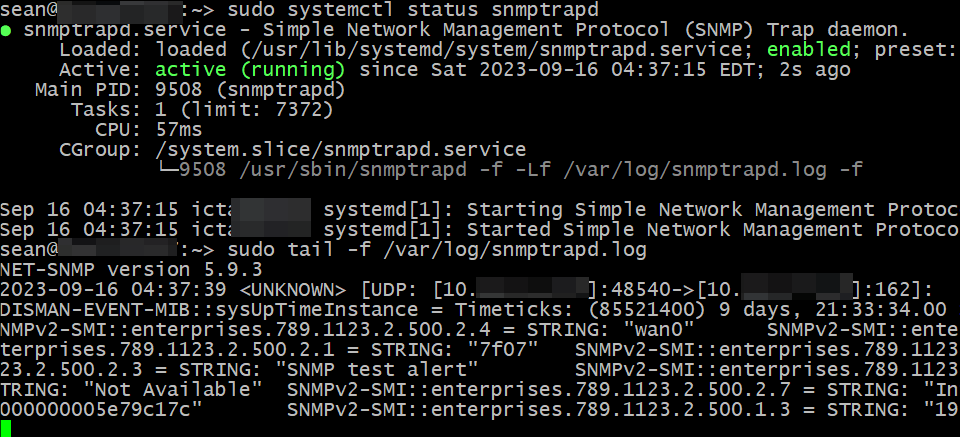
Original entries weren't sorted and formatted, by the way. The log entry looked more like that screenshot with a test trap.
In summary, if you can't implement some fine-grained rules, simply create alerts on enterprises.789.1123.2.500.2.7="Critical".
As a more educated version of that, pull cables, controllers, and disks (one thing at a time, with 2 min in between each action!) before entering production to find out what other logs that generates, and refine your approach.
"Needs attention" is cleared (enterprises.789.1123.2.500.1.7=0) if the condition that caused it is resolved. "Needs Attention" trap isn't a MEL code, but it's sent as a trap on both "set" and "clear".
Generic
Generic events don't contain the E-Series OID, but may still be useful. Controller coming online:
DISMAN-EVENT-MIB::sysUpTimeInstance = Timeticks: (2333100) 6:28:51.00
SNMPv2-MIB::snmpTrapOID.0 = OID: IF-MIB::linkUp
(The DISMAN-EVENT-MIB thing appears everywhere like that. Very annoying!)
Other approaches to delivering notifications to SNMP trap destinations
Assuming you have a way to figure out when to send an SNMP trap notification (such as, checking for MEL events using the SANtricity REST API), you could automate checks for that condition, and send notifications to your SNMP destination when needed.
This example is based on the PySNMP documentation. I'd like to get the critical notification and E-Series array name included.
sendNotification(
    SnmpEngine(),
    CommunityData('public', mpModel=0),
    UdpTransportTarget(('ops.datafabric.lan', 162)),
    ContextData(),
    'trap',
    NotificationType(
        ObjectIdentity('1.3.6.1.4.1.789.1123.1.500.0.2','SNMPv2-SMI::NOTIFICATION-TYPE')
    ).addVarBinds(
        ('1.3.6.1.4.1.789.1123.1.500.2.7', 'SNMPv2-SMI::enterprises.789.1123.2.500.1.1')
    ).loadMibs(
        'ES-NETAPP-06-MIB','SM10-R3-MIB'
    )
)
I haven't tested this and I don't know if it works. But you don't have to use this, even CLI commands can work.
Why use such an approach when SNMP traps work? Some users already use the SANtricity API for performance monitoring, workflows and more, and for them it may be easier to query the API and send SNMP notifications from existing application.
Forwarding notifications to other SNMP and non-SNMP destinations
Sometimes you receive SNMP traps, but also need these notifications elsewhere.
SNMP trap daemon can have a trap handling script set in snmptrapd.conf itself:
traphandle OID|default PROGRAM [ARGS ...]
Normally this OID would be a NOTIFICATION-TYPE object such as storageArrayCritical (1.3.6.1.4.1.789.1123.1.500.0.2), but can be another OID (full or with a wild-card which replaces multiple traphandle rows), or simply the string default. Example:
traphandle SNMPv2-SMI::enterprises.789.1123.2.500.0.2 /usr/local/bin/slack_notify.sh
When this SNMP trap is received, that trap handle will run the script with the following arguments:
- Hostname (from which it was received)
- IP (address from which the trap was received)
- Variables (content) which is a space-delimited pair or set of pairs:
${OID} ${VALUE}
The script can notify a Slack or do something else. From Net-SNMP documentation:
#!/usr/bin/bash

read host
read ip
vars=

while read oid val
do
  if [ "$vars" = "" ]
  then
    vars="$oid = $val"
  else
    vars="$vars, $oid = $val"
  fi
done

echo trap: $1 $host $ip $vars

# As we've seen above (screenshot #2), trap formatting is messy,
#   so you may want to use some preprocessing
#   before you send that content someplace else:
# python3 /scripts/snmp_critical_alert_notify.py $vars
In addition to handling with trap handles, we can forward specific OIDs to another destination. This works the same way as trap handlers, except there's no script.
forward OID|default DESTINATION
(See the Net-SNMP documentation for the details on destination format.)
We can use traphandle script(s) to send an email or message, and forward processors to forward matching OID(s) to another destination for final processing.
Conclusion
A lightweight approach with SNMP but without traps would be to use SNMP walk and check if enterprises.789.1123.2.500.1.7.0=1 ("Needs Attention"), and then check another place (SANtricity Web UI, Syslog, etc.) which contains necessary details.
E-Series' SNMP trap features are more useful than SNMP queries. Because traps are meant for event notifications, they can't be used for performance monitoring (at least that is a solved problem).
Once the first trap recipient receives notifications, they can process them and forward the OID to another destination or destinations. Fancy rules could act if several OID values (such as ssEventPriority and ssEventComponentType) match certain criteria to perform targeted alerting and notifications (example: ssEventPriority='Critical' AND ssEventComponentType='Drive' could be used to send emails to your supplier).
The final trap recipient can use critical severity as the sole condition that raises an alert in their monitoring system. The idea is to have one "catch-all" rule is to not miss any critical events due to complex matching rules. Or maybe start simple and gradually build more sophisticated rules.
If you don't use SNMP, you can use the SANtricity API as explained above, or try to use an existing plugin or integration to create your own SNMP or other notifier.
Appendix A - E-Series MEL Codes aka Storage System Event Types
As mentioned several times by now, ssEventType (enterprises.789.1123.2.500.2.1) corresponds to MEL types.
The "good" news is all these are "Critical", which means you don't have to think what to do when an event is not Critical.
The bad news is Event Category values range from Failure over Error to Notification. But you'll be relieved to know you probably don't need to worry about that. MEL_EV_PI_ANALYSIS_LOCKDOWN_MODE_ENTERED, for example, is logged when the controller has been rebooted into Analysis Lockdown Mode because the controller has detected excessive Data Assurance errors. It has the Event Category of "Notification" (0x4), but I'm pretty sure no administrator would just let this be. (As an aside: this KB (NetApp support account required) makes some distinctions around ASUP, etc., if you're interested, but for on-prem notifications we may not care.)
So…. you'll probably want to ignore Event Category and alert on any and all enterprises.789.1123.2.500.2.7="Critical" that you get, and ask someone to take a look at the box.
Especially since some of these events may change, new may be added, some may be removed. But "Critical" should always remain.
This below is the code name followed by its hex ID. In earlier text I mentioned how I brought a controller offline. The array had SNMPv2-SMI::enterprises.789.1123.2.500.2.1 = STRING: "5005" which is MEL_EV_SYMBOL_CONT_FAIL and (as the name suggests) activates upon controller failure (setControllerToFailed_1). Its hex ID is 5005 which is the string value we received in SNMP trap notification.
MEL_EV_ACS_ERROR - 0x2602
MEL_EV_ARMV_MIRROR_FAILED - 0x7C06
MEL_EV_ARVM_AMG_INTERNAL_SUSPENSION - 0x7C02
MEL_EV_ARVM_AMG_RECOVERY_POINT_LOST - 0x7C04
MEL_EV_ARVM_AMG_ROLE_CHANGE_PAUSED - 0x7C37
MEL_EV_ARVM_AMG_ROLE_CONFLICT - 0x7C03
MEL_EV_ARVM_AMG_SEC_MEM_REP_FULL - 0x7C09
MEL_EV_ARVM_AMG_SYNC_PAUSED_ALT_STATE - 0x7C34
MEL_EV_BACKUP_COMPONENT_STATUS_UNKNOWN - 0x7506
MEL_EV_BASE_CONTROLLER_DIAGNOSTIC_FAILED - 0x5100
MEL_EV_BATTERY_EXPIRED - 0x7308
MEL_EV_BATTERY_MISSING - 0x7306
MEL_EV_BBU_OVERHEATED - 0x7300
MEL_EV_BYPASS_GENERIC - 0x2823
MEL_EV_CACHE_BACKUP_DEVICE_FAILED - 0x7500
MEL_EV_CACHE_BACKUP_DEV_WRITE_PROTECTED - 0x7501
MEL_EV_CACHE_BACKUP_INSUFFICIENT_CAPACITY - 0x211F
MEL_EV_CACHE_BACKUP_PROTECTION_ERROR - 0x2125
MEL_EV_CACHE_BATTERY_FAILURE - 0x210C
MEL_EV_CACHE_BATTERY_WARN - 0x2113
MEL_EV_CACHE_DATA_LOSS - 0x210E
MEL_EV_CACHE_MEM_DIAG_FAIL - 0x2110
MEL_EV_CACHE_NOT_FLUSHED_ON_ONLY_CTLR - 0x2131
MEL_EV_CCM_HW_MISMATCH - 0x2109
MEL_EV_CFG_DRIVE_FAILURE - 0x226C
MEL_EV_CFG_DRV_TO_SMALL - 0x2249
MEL_EV_CFG_NTP_RES - 0x2287
MEL_EV_CFG_NTP_SERVICE_UNAVAIL - 0x2289
MEL_EV_CFG_NTP_UNREACH - 0x2288
MEL_EV_CFG_READ_FAIL - 0x2251
MEL_EV_CFG_WRONG_DRIVE_TYPE - 0x2262
MEL_EV_CONT_ID_MISMATCH - 0x2833
MEL_EV_CONT_ID_READ_FAILURE - 0x2855
MEL_EV_CONT_REDUNDANCY_LOSS - 0x2829
MEL_EV_CONTROLLER - 0x2500
MEL_EV_CONT_SUBMODEL_MISMATCH - 0x2841
MEL_EV_COPY_THEN_FAIL_NO_SPARE - 0x227C
MEL_EV_DATA_ALTERED_TO_CORRECT_REDUN_MISMATCH - 0x2048
MEL_EV_DATABASE_RECOVERY_MODE_ACTIVE - 0x6109
MEL_EV_DATA_PARITY_MISMATCH - 0x200A
MEL_EV_DBM_CONFIG_DB_FULL - 0x6101
MEL_EV_DBM_HCK_ALTCTL_NOT_FUNC - 0x6107
MEL_EV_DDC_AVAILABLE_CRITICAL - 0x6900
MEL_EV_DEDICATED_MIRROR_CHANNEL_FAILED - 0x2124
MEL_EV_DEGRADE_CHANNEL - 0x1209
MEL_EV_DEVICE_FAIL - 0x222D
MEL_EV_DFC_ALT_LOOP_DIAG_FAIL - 0x150E
MEL_EV_DFC_CHANNEL_FAILOVER - 0x1513
MEL_EV_DFC_CHANNEL_MISWIRE - 0x150F
MEL_EV_DFC_CTL_MISWIRE - 0x151E
MEL_EV_DFC_ESM_MISWIRE - 0x1510
MEL_EV_DFC_FIBRE_TRUNK_MISWIRE - 0x1525
MEL_EV_DFC_HW_FAILED_CHANNEL - 0x1515
MEL_EV_DFC_LSD_FAILURE - 0x151A
MEL_EV_DFC_MIXED_LOOP_TECHNOLOGY_MISWIRE - 0x1522
MEL_EV_DFC_TRUNK_INCOMPATIBLE_ESM - 0x1524
MEL_EV_DIAG_CONFIG_ERR - 0x5616
MEL_EV_DIAG_CONFIG_ERR_ALT - 0x5617
MEL_EV_DIAG_READ_FAILURE - 0x560D
MEL_EV_DIAG_READ_FAILURE_ALT - 0x560E
MEL_EV_DIAG_WRITE_FAILURE - 0x560F
MEL_EV_DIAG_WRITE_FAILURE_ALT - 0x5610
MEL_EV_DIFFERENT_DATA_RETURNED_ON_RETRY - 0x2047
MEL_EV_DIRECTORY_SERV_CONFIG_ERROR - 0x9204
MEL_EV_DISCRETE_LINE_FAIL - 0x2836
MEL_EV_DISK_POOL_CAPACITY_DEPLETED - 0x3809
MEL_EV_DISK_POOL_CORRUPTED_DB_RECORD - 0x380D
MEL_EV_DISK_POOL_INSUFFICIENT_MEMORY - 0x380C
MEL_EV_DISK_POOL_REC_RDRVCNT_BEL_THRSHLD - 0x3803
MEL_EV_DISK_POOL_UTILIZATION_CRITICAL - 0x3805
MEL_EV_DISK_POOL_UTILIZATION_WARNING - 0x3804
MEL_EV_DRAWER_DEGRADED - 0x285F
MEL_EV_DRAWER_FAILED - 0x2856
MEL_EV_DRAWER_INVALID - 0x2861
MEL_EV_DRAWER_OPEN - 0x2857
MEL_EV_DRAWER_REMOVED - 0x2862
MEL_EV_DRIVE_FAIL_READ_ERROR_SCAN_CYCLE - 0x203B
MEL_EV_DRIVE_IN_VG_OR_HOT_SPARE_REMOVED - 0x226D
MEL_EV_DRIVE_PFA - 0x1010
MEL_EV_DRIVE_PFA2 - 0x2285
MEL_EV_DRIVE_REDUNDANCY_LOSS - 0x282D
MEL_EV_DRIVE_TRAY_LOCKOUT - 0x2832
MEL_EV_DRIVE_TRAYS_NOT_GROUPED_TOGETHER - 0x2835
MEL_EV_DRIVE_UNSUP_INTERPOSER_FW_VER - 0x2276
MEL_EV_DRIVE_UNSUPPORTED_CAPACITY - 0x2271
MEL_EV_DRV_FORMAT_FAILED - 0x224B
MEL_EV_DRV_NO_RESPONSE - 0x224D
MEL_EV_DSAS_BK_END_HBA_MISWIRE - 0x1702
MEL_EV_DSAS_ESM_MISWIRE - 0x1704
MEL_EV_DSAS_EXP_PORT_DEV_MISWIRE - 0x170A
MEL_EV_DSAS_TOPOLOGY_MISWIRE - 0x1700
MEL_EV_DSAS_WPORT_DEG_TO_FAIL - 0x1707
MEL_EV_DSAS_WPORT_DEG_TO_FAIL_CTLR - 0x1710
MEL_EV_DSAS_WPORT_OPT_TO_DEG - 0x1706
MEL_EV_DSAS_WPORT_OPT_TO_DEG_CTLR - 0x170F
MEL_EV_ENCL_FAIL - 0x280D
MEL_EV_ENCL_ID_CONFLICT - 0x2816
MEL_EV_ESM_DRIVE_BYPASS - 0x2854
MEL_EV_ESM_TYPE_MISMATCH - 0x2849
MEL_EV_ESM_VERSION_MISMATCH - 0x281E
MEL_EV_EXCESSIVE_REBOOTS_DETECTED - 0x1403
MEL_EV_EXPANSION_TRAY_THERMAL_SHUTDOWN - 0x285D
MEL_EV_FACTORY_DEFAULT_MISMATCH - 0x2852
MEL_EV_FAILED_HOST_INTERFACE_CARD - 0x1904
MEL_EV_FAIL_VDSK_DELAYED - 0x2252
MEL_EV_FBM_BUNDLE_VIOLATION - 0x7001
MEL_EV_FC_HOST_SFP_FAILED - 0x120D
MEL_EV_FC_LINK_ERROR_THRESHOLD_CRITICAL - 0x1207
MEL_EV_FC_SFP_FAILED - 0x120A
MEL_EV_FC_SPEED_NEG_FAILURE - 0x1208
MEL_EV_FDE_LOCK_KEY_NEEDED - 0x226B
MEL_EV_FLASH_CACHE_FAILED_CACHE_SIZE_MISMATCH - 0x3604
MEL_EV_FLASH_CACHE_NON_OPTIMAL_DRIVES - 0x3605
MEL_EV_HIC_CONFIGURATION_OOC - 0x1908
MEL_EV_HOST_REDUNDANCY_LOST - 0x9102
MEL_EV_HOST_SFP_FAILED - 0x2863
MEL_EV_HOST_SFP_UNSUPPORTED - 0x2864
MEL_EV_HOT_SPARE_IN_USE - 0x2273
MEL_EV_ICC_REMOVED - 0x2838
MEL_EV_ICM_ENTERING_INVALID_SYSTEM_CONFIG - 0x2900
MEL_EV_INACTIVE_HOST_PORT_REGISTERED - 0x5224
MEL_EV_INACTIVE_INITIATOR_REGISTERED - 0x5225
MEL_EV_INCOMPAT_DRIVE_INVALID_CONFIG - 0x2267
MEL_EV_INCOMPATIBLE_ALIGNMENT_FOR_EMULATION_DRIVE - 0x2278
MEL_EV_INCOMPLETE_CACHE_BACKUP - 0x2126
MEL_EV_INSUFFICIENT_LEARNED_CAPACITY - 0x7301
MEL_EV_INSUFFICIENT_MEMORY_FOR_CACHE_SIZE - 0x2120
MEL_EV_INVALID_ENCLOSURE_SETTING - 0x284F
MEL_EV_IOC_CONTROLLER_FAILURE - 0x5101
MEL_EV_IOC_FAILURE - 0x5102
MEL_EV_ISCSI_FAILED_HOST_CARD - 0x180A
MEL_EV_ISOLATION_REDUN_MISMATCH - 0x2046
MEL_EV_LINE_FAILED - 0x280B
MEL_EV_LINE_MISSING - 0x280A
MEL_EV_LINK_SPEED_SWITCH_CHANGE - 0x284B
MEL_EV_LOCK_KEY_VALID_ATTEMPTS_EXCEEDED - 0x506D
MEL_EV_LOSS_EXT_REDUNDANCY - 0x171A
MEL_EV_LUN_DOWN - 0x2250
MEL_EV_MIRROR_DUAL_PRIMARY - 0x6400
MEL_EV_MIRROR_DUAL_SECONDARY - 0x6401
MEL_EV_MIRROR_UNSYNCHRONIZED - 0x6402
MEL_EV_MISCORRECTED_DATA - 0x202E
MEL_EV_MISSING_DRIVE_LOCKDOWN - 0x1907
MEL_EV_MIXED_DRIVE_TYPES_NOT_ALLOWED - 0x2830
MEL_EV_MULTIPATH_CONFIG_ERROR - 0x9103
MEL_EV_MULTIPLE_MISMATCHED_KEY_IDS - 0x2705
MEL_EV_OCB_SETTING_CONFLICT - 0x211B
MEL_EV_ON_BATTERY - 0x2801
MEL_EV_PERSIST_MPE - 0x2604
MEL_EV_PI_ANALYSIS_LOCKDOWN_MODE_ENTERED - 0x206A
MEL_EV_PI_DRIVE_LOCKED_OUT - 0x1020
MEL_EV_PI_SERVICE_MODE_ENTERED - 0x2069
MEL_EV_PITGROUP_FAILED - 0x7803
MEL_EV_PITGROUP_REPOSITORY_FULL - 0x7802
MEL_EV_PIT_PURGED - 0x7807
MEL_EV_PIT_ROLLBACK_PAUSED - 0x7800
MEL_EV_POWER_SUPPLY_FAIL - 0x283B
MEL_EV_RCB_CACHE_DATA_LOSS - 0x212E
MEL_EV_RECON_DRV_FAILED - 0x224E
MEL_EV_RECONFIGURATION_FAILED - 0x2266
MEL_EV_REDUNDANT_PS_REQUIRED - 0x284E
MEL_EV_REDUN_GROUP_NOT_CONSISTENT - 0x2045
MEL_EV_RMTVOL_LINK_DOWN - 0x6503
MEL_EV_RMTVOL_WWN_CHANGE_FAILED - 0x6505
MEL_EV_RVM_WRITE_MODE_INCONSISTENT - 0x6411
MEL_EV_SAFE_EVAL_EXPIRATION_IMMINENT - 0x5409
MEL_EV_SAFE_MISMATCHED_GK_DEP - 0x5405
MEL_EV_SAFE_MISMATCHED_MDT_DEP - 0x5406
MEL_EV_SAFE_NON_COMPLIANCE - 0x5402
MEL_EV_SAFE_TIER_NON_COMPLIANCE - 0x5403
MEL_EV_SAS_BACKEND_DISCOVERY_ERROR - 0x165A
MEL_EV_SAS_FRNT_END_MISWIRE - 0x1650
MEL_EV_SAS_HOST_WIDE_PORT_DEGRADED - 0x1654
MEL_EV_SAS_PARTNER_INITIATOR_OVERFLOW - 0x1652
MEL_EV_SAS_PHY_DISABLED_BYPASSED_DRIVE - 0x5104
MEL_EV_SAS_PHY_DISABLED_BYPASSED_PORT - 0x5103
MEL_EV_SAS_PHY_DISABLED_LOCAL_WIDE_PORT - 0x5105
MEL_EV_SAS_PHY_DISABLED_SHARED_WIDE_PORT - 0x5106
MEL_EV_SBB_MISMATCHED_ENCL_EEPROM_CONTENTS - 0x2303
MEL_EV_SBB_TWO_WIRE_INTERFACE_BUS_FAILURE - 0x2304
MEL_EV_SBB_VALIDATION_FAIL_FOR_POWER_SUPPLY - 0x2302
MEL_EV_SBB_VPD_EEPROM_CORRUPTION - 0x2305
MEL_EV_SCT_COMMAND_UNSUPPORTED - 0x7D00
MEL_EV_SECURITY_AUDIT_LOG_FULL - 0x9200
MEL_EV_SOD_FDE_INCONSISTENT_ARRAY_LOCK_KEY - 0x2607
MEL_EV_SPM_INVALID_DEFAULT_OS_INDEX_DETECTED - 0x5223
MEL_EV_SPM_INVALID_HOST_OS_INDEX_DETECTED - 0x5222
MEL_EV_SPRI_ACTIVATED - 0x6800
MEL_EV_SPRI_WRONG_PASSWORD - 0x6801
MEL_EV_SSD_AT_END_OF_LIFE - 0x226E
MEL_EV_SYMBOL_AUTH_FAIL_CONT_LOCKOUT - 0x5038
MEL_EV_SYMBOL_CONT_FAIL - 0x5005
MEL_EV_SYMBOL_CONT_SERVICE_MODE - 0x5040
MEL_EV_SYNTH_DRIVE_PFA - 0x101E
MEL_EV_TEMP_SENSOR_FAIL - 0x281C
MEL_EV_TEMP_SENSOR_MISSING - 0x281D
MEL_EV_TEMP_SENSOR_WARNING - 0x281B
MEL_EV_TPV_REPOSITORY_FAILED - 0x7B02
MEL_EV_TPV_REPOSITORY_FULL - 0x7B01
MEL_EV_TRAY_REDUNDANCY_LOSS - 0x282B
MEL_EV_UNCERTIFIED_DRIVE - 0x2260
MEL_EV_UNCERTIFIED_ESM - 0x2831
MEL_EV_UNSUPPORTED_CACHE_SIZE - 0x211E
MEL_EV_UNSUPPORTED_LHA_SATA_ESM - 0x282F
MEL_EV_UPS_BATTERY_2MIN - 0x2803
MEL_EV_USM_BAD_LBA_DETECTED - 0x6700
MEL_EV_USM_DATABASE_FULL - 0x6703
MEL_EV_VIEW_REPOSITORY_FAILED - 0x7806
MEL_EV_VIEW_REPOSITORY_FULL - 0x7805
MEL_EV_VOLCOPY_FAILED - 0x6600
MEL_EV_VOLUME_GROUP_INCOMPLETE - 0x2275
MEL_EV_VOLUME_GROUP_MISSING - 0x2274
MEL_EV_VOL_XFER_ALERT - 0x4011
MEL_EV_WB_CACHING_FORCIBLY_DISABLED - 0x212B
MEL_EV_WRONG_SECTOR_SIZE - 0x224A
Appendix B - Need Attention situation example
To test traps, simulate a failure and tail SNMP trap daemon log.

You should see a trap come in (we have been notified that a controller was placed in service mode).
At the bottom of this screenshot we can see how SNMP walk can be executed periodically to create basic alerts:
- If enterprises.789.1123.2.500.1.7.0 is NOT 0, alert via custom script
- Else, sleep 60 seconds and check again
In this situation it equals 1 because I disabled a controller, which means the array "Needs Attention".
SNMP walk command example for each copy-and-paste (replace 1.1.1.1 with own E-Series controller address):
$ snmpwalk -v 2c -c public -Os 1.1.1.1 enterprises.789.1123.2.500.1.7.0
enterprises.789.1123.2.500.1.7.0 = INTEGER: 1
Appendix C - Trap handling script example
There's nothing new here, it's all from Net-SNMP docs, but if "execute" is allowed in snmptrapd.conf, traphandle set (see the bottom of the screenshot) and the script ready to run (top), it will work. You will notice compared to the shell script given above, this one sends the contents to /tmp/trap-notify.log, which is done to make it easier to check.

You may also notice (in snmptrapd documentation) that there's an option to save traphandle-processed data to snmptrapd log or not. Sometimes people don't want to save data to log for security, sometimes for other reasons.
Reload and restart snmptrapd service before you test.
It seems the MEL error code ((0x1707) seen here stands for MEL_EV_DSAS_WPORT_DEG_TO_FAIL, which isn't unexpected considering that a controller has been disabled.
Appendix D - Centreon with E-Series
NOTE: change the IP to the IP of your SANtricity controller. Also note that if controller is down, you may not be able to query it. You can query both controllers, or set alert to go off when no response is received at all. It is strongly recommended to use proper TLS certificates.
The first example is using Centreon SNMP plugin from Github. Get the repo and get to the src directory. Assuming you have Perl and other dependencies, you can use this command with the right the hostname (E-Series controller IP) to check if storage "Needs Attention":
$ perl ./centreon_plugins.pl --plugin=apps::protocols::snmp::plugin \
  --mode=numeric-value \
  --oid='.1.3.6.1.4.1.789.1123.2.500.1.7.0' \
  --hostname=1.1.1.1 --snmp-version=2c --snmp-community=public
OK: current value is 0 | 'value'=0;;;;
It's 0, so it does not, at the moment. OK doesn't mean the array is OK, it means "run completed without errors".
"OK: current value is 1" really means "Crap - this is NOT good - current value is 1".
The second example uses the SANtricity API. As mentioned earlier, this project has a checker for the SANtricity API (not SANtricity Web Services Proxy) which can be used like this (there are other modes, this is just hardware checks):
$ perl ./centreon_plugins.pl \
  --plugin=storage::netapp::santricity::restapi::plugin \
  --mode=hardware  \
  --hostname 1.1.1.1 \
  --proto=https --port=8443 \
  --api-username admin --api-password istrator \
  --ssl-opt="SSL_verify_mode => SSL_VERIFY_NONE"

OK: All 49 components are ok
[2/2 batteries, 2/2 boards, 6/6 cbd, 2/2 ctrl,
24/24 drive, 4/4 fans, 2/2 psu, 1/1 storages, 6/6 thsensor].
...
Now that we know this works as seen on TV, you just need to deploy Centreon and make it work.
That's not necessarily easy, but the good news is they also sell support and services, so if you can't figure it out, they'll be happy to help.
As mentioned earlier these plugins can be used with any systems that support Nagios-style plugins, but if you want proper support Centreon may be the best choice.