NetApp E-Series DAS or SAN storage as Veeam Hardened Repository
- Introduction
- Longer answer
- Other notes
- Disk snapshots and security
- E-Series vs. internal RAID
- Relevant E-Series configuration steps
- Conclusion
Introduction
The idea behind Veeam Hardened Repository is simple:
- A Linux box runs the Veeam Data Mover Service (veeamtransport) and the Veeam Immutability Service (veeamimmureposvc)
- The latter "checks file immutability attributes every 20 minutes, calculates the time until a file needs to be immutable, and sets or removes the immutable attribute" (on backup files stored on XFS filesystem)
Among the free (and far less featured) approaches there's Rest Server for Restic clients, and Kopia.
So, does Veeam Hardened Repository (let's call it VHR) support E-Series or vice versa?
Yes.
Longer answer
E-Series is a popular choice for Veeam backup repositories. Some time ago I recorded this demo of Veeam scale-out backup and restore with E-Series, and the NetApp web site has a technical report ("TR") with integration details.
That TR does not cover VHR, though.
The requirements for VHR are simple:
- Ubuntu server with RAID1 on SSDs with at least 100 GB disk space for boot disk
- Repository can be RAID6 or RAID60 with stripe size 128 or 256 KB
If you want to boot from SAN. That's not a bad idea, by the way, because then you can take OS snapshots on E-Series and can replace the server with some fiddling (need to remap client identity and possibly reset network MAC addresses and such, if there's anything hard-coded).
But many users prefer to use internal disks and in that case you'd use E-Series only for backup data.
I'd recommend using DDP over RAID6, but both are fine. DDP gives you more flexibility in configuration and expansion without significant performance penalty.
The thing with DDP is you need at least 11 disks (whereas with RAID 6 you can get away with 10, but if you add a hot spare that DDP doesn't need, you still need 11).
I'm not sure how important is the requirement to use 128 or 256 KB stripe size because I haven't tested VHR or seen technical reports that show the difference between "common" stripe sizes (1024 KB) and small (128 KB) which is the case here.
If a Veeam consultant tells you it's important, then use RAID6 and set it correctly when creating data volumes. I'd go with RAID 6 and 32 KiB unless I knew 512 KiB is okay. That also means no DDP unless you know better.
- Volume group (such as RAID6) - pick 32 KiB segment size
- Dynamic Disk Pool (DDP) - fixed 128 KB segment size, resulting in 128 KiB x 8 = 512 KiB stripe size
- More smaller disks is better - because of small IO sizes and HDDs, you need IOPS so use small disks such as 4 TB NL-SAS if you can
For reference, E-Series' segment size is documented here.
Other notes
If we use RAID6 here, then best practices for E-Series mandate:
- RAID6 volume groups should be 8+2 (10 per group). If you can't follow best practices, you may as well use DDP and ignore other items
- Number of disks will be 10 or its multiple (plus at least 1 hot spare per array)
- You shouldn't grow capacity by adding 3 or 9 disks later; storage growth should be in (integer) multiples of 10 disks and with smaller disks (4TB or 8TB) you could have just one volume per RAID6 group
DAS can work, SAN can also work. If you want a lower cost you could use DAS and not have any SAN switches (iSCSI, FC, IB).
If you target < 10 GB/s, you may use iSCSI with DAS - it's only inexpensive, it's not "slow". You can also use IB and iSER without IB switches, which is fast but requires some fiddling as you can see in that post. Of course, most people default to FC for both DAS and SAN.
How much performance? E-Series 2800 is single digit GB/s and 5700 is 10 GB/s (both write). But, the requirements imply that IOs are small, i.e. 32 KiB, so we cannot use purely sequential guesstimates here.
- See this for examples of a single VM performance (with EF280 with SSDs, though). Tests from this link have no 32 KiB request sizes, there's just one 100% sequential write test (1.7 GiB/s) which doesn't apply here (as I said, you'll have HDDs and smaller request sizes)
- When buying E-Series, you should probably ask for throughput estimate based on a 32 KiB write I/O workload (100% write, for backup) or some mix (maybe 80% write, 20% read)
- If you want to use encrypted disks (media), ask for FED/SED/FIPS disks and check the SANtricity TR-4712 and product documentation for information on supported (external) KMIP servers
Say you have 30 NL-SAS disks in 3 RAID6 groups. Using 4 KiB requests and a 50/50 read-write ratio, that would be around 80 IOPS per disk or some 2,500 K in 4 KiB IOPS. But if requests are 32 KiB and the ratio 80/20, 50 MB/s should be possible.
Whatever figure you get, you shouldn't assume that will be your maximum backup performance. Data is compressed and deduplicated, so assuming some backup data is 100 GiB, 5 GiB changed, and after Veeam efficiencies only 2 GiB need to be written to disk. If we have 30 disks, the above figure (50 MiB * 80% = 40 MiB/s), writing 2 GiB of data would take 50 seconds. This is probably mildly incorrect - I didn't RTFM (Veeam) - but it shows you how to make educated guesses on your own.
Disk snapshots and security
The last bit here is to say a few things about E-Series snapshots and such, considering this is supposed to be hardened i.e. "almost immutable":
- See the second part of the post about Rest Server for some things you can do to further protect these volumes
- E-Series snapshots are confusing, I must say. But anyway - check out this post for some ideas on how to automate snapshot creation using the SANtricity API
- You can use E-Series Performance Analyzer to monitor, or even use the API to integrate with whatever else you use. Here is an example of monitoring E-Series snapshots in PRTG (there are other posts for other things)
- For overall security see TR-4712. You can set up SAML and KMIP (only if you buy SED/FED/FIPS HDDs!), for example, to protect E-Series management interfaces from unauthorized access
E-Series vs. internal RAID
This sometimes comes up.
There aren't many servers out there that can accommodate 50 or 250 3.5" NL-SAS drives.
If they do, you still have a SPOF (the server itself) which means you need another one to replicate, performance may be mediocre, etc.
Hardened repository volumes on E-Series with primary data copy
If your production data is on E-Series, should you use the same array for VHR?
I tend to think that "it depends". I'm 70% against, and 30% in favor.
Against using the same E-Series array for VHR:
- If you lose the E-Series array due to multiple hardware problems, you'll lose VHR with its backup data as well. This is extremely unlikely, but not impossible.
- If your E-Series gets hacked, the hacker can delete all volumes (both production data and VHR data)
- If you can get away with using a dedicated 2U server with NL-SAS for VHR, that's more secure and the cost of disks should be similar
In favor:
- A 2U server with internal disks is a good approach cost-wise, but if your backup size grows you'll need a 4U server and won't have system redundancy. For VHRs that will grow beyond 2U server capacity, I'd rather use a dedicated E-Series array (e.g. E-2812 or better)
- E-Series is redundant, servers are not (unless you have 2 or more and replicate, but then you'd be better off with a dedicated E-2812)
- Proper security practices should be in place for E-Series (SAML and 2FA, for example, with SANtricity management interface on a dedicated network), significantly lowering the risk of hacker penetration
If we assume management interfaces of our E-Series cannot be properly secured and want to mitigate that risk for backups, VHR's repositories should not reside on E-Series.
If we make two copies (e.g. cloud and on-prem), then that risk may be acceptable. Also - as discussed above - if our backup data requires a 4U server then another E-Series array is likely a more economical way store VHR data.
Relevant E-Series configuration steps
When you login to E-Series for the first time, you'll have a bunch of disks. You need to create a volume group (VG) or a pool (DDP; Dynamic Disk Pool) and then a volume or volumes. These screenshots may be open in another window/tab for easier viewing.
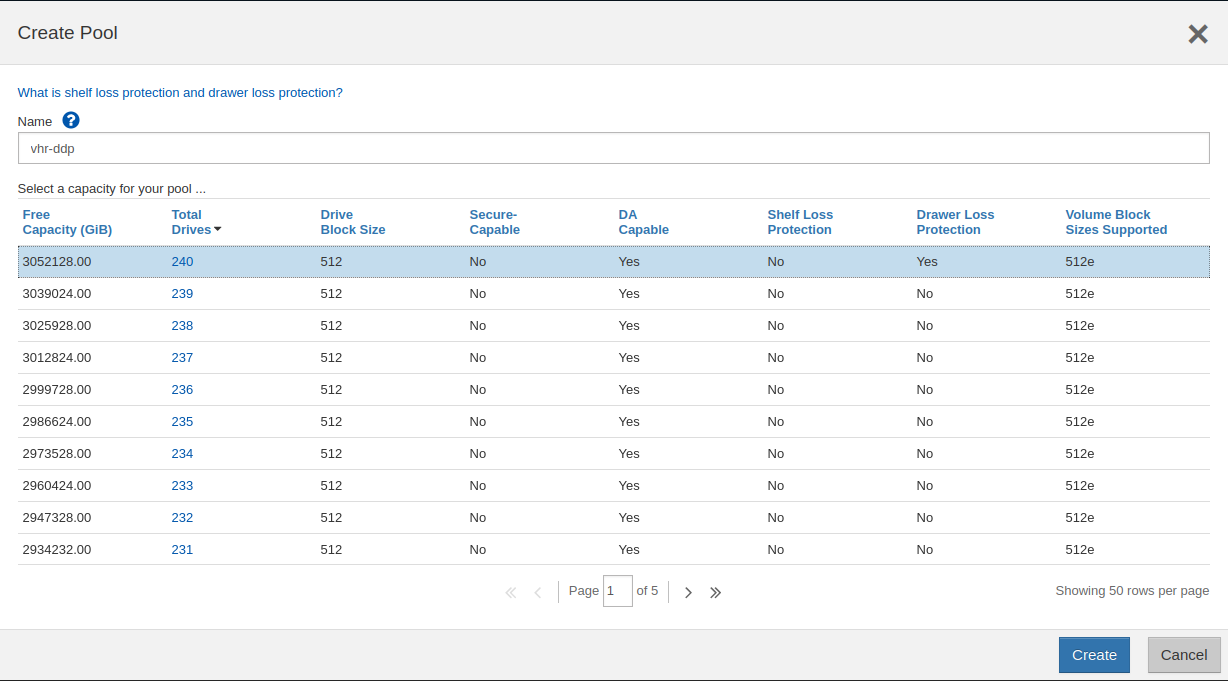
This screenshot shows how easy DDP is - you select a bunch of disks (240) and internally SANtricity will write all over the place in a RAID6-fashion (stripes of 8+2, 128 KiB):
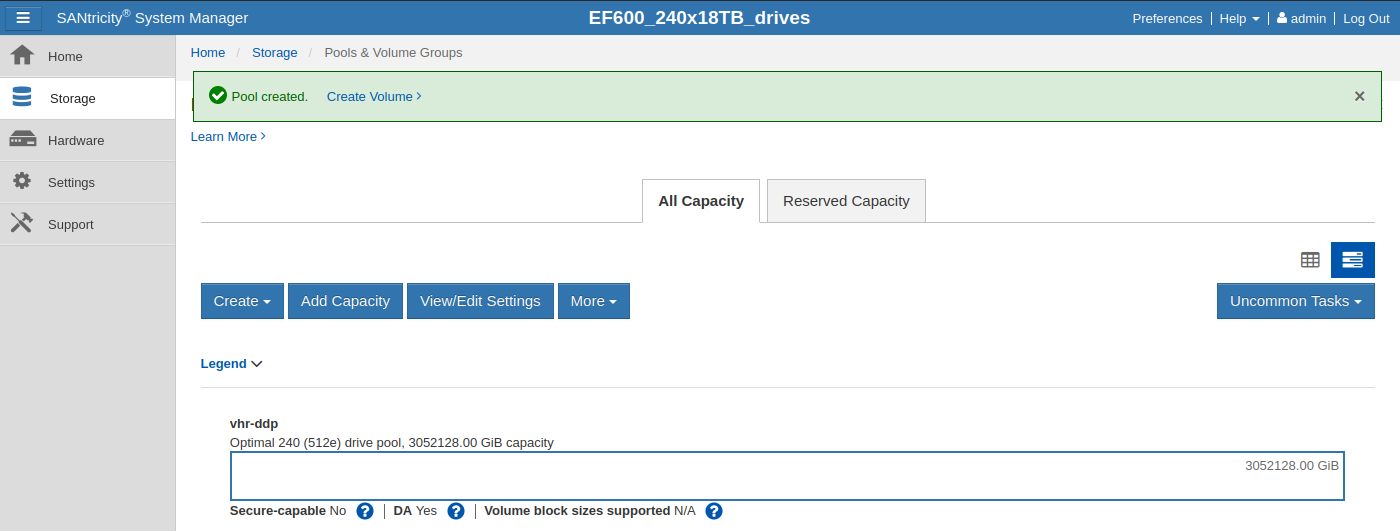
The pool:
Pool properties let you fine-tune reconstruction (similar to "RAID rebuild", but faster and pool-wide as stripes are all over the pool):
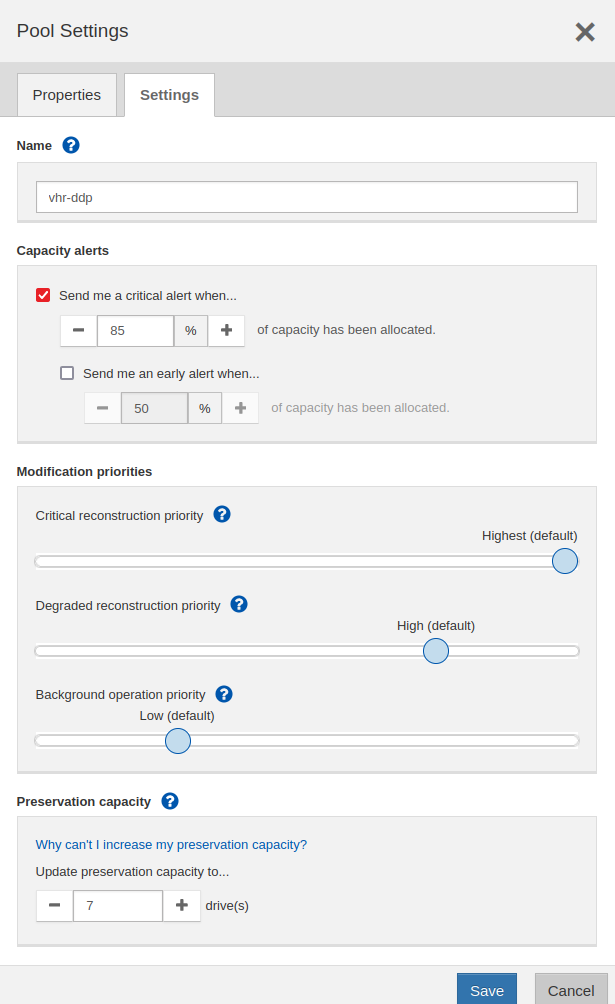
Notice "Preservation capacity" (space reserved for pool reconstruction) - here it's 7 because this DDP is huge. For a small one you'd have 1 or 2, similar to Hot Spares for with VGs.
To create a RAID6 VG (better, as it lets you follow the stripe size recommendation), you'd have to use a supported number of disks (such as 20, but that's not a best practice (10 is) - I have 20 here just for a comparison with DDP).
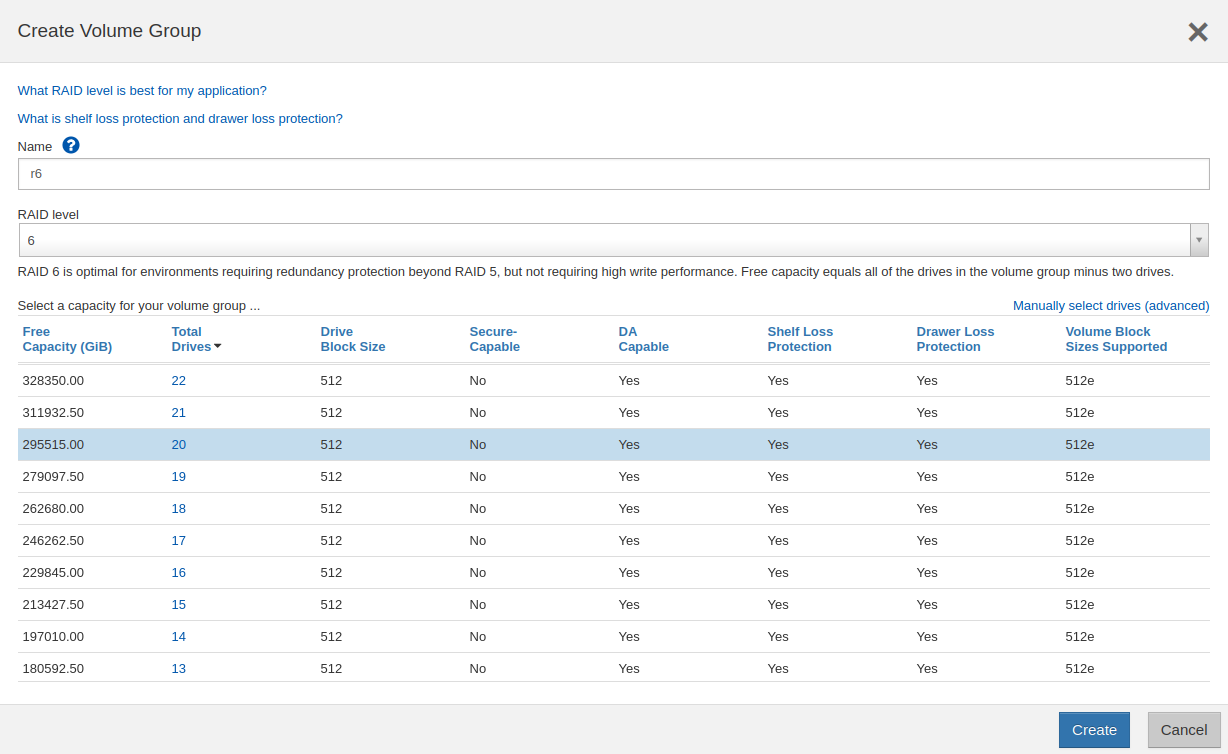
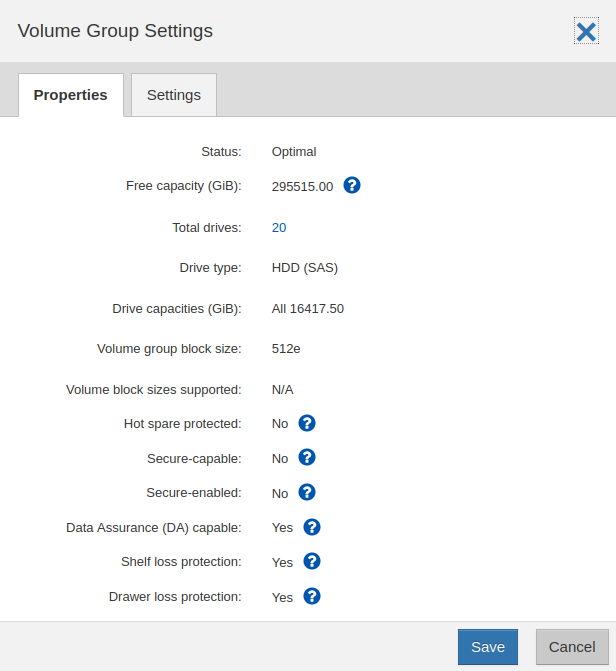
Here you can see DDP vs. R6 VG, both with 20 disks (that's why I used 20 disks in the RAID6 VG).
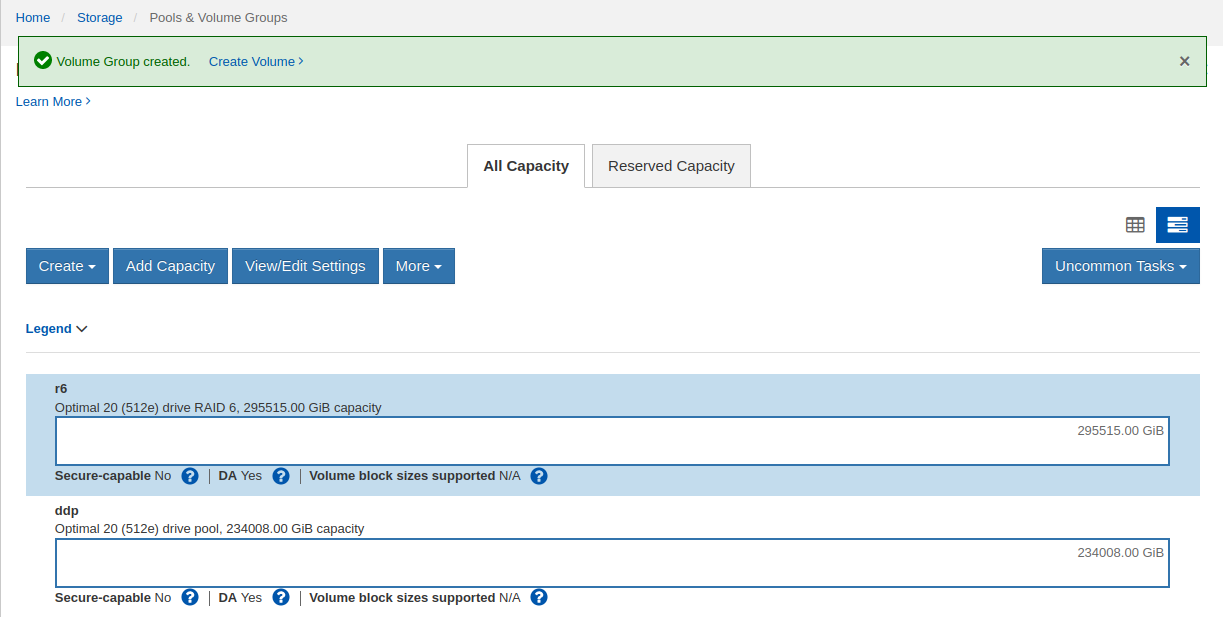
Don't bother comparing "usable" because it's not comparable for several reasons: first, you should use 10 disks in VG, and second, there's no Hot Spare (which ought to be present for VGs, but not required for DDPs).
In the case of VGs, if a disk fails and a Hot Spare kicks in, "Hot spare protected" will become Yes, whereas DDP would "reconstruct" and recover using internal pool capacity.
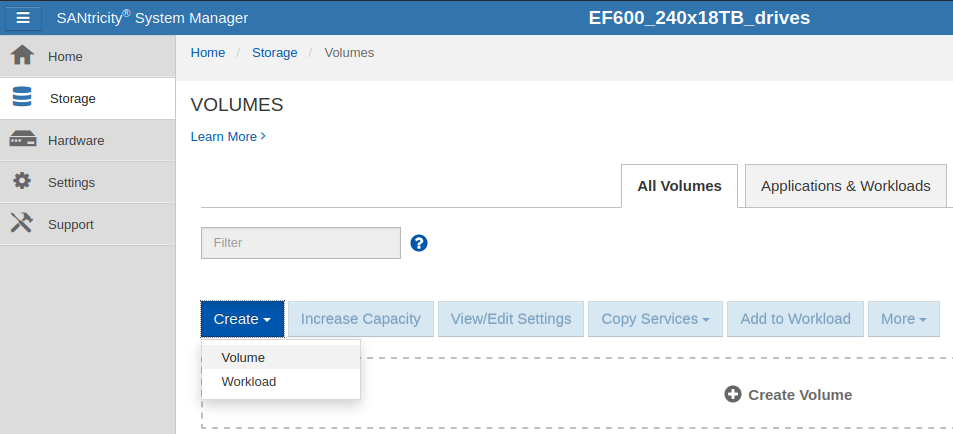
Once we have our VG (or a pool) ready, the next step is to create a volume or volumes (if we have a large DDP or more than 1 VG):
This step shows how VG-based volumes can set segment size (refer to the reference link from the SANtricity documentation above). This is probably the main non-default step when creating volumes for a Veeam Hardened Repository. There are other best practices (e.g. for security, monitoring, etc.), of course.
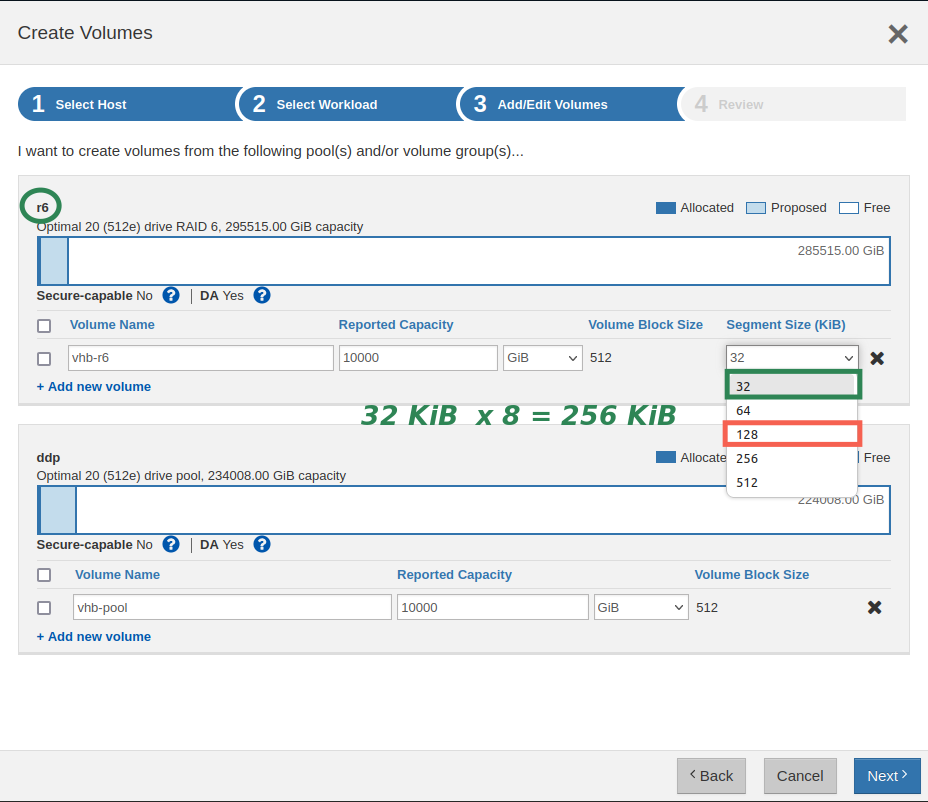
DDP has no segment size option - it's fixed (128 KiB), as I mentioned earlier.
Conclusion
E-Series is popular among Veeam users for its reliability, performance, economics and security and seems perfectly suited for Veeam Hardened Repository.
Unlike in the official NetApp Technical Report, RAID6 with a 32 KiB segment size may be necessary (with implications for performance sizing), and Veeam runs on a Linux OS.
Other than that, common best practices apply and although I haven't done hands-on testing, it seems simple and valuable for users who want a hardened backup repository attached to a secure, battle-proven external storage array.