Proxmox Plugin for NetApp E-Series SANtricity
Introduction
When PVE 8 was a thing, I considered building a SolidFire plug-in for PVE 8. I quickly realized that didn't make any sense.
We have PVE 9 now, things surely must be better, right? Riiight? Wrong.
But, let's also show and tell. So I've built a minimal viable plugin for E-Series.
This plug-in doesn't do almost anything
Why? Because after building and releasing one (this one), I am even surer 3rd party PVE storage plugins still don't make any sense.
- There's no way to provide UI integration without hacking the UI.
- All PVE nodes have (root-accessible) credentials for the storage system, so it takes just one compromised PVE host to have your storage array compromised, too.
For comparison, Firemox implements out-of-band storage provisioning for PVE hosts (with SolidFire), and just "pushes" storage configuration commands to PVE Datacenter (cluster) over TLS. Storage administrator doesn't store their credentials in PVE, the TUI has full storage features and it doesn't break after every minor PVE update. PVE administrator can't do anything that Firemox user can't, and Firemox is still faster.
That's why SANtricity Plug-in for Promox 9 doesn't do more than it should, which is provide basic status monitoring of shared LVM devices. It can work with the SANtricity read-only monitor account.
"Bring your own LUN" here means a storage volume on SANtricity has to be created beforehand and, for shared LVM storage (default), a VG must be created by PVE admin (the PVE side of business). The plug-in is used in this step and then PVE datacenter can start using shared LVM storage.
The NVMe/RoCE issue
There's another reason for this Spartan process: pvesm (PVE's Storage Manager) can't work with NVMe/RoCE. That's not the only storage protocol E-Series offers, but it's an important, and fastest-performing, one.
Debian Trixie (13) has nvme CLI, but PVE doesn't even install it.
Since pvesm can't scan NVMe/RoCE targets, so there's no way for a storage plugin to discover and attach NVMe/RoCE targets. Because that can't work, a plugin can't create a VG either.
Considering that, there's no point in trying to cater just to iSCSI, for example, when NVMe/RoCE scanning remains unaddressed and requires "Bring your own LUN". Even if I automated the iSCSI workflow, I'd have to use (and store on PVE hosts) SANtricity storage admin credentials for LUN creation, so I won't do it.
All the storage plugin problems from PVE 8 are still there and risks (of storing storage credentials) outweigh rewards. Is saving 20 seconds to resize a LUN once a week worth the risk? I don't think so.
E-Series storage provisioning workflow with Proxmox Virtualization Environment 9
That workflow is still the same as is with the usual shared storage LVM without the plug-in:
- Create a LUN (E-Series) volume, present it to PVE cluster
- Rescan storage on target hosts, log in to target
- Access storage from one of the PVE hosts and create a Volume Group (VG) on target LUN
pvesmto addsantricity_lvmstorage to the cluster
If you want to use single-host filesystems, that is also possible, but - since it requires even less features from storage plug-in - it's not covered by the plug-in.
Note that, for single-host filesystems not meant to failover among PVE hosts, you must limit access to that block device to only the host that is supposed to access that single-host filesystem (such as ZFS or Btrfs). Do that in PVE LVM create modal (and use shared 0) if that happens to be LVM that's not meant to be shared. For single-host filesystems, also limit access to a single host. The reason is a client (or "host" in the SANtricity UI) can't be part of a host group (such as PVE datacenter) and also have selected volumes mapped only to it; SANtricity maps a volume to the group the host is member of, but you can limit access to selected host(s) from the PVE side - it's inconvenient, but blacklists can be added to multipath configuration file. In the rare situation where a PVE host would only use single-host block devices, it could be not added to PVE datacenter host group on SANtricity, but that seems like an inconvenient setup as it wouldn't be able to access any shared storage like LVM on SANtricity.
See this post on PVE 9 with NetApp E-Series NVMe/RoCE post about storage choices for PVE 9 with E-Series. If you want to offload Tier 2/3 VMs and CTs to a PVE NFS VMs backed by NVMe/RoCE from E-Series, that's also possible.
SANtricity Plug-in for Proxmox workflow
At present, the least-privileged SANtricity role, monitor, is sufficient since SANtricity Plug-in for Proxmox 9 doesn't need anything else.
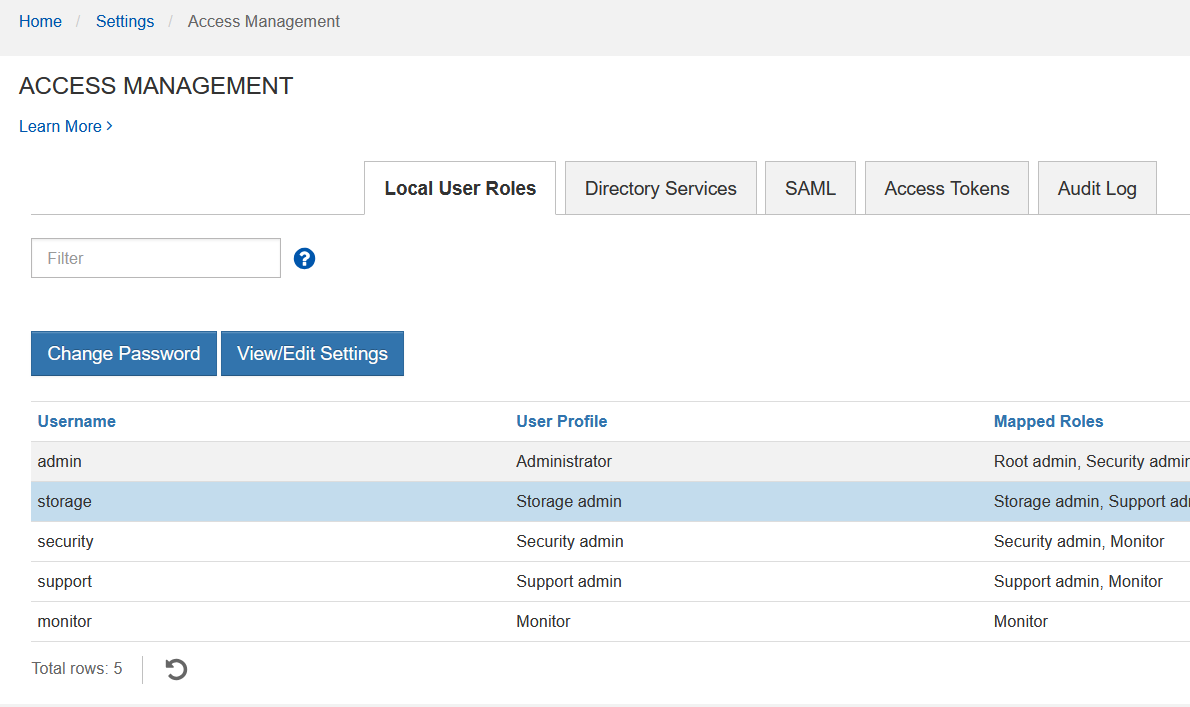
BYOL means you need to create a LUN, scan storage, enable access (to survive reboots), and pick one host to create a VG on the volume. All this doesn't involve the plug-in.
In the case of NVMe/RoCE, I used SANtricity UI to create a volume, nvme discover and (for example) nvme connect-all (see the NVMe/RoCE how-to and persist that configuration on host (in /etc/nvme/discovery.conf)).
With iSCSI, you could run pvesm scan iscsi (or pvesm iscsiscan) assuming your iSCSI and host group on SANtricity have all PVE nodes configured.
For both iSCSI and NVMe/ROCE, PVE datacenter is in charge of mounting and failover, so don't do more than usual for shared storage LVM.
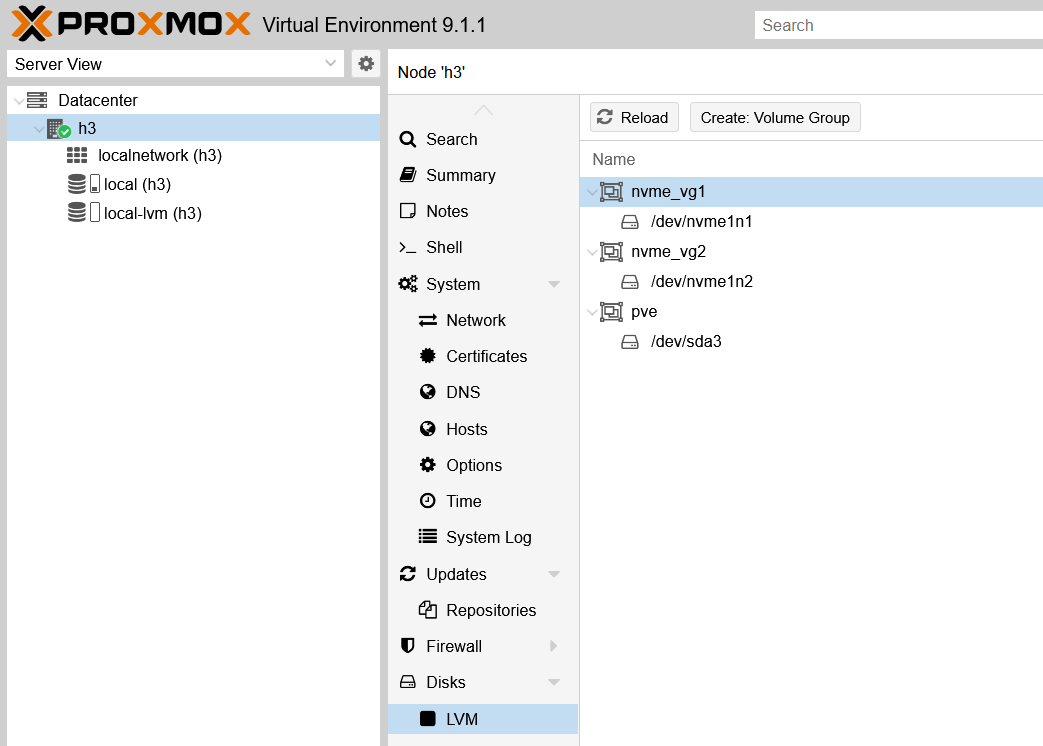
Once that VG is in place, run pvesm add santricity_lvm <lvm-name> --vgname <vg-name> ... to add this shared volume to the cluster.
pvesm add santricity_lvm nvme-lvm1 --vgname nvme_vg1 \
  --api_endpoint 10.0.0.1 --api_username "monitor" --api_password "penTestersFO" \
  --shared 1 \
  --content "images,rootdir" \
  --snapshot-as-volume-chain 1 \
  --saferemove 1
This is almost identical to adding regular shared block storage with LVM.
For now, only the status monitor is slightly improved compared to standard LVM which you can use without any plug-in. No matter if you use the plug-in or not, is important to enable shared LVM storage (shared 1) to avoid it being tied to just the host that created the VG.
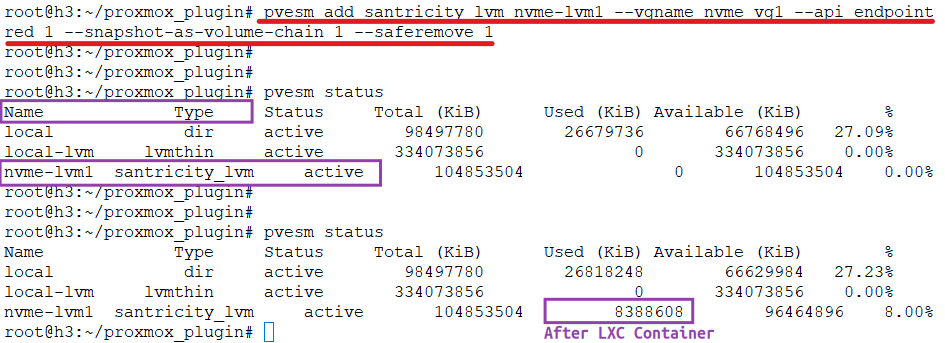
That surfaces the LVM storage on cluster level.
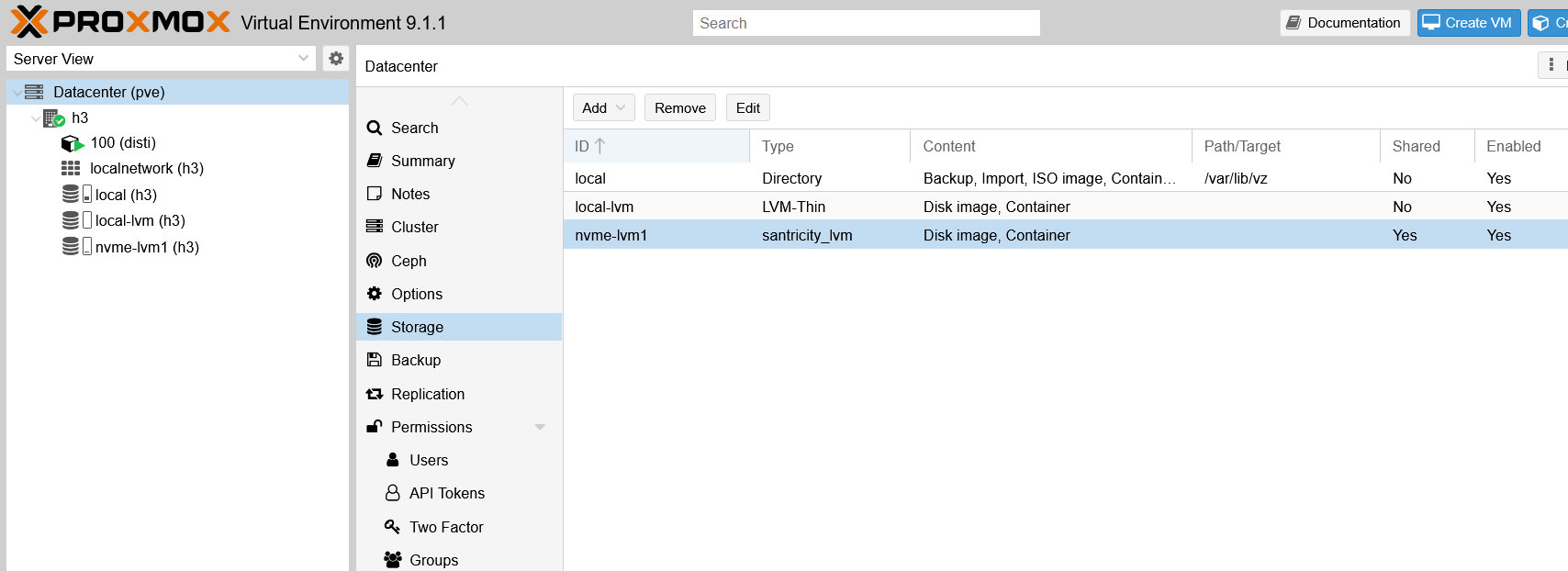
The storage type is santricity_lvm which is the same as regular LVM, but with hopefully smarter monitoring and (later) maybe other similar features that don't require a more powerful SANtricity role.
Let's create an LXC container on that data store.
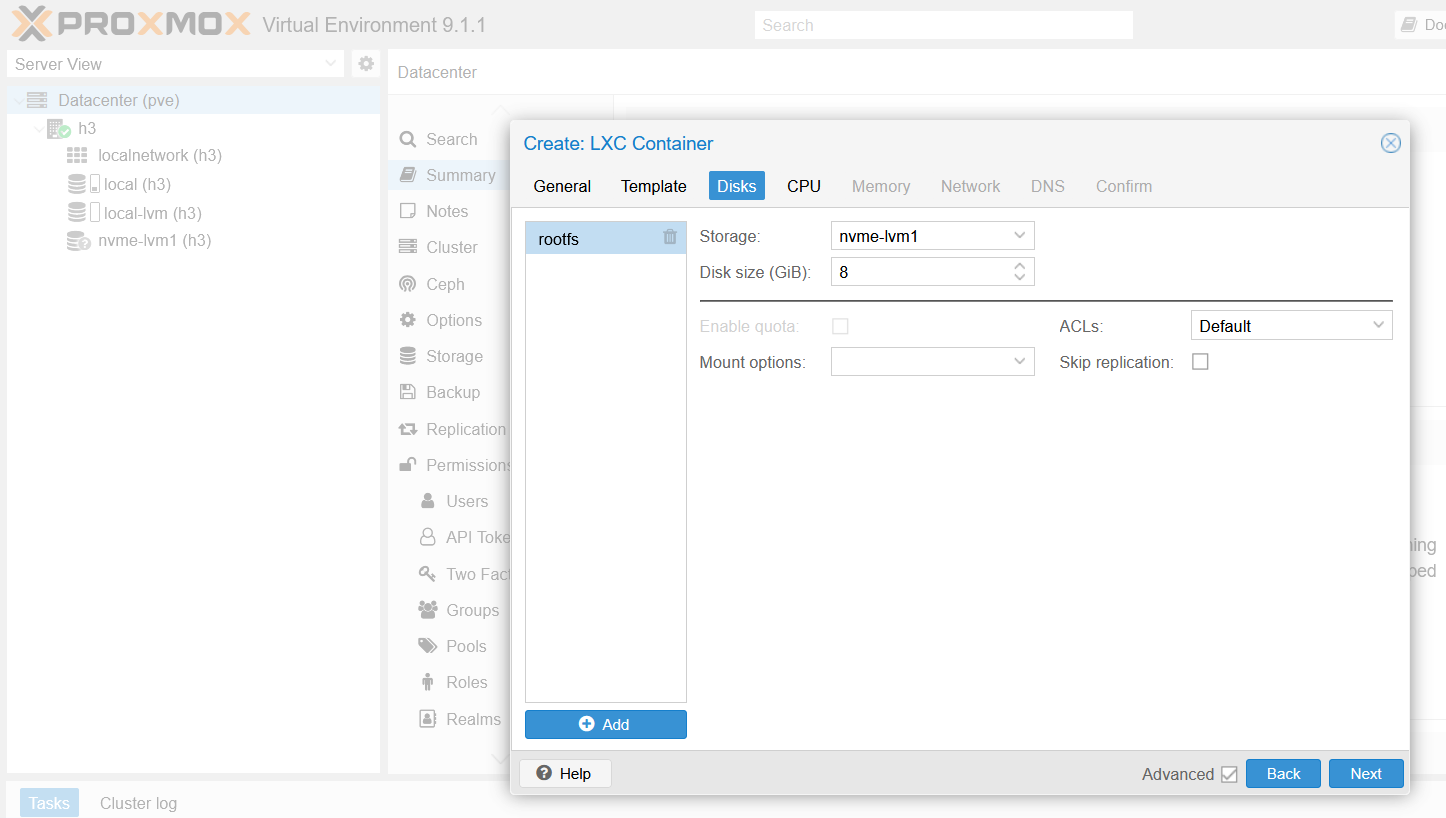
An LXC container on an NVMe/RoCE-backed shared LVM datastore from EF600.
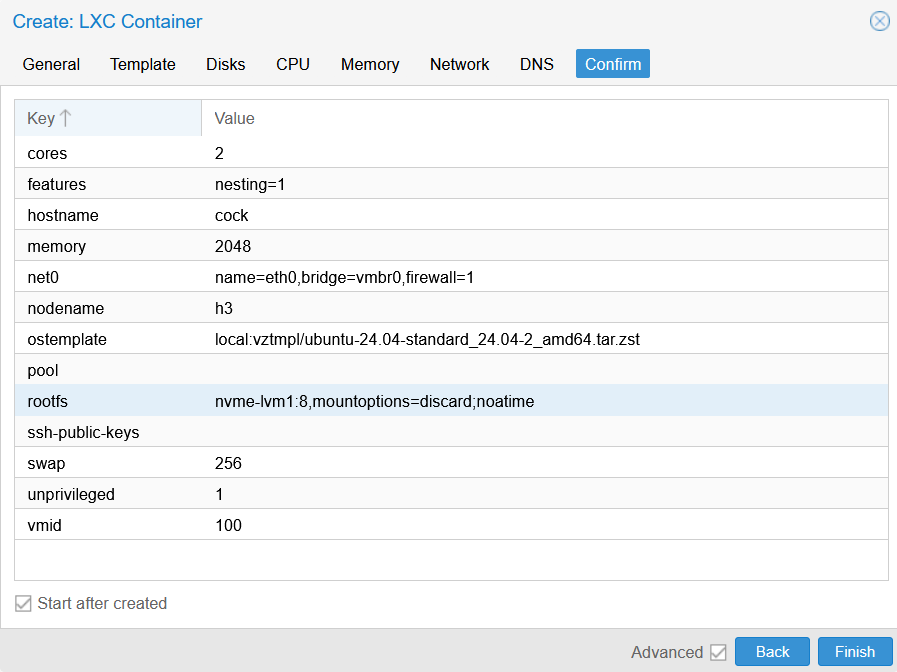
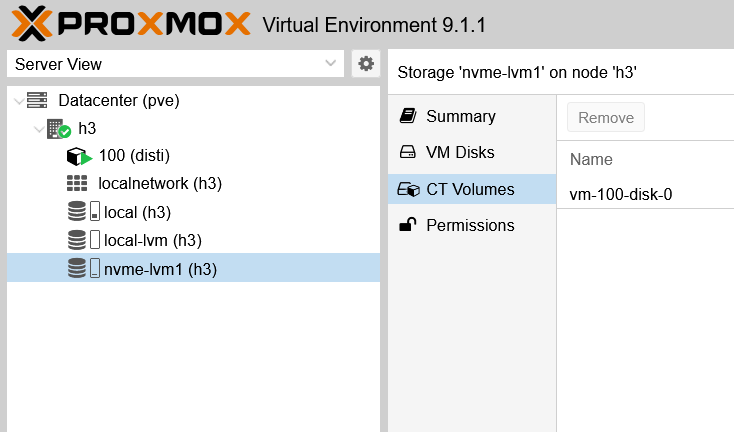
LXC container's boot disk on E-Series LVM data store.
nvme_vg2 is another "ready to go" VG on E-Series EF600.
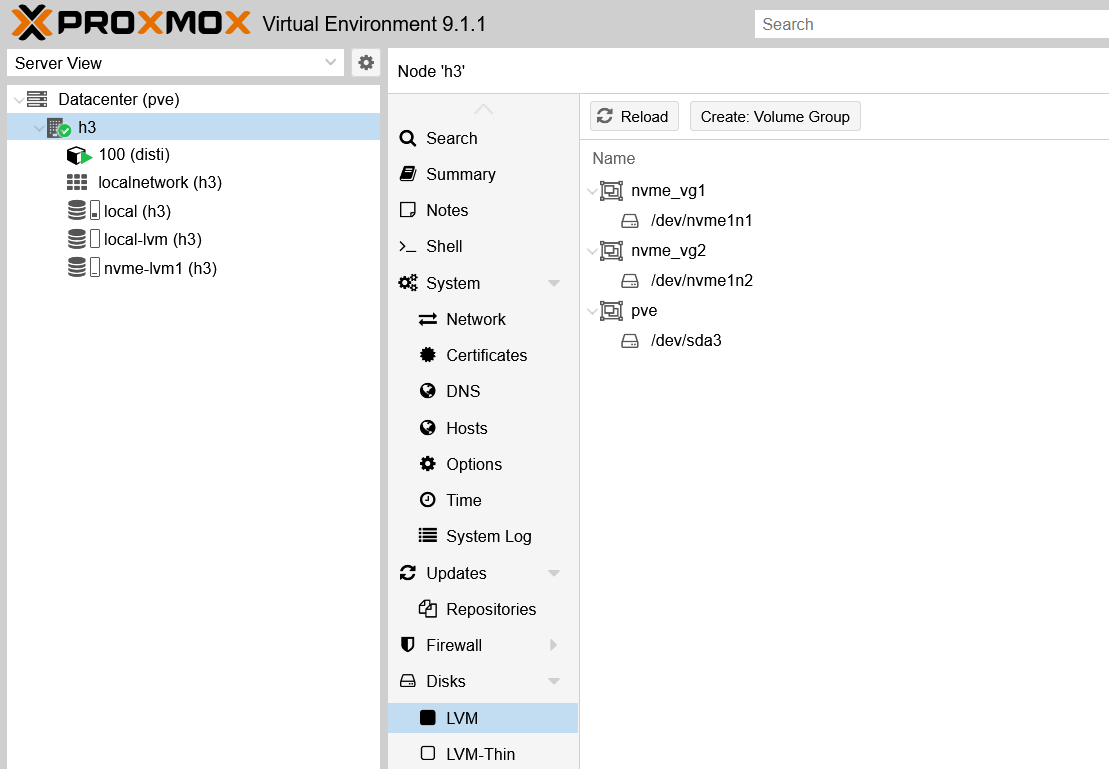
How to resize? In this "BYOL" workflow, you resize the LUN on E-Series (or via any automation tool or CLI) and then increase the size of PV/VG as per usual VG procedure.
Automate workflow for shared LVM and single-host filesystems
This has been "solved" for months, ever since Terraform Provider SANtricity came out in January 2026.
Provision E-Series storage, map it to host(s), expand volumes or delete them later.
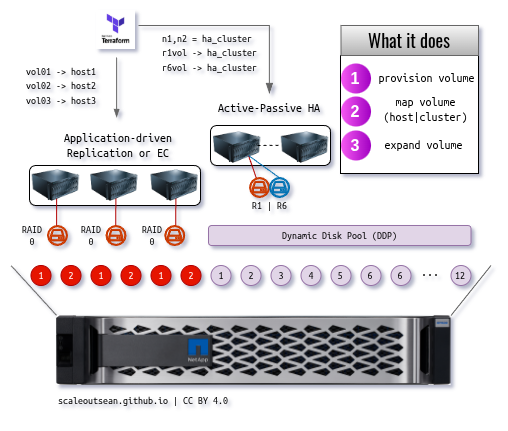
There's just one config file to edit, and one command to learn, terraform apply.
Workflow for shared storage LVM
The "HA" scenario in the middle is the PVE scenario for shared storage LVM. The entire "Bring your own LUN" workflow - is what can be used to automate shared storage LVM workflow (most of the steps prior to running pvesm, but even all of the steps if you also used a Terraform Provider Proxmox (if there is one)).
In fact Terraform with SANtricity and PVE provider could make the plug-in unnecessary, unless you care about smarter monitoring that santricity_lvm has (or can have, if it's not smart enough).
Workflow for single-host filesystems (ZFS, Btrfs)
The scenario on the left, with three single-host filesystems, is the scenario for single host filesystems with Proxmox.
Terraform does all steps but the last two, which are storage scan/login and the creation of ZFS or Btrfs.
This, too, can be done without this plug-in, which is why I created that provider so early - it works well for all sorts of environments and platforms (even Windows Hyper-V, for example).
SANmox - a SANtricity-Proxmox TUI
After creating this SANtricity Plug-in, I realized PVE storage plug-ins still don't make any sense, even in PVE 9.

I'm sorry, but I'm not sorry.
If you, as a PVE admin, need to make 3rd party storage management easier, you should use something like Terraform Provider, Ansible (yuck) or own script/TUI. Storage plug-ins on PVE add risk and don't give you much in return.
The approach I used for Firemox TUI is the right way for "interactive" management. Why? Because this is how it's supposed to be done until Proxmox comes up with a proper plugin framework.
- Admin uses a TUI from a management workstation
- The TUI communicates with PVE over management VLAN and HTTPS (TLS); PVE hosts have no storage credentials
- The TUI communicates with storage management API using same or dedicated storage management network
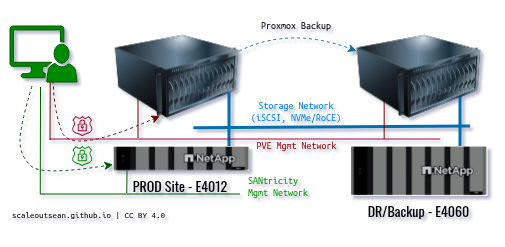
From a management workstation with the console (TUI), administrator can create LUNs, map them to PVE cluster, and obtain deterministic storage paths.
Simply copy a path to new SANtricity volume, scan/discover/login (make login persist after reboot), paste the path to the "create VG" command, and return to TUI to create LVM and import to PVE.
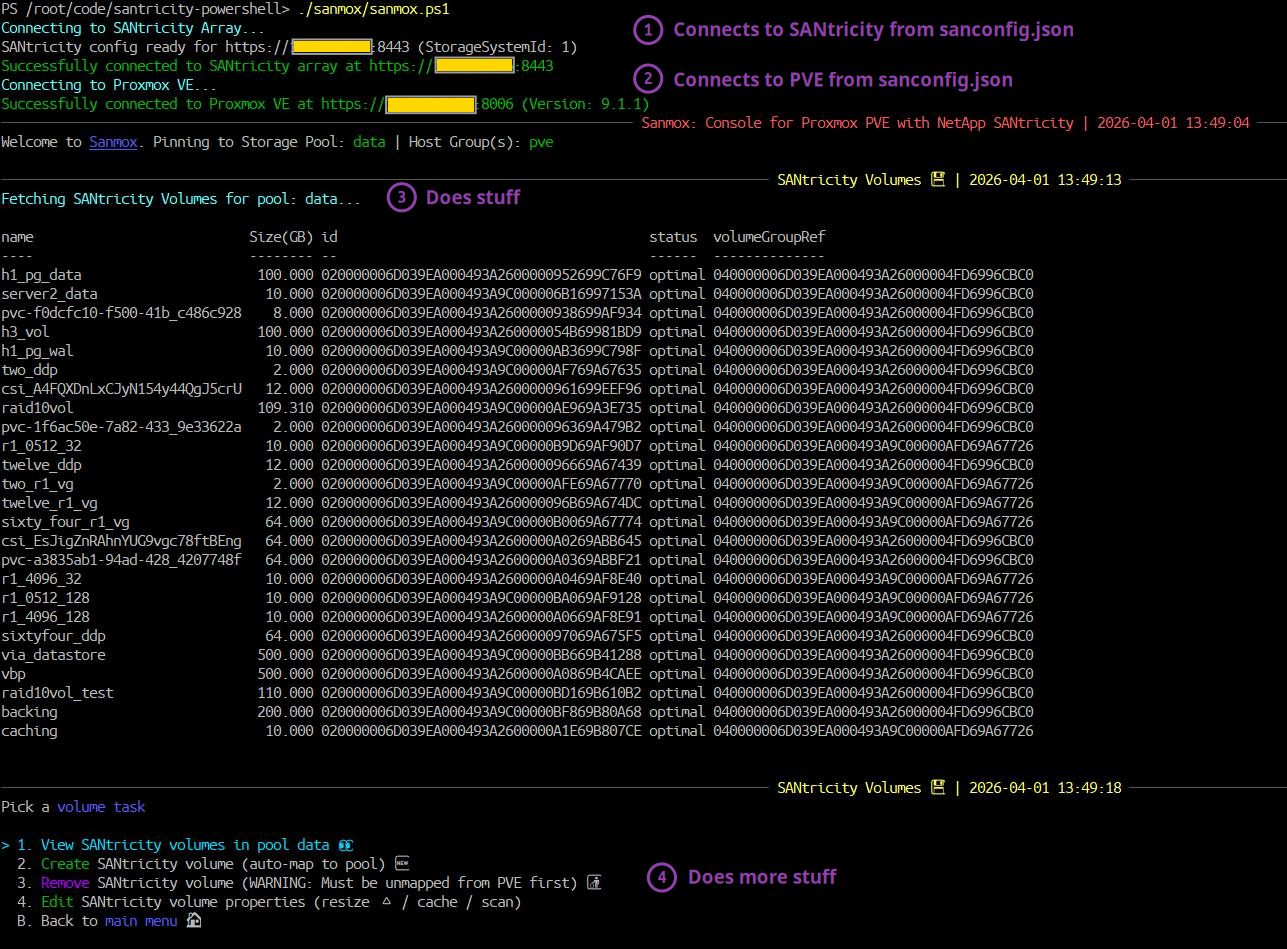
It's faster, better, more secure, survives minor Proxmox upgrades, works with iSCSI and NVMe/RoCE. I can actually manage storage for PVE this way.
For now, it's not as polished as Firemox but it delivers 90% of what Firemox has. I may add some extra gizmos to it later if I find some users out there.
One tricky part for a TUI is that a TUI can't absolutely reliably know which SANtricity volumes or host (groups) belong to which Proxmox cluster, while a Proxmox storage plug-in - running on a PVE cluster - can. Still, that's not a big advantage and while SANmox currently does not take advantage of SANtricity LVM plugin, it could. Here's how:
- Right now SANmox uses PVE API to create generic shared storage LVM datastores
- If SANtricity LVM is installed, SANmox could use it by default for all SANtricity volumes
- Because SANmox does have PVE cluster manager and SANtricity system admin (or at least storage admin) privileges, it could get that list of
santricity_lvmvolumes and use that to much more, knowing which PVE LVM datastores belong to SANtricity system that's being managed
At this time, however, there's no need to overthink this. A full-featured SANmox would be useful for someone with 10 or more E-Series arrays, but most people have just one or two and even the initial SANmox isn't necessary for easy storage management at that scale.
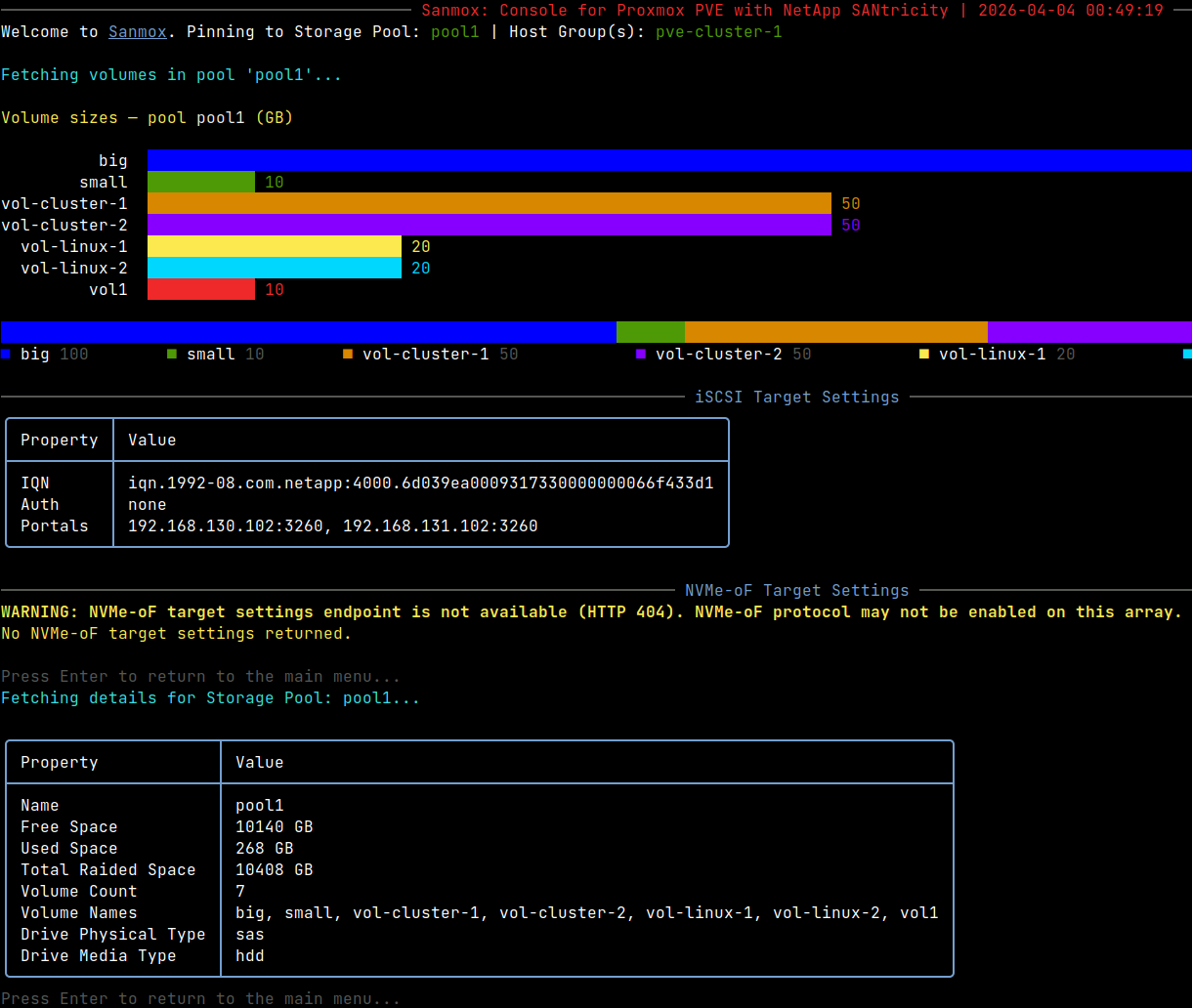
SANmox is written in PowerShell 7, developed and tested on Debian Trixie (13) with the new PowerShell 7.6.0 LTS. It should work just as fine on other Linux and Windows with PowerShell 7. Its primary focus is E-Series with either iSCSI or NVMe/RoCE protocol.
Conclusion
Even without this plug-in (which doesn't do much yet) and TUI, E-Series is already the most user-friendly NetApp storage for PVE. That's not because it has "best features" (it doesn't), but because of its great price/performance and a variety of tools that can help you get that storage out of your sight.
Why you don't really need anything but existing tools to integrate E-Series with Proxmox:
- SANtricity PowerShell module
- SANtricity (Python) client
- SANtricity Go CLI
- Terraform Provider SANtricity
- E-Series SANtricity Ansible Collection
- DIY API workflow that's simple enough for Day 1+ operations (create, delete, map, resize) even if built from scratch
- Full stack monitoring with E-Series Performance Analyzer
Not each of these integrations can do everything, but if all of them together still make it hard to manage E-Series in PVE environments without a "plug-in", then either the storage isn't good enough or you may be doing something wrong.
Even Firemox and SANmox are "fancy-ware". How many LUNs do you create every week and how hard is it with PowerShell or SANntricity Go CLI?
Even though this SANtricity plug-in doesn't do anything that we can't already do faster, easier and safer elsewhere, maybe some nice features can be added to it to make it more valuable without sacrificing security or increasing fragility.
Until that happens, I believe the way to improve E-Series integration with Proxmox is automation and monitoring, not plug-ins. Especially not on PVE 9 (and earlier), where the storage plugin system makes it almost impossible to add value without compromise in supportability or security. One can't do anything meaningful there without storing credentials on all PVE hosts and even as one does that, it's still hard to beat a simple TUI.
Both SANtricity LVM plugin and SANmox are functional, so you can give them a try.
The main value of SANtricity LVM is that it can be expanded with monitoring and observability without using a more powerful SANtricity account/role and - since the plugin works - users can also easily add the features I don't want to add for the reasons explained earlier (just remember to use a storage role, rather than monitor). The hard part is already done (100% implemented) in my Go-based santricity-cli (used by SANtricity LVM).
Where's what:
santricity_lvmplug-in will be posted in mysantricity-gorepo- SANmox (SANtricity-Proxmox TUI)
will bewas posted to mysantricity-powershellrepo
Demo of SANtricity Plug-in for Proxmox
- SANtricity Plug-in for Proxmox VE 9 (3 min 10 seconds)
- SANmox TUI for SANtricity-Proxmox (5 min 41 seconds)