The shocking truth about SANtricity snapshots
Introduction
Over the years I've deep dived into SANtricity snapshots but only when I needed to because those aren't fun to work with. On those occasions I wrote "how-to" type posts on individual and group snapshots.
As I've been using the API and UI quite a lot in recent weeks, I decided to create another post with my notes on what I think is wrong with them and how to work around these challenges as a user.
If you're looking for the official advice on "how to use snapshots and clones on E-Series", check out the TR on SANtricity Snapshots and Clones.
Snapshot schedules
The UI makes creating snapshot schedules nice & relatively easy (try using the API if you don't believe me!).
For example, it automatically creates "snapshot groups" (a separate problem) for you.
To a casual user, that's "good enough" because it works. All it takes is a couple of mouse clicks and you're all set!
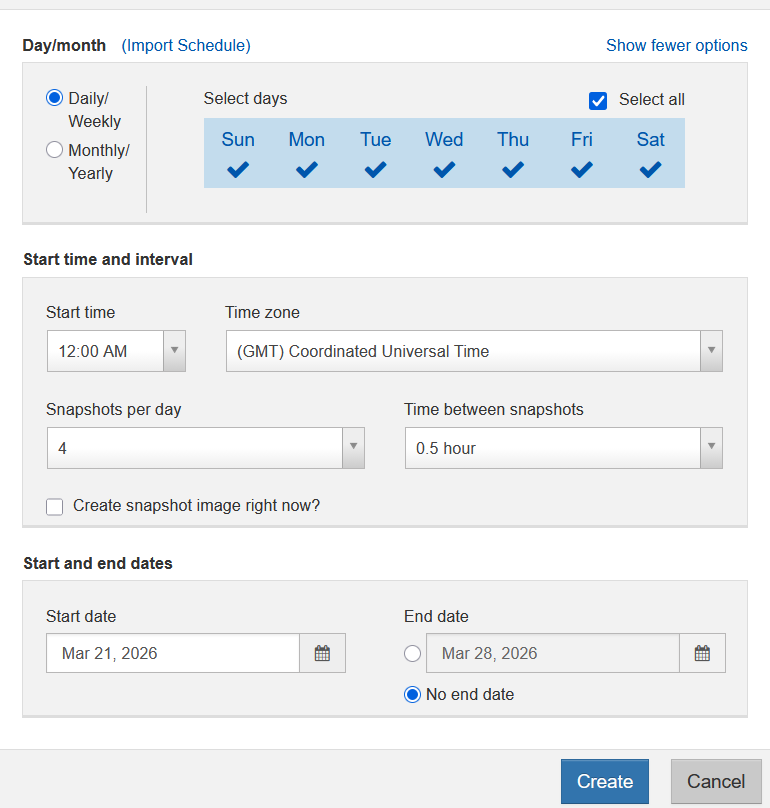
Except… did you notice you can't say "take one once every 30 minutes and keep 4"?
You can say "take 4 snapshots per day, one every 6 hours" as that means one snapshot every 6 hours so if you take these every day you'll hit the wall less than eight days from now because the maximum number of snapshots is 32.
The second annotation on this screenshot from one of the early posts on SANtricity snapshots shows how to fix that: limit the number of snapshots this schedule can create to (say 4, so that those taken last for 24 hours).

Alternatively, disable the schedule for some days.
Without doing either of these, your volume's snapshot count will be permanently in the state of being maxed out. That means that no one can take a snapshot without first deleting a snapshot.
If you want snapshots taken every day, the right way is to limit the maximum number and "purge oldest" (so 4 set in there would result in retention of the most recent 8 snapshots). So we do that and now our schedule "behaves" - one snapshot every so often, and only four are kept.
But now we also want another schedule, maybe one daily snapshot kept for five days. We must create a new schedule as is common on all storage systems.
But what happens here is a new snapshot schedule creates another Snapshot Group (snapshow schedules, even on the same volume, don't "share" the same CoW parking lot, so to speak), so maybe you reserve 10% of base volume size for the first schedule and reserve 30% for the second schedule as that second "CoW parking lot" needs to be enough for one week of data-parking capacity.
This is what creating two snapshot schedules - one hourly and another daily - does: one Repo Group is for hourly retention needs and another is for daily.
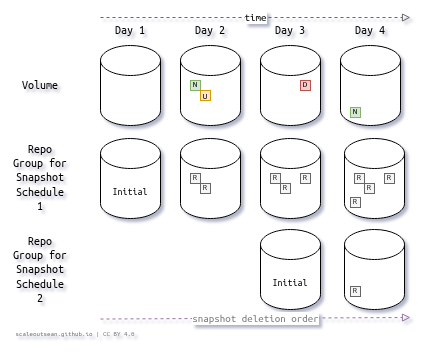
When you create a snapshot schedule, that creates a single volume "group" of repository volumes.
Two schedules result in two "groups" of single-repo volumes. If you allocate 20% of base volume to each, and your volume is 10 GiB large, each of these repo volumes will be 2GiB in size.
Since you don't really know how much you need, maybe one or both will be too small or too large.
Too large is less of a problem (at least in the short term, on Day 1), so you may at some point discover you've unnecessarily left tens or hundreds of GBs stranded in these "Snapshot Groups" for months. The snapshot wizard recommends 40% which "errs on the side of safety" and likely results in wasted capacity amounting to up to 80% of volume size (40% of base volume capacity for each snapshot schedule).
That can be fixed too, but you can't shrink a "Snapshot Group" capacity below the initial size.
You must delete existing snapshots from it, which means you need the third and maybe the fourth schedule (one or two more CoW parking lots!) combined with careful/gradual de-scheduling of existing snapshot schedules to let those early snapshots to gracefully age out.
If you can't allocate capacity for the third and forth parking lot, you'll be in a bad spot because you can't "shrink" a CoW parking lot without removing all CoW volumes from it (deleting all existing snapshots).
Now you may think "OK, but I can delete some snapshots I don't need in order to make space for new snapshot groups and new snapshot schedules". No, you can't.
Snapshots must be deleted in particular order (always the oldest) and it doesn't even matter whether you delete them or not, since the parking lot size is fixed (and that is the size of the first repository volume in your Repo Group).
Therefore, if you go with the defaults and set a 40% reserve, thee only way to "reset" is to delete all snapshots and re-create snapshot schedules. Use a smaller reserve (say, 10%) and increase it if you get alerted. How to do that? Add Repo volumes to Snapshot Group (i.e. Repo Group) for that schedule.
That's fine and good, but there's another problem: you'll probably also want to take on-demand ephemeral snapshots. What happens then is you get offered to use one of existing mysterious "Reserved Capacity" areas. You may not even know what those are and where they come from, because there's nowhere to tell you those are Repo Groups for that volume created by your snapshot schedules.
This results in several other potential risks:
- You pick one of these groups, where the maximum number of snapshots is limited. One of the schedules takes 4 per day and the maximum is set to 5. We do that because we must economize, since the per-volume limit is 32, like on SolidFire. Now you take an on-demand snapshot, and max out that snapshot count. What this means the next time your schedule runs, that scheduled snapshot will fail.
- Now you're without a snapshot for hours. Maybe you want to fix that, and delete your on-demand snapshot, but alas - it's not the oldest, but the newest! So now you need to delete the oldest snapshot(s), but that's not enough because 7 hours from now you'll again be maxed out. Workarounds:
- You can delete all snapshots, including the on-demand one, and take a new snapshot
- You can go to the "Snapshot Group" settings (if you can find where that is) and hike the maximum to 6, then come back tomorrow cut it down to 5 to complete this exercise

About SANtricity snapshot-related concepts
These aren't the only usability challenges. The official terminology related to snapshots and clones is confusing and even misleading. Here are some of the problems that creates:
- In the UI, Storage > Volumes has nothing about snapshots and clones. Snapshot and Clone counts and capacity information are in Storage > Pools, while actual snapshots and clones are in Storage > Snapshots.
- The concept of "Snapshot Groups" is incomprehensible. It appears to be nothing else but a list of snapshots with various bits and pieces of information pulled from the obscured objects such as Repos Groups. Why would anyone refer to these as "groups"?
- "Snapshot Consistency Groups" aren't grouped at all, as each volume is listed separately anyway
- "Snapshot Volumes": nobody calls these things "snapshot volumes". Those should be called Linked Clones. If you create a clone from a "Snapshot Consistency Group" (not really a group just as Snapshot Group isn't a group of snapshots), you don't get a "Snapshot Volumes Group" (that term doesn't exist in SANtricity)
- Snapshot Schedules, found in Storage > Snapshots, have noting that tells you what creating those means in terms of consuming storage capacity, or managing underlying storage constructs (Repo Groups, for example)
- Snapshot Images (because calling them Snapshots would be too easy) list all snapshots, but there's another tab for Snapshot Consistency Groups (CGs), which do not list snapshots for CGs. There, you just put them together, then y ou view them in Snapshot Images, and you view their Repo Groups yet elsewhere (in Storage > Pools)
- Consistency Groups Snapshots create reserve by running the same generous wizard that suggests the same Repo Group portion for each base volume, which is simply wrong. If you have a two-volume database (10 GiB log and 1TiB DB), setting that reserve to 40% means you strand hundreds of GBs for no good reason at all, and you're still at risk of snapshots failing because 4GiB may be too small for the log volume
- Snapshot Volumes, aka Linked Clones, are in their own tab. They create own Repo Groups (for writing to writable Linked Clones) without telling you what they are (same behavior like Snapshot Scheduler and Snapshot Images) and how to manage them in case of creating clones from existing writable Linked Clones. That wizard is also a big spender, suggesting 40% and a uniform size for all volumes. You can't shrink those, the same as with Snapshot Schedule-created "reserves"
- There's no place in the UI where these mysterious "Reserve Capacity" objects can be created before the first snapshot is taken or schedule created. They're obscured by "wizards" ("Create Snapshot Schedule, "Create Snapshot Image", "Create Snapshot Consistency Group" (which should be called "Create CG Snapshot"), "Create Snapshot Volume" (should be "Create Linked Clone)). As I've mentioned, one can add capacity to those Repo Groups (if you can find them in the UI), but there's no way to prepare them beforehand or create additional ones if you want/need to do that (possible UI workaround for that: create a Snapshot Schedule, which will create another Repo Group for the base volume, then pause the Schedule which might make the group unused and accessible for user-initiated on-demand snapshots)
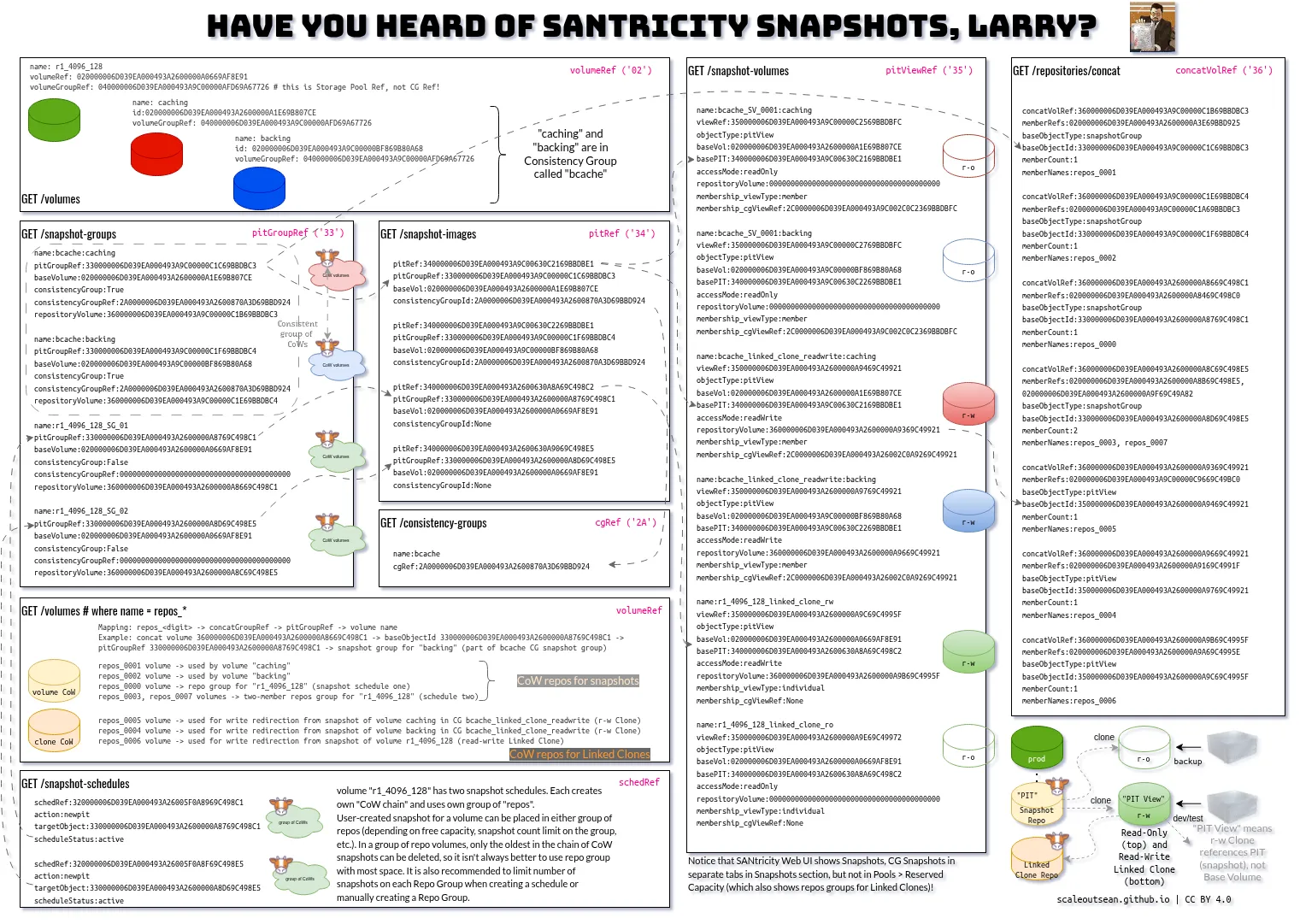
And what's going on behind the scenes? It's all about Repo Groups. What are Repo Groups?
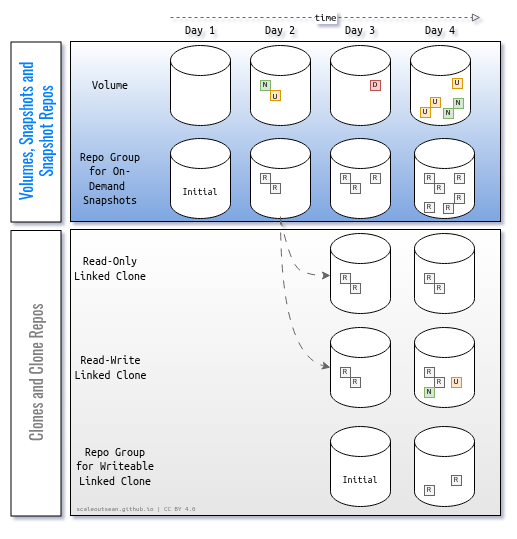
- They are volumes meant for data protection with CoW snapshots. There are two kinds by "use case": the first is snapshots (whether of individual volumes, or CGs), and the second is clones (Linked Clones, obviously writable, both stand-alone and CG Linked Clones)
- Read-only Linked Clones, just like snapshots, don't need Repo Groups since read-only clone volumes aren't writable
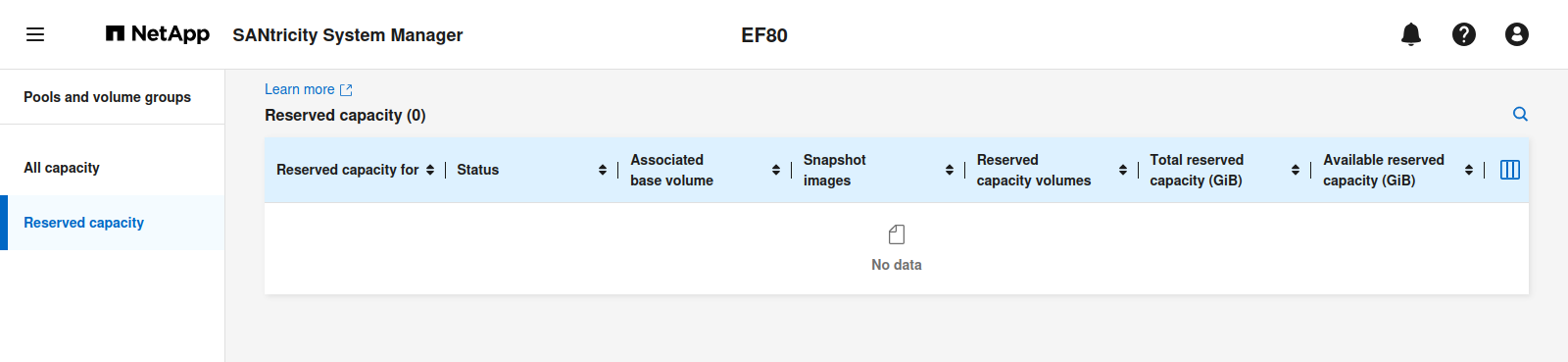
This is "Reserved Capacity" in SANtricity UI v12. It's not possible to directly create Repo Groups for Snapshots or writable Linked Clones in the UI without creating a snapshot, clone or snapshot schedule.
Let's consider this from a user's (server or storage administrator's) perspective:
- What do I want to see and where?
- How would I want to manage snapshots?
- What can I do to optimize this?
I want to see what those "Reserve Capacity" objects are. But I can't. That's because "Create Repo Groups" is only indirectly exposed in the UI to make the difficult-to-use API easier to use. But that's clearly not working, so Repo Groups should instead be fully visible, exposed to the user and Snapshot and Linked Clone management should be centered around Repo Group management.
How do I want to interface with Repo Groups? I want to access them from Volumes, and I want to be able to create, edit and delete Repo Groups. Today, the management of Volumes in the UI has nothing to do with Snapshots and Clones, while Repo Groups are hidden for all practical purposes (the create part fully, the rest partially).
When you create a Repo Group, it has just one, "initial", member volume.
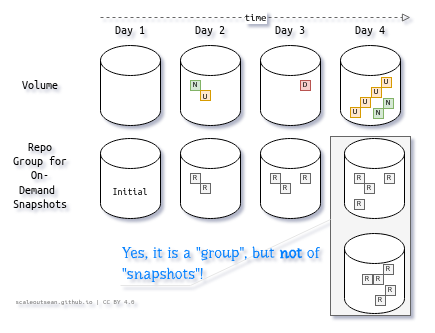
When your single volume Repo Group is running out of CoW storage capacity (it becomes over 75% full, for example), you can add another repo volume to it.
Another Repo Groups activity that should be highlighted is process of removing them.
Let's consider orphaned Repo Group members (Repo volumes). If you delete a base volume that has a snapshot schedule on it, you also delete its Repo Group "objects" (configuration entries). Base Volume: gone. Repo Group configuration: gone. Repo volume(s): remain.
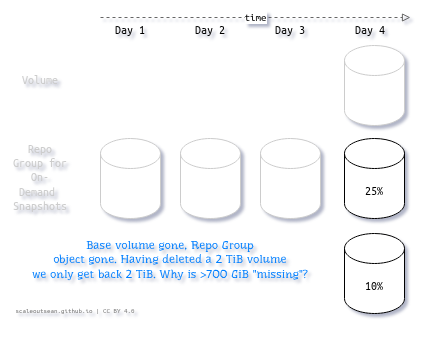
You can "solve" that in the UI, but figuring out - and even noticing that you have a problem - is hard because Repo Groups aren't clearly visible.
The second tricky aspect is the "shrinking" process for Repo Groups. They can be shrunk by removing "Repo" volumes from a Repo Group in the opposite order (LIFO), but because it's hard to see them and correlate information from Volumes, Schedules, Snapshots and "Reserve Capacity" items, waste happens and is hard to prevent.
I mention these because I don't think either of these problems would be worth documenting if Repo Groups were more visible. It's a consequence of hiding Repo Groups from the UI.
To summarize Repo Groups:
- Hosts write to Volumes and writable Linked Clones. Unique overwritten Volumes' chunks are evacuated to Repo Groups dedicated to snapshots, while unique changes to Linked Clones are stored on other Repo Groups dedicated to clone data.
- The difference between these two kinds is snapshot data contains original data chunks from a modified volume, while writable Linked Clone's Repo Group contains original data from a modified snapshot. The CoW concept is the same - a write to the "base" object causes data chunk evacuation to designated CoW area on the Repo Group, whether it's for a Volume or writable Linked Clone
- Snapshots aren't directly accessible and read-only Linked Clones aren't writable. So neither of these can write to Repo Groups.
- We should focus on managing and monitoring Repo Groups remember there are just two "consumers":
- Snapshots (individual and/or CG)
- Writable Linked Clones (individual and/or CG)
Automating what you don't understand can't work. Obfuscating or hiding what shouldn't be (and can't be, given the way SANtricity snapshots and clones work) does not work either.
While I will reluctantly follow the official terms, I plan to make Repo Groups accessible via helper functions both directly and from volume-related commands, and also easier to monitor in the monitoring tools I maintain.
Sadly, that's a very time-consuming process as there is nothing to reference or copy. Even the official "Technical Report" isn't technical enough. But I've made progress understanding and documenting these details.
What to do about SANtricity snapshot schedules
They already work, so we just need to use them better. Better CLIs (by this I mean "best don't use SMcli"), monitoring and management tools can help.
It's not like other platforms' implementations of snapshots are flawless. Consider that SolidFire won't even let you see the capacity utilization of snapshots, or decide how much capacity to allocate to snapshots (this is both good and bad). And this is not just for one user, but for any, and across the whole cluster! A tenant with 1 TiB volume allocation can create 32 snapshots and each can be 1 TiB large on disk, and there's nothing you can do about it (well, cluster admin can delete those snapshots, but one can't even see the problem - they'll only see the cluster is running out of capacity and have no idea why).
On ONTAP, in-advance allocation of "Reserve Capacity" is similar to SANtricity's, it's just that ONTAP (like SolidFire) has Thin Provisioning and efficient snapshot allocation.
So it's not like SANtricity snapshots are not usable. Far from that. If you use efficient filesystems (those with compression), don't abuse snapshots as poor man's backups, and employ good tools to manage snapshots, you won't be much worse off than with other NetApp products.
SANtricity is meant for different workloads from SolidFire, and the way SANtricity consumes snapshot capacity is very coarse (SolidFire allocates snapshot space on the fly and in 4 KiB increments). Fortunately, in most cases E-Series workloads are sequential (even, or especially with, modern databases), so you won't have many problems with that.
For high-churn volumes - maybe attached to high-churn file servers that serve small files:
- Don't even create snapshot schedules. Instead, issue snapshot commands from automation scripts, and delete snapshots after your backup is done. This helps in two ways:
- Avoids creating multiple Repo Groups per volume. Instead, you manage (and right-size) one Repo Group
- Automates the entire workflow rather than manage array as an island. Check out SANtricity API and various SANtricity clients - they can simplify your life
- Use a SANtricity CLI (or directly access the Repo Groups API, since the UI won't expose it) that lets you create and view Repo Volumes and Repo Groups. Use tiny dedicated Repo Groups for ephemeral snapshots and clones
- If you have a snapshot schedule, have just one, and limit it to 2-3 snapshots, to avoid wasting disk space
- When allocating capacity to scheduled or on-demand snapshots (or writable Linked clones), add a small percentage (not 40%, but more like 10%) at first, then monitor the Repo Group(s) capacity utilization and add additional Repo volumes to it (using the same or smaller increments, e.g. 10% at a time) if needed. Keep an eye on the Repo Group(s) after that to see if you can remove Repo Volumes added later. Right-size all your Repo Groups on a system
- For volumes and apps with less than 100TB, you may be better off just running and backing up such workloads as virtual machines using virtualization host snapshots, because those snapshots work really well (see these posts about Proxmox Backup Server and Veeam, for example) and require no effort. You can also use application backups, which are often the only supported way to restore modern workloads
There's a lot of upside users who find ways to work better.
Conclusion
Although I think SANtricity Snapshots and Linked Clones have significant usability issues that should be addressed in the product, the importance of snapshots and clones has been fading for years and especially so for heavy workloads that tend to be often deployed on E-Series.
Modern applications that are frequently used with E-Series either don't support or don't recommend recovery from hardware snapshots (examples: Splunk, Kafka), so we rarely need more than two snapshots or multiple snapshot schedules.
As users, we improve what we can and simply stick with the trend, which is moving towards using a minimum number of ephemeral snapshots.
Have one or two short-lived snapshots for emergency rescue from botched OS or application upgrades/patches, and one on-demand short-lived Linked Clone for backups (delete them immediately after backup is done) and that should be enough for 90% of your needs.
The SANtricity snapshots- and clones-related API methods aren't easy to consume, but with modern clients and monitoring tools it's easy to automate and monitor on-demand snapshots and clones without major challenges.