Single volume snapshots on IBM Block CSI with SANtricity patch
As explained in the post on SANtricity Client (Python), it was (and still is) work-in-progress, but now it also kind-of works.
What does that mean?
It means single volume CSI snapshots can be created (and deleted).
How to do it?
As usual, it's simple and there's nothing SANtricity-specific to learn. As per the README:
- Install the usual snapshot CRDs and snapshot controller
- Create a
VolumeSnapshotClass(example further below, and in the patch README on Github) - Create a snapshot YAML and apply (example further below)
I picked Splunk Kubernetes Operator from yesterday's post to test with.
The volume from SOK's namespace:
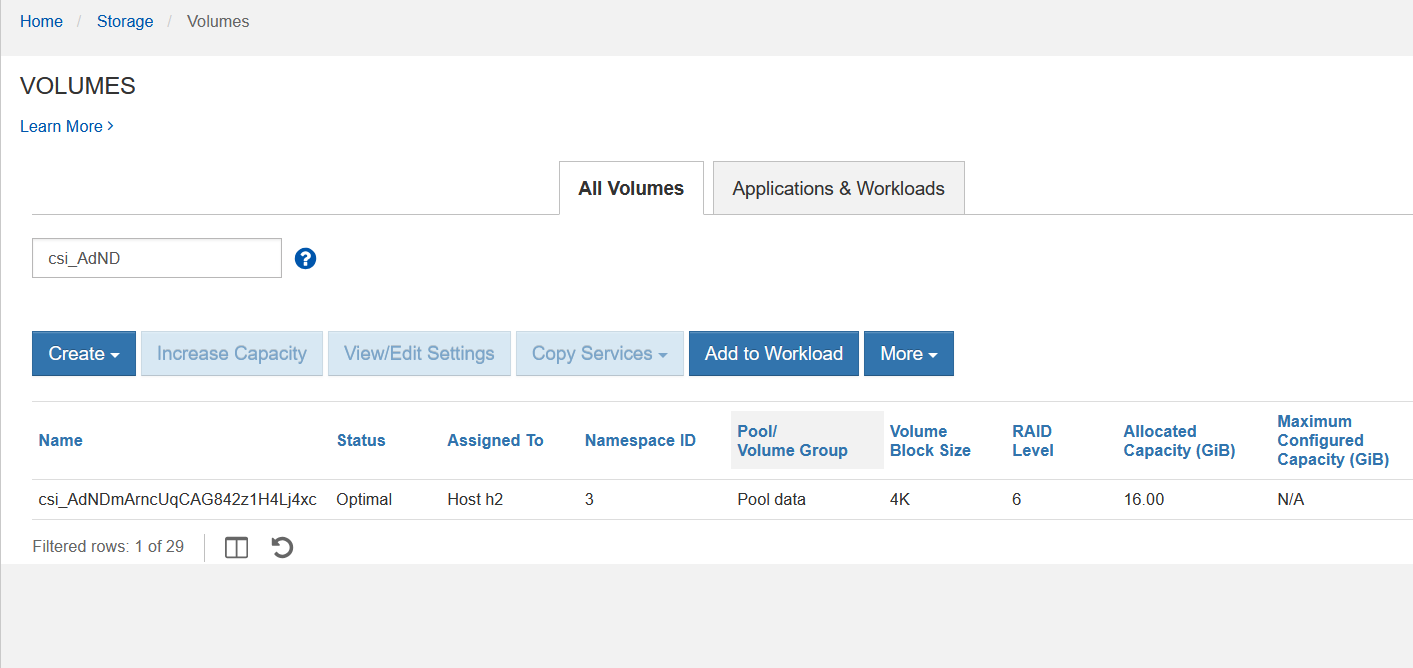
After going through the steps in the CLI screenshot above, a snapshot was created:
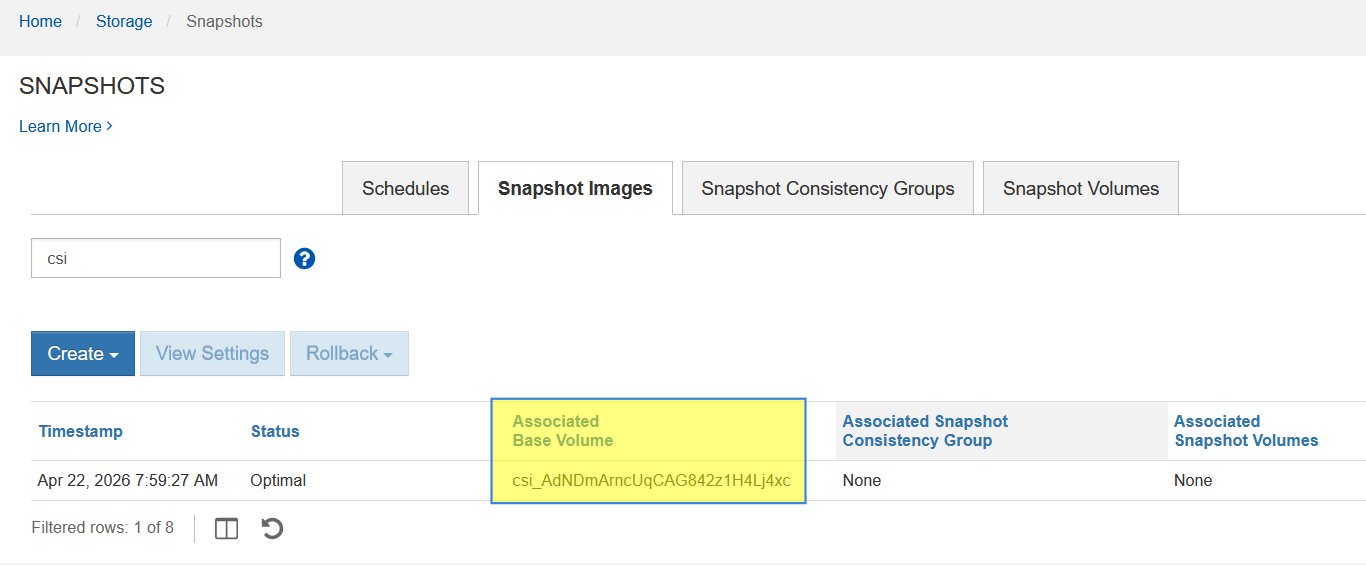
As explained in the other post, these snapshot sausages are automatically made - including the creation of concatenated repo groups.
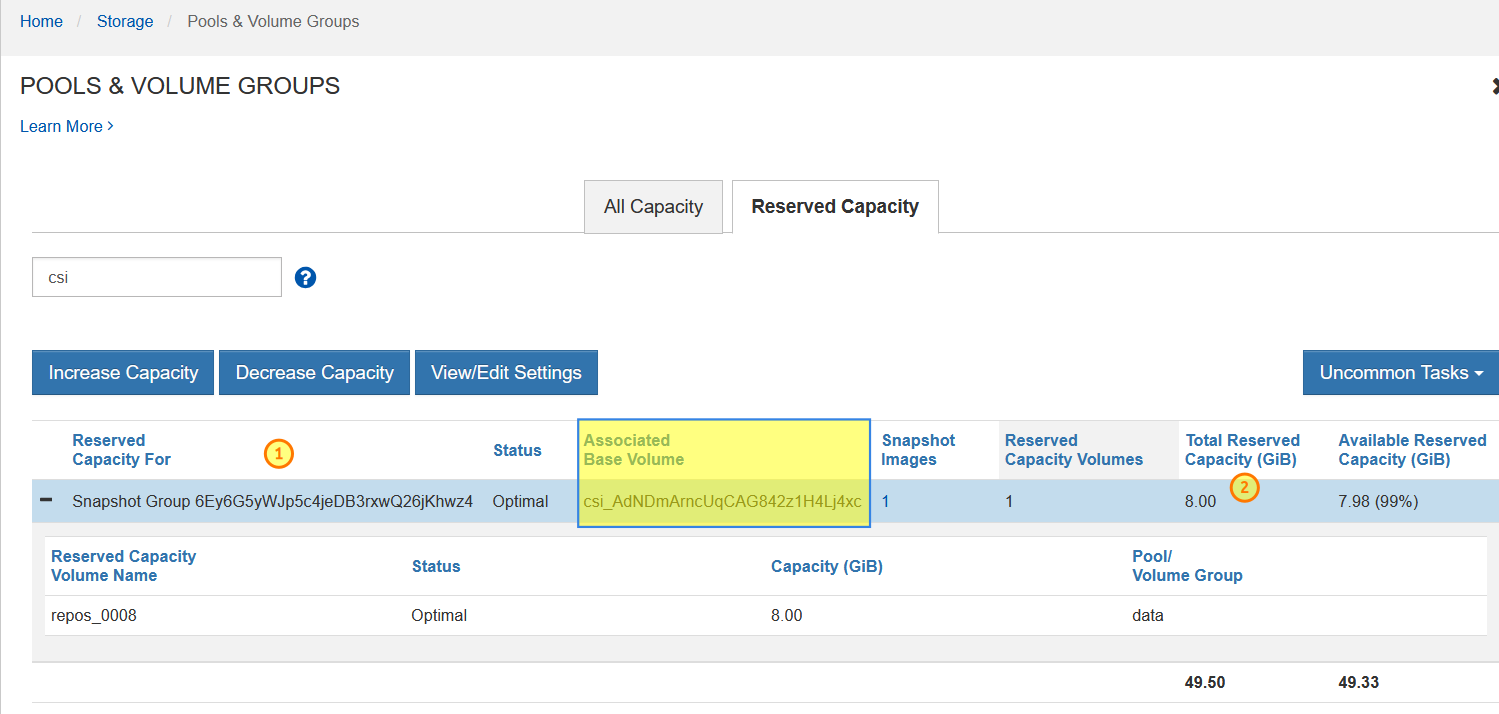
Points of concern(-trolling) marked with numbered circles:
- First, snapshot "group" names are random crap.
- Second, DDP-based storage allocation is coarse.
Regarding the snapshot "group" naming, it just can't be helped because IBM Block CSI makes it very hard to not use random names - as it does for volumes, so it does for snapshot "groups". It is annoying, but it's also not a huge deal. I know the "volume-is-a-pet" types like to micro-manage storage object names, but it's not how it should be. You should also not have more than one snapshot per volume in any case - ship the old ones off to S3! And one snapshot "group" as well. Oh, by the way - SANtricity snapshots do not have names. Only snapshot groups have, and although you can have multiple (up to 4 per volume), there are almost no use cases for having several snapshot groups per volume for user-created snapshots.
Regarding the second challenge, 2 GiB (20% of base volume capacity) was requested, but 8 GiB got allocated for a 10 GiB base volume. That's nothing new, I've blogged about this several times: for larger volumes, this won't matter. "Wasting" roughly 4 GiB per volume's snapshot gruop sounds terrible until you realize SANtricity supports just 2,048 volumes, so even if you had hundreds of snapshots lying around, it'd hardly be a problem. It's solved easily by sending backup to S3 and deleting the snapshot, which also deletes unused snapshot "group". Alternatively you can use traditional RAID for tiny volumes; they have has precise allocation and works the same way DDP works. I just prefer DDP and don't consider keeping hundreds of snapshots around a good management practice.
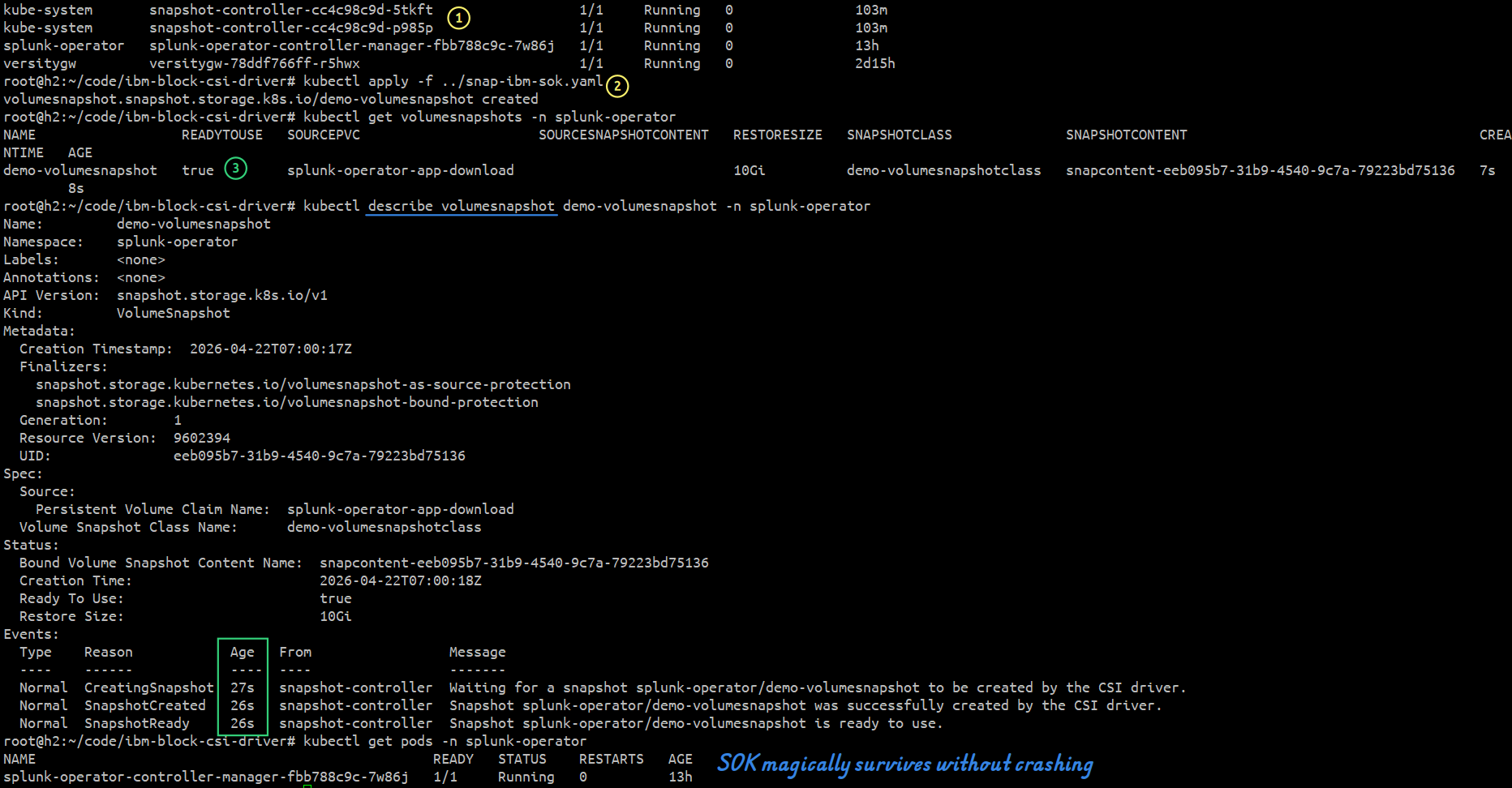
Some comments about the CLI screenshot at the top: the Splunk Operator for Kubernetes had a 10 GiB PVC - this isn't Splunk, but just the Splunk Operator that deploys it (see yesterday's post for more).
$ kubectl get pods -A
NAMESPACE         NAME                                                 READY   STATUS    RESTARTS        AGE
default           ibm-block-csi-controller-0                           8/8     Running   0               35s
default           ibm-block-csi-node-hmjhh                             3/3     Running   1 (35s ago)     66s
default           ibm-block-csi-operator-6f9878b875-kcpjm              1/1     Running   0               2d15h
kube-flannel      kube-flannel-ds-qml8x                                1/1     Running   7 (5d14h ago)   60d
kube-system       coredns-668d6bf9bc-56nmf                             1/1     Running   9 (5d14h ago)   60d
kube-system       coredns-668d6bf9bc-754wz                             1/1     Running   9 (5d14h ago)   60d
kube-system       etcd-h2                                              1/1     Running   0               5d14h
kube-system       kube-apiserver-h2                                    1/1     Running   0               5d14h
kube-system       kube-controller-manager-h2                           1/1     Running   0               5d14h
kube-system       kube-proxy-5qjxd                                     1/1     Running   7 (5d14h ago)   60d
kube-system       kube-scheduler-h2                                    1/1     Running   0               5d14h
kube-system       snapshot-controller-cc4c98c9d-5tkft                  1/1     Running   0               103m
kube-system       snapshot-controller-cc4c98c9d-p985p                  1/1     Running   0               103m
splunk-operator   splunk-operator-controller-manager-fbb788c9c-7w86j   1/1     Running   0               13h
versitygw         versitygw-78ddf766ff-r5hwx                           1/1     Running   0               2d15h
Volume Snapshot Class and Volume Snapshot that were used to create that snapshot:
apiVersion: snapshot.storage.k8s.io/v1
kind: VolumeSnapshotClass
metadata:
  name: demo-volumesnapshotclass
driver: santricity.block.csi.ibm.com # different from IBM's driver name
deletionPolicy: Delete
parameters:
  csi.storage.k8s.io/snapshotter-secret-name: santricity-secret
  csi.storage.k8s.io/snapshotter-secret-namespace: default
Volume Snapshot:
apiVersion: snapshot.storage.k8s.io/v1
kind: VolumeSnapshot
metadata:
  name: demo-volumesnapshot
  namespace: "splunk-operator"
spec:
  volumeSnapshotClassName: demo-volumesnapshotclass
  source:
    persistentVolumeClaimName: splunk-operator-app-download
Creating a single volume snapshot via SANtricity API is fast - it takes a few seconds.
$ kubectl apply -f ../snap-ibm-sok.yaml
volumesnapshot.snapshot.storage.k8s.io/demo-volumesnapshot created

$ kubectl get volumesnapshots -n splunk-operator
NAME                  READYTOUSE   SOURCEPVC                      SOURCESNAPSHOTCONTENT   RESTORESIZE   SNAPSHOTCLASS              SNAPSHOTCONTENT                                    CREATIONTIME   AGE
demo-volumesnapshot   true         splunk-operator-app-download                           10Gi          demo-volumesnapshotclass   snapcontent-eeb095b7-31b9-4540-9c7a-79223bd75136   7s             8s
We can see that here as well:
$ kubectl describe volumesnapshot demo-volumesnapshot -n splunk-operator
Name:         demo-volumesnapshot
Namespace:    splunk-operator
Labels:       <none>
Annotations:  <none>
API Version:  snapshot.storage.k8s.io/v1
Kind:         VolumeSnapshot
Metadata:
  Creation Timestamp:  2026-04-22T07:00:17Z
  Finalizers:
    snapshot.storage.kubernetes.io/volumesnapshot-as-source-protection
    snapshot.storage.kubernetes.io/volumesnapshot-bound-protection
  Generation:        1
  Resource Version:  9602394
  UID:               eeb095b7-31b9-4540-9c7a-79223bd75136
Spec:
  Source:
    Persistent Volume Claim Name:  splunk-operator-app-download
  Volume Snapshot Class Name:      demo-volumesnapshotclass
Status:
  Bound Volume Snapshot Content Name:  snapcontent-eeb095b7-31b9-4540-9c7a-79223bd75136
  Creation Time:                       2026-04-22T07:00:18Z
  Ready To Use:                        true
  Restore Size:                        10Gi
Events:
  Type    Reason            Age   From                 Message
  ----    ------            ----  ----                 -------
  Normal  CreatingSnapshot  27s   snapshot-controller  Waiting for a snapshot splunk-operator/demo-volumesnapshot to be created by the CSI driver.
  Normal  SnapshotCreated   26s   snapshot-controller  Snapshot splunk-operator/demo-volumesnapshot was successfully created by the CSI driver.
  Normal  SnapshotReady     26s   snapshot-controller  Snapshot splunk-operator/demo-volumesnapshot is ready to use.

$ kubectl get pods -n splunk-operator
NAME                                                 READY   STATUS    RESTARTS   AGE
splunk-operator-controller-manager-fbb788c9c-7w86j   1/1     Running   0          13h
Splunk Operator managed to survive snapshot creation without crashing.
It seems (based on NetApp KBs) that snapshots may take a lot longer with CGs or when many snapshots are taken sequentially, but that's not the kind of workloads people run on SANtricity. Such workloads can be offloaded to SDS containers running replicated ZFS or Btrfs or MicroCeph on E-Series backed by SANtricity volumes.
Key API-related features related to snapshots in IBM Block CSI with SANtricity patch come from SANtricity (Python) Client about which I blogged yesterday. This "engine" is barely visible, but it is key enabler for such features and there is simply nothing else out there in Python (there are my other SANtricity client libraries, currently with simpler snapshot features).
$ santricity snapshots list-snapshots
                                                           Snapshot Images

  Snapshot Group                   Pit Ref                                    Seq #    Timestamp   Created By   Repo Use %   Status
 ────────────────────────────────────────────────────────────────────────────────────────────────────────────────────────────────────
  bcache:caching                   340000006D039EA000493A9C00630C2169BBDBE1     156   1773928321   user            7864320   optimal
  bcache:backing                   340000006D039EA000493A9C00630C2269BBDBE1     156   1773928321   user            7864320   optimal
  bcache:caching                   340000006D039EA000493A9C00630CA469C7E5B4     220   1774717184   user                  0   optimal
  bcache:backing                   340000006D039EA000493A9C00630CA569C7E5B4     220   1774717184   user                  0   optimal
  r1_4096_128_SG_01                340000006D039EA000493A2600630B3769E2A445     248   1776470400   schedule        7864320   optimal
  r1_4096_128_SG_01                340000006D039EA000493A2600630B3869E3F5CD     249   1776556800   schedule              0   optimal
  r1_4096_128_SG_02                340000006D039EA000493A2600630B3969E3F5CD     250   1776556800   schedule              0   optimal
  6Ey6G5yWJp5c4jeDB3rxwQ26jKhwz4   340000006D039EA000493A9C00630D5669E85D76     252   1776844767   user                  0   optimal

$ santricity snapshots list-groups
                                                                                       Snapshot Groups

  Name                             Pit Group Ref                            Sched Owned   Sched Count   Base Volume                              Snapshots   Repo Cap (GiB)   CG    Status
 ───────────────────────────────────────────────────────────────────────────────────────────────────────────────────────────────────────────────────────────────────────────────────────────
  6Ey6G5yWJp5c4jeDB3rxwQ26jKhwz4   330000006D039EA000493A2600000B4069E85…       No                  0   020000006D039EA000493A2600000B3C69E79…           1             8.00   No    optimal
  bcache:backing                   330000006D039EA000493A9C00000C1F69BBD…       No                  0   020000006D039EA000493A9C00000BF869B80…           2            16.00   Yes   optimal
  bcache:caching                   330000006D039EA000493A9C00000C1C69BBD…       No                  0   020000006D039EA000493A2600000A1E69B80…           2             0.50   Yes   optimal
  r1_4096_128_SG_01                330000006D039EA000493A2600000A8769C49…       Yes                 1   020000006D039EA000493A2600000A0669AF8…           2             2.50   No    optimal
  r1_4096_128_SG_02                330000006D039EA000493A2600000A8D69C49…       Yes                 1   020000006D039EA000493A2600000A0669AF8…           1             5.50   No    optimal
In conclusion, this is now ready for testing, including backup/restore with Velero - for Velero backup to Versity S3 Gateway about which I blogged the other day, but now using CSI Snapshots rather than File System Backup.
Once single volume snapshots seem stable, Group Snapshots will be next. SANtricity has Consistency Group (CG) support, and so this is going to be "more of the same". Linked Clones (both for individual volumes and CGs) are part of this, too. We already automate them in SANtricity PowerShell and this is not going to be new or different.
As I said in the SOK post yesterday, snapshots have a limited role in Kubernetes especially when one considers the big picture, which is that S3 is becoming the single source of truth and the remaining block workloads either don't need (Web apps) or don't support (message queues (Kafka) and databases (such as Splunk)) hardware snapshots. I see hardware snapshots as a legacy feature for databases that don't have own native S3 backup and a pre-cautionary measure before major application upgrades.
Once single and CG snapshots and Linked Clones work on IBM Block CSI with SANtricity patch, SANtricity CSI will get CSI snapshots next.