SANtricity Client (Python) update
Reautomation continues.
Diehard SMcli fans may be unfazed, but our engaged community of enthusiasts keeps making progress across languages.
SANtricity Client (written in Python) is one of them.
Recent progress is related to two areas:
- Snapshots, where SANtricity Client fell behind PowerShell and Go client libraries
- Interfaces, where it has become clear that radical moves are required, not just simple API wrappers
I won't talk much about snapshots as that's still work in progress, but I've been doing everything I described in The Shocking Truth about SANtricity Snapshots.
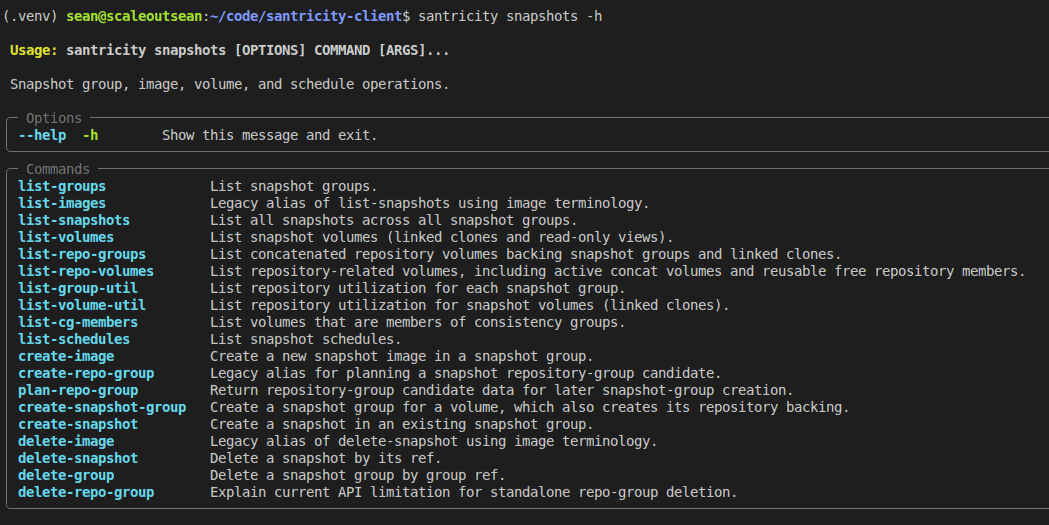
In essence, what SANtricity tries to hide, I expose. Those who know what they're doing might like that.
For example, if you want to check snapshot "group" (these aren't really groups - check the shocking truth post) status, you can. If you want to check five other things about snapshot matters in three seconds, you can.

Now, imagine if you could take a snapshot without checking anything at all. That's possible as well, so there's something for the clueless, too! I don't know how SMcli does it, but I'm sure SANtricity Client does it better.
SANtricity's host-side interfaces is another … "interesting" area of managing SANtricity. Here's what santricity report interfaces does:
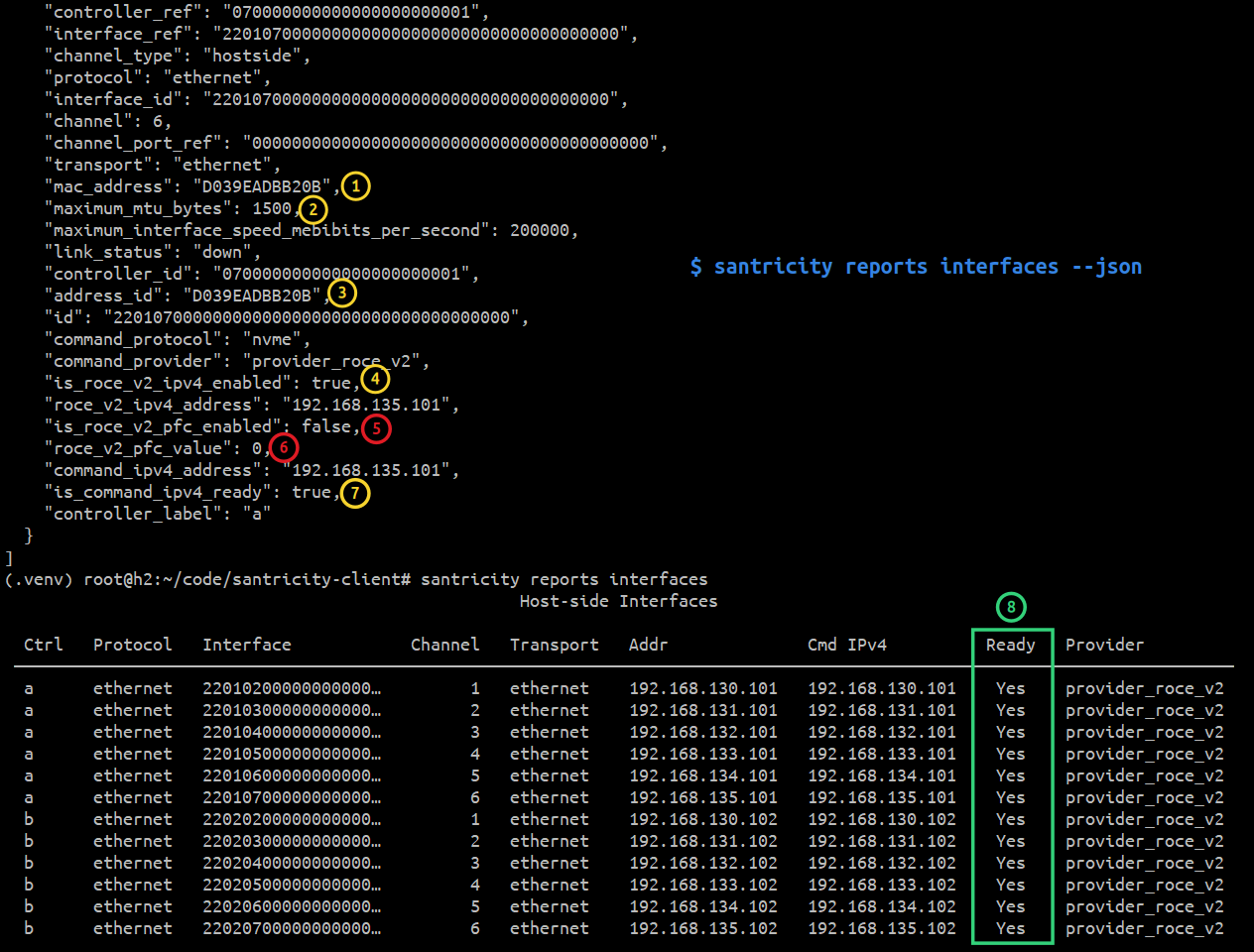
Yes, it tells us stuff about SANtricity interfaces. The above is how that might look like on a maxed out EF80.
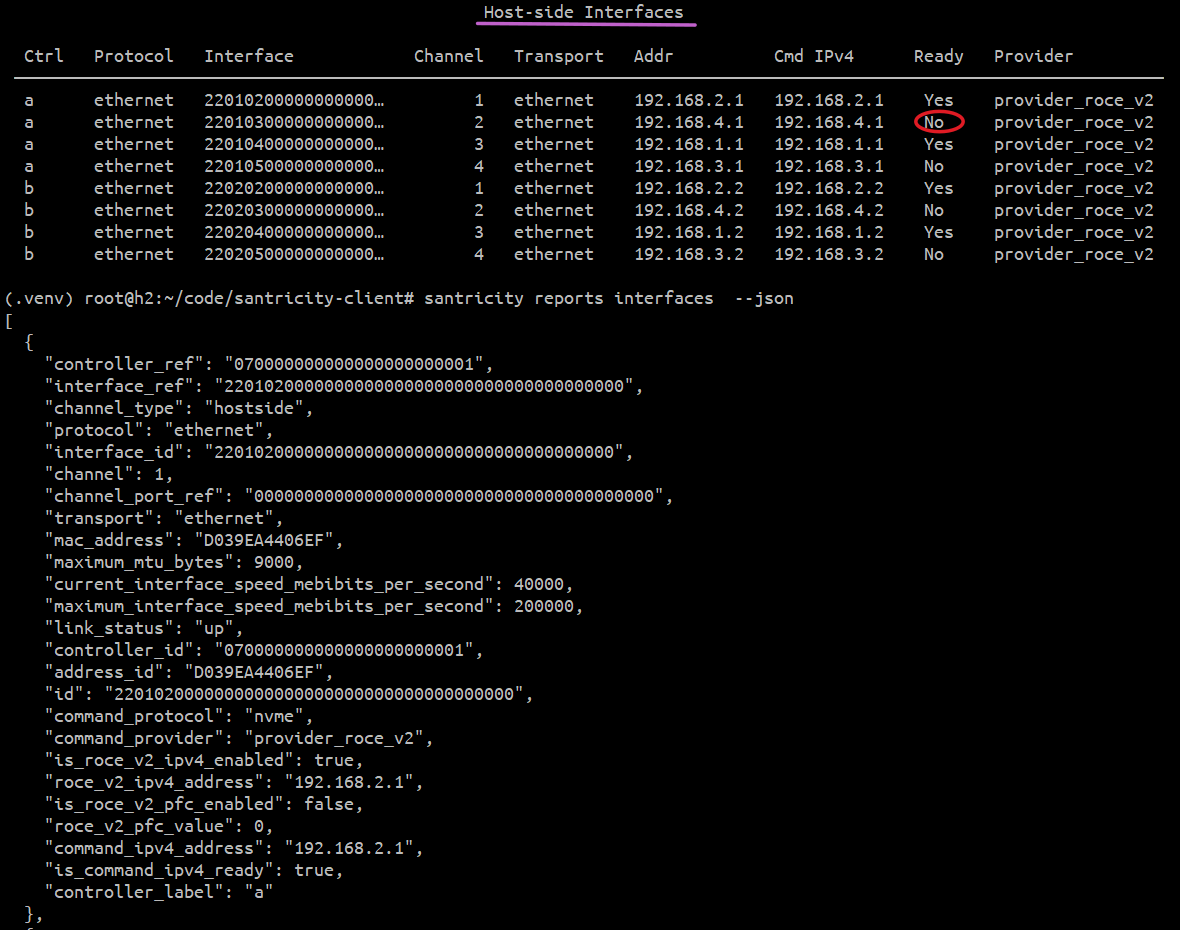
The table view is output without --json. With it, the CLI spits out more details, as seen in these screenshots.
But that's not the real highlight and point here, although (5) and (6) hint at the key feature: the key is we can see what does not work. EF600 with partially enabled NVMe/RoCEv2:
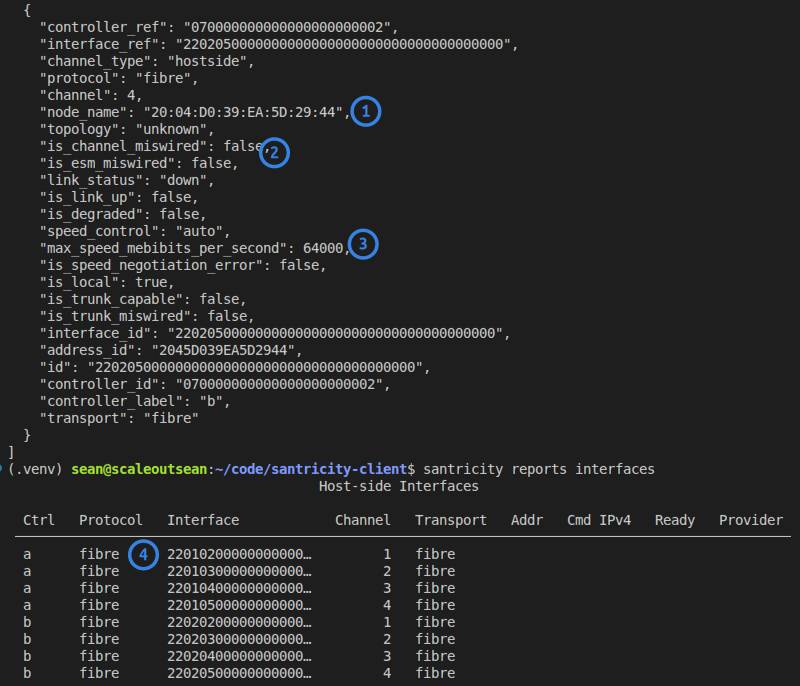
It does stuff even for the dead-end Fibre Channel protocol. I've no way to tell if this output is correct, but it might be.
The interfaces report is not perfect, but it's better than most alternatives. Here we can see "Ready" column is empty, but iSER port status (in JSON below) is "up".
                                             Host-side Interfaces

  Ctrl   Protocol   Interface            Channel   Transport   Addr              Cmd IPv4   Ready   Provider
 ────────────────────────────────────────────────────────────────────────────────────────────────────────────
  a      ib         22010500000000000…         3   ib
  a      ib         22010600000000000…         4   ib
  a      iscsi      22010300000000000…         1   ethernet    192.168.130.101
  a      iscsi      22010400000000000…         2   ethernet    192.168.131.101
  b      ib         22020500000000000…         3   ib
  b      ib         22020600000000000…         4   ib
  b      iscsi      22020300000000000…         1   ethernet    192.168.130.102
  b      iscsi      22020400000000000…         2   ethernet    192.168.131.102
One of the iSER ports shows it's enabled (below), so I'll have to check why that's not considered "Ready" ("Ready" may apply only to IB/RoCE). It will be fixed and improved.
{
  "controller_ref": "070000000000000000000001",
  "interface_ref": "2201040000000000000000000000000000000000",
  "channel_type": "hostside",
  "protocol": "iscsi",
  "channel": 2,
  "channel_port_ref": "1F00010002020000000000000000000000000000",
  "tcp_listen_port": 3260,
  "is_ipv4_enabled": true,
  "ipv4_address": "192.168.131.101",
  "transport": "ethernet",
  "maximum_mtu_bytes": 1500,
  "maximum_interface_speed_mebibits_per_second": 10000,
  "iqn": "iqn.1992-08.com.netapp:5700.600a098000f63714000000005e79c17c",
  "controller_id": "070000000000000000000001",
  "interface_id": "2201040000000000000000000000000000000000",
  "address_id": "iqn.1992-08.com.netapp:5700.600a098000f63714000000005e79c17c",
  "id": "2201040000000000000000000000000000000000",
  "controller_label": "a"
}
Not everything is bug-free, but we're better off than we we were yesterday.
All these "list" and "report" features work with the low-energy "monitor" account, so you can use them worry-free.
Conclusion
I've neglected snapshots in SANtricity client because I "didn't want to drive for too long in the possibly wrong direction" in all of the vehicles (PowerShell, Go, Python). Since "the shocking truth" post, I know exactly how I want to have this done and SANtricity Client now has what's becoming a decent CLI for a difficult-to-use SANtricity feature.
Equally importantly, that client library will serve as "plugin" for other utilities and programs that use SANtricity snapshots, so it's important to get it right.
Even with these and other improvements, snapshots/clones won't be great, but they'll be good enough for "normal use" which is my objective - just enough to snapshot and create a Linked Clone of a Consistency Group, so that it can be backed up. That's 90% of what hardware snapshots need to do in 2026.
The interfaces report is mostly related to connecting to SANtricity - something usually done only once (for the first client; the rest connect using more or less the same command), but that process is frustrating enough to need a report like this. That, too, will be used by other clients, so even though it still isn't perfect, it will save time to both me and anyone who decides to use the library.