Apache Ozone S3 with NetApp E-Series, SANtricity CSI
Back in 2022 I kicked tires on Apache Ozone v1 with NetApp E-Series (blog post).
Since we now have all these E-Series CSI drivers to play with, I picked one - accidentally IBM Block CSI with SANtricity patch (Ozone couldn't start on MicroK8s where I had SANtricity CSI installed) - to try with current Ozone, v2.1.0.
Long story short, it works. Ozone still works the same way, plus there have been improvements since 2022, of course. And "why E-Series?" still applies just like it applies to HDFS and other workloads.
The difference is, now it's even better because:
- We can confidently and within seconds (yep, it does take less than 10) deploy DAS-style storage for replicated Ozone instances with Terraform Provider SANtricity, without managing CSI. This would be preferred if you don't want to manage Ozone storage on Kubernetes
- We can do the same on Kubernetes using TopoLVM and single-host LUN/namespace assignment on E-Series
- We can do the same on Kubernetes in a completely freewheeling way using SAN-style attachment (NVMe/RoCE, for example)
The third one is new, so I'll just say something about the SAN-style Kubernetes approach with the newer, "HA" style CSI drivers:
- If you want automated PV clean-up, create and use a Storage Class with
reclaimPolicy: Delete - Scaling out and in works on the fly. Scale from three to five in seconds, shrink back to two if you no longer need that much capacity or performance
- With E-Series, we could put all disks on one DDP storage pool, or create multiple RAID 6 or DDP storage pools pools. Use RF2 or Erasure Coding
After we deploy, it takes seconds for the UI to become accessible.
sean@h2:~/code/ozone/ozone/santricity$ kubectl get svc om-public -n ozone-test
NAME              TYPE        CLUSTER-IP       EXTERNAL-IP   PORT(S)           AGE
om-public         NodePort    10.99.117.252    <none>        9874:30810/TCP    5m46s
It's mostly used to check service settings/configuration and service metrics. Data nodes are a stateful set, so we can easily scale from 3 to 4 data nodes.
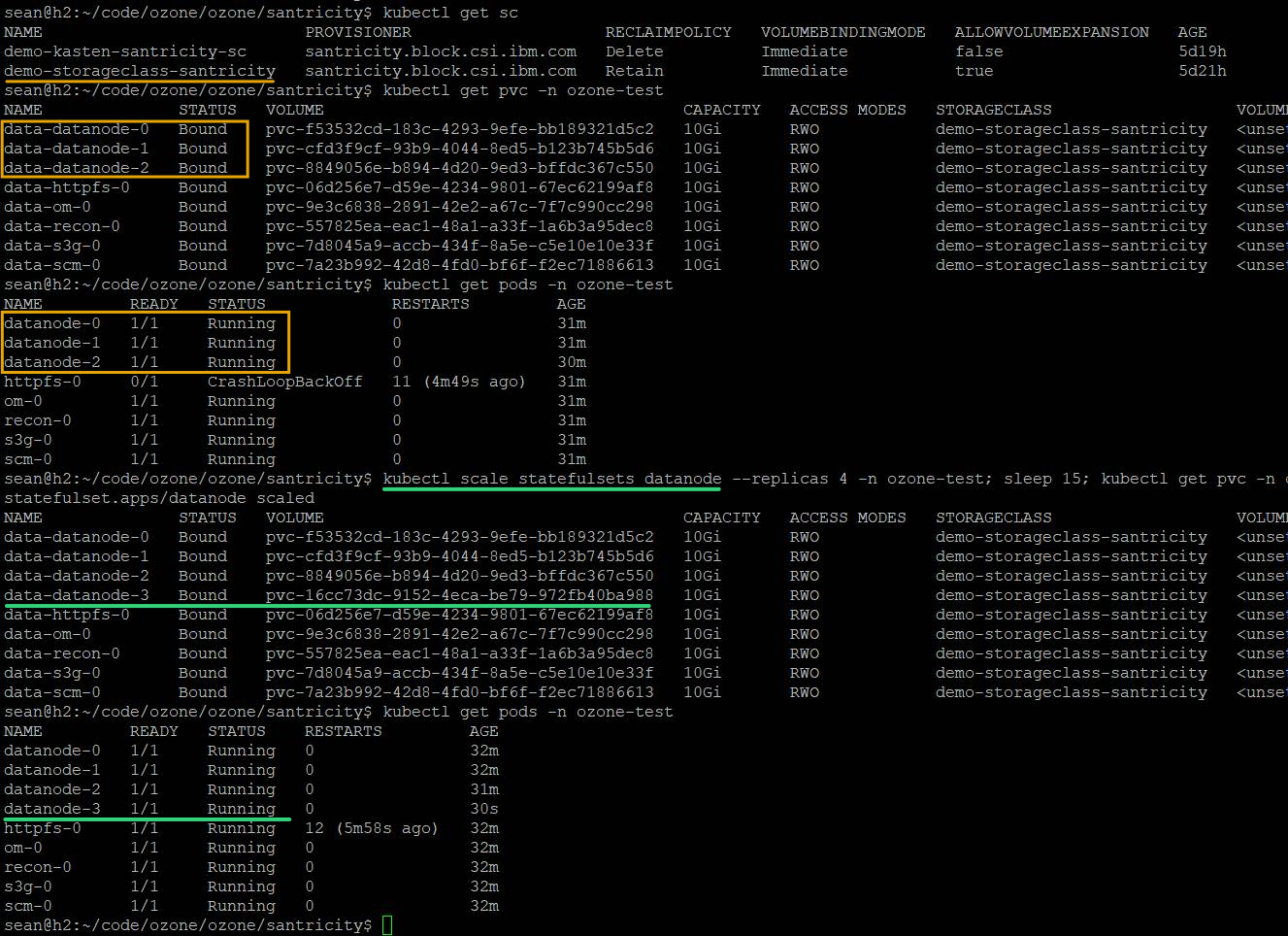
Storage gets provisioned on the fly - data-datanode-3 is new here (created 30+ minutes after the first three).
NAME              STATUS   VOLUME                                     CAPACITY   ACCESS MODES   STORAGECLASS                   VOLUMEATTRIBUTESCLASS   AGE
data-datanode-0   Bound    pvc-f53532cd-183c-4293-9efe-bb189321d5c2   10Gi       RWO            demo-storageclass-santricity   <unset>                 38m
data-datanode-1   Bound    pvc-cfd3f9cf-93b9-4044-8ed5-b123b745b5d6   10Gi       RWO            demo-storageclass-santricity   <unset>                 38m
data-datanode-2   Bound    pvc-8849056e-b894-4d20-9ed3-bffdc367c550   10Gi       RWO            demo-storageclass-santricity   <unset>                 38m
data-datanode-3   Bound    pvc-16cc73dc-9152-4eca-be79-972fb40ba988   10Gi       RWO            demo-storageclass-santricity   <unset>                 6m37s
If we wanted to scaled down to two (which would be possible if we had RF2 and data could fit), we could. Obviously we'd want to query Ozone and make sure data is re-protected after removing nodes, or - even better - drain data nodes before removing them.
$ kubectl scale statefulsets datanode --replicas 2 -n ozone-test
statefulset.apps/datanode scaled
When data node's PVC reclaim policy is set to Delete, disks simply go away. If you want to "park" data elsewhere, use rclone to copy it and then delete or scale down Ozone if you don't need it for time being. And if you need more of it, scale out and/or expand the size of your PVCs.
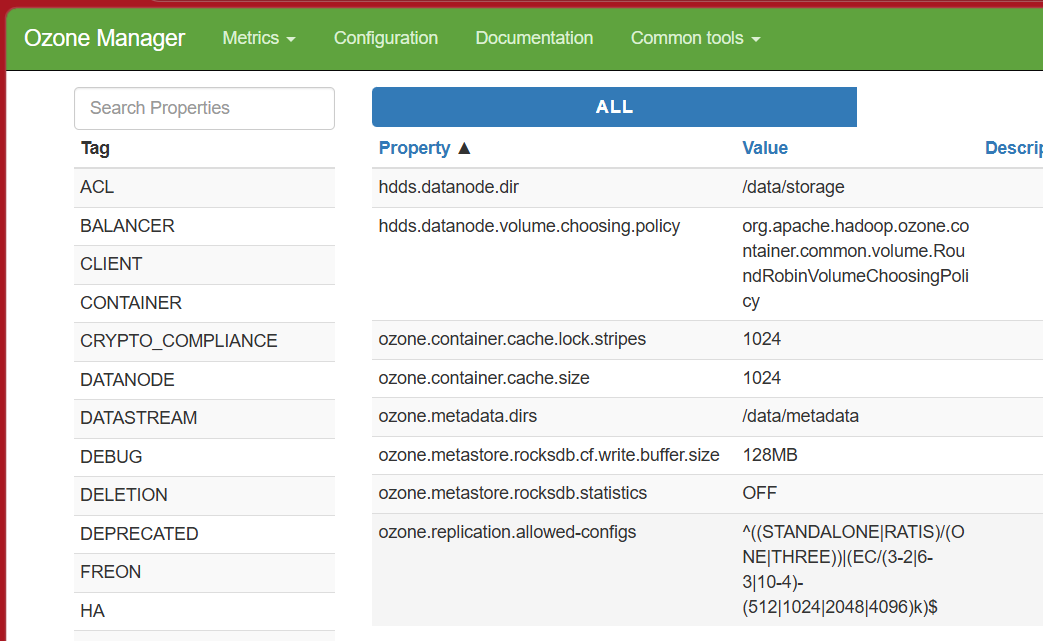
The UI looks quite familiar with how it was in the previous review. You can see the available RF/EC settings in OM (Ozone Manager).
I find StorageGRID much less brittle than Ozone and there's less "glueing" to do but, depending on what you need and how much of it, Ozone may be the right answer for you. For example, Ozone offers the ofs:// scheme.
If you don't have a lot of data or need to repurpose capacity or need one of those Ozone features, it may make sense to use SDS rather than standard enterprise S3 appliances. Even then, savings from using "storage servers" may not be as attractive as they seem.
I saw in one place they mention some user with 10 billion objects. That is a lot, but it's also not by enterprise S3 standards - you can PUT that much in half a dozen StorageGRID nodes that take 6RU and save a lot in management costs by not having to micro-manage software and hardware of those appliances for the next 3-5 years.
Another example: EC 6+3 lets you avoid buying "expensive" appliances, but it takes 10 nodes (N+1), likely 2U servers. That's half a rack of servers (and a lot of CPUs, RAM and network ports) and S3 is the only thing it can do. Yet, you can get the same in 25% less rack space, with fewer servers, and you can run a combination of all storage services with Ozone data on protected storage. Even if you need just Ozone S3, you may be better off with 6-7 1U servers and one EF50 box. It's not always like that, sometimes you'll be better off with cheapest white box servers, but I'd say not everyone would get this result.
Scenario for 120 NL-SAS disks:
| Storage | Storage Server | E-Series | TOTAL (Servers + Storage) |
|---|---|---|---|
| JBOD | 10 x 2U | - | 20U |
| Shared | 7 x 1U | 8U | 15U (25% savings) |
I already mentioned these comments elsewhere, such as in this Cloudera post a year ago. None of this is new, except that "storage server" bloat is much more expensive these days. For a comparison, the fastest E-Series array today, EF80, uses only 64GB RAM.
The new CSI drivers make E-Series significantly more usable and cost effective in these scenarios. No VMware tax, no OS tax, no complex bare metal provisioning. With up to 5 servers, you don't even need a dedicated storage network switch because the new models have a decent number of high-speed network ports on 'em.

If you use such multi-node pods, you can build still bigger clusters without storage switches.
It takes 60s to get from kubectl apply (or terraform apply in the Terraform Provider variant) to first results.
The Ozone example is based on the Minikube example from their repository has been posted to the usual place.