Cloudera Base with NetApp E-Series
- Introduction
- Reference architectures
- What's new in Cloudera Base
- Deployment topology
- Sizing and hardware selection
- Failure handling
- Operating system best practices
- Networking and security
- Third party filesystems
- FAQs
Introduction
First off, NetApp doesn't validate or certify E-Series for Cloudera. Maybe you can skip the rest if you need just that info.
Second, while reading their documentation I realized Cloudera doesn't seem too interested in the topic of external storage either. My guess is the KISS principle leads them to simply proposing DAS if the user doesn't have some particular concern or requirement.
DAS works, it's predictable, and it's inexpensive.
But at the same time Cloudera also doesn't say some external storage won't work. And obviously it does work when sized and solutioned correctly.
Reference architectures
For on-premises clusters, see these reference architectures.
I'll go through this and make E-Series-related comments.
High-level design and best practices
Cloudera Base on premises supports a variety of hybrid solutions where compute tasks are separated from data storage and where data can be accessed from remote clusters.
E-Series is great for this because, unlike "modern" arrays, it supports a variety of RAID levels. Need RAID 10 for a DB without buying another array? Bring it on!
They mention three groups of workloads:
| Workload | Recommended RAID Levels | Media |
|---|---|---|
| Data Engineering | RAID 6 or DDP | HDD or QLC |
| Data Mart | RAID 6 or DDP | HDD or QLC |
| Operational Database | RAID 5 or RAID 10 | TLC or QLC |
Depending on requirements you could have multiple E-Series arrays. For example, you need enough throughput for 5,000 CPU cores - you can't do this with one E-Series array. But for small clusters you could very well use just one (say, EF600) which is a hybrid box (NVMe TLC in controller shelf, SAS TLC and HDD in expansion shelves).
dfs.replication (see here) would be set to 2 for simple mirroring rather than the default RF3. RF2 was also recommended in the prehistoric TR-3969.
What's new in Cloudera Base
This is from here and I guess may be new in Cloudera 7, although I don't really care. Let's just get to the point:
Ozone is a scalable, redundant, and distributed object store, optimized for big data workloads. Apart from scaling to billions of objects of varying sizes, Ozone can function effectively in containerized environments such as Kubernetes and YARN.
Apache Ozone S3 and NetApp E-Series was a topic here back in 2022, so you can read about it and E-Series in that post. As mentioned in that post, it appears Cloudera provides support for Ozone (best to confirm with them), so storage just needs to provide sufficient bandwidth.
There's a dedicated page on "Next-Gen" (aka Ozone) storage where you can see how it can be used with Cloudera. This page shows how to migrate from HDFS to Ozone. I'd like to highlight this:
ofs: A Hadoop-compatible filesystem (HCFS) allowing any application that expects an HDFS-like interface to work against Ozone with no API changes. Frameworks like Apache Spark, YARN and Hive work against Ozone without the need of any change.
What that means is:
- Storage protocol simplicity - if you consider file and object (NFS, S3) to be simpler than block - is here for E-Series users. "
mc cp -r /data/in s3gw://datamart/etl" and you're done - new data is available toofsclients! - Look, Kubernetes! As I've been saying all along - you don't need NetApp Trident to support E-Series in a Kubernetes environment. Why? Because Ozone has Erasure Coding, so PV failover isn't critical.Host and worker reboots (and Ozone container restarts) can be handled transparently to S3 users. Like with MinIO, you can run Ozone on RAID 0 (which E-Series supports) and protect data exclusively with Ozone. Or you can do a combination (wide DDP on E-Series plus EC on Ozone on top of that).
- If you prefer to use S3 such as MinIO, that seems to work as well. You can read about MinIO Erasure Coding with E-Series here.
If you still wonder about CSI drivers for E-Series, read this post.
Deployment topology
This is from here. Cloudera recommends Spine & Leaf for easy rack redundancy and scaling to many racks.
This has no effect on E-Series apart from the obvious:
- If you want rack redundancy, you need multiple E-Series (e.g. two EF300 in two racks rather than one EF600 in one of three racks)
- If you use one or two E-Series across three racks you probably can't use SAS on clients because maximum supported SAS cable length may prevent access to nodes in the rack without EF-Series; you want iSCSI or NVMe or IB or FC
- For a switchless storage design, it may be possible to use iSCSI or FC or NVMe, but only as long as the number of ports on E-Series is enough for direct-attach. For example, 4 hosts with 1 x 100G NVMe on each could connect to EF600 without a switch. Three racks, three EF600, 12 hosts.
Sizing and hardware selection
Summary: don't be stupid and go with large HDDs to meet the capacity requirement.
This documentation seems a bit aged, but to make it simple, for Data Engineering and Data Mart, let's use 100 MB/s per core.
Let's say we have 8 hosts with 32 cores = 256 x 0.1 GB/s = 25.6 GB/s. Since this more than E5760 can provide, we'd need roughly two E5760, but if we need to provide 2 copies, then twice as much (4 arrays). Because it's 8 hosts, 4 arrays and 2 copies, we could split this in two racks.
Secondly, as we won't need all disk slots, we can add some SAS SSDs for Operational Database workloads (R5 or R10). Or, for a more luxury approach, get one or (rack redundancy version) two EF300 and use E-Series or (better) native database replication to protect databases.
Thirdly, we can brainstorm about other options such as 9 hosts and 3 racks:
- Instead of 4 E5760, get 3 E5760
- Instead of 2 replicas, use Erasure Coding on HDFS (6+3) or use Ozone with EC (6+3)
- EC 6+3 overhead is 50%, so 25.6 x 1.5 = 40 GB/s, which is roughly enough (or certainly enough, if you use EF600C (QLC) and don't need more capacity than what 3 EF600C can provide). With EF300C or EF600C you may also be able to avoid dedicated EF for Operational Database
Lastly, some points regarding throughput estimation:
- if data format is compressed (by say 60%), actual writes with RF2 won't be 2x, but 1 x 60% x 2x or only 1.2x. Make sure you consider this
- storage usually handles reads better, and E-Series is much faster with read, too. When sizing, consider whether you're sizing for 100% write, 100% read or a mix of both
Then there's this:
Cloudera does not support drives larger than 8 TB for HDFS data.
This seems outdated. What's wrong with 15.3 TB QLC SSDs?
There's also this:
Running Cloudera Base on premises on storage platforms other than direct-attached physical disks can provide suboptimal performance.
Driving in a car may result in a car crash. If we size correctly, there won't be suboptimal performance.
Failure handling
That's described here and with external storage not everything is the same.
External storage should have better availability and lower impact than DAS. One thing I mentioned earlier was the idea to "cut corners" for a switchless storage design, in which we'd max out hosts-per-array by using a single 100G link. Obviously, that means link failure results in loss of access to all disks for the host.
That must sound bad to "enterprise" users, but Cloudera claims it's not a big deal.
| Failure | Impact | Note |
|---|---|---|
| Multi-disk failure (Worker node) | Low | Allow automated Cloudera cluster recovery features to trigger |
You may disagree it's "low", but then you'd also begin to wonder what else they're wrong about.
Another scenario in this vein is that a failed E-Series controller would take out all Cloudera workers connected to that array without redundant paths to the surviving controller.
If you're worried about that, use multiple paths and add a pair of switches (e.g. dedicated FC, or allocate a few from existing Etherenet switches used by Compute Cluster).
The rest is more or less the same even across racks, if you have rack redundancy for storage (which would be 2 copies on protected RAID 6 LUNs on 2 arrays, or 3 copies on 3 arrays).
Operating system best practices
Cloudera supports RHEL, SLES, Ubuntu so compare that against the NetApp IMT.
As an aside, in a different topic (also outdated, for Cloudera 5), there's this note about OS boot disk in a VMware environment.
If storage is SAN-based, for 20 nodes, reserve 100 GB LUNs/datastores/VMDKs to each node.
This means that if you run Cloudera in VMware, you could create a RAID 5 volume group with 3 TB usable, and cut it in 150 GB LUNs for a separate data store for each Clodera VM. Or create 3 LUNs for 3 Datastores, each for VMware in its own rack (with 3 racks), for example.
Networking and security
Read about it here.
- Cloudera can encrypt in-flight data also supports encryption for data at rest
- E-Series is managed out of band (physically separate 1GigE LAN), so it doesn't introduce new security concerns either in management or data encryption level. FIPS and FED disks are supported, but you probably don't need them if that's taken care of by Cloudera
Example topologies
Let's take a look at some examples.
Older Cloudera 5 with Ceph in OpenStack environment:
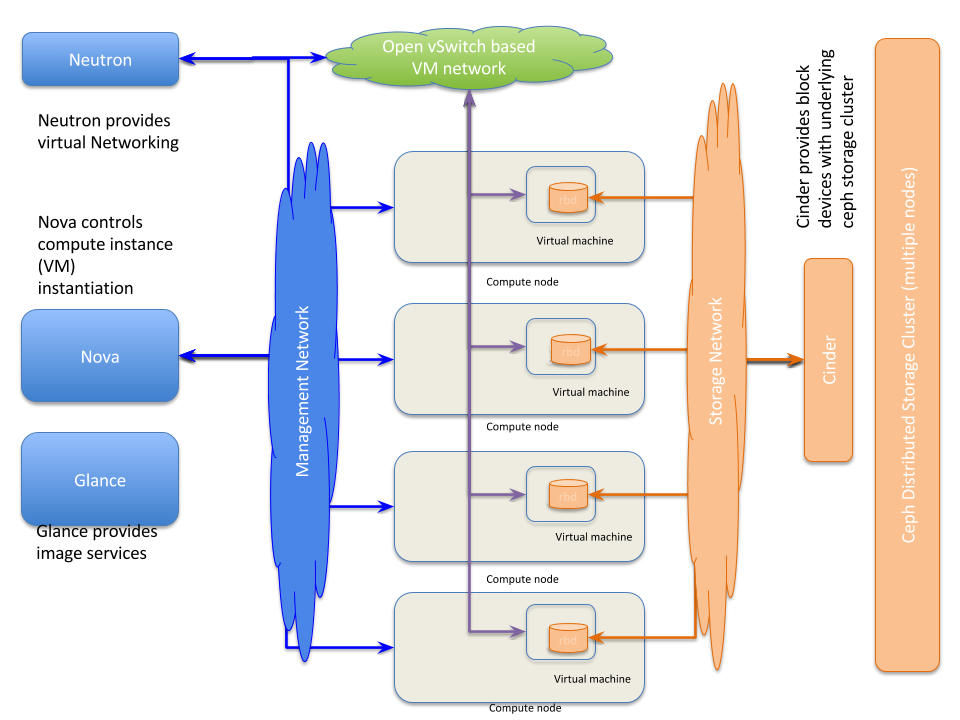
Two points about storage access (unrelated to OpenStack and Ceph):
- E-Series iSCSI would connect the same way, via IPv4. To avoid using Ethernet, we can use use IB or FC
- Cloudera itself would use a single network for its services
Why we need to be careful out IP networking:
Multihoming Cloudera Runtime or Cloudera Manager is not supported outside specifically certified Cloudera partner appliances… Cloudera finds that current Hadoop architectures combined with modern network infrastructures and security practices remove the need for multihoming.
Source: here
There's a "workaround", but if Cloudera doesn't support it there's no need to consider it. More on this multihoming thing:
By default HDFS endpoints are specified as either hostnames or IP addresses. In either case HDFS daemons will bind to a single IP address making the daemons unreachable from other networks.
Source: here
This is with Isilon and older Cloudera 5 but probably still valid.
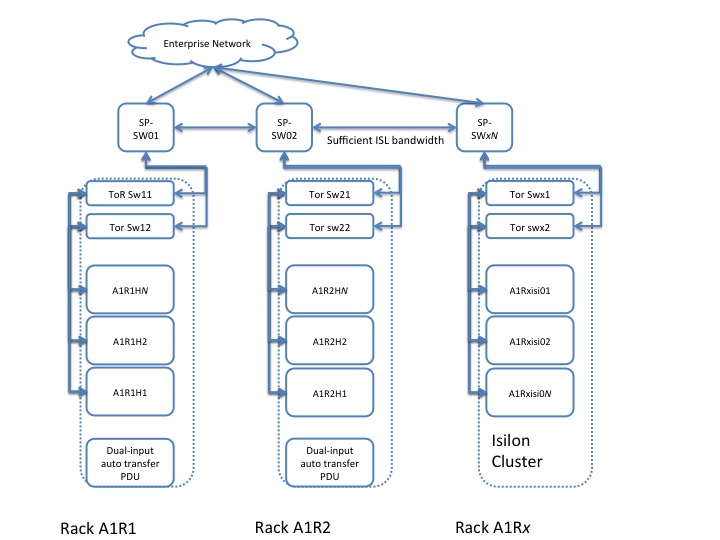
Note that there's no rack redundancy here. I guess the benefit of this approach is that if sufficient (non-blocking) bandwidth is provided, it doesn't make much difference in terms of performance.
E-Series - especially if there's just one box - would use this approach as well. But you have an option of multiple (entry-level) arrays with RF2 or RF3 with rack awareness. With RF2 and two racks all "local" workers would prefer to read from the replica stored on array in "local" rack.
With 3 racks and 2 E-Series, one rack would always read "remote" data, but this doesn't worse than all storage traffic reading over multiple hops. It's the same (writes) or better (reads for 66% of cases).
Third party filesystems
These are some of the validated non-standard ones: PowerScale (Isilon) and StorageScale (Spectrum Scale, GPFS).
Storage Scale with E-Series
E-Series supports GPFS, so you could buy GPFS and use it instead of HDFS.
If you use Ozone, maybe you don't need a 3rd party filesystem, but GPFS has better support and more features. Note that on E-Series GPFS would work best with protected volumes (RAID 6, 8+2, usually, and RAID1 on SSDs for metadata)
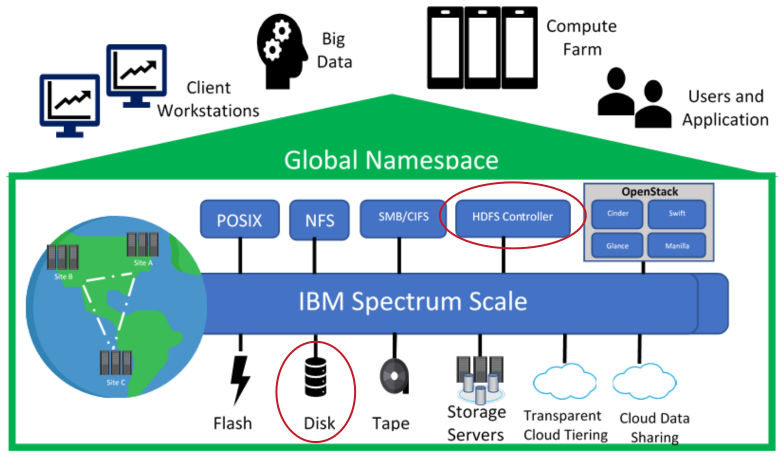
This image depicts HDFS service for clients which translates requests to GPFS which uses "disks". GPFS in this case runs on dedicated GPFS servers, which use (protected) E-Series LUNs. Cloudera workers don't need to have much storage besides R1 boot media, although they could have local (internal) read-only cache that GPFS supports.
You can read more about GPFS with E-Series in TR-4859. This TR also has some indicative performance figures.
FAQs
Some comments on the FAQs.
The HDFS data directories should use local storage, which provides all the benefits of keeping compute resources close to the storage and not reading remotely over the network.
This is nonsense.
If you read via NVMe without even a network switch in data path, what "latency" is there? Not to mention that - since Cloudera recommends NL-SAS - the latency of "remote" (NVMe) storage with QLC is much lower than the IO latency of NL-SAS. You may say "but QLC is more expensive" and that's true, but we may need a lot less of raw QLC compared to NL-SAS (if we use 2 copies on RAID 6 vs. 3 copies on DAS).
Secondly, the moment you use Cloudera in a cluster spanning multiple racks, the question becomes: do you still want to use DAS and RF3? Maybe you do, but you're sending 200% more writes over network. If you use Erasure Coding, you send only 50% more, but then you may need to read it from multiple racks, which means a lot more network hops, so "reading remotely over network" happens all the time anyway.
The same applies to Ozone or S3 which would generally be running on "dense" storage nodes and use EC.