Apache Hadoop 3 with NetApp E-Series
- HDFS Durability and External Protected Storage
- Does everyone need RF2
- HDFS
- NFS gateway
- Snapshots
- HttpFS, WebHDFS
- Recommended settings for E-Series
- Recommendations for Cloudera Enterprise
- Summary
HDFS Durability and External Protected Storage
For a long while HDFS predominantly used three replica policy (sometimes shortened as "RF3") with the less popular RF2 option used mostly by highly available external storage such as E-Series.
The idea behind HDFS R2 and E-Series was and still is that by using RF2 over RAID6, you can lower overhead with more upsides than downsides.
| HDFS durability | Storage durability | Total overhead |
|---|---|---|
| RF3 (default) | JBOD | 3 x 100% |
| RF2 | External HA RAID 6 | 2 x (8+2)/8 |
| RF2 | External HA DDP (24(2)) | 2 x (24/22) |
In the latter case, RF2 over RAID6 (8+2) means 2 x (10/8) or 250%. (You'd have some hot spares on the side, but you'd have even more of them for JBOD storage.)
In the case of DDP, or Dynamic Disk Pools, protection overhead is even lower (see here).
External storage - whether it uses DDP or RAID6 or something else - needs controllers and enclosures, so there's additional cost to that, but for many users these trade-offs are well worth it:
- Disaggregate compute & storage
- Scale only resources you need
- Use lower-cost 1U servers instead of 2U or 4U servers
- Save on compute nodes by not needing extra nodes to overcome drop in performance during disk rebuilds (which are required after node failures as well)
- Save software licensing fees
- Save rack space
- Save energy
- Easily manage compute (because there's just ephemeral storage on it) and storage (because it's redundant)
- etc.
See this dated TR-3969 for additional details on that.
Here's what the Cloudera documentation says about RF3:
A lower replication factor leads to a situation where the data is more vulnerable to DataNode failures since there are fewer copies of data spread out across fewer DataNodes.
That is true if you use servers as storage. But HDFS/E-Series users do not.
E-Series storage systems are more reliable than servers, have redundant controllers and can withstand the loss of at least two disks per RAID6 or DDP group without requiring HDFS rebuild (E-Series volume remains, and is eventually rebuilt or "reconstructed", depending on whether it's RAID 6 or DDP (which "reconstructs" to recover from disk failures)).
Does everyone need RF2
One common recommendation for HDFS on white box servers is to use multiple copies for Hadoop clusters spanning multiple racks.
E-Series recommends RF2, which protects from array downtime caused by a single rack downtime.
Now, depending on the situation, I would say sometimes it's okay to use just one E-Series array. As an example, instead of buying two EF300 I may propose a single EF600. I get the same performance, the same capacity (unless EF300 were sized to be maxed out), but it costs me less and I have just one array to manage.
What about rack failures?
Well, do you need to care about rack failures? Do you need 6 9's?
I've seen a number of Hadoop users who have 10-20 Hadoop nodes (which tend to be 2U servers). If you refresh those with new 1U servers, you may need just 8 1U servers, and then both E-Series and Hadoop servers can all fit into a single 40U rack.
The same customers have no rack redundancy for almost any data-heavy service, so why overspend only on your Hadoop cluster?
And why bother with extra racks unless you need five 9's for Hadoop (many Hadoop users of the kind I described do not)? And I bet it's cheaper and in many cases more feasible to fail service over to the public cloud, than have two racks (and still go down when your site loses power). You need to sync data to S3 or NFS in the cloud in order to have it ready, so that you can stand up a backup cluster in 25 minutes, and have it start running jobs minutes later.
For Spark workloads you don't even need to build a backup cluster - Spot.io can do that for you with serverless Spark on Kubernetes. Just sync your data to S3 once a day, and you can move your Spark workload to the cloud if your single rack (or site) is going to be down for more than 24 hours, for example. And you can eliminate one entire rack from your DC.
Note that RF2 can be used with just one E-Series array, and that we can have two E-Series arrays in a single rack (which may be needed for various reasons, including when you simply can't get enough performance with just one array), but the point is when there's no reason to span racks, why do it?
HDFS
These days HDFS has a lot more features, and given the age of that TR (it has nothing on modern Hadoop 3), I thought to write a post about that.
Erasure Coding
Erasure Coding (EC) is available and can lower storage overheads, but has some limitations - not everyone can just switch to EC and call it a day. in the case of Cloudera CD Private Cloud Base 7.6.1, only Hive, MapReduce and Spark can be used with EC.
Users who you can do it pick a Data + Parity schema and cell (which is the size of EC "chunk") size. For example, EC 6D3P (128kiB) would add three parity chunks to every 6 data chunks, and write that stripe as a 9 * 128kiB (1,152KiB) strips to E-Series volumes. And E-Series is generally happy with 128kB requests.
There are no official recommendations for HDFS EC configuration with E-Series, but we can draw some parallels between NetApp StorageGRID and E-Series here.
NetApp StorageGRID is an object storage storage solution that many customers deploy in the form of StorageGRID appliances, which are in turn based on StorageGRID software and customized E-Series appliances (there may also be server "heads" attached, depending on the model of StorageGRID appliance).
StorageGRID software running on StorageGRID appliances defaults to making two copies of each object (aka "RF2", which StorageGRID calls 2-copy Policy), which get stored on different StorageGRID appliances. If objects are large (i.e. container images, for example), one of several supported Erasure Coding schemas may be used for better results (lower overhead, more capacity, sometimes even better performance).
Sound familiar?
So, 2-copy and EC durability schemas run on hundreds if not thousands of StorageGRID appliances out there. E-Series doesn't know whether it's HDFS or StorageGRID or Ceph accessing its volumes. HDFS is just another RF2/2-copy or EC workload.
This is why I don't expect surprises with HDFS EC on E-Series, although I don't have first- or second-hand information about any experiences, good or bad.
What "chunk" size should be used with HDFS EC? HDFS didn't have EC when the TR was written, but while the size of RAID6 segments can be tuned, default 128kiB should work just fine. (Incidentally, VMFS also uses up to 128kB chunks, see page 6 of this PDF.)
For example, in a 5-drive RAID 5 volume group (4+1), if the typical read/write "chunk" size is 2 MiB, a segment size of 512 KiB (an even fraction [1/4] of the total chunk size) would be the best choice for the application's volume segment size because it ensures that each read/write is written as a single stripe of the volume group drives.
With RAID 6 (8+2) and 1 MB HDFS requests, 128kiB should be fine and that happens to be default anyway.
How "wide" should EC N+M be? With a single EF array, I'd keep it at 1MiB (which nicely lands on RAID 6 or DDP volumes). With multiple E-Series arrays across different racks, we'd want to make sure that a downed rack doesn't take down HDFS, so use N+M which equals the number of racks (or arrays, given one array per rack), so 4+1 for 5 racks with 5 arrays. I suspect any minor deviations such as going from 128kiB to 256kiB segment size if you suspect your IO requests are 2MiB or want to use 2MiB EC stripes wouldn't cause a big drop in performance as long as you're not completely wrong about the nature of your workload.
With tiering and hybrid E-Series, we could even use multiple approaches at the same time. Because of multiple filesystems and different media, we can segregate data by workload or by media type and for SSDs the impact of small writes is much smaller which allows us more flexibility when choosing these parameters.
Let's add two examples with EC to the earlier table:
| HDFS durability | Storage durability | Total overhead | Overhead (%) |
|---|---|---|---|
| RF3 (default) | JBOD | 3 x 100% | 300 |
| RF2 | External HA RAID 6 | 2 x (8+2)/8 | 250 |
| RF2 | External HA DDP (24(2)) | 2 x (24/22) | 218 |
| EC 6+2 on R6 | External HA RAID 6 | (6+2)/6 x (8+2)/8 | 166 |
| EC 6+3 on DDP | External HA DDP (18(2)) | (6+3)/6 x (16+2)/16 | 168 |
DDP (pools) usually have between 11 and 60 drives in a single pool, so the last row can have many variations based on storage durability: DDP (11) can have 11/10 overhead (one disk worth of spare capacity for reconstruction), DDP (24) would normally use two (24/22 overhead) and DDP (30) the same (30/28), etc.
Unlike fixed JBOD or internal RAID storage, this makes it easy to pick most suitable configuration and change it over time if workload changes.
Compression
Another interesting addition in newer HDFS versions is compression, which E-Series doesn't target as its focus applications tend to either implement it on its own (CCTV servers, NOSQL databases), or don't want it (so that I/O latency remains as low as possible).
HDFS users normally default to Gzip, but BZip2, Lzo, and Snappy are also supported. Because compression and decompression is done client-side, this is transparent to E-Series.
Assuming N% reduction, we can get up to 100/(100-N) percent more capacity and throughput (although, as always, "it depends"). Some of those gains are spent on the clients to compress and decompress data, but overall it should be helpful if you deal with compressible data such as text files and generic application logs.
NFS gateway
HDFS can be exported (shared) to non-HDFS clients via a built-in NFS gateway. While it has significant limitations, it still can be useful.
Snapshots
Snapshots may be taken on snapshottable directories.
Once you have a snapshot, you can copy its files to S3, ONTAP, BeeGFS, or public cloud targets using either NetApp XCP (NetApp-to-NetApp only), CloudSync (any-to-any), DataOps Toolkit, or other utilities and services of your choosing.
NetApp XCP and CloudSync can work with NFS sources, which is one of the situations where having snapshot directories available through NFS gateway can be useful (which I why I mentioned it earlier).
HttpFS, WebHDFS
I don't know if there are important use cases where these would be preferred over S3, but they provide additional protocols to access HDFS.
If you happen to dislike HDFS, you may as well migrate some or all of your data to object storage such as StorageGRID rather than manage and secure HttpFS and WebHDFS in addition to HDFS which you cannot stand. With StorageGRID you get 2-Copy and several EC schemas, security, encryption, built-in async replication to AWS S3, auditing, etc. - out of the box. If you want to keep some workloads on a fast tier, use something like Alluxio to move data on-demand to RAM, local disks, or a smaller all flash array (E-Series EF300 with 20-200 TiB), while persisting new writes to StorageGRID. And you could cache these S3 reads from cloud-based Spark or Hadoop instances as well (just deploy Alluxio on them and let it access on-premises StorageGRID) and eliminate extra redundancy for on-prem Hadoop or Spark.
Recommended settings for E-Series
TR linked at the top has a recommendation to "set a cache block size of 32KB" (this is granularity of E-Series controller cache allocation size), but even that may be workload dependent.
32kiB is the largest setting available on E-Series and suitable for application with large IO requests, so that recommendation is unlikely to change for recent versions of HDFS. If you have workloads that generate small IO and that's the bulk of the workload you could try 16kiB, but I wouldn't even try if I didn't have SSD media (with small sized requests NL-SAS will be slow anyway).
The rest is standard best practices that apply for many Big Data workloads on E-Series.
Recommendations for Cloudera Enterprise
I looked up some sizing recommendations from Cloudera, which may not be up to date, but most of them likely still apply.
Here we can find about general recommendations by Cloudera. We E-Series we don't have to use FC SAN, of course - it supports IB and other protocols.
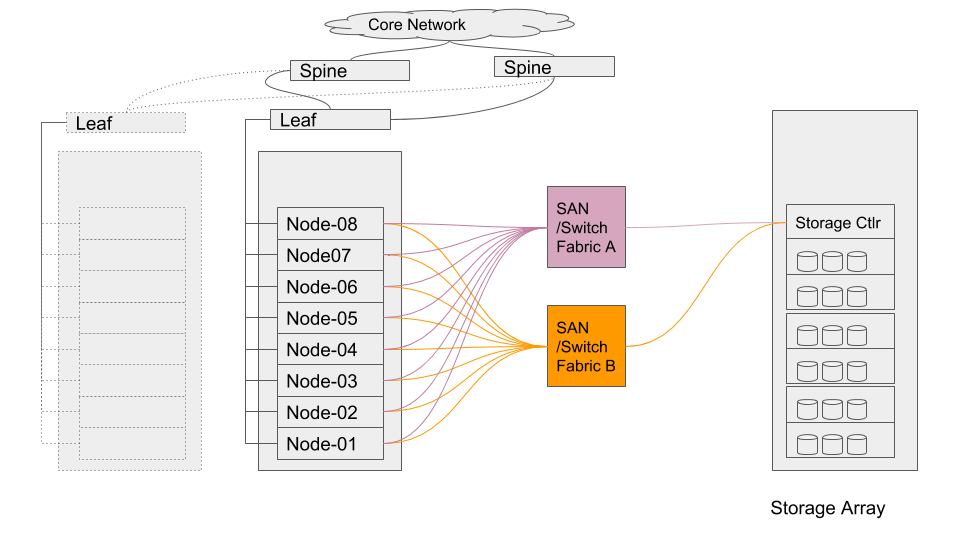
They recommend up to 800 MB/s per Worker Node, which makes it easy to size for E-Series. For example, 16 nodes need 16 GB/s, which can be satisfied by a single EF300 (100% sequential, 80/20 read-write) or EF600 (100% sequential write), depending on read-write ratio and whether RF2 is used or not.
On the same page there's another general guidance, 50 MB/s per VM core, which means that for 16 1U servers with 64 cores each we would need around 50 GB/s, which - if read-write ratio is high (90/10) - may be achievable with a single NVMe-based EF600, but more likely than not you'd need two EF600, especially if you use RF2 or need more than just NVMe flash media. For example, some data may be more suitable for NL-SAS which in both EF300 and EF600 can be added with expansion shelves; we'd need dozens of NL-SAS spindles to get a decent performance out of NL-SAS, resulting in a NL-SAS tier few hundred TB large (e.g. one 60 disk expansion enclosure = 60 * (8+2)/2 * 12 TB = 900 TB usable and perhaps around 10 GB/s from this NL-SAS tier).
If there are workloads with very varying characteristics (in terms of request size, performance requirements, read-write ratio and such), we'd probably want to use different RAID levels or media types. As an example: SSDs in RAID 10 for Kafka, and HDDs in DDP for read-mostly analysis of older data sets.
The Cloudera page contains some other valuable insights related to sizing, so please check it out, as well as Enterprise Storage Device Acceptance Criteria Guide. A reference for Bare Metal deployments can be found here.
CDP Private Cloud Base has newer documentation (for version 7), but it's not as detailed regarding HDFS which may be a sign that Hadoop users have had enough of using HDFS according to their JBOD recipes. I should also mention that Cloudera now also ships Apache Ozone which comes with a modern HDFS-compatible OzoneFS (see this post; Azure Ozone also has an S3 gateway built-in.)
Summary
A lot has changed in Hadoop (and HDFS) 3 since Hadoop 2, but the nature of Hadoop workloads hasn't changed much. Hadoop 3 does a lot of things better and can do more in general, but Hadoop workloads are still mostly sequential and I think the new features don't negate any of the advantages of E-Series described in the old TR from 2018.
Other technologies haven't stood still either - these days there's a lot more Spark, Kubernetes, S3 in Hadoop environments, in-memory caching, and easy-to-consume Spark on Kubernetes can be executed on demand using lowest-cost, Spot VM instances in the cloud.
Existing Hadoop users can take advantage of improvements in Hadoop 3 with E-Series, but NetApp can do a lot more to help you modernize and transform Big Data workloads with on-prem S3, synchronization/replication workflows (XCP, CloudSync, StorageGRID CloudMirror), local and remote caching (with Alluxio), and hybrid cloud (Spot.io) and Kubernetes integrations (Spot.io, DataOps Toolkit).
Get rid of 2U severs and improve Hadoop storage management by moving HDFS to E-Series, or even S3 or NFS. Your next Big Data environment can be better than your current Hadoop environment.