Ubuntu 26.04 LTS NVMe/RoCE with NetApp E-Series SANtricity
Introduction
Ubuntu's 26.04 LTS has been released. I evaluated a beta version with SolidFire (using iSCSI, of course) some weeks ago, and did not see any issues.
Similarly, Resurfacing Regression works fine with E-Series 11.95 using NVMe/RoCE.
I used NVMe/RoCE without any 3rd party packages this time.
Why is that important? Because it works. What I did last week (twice!) was trying to get smart with DOCA, and that wasted me hours for no reason at all. So I'm pleased that this worked "as seen on TV" (even older 24.04 LTS work out of box, though).
Notes on Ubuntu 26.04 LTS with E-Series and NVMe/ROCE
There are none - it just worked, the way I described it in Linux, NVMe/RoCE and HA NetApp EF-Series NVMe-oF storage.
Just follow the same steps as in that post and connect to one of NVMe addresses.
$ sudo nvme connect-all -t rdma -a 192.168.1.2
(.venv) sean@h1:~/code/eseries-perf-analyzer/epa$ nvme show-topology
nvme-subsys1 - NQN=nqn.1992-08.com.netapp:6000.6d039ea000493a9c00000000609943a4
               hostnqn=nqn.2014-08.org.nvmexpress:uuid:966595be-daab-11e9-a7bf-3a68dd15fe5f
               iopolicy=round-robin
\
 +- ns 1
 \
  +- nvme1 rdma traddr=192.168.2.1,trsvcid=4420 live optimized
  +- nvme2 rdma traddr=192.168.1.1,trsvcid=4420 live optimized
  +- nvme3 rdma traddr=192.168.2.2,trsvcid=4420 live non-optimized
  +- nvme4 rdma traddr=192.168.1.2,trsvcid=4420 live non-optimized
 +- ns 2
...
As you can see in this output, all (not just 192.168.1.2) paths were used to connect.
- Controller A (presumably) has two IP addresses, 192.168.1.1 and 192.168.2.1
- The volume is both preferred on that controller and that is the optimized path that doesn't involve IO "shipping" through the non-preferred controller
It just works.
Key tip: don't install DOCA unless you have to.
Let's see about some other mildly interesting stuff.
Notes on DM-MP with NVMe/RoCE
I'd never used it so I wanted to check it out (Device Mapper and multipath with NVMe/RoCE). It's an outdated approach, I know, but why not see how it works?
What I did:
- Injected "
enable_foreign yes" intodefaultssection of/etc/multipath.confand restartmultipathdservice - As a result, you should be able to see NVMe disks in
multipathoutput
The NetApp E-Series docs tell you to not do anything at all in multipath.conf, which may or may not be the optimal approach.
Here's what I had (enable_foreign is the main part; I'm not saying the rest is "good", "optimal" or whatever).
defaults {
    user_friendly_names yes
    find_multipaths yes
    polling_interval 10
    path_selector "round-robin 0"
    path_grouping_policy group_by_prio
    rr_weight uniform
    path_checker tur
    checker_timeout 10
    failback immediate
    enable_foreign yes
}

devices {
    device {
        vendor "(NETAPP|LSI|ENGENIO)"
        product "INF-01-00"
        path_grouping_policy group_by_prio
        path_selector "round-robin 0"
        path_checker tur
        features "1 no_path_retry"
        dev_loss_tmo 180
        rr_min_io 100
        failback immediate
        prio alua
        prio_args "polling_interval=10"
    }
}
(devices aren't pertinent here since all I had in this environment was NVMeoF, but I'd have that for non-NVMeoF devices on other E-Series arrays.)
The trouble is, that didn't work. I then fiddled with all sorts of settings (from multipathd to udev triggers) and then rebooted the system out of desperation.
Maybe the settings above are all you need (plus a reboot), maybe it was something else. TFM of multipath-tools says that "enable_foreign yes" should be enough.
Anyway, after that reboot, I was able to see NVMe paths with multipath.
$ sudo multipath -ll
eui.00000a0669af8e91d039ea0000493a26 [nvme]:nvme1n1 NVMe,NetApp E-Series,08901200
size=20971520 features='n/a' hwhandler='ANA' wp=rw
|-+- policy='n/a' prio=10 status=non-optimized
| `- 1:1:1 nvme1c1n1 0:0 n/a non-optimized live
|-+- policy='n/a' prio=10 status=non-optimized
| `- 1:2:1 nvme1c2n1 0:0 n/a non-optimized live
|-+- policy='n/a' prio=50 status=optimized
| `- 1:3:1 nvme1c3n1 0:0 n/a optimized     live
`-+- policy='n/a' prio=50 status=optimized
  `- 1:4:1 nvme1c4n1 0:0 n/a optimized     live
...
The weird part is… DM-MP doesn't actually create any new paths for you. So this not very useful. Or maybe a bug.
I guess you can say "now I know nvme1n1 = eui.00000a0669af8e91d039ea0000493a26", but you can use my SANtricity Client library or SANtricity PowerShell module to learn the same without enabling a rather intrusive service such as multipathd.
Some more log pr0n:
$ sudo multipath -v3 -ll
1634.272691 | set open fds limit to 2147483584/2147483584
1634.272792 | _read_bindings_file: reading /etc/multipath/bindings
1634.272859 | loading /usr/lib/multipath/libchecktur.so checker
1634.273216 | checker tur: message table size = 4
1634.273255 | loading /usr/lib/multipath/libprioconst.so prioritizer
1634.273969 | foreign library "nvme" loaded successfully
...
1634.344086 | test_ana_support: NVMe ctrl 240:1: ANA is supported
1634.344098 | _find_controllers: nvme: new path nvme1c1n1 added to nvme1n1
1634.368342 | _find_controllers: nvme: new path nvme1c2n1 added to nvme1n1
1634.392617 | _find_controllers: nvme: new path nvme1c3n1 added to nvme1n1
1634.416993 | _find_controllers: nvme: new path nvme1c4n1 added to nvme1n1
...
So this "successfully failed". It worked, but wasn't very helpful.
The next thing on my to-do list was VDO. I've been meaning to do this since 2025.
Notes on VDO
WTF is VDO? It's this thing here.
Long story short, the Virtual Data Optimizer (VDO) is an LVM-integrated deduplication and compression layer that can create thin-provisioned, "efficient" (that is, deduplicated and/or compressed) volumes.
As we all know, E-Series doesn't have any efficiency features, so being able to squeeze some more capacity out of volumes with "efficient" data is a good thing, especially when they're SSD-backed.
The tricky part is similar to ZFS - managing resource requirements on every single host that uses this thing, and dealing with potential emergencies such as a volume (or dozens) blowing up, consequences of downtime or data corruption on running out of space, etc.
I don't want to bother you with step-by-step details (they're still provided in Appendix A below), but VDO is interesting:
- It sort of works, if you manage it carefully it probably works well
- Effort required to manage and monitor may be greater than savings unless you have a lot of storage (but even then, you'd probably buy storage that comes with efficiency features)
- If you have predictable and well-undestood data and workloads, VDO may be very useful
- Unlike the more manageable open-source variants that use the less popular filesystems, this one is harder to manage, but works with the usual LVM choices (XFS and ext4)
So, it's a tool that can be useful to an E-Series admin with Linux hosts. Sometimes it will be better to use ZFS with E-Series, other times Btrfs, and yet other times VDO with XFS or ext4. As they say, "it depends".
Since we prefer LVM on shared storage for Proxmox VE datastores, VDO may be employed in some use cases down the road. Proxmox doesn't mention VDO-style LVM, but LVM-VDO with KVM is a real use case.
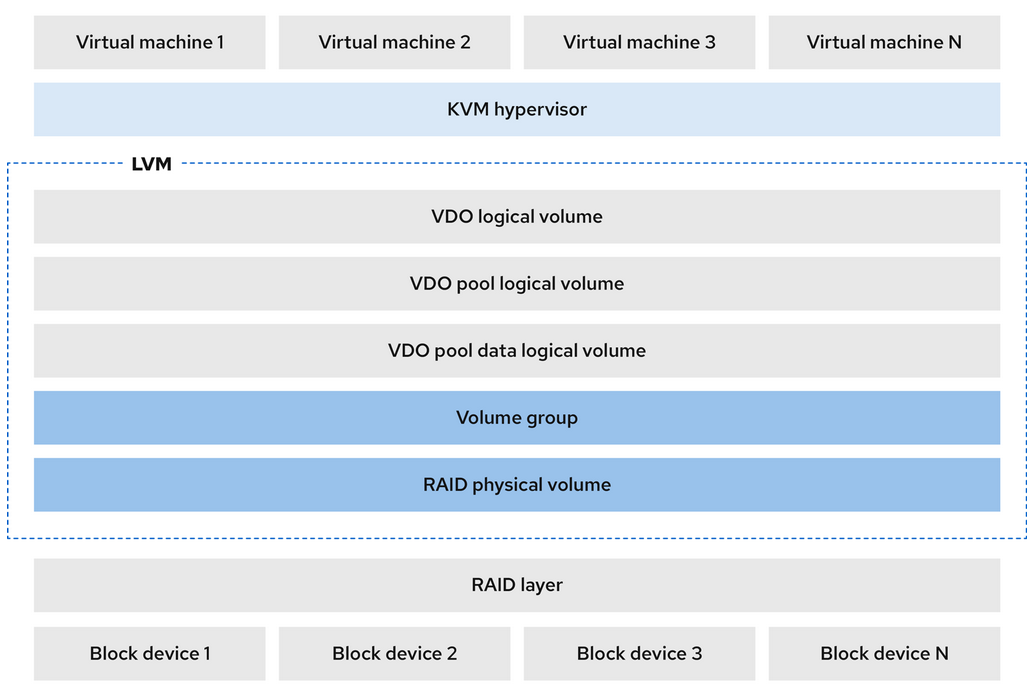
VDO may be interesting even for Tier 3, high-churn containers where a PVE-based NFS server is deployed with VDO to save space. As you create a bunch of clones and most of the capacity is containers themselves rather than user data, you can recover time and effort spent on managing VDO, which should be little as these workloads often don't need a backup and can be redeployed elsewhere without data.
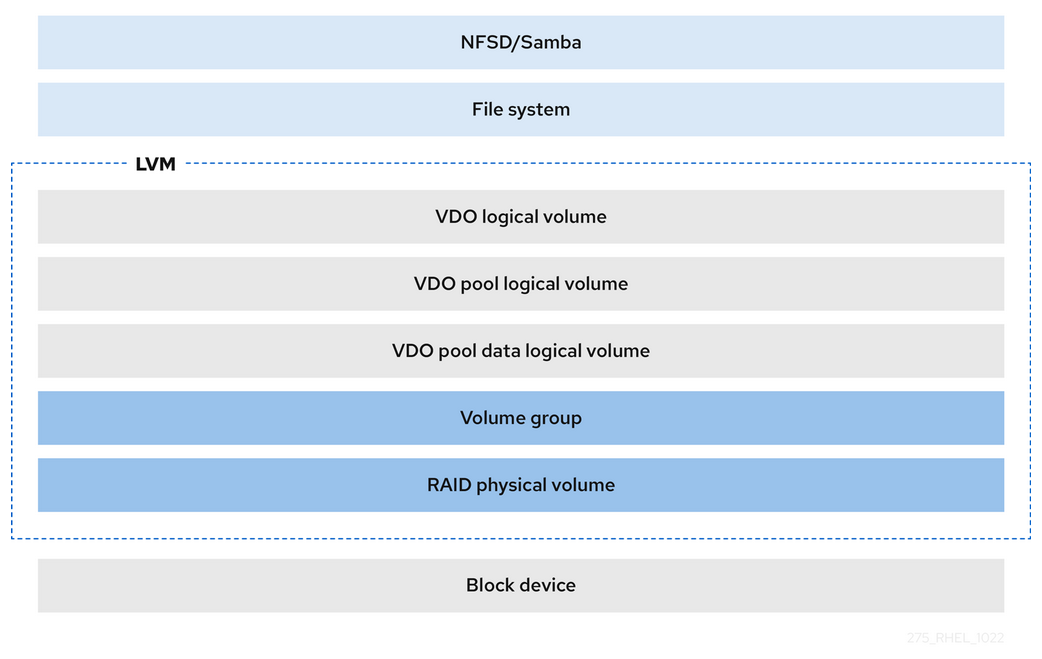
Of course, the simple NAS use cases - say, where uncompressed data is regularly dumped on NFS shares - are even easier, because those are very predictable workloads. I'd argue most of them are moving to S3, but you could even run Versity S3 Gateway the exact same way.
There's no shortage of "compress & store" file systems these days and one doesn't want to end up having five different "solutions" across 40 servers, so I wouldn't jump on LVM-VDO just because it works. E-Series helps us take care of that RAID layer at the bottom and we should use LVM-VDO or other compression-enabled filesystem where its benefits are truly significant.
Conclusion
Ubuntu 26.04 LTS behaves well as 24.04 LTS did, so it's good that I have nothing to report. I love the ability to set weak passwords! No more stupid password complexity enforcement - they've finally adopted one of the RPM distros' strongest features! Ubuntu 26.04 LTS hasn't yet made it to the NetApp E-Series Interoperability Matrix, but Debian 13 hasn't either and I use it all the time (with Proxmox).
DM-MP with native NVMe paths isn't useful.
VDO is useful for some use cases, but one has to find and opportunistically target suitable use cases while carefully considering cost (time, management, risk) of such savings. I'm generally not a big fan of deduplication in file systems due to memory requirements (ZFS is notorious when it comes to that), so I'd primarily look for compression savings. Deduplication can be useful, but needs even more careful evaluation which, given the state of these tools, needs more work to justify.
Appendix A: VDO on Ubuntu 26.04 LTS with E-Series
- A thin-provisioned 8 GiB VDO-based VDO-based LV (XFS filesystem) was created in 5 GiB of space on a 10GiB E-Series volume.
- I tried playing with compression and deduplication settings. Compression and deduplication were enabled (and disabled),
fstrimwas used, etc. This stuff is not easy to use and it's easy to see how managing dozens of such VDO-based LV devices in a dynamic enviromment can be hard. - There's nothing E-Series-specific here, all action happens on the client and that's where most resources are consumed as well. Still, later we'd like to understand how savings on the client reflect on, and impact, storage
sean@h1:~$ nvme list
Node                  Generic               SN                   Model                                    Namespace  Usage                      Format           FW Rev
--------------------- --------------------- -------------------- ---------------------------------------- ---------- -------------------------- ---------------- --------
/dev/nvme1n1          /dev/ng1n1            952103002724         NetApp E-Series                          0x6         10.74  GB /  10.74  GB      4 KiB +  0 B   08901200
/dev/nvme1n2          /dev/ng1n2            952103002724         NetApp E-Series                          0x1          2.15  GB /   2.15  GB      4 KiB +  0 B   08901200
/dev/nvme1n3          /dev/ng1n3            952103002724         NetApp E-Series                          0x4         10.74  GB /  10.74  GB      4 KiB +  0 B   08901200
/dev/nvme1n4          /dev/ng1n4            952103002724         NetApp E-Series                          0x2         68.72  GB /  68.72  GB      4 KiB +  0 B   08901200
/dev/nvme1n5          /dev/ng1n5            952103002724         NetApp E-Series                          0xb         10.74  GB /  10.74  GB      4 KiB +  0 B   08901200
/dev/nvme1n6          /dev/ng1n6            952103002724         NetApp E-Series                          0x7          1.07  GB /   1.07  GB      4 KiB +  0 B   08901200
/dev/nvme1n7          /dev/ng1n7            952103002724         NetApp E-Series                          0xa        107.37  GB / 107.37  GB      4 KiB +  0 B   08901200
/dev/nvme1n8          /dev/ng1n8            952103002724         NetApp E-Series                          0x3         10.74  GB /  10.74  GB    512   B +  0 B   08901200
/dev/nvme1n9          /dev/ng1n9            952103002724         NetApp E-Series                          0x5         10.74  GB /  10.74  GB    512   B +  0 B   08901200

sean@h1:~$ sudo pvcreate /dev/nvme1n1
WARNING: xfs signature detected on /dev/nvme1n1 at offset 0. Wipe it? [y/n]: y
  Wiping xfs signature on /dev/nvme1n1.
  Physical volume "/dev/nvme1n1" successfully created.

sean@h1:~$ sudo vgcreate vdo_vg /dev/nvme1n1
  Volume group "vdo_vg" successfully created

sean@h1:~$ sudo lvcreate --type vdo --name vdo_lv --size 5G --virtualsize 8G vdo_vg
    The VDO volume can address 2.00 GB in 1 data slab.
    It can grow to address at most 16.00 TB of physical storage in 8192 slabs.
    If a larger maximum size might be needed, use bigger slabs.
  Logical volume "vdo_lv" created.

sean@h1:~$ sudo mkfs.xfs /dev/vdo_vg/vdo_lv
...
Discarding blocks...
Done.

sean@h1:~$ sudo mount /dev/vdo_vg/vdo_lv ./vdo_thin/

sean@h1:~$ df -H
Filesystem                         Size  Used Avail Use% Mounted on
...
/dev/mapper/vdo_vg-vdo_lv          8.4G  195M  8.2G   3% /home/sean/vdo_thin

sean@h1:~$ sudo lvs
  LV        VG        Attr       LSize   Pool   Origin Data%  Meta%  Move Log Cpy%Sync Convert
  ubuntu-lv ubuntu-vg -wi-ao---- 100.00g
  vdo_lv    vdo_vg    vwi-aov---   8.00g vpool0        0.01
  vpool0    vdo_vg    dwi-------   5.00g               60.05

sean@h1:~$ sudo lvs -o+vdo_compression,vdo_compression_state
  LV        VG        Attr       LSize   Pool   Origin Data%  Meta%  Move Log Cpy%Sync Convert VDOCompression VDOCompressionState
  ubuntu-lv ubuntu-vg -wi-ao---- 100.00g
  vdo_lv    vdo_vg    vwi-aov---   8.00g vpool0        0.01                                           enabled online
  vpool0    vdo_vg    dwi-------   5.00g               60.05                                          enabled online

sean@h1:~/vdo_thin$ sudo wget https://cdn.kernel.org/pub/linux/kernel/v7.x/linux-7.0.1.tar.xz
...
Length: 157172284 (150M) [application/x-xz]
Saving to: 'linux-7.0.1.tar.xz'
linux-7.0.1.tar.xz 100%[===>] 149.89M   108MB/s    in 1.4s
2026-04-27 15:09:44 (108 MB/s) - 'linux-7.0.1.tar.xz' saved [157172284/157172284]

sean@h1:~/vdo_thin$ ll # after decompression
total 1604620
drwxr-xr-x  3 root root         48 Apr 27 15:11 ./
drwxr-x---  7 sean sean       4096 Apr 27 15:09 ../
drwxrwxr-x 26 root root       4096 Apr 22 11:32 linux-7.0.1/
-rw-r--r--  1 root root 1643120640 Apr 22 11:43 linux-7.0.1.tar

sean@h1:~/vdo_thin$ ls -lat
total 1604620
drwxr-xr-x  3 root root         48 Apr 27 15:11 .
drwxr-x---  7 sean sean       4096 Apr 27 15:09 ..
-rw-r--r--  1 root root 1643120640 Apr 22 11:43 linux-7.0.1.tar
drwxrwxr-x 26 root root       4096 Apr 22 11:32 linux-7.0.1

sean@h1:~/vdo_thin$ uname -a
Linux h1 7.0.0-14-generic #14-Ubuntu SMP PREEMPT_DYNAMIC Mon Apr 13 11:09:53 UTC 2026 x86_64 GNU/Linux

sean@h1:~/vdo_thin$ sudo lvs
  LV        VG        Attr       LSize   Pool   Origin Data%  Meta%  Move Log Cpy%Sync Convert
  ubuntu-lv ubuntu-vg -wi-ao---- 100.00g
  vdo_lv    vdo_vg    vwi-aov---   8.00g vpool0        13.25
  vpool0    vdo_vg    dwi-------   5.00g               81.27

sean@h1:~/vdo_thin$ sudo lvs -o+vdo_compression,vdo_compression_state
  LV        VG        Attr       LSize   Pool   Origin Data%  Meta%  Move Log Cpy%Sync Convert VDOCompression VDOCompressionState
  ubuntu-lv ubuntu-vg -wi-ao---- 100.00g
  vdo_lv    vdo_vg    vwi-aov---   8.00g vpool0        15.17                                          enabled online
  vpool0    vdo_vg    dwi-------   5.00g               84.39                                          enabled online

sean@h1:~/vdo_thin$ df -H
Filesystem                         Size  Used Avail Use% Mounted on
...
/dev/mapper/vdo_vg-vdo_lv          8.4G  3.7G  4.7G  45% /home/sean/vdo_thin

sean@h1:~/vdo_thin$ ll
total 1604620
drwxr-xr-x  3 root root         48 Apr 27 15:11 ./
drwxr-x---  7 sean sean       4096 Apr 27 15:09 ../
drwxrwxr-x 26 root root       4096 Apr 22 11:32 linux-7.0.1/
-rw-r--r--  1 root root 1643120640 Apr 22 11:43 linux-7.0.1.tar

sean@h1:~/vdo_thin$ sudo rm linux-7.0.1.tar
sean@h1:~/vdo_thin$ du -sh
1.7G    .
sean@h1:~/vdo_thin$ sudo lvs -o+vdo_compression,vdo_compression_state
  LV        VG        Attr       LSize   Pool   Origin Data%  Meta%  Move Log Cpy%Sync Convert VDOCompression VDOCompressionState
  ubuntu-lv ubuntu-vg -wi-ao---- 100.00g
  vdo_lv    vdo_vg    vwi-aov---   8.00g vpool0        15.28                                          enabled online
  vpool0    vdo_vg    dwi-------   5.00g               84.57                                          enabled online
sean@h1:~/vdo_thin$ sudo lvs
  LV        VG        Attr       LSize   Pool   Origin Data%  Meta%  Move Log Cpy%Sync Convert
  ubuntu-lv ubuntu-vg -wi-ao---- 100.00g
  vdo_lv    vdo_vg    vwi-aov---   8.00g vpool0        15.32
  vpool0    vdo_vg    dwi-------   5.00g               84.64

sean@h1:~/vdo_thin$ sudo lvchange --compression n vdo_vg/vdo_lv
  Logical volume vdo_vg/vdo_lv changed.

sean@h1:~/vdo_thin$ sudo lvs -o+vdo_compression,vdo_compression_state
  LV        VG        Attr       LSize   Pool   Origin Data%  Meta%  Move Log Cpy%Sync Convert VDOCompression VDOCompressionState
  ubuntu-lv ubuntu-vg -wi-ao---- 100.00g
  vdo_lv    vdo_vg    vwi-aov---   8.00g vpool0        15.32                                                  offline
  vpool0    vdo_vg    dwi-------   5.00g               84.63                                                  offline

sean@h1:~/vdo_thin$ sudo lvs -o+vdo_deduplication,vdo_saving_percent
  LV        VG        Attr       LSize   Pool   Origin Data%  Meta%  Move Log Cpy%Sync Convert VDODeduplication VDOSaving%
  ubuntu-lv ubuntu-vg -wi-ao---- 100.00g
  vdo_lv    vdo_vg    vwi-aov---   8.00g vpool0        15.32                                            enabled      64.63
  vpool0    vdo_vg    dwi-------   5.00g               84.63                                            enabled      64.63

sean@h1:~/vdo_thin$ sudo lvs -o+vdo_compression,vdo_compression_state
  LV        VG        Attr       LSize   Pool   Origin Data%  Meta%  Move Log Cpy%Sync Convert VDOCompression VDOCompressionState
  ubuntu-lv ubuntu-vg -wi-ao---- 100.00g
  vdo_lv    vdo_vg    vwi-aov---   8.00g vpool0        15.32                                                  offline
  vpool0    vdo_vg    dwi-------   5.00g               84.63                                                  offline

sean@h1:~/vdo_thin$ sudo lvchange --compression y vdo_vg/vdo_lv
  Logical volume vdo_vg/vdo_lv changed.

sean@h1:~/vdo_thin$ sudo lvs -o+vdo_compression,vdo_compression_state
  LV        VG        Attr       LSize   Pool   Origin Data%  Meta%  Move Log Cpy%Sync Convert VDOCompression VDOCompressionState
  ubuntu-lv ubuntu-vg -wi-ao---- 100.00g
  vdo_lv    vdo_vg    vwi-aov---   8.00g vpool0        15.32                                          enabled online
  vpool0    vdo_vg    dwi-------   5.00g               84.63                                          enabled online

sean@h1:~/vdo_thin$ sudo lvs -o+vdo_deduplication,vdo_saving_percent
  LV        VG        Attr       LSize   Pool   Origin Data%  Meta%  Move Log Cpy%Sync Convert VDODeduplication VDOSaving%
  ubuntu-lv ubuntu-vg -wi-ao---- 100.00g
  vdo_lv    vdo_vg    vwi-aov---   8.00g vpool0        15.32                                            enabled      64.63
  vpool0    vdo_vg    dwi-------   5.00g               84.63                                            enabled      64.63

sean@h1:~/vdo_thin$ sudo du -sh
1.7G    .

sean@h1:~/vdo_thin$ df -H
Filesystem                         Size  Used Avail Use% Mounted on
...
/dev/mapper/vdo_vg-vdo_lv          8.4G  2.1G  6.4G  25% /home/sean/vdo_thin

sean@h1:~/vdo_thin$ sudo vdostats
Device              1k-blocks      Used Available Use% Space saving%
vdo_vg-vpool0-vpool   5242880   4437088    805792  85%           64%


sean@h1:~/vdo_thin$ sudo vdostats --human-readable vdo_vg-vpool0-vpool
Device                   Size      Used Available Use% Space saving%
vdo_vg-vpool0-vpool      5.0G      4.2G    786.9M  85%           64%

sean@h1:~/vdo_thin$ pwd
/home/sean/vdo_thin
sean@h1:~/vdo_thin$ sudo fstrim /home/sean/vdo_thin

sean@h1:~/vdo_thin$ sudo vdostats --human-readable vdo_vg-vpool0-vpool
Device                   Size      Used Available Use% Space saving%
vdo_vg-vpool0-vpool      5.0G      3.7G      1.3G  74%           64%

sean@h1:~/vdo_thin$ sudo du -sh linux-7.0.1/
1.7G    linux-7.0.1/

sean@h1:~/vdo_thin$ sudo lvs -o+vdo_compression,vdo_compression_state
  LV        VG        Attr       LSize   Pool   Origin Data%  Meta%  Move Log Cpy%Sync Convert VDOCompression VDOCompressionState
  ubuntu-lv ubuntu-vg -wi-ao---- 100.00g
  vdo_lv    vdo_vg    vwi-aov---   8.00g vpool0        8.69                                           enabled online
  vpool0    vdo_vg    dwi-------   5.00g               74.02                                          enabled online

sean@h1:~/vdo_thin$ sudo lvs -o+vdo_deduplication,vdo_saving_percent
  LV        VG        Attr       LSize   Pool   Origin Data%  Meta%  Move Log Cpy%Sync Convert VDODeduplication VDOSaving%
  ubuntu-lv ubuntu-vg -wi-ao---- 100.00g
  vdo_lv    vdo_vg    vwi-aov---   8.00g vpool0        8.69                                             enabled      64.06
  vpool0    vdo_vg    dwi-------   5.00g               74.02                                            enabled      64.06