Auto-generate vector embeddings for StorageGRID using Instaclustr OpenSearch
This is a multi-part post:
- PART 1 (this post): Auto-generate vector embeddings for StorageGRID using Instaclustr OpenSearch
- Part 2: Custom manual Kompromise pipeline for StorageGRID and Instaclustr OpenSearch (WIP)
Introduction
You have, or plan to buy, StorageGRID and do something more with it - such as some "AI stuff". To do that, you need an index with embeddings for your S3 bucket data used by AI.
You can offload some of that work by using managed OpenSearch by Instaclustr. It takes 15 minutes to start, after which you have a properly configured OpenSearch with TLS access.
StorageGRID has search integration that's the same as it was 10 years ago. It works, but it's not good enough for AI.
We can create embeddings ourselves client-side, but we can also auto-generate embeddings by indexing text from objects using OpenSearch.
This post shows how this simpler auto-generated approach works. It also shows why that probably isn't enough and how other approaches to generating embeddings in OpenSearch can help you (more on that in Part 2).
Auto-generate embeddings in Instaclustr OpenSearch
We can create embeddings at scale (hundreds per second, for example) by provisioning a "vectorization worker" if we have a lot of documents to vectorize.
For smaller scale RAG (meaning simple text, small documents or tiny images) and development, maybe we can get away by using CPU in regular OpenSearch nodes. (Don't go too crazy with "benchmarking" if you also search and index at scale using the same nodes.)
Instead of trying to get creative, we just RTFM and copy-paste their instructions.
First, we enable generic OpenSearch nodes for vectorization workload:
PUT _cluster/settings
{
  "persistent": {
    "plugins.ml_commons.only_run_on_ml_node": "false",
    "plugins.ml_commons.native_memory_threshold": "85"
  }
}
If you use dedicated nodes, don't use the above payload - configure a dedicated node instead.
Second, join OpenSearch Confusion Fest at this page. Take your time picking through the 100 choices!
We'll create a "local" group. It can be any - this is a tag for your own groupings.
POST /_plugins/_ml/model_groups/_register
{
  "name": "local_model_group",
  "description": "A model group for local models"
}
Use the returned ID in model_group_id below (or otherwise drop the key below from payload) and pick one of the models from that pre-trained list (also, get the model version right).
NOTE: this one generates 384-d vectors. Maybe you want a different model or version. DYOR.
POST /_plugins/_ml/models/_register
{
  "name": "huggingface/sentence-transformers/all-MiniLM-L6-v2",
  "version": "1.0.3",
  "model_group_id": "1sVSMaEBxbvMjUqWqPfr",
  "model_format": "TORCH_SCRIPT"
}
Response:
{
  "task_id": "-sVWMaEBxbvMjUqWG_dc",
  "status": "CREATED"
}
Get the sucker:
GET /_plugins/_ml/tasks/-sVWMaEBxbvMjUqWG_dc
Model ID is needed later, so copy this into some "notepad" of sorts to not lose that ID:
{
  "model_id": "hqRWMaEB62QuBhwmJD7e",
  "task_type": "REGISTER_MODEL",
  "function_name": "TEXT_EMBEDDING",
  "state": "COMPLETED",
  "worker_node": [
    "akGpd1uwQxiIVho1qp1c9Q"
  ],
  "create_time": 1791829089110,
  "last_update_time": 1791829124033,
  "is_async": true
}
Deploy that model ID:
POST /_plugins/_ml/models/hqRWMaEB62QuBhwmJD7e/_deploy
Check if okay:
{
  "task_id": "JcVaMaEBxbvMjUqWjfjP",
  "task_type": "DEPLOY_MODEL",
  "status": "CREATED"
}
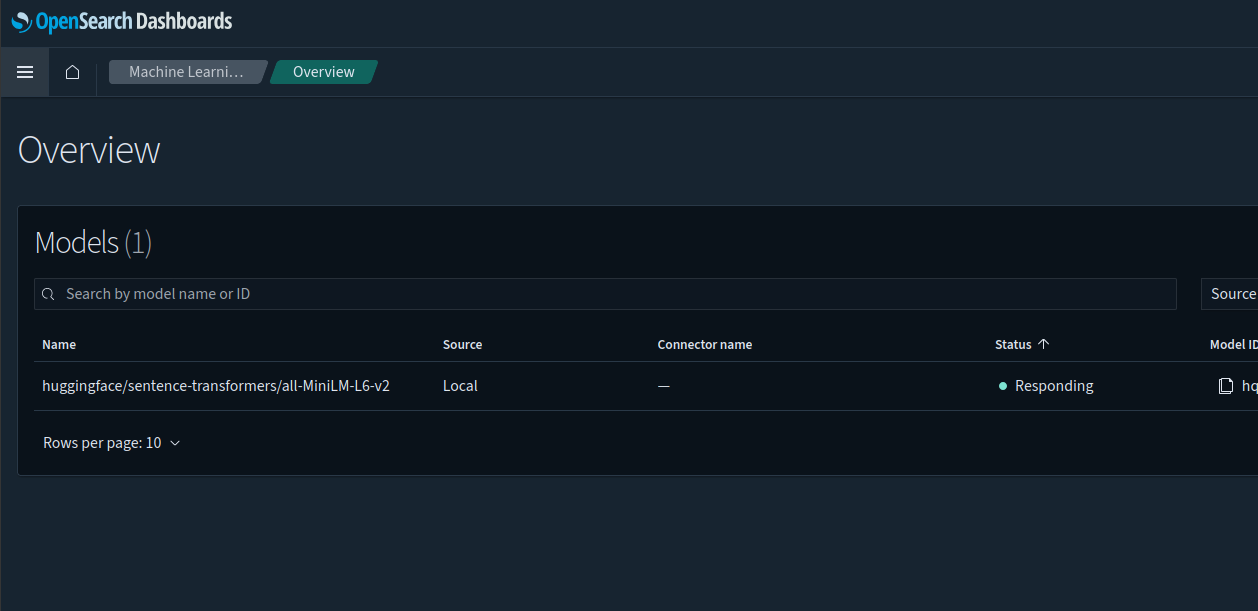
You may find your registered model in Machine Learning > Overview. If you check the details, you'll see which nodes it's running and responding on.
We're supposedly "ready" now. Let's give it a try!
POST /_plugins/_ml/_predict/text_embedding/hqRWMaEB62QuBhwmJD7e
{
  "text_docs":[ "train"],
  "return_number": true,
  "target_response": ["sentence_embedding"]
}
This took around three seconds on a small CPU node.
Result (trimmed):
{
  "inference_results": [
    {
      "output": [
        {
          "name": "sentence_embedding",
          "data_type": "FLOAT32",
          "shape": [
            384
          ],
          "data": [
            -0.023314947,
            0.089756876,
            -0.08136316,
            0.045115348
          ]
        }
      ]
    }
  ]
}
Since this works, our next step would be to do something useful with that model.
OpenSearch has an automated pipeline approach described here.
If that doesn't work for you, you can create a "manual", or rather "custom", workflow.
Using your model ID (ours is hqRWMaEB62QuBhwmJD7e):
POST /_plugins/_flow_framework/workflow?use_case=semantic_search&provision=true
{
    "create_ingest_pipeline.model_id" : "hqRWMaEB62QuBhwmJD7e",
    "text_embedding.field_map.output.dimension": "384",
    "text_embedding.field_map.input": "passage"
}
Response:
{
  "workflow_id": "-MVvMaEBxbvMjUqW6PgE"
}
Check that sucker:
GET /_plugins/_flow_framework/workflow/-MVvMaEBxbvMjUqW6PgE/_status
Response:
{
  "workflow_id": "-MVvMaEBxbvMjUqW6PgE",
  "state": "COMPLETED",
  "resources_created": [
    {
      "resource_id": "nlp-ingest-pipeline",
      "workflow_step_name": "create_ingest_pipeline",
      "workflow_step_id": "create_ingest_pipeline",
      "resource_type": "pipeline_id"
    },
    {
      "resource_id": "my-nlp-index",
      "workflow_step_name": "create_index",
      "workflow_step_id": "create_index",
      "resource_type": "index_name"
    }
  ]
}
Now we can use some Wikipedia content from the S3 storage page to create a few entries in our index:
PUT /my-nlp-index/_doc/1
{
  "passage": "Object storage (also known as object-based storage) is a computer data storage approach that manages data as blobs or objects ."
}

PUT /my-nlp-index/_doc/2
{
  "passage": "Jim Starkey coined the term blob working at Digital Equipment Corporation to refer to opaque data entities ."
}

PUT /my-nlp-index/_doc/3
{
  "passage": "Other related work includes the Coda filesystem project at Carnegie Mellon, which started in 1987, and spawned the Lustre file system ."
}
If we were using StorageGRID objects, this content would be text from our objects or (weaker use case) object tags.
These resulted in three responses like this one:
{
  "_index": "my-nlp-index",
  "_id": "1",
  "_version": 1,
  "result": "created",
  "_shards": {
    "total": 2,
    "successful": 2,
    "failed": 0
  },
  "_seq_no": 0,
  "_primary_term": 1
}
Let's try to find something from that content. Provide your model ID (hqRWMaEB62QuBhwmJD7e) and a search term. Say, Coda appears in the third document we indexed. Exclude passage_embedding to avoid full text-searching the embeddings themselves.
GET /my-nlp-index/_search
{
  "_source": {
    "excludes": [
      "passage_embedding"
    ]
  },
  "query": {
    "neural": {
      "passage_embedding": {
        "query_text": "coda",
        "model_id": "hqRWMaEB62QuBhwmJD7e",
        "k": 1
      }
    }
  }
}
k=1 because I want just one answer.
{
  "took": 278,
  "timed_out": false,
  "_shards": {
    "total": 2,
    "successful": 2,
    "skipped": 0,
    "failed": 0
  },
  "hits": {
    "total": {
      "value": 1,
      "relation": "eq"
    },
    "max_score": 0.4139904,
    "hits": [
      {
        "_index": "my-nlp-index",
        "_id": "3",
        "_score": 0.4139904,
        "_source": {
          "passage": "Other related work includes the Coda filesystem project at Carnegie Mellon, which started in 1987, and spawned the Lustre file system ."
        }
      }
    ]
  }
}
The score (0.4139904) is relative. The absolute value doesn't significantly matter. You want k top results first and maybe massage that set from another aspect to re-rank or pick based on some hybrid evaluation approach. You could get k=N for top N, but drop results below a certain limit, etc.
Coda is trivial as the word could be easily found using lexical search. Try files or university, for example. I got the same document returned as expected.
At the end, let's take a look at that auto-index:
GET my-nlp-index
Response:
{
  "my-nlp-index": {
    "aliases": {},
    "mappings": {
      "properties": {
        "passage": {
          "type": "text"
        },
        "passage_embedding": {
          "type": "knn_vector",
          "dimension": 384,
          "method": {
            "engine": "lucene",
            "space_type": "l2",
            "name": "hnsw",
            "parameters": {}
          }
        }
      }
    },
    "settings": {
      "index": {
        "replication": {
          "type": "DOCUMENT"
        },
        "number_of_shards": "2",
        "provided_name": "my-nlp-index",
        "merge": {
          "policy": {
            "floor_segment": "2mb",
            "max_merge_at_once": "10"
          }
        },
        "default_pipeline": "nlp-ingest-pipeline",
        "knn": "true",
        "creation_date": "1791830780927",
        "unassigned": {
          "node_left": {
            "delayed_timeout": "30m"
          }
        },
        "number_of_replicas": "1",
        "uuid": "ZHb2INLQT6W0c84k1E07cA",
        "version": {
          "created": "137277827"
        },
        "knn.derived_source": {
          "enabled": "true"
        }
      }
    }
  }
}
That's very different from indexes generated by StorageGRID storage integration. Check out this example (objects with tags haven't been ingested so I don't have tags in my index, but version ID and metadata (the other "optional" entries in StorageGRID index) are present because some of the objects had these):
{
  "sgi-index": {
    "aliases": {},
    "mappings": {
      "properties": {
        "accountId": {
          "type": "text",
          "fields": {
            "keyword": {
              "type": "keyword",
              "ignore_above": 256
            }
          }
        },
        "bucket": {
          "type": "text",
          "fields": {
            "keyword": {
              "type": "keyword",
              "ignore_above": 256
            }
          }
        },
        "key": {
          "type": "text",
          "fields": {
            "keyword": {
              "type": "keyword",
              "ignore_above": 256
            }
          }
        },
        "md5": {
          "type": "text",
          "fields": {
            "keyword": {
              "type": "keyword",
              "ignore_above": 256
            }
          }
        },
        "metadata": {
          "properties": {
            "key1": {
              "type": "text",
              "fields": {
                "keyword": {
                  "type": "keyword",
                  "ignore_above": 256
                }
              }
            }
          }
        },
        "region": {
          "type": "text",
          "fields": {
            "keyword": {
              "type": "keyword",
              "ignore_above": 256
            }
          }
        },
        "size": {
          "type": "long"
        },
        "versionId": {
          "type": "text",
          "fields": {
            "keyword": {
              "type": "keyword",
              "ignore_above": 256
            }
          }
        }
      }
    },
    "settings": {
      "index": {
        "replication": {
          "type": "DOCUMENT"
        },
        "number_of_shards": "1",
        "provided_name": "sgi-index",
        "creation_date": "1791751427057",
        "unassigned": {
          "node_left": {
            "delayed_timeout": "30m"
          }
        },
        "number_of_replicas": "1",
        "uuid": "h2NLvXJWSeWjvlo2epC9dQ",
        "version": {
          "created": "137277827"
        }
      }
    }
  }
}
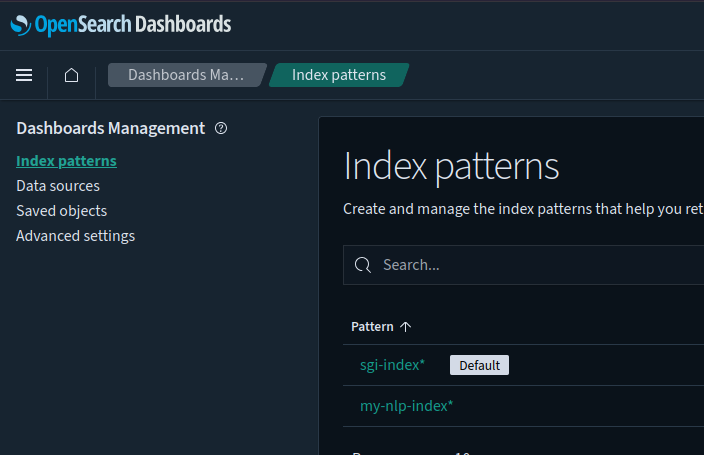
With this "dual" setup, we'd have one index for vectors, another for plain StorageGRID search integration:
A nicer view of what's in the index with embeddings:
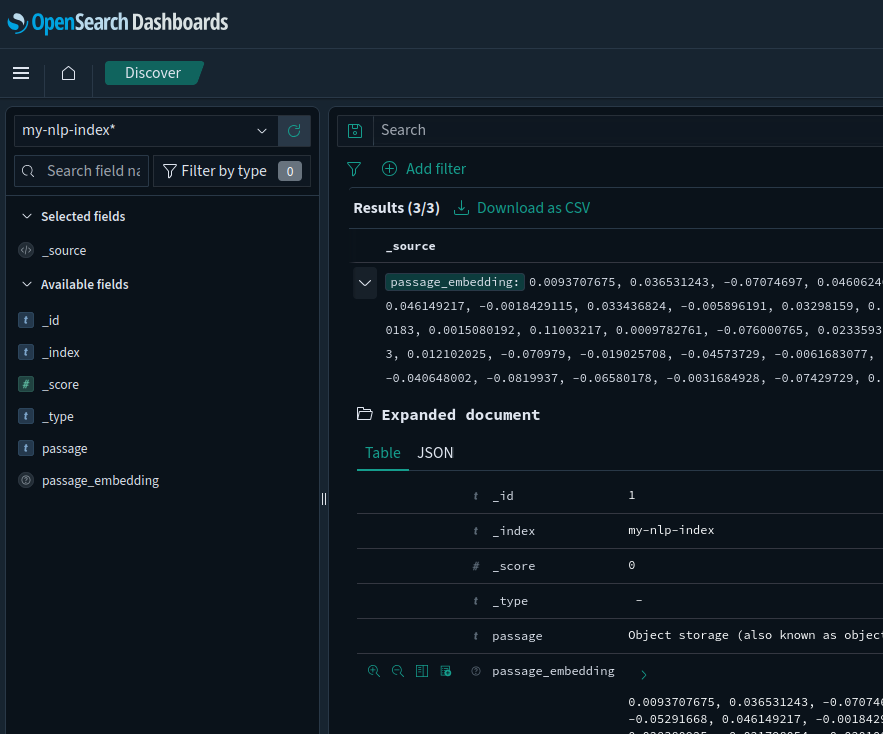
Obviously, we'd want more KVs (bucket, key, etc.) to be able to identify the document from which these came from, but that's simply a consequence of what fields we include when creating entries. So, the challenge is on the source side (getting these values from StorageGRID).
Other approaches
You can create embeddings manually on your side, without using OpenSearch for it. OpenSearch would be used only for search - i.e. comparison between stored embeddings with embeddings you send in queries.
I blogged about that in this post, so I won't repeat that.
Will you need "other approaches"? Almost certainly, yes. We'll consider a Kompromise- and OpenSearch-specific approach in Part 2.
StorageGRID integration
StorageGRID search integration for OpenSearch isn't useful for AI, because its index format is fixed.
You're gonna need a bigger boat index. This is where "custom" indexes come in:
- Create one that has embeddings and other details, like in the linked post above
- Or, create several (one basic based on StorageGRID search integration, one automated for Gen AI, etc.), so that you can search some for one thing and another for other
The issue with creating several - also described in the linked post, is that you need to work with notifications and touch them on their way to OpenSearch, which also means you shouldn't drop 'em while you do that, i.e. you need a reliable message store or database of some kind to prevent data loss.
Alternatively, run periodic object scans and refresh OpenSearch. This doesn't work well for large buckets, but utilities like SGII may be able to help you create these lists more effectively.
Because embeddings require content (you could create it from an object's metadata and tags, but that probably wouldn't be useful), you also need to download these objects and use their content to create embeddings.
Remember that these models have limits - you can't create a vector for an entire movie or book. You need to "chunk" them, as shown in the search section of that post above.
Most of these things are in the previous post, so I won't spend much time on rehashing them.
Conclusion
It takes minutes to get your vectorization pipeline ready with Instaclustr OpenSearch. That part is simple, but the rest can get complicated quickly.
If you're trying to meet deadlines or avoid learning how to administrate OpenSearch, you probably don't want to add OpenSearch to your list of worries.
With Instaclustr OpenSearch, you can run OpenSearch worry-free in your own cloud account. If you're up for custom indexes and pipelines, you probably want Instaclustr Kafka as well. These are fully Open Source-based, and you can replicate them 100% on premises. There's value in using the same exact software on-premises and in the cloud when complexity of your stack isn't trivial.
Related to StorageGRID and vector search, you will likely not want to use the built-in search integration feature.
You can build your own indexes based on StorageGRID Event Notification and object reads, or use something like Kompromise Lite described in the previous post (full-featured version is complicated, I'm still working on it). If you don't need near-real-time search, you can generate updated object lists with SGII or your own tool, and batch-upload once every day to OpenSearch.
If you want to generate embeddings yourself, then create manual indexes and read, chunk and vectorize before uploading data to OpenSearch. This is where the value of "100% reproducible" stack comes in play: you want the same models, same dimensions and same workflows on-premises (development, for example) and in the cloud (production). Instaclustr's OpenSearch and Kafka give you that, and more.
Part 2 will focus on a manually created OpenSearch pipeline for Kompromise notifications from StorageGRID, that hopefully simplifies the process on both StorageGRID side (Kompromise doesn't use StorageGRID Search Integration) and OpenSearch side, where we can make use of custom pipelines.