NetApp Trident v21.01.1 on Linux/ARM64 with SolidFire iSCSI storage
- Intro
- Build \& Deploy
- What about
s390x,ppc64leand other architectures - Next steps
- Version info
- Notes on linux/s390x (Feb 25, 2021)
Intro
NetApp Trident is open source dynamic storage provisioner for CSI-compatible platforms such as Docker and Kubernetes.
Currently it supports the x86_64 platform but - as we shall soon find out - it can work with other architectures.
That doesn't mean you can get support for Trident on ARM64 Linux today (check with your NetApp representative - it may be possible), but it does mean you can use Trident in some other interesting scenarios. Examples:
- Mixed architecture cluster:
amd64andarm64, with Trident running onamd64(i.e. you don't need Trident onarm64to dynamically provision NetApp iSCSI and NFS storage toarm64clusters in a supported way) - Casual use: Trident deployed on
linux/arm64Kubenetes workers connected to a NetApp storage system. Currently this isn't officially supported but you can check if you can get some sort of "best effort" support if you build and deploy Trident by yourself
The latter example can be seen in this screenshot which shows a three-node K8s cluster on ARM64 connected to an iSCSI SolidFire back-end. The SolidFire "cluster" is in fact a SolidFire VM running on VMware ESXi (x86_64). Works like a charm!
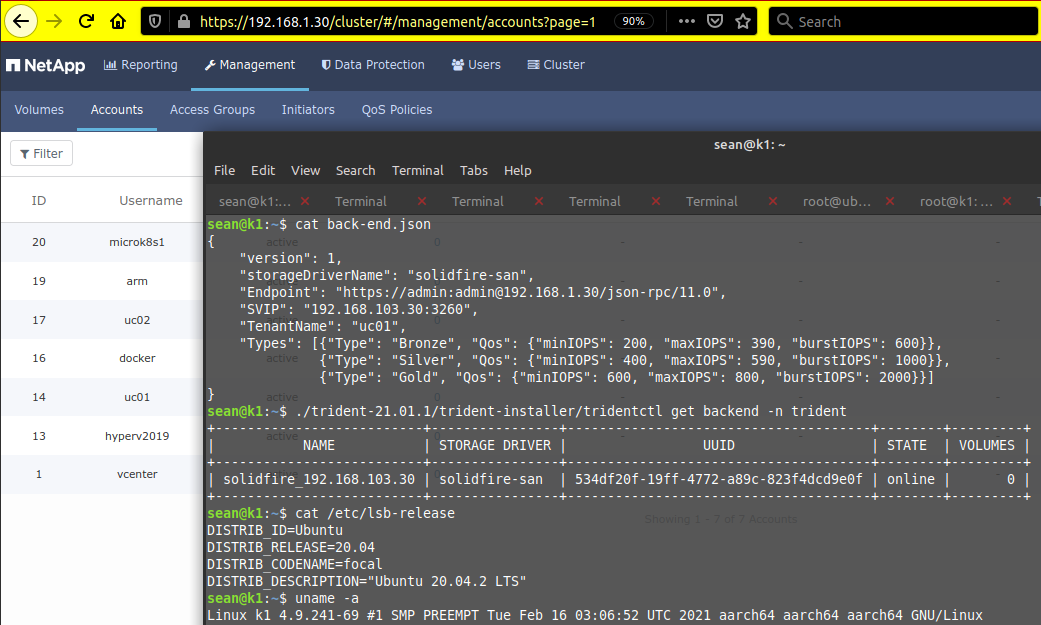
You could connect to other back-ends (E-Series, ONTAP) the same way. Personally I prefer to use SolidFire. Why? Because it is storage for people who fxxxing hate storage - having worked with storage for so long I can relate - and on top of that SolidFire Demo VM does not expire, so that is all I've ever wanted and more).
Anyway, once you build Trident for ARM64 and get it up and running, you should be able to use any of the supported back-ends, two of which - ONTAP and SolidFire - have a VM version (not for ESXi on ARM64, but still).
Build & Deploy
How to build this sucker? It took several evenings to find that out.
I've created a Trident issue for this (an ask for this to be documented), so I'll let the Trident Team describe (and potentially improve) the process, but here are high level steps for v21.01 (if you're reading this much later, don't bother with this post - best check the current state of the source code):
- Get latest Trident source code, find all
Dockerfiles and replace gcr.io/distroless/static with a "hard-coded" link to an ARM64 build - Have access to a container registry (whether local or remote, such as a free account on Docker Hub) where you can upload stuff
- Get the latest source (
wget https://github.com/NetApp/trident/archive/v21.01.1.tar.gz, at this time), decompress and descend into the decompressed source code directory. We'll be working from here. - Build Trident for
arm64(cat BUILD.mdor see my ask). You can build on x86_64 (cross-build), or natively (on your K8s worker nodes, for example). Both approaches work - I did try - but the native approach is simpler and probably takes longer (x86_64 CPUs are usually faster). - Download (
docker pull) an ARM64 version of all the required CSI images. If you're installing online this step isn't necessary, but for air-gapped installs you'll need them offline. For my version of Trident (v21.01.1) I used these:
k8s.gcr.io/sig-storage/csi-resizer v1.1.0
k8s.gcr.io/sig-storage/csi-provisioner v2.1.0
k8s.gcr.io/sig-storage/csi-node-driver-registrar v2.1.0
k8s.gcr.io/sig-storage/csi-attacher v3.1.0
k8s.gcr.io/sig-storage/csi-snapshotter v3.0.3
- Now you have five of these and one Trident image. Tag 'em all and push to your container registry. That's six containers in total. You may now delete local container images and try to pull 'em from registry to test whether that works.
- In the process of building Trident
tridentctlgot created in the bin subdirectory. Copy or move it to the trident-installer subdirectory - Now you can create custom YAML files in the setup subdirectory. We'll prepare them for the trident namespace:
$ ./trident-installer/tridentctl install --silence-autosupport --generate-custom-yaml --image-registry $YOUR_REGISTRY -n trident
- I identified two small bugs and one thing to watch out for in the generated YAML files.
- find
amd64and replace it witharm64insetup/*.yaml - remove the entire NetApp autosupport container section in
setup/trident-deployment.yamlbecause it's a closed source image only released foramd64 - depending on how you built and tagged, your Trident image URL may end up being wrong. I did some fancy crap with my tags and ended up with a weird-ass $MY_REGISTRY/trident:21.01.1-arm64.0 image, while in the setup directory that was $MY_REGISTRY/trident:21.01.1-custom (which I changed to reflect the reality, but if you don't do fancy tagging, that may be correct for your situation)
- As mentioned earlier, if your CSI images weren't downloaded you need to change their container image links to their online version or tell Trident installer where to get the images. From the Trident docs: "CSI sidecars are pulled from k8s.gcr.io/sig-storage when the Kubernetes version is 1.17 or greater, and quay.io/k8scsi otherwise."
- find
- This should let you deploy (don't forget
-n trident, and use the image name that corresponds to your situation in the registry):
$ ./trident-installer/tridentctl install --image-registry $YOUR_REGISTRY --trident-image $YOUR_REGISTRY/trident:21.01.1-arm64.0 --use-custom-yaml -n trident
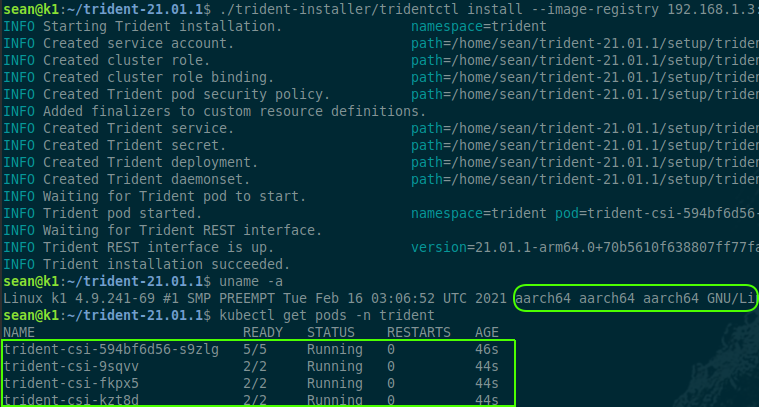
- Now that this somehow worked we can deploy a back-end of our choosing which in my case is SolidFire (in Trident,
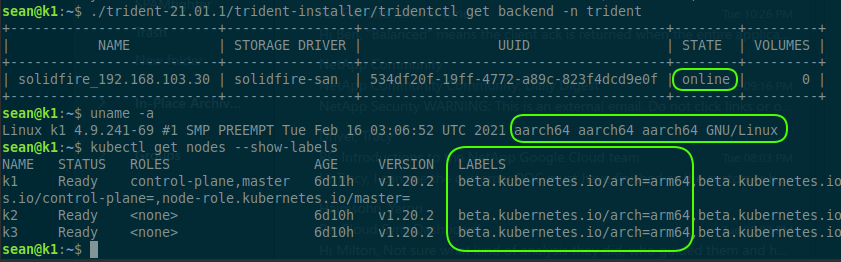
solidfire-sandriver). Create a back-end JSON file (an example for SolidFire can be found here and in the Trident installer's samples directory) and usetridentctlto create/configure it. The workers and storage need to be prepared for iSCSI or (for ONTAP) NFS as per the Trident documentation.
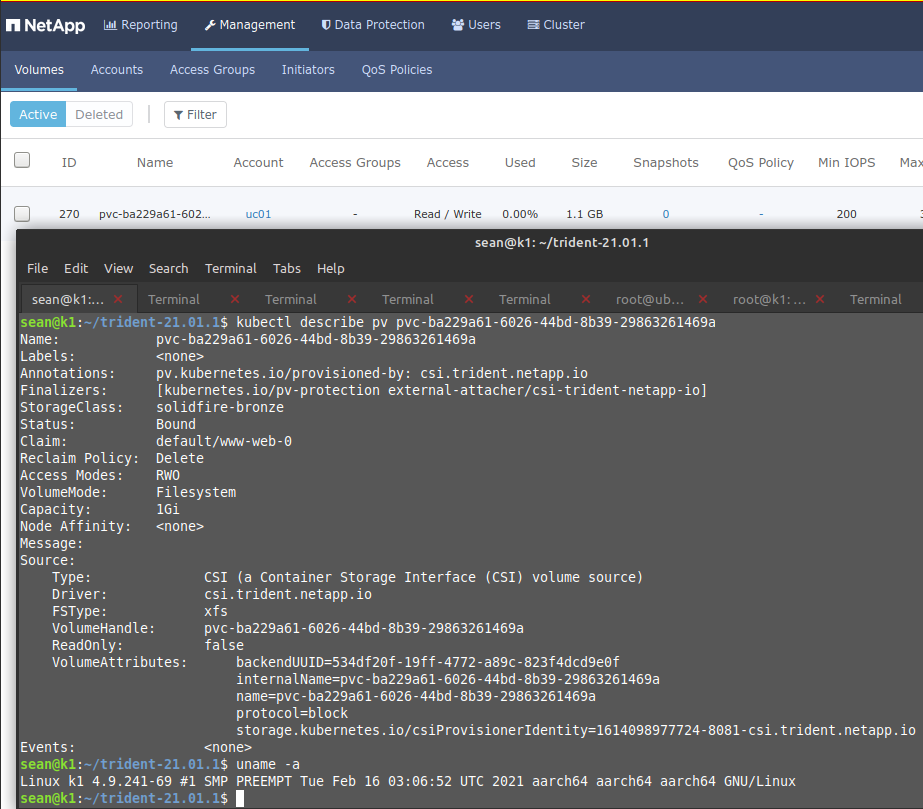
- Configure an SC for SolidFire and create a PVC that uses it.
I'm not going to spend another 30 minutes writing about troubleshooting because I've had enough of it: if the above doesn't help you and it's not something obvious that you can figure out by reading the Troubleshooting section of the Trident documentation, leave a comment here.
For v21.01.2 I uploaded a Trident image to Docker Hub so that those trying to test it without too much hassle can give it a try:
docker pull docker.io/scaleoutsean/trident-arm64:v21.01.2-custom
# v22.01
# docker pull docker.io/scaleoutsean/trident-arm64:v22.01.0-custom
See the README at Docker Hub for some other possibly relevant details.
What about s390x, ppc64le and other architectures
It's the same thing, just use the right architecture string for the architecture.
There may be tooling bugs unrelated to Trident (go, gcc, 3rd party containers which may or may not exist for your target architecture, and more). The ARM64 ecosystem is more mature compared to other non-x86 architectures so be ready to waste days on this and still get nowhere!
For supported use remember the other requirement which I didn't mention before, which is to have those clients (OS) supported by the array you're using. For example, SolidFire (solidfire-san) provides iSCSI service and supports only Windows and Linux on the x86_64 architecture. This means there's a problem from both a Trident perspective, but also from a client-protocol and back-end perspective.
NetApp usually provides that info in Interoperability Matrix (search for "NetApp IMT"). While Linux on ppc64 with an ontap-nas back-end is probably supported (I haven't checked, but it should be because NFSv3 is very old), solidfire-san does not provide NFS and doesn't support ppc64 (iSCSI) clients either. So check this stuff carefully before spending days on this.
Next steps
Trident on ARM64 is the only reason why I write about Kubernetes on ARM64 - there isn't much exciting or novel about it. I've had five ARM devices and used them with Docker for years. Three months ago I bought three more but haven't had time to look into Trident so they were idling.
Now that I have Trident running on linux/arm64 maybe I'll keep a Kubernetes-on-ARM64 cluster running and move some lightweight services and applications from older ARM and ARM64 systems to Kubernetes, and eventually retire the older 32-bit ARM systems. And there's a chance I come across an opportunity for ARM64-based clusters.
Other than that, if I need to use K8s I still prefer x86_64 VMs because in my specific case:
- x86_64 is many times faster
- x86_64 more power-efficient (I can run K8s on my x86_64 notebook or ESXi, both which are always on for workloads that cannot run on ARM)
- I can use Trident and any other containers without wasting time on troubleshooting. As a long-time ARM user, one thing I've learned is to stay away from exactly this type of activity (the troubleshooting of architecture-related issues)
Although neither Trident nor SolidFire (currently) support Linux on ARM64, this setup is good enough for me and I look forward to using Kubernetes with SolidFire in this environment.
But if you're an "Edge Computing" or even "HPC" person, this may be interesting to you professionally.
If you have a use case for Trident on ARM64 or other non-x86_64 architecture please up-vote (for that, you can use the "thumb up" emoji) my request on Github or contact NetApp with your requirements.
Version info
| Component | Version | Arch |
|---|---|---|
| Kubernetes (generic) | v1.20.2 | arm64 |
| Ubuntu Linux | 20.04.02 | arm64 |
| NetApp Trident | v21.01.1 | arm64 |
| NetApp SolidFire VM | 12.2 | x86_64 |
| VMware ESXi (for SolidFire) | 7.0U1 | x86_64 |
Notes on linux/s390x (Feb 25, 2021)
- Following the instructions for ARM64, I used x86_64 to build for
linux/s390x. First, edit the Dockerfiles to includeFROM gcr.io/distroless/static:latest-s390x - With Trident v21.01 you'll probably hit this bug in utils/osutils_linux.go:
$ sudo GOOS=linux GOARCH=s390x make trident_build
# github.com/netapp/trident/utils
utils/osutils_linux.go:70:28: invalid operation: int64(buf.Blocks) * buf.Bsize (mismatched types int64 and uint32)
utils/osutils_linux.go:80:32: invalid operation: int64(buf.Bavail) * buf.Bsize (mismatched types int64 and uint32)
Makefile:102: recipe for target 'trident_build' failed
- I couldn't get past this problem, so I cheated. This patch is for v21.01.1 but I successfully (i.e. I was able to build) used it with v21.01.2 as well.
70c70
< 	size := int64(buf.Blocks) * buf.Bsize
---
> 	size := int64(buf.Blocks) * int64(buf.Bsize)
80c80
< 	available = int64(buf.Bavail) * buf.Bsize
---
> 	available = int64(buf.Bavail) * int64(buf.Bsize)
- Build:
$ sudo GOOS=linux GOARCH=s390x make trident_build
cp /home/ubuntu/trident-21.01.1-s390x/bin/trident_orchestrator /home/ubuntu/trident-21.01.1-s390x/bin/tridentctl .
chwrap/make-tarball.sh /home/ubuntu/trident-21.01.1-s390x/bin/chwrap chwrap.tar
docker build --build-arg PORT=8000 --build-arg BIN=trident_orchestrator --build-arg CLI_BIN=tridentctl --build-arg K8S="" -t trident:21.01.1-custom --rm .
Sending build context to Docker daemon  318.7MB
Step 1/18 : FROM gcr.io/distroless/static:latest-s390x
latest-s390x: Pulling from distroless/static
2050d73f0a3c: Pull complete
Digest: sha256:b0dc5adcc32d2b00f871ea0d4badd0d7bd884255a1b3f47b199fd40ad03a7f07
Status: Downloaded newer image for gcr.io/distroless/static:latest-s390x
 ---> 6aeb63cb7882
Step 2/18 : LABEL maintainers="The NetApp Trident Team"       app="trident.netapp.io"       description="Trident Storage Orchestrator"
 ---> Running in e059c7005178
Removing intermediate container e059c7005178
 ---> 5a9d61e894f7
Step 3/18 : ARG PORT=8000
 ---> Running in cd0c3804ab74
Removing intermediate container cd0c3804ab74
 ---> c255028503c8
Step 4/18 : ENV PORT $PORT
 ---> Running in fdcaa31eb927
Removing intermediate container fdcaa31eb927
 ---> 599c6fcbb15d
Step 5/18 : EXPOSE $PORT
 ---> Running in 233387e823ca
Removing intermediate container 233387e823ca
 ---> 3fe30604b8b4
Step 6/18 : ARG BIN=trident_orchestrator
 ---> Running in 1006ff4e9286
Removing intermediate container 1006ff4e9286
 ---> f5810abb3b18
Step 7/18 : ENV BIN $BIN
 ---> Running in f55ab480ed88
Removing intermediate container f55ab480ed88
 ---> ce9da4427e22
Step 8/18 : ARG CLI_BIN=tridentctl
 ---> Running in c2e37683fd01
Removing intermediate container c2e37683fd01
 ---> 5fa055e239c2
Step 9/18 : ENV CLI_BIN $CLI_BIN
 ---> Running in 5e0427c95624
Removing intermediate container 5e0427c95624
 ---> 07e50c8502fb
Step 10/18 : ARG K8S=""
 ---> Running in b4b1d0ab2906
Removing intermediate container b4b1d0ab2906
 ---> 1fb74edfba4b
Step 11/18 : ENV K8S $K8S
 ---> Running in ac8e98e411d0
Removing intermediate container ac8e98e411d0
 ---> fac74d91b045
Step 12/18 : ENV TRIDENT_IP localhost
 ---> Running in f19b8f82fd4f
Removing intermediate container f19b8f82fd4f
 ---> ac418c20fb13
Step 13/18 : ENV TRIDENT_SERVER 127.0.0.1:$PORT
 ---> Running in 260d5decd8b2
Removing intermediate container 260d5decd8b2
 ---> cf03bcac7988
Step 14/18 : COPY $BIN /
 ---> 93bede2142d8
Step 15/18 : COPY $CLI_BIN /bin/
 ---> 097738c61bc9
Step 16/18 : ADD chwrap.tar /
 ---> c08cec73df85
Step 17/18 : ENTRYPOINT ["/bin/$CLI_BIN"]
 ---> Running in 369125b48b1d
Removing intermediate container 369125b48b1d
 ---> 1b609424e48c
Step 18/18 : CMD ["version"]
 ---> Running in bd9c950e41c6
Removing intermediate container bd9c950e41c6
 ---> a6a92f3b152d
Successfully built a6a92f3b152d
Successfully tagged trident:21.01.1-custom
rm trident_orchestrator tridentctl

$ sudo docker images | grep a6a92f3b152d
trident              21.01.1-custom      a6a92f3b152d        43 seconds ago      88.4MB

$ sudo docker inspect a6a92f3b152d | grep Arch
        "Architecture": "s390x",
-
tridentctl and trident_operator for s390x:
bin/tridentctl: ELF 64-bit MSB executable, IBM S/390, version 1 (SYSV), statically linked, strippedbin/trident_orchestrator: ELF 64-bit MSB executable, IBM S/390, version 1 (SYSV), statically linked, stripped
- tridentctl and trident_operator for ppc64le:
bin/tridentctl: ELF 64-bit LSB executable, 64-bit PowerPC or cisco 7500, version 1 (SYSV), statically linked, strippedbin/trident_orchestrator: ELF 64-bit LSB executable, 64-bit PowerPC or cisco 7500, version 1 (SYSV), statically linked, stripped
- Experimental NetApp Trident v21.01.2 containers for s390x and ppc64le:
scaleoutsean/trident:v21.01.2-s390x.0scaleoutsean/trident:v21.01.2-ppc64le.0
I don't know if these s390x and ppc64le images are any good (unlike with arm64, I don't have the hardware to try), so your mileage may vary.